
Choosing the right conference badge printing system can save time at check-in, reduce bottlenecks, and deliver a more polished first impression for attendees.
Below, we compare 10 options built for different event sizes, budgets, and printing needs, from simple single-sided setups to dual-sided systems with bundled software and supplies.
Best 10 Conference Badge Printing Systems Picks for 2026
Ready-to-Print Dual-Sided Bundle
Forge 1E ID Card Printer System

- Includes printer, software, webcam, cards, and ribbon
- Automatic dual-sided badge printing
- 250-print ribbon adds extra output value
Best For: Office and event teams wanting a complete dual-sided badge package
Portable Bronze Package
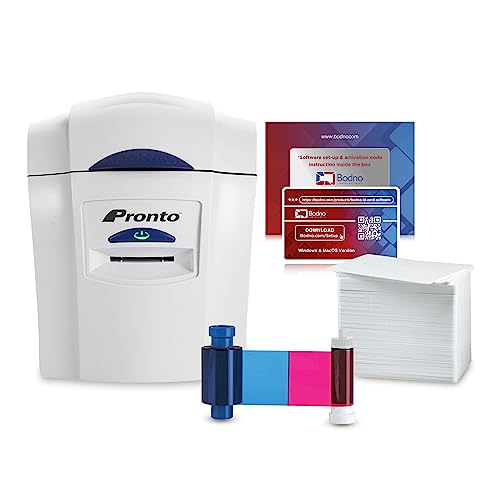
- Printer, ribbon, cards, and software are all included
- Drag-and-drop Bronze software keeps design simple
- Portable size and two-year hardware warranty
Best For: Small teams wanting an easy-to-learn badge printer bundle
Compact Single-Sided Starter

- Includes 400 cards and two 250-print ribbons
- Compact hand-fed printer for tight desk spaces
- Beginner software works on PC and Mac
Best For: Small organizations needing a simple single-sided badge printer bundle
Dual-Side Pro Package

- Automatic dual-sided printing with erase-and-rewrite support
- Includes ribbon, software, and 100 PVC cards
- Offers Ethernet and USB connectivity
Best For: Teams needing a more advanced dual-sided ID card printer bundle
Compact On-Demand Badge Printing

- Portable dye-sublimation printer for on-demand badges
- Badge Studio software and template library included
- USB print-only setup for quick in-house badge replacement
Best For: Small teams and event organizers needing quick badge replacement
All-In-One Conference Kit
Bodno Seaory S26 Bronze Edition

- Includes printer, ribbon, software, and camera in one package
- Prints up to 300 x 1200 dpi for sharp cards
- Works with Windows, Mac, and Linux
Best For: Teams wanting a ready-to-use badge printing bundle
Starter Bundle with Security Focus
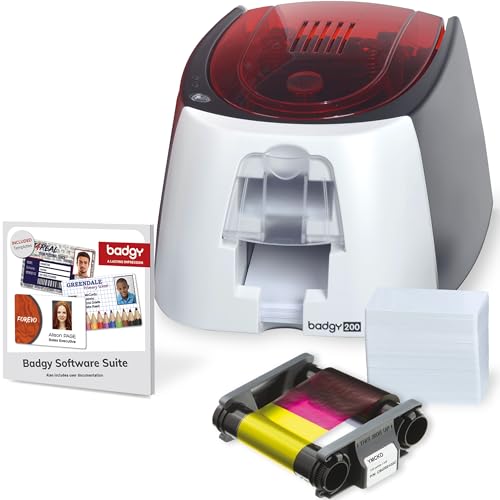
- Bundle includes printer, ribbon, blank cards, and software
- Badge Studio+ adds templates and database import
- 600 x 600 dpi output for full-color ID badges
Best For: Starter teams needing a complete badge printing kit
Bronze Starter Pick
Bodno Seaory S25 Single Sided ID Card Printer

- All-inclusive bundle with ribbon and supplies
- Manual feed for controlled one-card printing
- Windows, Mac, and Linux compatible
Best For: Small teams and low-volume conference badge printing
Dual-Sided Speed Upgrade
Evolis Primacy 2 Card Printer Bundle

- Dual-sided dye sublimation printing
- Up to 280 color cards per hour
- Includes ribbon, 100 cards, and software
Best For: Teams needing faster dual-sided conference badge output
Long-Warranty Event Ready Pick
Bodno Magicard 400X Dual Sided ID Printer

- Dual-sided printing with included ribbon
- Bronze software with templates and drag-and-drop design
- 4-year warranty with lifetime support
Best For: Organizers wanting dual-sided badges and long warranty coverage
Ready-to-Print Dual-Sided Bundle – Forge 1E ID Card Printer System
If you’re comparing conference badge printing systems, this Forge 1E bundle is built to get you printing quickly with very little setup. It includes the printer, ID software, webcam, 100 blank PVC cards, and a 250-print full-color ribbon, so it’s aimed at teams that want a complete badge workflow from day one.
Best For: Offices and event teams that want an all-in-one dual-sided badge solution with included software and camera.
Pros:
- Complete out-of-the-box bundle with printer, software, webcam, cards, and ribbon
- Automatic dual-sided printing for backs of badges, QR codes, barcodes, or policies
- 250-print ribbon offers more output than typical 100-print entry bundles
- Built and supported in the USA with U.S.-based support
Cons:
- USB connectivity only, so it is not a network-first setup
- Designed around card printing rather than broader office document use
- Requires space for a dedicated ID card printer workflow
Overall, the Forge 1E is a practical pick when badge production needs to be simple, consistent, and fully bundled. For conference use, the dual-sided printing and included capture/software tools make it especially convenient for badge programs that need fast setup.
Portable Bronze Package – Bodno Magicard Pronto Bundle
Bodno Magicard Pronto ID Card Printer & Complete Supplies Package ID Software - Bronze Edition
Check Price On AmazonFor conference badge printing systems that need a straightforward starter package, the Bodno Magicard Pronto bundle focuses on simplicity and portability. It includes the printer, color ribbon, 100 PVC cards, and Bodno Bronze software, giving small teams a guided way to produce professional photo ID or membership cards.
Best For: Small teams that want a portable, easy-to-learn ID badge setup with software included.
Pros:
- Complete package with printer, ribbon, cards, and software included
- Bodno Bronze software uses templates and drag-and-drop design tools
- Portable printer footprint suits limited desk space
- Two-year hardware warranty plus lifetime software support
Cons:
- Simplex printing only, so it does not automatically print both sides
- Includes 100 cards rather than a higher-volume card supply
- Designed as a print-only solution without extra functions
This is a good fit if you want a dependable badge printer without a steep learning curve. It is especially appealing for smaller conference operations that value ease of use, included supplies, and support over advanced printing features.
Compact Single-Sided Starter – Easy Badges Solid 210
When your conference badge printing systems need to stay compact and cost-conscious, the Easy Badges Solid 210 is built around a simple hand-fed workflow. This bundle includes beginner software, two 250-print ribbons, 400 PVC cards, and extra badge accessories, making it a practical fit for organizations that want to design and print standard ID badges without a complicated setup.
Best For: Small organizations that want a lightweight, single-sided ID badge printer bundle with generous starter supplies.
Pros:
- Includes 400 PVC cards and two 250-print color ribbons
- Compact and lightweight design fits easily on a desk
- Beginner software works on PC and Mac and supports template-based design
- Manual feed setup keeps operation straightforward
Cons:
- Single-sided printing only
- Manual feeding is slower than automated systems
- Best suited to standard CR80 badge sizes rather than larger formats
For smaller badge programs, the Solid 210 gives you plenty of starter materials and a minimal learning curve. It is a sensible choice when you want a simple printer that can handle employee IDs, visitor passes, and access cards without taking over your workspace.
Dual-Side Pro Package – Fargo DTC4250e Badge Printer
Fargo DTC4250e Dual-Side ID Card Printer & Supplies Package with Card Imaging Software 52100
Check Price On AmazonIf you’re shopping conference badge printing systems for more polished or higher-function ID cards, the Fargo DTC4250e bundle brings a more advanced feature set. It includes dual-sided printing, a color ribbon, 100 PVC cards, and Card Imaging software, along with built-in erase-and-rewrite printing capability on both sides of the card.
Best For: Teams that want a dual-sided printer bundle with advanced card features and both USB and Ethernet connectivity.
Pros:
- Dual-sided automatic printing for front-and-back badges
- Includes Card Imaging software plus 100 PVC cards and full-color ribbon
- Built-in erase and rewrite printing capability on both sides
- Supports both Ethernet and USB connections
Cons:
- Bundle includes only 100 cards
- Software package is tied to the included drivers and system setup
- More advanced than a basic starter printer, so it may be more than a simple one-off user needs
The DTC4250e is a strong option when badge printing needs go beyond basic entry-level output. Its dual-sided capability and rewrite functions make it a flexible tool for organizations that want more control over how cards are printed and managed.
Compact On-Demand Badge Printing – Badgy100 Plastic Card Printer
If you need conference badge printing systems that keep badge production in-house, the Badgy100 is built for straightforward on-demand printing. It focuses on full-color plastic ID badges with a portable footprint, so you can replace lost badges or print new attendee cards quickly without relying on outside vendors.
Best For: Small teams, schools, and event organizers that want a simple portable printer for quick badge replacement and custom ID cards.
Pros:
- Prints full-color plastic badges in seconds for on-demand use.
- Includes Badge Studio design software and an online template library.
- Portable design with USB connectivity for easy setup.
- Supports tamper-proof ID badge production on card stock.
Cons:
- Print-only device, so it is not built for scanning or copying.
- Single-sided, in-house badge workflow is better suited to simpler badge needs.
- Compact capacity is more limited than larger higher-volume systems.
Overall, the Badgy100 makes sense when you want a no-frills badge printer for fast, customized badge jobs without sub-contracting. It is a practical fit for smaller conference operations that value convenience and portability over high-volume throughput.
All-In-One Conference Kit – Bodno Seaory S26 Bronze Edition
For conference badge printing systems that need a ready-to-run package, the Bodno Seaory S26 Bronze Edition offers a bundled setup with supplies, software, and a camera. It is designed for users who want to start printing high-quality ID cards right away, with compatibility across Windows, Mac, and Linux.
Best For: Offices and event teams that want an all-inclusive ID card printer package with software support and supplied ribbon.
Pros:
- All-inclusive package includes the printer, ribbon supply, software, and camera.
- High-resolution printing up to 300 x 1200 dpi for sharp color cards.
- Compatible with Windows, Mac, and Linux.
- Bronze Edition software includes pre-made templates and drag-and-drop design tools.
Cons:
- Single-sided printing only.
- Print-only design means it does not add scanning or copying functions.
- USB connectivity may be less flexible than network-first systems.
This is a strong pick if you want a bundled badge-printing setup with fewer setup headaches. The combination of included supplies, broad OS compatibility, and lifetime software support makes it especially practical for organizations that want a smoother start.
Starter Bundle with Security Focus – Badgy200 Plastic Card Printer
The Badgy200 is a practical choice for conference badge printing systems when you want an all-in-one starter bundle for custom plastic IDs. It comes with the printer, color ribbon, blank cards, and Badge Studio+ software, making it easier to design and print full-color badges for events, schools, and workplaces.
Best For: Organizations that want a complete starter kit for full-color badge printing with software, ribbon, and cards included.
Pros:
- All-in-one package includes printer, ribbon, blank cards, and software.
- Badge Studio+ offers database import, templates, and design tools.
- 600 x 600 dpi color printing supports crisp badge output.
- Suitable for access control, event management, schools, gyms, and employee IDs.
Cons:
- Single-sided printing only.
- USB-only connectivity limits deployment options.
- Low color speed is better for smaller badge runs than heavy throughput.
For teams that want a ready-to-go badge printer with a stronger software package, the Badgy200 is well positioned. It is especially appealing when your priority is easy design, tamper-proof card output, and a complete starter setup.
Bronze Starter Pick – Bodno Seaory S25 Single Sided ID Card Printer
If you need conference badge printing systems for smaller events or occasional badge runs, the Bodno Seaory S25 is built for a simple, controlled workflow. This single-sided direct-to-card printer comes as an all-inclusive package with supplies and Bodno Bronze software, so you can start producing professional-looking cards right away.
Best For: Small teams, schools, and office users printing low-volume conference badges one at a time.
Pros:
- Includes supplies and a Seaory 11011 color ribbon for 100 prints.
- Manual feed design gives precise control for one-card-at-a-time printing.
- Bodno Bronze software includes pre-made templates and drag-and-drop design.
- Works with Windows, Mac, and Linux.
Cons:
- Single-sided printing only.
- Manual feed is better for low-volume use than busy badge stations.
- Not designed for high-capacity event throughput.
For straightforward badge setup and moderate needs, this package keeps the process simple and bundled. The included software support and warranty add value if you want an easy entry point into conference badge printing systems.
Dual-Sided Speed Upgrade – Evolis Primacy 2 Card Printer Bundle
For conference badge printing systems that need faster output and more flexibility, the Evolis Primacy 2 stands out as a dual-sided bundle with supplies included. It uses direct-to-card dye sublimation printing and ships with color ribbon, 100 blank cards, and card design software, making it a strong fit for professional badge production.
Best For: Offices and event teams that want faster dual-sided badge printing with included supplies.
Pros:
- Dual-sided printing supports more complete badge designs.
- Rated for up to 280 full-color cards per hour.
- Includes ribbon, 100 blank cards, and design software.
- USB and Ethernet connectivity plus Windows and Mac compatibility.
Cons:
- Larger footprint than compact single-feed printers.
- Standard setup includes a 100-card feeder, not the optional 200-card feeder.
- Higher-capacity use may require added configuration.
If your badge workflow needs speed and two-sided output, this bundle is the most scalable option here. The included supplies and 3-year warranty make it a practical choice for repeat event use.
Long-Warranty Event Ready Pick – Bodno Magicard 400X Dual Sided ID Printer
If your conference badge printing systems need a dual-sided printer with a bundled setup, the Bodno Magicard 400X is built around convenience and support. It includes a 300-print YMCKO ribbon, Bodno Bronze software, and a 4-year warranty, which makes it appealing for teams that want a ready-to-go package.
Best For: Event organizers and office users who want dual-sided badge printing with a long warranty.
Pros:
- Includes a 300-print YMCKO ribbon for full-color cards.
- Dual-sided printing adds space for more badge details.
- Bodno Bronze software offers templates and drag-and-drop design.
- Backed by a 4-year warranty and lifetime Bodno support.
Cons:
- USB-only connectivity may limit placement options.
- Slower color output than the Evolis option in this list.
- Best suited to ID card printing rather than broad office printing tasks.
This model is a solid middle ground if you want dual-sided badge production without giving up bundled supplies or support coverage. It is especially attractive when warranty length matters as much as day-to-day printing convenience.
How We Picked These Conference Badge Printing Systems
We focused on bundle completeness, print quality, ease of setup, badge output speed, software usability, and whether the system is practical for live events. We also looked at whether each option includes essentials such as cards, ribbons, cameras, or design software, since a complete package can matter more than the printer alone.
Quick Comparison: What Matters Most
For fast registration desks, prioritize simple operation and dependable supply bundles. For larger conferences or premium badges, dual-sided printing, better card imaging, and stronger software tools are more useful. Smaller teams may prefer compact, beginner-friendly systems, while high-volume organizers should look for durability and lower friction during repeated print runs.
Key Buying Factors for Conference Badge Printing Systems
Print Volume and Speed
Estimate how many badges you need per day, not just per event. A system that feels adequate for 100 attendees may become a bottleneck at 500.
Single-Sided Vs. Dual-Sided
Single-sided printing is simpler and usually cheaper. Dual-sided systems are better when you want to add schedules, QR codes, sponsor details, or emergency information without crowding the front of the badge.
Software and Workflow
Good software can make the biggest difference in real-world use. Look for templates, attendee import tools, easy photo handling, and straightforward badge edits for last-minute changes.
Supplies and Bundle Value
Many Conference Badge Printing Systems are sold as bundles. That can be helpful if you want to start quickly, but check how many cards, ribbons, and design tools are included so you can compare true startup costs.
Badge Quality and Security
If your event needs professional presentation or access control, consider systems that produce crisp text, strong color output, and tamper-resistant badge designs.
Who Should Buy Which Conference Badge Printing Systems?
If you run smaller events or need a straightforward in-house setup, a beginner-friendly single-sided bundle may be the easiest choice. If you manage recurring conferences, trade shows, or corporate meetings, dual-sided systems with stronger software and higher-capacity supplies are worth the upgrade. Teams that value speed and a polished attendee experience should lean toward more complete bundles that reduce setup time and simplify on-site printing.
In short, the best choice depends on your attendee count, badge format, and how much work you want the system to handle on event day.