
Choosing the right badge printer can make event check-in faster, cleaner, and more professional. The best models balance print quality, setup speed, and overall running costs.
This roundup focuses on badge printers for business events that work well for conferences, trade shows, meetings, and recurring on-site credentials.
Best 10 Badge Printers for Business Events Picks for 2026
Bronze Bundle
Bodno Seaory S25 Single Sided ID Printer

- Includes printer, supplies, and 100-print ribbon
- Manual feed suits controlled low-volume badge runs
- Works with Windows, Mac, and Linux
Best For: Small teams and event badge setups needing an all-in-one starter kit
Label Maker Pro
SUPVAN T50M Pro Bluetooth Label Maker

- Prints 3/4" to 2" labels for event support
- Inkless thermal design avoids toner and ink
- App includes fonts, frames, and 660+ icons
Best For: Event organizers needing a compact label maker for name tags and supplies
Starter Kit
IDP SMART-21S ID Card Printer Kit

- Includes printer, software, ribbon, and 100 PVC cards
- Compact hand-feed design suits desktop use
- Good for ID badges, access control, and loyalty cards
Best For: Small businesses and corporate badge projects needing an affordable starter kit
High-Detail Bundle
Bodno Seaory S26 ID Card Printer

- Bundled with supplies and a 300-print color ribbon
- Up to 300 x 1200 dpi for sharper cards
- Works with Windows, Mac, and Linux
Best For: Event teams and offices wanting a higher-resolution bundled badge printer
Standalone Budget Pick
Magicard Pronto 100 Bundle for Small Teams
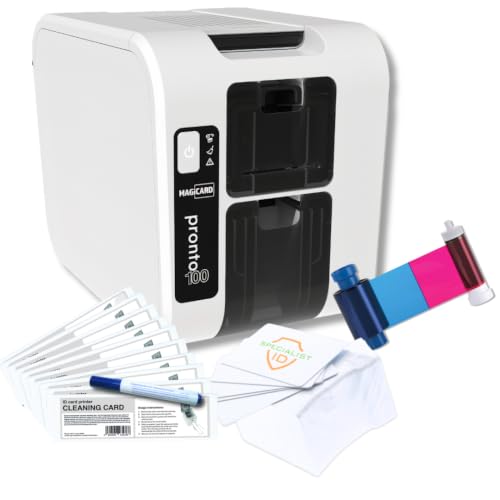
- Includes ribbon, cleaning kit, and 100 PVC cards
- Prints single-sided badges in 23 seconds or less
- Compact and compatible with Windows, Linux, and MacOS
Best For: Small teams that need a simple bundled badge printer for on-demand events
Easy Starter Choice
Badgy100 with Badge Studio Software

- Includes Badge Studio and template library
- Prints full-color plastic cards on demand
- Portable USB printer for single-badge jobs
Best For: Small teams wanting an easy starter printer for occasional event badges
Premium Dual-Sided Pick
Magicard 400X Bronze Edition Package

- Dual-sided printing for more complete badges
- Includes 300-print ribbon and software package
- Backed by 4-year warranty and lifetime support
Best For: Teams needing a dual-sided badge printer package with bundled supplies and support
Starter All-in-One
Badgy200 for Full-Color ID Cards
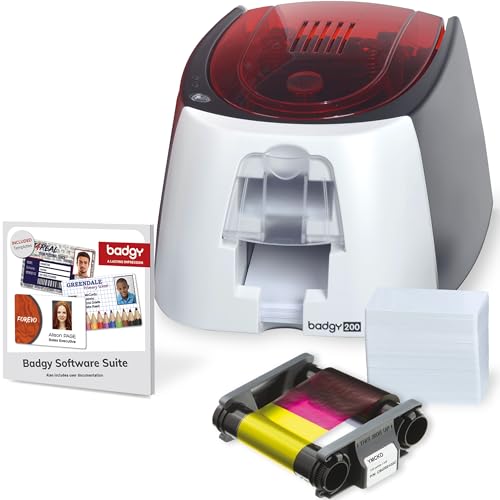
- Includes printer, ribbon, and blank cards
- Badge Studio+ adds templates and database import
- Prints full-color tamper-proof plastic badges
Best For: Small teams and event organizers needing an easy starter kit
Dual-Sided Event Kit

- Dual-sided printing for fuller badge designs
- Includes 300-print ribbon and software
- Compatible with Windows and Mac
Best For: Teams that want a ready-to-use dual-sided badge solution
Compact Printer-Only Pick
Fargo DTC1250e for Business Cards

- Compact desktop design saves space
- Edge-to-edge single-sided card printing
- Printer-only model with free software offer
Best For: Small businesses that already have ribbons and cards
Bronze Bundle – Bodno Seaory S25 Single Sided ID Printer
If you need badge printers for business events and want a ready-to-run setup, the Bodno Seaory S25 is built around convenience. It comes with the printer, supplies, and Bodno Bronze Edition software, so you can start producing professional-grade ID cards without piecing together a separate kit. Its manual feed design makes it a better fit for controlled, low-volume badge runs than for high-throughput event lines.
Best For: Small teams, offices, and event organizers that need a complete starter kit for on-demand badge printing.
Pros:
- All-inclusive package includes supplies and a 100-print color ribbon.
- Manual feed system gives precise control for one-card-at-a-time printing.
- Bodno Bronze Edition software includes pre-made templates and drag-and-drop design tools.
- Compatible with Windows, Mac, and Linux.
Cons:
- Manual feed design is better for low-volume use than fast badge batches.
- Single-sided printing only.
For business events that need polished, professional badges with minimal setup, this package is easy to understand and easy to deploy. The tradeoff is speed, but the included software and supplies make it a practical entry point for smaller badge workflows.
Label Maker Pro – SUPVAN T50M Pro Bluetooth Label Maker
The SUPVAN T50M Pro is not a card printer, but it can still support badge printers for business events by handling labels, name tags, file labels, and QR code stickers around the workflow. Its inkless thermal design, mobile app controls, and wide label compatibility make it a flexible choice for organizing event supplies, signage, and attendee materials. For teams that need crisp monochrome labels without buying ink or toner, it keeps setup simple.
Best For: Businesses that need a compact label maker for event organization, name tags, and support labels.
Pros:
- Prints 3/4″ to 2″ wide labels for many business uses.
- App offers 30+ fonts, 50+ frames, and 660+ icons.
- Inkless operation means no toner or ink refills.
- Compatible with square, round, address, cable, jewelry, and file labels.
Cons:
- Monochrome output only.
- Smaller label format is not a replacement for full ID card printing.
This model is best viewed as a supporting tool for event operations rather than a direct badge printer. If your business events need neat, durable labels alongside badge production, it offers plenty of flexibility in a compact package.
Starter Kit – IDP SMART-21S ID Card Printer Kit
For badge printers for business events, the IDP SMART-21S is a strong starter kit because it arrives with the printer, ribbon, PVC cards, software, and USB connectivity in one box. It is positioned for small businesses and larger corporations that need ID badges, access control badges, and other card-based credentials. The compact size and hand-feed design make it suitable for desktops and shared office spaces where badge production happens in manageable batches.
Best For: Small businesses and corporate teams that want an affordable, compact ID badge printing kit.
Pros:
- Includes printer, software, 100-print ribbon, and 100 PVC cards.
- Produces professional-quality full-color cards at 300 x 300 dpi.
- Can create ID badges, access control badges, student IDs, and loyalty cards.
- Compact hand-feed design fits small spaces.
Cons:
- PC-only software and Windows 10/11 support limit platform flexibility.
- Simplex, single-sided printing only.
This kit is a practical choice when you want a complete badge-printing setup without extra sourcing. It is especially appealing for event and workplace badge projects where compact size, included consumables, and straightforward operation matter more than high-volume automation.
High-Detail Bundle – Bodno Seaory S26 ID Card Printer
If your priority is sharper output for badge printers for business events, the Bodno Seaory S26 pushes higher print resolution than the simpler starter models here. It includes the printer, supplies, and Bodno Bronze Edition software, so you can get started quickly while still producing detailed single-sided cards. The bundled ribbon and compatibility across Windows, Mac, and Linux make it a practical choice for office badge workflows that need a polished finish.
Best For: Offices and event teams that want a bundled ID card printer with higher-resolution output.
Pros:
- Includes essential supplies and a color ribbon rated for 300 prints.
- Up to 300 x 1200 dpi resolution for sharper card detail.
- Bodno Bronze Edition software offers templates and drag-and-drop design.
- Compatible with Windows, Mac, and Linux.
Cons:
- Single-sided, simplex printing only.
- Manual throughput is better suited to controlled batches than high-volume runs.
The S26 stands out when badge quality matters as much as convenience. For business events that need professional-looking cards and a complete software-and-supplies package, it offers a solid balance of detail, setup ease, and support.
Standalone Budget Pick – Magicard Pronto 100 Bundle for Small Teams
For badge printers for business events, the Magicard Pronto 100 bundle is a practical choice when you want to print on demand without buying extra software. It ships with a YMCKO ribbon, 100 blank PVC cards, and a cleaning kit, so you can start producing visitor passes, staff badges, or event cards right away from a compact desktop setup.
Best For: Small offices, schools, and event teams that need a simple standalone ID badge printer with bundled supplies.
Pros:
- Includes a full-color ribbon, cleaning kit, and 100 PVC cards
- Prints single-sided cards in 23 seconds or less
- Compact 10″ x 7″ x 8.2″ footprint and lightweight 6.3 lb design
- Supports Ethernet or USB and works with Windows 11, Linux, and MacOS
Cons:
- Single-sided printing only
- Holds up to 50 cards in the input hopper/output stacker
- No laminator required, but it is still a print-only setup
Overall, this is a straightforward badge printer for business events if you value included supplies and easy setup over advanced finishing features. It is a good fit for quick badge creation in lower-volume environments.
Easy Starter Choice – Badgy100 with Badge Studio Software
If you need badge printers for business events and want a simple entry point, the Badgy100 focuses on fast on-demand ID printing with included Badge Studio software. It is designed for single printing needs, letting you replace lost or stolen cards and produce full-color badges without relying on outside vendors.
Best For: Small organizations and event planners that want a portable, software-included ID card printer for single-badge jobs.
Pros:
- Includes Badge Studio software with an online template library
- Prints full-color badges in high resolution on plastic cards
- Designed for on-demand replacement of lost or stolen cards
- Portable 1.7 kg unit with USB connectivity
Cons:
- Single-printing focus may not suit larger badge runs
- Manual duplex only
- Lower speed than some event-focused alternatives
In practice, the Badgy100 makes sense when you want a lightweight badge printer with software ready to go. It is best for simple, smaller-scale badge production rather than high-volume event credentialing.
Premium Dual-Sided Pick – Magicard 400X Bronze Edition Package
For badge printers for business events where you want more complete credentials, the Magicard 400X Bronze Edition package stands out with dual-sided printing and included supplies. It comes with a 300-print YMCKO ribbon plus Bodno Bronze Edition software, giving you a ready-to-use setup for printing professional ID cards from day one.
Best For: Organizations that want a dual-sided ID card printer package with software, supplies, and long-term support.
Pros:
- Dual-sided printing for more detailed badge layouts
- Includes a 300-print YMCKO ribbon and complete supplies package
- Bodno Bronze Edition software includes templates and drag-and-drop design tools
- Backed by a 4-year warranty and lifetime software support
Cons:
- USB connectivity only
- Larger desktop footprint than compact entry models
- Designed for ID card printing, so it is more specialized than general office printers
This bundle is a strong pick when your event badges need front-and-back information and you want a software package included. It is especially appealing for teams that prefer an all-in-one solution with support and warranty coverage.
Starter All-in-One – Badgy200 for Full-Color ID Cards
If you want badge printers for business events that are easy to set up and come ready to go, the Badgy200 is built around quick, full-color card production. It includes Badge Studio+ software, blank cards, and a color ribbon, so you can start creating employee badges, event IDs, member cards, or loyalty cards without piecing together a separate system.
Best For: Small teams, schools, and event organizers who want an all-in-one starter badge printing setup.
Pros:
- Includes printer, 100-print color ribbon, and 100 blank cards
- Badge Studio+ supports database import, templates, and a design wizard
- Prints full-color tamper-proof plastic ID badges
- USB connectivity keeps the setup straightforward
Cons:
- Single-purpose printer focused on card printing only
- USB connection may not suit networked office workflows
- Lower-volume output may be better for smaller badge runs
The Badgy200 makes sense when you want a practical entry point into in-house badge printing rather than a more complex production system. Its bundled supplies and software reduce setup friction, making it a convenient choice for recurring events and smaller organizations.
Dual-Sided Event Kit – Magicard 300 Bronze Edition
For badge printers for business events that need a more polished presentation, the Magicard 300 Bronze Edition offers dual-sided printing and a complete supplies package. It comes with a 300-print YMCKO ribbon, software with pre-made templates, and support for both Windows and Mac, which makes it a solid fit for teams producing professional ID cards in-house.
Best For: Businesses and organizations that want dual-sided ID card printing with bundled supplies and software.
Pros:
- Dual-sided printing supports more detailed badge layouts
- Includes a 300-print YMCKO ribbon
- Bodno Bronze Edition software offers templates and drag-and-drop design
- Compatible with both Windows and Mac
Cons:
- Heavier and larger than compact desktop badge printers
- Designed specifically for ID card printing, not general document use
- Printer package is most useful if you want the included software ecosystem
This package is a strong choice if you need a badge printer that is ready for more complete card designs from the start. The included ribbon, software, and longer warranty help make it practical for recurring business-event badge production.
Compact Printer-Only Pick – Fargo DTC1250e for Business Cards
If you need badge printers for business events in a small office footprint, the Fargo DTC1250e is a compact single-sided option aimed at professional ID and access cards. It prints edge-to-edge in full color or black and white, includes a complimentary beginner software offer, and is positioned as a straightforward printer-only solution for organizations that already have cards and ribbons.
Best For: Small to medium businesses that want a compact printer-only badge solution for IDs and access cards.
Pros:
- Compact footprint fits easily on a desktop
- Edge-to-edge printing for professional-looking cards
- Includes a free software offer through 2iD Beginner Edition
- Extended global three-year warranty adds confidence
Cons:
- Printer only; ribbon and cards are sold separately
- Single-sided printing limits badge layout options
- USB-only connectivity is less flexible than network options
The DTC1250e is best viewed as a dependable, compact badge printer for teams that want straightforward production without a bundled supplies package. It is a sensible fit when you already have the consumables and need a reliable desktop printer for business-event credentials.
How We Picked the Best Badge Printers for Business Events
We prioritized printers that are practical for live event use: consistent print quality, straightforward software, dependable card handling, and bundles that reduce the need to buy essentials separately. For Badge Printers for Business Events, we also looked for models that make short-run printing efficient and easier for nontechnical staff to manage.
Quick Comparison
In this group, some printers are better suited to occasional event badge runs, while others are built for higher-volume, repeat use. Single-sided printers usually cost less and are simpler to operate, while dual-sided options add flexibility for credentials that need more information. Bundle kits can be especially useful if you want cards, ribbons, and software included from day one.
Key Buying Factors for Badge Printers for Business Events
Print Speed and Throughput
If you expect long registration lines or same-day badge changes, faster print speeds matter. Look for a printer that can keep up without creating delays at check-in.
Single-Sided Vs. Dual-Sided
Single-sided printing is often enough for names, titles, and QR codes. Dual-sided printing is better when you need sponsor details, schedules, safety info, or multilingual content on the back.
Software and Badge Design Workflow
Easy-to-use badge software is a major advantage for event teams. Simple templates, database import tools, and photo capture support can save time and reduce errors.
Media and Supply Costs
Budget beyond the printer itself. Ribbons, blank cards, cleaning kits, and software licenses can affect the true cost of ownership more than the machine price alone.
Security and Durability
For professional events, choose cards and print methods that resist smudging and tampering. If badges will be worn all day, durability is just as important as color quality.
Who Should Buy Which Badge Printers for Business Events?
If you run smaller meetings or occasional events, a simpler entry-level printer bundle may be enough. If your team handles frequent conferences or multi-day programs, choose a faster model with stronger software and better supply support. For larger business events, dual-sided printers and complete bundles usually offer the best balance of convenience and consistency. The right badge printer should fit your expected volume, your check-in workflow, and how quickly you need badges ready when guests arrive.