
Choosing the right badge printer can make front-desk check-in faster, cleaner, and more professional. The best options balance print speed, ease of use, and total cost of ownership.
This roundup highlights practical choices for busy lobbies, from simple roll-fed visitor labels to full-color card printers with software bundles.
Best 10 Visitor Badge Printers for Reception Desks Picks for 2026
Roll-Format Desk Badge Supply
Roll-Ready Badges for Front Desks

- 4 rolls / 1,000 visitor badges
- Works with Brother direct thermal printers
- Fabric-friendly adhesive for better hold
Best For: Busy receptions using compatible direct thermal printers
All-in-One Card Printing Bundle
Complete Photo Badge Starter Set
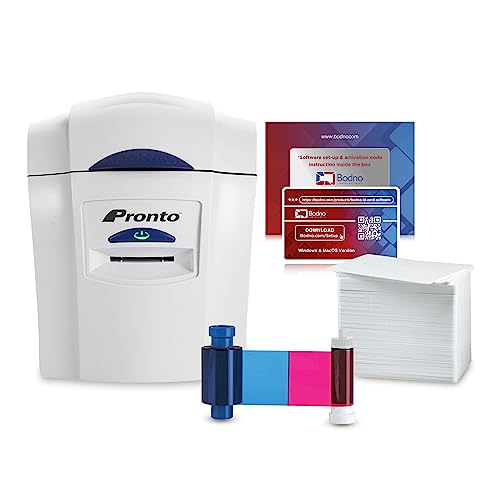
- Printer, ribbon, cards, and software included
- Templates and drag-and-drop design tools
- 2-year hardware warranty with lifetime software support
Best For: Front desks wanting an out-of-the-box badge printer kit
Security-First Card Printer
Fast Single-Sided Badge Output

- Fast printer in its class
- AES-256 encryption and resin scramble protection
- Plug-and-play desktop setup
Best For: Teams needing secure on-demand ID and visitor card printing
Compact On-Demand Badge Printer

- Compact printer for single-card printing
- Includes Badge Studio software and templates
- Prints full-color plastic badges
Best For: Small reception desks needing occasional custom visitor cards
Bronze Edition Starter Kit
Bodno Seaory S25 Single Sided ID Card Printer

- All-inclusive package with supplies and ribbon
- Manual feed for one-card-at-a-time printing
- Works with Windows, Mac, and Linux
Best For: Low-volume reception desks needing a bundled badge printer
Full-Color Quick Badge Maker
Badgy200 Plastic Card Printer with Badge Studio+
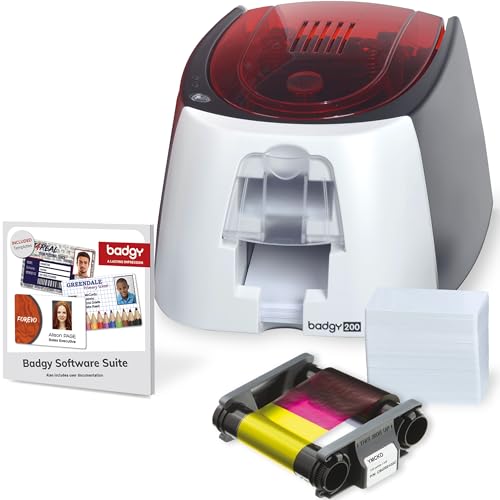
- Includes printer, ribbon, cards, cables, and software
- Badge Studio+ supports templates and database import
- Prints full-color tamperproof plastic ID badges
Best For: Front desks and small organizations needing easy full-color badge printing
High-Resolution Badge Printer Bundle

- Includes ribbon with 300 prints and software
- Prints up to 300 x 1200 dpi for sharper badges
- Compatible with Windows, Mac, and Linux
Best For: Desks wanting a higher-resolution bundled badge printer with photo support
Compact Desktop ID Printer
Fargo DTC1250e Single-Sided Badge Printer

- Compact footprint for desktop use
- Single-sided edge-to-edge card printing
- 3-year global warranty included
Best For: Small to medium teams needing a compact, reliable badge printer
All-In-One Dual-Sided Kit
Seaory S28 Bronze Edition Dual-Sided Printer

- Complete bundle includes software, ribbon, and camera
- Prints both sides in a single pass
- Works with Windows, Mac, and Linux
Best For: Reception desks that want an all-inclusive dual-sided printing kit
Budget-Friendly Starter Printer
Easy Badges Solid 210 Starter ID Printer

- Includes software, ribbon, and 200 PVC cards
- Compact and lightweight for desk placement
- Supports visitor passes and ID cards
Best For: Small offices that want an affordable starter badge printer
Roll-Format Desk Badge Supply – Roll-Ready Badges for Front Desks
If you need visitor badge printers for reception desks that keep check-in fast and readable, this Threshold roll-format badge supply is built for simple, at-a-glance identification. It’s designed to work with Brother direct thermal printers and fits into existing visitor management workflows, which makes it a practical choice for busy front desks and office security teams.
Best For: Reception areas that want roll-fed visitor badges compatible with Brother direct thermal printers and common visitor systems.
Pros:
- Includes 4 rolls for a total of 1,000 badges
- Compatible with most popular visitor management systems and printers
- Fabric-friendly adhesive is designed to adhere better
- Supports clear visitor identification and improved security
Cons:
- Designed for direct thermal Brother printers, so compatibility is specific
- Badge format is focused on visitor labeling rather than full custom card printing
This is a strong fit if your priority is straightforward visitor admission at the desk rather than a full ID-card production setup. The roll format and compatibility focus make it a practical consumable for organizations that already have a supported printer in place.
All-in-One Card Printing Bundle – Complete Photo Badge Starter Set
Bodno Magicard Pronto ID Card Printer & Complete Supplies Package ID Software - Bronze Edition
Check Price On AmazonFor visitor badge printers for reception desks, this Bodno Magicard Pronto bundle is a convenient all-in-one option when you want to print professional-looking cards in-house. The package includes the printer, ribbon, 100 PVC cards, and Bodno Bronze software, so a front desk team can get started without piecing together separate supplies.
Best For: Reception desks that want a complete, ready-to-use badge printing package with software and supplies included.
Pros:
- Includes printer, ribbon, 100 PVC cards, and user guide
- Bodno Bronze software offers templates and drag-and-drop design tools
- User-friendly setup is designed for quick printing
- Backed by a 2-year hardware warranty and lifetime software support
Cons:
- Uses USB connectivity, so it’s not a wireless setup
- Built for card printing, which may be more than needed for simple visitor stickers
This bundle makes sense if your reception desk needs a more polished card-style badge solution instead of disposable visitor labels. The included software and supplies reduce setup friction and help staff produce professional badges right away.
Security-First Card Printer – Fast Single-Sided Badge Output
If your reception desk needs visitor badge printers for reception desks with a stronger security and speed focus, the Fargo DTC1250e is built for dependable on-demand card printing. It offers fast output, plug-and-play setup, and built-in AES-256 encryption with resin scramble data protection, making it a solid fit for organizations that care about both workflow and credential security.
Best For: Reception and security teams that want fast, secure, single-sided badge printing for on-demand use.
Pros:
- Fast printer in its class for reduced wait times
- Plug-and-play operation with intuitive setup and loading
- Built-in AES-256 encryption and resin scramble data protection
- Supports eco-friendly refill ribbons and rewritable cards
Cons:
- Single-sided printing only
- USB connectivity keeps it tied to a wired desktop setup
For desks that handle frequent badge issuance and want a more secure workflow, this Fargo model stands out for speed and protection features. It is a good match when the goal is reliable in-house card printing rather than a basic entry-level setup.
Compact On-Demand Badge Printer – Quick Custom Visitor Cards
When you want visitor badge printers for reception desks that are compact and easy to deploy, the Badgy100 is aimed at single-printing needs with on-demand badge creation. It prints full-color custom plastic cards and includes Badge Studio software plus an online template library, which can help a front desk produce polished badges without outside vendors.
Best For: Reception desks that need a compact printer for quick, custom, full-color visitor cards.
Pros:
- Designed for single printing and immediate replacement of lost or stolen cards
- Prints high-resolution color badges on quality plastic cards
- Includes Badge Studio software and an online template library
- Portable form factor for smaller desk setups
Cons:
- Low output capacity with a 25-sheet maximum capacity
- Best suited to card printing rather than high-volume badge runs
The Badgy100 is a practical option for offices that need flexible custom badges without a large production machine. Its compact size and template-based software make it approachable for front-desk teams that print badges one at a time.
Bronze Edition Starter Kit – Bodno Seaory S25 Single Sided ID Card Printer
If you need visitor badge printers for reception desks that are simple to deploy and include the essentials, the Bodno Seaory S25 is built for low-volume, one-at-a-time badge printing. This direct-to-card model comes as an all-inclusive package with supplies, software, and a color ribbon, so a front desk can start producing professional ID cards without piecing together extra components.
Best For: Reception desks that print occasional visitor badges, employee IDs, or school cards and want an all-in-one setup.
Pros:
- Includes supplies and a Seaory 11011 color ribbon with 100 prints.
- Manual feed system gives precise control for printing one card at a time.
- Bodno Bronze Edition software includes templates and drag-and-drop design tools.
- Works with Windows, Mac, and Linux.
Cons:
- Manual feed design suits low-volume use rather than high-throughput desks.
- Single-sided printing only.
- Output is limited to 300 x 300 dpi.
For reception teams that value simplicity and a bundled start-up package, the S25 is a practical choice. It is a stronger fit for controlled, smaller printing runs than for busy lobbies that need constant badge output.
Full-Color Quick Badge Maker – Badgy200 Plastic Card Printer with Badge Studio+
Among visitor badge printers for reception desks, the Badgy200 stands out for quick, full-color badge creation with an included software package. It is designed for tamperproof plastic IDs, and the bundled Badge Studio+ software adds database import, templates, and a design wizard, which can help front-desk teams create badges efficiently.
Best For: Reception desks, schools, gyms, and small organizations that want a full-color badge printer with easy design tools.
Pros:
- Includes printer, 100-print color ribbon, 100 blank cards, cables, and software.
- Badge Studio+ offers database import, templates, a design wizard, and start-from-scratch editing.
- Prints full-color, tamperproof plastic ID badges in seconds.
- Designed for access control, event management, and identification use cases.
Cons:
- Included warranty is 1 year, with extended coverage optional.
- Print speed is modest at 1.6 color pages per minute.
- Uses USB connectivity only.
The Badgy200 is a solid fit when the front desk needs polished color badges and straightforward software rather than a complex system. Its bundled supplies and editing tools make it especially appealing for organizations starting badge printing from scratch.
High-Resolution Badge Printer Bundle – Bodno Seaory S26 with Camera
If you are comparing visitor badge printers for reception desks and want sharper card output, the Bodno Seaory S26 raises the resolution to 300 x 1200 dpi and includes essential supplies plus a camera. That makes it a useful bundle for teams that want a more complete setup for creating professional-looking badges right away.
Best For: Reception desks that want a higher-resolution badge printer bundle with included supplies and photo capture support.
Pros:
- Includes a Seaory 17031 color ribbon with 300 prints.
- Prints at up to 300 x 1200 dpi for sharper color output.
- Comes with Bodno Bronze Edition software and lifetime support.
- Compatible with Windows, Mac, and Linux.
Cons:
- Single-sided printing only.
- Manual feed and print-only design are better for controlled, lower-volume use.
- Uses USB connectivity rather than broader network-focused options.
The S26 is a strong choice when image quality matters and you want a bundled package that includes the core hardware and supplies. It is best suited to reception workflows that prioritize quality and setup completeness over speed and automation.
Compact Desktop ID Printer – Fargo DTC1250e Single-Sided Badge Printer
If you’re comparing visitor badge printers for reception desks, the Fargo DTC1250e is a straightforward single-sided option for teams that need professional-looking cards without taking up much space. It fits neatly on a desktop, supports edge-to-edge printing in full color or black and white, and is designed for quick, user-friendly badge production.
Best For: Small to medium organizations that want a compact, reliable printer for ID, proximity, and visitor-style badges.
Pros:
- Small footprint fits easily on a reception desk or office desktop.
- Edge-to-edge printing produces polished, professional cards.
- Color-changing buttons provide real-time system status updates.
- Includes a 3-year global warranty for added confidence.
Cons:
- Printer only, so ribbons and cards are sold separately.
- Single-sided printing only.
For reception teams that need a dependable card printer with simple operation and a compact design, this model is a practical fit. It’s especially appealing if you want a machine that can slot into a front desk workflow without adding clutter.
All-In-One Dual-Sided Kit – Seaory S28 Bronze Edition Dual-Sided Printer
For visitor badge printers for reception desks, the Seaory S28 Bronze Edition stands out because it ships as a complete package with software and supplies, so you can get started quickly. It prints on both sides in one pass, supports Windows, Mac, and Linux, and includes Bodno Bronze Edition software with lifetime support.
Best For: Front desks and offices that want an all-inclusive dual-sided badge printing setup with software included.
Pros:
- Complete package includes the printer, color ribbon, ID software, and camera.
- Dual-sided printing in one pass helps save time.
- Compatible with Windows, Mac, and Linux.
- Includes a two-year hardware warranty and lifetime software support.
Cons:
- Bulkier than a basic compact printer.
- Print-only design, so it is focused on badge production rather than multi-function use.
If your reception workflow needs quicker turnaround and fewer separate purchases, this bundle is a strong fit. The included supplies and software make it easier to move from unboxing to printing professional badges.
Budget-Friendly Starter Printer – Easy Badges Solid 210 Starter ID Printer
If you need visitor badge printers for reception desks on a tighter budget, the Easy Badges Solid 210 is built to be simple and compact. It comes with beginner software, cards, and a ribbon, and its hand-fed, single-sided setup is aimed at quick ID and visitor-pass creation.
Best For: Small offices and security-minded teams that want an easy-to-use starter badge printer with supplies included.
Pros:
- Includes beginner software, ribbon, and 200 PVC cards.
- Compact, lightweight design fits easily on an office desk.
- Compatible with PC and Mac.
- Software supports visitor passes, employee IDs, and access cards.
Cons:
- Single-sided printing only.
- Manual feeding may be slower than higher-volume systems.
This is a practical entry-level choice if your front desk only needs occasional badge printing and you want a simple setup. The included supplies make it easier to start producing badges without assembling a full bundle yourself.
How We Picked These Visitor Badge Printers for Reception Desks
We focused on systems that work well in real front-desk environments: fast setup, reliable output, clear visitor identification, and manageable running costs. We also considered whether each option is better for occasional walk-ins, daily lobby traffic, or higher-volume reception workflows.
Because Visitor Badge Printers for Reception Desks can range from thermal label printers to plastic card systems, we favored products that make the tradeoffs clear. That includes software bundles, camera support, single- versus dual-sided printing, and supply availability.
Quick Comparison
If you want the simplest and lowest-cost path, roll-based badge labels are often easiest to deploy. If you need a more polished, reusable, or tamper-resistant result, a dedicated card printer is usually the better fit. Full bundles are attractive for teams that want one purchase to cover hardware, software, and starter supplies.
Key Buying Factors for Visitor Badge Printers for Reception Desks
Badge Format
Decide whether you need adhesive labels, plastic cards, or both. Labels are convenient for temporary guests and high turnover. Plastic cards look more professional and can be better for longer visits, recurring contractors, or access-controlled areas.
Print Speed and Workflow
For reception desks, speed matters as much as print quality. Look for easy software, low training requirements, and straightforward badge creation so staff can print without slowing the check-in line.
Single-Sided or Dual-Sided
Single-sided printers are usually enough for visitor badges. Dual-sided models make more sense when you need extra information, branding, instructions, or return-use cards.
Supplies and Total Cost
Check the ongoing cost of cards, ribbons, labels, and software. A low upfront price can become expensive if supplies are proprietary or replacement consumables are difficult to source.
Security and Presentation
For Visitor Badge Printers for Reception Desks, tamper resistance, legibility, and professional appearance all matter. If badges need to be reused or collected at checkout, choose a format that supports clean removal or secure reprinting.
Who Should Buy Which Visitor Badge Printers for Reception Desks?
Choose a thermal label system if you want fast, simple, affordable visitor badges for everyday front-desk use. Choose a single-sided card printer if you want a polished appearance and better durability. Choose a bundled printer-and-software package if you want the easiest path for teams without in-house badge design experience. Dual-sided options are best for organizations that need more information on each badge or expect badges to serve multiple functions.
For most reception teams, the best choice comes down to your check-in volume, badge lifespan, and how much design control you need. Start with the format that matches your workflow, then compare software, supplies, and support before buying.