Shared offices make color consistency harder: multiple displays, changing users, mixed lighting, and different editing workflows can all affect what people see. The right calibration tools help teams produce more predictable photos, video, proofs, and client deliverables.
This roundup includes monitor colorimeters, camera color targets, gray cards, and combined capture-to-edit kits. The best choice depends on how many users share the equipment, the displays you need to calibrate, and whether your team works primarily on-screen or in-camera.
Best 10 Color Calibration Tools for Shared Offices Picks for 2026
Best Beginner Pick

- Guided single-click calibration
- Supports multiple monitors
- Includes room-light monitoring
Best For: Shared offices with first-time calibration users
Versatile Pro Choice

- Profiles monitors and projectors
- Measures ambient light
- Works with ColorTRUE mobile app
Best For: Workgroups managing varied displays and projectors
Best Camera Color Reference

- Provides 24 color targets and grey target
- Aligns multiple camera systems
- Compact for location shoots
Best For: Photography teams standardizing camera color
Easy Dual-Screen Calibration

- Guided 1 2 3 calibration workflow
- Supports up to two displays
- Before-and-after accuracy check
Best For: Small creative teams using dual-monitor workstations
Fast Multi-Display Profiling

- Calibrates up to three displays
- About 90-second calibration workflow
- Upgrade path for advanced features
Best For: Multi-screen creative workstations in busy shared offices
Portable Reference Targets
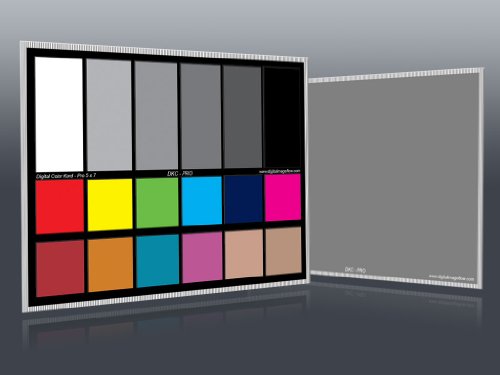
- Two 5-by-7-inch calibration charts
- 12% and 18% gray references
- 18 color patches for correction
Best For: Photography teams sharing white-balance references
Travel Reference Pick
Calibrite ColorChecker Classic Mini

- 24-patch target for white balance and color grading
- Supports custom DNG and ICC profiles with PROFILER
- Compact design for shared offices and location work
Best For: Portable camera-reference workflows
Simple Gray-Card Set
DKK 5 x 7 Color Calibration Charts

- Includes 12% and 18% gray references
- Colorbar and grayscale design supports video calibration
- Two compact charts include a stand and user guide
Best For: Basic shared video-workstation reference checks
Complete Capture-to-Edit Kit
Calibrite Photo Kit with Display Pro HL

- Combines monitor and camera color calibration
- Supports mini LED, OLED, and Apple XDR displays
- Includes Passport Photo 2 and PROFILER software
Best For: Shared photo-editing offices needing end-to-end consistency
Best Beginner Pick – Spyder X Pro
The Datacolor Spyder X Pro is a practical starting point for shared offices that need more consistent color across multiple laptops and desktop monitors. Its guided workflow, room-light monitoring, and quick calibration make it approachable for teams without dedicated color-management expertise.
Best For: Shared offices with first-time users who need straightforward calibration for multiple displays.
Pros:
- Lens-based color engine supports accurate color, shadow detail, and white balance.
- Single-click calibration and wizard workflow simplify setup.
- Supports multiple laptop and desktop monitors.
- SpyderProof provides before-and-after comparisons using your own images.
Cons:
- Designed for monitors rather than camera color calibration.
- Its feature set may be more than needed for basic office documents.
For a shared workspace, the Spyder X Pro balances ease of use with useful multi-monitor support. It is especially suitable when different team members need repeatable results without learning a complex calibration process.
Versatile Pro Choice – X-Rite i1Display Pro
The X-Rite i1Display Pro is a flexible option among color calibration tools for shared offices, combining ambient-light measurement with monitor and projector profiling. Its USB connection and included profiling software suit workgroups that manage varied display equipment.
Best For: Offices that need advanced control across monitors, projectors, and supported mobile devices.
Pros:
- Supports ambient-light measurement, monitor profiling, and projector profiling.
- Measures five times faster than previous devices, according to the supplied product notes.
- Compatible with X-Rite ColorTRUE for Apple iOS and Android calibration.
- Supports modern display technologies including LED, OLED, plasma, and wide-gamut screens.
Cons:
- Its broader controls may require more setup knowledge than beginner-focused tools.
- The supplied listing identifies the product as the i1Display Pro, despite the provided title referencing ColorChecker Classic.
This is a strong fit when a shared office has more than standard desktop monitors to manage. The included software and projector support provide useful flexibility for presentation rooms and creative workstations.
Best for HDR Workstations – Calibrite Display Pro HL
The Calibrite Display Pro HL is built for shared offices using bright LCD, mini-LED, OLED, or Apple XDR displays. Its high-luminance sensor, PROFILER software, validation tools, and preset sharing help teams pursue consistent results across modern workstations.
Best For: Creative teams using high-brightness or HDR-capable displays that need validated, repeatable profiles.
Pros:
- Measures displays up to 3000 nits.
- Supports LCD, mini-LED, OLED, Apple XDR displays, and compatible projectors.
- PROFILER offers Basic and Advanced modes with custom white point, luminance, contrast, and gamma controls.
- Validation, uniformity, Quick Check, and flare-correction tools help verify results.
Cons:
- Advanced controls may be unnecessary for routine office productivity screens.
- Requires Mac or Windows software and a USB-C connection, with a USB-A adapter included.
For teams sharing demanding creative displays, the Display Pro HL offers the most extensive verification and high-brightness support in this group. Preset sharing is particularly useful when multiple workstations need a common calibration target.
Best Camera Color Reference – SpyderCheckr 24
The Datacolor SpyderCheckr 24 is a camera color reference rather than a monitor calibrator, but it can complement color calibration tools for shared offices with photography teams. It helps align cameras and lighting through a test image, grey target, and software-based HSL presets.
Best For: Shared creative offices coordinating camera color across photographers, lenses, lighting setups, and locations.
Pros:
- Includes 24 spectrally engineered color targets and a grey face target.
- Supports consistent color across cameras, lenses, and lighting environments.
- Works with DSLR cameras, smartphones, drones, and action cameras.
- Compact design and protective sleeve suit location work.
Cons:
- Does not calibrate computer monitors.
- Its workflow depends on taking a test photo and using software-based HSL presets.
- More relevant to photography production than general office display management.
Choose the SpyderCheckr 24 when the shared-office problem is camera consistency rather than screen profiling. Used alongside a monitor calibrator, it can help create a more controlled color workflow from capture through editing.
Easy Dual-Screen Calibration – Display 123
The Calibrite Display 123 is a straightforward choice among color calibration tools for shared offices, especially when two people or workstations need more consistent monitor color. Its guided workflow, USB-C connection, and support for two displays make it practical for creative teams sharing a workspace.
Best For: Photo editors and small creative teams that need simple calibration across two monitors.
Pros:
- Guided Easy 1 2 3 workflow keeps setup approachable.
- Supports calibration of up to two displays for closer matching.
- Includes brightness targets and a before-and-after comparison.
- Compact body and adjustable counterweight support flexible screen placement.
Cons:
- Supports up to two displays, which may not suit larger shared workstations.
- Its feature set is focused on approachable calibration rather than advanced upgrade options.
For a shared office with a dual-monitor setup, Display 123 emphasizes repeatable results without a complicated process. The before-and-after check is useful when confirming that a screen is ready for dependable editing.
Fast Multi-Display Profiling – SpyderExpress
Datacolor SpyderExpress is a useful option for shared offices where several connected displays need consistent color with minimal setup time. It calibrates up to three displays per workstation, and the software-led process is designed to produce edit-ready results in about 90 seconds.
Best For: Creative workstations with up to three connected displays and users who value quick recalibration.
Pros:
- Three-step setup is designed to be quick and easy.
- Supports calibration of up to three connected displays per workstation.
- Supports the latest Liquid Retina XDR displays, including the MacBook M4 mini-LED screen.
- Software upgrades can add ambient-light adjustment, advanced display support, and DevicePreview.
Cons:
- Some advanced features require software upgrades.
- Its larger listed dimensions may be less convenient to store than a compact colorimeter.
SpyderExpress stands out for shared offices that rotate users or frequently need to recalibrate before editing. Its multi-display support is especially practical when one workstation serves several screens, while upgrades provide a path to expanded features.
Portable Reference Targets – DKC-Pro Chart Set
The DKC-Pro set takes a camera-based approach to color consistency, making it a useful complement to monitor-focused color calibration tools for shared offices. Two 5-by-7-inch charts provide 12% and 18% gray references plus 18 color patches for white balance and digital color correction in Photoshop or Lightroom.
Best For: Photography teams that need shared white-balance and color-reference charts for image correction.
Pros:
- Includes two charts for convenient team or multi-camera use.
- Provides 12% and 18% gray references for white balance.
- Includes 18 color patches for digital color correction.
- n-Chrome coating is designed to improve saturation, luminance, and accuracy while reducing metamerism.
Cons:
- It is a physical reference target set, not a monitor colorimeter.
- Consistent results still depend on using the charts with compatible editing software and an appropriate workflow.
For a shared photography office, the DKC-Pro set gives multiple users a repeatable physical reference for capture and editing. It works best alongside monitor calibration rather than as a replacement for a screen calibrator.
Travel Reference Pick – Calibrite ColorChecker Classic Mini
For shared offices where cameras and lighting conditions can vary between users, the Calibrite ColorChecker Classic Mini is a portable color reference for more consistent capture. Its 24 patches support white balance, exposure evaluation, color grading, and profile creation when paired with Calibrite PROFILER software.
Best For: Shared offices, mobile production teams, and photographers who need a compact reference target for repeatable color.
Pros:
- Pocket-sized design is easy to transport between workstations or shoots.
- Supports white balance, exposure checks, and color grading.
- Can be used for custom DNG and ICC camera profiles with Calibrite PROFILER.
Cons:
- It is a camera reference target, not a monitor-calibration colorimeter.
- The compact chart may offer less viewing area than larger calibration targets.
This is a practical choice when multiple people share cameras or move between lighting setups. It provides an objective color reference without adding much equipment to a shared workspace.
Simple Gray-Card Set – DKK 5 x 7 Color Calibration Charts
The DKK set offers a straightforward option for shared offices looking for color calibration tools for shared offices without a software-based monitor system. Two 5 x 7-inch charts combine color bars with 12% and 18% gray references, and the included stand and guide simplify setup.
Best For: Video teams that need an inexpensive, portable reference for white balance, exposure, and consistent image capture.
Pros:
- Includes two charts with 12% and 18% gray references.
- Built-in colorbar and grayscale combination supports color and exposure checks.
- Includes a frame stand and user guide for convenient setup.
- Compact size is easy to move among shared workstations or shoots.
Cons:
- Does not include a monitor colorimeter or dedicated profiling software.
- Supplied notes provide limited information about long-term materials and software compatibility.
This set suits teams that want a basic physical reference rather than a complete capture-to-edit calibration system. Its small format and stand make it convenient to keep available in a shared production area.
Complete Capture-to-Edit Kit – Calibrite Photo Kit with Display Pro HL
For shared offices that need both camera and display consistency, this Calibrite kit combines the Display Pro HL monitor colorimeter with ColorChecker Passport Photo 2. It is designed to connect RAW capture, custom camera profiles, white balance, and display calibration in one workflow.
Best For: Shared photography and editing offices using modern displays, including mini LED, OLED, or Apple XDR panels.
Pros:
- Combines monitor calibration with a camera color reference.
- Display Pro HL supports calibration for mini LED, OLED, and Apple XDR displays.
- Passport Photo 2 supports custom RAW camera profiles and white balance references.
- Calibrite PROFILER offers presets plus adjustable white point and gamma targets.
Cons:
- More equipment than a simple chart, so it may be excessive for basic white-balance checks.
- The supplied notes do not specify operating-system compatibility or included accessories beyond the listed kit components.
This is the most comprehensive option for a shared office where several people edit images on different displays. By addressing both capture and monitor calibration, it can help create a more consistent handoff between photographers and editors.
How We Picked the Best Color Calibration Tools for Shared Offices
We grouped these tools by their job: calibrating monitors, establishing consistent camera color, or supporting both capture and editing. For shared offices, we prioritized repeatable results, straightforward workflows, broad display compatibility, portability, and features that reduce training time. We also considered whether a product is better suited to one dedicated workstation or a team that moves between desks and cameras.
Quick Comparison
| Tool type | Best for | Key advantage |
|---|---|---|
| Monitor colorimeter | Shared editing stations | Creates consistent screen profiles |
| Color reference chart | Photo and video capture | Improves white balance and color matching |
| Gray card set | Exposure and white balance checks | Simple, affordable on-location reference |
| Combined kit | End-to-end workflows | Connects camera capture with display calibration |
Key Buying Factors for Color Calibration Tools for Shared Offices
Display Compatibility and Brightness
Check whether the colorimeter supports your office’s LCD, mini-LED, or OLED panels. High-brightness HDR displays may require a tool and software package designed for substantially higher luminance than standard monitors.
Ease of Repeat Use
Shared equipment should be easy to identify, connect, and operate. Guided software is valuable when several people with different technical backgrounds use the same tool. USB-C connectivity can also simplify deployment on newer laptops and workstations.
Workflow Coverage
A monitor calibrator addresses what users see during editing, while a camera chart helps create a reliable reference during capture and color grading. If your team handles both stages, a kit or two complementary tools may be more useful than relying on either alone.
Portability and Storage
Charts and gray cards should be protected from dust, scratches, and fading. For equipment that travels between rooms or shoots, compact formats and included stands or cases can make consistent use more likely.
Who Should Buy Which Color Calibration Tools for Shared Offices?
- For a shared photo-editing desk: Choose a dependable monitor colorimeter with accessible profiling software.
- For bright HDR or OLED workstations: Select a model specifically rated for modern high-luminance displays.
- For photographers and videographers: Add a color reference chart to improve white balance and color matching across scenes.
- For simple exposure checks: A paired gray-card set offers a practical, low-cost reference.
- For small creative teams: A combined photo kit can streamline capture-to-edit consistency and reduce the need to assemble separate tools.
Before buying, decide whether the main problem is inconsistent screens, inconsistent camera capture, or both. In many shared offices, calibrating the most-used displays first delivers the fastest improvement; reference charts can then standardize camera work across the wider team.