
A dependable USB Wi-Fi adapter can give an older Mac, desktop, or replacement setup a more practical path to wireless connectivity. The best choice depends on macOS support, your router’s wireless standard, USB compatibility, and whether you prioritize compact size or stronger range.
We’ve gathered 10 adapters spanning basic N150 models, dual-band AC600 options, and faster Wi-Fi 6 hardware. Use the guide below to narrow the list by compatibility, connection demands, and budget.
Best 10 Wifi Adapters for Mac Picks for 2026
Best Nano Upgrade
ASUS USB-AC53 Nano AC1200 Adapter

- Compact dual-band 802.11ac design
- Up to 867Mbps on 5GHz
- MU-MIMO support for compatible routers
Best For: Mac users wanting a small dual-band upgrade
Best for Windows Only
Tenda AX900 WiFi 6 USB Adapter

- WiFi 6 dual-band connectivity
- Up to 600Mbps on 5GHz
- Not compatible with macOS
Best For: Windows 7, 10, and 11 computers
Best Budget Mac Compatibility

- Supports Mac OS 10.9–10.15
- Tiny nano-sized USB design
- 150Mbps 2.4GHz Wi-Fi 4
Best For: Basic wireless use on supported Macs
Best Range-Focused Option

- Dual-band AC600 connectivity
- Adjustable 5dBi high-gain antenna
- Windows compatibility is clearly listed
Best For: Users prioritizing antenna reach on compatible systems
Best High-Speed Pick

- AC1300 dual-band Wi-Fi
- USB 3.0 interface
- Supports Mac OS X 10.9–10.14
Best For: Supported older Macs needing higher wireless throughput
Best Support Coverage

- AC600 dual-band wireless
- AP mode for hotspot sharing
- Supports Mac OS 10.6–10.14
Best For: Older Macs needing legacy OS support and AP mode
Best Ultra-Compact Pick

- Tiny nano-size design
- AC600 dual-band Wi-Fi
- Supports Mac OS X 10.9–10.14
Best For: Travel and low-profile use on compatible older Macs
Best Budget Pick
TP-Link TL-WN725N Nano WiFi Adapter

- Tiny plug-and-forget design
- 150 Mbps 2.4GHz connection
- Supports macOS 10.9–10.15
Best For: Basic 2.4GHz connectivity on compatible older Macs
Best Performance Option
TP-Link Archer T3U Plus AC1300 Adapter

- AC1300 dual-band WiFi
- Adjustable high-gain antenna
- MU-MIMO and USB 3.0 support
Best For: Desktop users seeking faster dual-band performance
Best Compact Dual-Band Alternative
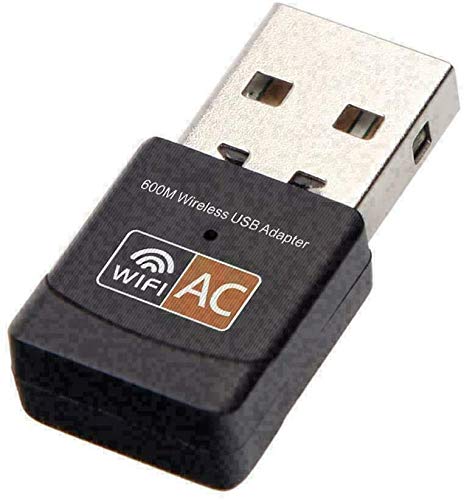
- 2.4GHz and 5GHz support
- Compact 3-gram design
- Works with laptops and desktops
Best For: Mac users on macOS 10.12+ wanting portable dual-band WiFi
Best Nano Upgrade – ASUS USB-AC53 Nano AC1200 Adapter
The ASUS USB-AC53 Nano is a compact choice among wifi adapters for mac users who want dual-band 802.11ac connectivity in a small USB design. It supports 2.4GHz and 5GHz networks, with an AC1200 combined speed rating and MU-MIMO support when paired with a compatible router.
Best For: Mac users seeking a small dual-band adapter for upgrading compatible desktops or laptops.
Pros:
- Dual-band AC1200 connectivity with speeds up to 867Mbps on 5GHz.
- Nano-sized design is easy to leave plugged in.
- MU-MIMO support works with compatible routers and access points.
- Includes a three-year warranty.
Cons:
- The supplied specifications emphasize Windows compatibility, so macOS version support should be verified before purchase.
- Maximum performance depends on the router and network conditions.
With its small footprint and faster 802.11ac standard, this ASUS adapter is appealing for a compact wireless upgrade, but confirm current Mac compatibility for your specific system.
Best for Windows Only – Tenda AX900 WiFi 6 USB Adapter
The Tenda U11 offers WiFi 6 dual-band performance for supported Windows computers, but it is not a suitable pick among wifi adapters for mac because the supplied specifications explicitly exclude macOS. It reaches an AX900 rating when used with a WiFi 6 router.
Best For: Windows 7, 10, and 11 desktop or laptop users who want a compact WiFi 6 adapter.
Pros:
- WiFi 6 dual-band speeds rated at up to 600Mbps on 5GHz and 286Mbps on 2.4GHz.
- Built-in drivers support quick installation on compatible Windows systems.
- Can receive Wi-Fi and share the computer’s internet connection.
- Supports WPA and WPA2 encryption.
Cons:
- Not compatible with macOS, Linux, Windows 8/8.1, or XP.
- AX900 speeds require a WiFi 6 router.
- Recommended placement is within 30 feet of the router for the strongest signal.
This is a capable, compact WiFi 6 option for Windows PCs, but Mac shoppers should skip it because the supplied compatibility information rules out macOS.
Best Budget Mac Compatibility – Edimax EW-7811Un V2 N150
The Edimax EW-7811Un V2 is a basic, nano-sized option for wifi adapters for mac users who prioritize broad operating-system support and a discreet design over modern dual-band speeds. It uses 2.4GHz Wi-Fi 4 with throughput up to 150Mbps.
Best For: Mac users who need a tiny adapter for basic browsing and 2.4GHz wireless connectivity.
Pros:
- Supports Mac OS 10.9 through 10.15 according to the supplied notes.
- Nano design minimizes protrusion and reduces the chance of bump damage.
- Supports Windows, macOS, and several Linux distributions.
- Includes WPA3, WPA2, WPA, and WEP security support.
Cons:
- Limited to 2.4GHz Wi-Fi 4 and up to 150Mbps.
- Newer macOS versions beyond the listed range should be verified.
- Linux support varies by kernel and may require additional drivers or compilation.
The Edimax is a sensible low-profile choice for older or supported Macs and straightforward wireless tasks, but it is not designed for high-speed streaming or crowded modern networks.
Best Range-Focused Option – TP-Link Archer T2U Plus AC600
The TP-Link Archer T2U Plus combines dual-band AC600 connectivity with a high-gain, adjustable antenna. For shoppers comparing wifi adapters for mac, note that the supplied product details emphasize Windows support and provide no specific macOS version, so compatibility should be confirmed before ordering.
Best For: Users who need a directional, high-gain antenna for a compatible Windows desktop or laptop.
Pros:
- Dual-band speeds rated up to 433Mbps on 5GHz and 200Mbps on 2.4GHz.
- 5dBi multi-directional antenna can be rotated toward the router.
- Supports 802.11ac for an upgrade over wireless N.
- Supports Windows 11, 10, 8.1, 8, 7, and XP.
Cons:
- The supplied notes do not confirm a specific macOS version or driver.
- Its larger antenna is less discreet than a nano adapter.
- Actual speeds vary with distance, obstacles, and network conditions.
When antenna positioning matters, the Archer T2U Plus offers more flexibility than tiny dongles. Mac buyers should verify driver availability and OS compatibility before choosing it.
Best High-Speed Pick – TP-Link Archer T3U AC1300
If you need wifi adapters for mac and want higher dual-band throughput, the TP-Link Archer T3U is a strong option. It supports up to AC1300 speeds, uses USB 3.0, and is listed as compatible with Mac OS X 10.9–10.14. Check your macOS version before buying, since the supplied compatibility details cover older releases.
Best For: Mac users with supported OS X versions who want a fast dual-band adapter for desktop or laptop use.
Pros:
- Dual-band AC1300 performance with 2.4GHz and 5GHz support.
- USB 3.0 offers faster connectivity than USB 2.0.
- MU-MIMO and beamforming are designed to support a more stable, responsive connection.
- Compact design and a two-year manufacturer warranty.
Cons:
- Mac compatibility is listed only through Mac OS X 10.9–10.14.
- Driver installation may be needed depending on the operating system.
The Archer T3U stands out for speed and USB 3.0 performance, making it the most capable choice here for compatible older Macs. Verify both your macOS version and available USB port before ordering.
Best Support Coverage – EDUP AC600 USB WiFi Adapter
The EDUP AC600 is a practical choice among wifi adapters for mac if your computer runs Mac OS 10.6–10.14. It offers dual-band wireless networking, AP mode for sharing a computer’s connection, and stated support for desktop PCs and laptops. Manual driver installation may be required on non-Windows systems.
Best For: Users with compatible older Macs who value AP mode, broad legacy OS support, and a replacement warranty.
Pros:
- Supports 2.4GHz and 5GHz connections with speeds up to AC600.
- Compatible with Mac OS 10.6–10.14 according to the supplied notes.
- AP mode can turn the computer into a Wi-Fi hotspot.
- Includes a three-year manufacturer replacement warranty in the product notes.
Cons:
- Driver installation is generally required for Mac and other non-Windows systems.
- Not compatible with Raspberry Pi, smart TVs, or gaming consoles.
- Lower maximum throughput than the AC1300 option.
Choose the EDUP when legacy Mac support and hotspot functionality matter more than maximum speed. Download the appropriate driver before installation and confirm your Mac falls within the listed OS range.
Best Ultra-Compact Pick – TP-Link Archer T2U Nano AC600
The TP-Link Archer T2U Nano is a convenient option for wifi adapters for mac when you want a small adapter that can remain plugged in. It provides dual-band AC600 connectivity and is listed for Mac OS X 10.9–10.14, though TP-Link notes that driver installation may be required.
Best For: Mac laptop and desktop users who prioritize a tiny, travel-friendly adapter for supported older OS X versions.
Pros:
- Ultra-small nano design is suitable for travel and permanent plug-in use.
- Dual-band 2.4GHz and 5GHz support with AC600 speeds.
- Two-year manufacturer warranty and free 24/7 technical support.
- Supports Mac OS X 10.9–10.14 according to the supplied details.
Cons:
- Uses USB 2.0 rather than USB 3.0.
- Mac compatibility is limited to the listed older OS X versions.
- Driver installation may be necessary.
Its nearly flush nano form factor is the main advantage, especially for laptops or travel setups. It is a sensible low-profile pick provided your Mac uses a supported OS X version and has a USB Type-A port.
Best Budget Pick – TP-Link TL-WN725N Nano WiFi Adapter
If you need a simple, unobtrusive option among wifi adapters for mac, the TP-Link TL-WN725N is a practical choice for compatible older Macs. It supports macOS 10.9 through 10.15, uses the 2.4GHz band, and may require a driver download from TP-Link.
Best For: Mac users who want a tiny, inexpensive adapter for basic browsing, streaming, and internet calls on a 2.4GHz network.
Pros:
- Extremely compact nano design that can remain plugged in.
- Supports speeds up to 150 Mbps on the 2.4GHz band.
- Compatible with macOS 10.9–10.15, Windows, and select Linux kernels.
- Includes a two-year warranty and 24/7 technical support.
Cons:
- 2.4GHz only; it does not support 5GHz WiFi.
- Driver installation may be required.
- Mac support is limited to macOS 10.9–10.15.
The TL-WN725N makes the most sense when size and basic connectivity matter more than modern dual-band performance. Check your Mac version and router band before buying.
Best Performance Option – TP-Link Archer T3U Plus AC1300 Adapter
For shoppers comparing wifi adapters for mac with stronger range and faster wireless capability, the TP-Link Archer T3U Plus offers AC1300 dual-band connectivity. Its external high-gain antenna and USB 3.0 interface are designed for desktop use, while macOS 10.9–10.15 support is listed.
Best For: Mac and desktop users who want dual-band WiFi, an adjustable antenna, and higher listed throughput than a basic 2.4GHz nano adapter.
Pros:
- AC1300 dual-band speeds rated up to 867 Mbps on 5GHz and 400 Mbps on 2.4GHz.
- External high-gain antenna can be rotated toward the router.
- MU-MIMO technology is designed to improve network throughput and efficiency.
- Supports macOS 10.9–10.15 and includes a two-year manufacturer warranty.
Cons:
- Large external antenna is less discreet than a nano adapter.
- Mac support is limited to macOS 10.9–10.15.
- Actual speeds depend on the connected router and network conditions.
This is the stronger choice for compatible Macs that need dual-band flexibility or better reception. Its antenna makes it more suitable for a desktop setup than highly portable use.
Best Compact Dual-Band Alternative – DWS AC600 USB WiFi Adapter
The DWS AC600 is a small dual-band option for shoppers looking at wifi adapters for mac across several operating systems. It supports 2.4GHz and 5GHz networks, works with desktops and laptops, and lists Mac OS 10.12 Sierra among its compatible systems.
Best For: MacBook and desktop users with macOS 10.12 or newer who want a compact adapter with basic AC600 dual-band capability.
Pros:
- Supports both 2.4GHz and 5GHz WiFi bands.
- Compact design weighs about 3 grams.
- Compatible with desktops and laptops.
- Driver links are provided for Mac, Linux, and Windows when no CD-ROM drive is available.
Cons:
- Listed Mac compatibility starts at macOS 10.12 Sierra.
- Driver installation may be needed, especially without a CD-ROM drive.
- Its 600 Mbps rating is a theoretical data-transfer specification.
The DWS adapter is a useful middle ground between a basic 2.4GHz dongle and a larger high-gain model. Verify your exact macOS version and download the appropriate driver before installation.
How We Picked These Wifi Adapters for Mac
We selected models across common speed tiers, including N150, AC600, AC1200, AC1300, and Wi-Fi 6 options. Our comparison focuses on wireless bands, advertised throughput, adapter size, antenna design, operating-system support, and how easily each model fits a typical desktop or laptop setup.
Compatibility deserves special attention: many USB Wi-Fi adapters are marketed primarily for Windows, while macOS support can depend on the exact operating-system version and available driver. Before buying, confirm current Mac support from the manufacturer or seller and check whether your Mac has the required USB-A or USB-C connection.
Quick Comparison
| Adapter class | Best suited to | Typical advantage |
|---|---|---|
| N150 | Basic browsing and older networks | Low cost and very small size |
| AC600 | Everyday browsing and streaming | Dual-band flexibility |
| AC1200–AC1300 | Busy networks and larger downloads | Higher throughput and better headroom |
| Wi-Fi 6 | Compatible modern routers | Improved efficiency on crowded networks |
Key Buying Factors for Wifi Adapters for Mac
MacOS and Port Compatibility
Verify driver availability for your exact macOS release rather than relying only on a general “Mac compatible” label. Also check the connector: a USB-A adapter may require a reliable USB-C hub or adapter on newer Macs.
Wireless Standard and Bands
Dual-band 2.4GHz and 5GHz adapters are usually more versatile than single-band models. The 2.4GHz band travels farther, while 5GHz can offer better speed with less congestion at shorter distances. Wi-Fi 6 is worthwhile when your router and network environment can use it.
Size, Antennas, and Placement
Nano adapters are convenient for travel and unobtrusive laptop use, but larger adapters or external antennas may maintain a stronger connection through walls or at longer range. For a desktop, a model that can be repositioned may perform better than one hidden behind the computer.
Realistic Performance
Advertised Mbps figures are theoretical maximums. Actual results depend on router quality, signal strength, interference, USB limitations, and internet service speed. Prioritize stable dual-band performance over a headline number alone.
Who Should Buy Which Wifi Adapters for Mac?
Choose an N150 model for light browsing, email, and older routers when affordability matters most. An AC600 adapter is a sensible general-purpose option for streaming, video calls, and routine downloads. Select AC1200 or AC1300 when you want more capacity for faster broadband, file transfers, or multiple active devices. A Wi-Fi 6 adapter makes the most sense with a modern Wi-Fi 6 router and a congested home network.
For any of these Wifi Adapters for Mac, confirm macOS drivers before checkout, especially if you use a recent Apple-silicon Mac or the latest macOS version. If plug-and-play operation is essential, favor a model with clearly documented Mac support or consider a Mac-specific alternative.