
High-end PCs generate serious heat, and the right fan setup can help maintain stable temperatures without turning your workstation or gaming rig into a noise source. The best computer cooling fans for high-end PCs balance airflow, static pressure, acoustics, control options, and build quality.
This roundup compares 10 strong 120mm options, including premium quiet fans, high-airflow value packs, and RGB systems with controllers or daisy-chain connectivity. Use the buying guide below to match the fan design and features to your case, radiator, and performance goals.
Best 10 Computer Cooling Fans for High End PCs Picks for 2026
Quiet Performance Pick
Noctua NF-A12x25 G2 chromax.Black 2-Pack

- Speed-offset pair helps reduce acoustic interaction
- High airflow and static pressure for radiators or cases
- Includes anti-vibration accessories and six-year warranty
Best For: Quiet premium builds and radiator push-pull setups
RGB Cable-Management Pick
Lian Li UNI Fan SL-Infinity Triple Pack

- Includes controller with support for up to 16 fans
- Interlocking design reduces cable clutter
- Infinity-mirror lighting with 40 LEDs per fan
Best For: RGB-focused desktops and clean cable-managed builds
Value Cooling Pick
ID-COOLING AS-120-K Trio 120mm Fans

- Three versatile 120mm PWM fans in one pack
- 58 CFM airflow and 1.94 mm-H2O static pressure
- Daisy-chain connectors simplify wiring
Best For: Straightforward black builds needing broad airflow coverage
High-Pressure Five-Pack
ARCTIC P12 Pro PST 120mm Five-Pack

- Five fans provide extensive system coverage
- Up to 3,000 RPM with PWM and 0 RPM mode
- High static pressure suits radiators and restrictive panels
Best For: Multi-fan performance systems and dense radiator layouts
Best Premium RGB Pick
CORSAIR iCUE Link RX120 RGB Triple Pack

- 4.38mm-H2O static pressure for restrictive radiators
- Up to 74.2 CFM at 2,100 RPM
- iCUE LINK connections and eight RGB LEDs
Best For: Premium RGB gaming PCs and radiator cooling
Best Quiet Performance Value
Noctua NF-P12 redux-1700 PWM 3-Pack

- 25.1 dB(A) maximum rated noise
- Pressure-optimized design for coolers and radiators
- 1700 RPM PWM control with six-year warranty
Best For: Quiet, performance-focused PC builds
Best Easy Daisy-Chain Setup
CORSAIR RS120 ARGB Triple Pack
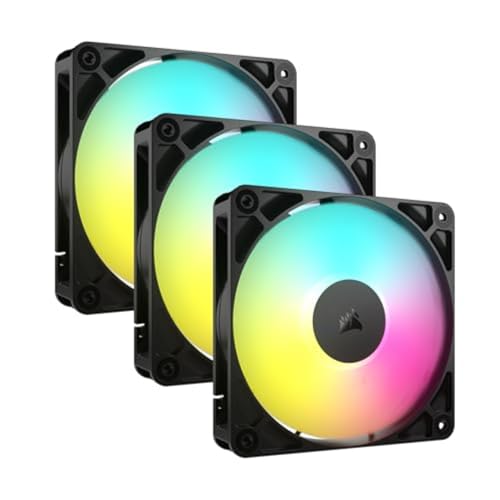
- Daisy-chain PWM and 5V ARGB connections
- Up to 72.8 CFM at 2,100 RPM
- 2.8mm-H2O static pressure for radiators
Best For: Cleanly wired ARGB case or radiator setups
Best Pressure-Optimized Value

- Pressure-optimized for heatsinks and radiators
- Five fans for flexible system airflow
- 56.3 CFM with Fluid Dynamic Bearing
Best For: Radiator, heatsink, and multi-fan builds
Best Premium RGB System
CORSAIR iCUE LINK LX120 Triple Pack
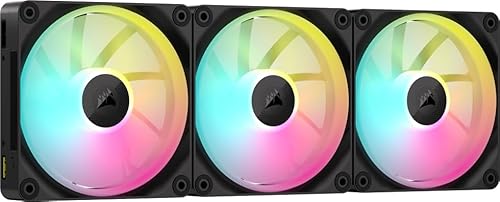
- 69.9 CFM airflow and 5.22 mmH₂O pressure
- Dual-loop RGB with 18 LEDs per fan
- Linkable design with AirGuide vanes
Best For: High-end RGB and radiator builds
Best Quiet ARGB 5-Pack
Thermalright TL-C12C-S 120mm ARGB Fans

- Five PWM fans with 66.17 CFM airflow
- Quiet rating of up to 25.6 dBA
- ARGB lighting with motherboard synchronization
Best For: Quiet, illuminated case and CPU cooling
Quiet Performance Pick – Noctua NF-A12x25 G2 chromax.Black 2-Pack
For builders seeking computer cooling fans for high end pcs, the Noctua NF-A12x25 G2 PWM Sx2-PP emphasizes refined acoustics and strong radiator performance. This two-pack uses speed-offset fans to help reduce unwanted acoustic interaction when installed side by side or in push-pull configurations.
Best For: Quiet premium builds, radiators, push-pull cooling, and coordinated intake or exhaust setups.
Pros:
- Two 120mm fans with up to 1,800 RPM and 107.3 m³/h airflow
- Designed for high airflow and static pressure with low-noise operation
- Includes anti-vibration mounts, gasket, LNA, extension, splitter, and screws
- Premium SSO2 bearing with a stated MTTF above 150,000 hours and six-year warranty
Cons:
- Two-fan pack may not cover a larger multi-fan case setup
- Premium feature set may be more than a basic airflow build needs
This is a strong choice when acoustic refinement, radiator compatibility, and included installation accessories matter more than maximizing the number of fans per purchase.
RGB Cable-Management Pick – Lian Li UNI Fan SL-Infinity Triple Pack
The Lian Li UNI Fan SL-Infinity 120mm triple pack suits computer cooling fans for high end pcs where presentation and simplified wiring are priorities. Its interlocking design, included controller, and customizable infinity-mirror lighting help create a coordinated build with less cable clutter.
Best For: RGB-focused desktops, clean-looking builds, and users who want one controller for an expandable fan arrangement.
Pros:
- Triple-pack includes a controller supporting up to 16 fans across four groups
- Interlocking cable design simplifies installation and cable management
- Infinity-mirror styling includes 40 LEDs per fan with customizable lighting
- Runs up to 2,100 RPM and includes radiator-oriented compatibility features
Cons:
- Listed noise level is 29 dB, so it is not the quietest option here
- One-year warranty is shorter than some premium alternatives
- Lighting and controller add features that may not matter in understated builds
Choose this pack when the visual design and tidy daisy-chain installation are central to the build. Its airflow specifications are solid, but its main advantage is the integrated lighting and ecosystem approach.
Value Cooling Pick – ID-COOLING AS-120-K Trio 120mm Fans
The ID-COOLING AS-120-K Trio offers a practical route to computer cooling fans for high end pcs when you need three 120mm fans without an elaborate lighting system. PWM control, 58 CFM airflow, and 1.94 mm-H2O static pressure make the set suitable for cases, radiators, or compatible CPU air coolers.
Best For: Straightforward black builds needing three versatile intake, exhaust, radiator, or cooler fans.
Pros:
- Three-fan set provides broad coverage for a case airflow layout
- 300–2,000 RPM PWM range supports adjustable cooling performance
- Rated for 58 CFM airflow and 1.94 mm-H2O static pressure
- Hydraulic bearing and daisy-chain connectors support quieter operation and simpler wiring
Cons:
- Maximum listed noise level is 27.2 dBA
- Does not include the advanced lighting or controller features of RGB-focused options
This trio is a sensible, flexible option for expanding airflow on a dark-themed system. Its combination of useful pressure, adjustable speed, and daisy chaining keeps the feature set focused on practical installation and cooling.
High-Pressure Five-Pack – ARCTIC P12 Pro PST 120mm Five-Pack
The ARCTIC P12 Pro PST five-pack is aimed at builders outfitting multiple positions with computer cooling fans for high end pcs. Its 600–3,000 RPM PWM range, high static pressure design, and included Y-cable splitter make it well suited to radiators, restrictive mesh, and larger case layouts.
Best For: Multi-fan systems, dense radiators, restrictive panels, and users who want a wide controllable speed range.
Pros:
- Five 120mm fans cover extensive case or radiator configurations
- High static pressure helps airflow through radiators and restrictive panels
- 600–3,000 RPM PWM range includes a 0 RPM mode below 5% PWM
- FDB bearing, precision balancing, and redesigned blades target smooth operation
Cons:
- High maximum speed may be unnecessary for quieter everyday profiles
- Plastic construction and included-fan focus provide fewer premium accessories
This pack stands out for coverage and control rather than decorative extras. It is a strong fit for performance-oriented builds that need several pressure-capable fans and the flexibility to stop or ramp them through PWM control.
Best Premium RGB Pick – CORSAIR iCUE Link RX120 RGB Triple Pack
For high-end PCs where radiator performance and clean cable management matter, the CORSAIR iCUE Link RX120 RGB triple pack combines PWM control, strong airflow, and high static pressure. It can reach 2,100 RPM, deliver up to 74.2 CFM, and connect through the iCUE LINK system.
Best For: High-end gaming PCs and liquid-cooling radiators where configurable RGB lighting and simplified fan connections are priorities.
Pros:
- High 4.38mm-H2O static pressure for radiators and heatsinks.
- Up to 74.2 CFM airflow with PWM speeds reaching 2,100 RPM.
- iCUE LINK connectors create a streamlined connected fan setup.
- Eight RGB LEDs and side-view lighting add visual customization.
Cons:
- Requires the iCUE LINK ecosystem for its connected control setup.
- Listed noise level reaches 36 dB.
The RX120 RGB is a strong choice when cooling performance, radiator compatibility, and premium lighting are all important. Its included iCUE LINK system hub and five-year warranty further suit ambitious PC builds.
Best Quiet Performance Value – Noctua NF-P12 redux-1700 PWM 3-Pack
The Noctua NF-P12 redux-1700 PWM 3-pack is a practical option for computer cooling fans for high end pcs when dependable airflow and lower noise matter more than RGB lighting. Its pressure-optimized design supports CPU coolers, radiators, and case ventilation.
Best For: Quiet performance-focused builds using air CPU coolers, water-cooling radiators, or low-noise chassis ventilation.
Pros:
- 1700 RPM PWM control allows automatic motherboard speed adjustment.
- Pressure-optimized blades provide strong airflow and static pressure.
- Maximum rated noise is 25.1 dB(A), lower than the other listed options.
- Rated for more than 150,000 hours MTTF and backed by a six-year warranty.
Cons:
- Maximum speed and airflow specifications are less aggressive than the CORSAIR alternatives.
- Does not include RGB lighting or a dedicated fan-linking system.
This 3-pack prioritizes proven cooling performance and quiet operation. It is especially appealing for high-end systems where acoustics, PWM automation, and long-term reliability outweigh lighting features.
Best Easy Daisy-Chain Setup – CORSAIR RS120 ARGB Triple Pack
The CORSAIR RS120 ARGB triple pack suits computer cooling fans for high end pcs that need strong general-purpose cooling without a complicated wiring layout. Daisy-chain connections reduce cable clutter, while PWM control, ARGB lighting, and radiator-friendly airflow add flexibility.
Best For: High-end desktop builds with a compatible motherboard that need multiple radiator or case fans and straightforward ARGB control.
Pros:
- Daisy-chains multiple fans through one 4-pin PWM and one 5V ARGB connector.
- Reaches up to 2,100 RPM and delivers up to 72.8 CFM airflow.
- 2.8mm-H2O static pressure supports radiator use.
- Eight LEDs per fan provide customizable motherboard-controlled lighting.
Cons:
- ARGB lighting requires a compatible motherboard.
- Listed noise level reaches 36 dB.
- Its static pressure is lower than the CORSAIR RX120 RGB model.
The RS120 ARGB balances capable cooling with convenient installation. Choose it for a clean, motherboard-managed setup; choose a higher-pressure model if your build places maximum emphasis on dense radiators.
Best Pressure-Optimized Value – ARCTIC P12 120mm 5-Pack
For builders comparing computer cooling fans for high end pcs, the ARCTIC P12 5-pack is a practical option when radiator or heatsink performance matters. Its pressure-optimized design, 1800 RPM speed, and 2.2 mmH₂O static pressure support cooling through increased air resistance, while the Fluid Dynamic Bearing is designed for quiet, long-term operation.
Best For: Multi-fan builds using radiators, heatsinks, or case ventilation where airflow performance and value are priorities.
Pros:
- Pressure-optimized design suits heatsinks and radiators.
- Includes five 120mm fans for broad system coverage.
- Delivers up to 56.3 CFM with a stated 0.3 Sone noise level.
- Fluid Dynamic Bearing includes a six-year warranty.
Cons:
- Uses a 3-pin connector rather than PWM control.
- Black, non-RGB design may not suit lighting-focused builds.
The P12 5-pack is a strong straightforward choice for high-performance cooling layouts, especially when static pressure is more important than lighting or advanced fan control.
Best Premium RGB System – CORSAIR iCUE LINK LX120 Triple Pack
The CORSAIR iCUE LINK LX120 is aimed at builders who want computer cooling fans for high end pcs with both strong cooling specifications and coordinated lighting. PWM control reaches 2,400 RPM, airflow is rated at 69.9 CFM, and 5.22 mmH₂O static pressure gives these fans substantial radiator capability.
Best For: Premium RGB systems using radiators or multiple iCUE LINK-compatible fans.
Pros:
- High 69.9 CFM airflow and 5.22 mmH₂O static pressure.
- 18 LEDs per fan provide dual-loop RGB lighting.
- iCUE LINK connectors simplify linking the three fans.
- AirGuide vanes concentrate airflow toward hot components.
Cons:
- Rated noise reaches 36 dB.
- Advanced iCUE LINK features are most useful within the CORSAIR ecosystem.
With high airflow, strong static pressure, PWM control, and integrated lighting, the LX120 is the most feature-rich pick here for performance-focused builds where presentation also matters.
Best Quiet ARGB 5-Pack – Thermalright TL-C12C-S 120mm ARGB Fans
For builders seeking computer cooling fans for high end pcs without giving up coordinated lighting, the Thermalright TL-C12C-S 5-pack combines 4-pin PWM control, ARGB effects, and a stated noise level of no more than 25.6 dBA. Its 66.17 CFM airflow rating makes it suitable for case ventilation, CPU coolers, and radiators.
Best For: Quiet multi-fan systems that need PWM control, ARGB synchronization, and broad compatibility with cases or CPU cooling setups.
Pros:
- Five 120mm fans provide extensive airflow coverage.
- 4-pin PWM enables automatic speed adjustment from motherboard temperatures.
- Rated at 66.17 CFM with noise up to 25.6 dBA.
- ARGB lighting supports motherboard synchronization and up to 17 modes.
Cons:
- Maximum speed is 1550 RPM, lower than some performance-oriented alternatives.
- Static pressure is rated at 1.53 mmH₂O.
The TL-C12C-S offers a balanced package for users who want a large five-fan setup, quiet operation, PWM control, and ARGB styling at the same time.
How We Picked the Best Computer Cooling Fans for High End PCs
We focused on 120mm PWM fans suited to demanding gaming PCs, workstations, and custom builds. The selection covers radiator-friendly pressure-optimized designs, case fans built for high airflow, quiet premium models, and RGB ecosystems. We also considered pack size, speed range, bearing design, control methods, included controllers or splitters, and compatibility with common motherboard fan headers.
Because performance depends on case layout, radiator restriction, fan curves, and ambient temperature, specifications should be treated as comparison points rather than guaranteed temperature results. A well-balanced setup generally performs better than simply installing the highest-rated RPM fan everywhere.
Quick Comparison
- Best for premium quiet performance: Noctua NF-A12x25 G2 PWM Sx2-PP.
- Best for high airflow per dollar: ARCTIC P12 Pro PST five-pack.
- Best budget multi-pack: ARCTIC P12 five-pack or ID-COOLING AS-120-K Trio.
- Best for synchronized RGB: Lian Li UNI Fan SL-Infinity or CORSAIR iCUE LINK models.
- Best for straightforward ARGB expansion: CORSAIR RS120 ARGB or Thermalright TL-C12C-S.
Key Buying Factors for Computer Cooling Fans for High-End PCs
Airflow and Static Pressure
Use high-airflow fans for unrestricted intake and exhaust positions. For CPU coolers, radiators, dust filters, and compact cases, prioritize static pressure and pressure-optimized blade designs. A fan’s maximum RPM can indicate performance potential, but it may also bring more noise.
PWM Control and Fan Curves
Four-pin PWM fans allow the motherboard or a dedicated controller to adjust speed based on CPU or GPU temperature. Look for a broad operating range and, where useful, a zero-RPM or low-speed mode. Set a curve that keeps idle operation quiet while increasing airflow under sustained loads.
Noise, Bearings, and Longevity
Premium bearings and well-balanced motors can reduce hum, ticking, and vibration. Check measured noise reviews when possible, since manufacturer ratings are not always directly comparable. Rubber corners, solid mounting, and sensible speed limits can also improve real-world acoustics.
RGB, Wiring, and Compatibility
RGB fans may require a motherboard ARGB header, proprietary controller, or ecosystem software. Daisy-chain and link systems can greatly reduce cable clutter, but verify connector compatibility before buying. Confirm that your case has enough fan mounts and that your power supply and headers can support the chosen setup.
Who Should Buy Which Computer Cooling Fans for High End PCs?
Choose a premium Noctua model if low noise, refined construction, and dependable PWM control matter more than lighting. Pick an ARCTIC, ID-COOLING, or Thermalright multi-pack when you need to populate several case positions affordably. Choose Lian Li or CORSAIR link-style RGB fans for clean cable management and coordinated lighting, provided you are comfortable using the matching controller or software ecosystem. For a mixed build, reserve the strongest pressure-focused fans for the CPU radiator or filtered intake, then use quieter airflow models for exhaust positions.