
The right case fans can help a gaming PC maintain steadier temperatures, reduce fan noise, and improve airflow around heat-producing components. The best choice depends on more than RPM alone: case layout, radiator or heatsink restrictions, fan control, and your lighting preferences all matter.
We’ve gathered 10 popular 120mm options, from quiet single fans to multi-packs with PWM control, ARGB lighting, reverse blades, and daisy-chain connectivity. Use the guide below to narrow the list by performance goals, installation needs, and budget.
Best 10 Computer Cooling Fans for Gaming PCs Picks for 2026
Quiet Performance Pick

- 1700 RPM 120mm PWM fan
- Up to 120.2 m³/h airflow
- Designed for quiet, pressure-focused cooling
Best For: Quiet CPU cooler, radiator, or case ventilation
RGB Multi-Fan Value

- Three 120mm PWM ARGB fans
- 2000 RPM and 68.9 CFM airflow
- Infinity mirror lighting and daisy-chain wiring
Best For: RGB gaming builds needing three coordinated fans
Durable ARGB Choice

- Three 120mm fans with infinity-mirror ARGB
- 1800 RPM, 61.5 CFM, and 2.0 mmH2O pressure
- HDB bearings rated for 50,000 hours
Best For: ARGB gaming setups prioritizing lighting and durability
Low-Noise Case Fan

- 1600 RPM 4-pin PWM fan
- 49.9 CFM airflow at 25.5 dB
- Seven blades and 80,000-hour rifle bearing
Best For: Quiet gaming desktops and radiator-friendly case airflow
Balanced RGB Airflow

- Three 120mm PWM fans with up to 68.9 CFM airflow
- Daisy-chain PWM and 5V ARGB connections
- Infinity mirror lighting with illuminated fan blades
Best For: RGB-focused gaming PC builds needing three coordinated fans
Radiator-Ready Performance
CORSAIR RS120 ARGB Triple Pack
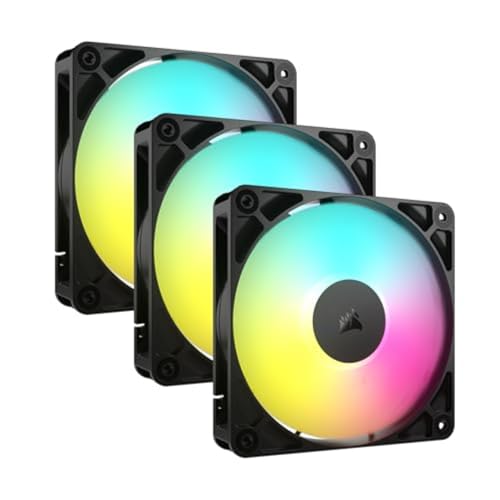
- Up to 72.8 CFM and 2.8 mm-H2O static pressure
- AirGuide vanes focus airflow toward hot components
- Daisy-chain PWM and 5V ARGB connections
Best For: Radiators, heatsinks, and high-airflow gaming PC layouts
Affordable Infinity Lighting

- Three 120mm fans with ARGB blades and frames
- Infinity mirror design creates layered lighting effects
- PWM speed range from 800 to 1,600 RPM
Best For: RGB-focused cases and general 120mm PC cooling
Best Multi-Fan Value

- Five 120mm fans for case or CPU-cooler use
- 4-pin PWM, up to 1550 RPM and 66.17 CFM
- ARGB lighting with motherboard synchronization
Best For: Multi-fan gaming PC builds
Best Airflow Layout

- Includes four forward and three reverse fans
- 4-pin PWM operation at up to 1550 RPM
- 28 ARGB LEDs with infinity-mirror lighting
Best For: Large cases and customized airflow layouts
Best Compact Upgrade
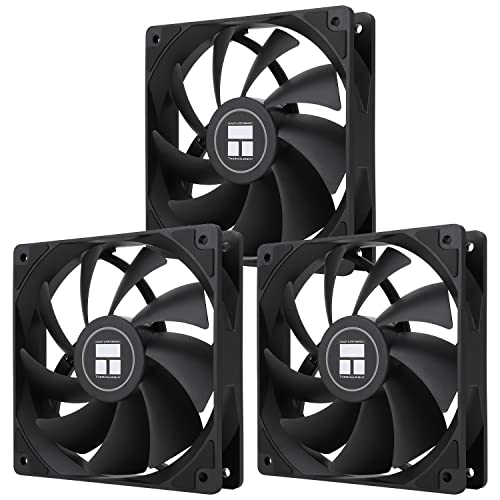
- Three 120mm fans for targeted upgrades
- PWM control with up to 1550 RPM and 66.17 CFM
- S-FDB bearings and customizable ARGB lighting
Best For: Smaller builds and selective fan replacements
Quiet Performance Pick – Noctua NF-P12 redux-1700 PWM
The Noctua NF-P12 redux-1700 PWM is a strong choice among computer cooling fans for gaming pcs when you want dependable airflow without excessive noise. Its pressure-optimized design suits CPU coolers, radiators, and case ventilation, while 4-pin PWM control lets a compatible motherboard adjust fan speed automatically.
Best For: Gamers seeking a quiet, versatile 120mm fan for CPU cooling, radiators, or chassis airflow.
Pros:
- 1700 RPM speed with up to 120.2 m³/h airflow
- Pressure-optimized design supports coolers and radiators
- 4-pin PWM control enables automatic speed adjustment
- Backed by a six-year manufacturer warranty
Cons:
- Single-fan package may cost more than a multi-fan kit
- No integrated lighting for RGB-focused builds
This is a practical performance-and-noise balance for builds where cooling consistency matters more than visual effects. The streamlined design also leaves room to add optional accessories later.
RGB Multi-Fan Value – Thermalright TL-M12Q X3
The Thermalright TL-M12Q X3 is a three-pack built for RGB gaming systems that need both airflow and coordinated lighting. These computer cooling fans for gaming pcs reach 2000 RPM, offer 68.9 CFM airflow, and use 4-pin PWM plus 5V ARGB connections for compatible motherboard control and synchronization.
Best For: RGB-focused desktop builds needing three matching fans for intake, exhaust, or radiator use.
Pros:
- Three 120mm fans provide broad case coverage
- Up to 2000 RPM and 68.9 CFM airflow
- Infinity mirror lighting with dual-side illumination
- Daisy-chain wiring helps simplify multi-fan installation
Cons:
- ARGB effects require compatible 5V motherboard headers
- At 28.2 dB, it is not the quietest option listed
Choose this kit when a glass-panel system needs a coordinated lighting look without buying fans individually. Its PWM control and multi-fan wiring also make it a convenient case-upgrade package.
Durable ARGB Choice – AsiaHorse AMICI-5GT ARGB Fans
The AsiaHorse AMICI-5GT combines 120mm cooling with infinity-mirror ARGB effects for visually focused gaming systems. These computer cooling fans for gaming pcs deliver up to 61.5 CFM airflow and 2.0 mmH2O air pressure at 1800 RPM, with cable-connected daisy chaining and support for major motherboard lighting systems.
Best For: Gamers who want a three-fan ARGB setup with strong airflow, lighting synchronization, and HDB bearings.
Pros:
- Three-fan package with up to 1800 RPM operation
- 61.5 CFM airflow and 2.0 mmH2O air pressure
- 24 LEDs per fan with broad ARGB motherboard compatibility
- HDB bearing design rated for a 50,000-hour lifespan
Cons:
- Daisy chaining is cable-based rather than wireless
- Recommended series connections should not exceed three
- Maximum noise is listed at 30 dB(A)
This kit makes the most sense when lighting design is nearly as important as cooling performance. Confirm that your motherboard has compatible 5V 3-pin ARGB and fan connections before installation.
Low-Noise Case Fan – be quiet! Pure Wings 3 120mm
The be quiet! Pure Wings 3 is a straightforward single 120mm fan for builders who prefer restrained styling and low operating noise. It reaches 1600 RPM, uses seven airflow-optimized blades, and includes a 4-pin PWM connector for quiet low-speed operation and motherboard speed control.
Best For: Gaming desktops that need a quiet replacement or additional case fan with radiator-friendly frame design.
Pros:
- Quiet 25.5 dB operation rating
- 49.9 CFM airflow from seven optimized blades
- Low minimum RPM supports quieter idle operation
- 80,000-hour rifle-bearing operating life
Cons:
- Single-fan package offers less value for multi-fan installations
- 1600 RPM and 49.9 CFM are lower than some higher-speed options
- No RGB lighting
Pure Wings 3 is a sensible choice for a clean, quiet build where dependable case airflow matters more than maximum speed or lighting. Its PWM range makes it suitable for everyday gaming and quieter idle periods.
Balanced RGB Airflow – Thermalright TL-M12Q-S X3
The Thermalright TL-M12Q-S X3 is a practical three-pack for builders comparing computer cooling fans for gaming PCs. Its 120mm PWM fans combine up to 68.9 CFM of airflow with ARGB fan blades and infinity mirror lighting, making them suitable for intake, exhaust, or radiator positions.
Best For: Gaming PC builders who want coordinated RGB lighting, daisy-chain wiring, and flexible 120mm cooling.
Pros:
- Three 120mm PWM fans reach up to 2,000 RPM and 68.9 CFM.
- Daisy-chain PWM and ARGB connections help reduce cable clutter.
- Infinity mirror lighting and illuminated blades add a strong visual effect in glass-panel cases.
- Supports compatible 4-pin PWM and 3-pin 5V ARGB motherboard headers.
Cons:
- ARGB lighting and control require compatible motherboard connections.
- The 28.2 dB noise rating may not suit buyers prioritizing the quietest possible setup.
Choose this kit when lighting design and clean multi-fan installation matter alongside solid airflow. Its 3-year warranty also adds useful coverage for a multi-fan upgrade.
Radiator-Ready Performance – CORSAIR RS120 ARGB Triple Pack
The CORSAIR RS120 ARGB triple pack is aimed at gaming PC builders who need computer cooling fans for gaming PCs that can handle both case airflow and restrictive radiator or heatsink positions. Each 120mm fan offers PWM control up to 2,100 RPM, 72.8 CFM airflow, and 2.8 mm-H2O static pressure.
Best For: Radiator, heatsink, and case installations where concentrated airflow and streamlined wiring are priorities.
Pros:
- Up to 72.8 CFM airflow and 2.8 mm-H2O static pressure suit radiator use.
- AirGuide vanes direct airflow toward hotter components.
- Daisy-chain design uses one 4-pin PWM and one 5V ARGB connection for the group.
- Magnetic dome bearing design and a five-year manufacturer warranty provide useful long-term appeal.
Cons:
- The listed 36 dB noise level is higher than some quieter-focused fan options.
- Customizable lighting requires a compatible motherboard ARGB connection.
The RS120 stands out when static pressure and directed airflow matter more than minimalist acoustics. It is a versatile choice for a three-fan radiator or a mixed case-cooling layout.
Affordable Infinity Lighting – DARKROCK Black F120 3in1
The DARKROCK Black F120 3in1 offers a visually focused option for shoppers choosing computer cooling fans for gaming PCs. Its three 120mm fans use ARGB blade and frame lighting, infinity mirror effects, PWM control, and hydraulic bearings for a balance of customizable appearance and everyday case cooling.
Best For: RGB gaming cases, air coolers, and water-cooling systems where layered lighting and low-noise hardware features are desirable.
Pros:
- Three 120mm fans fit most PC chassis and many air- or water-cooling setups.
- ARGB lighting appears on both the blades and frame, with an infinity mirror design.
- PWM control adjusts fan speed from 800 to 1,600 RPM.
- Hydraulic bearings and eight rubber pads are designed for stable, low-noise operation.
Cons:
- Maximum airflow is listed at 46.7 CFM, below the other featured options.
- The listed 36 dB noise level may be noticeable at higher speeds.
- Its 3-pin power connector may require careful compatibility checking with the intended setup.
This kit is best suited to builders who value a layered RGB presentation and broad 120mm compatibility. Consider another option if maximum airflow or radiator-focused static pressure is the main goal.
Best Multi-Fan Value – Thermalright TL-C12C-S 5-Pack
For builders looking for computer cooling fans for gaming pcs, this five-pack provides a practical way to populate a case or supplement a CPU cooler. Each 120mm fan uses 4-pin PWM control, reaches up to 1550 RPM, and delivers up to 66.17 CFM of airflow.
Best For: Gaming PC builds that need several 120mm case or CPU-cooler fans with synchronized ARGB lighting.
Pros:
- Five 120mm fans offer broad case coverage.
- 4-pin PWM enables automatic motherboard-based speed control.
- S-FDB bearings and a rated noise level of up to 25.6 dBA support quieter operation.
- ARGB blades support up to 17 lighting modes and motherboard synchronization.
Cons:
- The 1550 RPM maximum speed is moderate rather than especially high.
- ARGB synchronization requires a compatible motherboard connection.
This pack is a strong fit when quantity and coordinated lighting matter. Its 66.17 CFM airflow and PWM control make it flexible for intake, exhaust, or CPU-cooler use, provided your case supports 120mm fans.
Best Airflow Layout – 7-Pack 120mm ARGB PC Fans
This seven-fan set is designed for gaming PC builders who want to plan airflow across a larger case. It includes four forward-blade and three reverse-blade 120mm fans, with 4-pin PWM control, 1550 RPM operation, and 28 ARGB LEDs.
Best For: Larger gaming PC cases, AIO setups, and builds needing both forward- and reverse-blade fan configurations.
Pros:
- Seven-fan quantity supports comprehensive case airflow layouts.
- Four forward and three reverse fans help accommodate different mounting positions.
- 4-pin PWM control and 1550 RPM operation balance adjustability and cooling performance.
- 28 ARGB LEDs provide bright infinity-mirror-style lighting.
Cons:
- Seven fans may be more than smaller cases require.
- The supplied notes do not specify an airflow rating in CFM.
The forward/reverse combination is the main reason to choose this kit over a conventional uniform pack. Confirm your case, radiator, and motherboard connections before buying, especially if you plan to use all seven fans and their ARGB lighting.
Best Compact Upgrade – Thermalright TL-C12C 3-Pack
For a smaller refresh, this three-pack offers computer cooling fans for gaming pcs without committing to a full case-wide replacement. The 120mm fans use 4-pin PWM control, reach up to 1550 RPM, and are rated for up to 66.17 CFM of airflow.
Best For: Upgrading a few intake, exhaust, or CPU-cooler positions in a gaming desktop with 120mm mounts.
Pros:
- Three-fan pack suits targeted upgrades and smaller builds.
- PWM control automatically adjusts speed based on motherboard temperature.
- S-FDB bearings are designed to reduce blade shaking and noise.
- ARGB blades support up to 17 modes and motherboard synchronization.
Cons:
- Three fans may not cover a larger case’s complete airflow layout.
- The 25.6 dBA rating is specified as a maximum, not a guaranteed operating level.
This is the practical middle ground for replacing worn fans or adding airflow to selected positions. It offers the same listed 1550 RPM and 66.17 CFM capability as the larger pack while requiring less unused hardware.
How We Picked These Computer Cooling Fans for Gaming PCs
We focused on widely compatible 120mm fans suited to modern gaming cases, comparing their stated speed ranges, airflow claims, bearing designs, control features, lighting options, and pack sizes. The selection includes both understated cooling fans and ARGB models, as well as standard- and reverse-blade designs for more flexible intake layouts.
Specifications are useful starting points, but they do not tell the entire story. Actual performance depends on restriction from dust filters, front panels, radiators, heatsinks, and cable routing. We also considered whether each option makes sense for a complete replacement, an airflow expansion, or a targeted upgrade.
Quick Comparison
| Best For | What to Look For | Options in This Roundup |
|---|---|---|
| Quiet everyday gaming | Lower noise ratings, PWM control, and quality bearings | Noctua, be quiet! |
| High-value multi-fan upgrades | Three- to seven-fan packs and standard 120mm mounting | Thermalright models |
| RGB-focused builds | ARGB compatibility, lighting density, and cable management | AsiaHorse, CORSAIR, DARKROCK |
| Flexible intake layouts | Reverse-blade fans for a cleaner visible fan face | AsiaHorse and seven-pack options |
Key Buying Factors for Computer Cooling Fans for Gaming PCs
Airflow and Static Pressure
Airflow, usually listed in CFM, indicates how much air a fan can move in open conditions. Static pressure matters more when air must pass through a restrictive mesh, radiator, tower cooler, or dust filter. For unrestricted exhaust positions, airflow is often the priority; for front intakes and radiators, look for a fan designed to handle resistance.
PWM Control and Motherboard Compatibility
Four-pin PWM fans allow the motherboard or fan controller to adjust speed based on temperature. This is generally preferable to fixed-speed operation because the system can stay quiet during light use and increase cooling during gaming. Confirm that your motherboard has enough fan and ARGB headers, or budget for a hub or splitter.
Noise, Bearings, and Speed
Higher maximum RPM can improve cooling but may also increase noise. A reliable bearing design and a broad controllable speed range can be more useful than chasing the highest advertised number. Check fan thickness, start-up speed, and published noise figures when replacing fans in a quiet build.
Size, Orientation, and Lighting
Most products here are 120mm fans, but verify your case’s mounting points before ordering. ARGB requires a compatible 5V addressable header; it should not be connected to a 12V RGB header. Reverse-blade models can show the attractive side while still serving as intake fans, which is helpful in showcase cases.
Who Should Buy Which Computer Cooling Fans for Gaming PCs?
Choose Noctua or be quiet! if low noise and dependable everyday operation matter more than lighting. Thermalright’s multi-packs are strong value choices for builders replacing several stock fans or adding balanced intake and exhaust airflow. Pick CORSAIR if daisy-chain wiring and ecosystem integration are priorities, while AsiaHorse, DARKROCK, and the larger ARGB packs suit visually focused builds.
Before buying, count your available mounting positions, measure clearance around radiators and coolers, and decide how many fans you genuinely need. A balanced setup with sensible intake and exhaust placement is usually better than filling every mount with high-speed fans.