
The best RGB computer cooling fans can improve case airflow while giving your PC a cleaner, more personalized look. The right choice depends on more than LED count: fan layout, static pressure, control method, noise, and compatibility all matter.
We compared 10 popular 120mm options, including budget multipacks, reverse-blade designs, daisy-chain systems, and premium ecosystem fans, to help you choose a setup that fits your case and upgrade plans.
Best 10 RGB Computer Cooling Fans Picks for 2026
Best Value 5-Pack
Thermalright TL-C12C-S ARGB Fans

- Five 120mm PWM ARGB fans
- 66.17 CFM airflow at up to 1550 RPM
- S-FDB bearings and motherboard lighting sync
Best For: Filling multiple case, radiator, or cooler mounts
Best Performance
CORSAIR iCUE LINK RX120 RGB Triple Pack

- Up to 74.2 CFM and 2100 RPM
- 4.38 mm-H2O static pressure
- LINK connectors and AirGuide vanes
Best For: Radiators, dense heatsinks, and performance-focused builds
Best Balanced Option
Cooler Master MF120 Lite ARGB 3-Pack

- 650–1750 RPM PWM speed range
- Frosted ARGB blades for diffused lighting
- Daisy-chain extender included
Best For: Mainstream case, air-cooler, or liquid-cooler builds
Best Visual Design
DARKROCK Black F120 Infinity-Mirror Fans

- Infinity-mirror center and side effects
- ARGB lighting on blades and frame
- 800–1600 RPM PWM control
Best For: Showpiece 120mm builds centered on layered lighting
Best Reverse-Blade RGB Fans
Corsair RS120-R ARGB Triple Pack

- Reverse rotor keeps intake lighting visible
- Up to 2,100 RPM and 65.82 CFM airflow
- Three fans with PWM, daisy-chain, and Zero RPM support
Best For: Intake layouts, radiators, and white PC builds
Best Quiet Single RGB Fan
Thermalright TL-C12C-S ARGB 120mm

- Rated at up to 25.6 dBA
- 66.17 CFM airflow with PWM control
- ARGB lighting with up to 17 modes
Best For: Quiet single-fan upgrades and CPU cooler pairings
Best Value Multi-Fan RGB Kit

- Includes four forward and three reverse fans
- 1,550 RPM with 4-pin PWM control
- 28 ARGB LEDs with Infinity Mirror lighting
Best For: Full-case installations and mixed airflow layouts
Premium Reverse-Flow Pick

- Visible RGB on intake mounts
- Up to 66.7 CFM airflow
- Magnetic Dome bearing
Best For: Premium CORSAIR iCUE LINK builds
Budget Multi-Fan Value

- Five fans in one package
- Includes hub and remote
- Up to 53 CFM per fan
Best For: Affordable whole-case fan upgrades
Radiator-Ready ARGB Set
CORSAIR RS120 ARGB Triple Pack
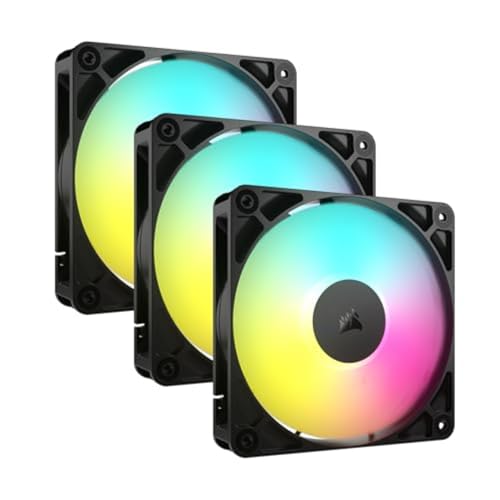
- Up to 72.8 CFM airflow
- 2.8mm-H2O static pressure
- Daisy-chain PWM and ARGB
Best For: Radiators, heatsinks, and tidy builds
Best Value 5-Pack – Thermalright TL-C12C-S ARGB Fans
For buyers outfitting several positions at once, this five-pack of rgb computer cooling fans combines 4-pin PWM control, 1550 RPM operation, and 66.17 CFM airflow. The frosted ARGB blades support up to 17 lighting modes, while S-FDB bearings are designed to reduce vibration and noise.
Best For: Multi-fan case, radiator, or CPU-cooler installations on a value-focused build.
Pros:
- Five 120mm fans provide broad case coverage.
- 4-pin PWM control adjusts speed according to system temperature.
- Frosted ARGB blades support motherboard lighting synchronization.
- Up to 66.17 CFM airflow with noise rated at 25.6 dBA.
Cons:
- Maximum speed is lower than some performance-oriented alternatives.
- The five-fan bundle may be more than a small case needs.
This is a practical choice when you need several synchronized fans without buying them individually. Its balanced airflow and relatively low stated noise make it suitable for general-purpose cooling.
Best Performance – CORSAIR iCUE LINK RX120 RGB Triple Pack
The CORSAIR iCUE LINK RX120 is aimed at systems that need strong airflow and pressure through restrictive components. These rgb computer cooling fans reach 2100 RPM, deliver up to 74.2 CFM, and provide 4.38 mm-H2O static pressure for radiators and dense heatsinks.
Best For: High-performance desktops using radiators, dense heatsinks, or the iCUE LINK ecosystem.
Pros:
- High 74.2 CFM airflow and 4.38 mm-H2O static pressure.
- PWM control supports precise speeds up to 2100 RPM.
- LINK bridge connectors create a connected fan bank with one system cable.
- AirGuide vanes concentrate airflow toward hot components.
Cons:
- Listed noise level is 36 dB.
- The advanced LINK-focused setup may be unnecessary for simpler builds.
Choose this pack when cooling performance and streamlined fan connectivity matter more than a basic installation. Its radiator-friendly pressure and included iCUE LINK system hub make it particularly suited to more elaborate builds.
Best Balanced Option – Cooler Master MF120 Lite ARGB 3-Pack
The Cooler Master MF120 Lite offers a straightforward mix of airflow control and customizable lighting. Its 4-pin PWM connection adjusts fan speeds from 650 to 1750 RPM, while the curved blades and hybrid frame are designed to support stable airflow in cases, air coolers, and liquid coolers.
Best For: Mainstream PC builds that need three versatile ARGB fans and simple daisy-chain expansion.
Pros:
- PWM range from 650 to 1750 RPM helps balance noise and airflow.
- Curved blades are designed to improve airflow efficiency.
- Frosted blades disperse ARGB lighting for a vivid effect.
- Included extender supports daisy-chaining to a motherboard or splitter.
Cons:
- Noise is listed at 30 dB.
- Its airflow specifications are less extensive than some competing models.
This three-pack is a sensible middle ground for a new build or a lighting-focused refresh. It combines broad compatibility with adjustable PWM operation and convenient ARGB expansion.
Best Visual Design – DARKROCK Black F120 Infinity-Mirror Fans
For builders prioritizing appearance, the DARKROCK F120 uses an infinity-mirror center and side design alongside ARGB lighting on the blades and frame. These rgb computer cooling fans use PWM control across an 800–1600 RPM range and include hydraulic bearings plus rubber pads for quieter, steadier operation.
Best For: Showpiece desktop builds where layered ARGB effects and broad 120mm compatibility are priorities.
Pros:
- Infinity-mirror design creates layered lighting effects.
- ARGB illumination appears on both the blades and frame.
- PWM speed control adjusts operation from 800 to 1600 RPM.
- Hydraulic bearing and eight rubber pads support low-noise operation.
Cons:
- Listed airflow is 46.7 CFM.
- The product uses a 3-pin power connector rather than a 4-pin connector.
- Noise is listed at 36 dB.
This pack makes the most sense when visual impact is central to the build. It remains flexible for most 120mm cases, air coolers, and water-cooling systems, but buyers should verify connector and lighting compatibility first.
Best Reverse-Blade RGB Fans – Corsair RS120-R ARGB Triple Pack
The Corsair RS120-R ARGB triple pack is a strong option for builders who want RGB computer cooling fans that keep the lighting visible when the fans are mounted as intake. Reverse-rotor blades, PWM control, 65.82 CFM airflow, and 2.81 mm H2O static pressure make this white three-pack suitable for cases and radiator-focused builds.
Best For: Intake layouts, radiator cooling, and coordinated white builds with motherboard-controlled ARGB.
Pros:
- Reverse rotor keeps the RGB lighting visible in intake orientation.
- Up to 2,100 RPM, 65.82 CFM airflow, and 2.81 mm H2O static pressure.
- Eight LEDs per fan, PWM control, daisy-chain support, and Zero RPM mode.
- Includes three fans and a five-year manufacturer warranty.
Cons:
- Motherboard ARGB control requires a compatible motherboard.
- Specified noise level reaches 34.6 dB.
This pack prioritizes visible intake-side lighting and flexible cooling performance. Its high static pressure is useful for radiators, while PWM and Zero RPM control allow quieter operation when maximum airflow is unnecessary.
Best Quiet Single RGB Fan – Thermalright TL-C12C-S ARGB 120mm
The Thermalright TL-C12C-S is a practical single-fan choice for RGB computer cooling fans in a case, CPU cooler, or radiator. Its 4-pin PWM connection supports automatic motherboard speed control, while the S-FDB bearing, 66.17 CFM airflow, and rated noise of up to 25.6 dBA emphasize balanced cooling and quieter operation.
Best For: Quiet upgrades, CPU cooler pairings, and builds that need one motherboard-synchronized ARGB fan.
Pros:
- S-FDB bearing is designed to reduce blade shake and operating noise.
- 66.17 CFM airflow with a 1.53 mm H2O air-pressure rating.
- 4-pin PWM control supports automatic speed adjustment up to 1,550 RPM.
- ARGB lighting offers up to 17 modes and motherboard synchronization.
Cons:
- This listing includes only one fan.
- ARGB synchronization requires a compatible motherboard connection.
With a 120mm frame, long PWM cable, and compatibility with cases, radiators, and CPU coolers, this model is flexible for targeted cooling upgrades. It is especially appealing when lower rated noise matters more than multi-fan quantity.
Best Value Multi-Fan RGB Kit – 7-Pack 120mm ARGB PC Fans
This seven-pack offers broad coverage for builders outfitting a case with RGB computer cooling fans. It combines four forward-blade fans with three reverse-blade fans, 4-pin PWM control, 1,550 RPM operation, and 28 ARGB LEDs, making it suited to mixed airflow layouts and coordinated gaming builds.
Best For: Full-case fan installations, mixed forward/reverse layouts, and users wanting seven fans in one kit.
Pros:
- Includes four forward-blade and three reverse-blade 120mm fans.
- 1,550 RPM operation balances airflow and acoustic comfort according to the supplied notes.
- 28 ARGB LEDs provide Infinity Mirror lighting.
- Designed for cases, AIOs, and CPU coolers with 4-pin PWM connections.
Cons:
- The large seven-fan kit may be more than a small case requires.
- The supplied details do not specify airflow or static-pressure figures.
- At 19 dB, the listed noise figure should be interpreted within the specific installation.
The mix of blade directions makes this kit useful for filling multiple case positions while maintaining a consistent lighting theme. It is a practical choice when quantity and layout flexibility are more important than selecting individual fans for specialized radiator performance.
Premium Reverse-Flow Pick – iCUE LINK LX120-R RGB
The CORSAIR iCUE LINK LX120-R RGB is a premium choice for builders who want polished lighting and strong performance from their RGB computer cooling fans. Its reversed rotor keeps the lighting visible when the fan is configured for intake, while PWM control allows speeds up to 2,400 RPM.
Best For: High-performance builds using CORSAIR iCUE LINK components and visible intake-side RGB lighting.
Pros:
- Reversed rotor keeps the RGB rings fully visible in intake positions.
- Dual light loops with 18 LEDs per fan provide customizable illumination.
- Strong cooling capability with up to 66.7 CFM airflow and 4.72mm H2O static pressure.
- Magnetic Dome bearing is designed for quieter, lower-friction operation.
Cons:
- The iCUE LINK System Hub is sold separately.
- It is a single-fan package, so outfitting a case may require multiple units.
- Maximum noise is listed at 37.7 dB.
This fan stands out when appearance matters as much as airflow, particularly in builds where intake fans are prominently displayed. Its LINK connectors simplify fan-to-fan connections, but the additional hub requirement raises the overall system cost.
Budget Multi-Fan Value – 120mm RGB 5-Pack with Hub
This 120mm five-pack is a practical way to add several RGB computer cooling fans to a desktop at once. The included hub, PWM support, and supplied remote make it suited to straightforward case upgrades, while each fan delivers up to 53 CFM at a maximum 1,300 RPM.
Best For: Budget-conscious builders who need multiple fans for a case, radiator, or CPU cooler.
Pros:
- Five fans provide broad case coverage in one package.
- Includes a fan hub and remote for convenient control.
- PWM support enables fan-speed control, with noise listed around 25 dB.
- Can be used as case fans or alongside a CPU cooler.
Cons:
- Maximum speed is limited to 1,300 RPM.
- Airflow is rated at up to 53 CFM per fan, below the higher-performance options here.
- Its 5V 3-pin interface requires compatible ARGB connectivity.
For a full-case refresh, the quantity and included hub are the main advantages. These fans favor accessible, moderate-speed cooling over the higher airflow and static-pressure figures offered by performance-focused models.
Radiator-Ready ARGB Set – CORSAIR RS120 ARGB Triple Pack
The CORSAIR RS120 ARGB triple pack balances strong airflow with radiator-friendly static pressure, making it a versatile option among RGB computer cooling fans. Daisy-chain connections reduce cable clutter, while motherboard-controlled ARGB lighting keeps configuration centralized.
Best For: Gaming PCs using radiators or heatsinks and a compatible motherboard with 5V ARGB control.
Pros:
- Daisy-chains multiple fans through one 4-pin PWM and one 5V ARGB connection.
- Reaches up to 2,100 RPM and 72.8 CFM airflow.
- 2.8mm-H2O static pressure suits radiator and heatsink use.
- AirGuide vanes direct airflow toward hot components.
Cons:
- Customizable lighting requires a compatible motherboard.
- Maximum noise is listed at 36 dB.
- The triple pack may be more than needed for a small upgrade.
This is the most balanced choice for users who want a coordinated three-fan setup without complicated wiring. Its combination of airflow, static pressure, and daisy-chain support makes it especially practical for liquid-cooling radiators and heatsinks.
How We Picked the Best RGB Computer Cooling Fans
We focused on the factors that matter in a real PC build: airflow potential, PWM speed control, bearing design, lighting quality, included accessories, installation simplicity, and overall value. We also considered whether each fan is better suited to unrestricted intake, exhaust, radiators, or visually clean builds using reverse-rotor fans.
Because these products include both single fans and multipacks, value was judged by more than the sticker price. A three-, five-, or seven-fan kit may be a better choice for a complete build, while a single premium fan makes more sense for targeted replacement or expansion.
Quick Comparison
- Best for low-cost expansion: Thermalright and generic multipacks offer many fans for the money.
- Best for coordinated lighting: CORSAIR iCUE Link and RS-series options suit users already invested in the CORSAIR ecosystem.
- Best for radiator or restrictive intake use: Choose a model that emphasizes static pressure and PWM control.
- Best for clean showcase layouts: Reverse-blade options keep the attractive fan face visible on intake positions.
- Best for straightforward setup: Standard 4-pin PWM and 5V ARGB connections are broadly practical, provided your motherboard has the right headers.
Key Buying Factors for RGB Computer Cooling Fans
Size, Airflow, and Placement
Most products here use the common 120mm format, but confirm your case supports that size and check the number of mounting positions. Front and bottom fans typically serve as intake, while rear and top fans usually exhaust warm air. More fans do not automatically mean better cooling if airflow direction is poorly balanced.
PWM and Speed Range
Four-pin PWM control lets your motherboard adjust fan speed according to temperature. A wider usable speed range can provide stronger cooling under load and quieter operation at idle. Check your motherboard headers and BIOS or software support before buying.
ARGB Compatibility and Control
Addressable RGB usually uses a 3-pin 5V ARGB connector. It is not interchangeable with a 4-pin 12V RGB header. Some kits include a hub or controller, while ecosystem products may require proprietary hardware or software. Verify connectors, included cables, and controller requirements before ordering.
Noise, Bearings, and Cable Management
Bearing quality affects smoothness and long-term comfort, but advertised noise figures are not always directly comparable. Daisy-chain connectors can reduce cable clutter, whereas standard fans may offer simpler universal compatibility. Look for included splitters, hubs, screws, and extension cables when planning a multi-fan installation.
Who Should Buy Which RGB Computer Cooling Fans?
Choose a budget multipack if you are building a complete airflow layout and already have a compatible ARGB header or hub. Pick a CORSAIR model if synchronized lighting, cleaner cabling, and integration with existing CORSAIR hardware are priorities. Select reverse-blade fans for intake positions where you want the illuminated side facing into the case. For a single replacement or small upgrade, a standard PWM ARGB fan is usually the most practical option.
Before buying, map your case’s fan positions, decide which fans are intake or exhaust, and count available PWM and 5V ARGB connections. That simple check helps prevent compatibility surprises and ensures your new RGB Computer Cooling Fans improve both temperatures and appearance.