
Choosing the right camera can make Zoom Rooms feel more natural, more professional, and far easier to manage. The best options balance sharp video, strong audio pickup, and automatic framing so every participant is seen clearly.
In this roundup, we focused on conference cameras for Zoom Rooms that simplify hybrid meetings without adding setup headaches. Whether you need a wide-angle all-in-one unit or a PTZ system with stronger zoom, you’ll find practical options for different room sizes and budgets.
Best 10 Conference Cameras for Zoom Rooms Picks for 2026
Best for Plug-and-Play Teams Rooms
Yealink UVC34 4K Conference Camera

- All-in-one 4K camera, mic array, and speaker
- AI auto-framing with wide 120° coverage
- USB-A plug-and-play with Zoom Rooms support
Best For: Teams needing a simple, certified video bar for small to mid-sized Zoom Rooms.
Best for AI Speaker Tracking
COOLPO Camera 360 4K Conference Cam

- 360° 4K camera covers the whole room
- AI tracks the active speaker automatically
- 8 mics and USB plug-and-play setup
Best For: Meeting rooms that need automatic speaker focus and easy Zoom compatibility.
Best for Auto-Tracking
TONGVEO 4K Conference Room Camera Kit

- AI auto-tracking and gesture control for speaker-focused meetings.
- 4K/30fps, 5X digital zoom, and 120° wide-angle coverage.
- Includes a speakerphone with dual mics and noise reduction.
Best For: Teams that want an easy-to-use PTZ camera and speakerphone bundle for Zoom rooms.
Best for Speaker Tracking

- 360° 1080p video with AI speaker focus
- 18-foot mic pickup for room coverage
- Fast plug-and-play setup for Zoom rooms
Best For: Hybrid teams that want an easy all-in-one camera for Zoom rooms and other meeting platforms.
Best for Easy Setup
TONGVEO All-in-One Conference Camera System

- AI auto-tracking keeps the active speaker in frame.
- 1080p 60fps video with 3x optical zoom.
- Bundled speakerphone simplifies room audio setup.
Best For: Small-to-medium Zoom rooms that need auto-tracking video and integrated audio.
Best for Intelligent Framing
4K AI Conference Camera System

- AI auto framing with speaker and presenter tracking
- 120° wide angle plus 5X zoom for flexible room coverage
- 4-mic array and dual speakers for integrated room audio
Best For: Teams that want automated framing and tracking for modern meeting rooms.
Best for Optical Zoom
NexiGo PTZ Conference Room Camera

- 10x optical zoom for wide shots and speaker close-ups
- Remote PTZ control with up to 10 IR presets
- 1080p video with 3D noise reduction for cleaner image quality
Best For: Small to medium Zoom rooms that need flexible framing and sharper close-ups.
Best for All-in-One Audio/Video
TONGVEO 4K PTZ Conference System

- 4K PTZ camera with 20x optical zoom
- AI auto-tracking for speaker focus
- Includes Bluetooth speakerphone with mic arrays
Best For: Teams that want one bundled system for larger Zoom rooms and hybrid meetings.
Best All-in-One Kit
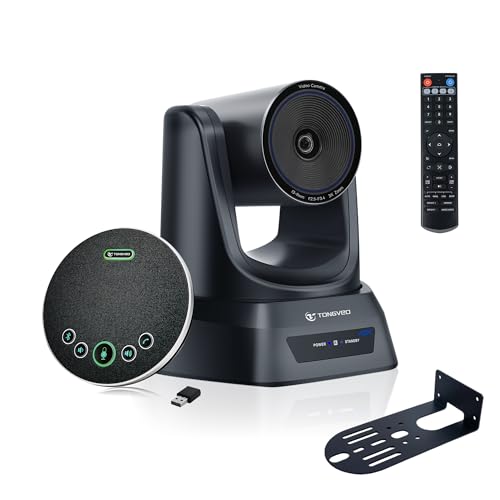
- Includes camera and wireless speakerphone in one package
- 3X optical zoom with auto framing and presenter tracking
- Easy room setup with USB 3.0 and bundled accessories
Best For: Teams that want a complete room kit with strong video and audio for Zoom-style meetings.
Best for Plug-and-Play Teams Rooms – Yealink UVC34 4K Conference Camera
If you want one of the more practical conference cameras for zoom rooms, the Yealink UVC34 is built for quick setup and reliable everyday use. It combines a 4K camera, microphone array, and speaker in a single USB-A device, making it a strong fit for small to medium meeting spaces that need simple deployment and clear AV quality.
Best For: Teams that want an all-in-one, easy-to-install conference camera for Zoom Rooms or similar huddle spaces.
Pros:
- All-in-one design with 4K camera, 8-mic array, and built-in speaker
- AI auto-framing and 120° field of view help cover the whole room
- USB plug-and-play setup keeps installation simple
- Teams and Zoom Rooms certification makes it easier to deploy
Cons:
- Best suited to small and mid-sized rooms rather than large boardrooms
- USB-A connection may be less flexible on newer laptop setups
For buyers comparing conference cameras for zoom rooms, this Yealink stands out for reducing cable clutter and setup time without sacrificing core meeting quality. It is a smart choice when you want dependable framing, solid audio, and a straightforward path to getting rooms online fast.
Best for AI Speaker Tracking – COOLPO Camera 360 4K Conference Cam
For teams comparing conference cameras for zoom rooms, the COOLPO Camera 360 is built to simplify hybrid meetings with a 360-degree view, 4K video, and AI-based speaker tracking. It’s a strong fit when you want everyone in the room visible without manual camera control or complicated setup.
Best For: Meeting rooms that need automatic speaker focus, broad room coverage, and a fast plug-and-play setup.
Pros:
- 360° all-in-one design with 4K resolution for full-room coverage
- AI speaker tracking and intelligent framing keep the active speaker centered
- 8 built-in microphones help capture voices from up to 15 feet away
- USB plug-and-play connection keeps setup simple and secure
Cons:
- Best suited to small and mid-size rooms rather than large conference spaces
- Some teams may prefer a more traditional camera angle instead of 360° framing
Overall, this COOLPO model is a practical pick if you want conference cameras for zoom rooms that reduce setup friction while making multi-person meetings feel more natural. Its local processing and automatic tracking make it appealing for teams that value convenience and privacy.
Best for Auto-Tracking – TONGVEO 4K Conference Room Camera Kit
If you want conference cameras for zoom rooms that can follow the speaker without constant manual adjustments, the TONGVEO 4K conference camera system is built for that job. It combines AI auto-tracking, gesture control, and a wide 120° field of view with a matching speakerphone, making it a practical all-in-one option for small to medium meeting spaces.
Best For: Teams that want a PTZ camera and speakerphone bundle with hands-free tracking, broad software compatibility, and straightforward USB setup.
Pros:
- AI auto-tracking and gesture controls help keep the camera focused on the active speaker.
- 4K/30fps output, 5X digital zoom, and 120° wide-angle coverage suit room-based meetings.
- Included speakerphone adds dual-mic pickup, noise reduction, and flexible USB or dongle connection.
Cons:
- Digital zoom is less flexible than true optical zoom for closer framing.
- 4K quality depends on both the connected software and the meeting setup supporting 4K.
For buyers comparing conference cameras for zoom rooms, this kit stands out more for convenience than sheer broadcast polish. It is a strong fit if you want an easy-to-deploy conferencing bundle that can track presenters, handle audio in one package, and work across common platforms like Zoom, Teams, and WebEx.
Best for Speaker Tracking – Owl Labs Meeting Owl 3
The Owl Labs Meeting Owl 3 is a practical pick for conference cameras for zoom rooms when you want a single device that handles video, audio, and speaker tracking without extra setup. Its 360° view and automatic focus help remote participants follow the conversation more naturally in small to mid-size meeting spaces.
Best For: Hybrid teams that need an easy-to-use, all-in-one camera for Zoom rooms and other web conferencing platforms.
Pros:
- 360° 1080p video with AI-driven active speaker focus
- 18-foot microphone pickup for room coverage
- Plug-and-play USB setup gets meetings started fast
- Works with Zoom, Google Meet, Teams, and more
Cons:
- Not the cheapest option in this category
- Best suited to smaller rooms unless expanded with Owl accessories
- 360° framing may be overkill for teams that only need a fixed frontal view
Overall, the Meeting Owl 3 stands out among conference cameras for zoom rooms because it makes hybrid discussions easier to follow with minimal admin effort. If your priority is simple deployment and better engagement from remote attendees, it’s a strong fit.
Best for Easy Setup – TONGVEO All-in-One Conference Camera System
If you want conference cameras for zoom rooms that handle both video and audio in one package, the TONGVEO system is a practical pick. It combines an AI auto-tracking PTZ camera with a Bluetooth speakerphone, making it a solid fit for small-to-medium meeting spaces where a simple, all-in-one setup matters.
Best For: Small-to-medium Zoom rooms that need camera tracking and integrated speakerphone audio without a complicated install.
Pros:
- AI auto-tracking helps keep the speaker centered during meetings and presentations.
- 1080p at 60fps with 3x optical zoom offers sharper video than basic webcam-style options.
- Includes a Bluetooth speakerphone with mic array for a cleaner all-in-one conferencing setup.
- USB 3.0 and HDMI output make it flexible for both laptop-based and room display workflows.
Cons:
- The PTZ camera is wired, so the setup is less portable than a single USB webcam.
- Audio pickup range is better suited to smaller rooms than larger boardrooms.
- More hardware than a basic plug-and-play camera if you only need occasional video calls.
Overall, this is a strong choice for teams comparing conference cameras for zoom rooms and wanting smoother speaker framing plus better room audio in one bundle. It makes the most sense when you need a step up from a simple webcam but do not want a full enterprise AV system.
Best for Intelligent Framing – 4K AI Conference Camera System
If you want conference cameras for zoom rooms that handle dynamic meetings well, this 4K camera system is built around AI auto framing, speaker tracking, and presenter tracking. The 120° wide angle, 5X zoom, and USB connectivity make it a flexible option for conference spaces that need clear coverage without a complicated setup.
Best For: Teams that want automated framing and tracking for Zoom, Teams, or Google Meet rooms.
Pros:
- AI auto framing plus speaker and presenter tracking helps keep meetings focused.
- 120° wide-angle view and 5X zoom offer strong coverage for different room sizes.
- Built-in 4-mic array and dual speakers support more complete room audio.
- USB compatibility works with Zoom, Teams, and Google Meet setups.
Cons:
- The feature set may be more than small huddle rooms need.
- Best results depend on a room layout that supports tracking and wide-angle capture.
Overall, this is a strong pick for conference cameras for zoom rooms when you want a camera system that does more of the framing work for you. It suits teams that value automated presentation tracking and broad coverage over a basic plug-and-play webcam approach.
Best for Optical Zoom – NexiGo PTZ Conference Room Camera
If you need one of the more flexible conference cameras for zoom rooms, this NexiGo PTZ system stands out for its 10x optical zoom, wide coverage, and simple USB setup. It’s built to keep the whole room visible while still letting you punch in on the presenter without losing image quality.
Best For: Small to medium conference rooms that need sharper close-ups, preset framing, and easy remote-controlled PTZ movement for Zoom meetings or live streaming.
Pros:
- 10x optical zoom helps frame both wide group shots and tighter speaker close-ups.
- Silent pan/tilt control with remote presets makes it easy to switch views during meetings.
- 1080p output with 3D noise reduction delivers a cleaner image in lower light.
- USB connectivity and multiple mounting options simplify installation in shared spaces.
Cons:
- No built-in microphone, so you’ll need separate audio for calls.
- Mounting hardware is not included.
- Best suited to rooms that can take advantage of PTZ control rather than plug-and-forget use.
For buyers comparing conference cameras for zoom rooms, this NexiGo model is strongest when zoom flexibility matters more than all-in-one convenience. It’s a practical pick if you want a room camera that can adapt to different meeting formats and still stay straightforward to run.
Best for All-in-One Audio/Video – TONGVEO 4K PTZ Conference System
If you want conference cameras for zoom rooms that cover both the speaker and the room without piecing together separate gear, this TONGVEO kit is a practical all-in-one option. It combines a 4K PTZ camera with AI auto-tracking and a Bluetooth speakerphone, making it a strong fit for larger meeting spaces and hybrid presentations.
Best For: Teams that need a single camera-and-audio bundle for medium to large Zoom rooms, live meetings, and presentations.
Pros:
- 4K/30fps PTZ camera with 20x optical zoom for clear coverage in larger rooms
- AI auto-tracking helps keep the speaker centered during meetings and demos
- Includes a full-duplex Bluetooth speakerphone with multiple mic arrays
- USB, HDMI, and LAN outputs add flexibility for Zoom, streaming, and installs
Cons:
- More than many small-room Zoom setups need
- Setup may be overkill if you only want a simple plug-and-play webcam
- Best results depend on placing the PTZ camera correctly in the room
For conference cameras for zoom rooms, this model stands out when you need stronger reach, tracking, and room audio in one package. It is a sensible pick if your priority is reducing setup complexity while keeping a polished, professional meeting experience.
Best All-in-One Kit – TONGVEO 4K PTZ Camera System
If you want a plug-and-play option among conference cameras for zoom rooms, this TONGVEO system stands out for combining video and audio in one package. The 4K PTZ camera, wireless Bluetooth speakerphone, and included mounts/cables make it easier to set up a meeting space without piecing together separate components.
Best For: Teams that want a complete room kit with strong video, built-in audio, and quick deployment for Zoom, Teams, and similar platforms.
Pros:
- All-in-one bundle reduces the guesswork of matching camera and speakerphone components.
- 3X optical zoom plus auto framing/presenter tracking adds flexibility for meetings and presentations.
- Wireless speakerphone with 360° pickup helps keep the table free of cable clutter.
- USB 3.0 compatibility and included accessories simplify setup for standard conference rooms.
Cons:
- 1080p over USB means the full 4K image is not used for every workflow.
- May be more system than small huddle rooms need.
For buyers comparing conference cameras for zoom rooms, this is a practical choice if you want a tidy, integrated system instead of building your own AV stack. It prioritizes convenience, room-ready features, and broad compatibility over ultra-specialized pro customization.
Best for Auto Tracking – TONGVEO PTZ Camera System
If you need conference cameras for zoom rooms that can follow speakers automatically, this TONGVEO PTZ system is built for hands-off operation. It combines 20X optical zoom, 1080p/60fps output, and HDMI/USB plug-and-play connectivity, making it a practical choice for meetings, livestreams, and hybrid presentations.
Best For: Teams that want automatic framing and smooth PTZ control for Zoom rooms, churches, and training spaces.
Pros:
- AI auto tracking and auto framing help keep presenters centered without constant camera control.
- 20X optical zoom plus 1080p 60fps delivers sharp, flexible coverage for larger rooms.
- HDMI and USB 3.0 connections make setup simple with Zoom, OBS, Teams, and more.
- Quiet PTZ movement and 255 presets improve multi-angle switching during live use.
Cons:
- Most useful in larger or more structured rooms where PTZ movement and zoom really matter.
- Advanced tracking and preset features may take a little time to configure.
For conference cameras for zoom rooms, this model stands out when automation and reach matter more than a basic webcam. It is a strong fit if you want a camera that can track movement, switch angles quickly, and keep video looking polished in a professional setting.
How We Picked the Best Conference Cameras for Zoom Rooms
We prioritized cameras that are well suited to everyday meeting use: dependable video quality, usable field of view, clear speaker pickup, and features that reduce manual control during calls. We also looked for models with Zoom-friendly operation, flexible mounting or placement options, and useful automation such as auto-framing or speaker tracking.
For Conference Cameras for Zoom Rooms, the best choice is not always the most feature-packed model. It is the one that matches your room size, seating layout, and how much control your team wants during meetings.
Quick Comparison: Which Type Fits Your Room?
Wide-angle all-in-one cameras work well for small to medium rooms where everyone sits close together. 360-degree models are useful when people gather around a shared table and the goal is to keep every participant visible with minimal adjustment.
PTZ cameras are better for larger rooms, deeper tables, and presentations where zoom range matters. If your meetings often include a presenter, whiteboard, or distant attendees, PTZ options usually deliver the most flexibility.
Key Buying Factors for Conference Cameras for Zoom Rooms
Video Quality and Zoom
Look for at least solid 1080p performance, with 4K preferred when image clarity matters for larger displays or tighter crops. Optical zoom is more valuable than digital zoom because it preserves detail when focusing on speakers or presentation areas.
Field of View and Framing
A wider field of view helps cover table-heavy rooms, while auto-framing can keep people centered without manual adjustment. Speaker tracking is helpful for active meetings, but presenter tracking is more important if you run demos or training sessions.
Audio Pickup
Camera video means little if participants cannot be heard clearly. Built-in microphones, speakerphones, or external audio support can make a major difference, especially in medium-sized rooms where voices come from multiple directions.
Connectivity and Compatibility
Check for USB, HDMI, LAN, or Bluetooth based on how your room system is configured. For Zoom Rooms, simple plug-and-play behavior is valuable, but broader compatibility can help if the same hardware is used across different platforms.
Privacy and Ease of Use
Privacy covers, remote controls, and simple presets can save time and build confidence in shared spaces. The best Conference Cameras for Zoom Rooms should be easy for non-technical users to operate without constant IT support.
Who Should Buy Which Conference Cameras for Zoom Rooms?
If you run small huddle rooms, choose a compact wide-angle or all-in-one camera with auto-framing. If your team meets around a larger table, a 360-degree or speaker-tracking camera is often the simplest solution. For boardrooms, training rooms, or rooms with presenters, a PTZ camera with stronger optical zoom is usually the smartest investment.
In short, match the camera to the room first, then look for the extras that improve day-to-day usability. That approach will give you better results than choosing based on specs alone.