
If you’re looking to enhance your MacBook setup in 2026, investing in the right docking station can make a significant difference. With options that support dual 4K displays and offer versatile connectivity, finding the perfect solution to streamline your workflow is essential. We’ll explore the top choices available this year, ensuring you have the tools you need to boost productivity and connectivity. Discover which docking station might be the best fit for your needs.
Anker Prime TB5 Docking Station (14-in-1 Thunderbolt 5)

If you’re a MacBook user looking for a high-performance docking station, the Anker Prime TB5 Docking Station is an outstanding choice. With 14-in-1 connectivity, you get a Thunderbolt 5 upstream port and two downstream ports, plus USB-C, USB-A, and card readers. Experience lightning-fast file transfers, moving a 150GB file in just 25 seconds. The dual display support allows for stunning visuals, up to 8K@60Hz. With 140W charging capability, you can power multiple devices efficiently. Packed with a Thunderbolt 5 cable and a 24-month warranty, it’s designed to elevate your workspace seamlessly. Enjoy superior performance with advanced cooling technology.
Best For: MacBook users seeking a high-performance docking station with extensive connectivity and fast data transfer capabilities.
Pros:
- 14-in-1 connectivity allows for versatile connections, including Thunderbolt 5, USB-C, USB-A, and card readers.
- Rapid data transfer speeds enable moving large files, such as a 150GB file in just 25 seconds.
- Dual display support offers stunning visuals with up to 8K@60Hz resolution.
Cons:
- Higher price point compared to standard docking stations may not suit budget-conscious consumers.
- Limited compatibility with non-Thunderbolt devices may restrict usage for some users.
- Bulkier design might not be ideal for portable setups or small workspaces.
Anker Laptop Docking Station Dual Monitor (8-in-1 USB C Hub)

The Anker Laptop Docking Station Dual Monitor (8-in-1 USB C Hub) is an ideal choice for MacBook users who need extensive connectivity and display options. With dual HDMI ports, you can enjoy stunning 4K visuals at 60Hz or 30Hz on two screens. Its eight-in-one design includes USB-A ports, an Ethernet port, and an SD card reader, providing immense versatility. You’ll benefit from 85W power delivery, ensuring your devices charge efficiently, though you’ll need a 100W charger. This hub supports various operating systems, making it a robust addition to your workspace. Elevate your setup effortlessly with Anker’s reliable hub.
Best For: MacBook users seeking extensive connectivity and display options for their workspace.
Pros:
- Supports dual HDMI for stunning 4K visuals at 60Hz or 30Hz on two displays.
- Offers a wide range of connectivity options with multiple USB-A ports, Ethernet, and SD card reader.
- Provides 85W power delivery for efficient device charging.
Cons:
- Requires a separate 100W wall charger for optimal power delivery.
- Not compatible with Linux operating systems.
- macOS displays identical content on both external monitors, limiting multi-display functionality.
TobenONE MacBook Docking Station Dual 4K@60Hz
For MacBook users who crave high-performance multitasking, the TobenONE MacBook Docking Station stands out with its dual 4K@60Hz support. This 16-in-2 USB C docking station features two HDMI ports and seven versatile USB ports, making it perfect for connecting multiple devices. With a 100W GaN power supply, it charges your MacBook directly while offering lightning-fast 2.5Gbps Ethernet for seamless connectivity. Designed for home and office, it’s compatible with various MacBook models, ensuring peak performance. Weighing just 12.4 ounces, it’s portable yet powerful, earning a solid 4.7 out of 5 stars from users who appreciate its efficiency.
Best For: Professionals and creatives using MacBooks who require efficient multitasking with dual 4K display capabilities.
Pros:
- Supports dual 4K@60Hz monitors, enhancing productivity for multitasking.
- Features a 100W power supply that charges the MacBook directly, eliminating the need for an additional charger.
- Offers 2.5Gbps Ethernet for high-speed internet connectivity, ideal for streaming and large file transfers.
Cons:
- Not compatible with Windows laptops and certain non-Pro/Max MacBook models with M1/M2/M3 chips.
- Limited to specific MacBook models, restricting versatility for users with different devices.
- May not include warranty information readily available, which could be a concern for some buyers.
Anker 13-in-1 USB-C Laptop Docking Station

Looking to elevate your MacBook’s functionality? The Anker 13-in-1 USB-C Laptop Docking Station has you covered. With support for triple display via dual HDMI and a DisplayPort, you can easily expand your workspace. It features an 85W USB-C charging port for your laptop and an 18W Power Delivery port for your mobile devices, ensuring fast charging while you work. You’ll find multiple connectivity options, including three USB-A ports, Ethernet, and SD/microSD card slots. This dock is compatible with various systems, making it a versatile addition to your setup. Elevate your productivity with Anker’s reliable docking solution!
Best For: Professionals and students looking to enhance their MacBook’s connectivity and productivity with multiple display options and fast charging capabilities.
Pros:
- Supports triple display with dual HDMI and DisplayPort, allowing for expanded workspace.
- Fast charging capabilities with 85W USB-C port for laptops and 18W Power Delivery port for mobile devices.
- Multiple connectivity options including USB-A ports, Ethernet, and SD/microSD card slots.
Cons:
- macOS and iPadOS limitations restrict to Single-Stream Transport mode, resulting in identical content across external monitors.
- Not compatible with Linux, limiting usage for users on that operating system.
- Might require additional setup for optimal multi-display configurations, which could be complex for some users.
TobenONE DisplayLink Docking Station for Triple Monitors
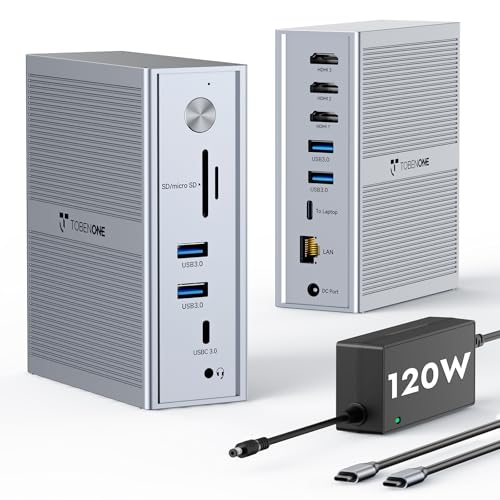
Designed for professionals who demand seamless multitasking, the TobenONE DisplayLink Docking Station for Triple Monitors transforms your MacBook into a powerhouse of productivity. With 14-in-1 functionality, it supports M1-M5 MacBooks and features three HDMI outputs for stunning displays. Experience 4K resolution on your main screen and up to 1920×1200 on the additional monitors, perfect for video editing and gaming. Plus, the 120W power supply keeps your devices charged. With five USB ports and an Ethernet connection, you’ll enjoy fast data transfer and reliable networking. Elevate your workspace and simplify your tech setup with this essential docking station.
Best For: Professionals, tech enthusiasts, remote workers, and creative individuals who require efficient multitasking with multiple displays.
Pros:
- Supports triple monitor setups with high-definition output for enhanced productivity.
- Includes multiple connectivity options (5 USB ports and Ethernet) for versatile and reliable connections.
- 120W power supply ensures stable charging while using multiple devices simultaneously.
Cons:
- Limited to specific MacBook models (M1-M5) which may not accommodate all users.
- Requires DisplayLink software installation for optimal functionality, which can be an additional step for users.
- Physical size and design may not suit all workspace aesthetics, potentially leading to clutter.
TobenONE DisplayLink Docking Station Triple Monitor
The TobenONE DisplayLink Docking Station stands out with its impressive capability to support triple and quad monitor setups, making it the perfect choice for professionals who need expansive screen real estate. With 18 ports, including 3x HDMI and 3x DP, you can easily connect multiple 4K@60Hz monitors for enhanced productivity. It’s compatible with Thunderbolt 3, USB4.0, and various operating systems, ensuring versatility. Plus, the 120W power adapter charges your laptop while allowing for swift data transfers at up to 10Gbps. Whether you’re into content creation or financial analysis, this dock elevates your workspace efficiently.
Best For: Professionals in fields such as content creation, financial analysis, and software development who require multiple monitor setups for enhanced productivity.
Pros:
- Supports triple/quad monitor setups with 4K@60Hz resolution for expansive visual workspace.
- Versatile compatibility with Thunderbolt 3, USB4.0, and multiple operating systems, including macOS and Windows.
- Fast data transfer speeds of up to 10Gbps, allowing for quick file transfers and efficient multitasking.
Cons:
- Requires driver installation based on the operating system, which may complicate initial setup for some users.
- Not compatible with Linux/Unix, limiting usage for those operating on these systems.
- Maximum monitor support is limited to 3 for macOS users, which may be restrictive for some professionals.
WAVLINK USB-C Triple Monitor Docking Station for MacBook and Windows

For professionals juggling multiple tasks, the WAVLINK USB-C Triple Monitor Docking Station stands out as an ideal solution. With support for up to three displays, including a stunning 4K output, you can enhance your workspace effortlessly. Its single USB-C connection provides 100W power delivery, ensuring your MacBook stays charged while you work. Plus, the six high-speed USB ports let you transfer large files quickly. Gigabit Ethernet guarantees stable internet for remote meetings and online classes. Compatible with various laptops, this durable dock is built to last, making it a smart investment for any serious professional.
Best For: Professionals who require a versatile and efficient workspace with multiple displays and robust connectivity options.
Pros:
- Supports triple display setup with resolutions up to 4K + 2K + 2K for enhanced productivity.
- Single USB-C connection provides 100W charging and high-speed data transfer, streamlining your workspace.
- Gigabit Ethernet connection ensures stable internet for remote work, making it superior to standard Wi-Fi.
Cons:
- Requires DisplayLink driver for MacBook models, which may add complexity for some users.
- Not suitable for USB-A laptops or gaming consoles, limiting compatibility with some devices.
- Limited to 8-10 hours of daily use, which may not meet the needs of heavy users or those who work longer hours.
LIONWEI 13 in 1 USB C Docking Station

If you’re a MacBook user looking for versatility and functionality, the LIONWEI 13 in 1 USB C Docking Station is an excellent choice. It’s compatible with various devices, including Dell and HP, and features plug-and-play functionality. With dual 4K HDMI ports, a DisplayPort, and multiple USB options, you can easily expand your setup. Enjoy rapid 10Gbps data transfer and 100W power delivery, ensuring your laptop stays charged. Plus, it supports triple display—ideal for multitasking. With an 18-month warranty and reliable customer support, you can count on LIONWEI for a seamless experience in your workspace.
Best For: MacBook users and professionals looking for an efficient and versatile docking station to enhance their workspace.
Pros:
- Multiple Connectivity Options: Offers 2*4K HDMI, DisplayPort, and various USB ports for extensive device support.
- High-Speed Data Transfer: Supports 10Gbps data transfer and 100W power delivery for fast charging.
- Triple Display Support: Ideal for multitasking with the ability to extend displays on compatible devices.
Cons:
- Limited Mac OS Functionality: Mac users can only extend one monitor at 4K@60Hz, which may restrict multi-display setups.
- Power Usage: The docking station consumes 13W, leaving 87W available for charging the laptop, which might not be sufficient for high-performance laptops under heavy use.
- Potential Compatibility Issues: While compatible with many brands, there may be occasional compatibility issues with certain devices or configurations.
TobenONE 18-in-2 MacBook Docking Station

Designed specifically for MacBook users, the TobenONE 18-in-2 Docking Station stands out with its ability to support dual 4K@60Hz monitors via HDMI and DisplayPort. With eight USB ports, a 2.5Gbps Ethernet connection, and dual audio ports, it enhances your workspace’s functionality. You’ll appreciate the powerful 150W adapter, delivering up to 100W charging for your MacBook and 20W for your devices. Its plug-and-play feature simplifies setup, perfect for multitasking or presentations. Weighing just 12.3 ounces, it’s portable, too. With a solid customer rating and support, it’s a reliable choice for MacBook users looking to elevate their setups.
Best For: MacBook users seeking an efficient and versatile docking station for enhanced productivity with dual monitor setups.
Pros:
- Supports dual 4K@60Hz monitor setups via HDMI and DisplayPort for high-resolution displays.
- Offers extensive connectivity options with 8 USB ports, a 2.5Gbps Ethernet port, and dual audio ports, enhancing workspace functionality.
- Includes a powerful 150W power adapter that provides up to 100W charging for MacBooks, ensuring devices remain powered during use.
Cons:
- Incompatible with Windows laptops, limiting its use to MacBook models only.
- Limited to connecting 2 external monitors, which may not meet the needs of users requiring more extensive multi-monitor setups.
- Weighs 12.3 ounces, which may be slightly heavier than other portable docking solutions on the market.
TobenONE MacBook Docking Station Dual 4K Monitor

The TobenONE MacBook Docking Station is the ultimate choice for creative professionals who rely on dual 4K displays for their work. Compatible with MacBook Pro (2016-2024) and MacBook Air (2018-2025), it guarantees seamless integration. With dual 4K@60Hz output via HDMI and VGA ports, you’ll enjoy crisp visuals perfect for video editing and presentations. Plus, the 100W PD3.0 charging capability keeps your MacBook powered without interruptions. Its array of ports minimizes cable clutter, allowing you to connect multiple peripherals easily. The vertical stand saves desk space, making your workspace efficient and organized.
Best For: Creative professionals who need dual 4K displays for video editing, graphic design, and presentations.
Pros:
- Supports dual 4K@60Hz output, providing crisp visuals ideal for demanding tasks.
- Equipped with 100W PD3.0 charging capability, ensuring your MacBook stays powered during intensive work sessions.
- Versatile port availability reduces cable clutter and allows for easy connectivity with multiple peripherals.
Cons:
- Limited compatibility with devices outside the specified MacBook models.
- The vertical stand design may not suit all users’ preferences for workspace organization.
- Higher price point compared to basic docking stations with fewer features.
Factors to Consider When Choosing a Docking Station for Macbook Office
When choosing a docking station for your MacBook office setup, you’ll want to contemplate compatibility with your specific Mac model. Think about the display output options you need, along with power delivery capability and the variety of ports available. Finally, don’t forget to evaluate the design and portability, especially if you plan to move your workstation frequently.
Compatibility With Mac Models
Choosing the right docking station for your MacBook can greatly enhance your workspace efficiency. First, make sure the docking station explicitly states compatibility with your specific MacBook models, as some may limit external monitor support. Check for support of both Intel-based models (2016-2020) and Apple Silicon models (M1/M2/M3/M4/M5) to guarantee full functionality. Keep in mind that some docking stations might only extend one external monitor on non-Pro/Max MacBooks with M1/M2/M3 chips, so verify their display capabilities beforehand. If multitasking is important to you, look for models that facilitate dual or triple monitor setups. Finally, confirm compatibility with the latest macOS versions for seamless operation and access to updated features.
Display Output Options
Selecting a docking station involves more than just compatibility; display output options play a significant role in enhancing your workspace. When choosing a docking station for your MacBook, consider those that support dual monitor setups for improved multitasking. Look for models offering 4K display output at 3840×2160 at 60Hz, perfect for graphic design and presentations. It’s vital to guarantee compatibility with macOS, as some docks may limit external displays to one. Opt for docking stations with multiple HDMI and DisplayPort outputs to connect various devices. Advanced options might support DisplayPort Multi-Stream Transport (MST), allowing multiple monitors through a single output, maximizing your workspace efficiency and productivity.
Power Delivery Capability
Power delivery capability is vital for maintaining your MacBook’s performance during intensive tasks, especially in an office setup. Look for a docking station that offers at least 100W power delivery, as this can effectively charge most MacBook models while keeping them running at full capacity. If you’re multitasking with other devices, consider a docking station with additional power delivery ports, allowing you to charge multiple gadgets simultaneously. It’s important that the power delivery specification matches or exceeds your laptop’s charging requirements to prevent any performance issues. High-quality power delivery guarantees rapid charging, reducing downtime and keeping your productivity levels high. Choose wisely, and your office setup will seamlessly support your workflow.
Port Variety and Connectivity
When it comes to port variety and connectivity, having the right docking station can make all the difference for your MacBook setup. You’ll want multiple USB ports, both USB-A and USB-C, to connect various peripherals easily. Check for HDMI and DisplayPort outputs, as these will allow you to set up dual or even triple monitors, boosting your productivity. High-speed data transfer options like USB 3.1 or Thunderbolt ports are essential for rapid file transfers and supporting high-resolution displays. Don’t overlook Ethernet connectivity, which guarantees stable internet access—vital for video conferencing and collaboration. Finally, make sure the docking station offers at least 100W power delivery to efficiently charge your MacBook while using multiple devices.
Design and Portability
A well-designed docking station can elevate your MacBook experience beyond just connectivity. When choosing one, consider its sleek, compact profile to enhance your desk’s aesthetics while saving valuable space. Portability is key; lightweight options with slim designs make it easy to transport between home and the office. Look for vertical stand designs that help organize cables, promoting a clutter-free workspace. Additionally, a docking station with an integrated cooling system guarantees peak performance during extended use without overheating. Finally, confirm the design allows easy access to ports for quick setup and hassle-free connectivity. Balancing aesthetics and functionality will transform your MacBook setup into an efficient and stylish workspace.