
In today’s fast-paced tech environment, having the right docking station can greatly enhance your connectivity experience. Whether you’re working from home or in an office, a docking station with Ethernet ports can streamline your setup and improve your productivity. With various options available, it’s crucial to identify which features matter most to you. Let’s explore the top selections that combine functionality and efficiency, making your workspace more versatile.
Anker Laptop Docking Station Dual Monitor (8-in-1 USB C Hub)

If you’re a professional or a student needing seamless multitasking, the Anker Laptop Docking Station Dual Monitor (8-in-1 USB C Hub) is an excellent choice. This hub offers extensive connectivity with two HDMI ports for 4K dual displays, ensuring you can stream or mirror content effortlessly. You’ll appreciate the 1 Gbps Ethernet hub for stable internet access, along with multiple USB-A ports and an SD card reader for added convenience. Plus, with 85W power delivery, you can charge your devices while you work. Just remember, a power charger isn’t included, so grab one to maximize its capabilities!
Best For: Professionals and students who require efficient multitasking with dual monitor support and extensive connectivity options.
Pros:
- 4K Dual Monitor Support: Stream or mirror content seamlessly with two HDMI ports.
- Multiple Connectivity Options: Includes USB-A data ports, Ethernet port, and SD card reader for versatile use.
- Power Delivery: Provides up to 85W pass-through charging for your devices while you work.
Cons:
- No Charger Included: Requires a separate 100W PD wall charger to utilize full power delivery capabilities.
- Limited macOS Functionality: Displays identical content on both external monitors when used with macOS.
- Not Compatible with Linux: This docking station does not support Linux operating systems.
LIONWEI 13 in 1 USB C Docking Station

The LIONWEI 13 in 1 USB C Docking Station is an excellent choice for professionals who need versatile connectivity and high-performance display options. It’s compatible with various devices, including MacBook and Dell laptops, ensuring seamless integration. With dual 4K HDMI and DisplayPort outputs, you can easily set up triple displays. You’ll benefit from fast data transfer via USB-C and 100W Power Delivery for your laptop. Plus, the Gigabit Ethernet port guarantees stable internet connectivity. Enjoy plug-and-play functionality and peace of mind with an 18-month warranty and reliable customer support for any issues you might encounter.
Best For: Professionals and creatives who require versatile connectivity options and high-performance display capabilities for their laptops.
Pros:
- Versatile connectivity with 13 ports, including dual 4K HDMI and DisplayPort for triple display support.
- Fast data transfer speeds of up to 10Gbps and 100W Power Delivery for efficient laptop charging.
- Plug-and-play functionality ensures easy setup and compatibility with multiple devices.
Cons:
- Limited to extending only one monitor on Mac OS, which may restrict multi-display setups for Mac users.
- The docking station consumes 13W of power, leaving 87W available for laptop charging, which might not be sufficient for all high-performance laptops.
- Some users may find the size and design less portable compared to smaller docking options.
Anker Prime Docking Station (14-Port, 160W Max Output)

For professionals juggling multiple devices, the Anker Prime Docking Station stands out with its impressive 14 ports and 160W max output. You’ll enjoy 10Gbps fast data transfer through 11 versatile ports, including three USB-C ports, each with a 100W max capacity. With the ability to charge up to four devices simultaneously, efficient power management becomes effortless. Dual HDMI ports let you connect two displays, perfect for multitasking. This docking station is compatible with Windows and ChromeOS, ensuring seamless integration with your setup. Plus, it comes with a USB-C cable, making it easy to get started right away.
Best For: Professionals managing multiple devices who need efficient power and data transfer solutions.
Pros:
- Versatile Connectivity: 14 ports including three high-power USB-C ports and fast data transfer speeds up to 10Gbps.
- Simultaneous Charging: Capable of charging up to four devices at once, enhancing power management efficiency.
- Dual Display Support: Allows connection of dual HDMI displays for improved multitasking and productivity.
Cons:
- Limited Compatibility: Not compatible with Linux systems, which may restrict usage for some users.
- MacOS Display Limitation: External monitors display identical content on macOS, limiting the potential for independent displays.
- Monitor Resolution Restriction: Does not support 5120*1440 monitors, which may be a drawback for users with high-resolution needs.
Selore USB C Docking Station with Dual Monitor Support

Looking to enhance your productivity with multiple displays? The Selore USB C Docking Station is your perfect solution. It supports dual and triple monitor setups, giving you the power to extend your laptop through eight ports, including two 4K HDMI, a 4K DisplayPort, and USB connections. Enjoy ultra-fast Gigabit Ethernet for reliable internet connectivity, while USB-C and USB-A ports enable high-speed data transfers. With up to 100W Power Delivery, you can charge your devices quickly and safely. Plus, with an 18-month warranty and solid customer support, you can trust Selore to meet your connectivity needs efficiently.
Best For: Professionals and multitaskers looking to enhance their productivity with dual or triple monitor setups.
Pros:
- Supports multiple display configurations, including dual and triple monitors.
- Offers high-speed data transfer with USB ports and reliable internet connectivity via Gigabit Ethernet.
- Provides fast charging capability with up to 100W Power Delivery for devices.
Cons:
- macOS users can only use mirror mode, lacking extended display functionality.
- Compatibility may be limited to full-featured USB-C ports and Thunderbolt 3/4/5, which may not be available on all laptops.
- Some users may find the price point higher compared to basic docking stations.
Plugable USB 3.0 and USB-C Universal Laptop Docking Station

Designed with versatility in mind, the Plugable USB 3.0 and USB-C Universal Laptop Docking Station is an excellent choice for professionals and students needing dual monitor support. With two HDMI ports, you can easily connect dual HD monitors, even if your laptop only has one output. It supports resolutions up to 1920×1200, making it perfect for productivity tasks. Plus, you’ll enjoy wired Gigabit Ethernet and multiple USB ports for all your devices. While it’s compatible with Windows and macOS, keep in mind that gaming isn’t its strong suit. You’ll also benefit from a two-year warranty and lifetime support.
Best For: Professionals and students needing dual monitor support for productivity tasks without the need for gaming capabilities.
Pros:
- Dual HDMI ports allow for easy connection of dual HD monitors, enhancing productivity.
- Supports resolutions up to 1920×1200, suitable for web and productivity applications.
- Comes with a two-year warranty and lifetime support from a North American-based team.
Cons:
- Not recommended for gaming, as it’s not designed for high-performance graphics.
- Requires driver installation for macOS users, which may add complexity.
- Linux is not supported, limiting compatibility for some users.
Baseus Spacemate 11 in 1 Docking Station

The Baseus Spacemate 11 in 1 Docking Station stands out for its remarkable versatility, making it an ideal choice for professionals who need seamless connectivity and enhanced multitasking capabilities. With support for various brands like Dell, HP, and Mac, it offers 11 ports, including 2 HDMI and 2 DisplayPort connectors for stunning 4K visuals. You’ll enjoy lightning-fast data transfer speeds of up to 10Gbps, allowing quick file transfers. Its compact design features a built-in LED screen for monitoring connections, while the Gigabit Ethernet guarantees stable internet access. Plus, a maximum 100W power input keeps your devices charged efficiently.
Best For: Professionals and tech enthusiasts seeking an all-in-one docking solution for enhanced connectivity and multitasking.
Pros:
- Supports multiple operating systems including Windows and Mac, making it versatile for various users.
- Offers impressive data transfer speeds of up to 10Gbps, enabling quick file transfers.
- Compact design with a built-in LED screen for monitoring connection status and optimizing workspace.
Cons:
- MacOS supports only one extended display, limiting multi-monitor capabilities for Mac users.
- Charger not included, requiring users to purchase an appropriate power adapter separately.
- May be considered bulky for users with limited desk space due to its vertical design.
LIONWEI 13 in 1 USB C Hub for Laptops
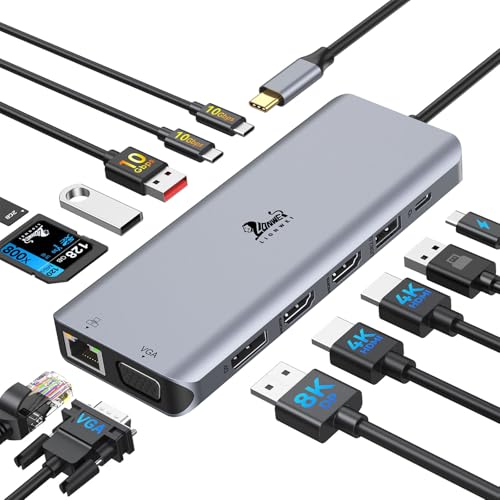
If you’re a multitasking professional or a creative who relies on multiple displays, the LIONWEI 13 in 1 USB C Hub for Laptops is the perfect solution for you. With support for up to four monitors via dual HDMI, an 8K DisplayPort, and a VGA port, your setup’s versatility skyrockets. It features a 1000Mbps Ethernet port for fast internet, plus multiple USB ports for speedy data transfers. Weighing only 4.6 ounces, it’s portable, and its compatibility with various devices guarantees seamless connectivity. With an 18-month warranty, you can trust this hub to enhance your productivity wherever you go.
Best For: Multitasking professionals and creatives who need to connect multiple displays for enhanced productivity.
Pros:
- Supports up to four monitors with dual HDMI and an 8K DisplayPort for versatile display options.
- Fast data transfer speeds with USB 3.1 ports and a 1000Mbps Ethernet connection for efficient workflow.
- Lightweight and portable design makes it easy to carry for on-the-go use.
Cons:
- Limited macOS support for extending monitors, only allowing one extended display.
- Requires USB-C port to support video output, which may not be available on all devices.
- Customer reviews indicate some users experience compatibility issues with certain laptops.
LIONWEI 9 in 1 Laptop Docking Station for 4 Monitors

For professionals and creatives seeking seamless multitasking, the LIONWEI 9 in 1 Laptop Docking Station stands out as an ideal choice. With support for up to four monitors, you can easily connect via 2 x 4K HDMI, DisplayPort, and VGA. The 1000Mbps Ethernet port guarantees reliable internet connectivity, while USB ports provide quick data transfers at 5Gbps. Plus, the 100W PD charging capability keeps your devices powered. Safety features like overload protection and an 18-month warranty give you peace of mind. Whether you’re using a Dell, HP, Surface, or MacBook, this docking station enhances your workspace effortlessly.
Best For: Professionals and creatives looking for seamless multitasking with support for multiple monitors and quick connectivity options.
Pros:
- Supports up to four monitors with high-resolution output for enhanced productivity.
- Features quick data transfer speeds of up to 5Gbps and reliable 1000Mbps Ethernet connectivity.
- Equipped with advanced safety features and an 18-month warranty for added peace of mind.
Cons:
- macOS users can only extend one monitor at 4K@60Hz, limiting display options.
- May require additional adapters for certain devices or setups not covered by included ports.
- The physical size of the docking station might take up more space on a desk compared to smaller hubs.
Plugable USB 3.0 Universal Docking Station for Windows, macOS, ChromeOS

With its 12-port expansion, the Plugable USB 3.0 Universal Docking Station is ideal for users juggling multiple devices across different operating systems, including Windows, macOS, and ChromeOS. You can easily connect dual monitors, supporting resolutions up to 1920×1200 @ 60Hz, thanks to its HDMI and versatile adapter options. While it’s designed for web and productivity tasks, it’s not suitable for gaming or streaming services like Netflix. Installation is straightforward, with auto driver support for Windows and manual setup for macOS. Plus, you’ll benefit from lifetime support from North American connectivity experts, ensuring reliability in your IT environment.
Best For: Users who need a reliable docking solution for multiple devices across different operating systems focused on web and productivity tasks.
Pros:
- Supports dual monitors with resolutions up to 1920×1200 @ 60Hz.
- Compatible with Windows, macOS, and ChromeOS, making it versatile for mixed laptop environments.
- Includes lifetime support from North American connectivity experts for reliable IT deployment.
Cons:
- Not recommended for gaming or HDCP streaming services like Netflix and Hulu.
- Does not charge laptops, requiring its own power adapter.
- Manual installation required for macOS users, which may be less convenient than auto installation.
Plugable Universal Laptop Docking Station (UD-3900)

The Plugable Universal Laptop Docking Station (UD-3900) stands out for its dual HDMI output capabilities, making it an excellent choice for professionals who need to enhance their productivity with multiple monitors. With a hybrid USB 3.0 and USB-C connection, you can easily expand your workspace. It supports dual HDMI displays at 1920×1200 @ 60Hz or a single display up to 2560×1440 @ 50Hz. You’ll enjoy wired Gigabit Ethernet and ample USB ports for various devices. While it’s not meant for gaming, it excels with web and productivity software, making it a reliable companion for your laptop.
Best For: Professionals seeking to enhance their productivity with multiple monitor setups and efficient connectivity options.
Pros:
- Supports dual HDMI outputs, allowing for an extended workspace with high-resolution displays.
- Includes a variety of USB ports for connecting multiple devices, enhancing versatility.
- Wired Gigabit Ethernet provides stable and fast internet connectivity.
Cons:
- Not suitable for gaming or high-performance graphics tasks.
- Requires manual driver installation for macOS users, which may be inconvenient.
- Does not charge the host laptop, requiring separate power management.
Factors to Consider When Choosing a Docking Station With Ethernet Port
When you’re picking a docking station with an Ethernet port, consider the port count and types you’ll need. You’ll also want to check the display resolution support and power delivery capability to make certain it fits your devices. Don’t forget about compatibility and data transfer speeds, as these factors can greatly influence your productivity.
Port Count and Types
Selecting a docking station with an Ethernet port involves careful consideration of port count and types to confirm it meets your connectivity needs. First, assess the total number of ports available; this guarantees you can connect all your peripherals and displays. Look for a variety of port types, like USB-A, USB-C, HDMI, and DisplayPort, to assure compatibility with your devices and support multiple monitors. Pay attention to the data transfer speeds of the USB ports, aiming for USB 3.1 for faster file transfers. Also, verify the Ethernet port supports Gigabit speed (1 Gbps) for ideal internet connectivity. Finally, consider power delivery capabilities, particularly if you need to charge your laptop while using multiple devices.
Display Resolution Support
Ensuring your docking station supports the display resolution you need is essential for an ideal viewing experience. Many options offer capabilities up to 4K at 60Hz, delivering high-definition clarity. If you’re considering a dual monitor setup, remember that resolutions can differ; you might get 4K at 60Hz on one display and only 4K at 30Hz on two. For macOS users, be aware that external monitors often mirror the display, limiting your multitasking abilities. It’s also vital to check for DisplayPort 1.4 or HDMI 2.0 support, as these standards directly impact maximum resolution and refresh rates. Finally, consider the total number of display outputs to enhance your workspace organization and productivity.
Power Delivery Capability
Power delivery capability is an essential factor to evaluate in a docking station with an Ethernet port. This refers to the station’s ability to charge your connected devices, with wattage output typically ranging from 60W to 100W or more. A higher wattage guarantees faster charging, keeping your laptop and peripherals powered while you work. Look for docking stations that offer pass-through charging, which allows the station to charge your host laptop while simultaneously powering other devices. Make certain the docking station supports USB-C Power Delivery for efficient power management through a single cable connection. Always check that the power delivery capability meets your laptop’s requirements to avoid performance issues or inadequate charging.
Compatibility With Devices
When choosing a docking station with an Ethernet port, you’ll want to take into account its compatibility with your devices to guarantee smooth operation. First, confirm the docking station works with your device’s USB-C, USB4, or Thunderbolt ports, as compatibility varies. Check if it supports video output and DisplayPort Alt Mode, especially if you plan to use multiple monitors. It’s also essential to verify that the docking station is compatible with your operating system, since some may not work with Linux. Look for plug-and-play functionality for quick setup, and consider its power delivery capabilities to make sure it can charge your device while connected to peripherals and the Ethernet network. This will enhance your overall connectivity experience.
Data Transfer Speeds
Data transfer speeds play a crucial role in your choice of a docking station with an Ethernet port, as they directly impact how efficiently your devices communicate and perform. Typically, USB 3.1 ports offer speeds up to 10Gbps, while USB 3.0 ports provide up to 5Gbps. When it comes to Ethernet, look for docking stations that support Gigabit speeds, enabling data transfer rates of up to 1Gbps—important for reliable internet connectivity. Check the supported data transfer speeds for each port to guarantee peak performance, especially if you plan to connect multiple devices. A docking station with high-speed Ethernet can greatly enhance network performance, outperforming standard Wi-Fi connections, particularly for data-intensive applications.
Design and Aesthetics
Choosing a docking station with an Ethernet port involves more than just functionality; design and aesthetics play an essential role in how it fits into your workspace. Compact and vertical designs can optimize your desk space, making it easier to keep everything organized. Look for aesthetically pleasing finishes like aluminum or sleek plastic that enhance your workstation’s overall look while ensuring durability.
The arrangement of ports should allow easy access to frequently used connections, minimizing clutter on your desk. LED indicators for connection status provide visual cues, helping you manage your connections effectively. Also, consider cable management features such as built-in organizers or detachable cables to maintain a clean and tidy environment.
Warranty and Support
A well-designed docking station not only enhances your workspace but also needs reliable warranty and support to guarantee your investment is protected. When choosing a docking station with an Ethernet port, consider the warranty period; many products offer 18-month coverage, ensuring you’re safeguarded against defects. Some even extend this to two years, giving you peace of mind for long-term use. Additionally, look for brands that provide lifetime customer support, which can be invaluable for troubleshooting beyond the warranty. It’s also wise to check the manufacturer’s reputation for customer service, as this can greatly impact your overall experience. Ultimately, customer reviews can offer valuable insights into the reliability of the support and warranty services, helping you make an informed choice.
Price and Value
When you’re looking for a docking station with an Ethernet port, it’s crucial to evaluate the price in relation to the features it offers. Budget-friendly options typically range from $50 to $100, while high-end models can exceed $200. Assess the number of ports, data transfer speeds, and display capabilities to determine what aligns with your needs. Don’t forget to take into account the warranty and customer support, as these factors can affect long-term value. To gauge quality, check customer reviews and ratings for insights into performance and reliability. Finally, remember that the total cost of ownership includes necessary accessories, like cables or power adapters, which can add to your overall expenses. Choose wisely to maximize your investment.