
Need a simple way to clone, erase, or redeploy drives without tying up a workstation? The right duplicator can save time, reduce setup errors, and make storage handling more consistent.
We narrowed the field to 10 practical options for small business teams that want fast, offline copying and straightforward workflows.
Best 10 Hard Drive Duplicators for Small Businesses Picks for 2026
Multi-Drive Cloner/Wiper
StarTech 4-Bay HDD/SSD Duplicator

- 4-bay standalone cloning and erasing
- Supports 2.5/3.5-inch SATA and IDE drives
- Quick Erase and Secure Erase modes
Best For: Small IT teams needing a multi-drive standalone cloner and wiper
Fast Two-Bay Cloner
StarTech Dual-Bay SATA Duplicator Dock

- Standalone cloning for 2.5/3.5-inch SATA drives
- Up to 28 GB/min duplication speed
- Also works as a USB-to-SATA dock
Best For: Small offices needing a quick, no-PC SATA cloner
Forensic Multi-Copy Tool
EZ Dupe Forensic 1-to-3 Duplicator
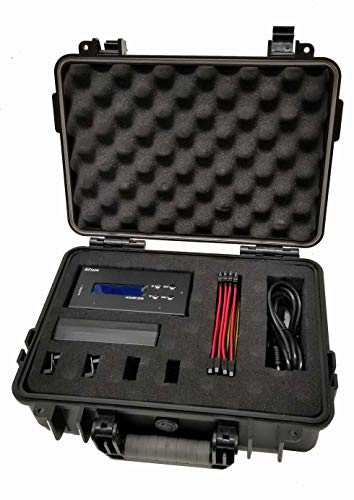
- 1-to-3 standalone duplication
- HPA/DCO removal and MD5/SHA-1 verification
- DoD 3-pass and 7-pass erase options
Best For: Teams needing forensic-style cloning, verification, and secure erase
USB Media Duplicator
StarTech 1:2 USB Flash Drive Duplicator

- Standalone 1-to-2 USB copy and erase
- Supports system, file, and sector-by-sector copies
- Copy and compare verification included
Best For: Technicians managing USB boot drives and flash-drive sanitizing
Budget-Friendly Dual-Bay Cloner for Small Offices
Dual-bay SATA dock with offline clone support

- Offline clone works without a computer
- USB 3.0 up to 5Gbps
- Supports two 2.5/3.5-inch SATA drives
Best For: Small offices needing basic cloning and drive access
IT-Grade Drive Cloner and Eraser
Standalone SATA cloner with secure erase modes

- Three clone modes and four erase modes
- Copy-and-compare verification on LCD menu
- Supports 2.5/3.5-inch SATA HDDs and SSDs
Best For: Small IT teams needing cloning plus secure wiping
Fast Dual-Bay Dock with USB-C Convenience
USB-C dual-bay dock with offline duplication

- USB 3.0 and USB-C connectivity
- UASP speeds up to 6Gbps
- Offline cloning built in
Best For: Small businesses wanting USB-C and drive duplication
All-in-one offline cloner
1 to 3 Hard Drive Duplicator Kit

- Copies HDDs and SSDs up to 600 MB/sec per channel
- Includes 4 copy modes and 8 erase modes
- Comes with SATA, IDE/PATA adapters, and a protective case
Best For: Teams that need controlled cloning, wiping, and record-friendly workflow
SATA dock-and-clone hybrid
Standalone Dual Bay SATA Cloner

- Clones 2.5/3.5-inch SATA drives without a PC
- Doubles as a USB/eSATA docking station
- Backed by a 2-year warranty and lifetime support
Best For: SATA-focused teams that want cloning plus drive-dock convenience
Cloner with USB hub expansion
48TB Dual Bay SATA Dock Cloner

- Offline clones SATA HDDs and SSDs without a PC
- Adds 3 USB 3.0 hub ports, including one charging port
- Supports up to 48TB total capacity
Best For: Offices that want cloning plus extra USB connectivity at the desk
Multi-Drive Cloner/Wiper – StarTech 4-Bay HDD/SSD Duplicator
If you need hard drive duplicators for small businesses that can clone, wipe, and dock multiple drives without tying up a PC, this StarTech 4-bay unit is a practical fit. It handles standalone sector-by-sector duplication and supports both quick and secure erase modes, making it useful for routine IT workflows and drive sanitization tasks.
Best For: Small IT teams that need a multi-drive standalone cloner plus eraser for SATA workflows.
Pros:
- Standalone cloning and erasing with no computer required.
- Supports 2.5/3.5-inch SATA and IDE SSDs/HDDs with included adapters.
- Up to 4-bay docking adds flexibility for access, backup, recovery, and transfer tasks.
- Includes quick erase and secure erase support based on NIST SP 800-88 Rev 1 Purge.
Cons:
- Target disk must be equal to or larger than the source disk.
- Top-end copying speed depends on the drives being used.
For small businesses that want one device to duplicate, sanitize, and dock drives, this model offers broad compatibility and an IT-friendly control layout. Its mix of standalone operation and multi-bay access makes it especially useful for repeat admin tasks.
Fast Two-Bay Cloner – StarTech Dual-Bay SATA Duplicator Dock
Among hard drive duplicators for small businesses, a dual-bay dock is often the easiest way to handle straightforward cloning jobs without extra software. This StarTech model clones 2.5/3.5-inch SATA drives in standalone mode, while also working as a USB-to-SATA dock for quick drive access when you are not duplicating.
Best For: Small offices that want a fast, no-PC SATA cloner and everyday drive dock in one.
Pros:
- Standalone sector-by-sector cloning with no computer required.
- Supports 2.5/3.5-inch SATA HDDs and SSDs of any capacity.
- High duplication speed rated up to 28 GB/min.
- Tool-less, tray-less design with top-loading drive doors and eject buttons.
Cons:
- Designed for two drives at a time, so it is less suited to bulk workflows.
- IDE adapter is sold separately.
This is a strong choice if your business mainly clones one source drive to one target drive and values speed over capacity. The dock-style design also adds everyday utility for working with SATA drives over USB.
Forensic Multi-Copy Tool – EZ Dupe Forensic 1-to-3 Duplicator
If your small business needs hard drive duplicators for small businesses with a more forensic-minded feature set, this EZ Dupe unit stands out. It can make identical copies of 2.5-inch and 3.5-inch SATA HDDs and SSDs, support disk-to-disk or disk-to-file workflows, and includes HPA/DCO write/removal plus hash verification tools.
Best For: Teams that need forensic-style cloning, verification, and erase functions in a standalone unit.
Pros:
- 1-to-3 duplication supports multiple destination drives.
- Includes HPA/DCO write/removal and hash value checks with MD5 and SHA-1.
- Standalone disk-to-disk or disk-to-file duplication requires no computer.
- Offers multiple erase functions, including DoD 3-pass and 7-pass compliant erase.
Cons:
- Best copy speed depends on the source and target drive performance.
- Its forensic feature set may be more than some basic office users need.
This model is a good fit when verification and data handling controls matter as much as raw cloning speed. It brings a deeper toolset than a basic copier, which can be valuable for IT, evidence handling, or secure media prep.
USB Media Duplicator – StarTech 1:2 USB Flash Drive Duplicator
Not every small business task calls for SATA hardware; sometimes you need a simple way to manage USB media instead. This standalone USB duplicator is useful for creating boot drives, sharing prepared files with teams, and wiping flash drives without using a computer.
Best For: Technicians who need a compact USB flash drive copier and sanitizer.
Pros:
- Standalone 1-to-2 USB duplication and erasing with no computer required.
- Supports system and file copy plus sector-by-sector copying.
- Includes quick erase, single-pass, and 3-pass overwrite options.
- Copy and compare verification helps confirm cloned drives.
Cons:
- Designed for USB flash media, not SATA hard drives.
- Asynchronous copy mode is limited to source content under 64 MB.
For offices that regularly distribute small boot media or need to sanitize USB drives, this is a compact, focused tool. It is less versatile than a hard-drive duplicator, but it does its specific job well and without PC dependence.
Budget-Friendly Dual-Bay Cloner for Small Offices – Dual-bay SATA dock with offline clone support
For small businesses that need a simple way to duplicate or access SATA drives, this hard drive duplicator for small businesses keeps the workflow straightforward. It supports 2.5-inch and 3.5-inch SATA HDDs/SSDs, connects over USB 3.0, and can do offline cloning without a computer.
Best For: Small offices that want a dual-bay dock for basic drive access and offline cloning.
Pros:
- Supports offline cloning with a one-button process and no PC required
- Dual-bay design works with two 2.5-inch or 3.5-inch SATA drives at once
- USB 3.0 connection offers up to 5Gbps transfer speed
- Plug-and-play setup with no driver installation needed
Cons:
- Supports SATA HDD/SSD only, not other drive types
- Best suited to straightforward cloning rather than advanced wipe features
Overall, this is a practical low-friction option if your team mainly needs a docking station that can clone a drive offline and handle routine SATA access. It is especially appealing when simplicity and price matter more than enterprise-grade sanitizing tools.
IT-Grade Drive Cloner and Eraser – Standalone SATA cloner with secure erase modes
If you need hard drive duplicators for small businesses with more control over cloning and sanitizing, this standalone StarTech unit is built for that job. It handles 2.5-inch and 3.5-inch SATA drives, offers multiple copy modes, and includes erase options for cleanup and disposal workflows.
Best For: Small IT teams that need a standalone cloner with secure erase options.
Pros:
- Standalone 1:1 duplicator and eraser with no computer required
- Three duplication modes, including sector-by-sector and partition-based copying
- Four erase modes, including Quick Erase, Secure Erase, and 3-pass overwrite
- LCD menu and copy-compare verification help reduce errors
Cons:
- Designed as a 1:1 tool, so it is less flexible than multi-drive workstation solutions
- Advanced interface adapters are sold separately for some drive types
This is the strongest pick here if your business cares about repeatable cloning and proper drive sanitization. The built-in menus and verification tools make it better suited to IT-minded tasks than a basic dock.
Fast Dual-Bay Dock with USB-C Convenience – USB-C dual-bay dock with offline duplication
For businesses comparing hard drive duplicators for small businesses, this WAVLINK dock stands out for its dual-bay design and flexible USB 3.0 plus USB-C connectivity. It supports 2.5-inch and 3.5-inch SATA drives, offers UASP-based transfer speeds, and includes offline cloning for quick drive-to-drive copies.
Best For: Small businesses that want a dual-bay dock with USB-C support and offline cloning.
Pros:
- Supports USB 3.0 and USB-C connections for broader compatibility
- Dual-bay dock works with 2.5-inch and 3.5-inch SATA HDDs/SSDs
- UASP transfer protocol supports up to 6Gbps speeds
- Offline cloning is built in, with no drivers required for the dock itself
Cons:
- Offline cloning is limited to target disks that are the same size or larger than the source
- Online cloning is not supported
Overall, this model is a solid fit if your team wants a simple dock that doubles as a duplicator and offers modern connectivity. The USB-C option and UASP support make it especially practical for day-to-day drive handling.
All-in-one offline cloner – 1 to 3 Hard Drive Duplicator Kit
If you need hard drive duplicators for small businesses that can handle offline cloning, wiping, and documentation in one package, the EZ Dupe HD Pal Pro is built for that kind of workflow. It supports 2.5-inch and 3.5-inch HDDs and SSDs, includes SATA and IDE/PATA adapters, and adds source write blocking plus label printing for more controlled copy jobs.
Best For: Small teams that want a standalone duplicator with advanced erase modes, record keeping, and mixed-drive support.
Pros:
- Copies up to 1-to-3 drives at speeds up to 600 MB/sec per channel
- Includes 4 copy modes and 8 erase modes, including Secure and Enhanced Erase
- Supports HPA/DCO duplication and removal for more complete cloning
- Rugged protective case helps keep adapters, cords, and the unit organized
Cons:
- Standalone design means it will not connect to other devices for normal use
- Label printing is available, but log file download is not available for label printing
- IDE/PATA support depends on the included adapter setup
For small-business backup, sanitizing, and project tracking, this model stands out because it combines duplication speed with useful admin features. It is especially practical when you need a portable, all-in-one tool rather than a PC-tethered dock.
SATA dock-and-clone hybrid – Standalone Dual Bay SATA Cloner
Among hard drive duplicators for small businesses, this StarTech dual-bay dock is a straightforward choice for offline cloning and everyday drive access. It clones 2.5-inch and 3.5-inch SATA HDDs and SSDs without a PC, while also working as a USB 3.0 or eSATA docking station for recovery, mounting, and quick access.
Best For: IT teams and office users who want a simple SATA-only duplicator that doubles as a dock.
Pros:
- Standalone sector-by-sector cloning with no computer required
- Compatible with SATA I/II/III HDDs and SSDs of any capacity
- Also functions as a USB/eSATA docking station for drive access
- Backed by a 2-year warranty and lifetime technical assistance
Cons:
- IDE adapter is sold separately
- Copy speed is up to 22 GB/min, which is slower than some higher-end duplicators
- Target disk must be equal to or larger than the source disk
This is a practical pick when your business primarily works with SATA drives and wants a dependable, no-fuss duplicator. Its dock functionality adds flexibility for recovery tasks without making the setup overly complex.
Cloner with USB hub expansion – 48TB Dual Bay SATA Dock Cloner
If your small business wants a compact, offline cloning tool with extra USB expansion, this MAIWO dock is a practical option in the hard drive duplicators for small businesses category. It supports 2.5-inch and 3.5-inch SATA HDDs and SSDs, clones without a computer, and adds three USB 3.0 hub ports for day-to-day peripheral use.
Best For: Offices that want offline drive duplication plus extra USB hub ports in one device.
Pros:
- Supports up to 48TB total capacity, with 24TB per port
- Offline clone function works without connecting to a computer
- Includes 3 USB 3.0 hub ports, including one 2.4A charging port
- Tool-free installation and LED clone progress indicators make it easy to use
Cons:
- Designed for SATA drives only
- Built-in capacity is listed at 48TB total, but memory storage capacity is listed separately as 36TB
- One-year manufacturer warranty is shorter than some alternatives
For teams that value convenience and desk-space efficiency, this model offers more than just cloning. The added USB hub function makes it useful as a workstation accessory when you are not duplicating drives.
How We Picked the Best Hard Drive Duplicators for Small Businesses
We focused on Hard Drive Duplicators for Small Businesses that balance speed, drive compatibility, and ease of use. Priority went to standalone units that can operate without software, support both HDDs and SSDs where possible, and offer enough bay flexibility for common office and IT tasks.
We also looked at throughput, erase functions, dock-style convenience, and whether a model is better suited for routine office cloning, asset refreshes, or more specialized forensic and data-handling work.
Quick Comparison
In this category, the biggest differences come down to bay count and workflow. Dual-bay docks are usually best for everyday copying and drive access. 1:3 duplicators are better when you need to roll out multiple identical drives at once. Standalone eraser/duplicator units are useful when security and repeatability matter more than a simple dock.
Key Buying Factors for Hard Drive Duplicators for Small Businesses
Drive Types and Interface Support
Check whether the unit supports 2.5-inch and 3.5-inch SATA drives, SSDs, and any older formats your business still uses. If you manage mixed legacy hardware, broad compatibility matters more than raw speed.
Copy Speed and Capacity
Faster duplication is valuable, but only if the rest of your process can keep up. A higher transfer rate helps when you clone drives often, yet for occasional use, reliability and stable performance are usually more important than top-end numbers.
Offline Cloning and Erasing
Standalone operation is a major advantage for small teams. It reduces dependence on software, avoids network bottlenecks, and makes it easier to replicate or wipe drives in a repeatable way.
Security and Data Handling
If you retire customer, employee, or financial drives, look for secure erase support and features that help manage hidden areas or drive metadata. These capabilities can be especially important for compliance-minded businesses.
Workflow Fit
Choose a dock if you need frequent read/write access to individual drives. Choose a duplicator if your main goal is imaging, cloning, or wiping multiple drives with minimal manual intervention.
Who Should Buy Which Hard Drive Duplicators for Small Businesses?
IT generalists and office managers usually do best with a dual-bay SATA dock or a compact standalone duplicator. Small businesses with frequent rollouts, repair work, or device staging should consider 1:3 models for better batch efficiency. If your priority is secure disposal or forensic-style handling, pick a unit with erasing and advanced drive management features. For light, mixed-use storage access, a dual-bay docking station is often the most practical choice.