
High-speed memory card readers can make a noticeable difference when moving large photo libraries, 4K video, and camera backups to a computer. The right model depends on your card format, port type, and workflow—not just its advertised transfer rate.
We compared ten popular readers, including UHS-II SD, CFexpress Type A and Type B, multi-card, USB-C, and budget-friendly options, to help you choose a practical match for your gear.
Best 10 High Speed Memory Card Readers Picks for 2026
Best UHS-II SD Pick
Sony MRW-S1 High-Speed SD Reader

- Supports UHS-II and UHS-I SD cards
- USB 3.1 with USB 3.0/2.0 compatibility
- Compact, lightweight design with activity indicator
Best For: Photographers using high-speed SD cards
Best CFexpress Type A Workflow
ProGrade Digital PG09 Card Reader

- Reads CFexpress Type A and SDXC cards
- Dual-slot USB 3.2 Gen 2 design
- Magnetic laptop mounting and two-year warranty
Best For: Mobile photo and video professionals using Type A media
Best USB-C SD Value
Lexar Dual-Slot SD/microSD Reader
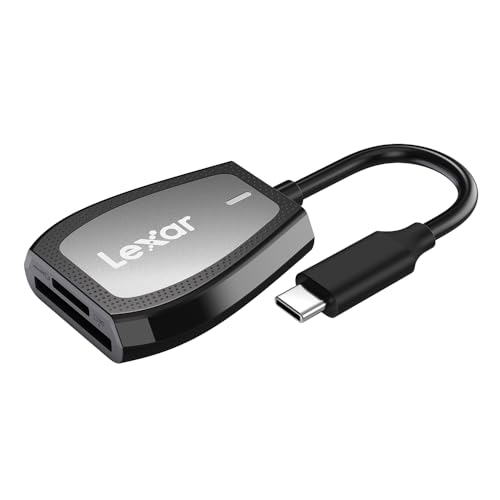
- Reads SD and microSD cards
- Up to 312MB/s read speed
- USB-C, dual-slot design with LED indicator
Best For: USB-C laptop and desktop users
Best CFexpress Type B Speed
ProGrade Digital PG05.5 Reader

- Supports CFexpress Type B and SD UHS-II
- Up to 10 Gbps from both slots simultaneously
- Magnetic mounting and two-year warranty
Best For: Professional workflows using Type B and UHS-II cards
Best UHS-II USB-C Pick
UGREEN USB-C SD 4.0 Card Reader

- Up to 312MB/s UHS-II transfer speeds
- Simultaneous SD and Micro SD access
- Aluminum body with braided cable
Best For: USB-C photographers and videographers using UHS-II cards
Best USB-A Value
Anker 2-in-1 USB-A Card Reader

- USB 3.0 speeds up to 5Gbps
- Dual-card read and write support
- Broad SD, microSD, and legacy format compatibility
Best For: USB-A computers and devices using UHS-I or standard memory cards
Best Compact UHS-II Design

- Up to 312MB/s UHS-II speeds
- Dual SD and MicroSD card slots
- Compact aluminum design with 15cm cable
Best For: USB-C creators who need fast transfers on the go
Versatile Four-Slot Pick
SmartQ C368 USB 3.0 Card Reader

- Four slots support Micro SD, SD, MS, and CF cards
- USB 3.0 speeds up to 5Gbps
- Plug-and-play support for Windows, Mac OS, and Linux
Best For: Users who need broad card-format compatibility
Compact USB-C Choice
Anker PowerExpand Dual-Slot Reader

- USB-C connection for compatible laptops and smartphones
- Separate SD and microSD slots
- Up to 5Gbps transfer speed in a compact design
Best For: USB-C users working with SD and microSD cards
Simultaneous Multi-Card Hub
UGREEN USB 3.0 Four-Slot Card Reader

- Reads and writes four cards at the same time
- Supports SD, microSD, CF, and MS cards
- Up to 5Gbps with Windows, Mac, Linux, and Chrome OS
Best For: Photographers managing several cards at once
Best UHS-II SD Pick – Sony MRW-S1 High-Speed SD Reader
The Sony MRW-S1 is a compact choice for shoppers comparing high speed memory card readers for UHS-II or UHS-I SD cards. Its USB 3.1 interface is compatible with USB 3.0 and USB 2.0, and it can read microSD cards when used with a full-size SD adapter.
Best For: Photographers who primarily use UHS-II SD cards and want a straightforward single-slot reader.
Pros:
- Supports both UHS-II and UHS-I SD cards
- USB 3.1 interface works with USB 3.0 and 2.0
- Activity indicator and protective USB connector cover
- Lightweight portable design
Cons:
- Only one card slot
- Full-size SD adapter for microSD cards is not included
This Sony reader is a focused option rather than a multi-format hub. Choose it when SD performance and portability matter more than simultaneous transfers or broader card support.
Best CFexpress Type A Workflow – ProGrade Digital PG09 Card Reader
The ProGrade Digital PG09 is a dual-slot option for users who need high speed memory card readers that handle CFexpress Type A and SDXC media. Its USB 3.2 Gen 2 connection supports transfer speeds up to 10 Gbps, while the magnetic mounting system is designed for mobile workstations.
Best For: Photographers, videographers, and editors working with CFexpress Type A and SDXC cards on the road.
Pros:
- Dual slots for CFexpress Type A and SDXC cards
- Up to 10 Gbps USB 3.2 Gen 2 transfer rate
- Magnetic laptop mounting system with included metal plate
- Includes a two-year warranty
Cons:
- Supports CFexpress Type A rather than Type B
- Heavier than the compact single-slot Sony option
The PG09 is built around fast, flexible media handling and travel-friendly mounting. It is a strong fit for demanding photo and video workflows that use Type A cards.
Best USB-C SD Value – Lexar Dual-Slot SD/microSD Reader
The Lexar dual-slot reader is a practical pick among high speed memory card readers for USB-C computers. It accepts SD and microSD cards, advertises read speeds up to 312MB/s, and includes USB 3.2 Gen 1 support with backward compatibility for USB 2.0 ports.
Best For: Laptop and desktop users who need convenient SD and microSD access through USB-C.
Pros:
- Two slots for SD and microSD cards
- Read speeds up to 312MB/s
- USB-C connection with USB 2.0 compatibility
- LED activity light and two-year limited warranty
Cons:
- USB 3.2 Gen 1 rather than Gen 2
- Its listed UHS-I backward compatibility supports speeds up to 170MB/s
Lexar keeps the feature set focused on everyday USB-C file transfers. It is especially convenient for users moving files between standard SD and microSD media without carrying separate readers.
Best CFexpress Type B Speed – ProGrade Digital PG05.5 Reader
The ProGrade Digital PG05.5 is designed for high speed memory card readers users who work with CFexpress Type B and SD UHS-II media. Its USB 3.2 Gen 2 interface supports transfers up to 10 Gbps from both slots simultaneously, and its magnetic mounting system suits mobile editing setups.
Best For: Professional photo, video, audio, and imaging workflows using CFexpress Type B and SD UHS-II cards.
Pros:
- Supports CFexpress Type B and SD UHS-II cards
- Dual-slot transfers up to 10 Gbps simultaneously
- Magnetic laptop mounting with included adhesive metal plate
- Two-year warranty and Refresh Pro support
Cons:
- Designed for USB 3.2 Gen 2 hardware to reach its listed speed
- Heavier and more specialized than basic SD-only readers
The PG05.5 is the specialized choice for Type B media and fast post-production transfers. Its dual-slot design and mobile mounting features make it well suited to demanding workflows away from the desk.
Best UHS-II USB-C Pick – UGREEN USB-C SD 4.0 Card Reader
For creators who need high speed memory card readers, the UGREEN USB-C SD 4.0 reader supports UHS-II transfer speeds of up to 312MB/s. Its two slots handle SD and Micro SD cards, while simultaneous card access makes file transfers more convenient.
Best For: Photographers, videographers, and mobile users with USB-C devices who work with UHS-II cards.
Pros:
- Supports SD 4.0 UHS-II speeds up to 312MB/s.
- Reads and writes SD and Micro SD cards simultaneously.
- Plug-and-play support across Windows, macOS, Linux, ChromeOS, iPadOS, and Android.
- Durable aluminum body and braided cable.
Cons:
- Requires a USB-C port; Android devices need OTG support.
- USB 3.0 connectivity is listed with a 5Gbps interface, so actual speeds depend on the host device and card.
This is a strong choice when UHS-II performance and dual-card workflow matter. The compact build and 24-month warranty add practical appeal for frequent travel and field use.
Best USB-A Value – Anker 2-in-1 USB-A Card Reader
The Anker 2-in-1 is a practical option for shoppers seeking high speed memory card readers for USB-A computers and devices. USB 3.0 supports transfer rates up to 5Gbps, and the dual-slot design lets you work with two cards without repeated unplugging.
Best For: Users with USB-A laptops, desktops, tablets, smartphones, and cameras who need broad card compatibility.
Pros:
- USB 3.0 supports transfer rates up to 5Gbps and works with USB 2.0 and 1.1.
- Simultaneously reads and writes two cards.
- Supports SD, microSD, SDXC, SDHC, UHS-I, MMC, Memory Stick, and other listed formats.
- Powered directly through the USB port with no separate power supply.
Cons:
- Uses USB-A rather than USB-C.
- Supports UHS-I cards, not the faster UHS-II standard.
Choose this reader for straightforward USB-A compatibility and a wide range of legacy and current card formats. It is less suited to newer USB-C-only devices or users specifically seeking UHS-II speeds.
Best Compact UHS-II Design – uni USB-C SD 4.0 Card Reader
The uni USB-C SD 4.0 reader is designed for users who want high speed memory card readers in a compact, travel-friendly format. Its dual SD 4.0 slots support transfer speeds up to 312MB/s, with a short 15cm cable for convenient laptop, tablet, and smartphone use.
Best For: Content creators using USB-C MacBooks, PCs, tablets, and compatible smartphones with SD or MicroSD cards.
Pros:
- Supports UHS-II speeds up to 312MB/s, up to three times faster than UHS-I.
- Dual slots support SD and MicroSD card access.
- Compact midnight-blue aluminum casing and 15cm cable.
- Plug-and-play compatibility with many Windows, macOS, ChromeOS, Linux, iOS, and Android devices.
Cons:
- Not compatible with Lightning-port iPads and iPhones.
- Requires a compatible USB-C device and UHS-II card to reach its rated performance.
This reader balances fast UHS-II performance with a small footprint and broad USB-C compatibility. Verify your device port before buying, especially if you use an older Lightning-based iPad or iPhone.
Versatile Four-Slot Pick – SmartQ C368 USB 3.0 Card Reader
The SmartQ C368 is a practical choice among high speed memory card readers when you need broad card compatibility in a plug-and-play design. Its four slots support Micro SD, SD, MS, and CF cards, while USB 3.0 connectivity offers transfer speeds up to 5Gbps.
Best For: Travelers, photographers, and computer users who work with several card formats.
Pros:
- Four-in-one support for Micro SD, SD, MS, and CF cards
- USB 3.0 transfer speeds up to 5Gbps
- Works with Windows, Mac OS, and Linux without additional drivers
- Blue LED clearly shows power and operating status
Cons:
- Uses a USB Type-A connection
- Memory cards are not included
The C368 stands out for users who want one reader for older and newer card types. Its included cable organizer and compact design also make it convenient for mobile use.
Compact USB-C Choice – Anker PowerExpand Dual-Slot Reader
The Anker PowerExpand is a compact option for high speed memory card readers, especially if your laptop or phone uses USB-C. It provides separate SD and microSD slots and supports transfer speeds up to 5Gbps for convenient file sharing on the go.
Best For: USB-C laptop and smartphone users who primarily handle SD and microSD cards.
Pros:
- Dual slots support standard SD and microSD cards
- USB-C connection works with compatible computers and phones
- Compact design is easy to use alongside other peripherals
- Includes an 18-month warranty
Cons:
- Supports fewer card formats than four-slot readers
- Some devices may require removing the case
- Compatibility is centered on USB-C devices
This reader is a straightforward fit for modern USB-C setups. Its small footprint and dual-slot layout make swapping or copying files convenient without carrying a larger hub.
Simultaneous Multi-Card Hub – UGREEN USB 3.0 Four-Slot Card Reader
The UGREEN USB 3.0 Card Reader is built for users comparing high speed memory card readers that can handle multiple formats at once. Its four slots support SD, microSD, CF, and MS cards, and the reader can read and write four different cards simultaneously at up to 5Gbps.
Best For: Photographers and other users who regularly transfer files between multiple memory cards.
Pros:
- Reads and writes four different cards simultaneously
- Supports SD, microSD, CF, and MS formats
- USB 3.0 transmission rates reach up to 5Gbps
- Compatible with Windows, Mac OS, Linux, and Chrome OS
Cons:
- Uses a USB connection rather than USB-C
- Larger and heavier than the compact dual-slot option
- Cards are not included
The UGREEN model is the strongest match when reducing card swapping matters. Its 1.7-foot cable and broad operating-system support add flexibility for desk or mobile workflows.
How We Picked the Best High Speed Memory Card Readers
We focused on compatibility, interface speed, slot design, portability, and everyday usability. A reader is only as fast as the slowest part of the transfer chain, so we considered whether each model supports modern UHS-II, CFexpress, USB 3.x, or USB-C hardware where applicable. We also looked for clear advantages for photographers, videographers, travel users, and people managing several card formats.
Advertised speeds are maximum theoretical figures. Actual performance varies with the card, computer, cable, file size, operating system, and whether other devices share the same USB controller.
Quick Comparison
| Best For | Reader Type | Key Advantage |
|---|---|---|
| UHS-II SD workflows | Single-slot or SD-focused | Fast transfers from compatible SD cards |
| CFexpress Type A | CFexpress Type A and SD | Useful for select Sony and professional cameras |
| CFexpress Type B | CFexpress Type B and SD | Designed for high-bitrate professional video and stills |
| Multiple card formats | Multi-slot USB reader | Convenience for mixed media and backup tasks |
| USB-C laptops and tablets | USB-C SD or microSD reader | Simple connection to newer devices |
Key Buying Factors for High-Speed Memory Card Readers
Card Format and Slot Compatibility
Start with the cards used by your camera. UHS-II SD cards require a reader with a second-row contact interface to reach their best speeds. CFexpress Type A and Type B are different physical formats and are not interchangeable. If you use microSD cards, choose a dedicated microSD slot or an SD adapter that fits your workflow.
USB Interface and Connector
USB 3.0, USB 3.2, and USB 3.1 labels can be confusing, and the advertised standard does not guarantee a particular real-world speed. Check both the reader connector and your computer’s port. USB-C is convenient, but a USB-C plug alone does not prove that the reader supports high-speed transfers.
Single-Slot Versus Multi-Slot Design
A focused reader is often smaller and simpler, while a multi-card model can reduce the number of accessories in a camera bag. Confirm whether simultaneous card use is supported; some readers share bandwidth or allow only one card to be accessed at a time.
Build, Cable, and Portability
For travel, prioritize a compact body, a secure connector, and a detachable or sufficiently durable cable. A reader with a short integrated cable may be convenient, while a separate cable is easier to replace if damaged.
Who Should Buy Which High Speed Memory Card Readers?
Photographers using UHS-II SD cards: Choose a UHS-II-compatible reader with USB 3.x or faster connectivity. This is the best balance for rapid RAW photo imports.
Professional video users: Match the reader to your exact CFexpress format. Type A and Type B readers serve different cameras, so verify the card marking before buying.
Creators with USB-C laptops: A USB-C SD or microSD reader offers the simplest setup, especially when you mainly transfer files from one card type.
Families and mixed-device households: A multi-slot reader is useful when cameras, drones, phones, and tablets use different media formats.
Occasional users on a budget: A basic USB 3.0 reader can be sufficient for standard SD or microSD cards, particularly when maximum transfer speed is not a priority.