
The right card reader can make the difference between a smooth photo import and a frustrating bottleneck. This roundup compares 10 memory card readers for photographers across camera compatibility, connection types, transfer speeds, and portability.
Whether you use SD, microSD, CompactFlash, CFexpress, Memory Stick, or several formats, the best choice depends on your cards, computer, and everyday workflow.
Best 10 Memory Card Readers for Photographers Picks for 2026
Best All-Around 4-in-1
BENFEI USB-C/USB 3.0 Card Reader

- Reads four card types simultaneously
- USB-C and USB 3.0 connectivity
- Up to 160MB/s UHS-I transfer rates
Best For: Mixed card formats and modern USB-C devices
Best for CFexpress Workflows
ORICO 40Gbps 4-in-1 Card Reader

- Supports CFexpress Type A and B
- Thunderbolt 40Gbps connectivity
- Cooling design for sustained transfers
Best For: Professional CFexpress and high-resolution workflows
Best USB 3.0 Multi-Card Hub

- Four card slots with simultaneous access
- Up to 5Gbps USB 3.0 transmission
- Compatible with major desktop operating systems
Best For: USB-A computers and multi-card organization
Best Compact Dual-Slot Option

- Simultaneous SD and microSD access
- Up to 5Gbps USB 3.0 transfers
- Lightweight 14-gram plug-and-play design
Best For: Portable SD and microSD workflows
Best All-in-One USB-C Pick

- Reads CF, SD, and microSD cards
- Plug-and-play USB-C connection
- Compatible with many phones, tablets, and computers
Best For: Photographers with mixed CF, SD, and microSD media
Best Dual-Slot Workflow

- USB 3.0 and USB-C support up to 5 Gbps
- Reads and writes two cards simultaneously
- Protective covers and compact design
Best For: SD and microSD workflows requiring frequent transfers
Best Multi-Format Coverage

- Seven slots support five card families
- Reads up to five cards simultaneously
- USB-C transfers up to 5 Gbps
Best For: Photographers with diverse legacy and current card formats
Most Versatile
SmartQ C368 Pro 4-in-1 Card Reader
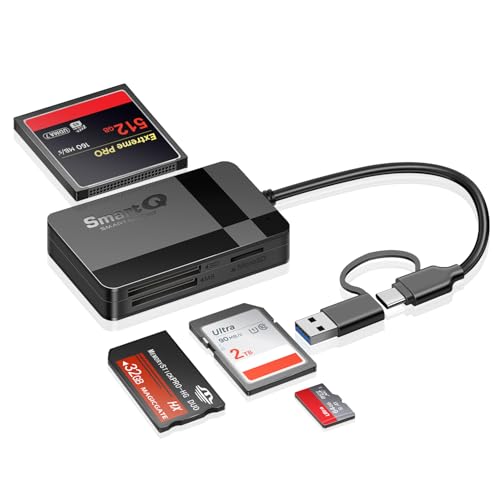
- Reads SD, microSD, CF, and MS cards
- Supports simultaneous multi-card reading
- USB 3.0 plug-and-play design
Best For: Photographers using several memory card formats
Best for USB-C Workflows
WNXSLOAD Dual-Slot Card Reader

- SD and microSD slots in one reader
- Works with USB-C iPhones, iPads, and Macs
- Listed transfer rate up to 98 MB/s
Best For: Direct camera-to-USB-C device transfers
Best Dual-Connector Value

- Includes iPhone and USB-C connectors
- Reads SD and microSD cards
- Supports JPEG, RAW, and common video formats
Best For: Photographers using multiple device generations
Best All-Around 4-in-1 – BENFEI USB-C/USB 3.0 Card Reader
For photographers who use several card formats and devices, the BENFEI is a flexible choice among memory card readers for photographers. Its USB-C and USB 3.0 connectivity supports SD, microSD, Memory Stick, and CompactFlash cards, while all four slots can read and write simultaneously.
Best For: Photographers who need broad card-format support and USB-C/USB-A flexibility.
Pros:
- Reads and writes four card types at the same time.
- Supports USB-C and USB 3.0 connections.
- Offers UHS-I transfer rates up to 160MB/s, depending on the card and port.
- Includes an 18-month warranty.
Cons:
- Does not support Memory Stick Standard, Memory Stick Micro, or CF Type I.
- Actual transfer speeds depend on the card and connected USB port.
The BENFEI stands out for photographers who work with mixed media and newer USB-C devices. It is a practical general-purpose reader, though professionals using CFexpress or faster UHS-II workflows will need a more specialized option.
Best for CFexpress Workflows – ORICO 40Gbps 4-in-1 Card Reader
The ORICO is built for photographers and videographers moving large files from newer high-performance cards. This memory card reader for photographers supports CFexpress Type A, CFexpress Type B, SD, and microSD, with Thunderbolt connectivity and support for sustained high-load transfers.
Best For: Professionals using CFexpress cards, high-resolution cameras, and Thunderbolt-equipped devices.
Pros:
- Supports CFexpress Type A and Type B, plus SD and microSD.
- Designed for 40Gbps Thunderbolt USB-C interfaces.
- Supports simultaneous quad-card reading.
- Aluminum housing and cooling film help manage heat during long transfers.
Cons:
- Compatible only with Thunderbolt interfaces according to the supplied notes.
- Maximum speeds depend on the card, interface, and connected device.
For compatible professional setups, the ORICO offers the most advanced format and speed support in this group. Verify that your computer or tablet has a compatible Thunderbolt interface before buying.
Best USB 3.0 Multi-Card Hub – UGREEN 4-Slot Card Reader
The UGREEN combines four common card slots in a compact USB 3.0 reader. For photographers sorting cards at a workstation, it supports SD, microSD, CompactFlash, and Memory Stick formats and can read and write four cards simultaneously.
Best For: Photographers who want a simple, compact multi-card reader for computers with USB-A.
Pros:
- Supports SD, microSD, CompactFlash, and Memory Stick cards.
- Reads and writes four cards simultaneously.
- USB 3.0 transmission reaches up to 5Gbps.
- Works with Windows, macOS, Linux, and ChromeOS.
Cons:
- Uses a USB connection rather than USB-C.
- It is limited to the supplied format and speed support, including UHS-I.
The UGREEN is a straightforward choice for photographers who regularly manage multiple mainstream card formats. Its included cable and compact body make it convenient for desktop or travel use, provided your device has a compatible USB port.
Best Compact Dual-Slot Option – Anker USB-A SD Card Reader
The Anker is a compact two-slot option for photographers who primarily use SD and microSD cards. It connects through USB-A, requires no additional power supply or drivers, and can read and write two cards simultaneously.
Best For: Photographers who want a small, plug-and-play reader for SD and microSD cards.
Pros:
- Reads and writes two cards simultaneously.
- USB 3.0 supports transfer rates up to 5Gbps.
- Compact 14-gram design is easy to carry.
- Works with Windows and Mac OS without additional drivers.
Cons:
- Provides two slots rather than four.
- Uses USB-A and does not offer CFexpress support.
The Anker favors portability and simplicity over maximum format coverage. It is a sensible everyday reader for SD-based camera kits, especially when you need a lightweight USB-A accessory rather than a larger multi-format hub.
Best All-in-One USB-C Pick – 3-in-1 CF/SD/MicroSD Reader
For photographers who need memory card readers for photographers with broad card compatibility, this ChiaoPio model combines CompactFlash, SD, and microSD slots in a plug-and-play USB-C adapter. Its built-in cable and support for USB-C iPhone, iPad, Mac, and Windows devices make it useful for reviewing and transferring photos away from a camera workstation.
Best For: Photographers using CF, SD, and microSD cards with USB-C devices.
Pros:
- Supports CompactFlash, SD, and microSD cards.
- Plug-and-play operation requires no drivers or additional power.
- Built-in USB-C cable avoids blocking other ports.
- Works with many USB-C iPhone, iPad, Mac, Windows, and Android devices.
Cons:
- Uses a USB-C connector and is not compatible with Lightning ports.
- Listed data transfer rate is 30 megabits per second.
This is a practical choice when your camera kit includes several common card formats and your main devices use USB-C. It is less compelling for users who need higher listed transfer speeds or Lightning connectivity.
Best Dual-Slot Workflow – uni USB-C/USB 3.0 Card Reader
This uni reader is a strong option among memory card readers for photographers who regularly work with both full-size SD and microSD cards. Its USB 3.0 and USB-C interfaces support transfers up to 5 Gbps, while the dual slots can read and write two cards simultaneously for faster file handling.
Best For: Photographers who transfer between SD and microSD cards and want dual-card access.
Pros:
- Supports SD and microSD formats, including SDXC and microSDXC.
- USB 3.0 and USB-C interfaces support speeds up to 5 Gbps.
- Can read and write two cards simultaneously.
- Compact design includes protective covers and a useful cord.
Cons:
- Does not support CFexpress, XQD, Memory Stick, or SIM cards.
- Not compatible with Lightning-port devices.
- Connects to cards rather than directly to a camera.
Choose this model if your workflow centers on SD and microSD media and you value simultaneous card access. Its format support is narrower than multi-card readers, but the faster listed interface and dual-slot design suit streamlined transfers.
Best Multi-Format Coverage – 7-in-1 USB-C Card Reader
For photographers managing a varied collection of media, this Yeemie Pro reader offers unusually broad coverage in the memory card readers for photographers category. It includes two SD slots, two TF slots, plus CF, MS, and XD slots, with USB-C connectivity and support for reading up to five cards at the same time.
Best For: Photographers using SD, microSD, CF, Memory Stick, and XD cards.
Pros:
- Seven slots cover SD, TF/microSD, CF, MS, and XD cards.
- Supports simultaneous access to up to five cards.
- USB-C interface provides listed transfer speeds up to 5 Gbps.
- Compact aluminum-alloy design includes reinforced cabling and slot indicator LEDs.
Cons:
- Uses USB-C, so device compatibility should be checked before purchase.
- The many-slot design may be more than needed for photographers using only SD cards.
This is the most versatile pick of the three for mixed-format camera kits and archival workflows. Its broad slot selection can reduce repeated card swaps, while the USB-C design suits newer phones, tablets, and laptops.
Most Versatile – SmartQ C368 Pro 4-in-1 Card Reader
For photographers who work with several card formats, the SmartQ C368 Pro is one of the more flexible memory card readers for photographers. It provides SD, microSD, CompactFlash, and Memory Stick support, with USB-C and USB 3.0 connectivity for computers, tablets, and compatible smartphones.
Best For: Photographers and content creators managing multiple card formats, including CF, SD, microSD, and MS.
Pros:
- Supports SD, microSD, CF, and MS cards.
- Can read multiple card types simultaneously.
- USB 3.0 supports data transfer rates up to 5 Gbps and works with USB 2.0 ports.
- Plug-and-play compatibility with Windows, macOS, Linux, and USB-C devices.
Cons:
- Its broader format support may be unnecessary if you only use SD cards.
- The listed USB-C compatibility may require checking your device’s port and operating-system support.
The C368 Pro is a practical choice when your camera kit includes older or less common card formats. Its compact design and simultaneous-reading capability also make it useful for travel and on-location file management.
Best for USB-C Workflows – WNXSLOAD Dual-Slot Card Reader
The WNXSLOAD dual-slot reader is a focused option among memory card readers for photographers using USB-C devices. Its SD and microSD slots connect directly to USB-C iPhones, iPads, Macs, laptops, and other compatible devices, with support for importing photos and videos through iOS Photos or Files.
Best For: Photographers transferring SD or microSD camera files directly to recent iPhones, iPads, MacBooks, and other USB-C devices.
Pros:
- Includes dedicated SD and microSD slots.
- Designed for plug-and-play use without additional apps or drivers.
- Compatible with USB-C iPhone 15 and 16 models and a wide range of iPads and Macs.
- Listed data transfer rate is up to 98 MB/s.
Cons:
- Does not support XD or Memory Stick cards.
- Limited to SD and microSD formats rather than CF or other professional media.
This reader makes sense for a modern, USB-C-based workflow where quick mobile access matters. Verify your device model and card type before buying, especially if your camera uses anything beyond SD or microSD.
Best Dual-Connector Value – SUNTRSI SD/TF Camera Reader
The SUNTRSI reader combines SD and microSD support with both an iPhone connector and USB-C connector. For photographers seeking portable memory card readers for photographers, it offers direct photo and video transfers without requiring a computer or separate app, while supporting common JPEG, RAW, H.264, and MPEG-4 files.
Best For: Photographers who need one compact reader for older iPhones, USB-C iPhones, iPads, Macs, laptops, and Android devices.
Pros:
- Dual card slots support SD and microSD cards.
- Dual-connector design covers iPhone and USB-C devices.
- Supports common photo and video formats, including JPEG and RAW.
- Plug-and-play operation with support for cards up to 2TB.
Cons:
- Listed transfer speeds of 20–30 MB/s are lower than the faster USB-C reader in this roundup.
- It supports SD and microSD only, not CF, XD, or Memory Stick cards.
- Users should wait about five seconds after connecting, according to the supplied instructions.
This is a useful travel reader for photographers carrying a mix of older and newer Apple devices. Its main advantage is connector flexibility, while its stated transfer speed is better suited to convenient mobile imports than the fastest high-volume workflow.
How We Picked the Best Memory Card Readers for Photographers
We focused on readers that cover common photography workflows while offering practical combinations of speed, compatibility, connectivity, and value. The selection includes simple single-format adapters, multi-slot hubs, USB-A and USB-C models, mobile-compatible readers, and a high-speed CFexpress Type B option.
We also considered whether a reader can handle simultaneous card access, whether its connector suits modern laptops and phones, and how useful it is for photographers moving files in the field.
Quick Comparison
| Reader Type | Best For | Main Advantage |
|---|---|---|
| CFexpress Type B | Professional cameras and large RAW files | Very high transfer potential |
| Multi-format 4-in-1 or 7-in-1 | Photographers with several card types | Broad compatibility |
| USB-C SD or microSD | Modern laptops, tablets, and phones | Compact, convenient connections |
| USB-A readers | Older computers and general use | Wide device compatibility |
Key Buying Factors for Memory Card Readers for Photographers
Card Compatibility
Start with the cards used by your cameras. SD and microSD are common, but older cameras may require CompactFlash, Memory Stick, or XD support. A multi-slot reader is worthwhile if you regularly work with more than one format.
Connection and Transfer Speed
USB 3.0 is generally sufficient for routine SD transfers, while faster USB standards can reduce wait times with high-capacity cards. The reader, cable, computer port, and card must all support the advertised speed. For CFexpress workflows, choose a reader designed specifically for the correct card type.
USB-C, USB-A, or Both
USB-C is useful for current MacBooks, Windows laptops, iPads, and compatible phones. USB-A remains valuable for older desktops and accessories. Dual-connector designs can provide more flexibility, but check the physical clearance around phone or laptop ports.
Simultaneous Reading and Portability
Some readers support multiple cards at once, which can help when organizing files from several cameras. However, simultaneous access does not always mean faster combined transfers. For travel, prioritize a compact body, protected slots, and a connector that does not require carrying extra adapters.
Who Should Buy Which Memory Card Readers for Photographers?
Choose a CFexpress Reader for Demanding Professional Workflows
If your camera records to CFexpress Type B and you frequently transfer large RAW, video, or burst-session files, a dedicated high-speed CFexpress reader is the most appropriate choice.
Choose a Multi-Format Reader for Mixed Camera Kits
Photographers using SD alongside CompactFlash, microSD, Memory Stick, or other legacy formats should consider a 4-in-1 or 7-in-1 model. It can replace several separate adapters and simplify travel.
Choose a USB-C Reader for Mobile Editing
For iPhone, iPad, Mac, or USB-C laptop users, a compact USB-C SD or dual-slot reader offers the simplest way to import images without a hub. Confirm that the phone or tablet supports external storage and that the reader’s connector matches the device.
Choose a Basic USB-A Reader for Occasional Transfers
If you mainly copy SD or microSD images to an older computer, a straightforward USB-A reader can provide dependable functionality without paying for unused slots or specialized high-speed standards.