
Choosing the right badge printer can make access control faster, more secure, and easier to manage day to day. The best systems produce clean, durable badges that scan reliably and look professional.
This roundup highlights 10 badge card printers for access control that fit different needs, from small offices to larger organizations with recurring badge printing demands.
Best 10 Badge Card Printers for Access Control Picks for 2026
Bronze all-in-one starter kit

- Includes ribbon and software bundle
- Prints single-sided cards at up to 300 x 1200 dpi
- Works with Windows, Mac, and Linux
Best For: Small teams that want a ready-to-use ID card printer kit
Fast on-demand desktop option

- Prints full-color plastic ID badges
- Includes Badge Studio software and templates
- Compact USB printer for quick replacements
Best For: Occasional badge printing for small offices or entry-level access control
Compact bundled workhorse
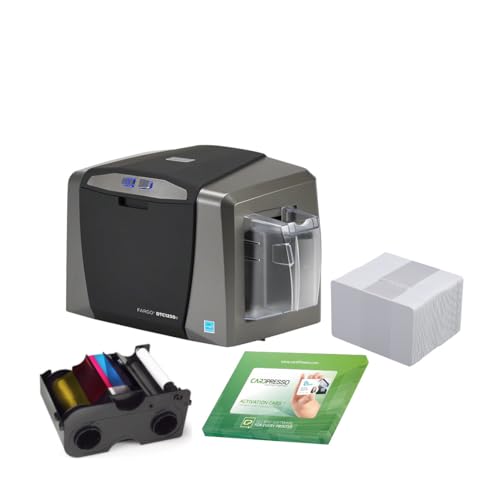
- Includes ribbon, rollers, and PVC cards
- Compact USB single-sided printer
- Comes with full warranty coverage
Best For: Small organizations wanting a ready bundle for basic access badges
High-resolution all-in-one badge maker
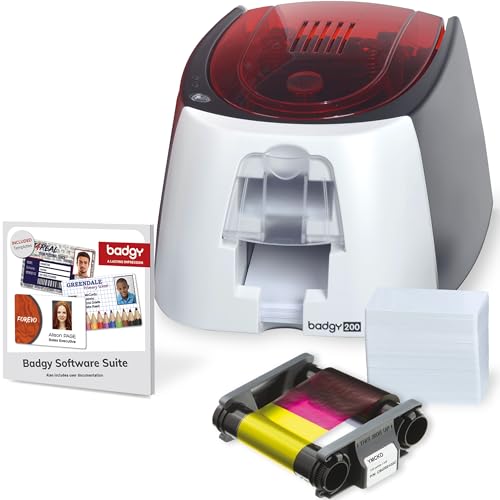
- Includes printer, software, ribbon, and blank cards
- 600 x 600 dpi output with Badge Studio+
- Suited to access control, schools, and workplaces
Best For: Organizations that want a complete badge system with stronger design tools
Dual-Side Desktop ID Package
Fargo DTC1250e Dual-Side ID Card Printer

- Dual-sided direct-to-card printing
- Includes ribbon, cards, software, and camera
- Compact desktop design with 100-card hopper
Best For: Small offices and campuses needing a complete access badge starter kit
Starter Kit for Small Teams
IDP SMART-21S Simplex Printer Kit

- Single-sided printer with included starter supplies
- Compact desktop footprint
- Photo capture trial for rebadging workflows
Best For: Small businesses needing an affordable access badge printer kit
All-in-One Bronze Bundle
Bodno Seaory S25 ID Card Printer

- Manual-feed, single-sided printer for low volume
- Bundled ribbon and Bronze Edition software
- Works with Windows, Mac, and Linux
Best For: Schools and offices needing a simple bundled access badge solution
Corporate Access Choice
Fargo DTC1250e Dual-Sided Printer Only

- Dual-sided dye sublimation printing
- Built for access, business, and member cards
- Printer-only setup with USB and Windows support
Best For: Teams needing two-sided access badges with an existing supply setup
Starter Bundle Pick
Bodno Magicard Pronto Bronze Edition
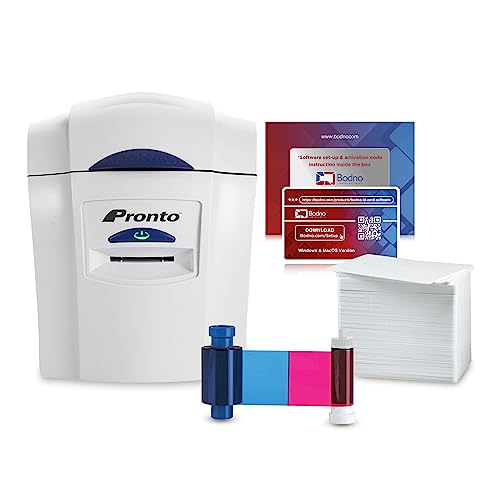
- Complete bundle includes printer, ribbon, cards, and software
- Portable dye sublimation printer with color output
- Includes templates and lifetime software support
Best For: New users who want a ready-to-print access badge package
Compact Access Badge Option
Fargo DTC1250e Single-Sided Printer

- Compact desktop printer for access cards
- Single-sided dye sublimation printing
- Edge-to-edge color or black-and-white output
Best For: Small teams needing a simple single-sided access card printer
Bronze all-in-one starter kit – Seaory S26 ID Card Printer
If you want badge card printers for access control that are simple to launch and already bundled with the essentials, the Bodno Seaory S26 is built for fast setup. It prints single-sided color ID cards at up to 300 x 1200 dpi, and the package includes a color ribbon plus Bodno Bronze Edition software, so you can start producing cards without piecing together extra supplies.
Best For: Small offices or organizations that want an all-in-one ID card printer package with software and supplies included.
Pros:
- Includes a 300-print color ribbon and software to get started quickly
- High-resolution output up to 300 x 1200 dpi for sharp card detail
- Compatible with Windows, Mac, and Linux
- Lifetime Bodno software support and a 2-year hardware warranty
Cons:
- Single-sided printing only
- Print-only function, so it does not add scanning or copying
- USB connectivity may be limiting for some networked setups
This is a practical choice if you value a bundled, user-friendly setup over advanced printer features. The included templates and drag-and-drop software make it especially approachable for routine badge production.
Fast on-demand desktop option – Badgy100 Plastic Card Printer
The Badgy100 is a straightforward choice for badge card printers for access control when you need to print on demand and replace lost or stolen cards quickly. It produces full-color, tamper-proof plastic ID badges, and the included Badge Studio software plus online template library helps you get professional-looking results without much setup.
Best For: Small teams or single-location users who need a compact, simple printer for on-demand badge creation.
Pros:
- Prints full-color ID badges on plastic cards
- Includes Badge Studio software and access to online templates
- Compact, portable design with USB connectivity
- Useful for replacing lost or stolen cards immediately
Cons:
- Single-card output capacity is low
- Slower print speed than larger card printer bundles
- PC compatibility is listed, which may narrow flexibility for some users
Overall, the Badgy100 fits buyers who want a basic, easy-to-use ID card printer more than high-volume throughput. It is a practical desktop option for occasional access cards and custom badges.
Compact bundled workhorse – Fargo DTC1250e Card Printer
For badge card printers for access control, the Fargo DTC1250e bundle is a compact, practical option that arrives with useful supplies. It prints single-sided color cards over USB and includes a YMCKO ribbon, cleaning rollers, and PVC cards, so it is aimed at buyers who want a straightforward printer package rather than a bare unit.
Best For: Small organizations that want a compact printer bundle with supplies included for immediate badge production.
Pros:
- Bundle includes ribbon, cleaning rollers, and blank PVC cards
- Compact design with USB connectivity
- Full warranty coverage is included in the package
- Built for card stock and single-sided printing
Cons:
- Single-sided output only
- USB-only connection may not suit every deployment
- Basic bundle suggests fewer advanced features than higher-end systems
This model makes sense if you want a reliable entry into in-house card printing with fewer add-ons to source separately. The supplied consumables help reduce setup friction for basic access badge workflows.
High-resolution all-in-one badge maker – Badgy200 Plastic Card Printer
The Badgy200 is a strong fit for badge card printers for access control when you want a complete package with higher-resolution output. It includes Badge Studio+ software, database import, templates, a design wizard, and starter supplies, making it easier to create full-color tamper-proof badges for employees, students, or members.
Best For: Schools, workplaces, and member-based organizations that need an easy all-in-one ID badge system.
Pros:
- Includes printer, software, ribbon, blank cards, and cables
- 600 x 600 dpi resolution for sharp card printing
- Badge Studio+ adds database import and design tools
- Listed for access control, employee IDs, student IDs, and member IDs
Cons:
- Print-only design limits multifunction use
- USB connectivity only
- Starter capacity is relatively small with a 25-sheet input tray
Compared with simpler entry-level printers, the Badgy200 offers a more polished software stack and higher resolution for professional-looking cards. It is best suited to users who need a complete badge production setup rather than just a printer.
Dual-Side Desktop ID Package – Fargo DTC1250e Dual-Side ID Card Printer
If you need badge card printers for access control in a small office or campus setting, this Fargo DTC1250e bundle is built for straightforward desktop use. It prints on both sides, includes erase-and-rewrite support for temporary IDs when used with rewritable cards, and comes as a complete starter package with cards, ribbon, software, camera, and a 3-year warranty.
Best For: Teams that want a compact dual-sided access control badge printer with a ready-to-use starter kit.
Pros:
- Dual-sided direct-to-card printing for front-and-back badges
- Built-in erase and rewrite function for temporary ID cards with rewritable media
- Compact footprint and 100-card input hopper for batch jobs
- Bundle includes ribbon, PVC cards, software, camera, and warranty
Cons:
- Best suited to low-volume printing rather than heavy production
- USB connectivity only, so it’s centered on a desktop workflow
- Uses CR-80 card size, which may not fit specialty badge formats
This is a practical all-in-one option if you want to start producing access control badges without building a system from scratch. The included supplies and dual-sided printing make it especially convenient for organizations that need a dependable desktop setup.
Starter Kit for Small Teams – IDP SMART-21S Simplex Printer Kit
This IDP SMART-21S kit is a solid pick if you’re shopping for badge card printers for access control and want something compact, affordable, and easy to deploy. It prints single-sided cards, ships with software, ribbon, PVC cards, and a photo capture trial, and is aimed at small businesses as well as larger organizations making access badges.
Best For: Small businesses and offices that want a compact simplex printer for access control badges.
Pros:
- Starter kit includes printer, software, ribbon, cards, and cables
- Compact size fits easily on desktops and in shared spaces
- High-volume speed claims for color and monochrome cards
- EasyCapture trial supports photo collection for rebadging and onboarding
Cons:
- Single-sided printing only
- PC-only software limits flexibility for mixed-device environments
- USB connection only, with no Ethernet listed
For teams focused on straightforward badge issuance, this kit keeps the setup simple while covering the core supplies. It’s a good fit when access control cards are needed quickly and the workflow stays centered on one desktop printer.
All-in-One Bronze Bundle – Bodno Seaory S25 ID Card Printer
If you want badge card printers for access control with a complete software-and-supplies package, this Bodno Seaory S25 bundle is designed to get you printing right away. It is a single-sided, manual-feed printer for low-volume jobs, and the Bronze Edition software adds templates and drag-and-drop tools for easy card design.
Best For: Offices and schools that want a low-volume access badge printer with bundled software support.
Pros:
- All-inclusive package with ribbon and software included
- Manual feed design gives precise one-card-at-a-time control
- Bronze Edition software includes templates and drag-and-drop design
- Compatible with Windows, Mac, and Linux
Cons:
- Single-sided printing only
- Manual feed setup is better for low-volume use
- Included card capacity is limited to 30 sheets/cards listed in the specs
This package makes sense when simplicity and bundled software matter more than production speed. It’s a practical choice for organizations that need access control badges without investing in a more complex print environment.
Corporate Access Choice – Fargo DTC1250e Dual-Sided Printer Only
If you need badge card printers for access control that can also handle employee IDs, business badges, and membership cards, this dual-sided Fargo DTC1250e is built for straightforward office use. It prints in color on both sides, supports Windows, and is a printer-only setup, so it fits buyers who already have cards and ribbon cartridges lined up.
Best For: Organizations that want dual-sided badge printing for corporate access badges and school or business IDs.
Pros:
- Dual-sided printing for cards that need information on both sides
- Supports ID, business, member, loyalty, gift, and corporate access badges
- Compact printer-only design for existing supply workflows
- USB connectivity with Windows compatibility
Cons:
- Ribbon cartridges and ID cards are sold separately
- Printer-only bundle means no starter supplies are included
- May be more printer than needed for very basic single-sided jobs
This is a practical pick if your access badge workflow benefits from two-sided printing and you already manage supplies separately. It is best suited to teams that want a dedicated badge printer rather than an all-in-one starter bundle.
Starter Bundle Pick – Bodno Magicard Pronto Bronze Edition
Bodno Magicard Pronto ID Card Printer & Complete Supplies Package ID Software - Bronze Edition
Check Price On AmazonFor badge card printers for access control buyers who want a complete out-of-box setup, this Bodno Magicard Pronto bundle covers the hardware, ribbon, cards, and software. It is designed for professional photo ID cards and membership cards, with a portable printer format and easy design tools for users who do not want to piece together supplies separately.
Best For: First-time buyers who want a complete ID card printing package with supplies and software included.
Pros:
- Includes printer, color ribbon, 100 PVC cards, and software
- Portable dye sublimation printer with color output
- Easy-to-learn Bodno Bronze software with templates and drag-and-drop tools
- Two-year hardware warranty plus lifetime software support
Cons:
- Simplex printing only, so it does not print on both sides automatically
- USB-only connectivity may limit placement options
- Included card capacity and bundle scope may suit smaller runs better than high-volume needs
This bundle stands out because it reduces setup friction for access badge printing and general ID work. If you want a manageable, ready-to-print package rather than an equipment-only purchase, it is a strong fit.
Compact Access Badge Option – Fargo DTC1250e Single-Sided Printer
If you want badge card printers for access control in a compact desktop footprint, this single-sided Fargo DTC1250e is a practical fit for small to medium businesses. It is aimed at ID and proximity cards, prints edge to edge in full color or black and white, and keeps the workflow simple with real-time status buttons.
Best For: Small to medium organizations printing single-sided access cards and employee IDs.
Pros:
- Compact desktop design for tighter spaces
- Supports ID cards and proximity cards
- Edge-to-edge printing in full color or black and white
- Includes a complimentary 2iD Beginner Edition software offer
Cons:
- Printer-only package means cards and ribbon are sold separately
- Single-sided printing only
- USB connectivity only
This model makes sense when your access card process is mostly single-sided and you want a small, dependable desktop printer. It balances simplicity with the core features needed for basic badge production.
How We Picked These Badge Card Printers for Access Control
We focused on printers that are practical for real-world badge production, not just basic desktop printing. Priority went to models with dependable print quality, straightforward setup, bundled supplies, and features that support secure ID issuance.
We also considered print volume, single- versus dual-sided capability, software usability, and the long-term cost of ribbons, cards, and maintenance. For access control, reliability matters more than flashy specs.
Quick Comparison: What Matters Most
Some buyers only need a simple single-sided printer for employee badges. Others need dual-sided output for photos, barcodes, rules, or emergency info. Bundled kits can reduce startup friction, while standalone printers may offer more flexibility if you already have supplies or software.
In this category, faster workflows, easy badge design, and compatibility with your access system can matter as much as print speed.
Key Buying Factors for Badge Card Printers for Access Control
Single-Sided Vs. Dual-Sided Printing
Single-sided printers are usually enough for straightforward ID badges. Dual-sided models are better when you need more space for credentials, access instructions, or company branding without crowding the front.
Security and Badge Durability
Look for printers that support tamper-resistant badge design, sharp photo output, and durable PVC card printing. If cards will be used daily at doors or turnstiles, clarity and wear resistance are essential.
Software and Workflow
Good badge software saves time during employee onboarding and visitor management. If your team prints badges often, choose a package that makes it easy to import photos, update records, and reissue cards quickly.
Supplies and Total Cost
The sticker price is only part of the equation. Ribbons, cards, and replacement components affect the real cost over time. Bundles can be a smart value if you are starting from scratch.
Volume and Growth
A small office may do well with a compact printer, but growing organizations should think ahead. If you expect more badge jobs later, it can be worth choosing a model that handles higher demand or faster reprints.
Who Should Buy Which Badge Card Printers for Access Control?
Small teams and first-time buyers should look at easy-to-use bundle kits that include software and supplies. They are the simplest path to getting badges printed quickly.
Mid-size businesses and schools often benefit from dual-sided options because they offer more room for IDs, policies, and access details. If you want a balance of value and flexibility, that is the sweet spot.
Organizations that print badges regularly should prioritize dependable performance, software efficiency, and supply availability. For Badge Card Printers for Access Control, the best choice is the one that matches your badge volume, security needs, and ongoing budget.