
Large laptops need more than a basic stand. The right mount should support the device securely while keeping the screen at a comfortable height and leaving valuable desk space available.
These 10 laptop mounts for heavy devices include clamp-on trays, monitor-arm combinations, flip-down holders, and wall-mounted designs. Compare capacity, compatibility, adjustability, and ventilation before choosing the best fit for your workspace.
Best 10 Laptop Mounts for Heavy Devices Picks for 2026
Heavy-Duty Desk Pick

- Supports up to 22 pounds and 17-inch laptops
- C-clamp or grommet mounting
- Full-motion arm with cable management
Best For: High-capacity adjustable desk setups
Rugged Retention Pick
RAM MOUNTS Tough-Tray Laptop Tray

- Spring-loaded fit for 10- to 17-inch laptops
- Adjustable rubber-grip clamping arms
- Shock- and vibration-dampening ball system
Best For: Secure, vibration-conscious laptop mounting
Convertible Workspace Pick

- Laptop and monitor modes in one arm
- Supports up to 19.8 pounds
- Ventilated tray with straps and cable guides
Best For: Flexible laptop-to-monitor workstations
Space-Saving Wall Pick

- Supports up to 22 pounds and 17-inch laptops
- Wall or VESA mounting options
- Folds away and promotes airflow
Best For: Floating, space-saving laptop workstations
Best Flexible 2-in-1 Pick

- 22-pound capacity for heavier setups
- Removable tray supports laptop or monitor use
- Ventilated tray with broad adjustability
Best For: Flexible laptop-and-monitor workstations
Best Single-Arm Setup
HUANUO Adjustable Laptop Mount
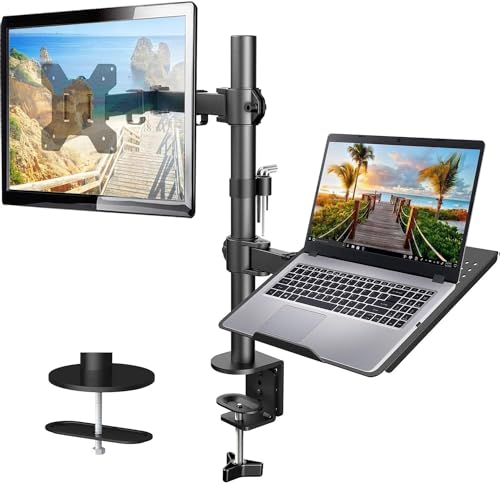
- 22-pound capacity with monitor support
- Articulating arm reaches up to 16 inches
- Ventilated tray and integrated cable management
Best For: A flexible single-arm laptop or monitor station
Best Wall-Mounted Heavy-Duty Option

- Supports up to 19.8 pounds
- Fits 11-17-inch laptops
- Converts for 13-32-inch VESA monitors
Best For: Solid-wall workstations that need substantial weight support
Best Desk-Mount Versatility

- Supports up to 19.8 pounds
- Fits laptops up to 17 inches
- Clamp and grommet mounting options
Best For: Adjustable desk setups switching between laptops and monitors
Best Add-On Tray

- Attaches to 75x75 or 100x100 VESA arms
- Fits laptops up to 16.5 inches wide
- Steel tray with ventilation and adjustable clips
Best For: Upgrading an existing monitor arm for laptop use
Heavy-Duty Desk Pick – VIVO Single Laptop Desk Mount
For shoppers comparing laptop mounts for heavy devices, the VIVO STAND-V001L stands out with a 22-pound capacity, a ventilated tray, and flexible desk positioning. Its C-clamp or grommet mounting gives you a drill-free way to lift a laptop up to 17 inches off the work surface.
Best For: Users who need a high-capacity, adjustable laptop tray for a desk setup.
Pros:
- Supports laptops up to 17 inches and 22 pounds.
- Offers tilt, swivel, rotation, height adjustment, and tray extension.
- Includes both C-clamp and grommet mounting options plus cable clips.
Cons:
- Its desk-mount design requires a suitable surface up to the specified thickness limits.
- The tray and arm may occupy more workspace than a compact fixed holder.
With its unusually strong load rating and broad range of adjustments, this is a practical choice for larger or heavier notebooks where basic laptop stands may fall short.
Rugged Retention Pick – RAM MOUNTS Tough-Tray Laptop Tray
The RAM MOUNTS Tough-Tray is a rugged option among laptop mounts for heavy devices, using a spring-loaded tray and four adjustable rubber-grip arms to hold laptops securely. Its shock- and vibration-dampening ball-and-socket system makes it especially suited to demanding mounting environments.
Best For: Buyers who prioritize adjustable retention and vibration isolation for 10- to 17-inch laptops.
Pros:
- Spring-loaded tray accommodates laptops from 10 to 17 inches.
- Four arms adjust vertically and horizontally to clear ports and fit varying thicknesses.
- High-strength composite construction and a lifetime warranty.
Cons:
- The supplied notes describe the tray but do not specify a total supported weight.
- It is a tray component rather than a complete desk or wall mounting system.
The Tough-Tray is a strong fit when secure clamping and vibration management matter more than a polished desktop workstation design.
Convertible Workspace Pick – MOUNT PRO Laptop Arm Mount
The MOUNT PRO arm combines a laptop tray and monitor mount in one flexible setup, making it a versatile choice among laptop mounts for heavy devices. It holds laptops up to 17 inches and up to 19.8 pounds, while the tray can be removed for a compatible VESA monitor.
Best For: Multitaskers who want to switch between a laptop tray and a single monitor mount.
Pros:
- Supports laptops up to 17 inches and loads from 4.4 to 19.8 pounds.
- Provides tilt, swivel, rotation, and up to 16.9 inches of height adjustment.
- Includes a ventilated tray, anti-slip pads, Velcro straps, and cable management.
Cons:
- The tray should not be rotated to a vertical position.
- Monitor mode requires a display with a 75x75mm or 100x100mm VESA pattern.
This model offers useful flexibility for a changing workstation, particularly if you may alternate between supporting a heavier laptop and mounting a monitor.
Space-Saving Wall Pick – VIVO Flip Down Laptop Holder
For a floating workstation, the VIVO MOUNT-FDLAP1 is one of the more substantial laptop mounts for heavy devices, supporting up to 22 pounds in a steel flip-down tray. It can mount directly to a wall or attach to a compatible VESA arm, then fold away when the laptop is not in use.
Best For: Space-conscious users building a wall-mounted or VESA-based laptop workstation.
Pros:
- Holds 13- to 17-inch laptops weighing up to 22 pounds.
- Supports wall mounting and standard 75x75mm or 100x100mm VESA patterns.
- Folds up to save space and includes ventilation slots, padding, and safety stoppers.
Cons:
- Wall installation requires a suitable surface and secure attachment.
- Its fixed tray format offers less positioning flexibility than a full articulated arm.
If desk space is limited, this holder’s high capacity and fold-away design make it a practical way to create a sturdy floating laptop surface.
Best Flexible 2-in-1 Pick – HUANUO Laptop Desk Mount
For shoppers comparing laptop mounts for heavy devices, this HUANUO model stands out as a flexible desk-mounted option with a 22-pound capacity. Its ventilated tray supports laptops up to 17 inches, while the removable tray lets you use the arm with a compatible monitor instead.
Best For: Users who want one adjustable mount for either a laptop or a monitor and need substantial weight support.
Pros:
- Supports up to 22 pounds and accommodates laptops up to 17 inches.
- Removable tray enables use with 15- to 32-inch VESA monitors.
- Offers tilt, swivel, rotation, a 15-inch pole, and cable management.
- Ventilated tray includes 240 holes to promote airflow.
Cons:
- The tray is limited to laptops up to 17 inches.
- C-clamp and grommet installation are specified for wooden desks.
With its higher weight capacity and two-in-one design, this is a practical choice when your setup may change between a laptop and monitor. Check your desk thickness and mounting surface before installation.
Best Tray-Only Upgrade – VIVO Steel Laptop Tray
This VIVO steel tray is a straightforward add-on for shoppers seeking laptop mounts for heavy devices without buying a complete arm. It fits laptops up to 17 inches, connects to a 100-by-100mm VESA plate, and is designed to work with a separately purchased VESA mount.
Best For: Users who already own a compatible VESA arm and want a metal laptop tray with ventilation and a retaining lip.
Pros:
- Fits laptops and notebooks up to 17 inches.
- Metal construction provides a durable tray platform.
- Ventilation holes help improve airflow.
- Bottom lip helps prevent devices from sliding.
Cons:
- This purchase includes the tray only; the VESA arm is sold separately.
- Compatibility is specified for 100-by-100mm VESA mounting holes.
Choose this tray when you already have the mounting hardware and want a simple way to convert a VESA setup for laptop use. Confirm the arm’s plate compatibility before ordering.
Best Single-Arm Setup – HUANUO Adjustable Laptop Mount
This HUANUO single-arm mount is a practical choice among laptop mounts for heavy devices, combining a ventilated 14-by-12-inch tray with support for a VESA monitor. The arm supports up to 22 pounds and can be installed with either a C-clamp or grommet base on a compatible wooden desk.
Best For: Users who want a single articulating arm for a laptop, monitor, or flexible two-device workspace.
Pros:
- Supports up to 22 pounds and monitors from 13 to 32 inches.
- Ventilated tray includes a protruding bottom lip for added retention.
- Provides tilt, swivel, rotation, and height adjustment.
- Includes cable management and two mounting options.
Cons:
- The tray is designed for laptops up to 17 inches.
- Mounting hardware is specified for wooden desks.
- Arm adjustments require the screws to be tightened securely.
This model balances monitor compatibility, laptop support, and articulation in one desk mount. It is a strong fit for users who value adjustability, provided the device specifications and desk construction match the requirements.
Best Wall-Mounted Heavy-Duty Option – 2-in-1 Laptop Wall Mount
For laptop mounts for heavy devices, the MOUNT PRO stands out as a wall-mounted option rated for 4.4 to 19.8 pounds. Its ventilated tray supports most 11- to 17-inch laptops, while the included VESA plate lets it serve as a monitor arm.
Best For: Home offices, standing or sitting workstations, and users who want to clear desk space with a wall installation.
Pros:
- Supports laptops or monitors weighing up to 19.8 pounds.
- Full-motion adjustment includes tilt, swivel, and up to 11.8 inches of height adjustment.
- Ventilated tray, adjustable straps, cable management, and durable aluminum-steel construction.
Cons:
- Requires secure installation into a wood stud, concrete, brick, or another suitable solid surface.
- Not intended for drywall alone.
- Monitor rotation is specified for monitor use only.
This is a strong choice when weight capacity and desk clearance matter most. The wall-mount format is less convenient than a desk clamp, but it provides a stable, flexible setup when installed correctly.
Best Desk-Mount Versatility – 2-in-1 Laptop and Monitor Arm
The HUANUO is a practical pick among laptop mounts for heavy devices, supporting up to 19.8 pounds while working with laptops up to 17 inches or VESA monitors up to 34 inches. Its clamp and grommet mounting options suit a range of desks.
Best For: Users who want a heavy-duty laptop or monitor arm with flexible desk installation and broad screen compatibility.
Pros:
- Supports 4.85 to 19.8 pounds and monitors from 13 to 34 inches.
- Offers tilt, swivel, rotation, up to 18.1 inches of extension, and up to 17.5 inches of height.
- Includes a ventilated tray with anti-slip pads, a bottom guard, and Velcro straps.
Cons:
- The laptop tray is limited to notebooks up to 17 inches.
- The counterbalanced arm may rise when the laptop is removed.
- Desk thickness limits apply to both the C-clamp and grommet installation.
With strong weight support and multiple mounting methods, this arm is a well-rounded choice for a desk-based setup. Its adjustment range is especially useful for positioning a heavy laptop at eye level.
Best Add-On Tray – VESA Laptop Mount Tray
The Mount-It! Laptop Tray is a straightforward solution for adding a laptop to an existing VESA monitor arm. For laptop mounts for heavy devices, its steel construction, adjustable clips, and traction pads help keep a compatible notebook positioned securely.
Best For: Anyone who already owns a 75×75 or 100×100 VESA monitor arm and wants a laptop tray for a dual-screen workstation.
Pros:
- Converts a compatible VESA monitor arm into a laptop mount.
- Adjustable clips fit laptops up to 16.5 inches wide.
- Ventilated steel tray, bottom lips, and traction pads help with cooling and stability.
Cons:
- Requires an existing monitor arm or stand, which is not included.
- Compatibility depends on a 75×75 or 100×100 VESA pattern.
- It provides a tray rather than a complete mounting arm.
This is the most economical-style option when a VESA arm is already part of your workspace. It avoids replacing existing hardware, but buyers without a monitor arm will need to budget for one separately.
How We Picked the Best Laptop Mounts for Heavy Devices
We focused on mounts designed for larger notebooks and heavier daily setups, prioritizing published weight limits, supported laptop sizes, construction, attachment method, and adjustment range. We also considered whether each model supports VESA monitor arms, includes ventilation, and provides a stable way to secure the laptop during repositioning.
Because desks and devices vary, no single mount is best for everyone. A tray rated for a large laptop may still be unsuitable for a narrow desk, weak surface, unusually thick computer, or arm that cannot support the combined load.
Quick Comparison
| Mount type | Best for | What to check |
|---|---|---|
| Clamp-on desk mount | Flexible workstation setups | Desk thickness, clamp clearance, total load |
| Monitor-arm laptop tray | Shared screen-and-laptop arrangements | VESA pattern, arm capacity, tray dimensions |
| Flip-down tray | Saving desk space | Wall or desk mounting surface and hinge capacity |
| Wall mount | Permanent, space-efficient installations | Wall construction, hardware, and stud placement |
| Steel ventilated tray | Durability and airflow | Edge supports, device fit, and padding |
Key Buying Factors for Laptop Mounts for Heavy Devices
Weight Capacity and Stability
Check the mount’s maximum load, then account for the laptop, charger, docking accessories, and any pressure created while typing. For an articulated arm, the stated capacity may change as the arm extends. Choose a comfortable margin rather than operating at the limit.
Fit and Retention
Confirm both the advertised screen-size range and the tray’s actual usable dimensions. Large laptops can have thick bodies, wide bezels, or off-center ports. Raised lips, adjustable brackets, rubber pads, and retaining straps help prevent sliding, especially on angled or moving arms.
Mounting Compatibility
Desk clamps need a suitable edge and adequate clearance. VESA trays generally require a compatible 75×75 or 100×100 mm pattern and a monitor arm strong enough for the combined load. Wall mounts require the correct anchors or direct attachment to studs or masonry.
Adjustability and Ergonomics
Look for height, tilt, swivel, and extension adjustments that suit your chair and display position. A mount should let you place the laptop near eye level without forcing the keyboard too high for comfortable typing. A separate keyboard is often the better choice for elevated laptop setups.
Ventilation and Construction
Perforated or open steel trays can improve airflow, but they do not replace the laptop’s own cooling system. Check for smooth edges, durable joints, secure fasteners, and padding that will not block vents or damage the chassis.
Who Should Buy Which Laptop Mounts for Heavy Devices?
- Choose a clamp-on desk mount if you want a flexible installation without drilling and have a sturdy desk edge.
- Choose a monitor-arm tray if your workspace already uses a VESA arm or you want the laptop and monitor to move together.
- Choose a flip-down design if reclaiming desk space is the main priority and you prefer a compact, foldable setup.
- Choose a wall mount for a permanent workstation, especially where desk depth is limited and the wall can support the load.
- Choose a reinforced ventilated tray if durability, airflow, and support for a larger notebook matter more than the smallest footprint.
Before ordering, measure the laptop, desk or wall, and available cable path. Then verify the mount’s weight rating, hardware requirements, and adjustment limits to ensure a secure long-term installation.