
The best laptop mounts free up desk space, improve screen positioning, and make it easier to build a comfortable workstation. This roundup covers adjustable monitor-arm trays, C-clamp stands, universal laptop platforms, and a vehicle-specific mount.
Before choosing, confirm your laptop’s size and weight, available mounting space, and whether you need a fixed platform or full-motion adjustment. The right mount should remain stable while keeping ports, ventilation, and everyday access practical.
Best 10 Laptop Mounts Picks for 2026
Best Desk-and-Monitor Combo
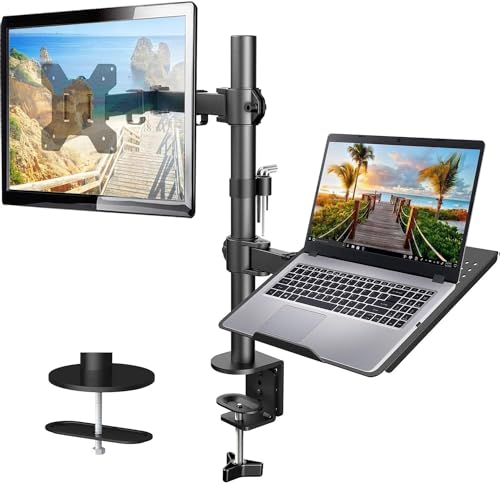
- Ventilated 14 x 12-inch laptop tray
- Supports 13-32-inch VESA monitors
- C-clamp and grommet mounting options
Best For: Combined laptop-and-monitor desk setups
Best Truck-Specific Option

- Designed for specified Ford trucks
- Installs using existing seat bolts
- Dual articulating swing arm
Best For: Mobile work in compatible Ford pickups
Best Large-Laptop Desk Stand
Fully Adjustable C-Clamp Mount

- Fits laptops up to 17 inches
- Supports up to 22 pounds
- Offers C-clamp or grommet mounting
Best For: Large laptops and highly adjustable desks
Best Universal Replacement Tray

- Spring-loaded 10-16-inch laptop fit
- Adjustable rubber-gripped side arms
- Lifetime warranty and vibration isolation
Best For: Modular RAM mounting systems
Best Versatile Pick
WALI 2-in-1 Laptop and Monitor Desk Mount

- Supports laptops up to 17 inches and compatible monitors
- Full-motion adjustment with height and extension range
- Clamp or grommet mounting for flexible installation
Best For: Flexible laptop-and-monitor workstations
Best Cooling Design
HUANUO Ventilated Laptop Desk Mount

- Tray includes 240 ventilation holes
- Converts between a laptop holder and monitor arm
- Includes cable clips plus clamp and grommet mounting
Best For: Cooler, organized laptop workspaces
Best Height Range
WALI Adjustable Laptop Desk Mount

- Offers up to 16 inches of height adjustment
- Supports laptops up to 17 inches and 22 pounds
- Includes C-clamp and grommet mounting options
Best For: Desks needing flexible height and mounting compatibility
Most Versatile

- Works with laptops up to 17 inches or monitors up to 34 inches.
- Full-motion arm with tilt, swivel, rotation, and extension.
- Ventilated tray with anti-slip pads and Velcro straps.
Best For: Flexible laptop-and-monitor workstations
Best Warranty
MOUNT PRO 2-in-1 Laptop Arm Mount

- Fits laptops up to 17 inches or monitors up to 32 inches.
- Full-motion arm raises screens up to 16.9 inches.
- Includes cable management and a 10-year warranty.
Best For: Long-term, space-saving workstation setups
Best Desk-and-Monitor Combo – Adjustable Laptop Arm
For shoppers comparing laptop mounts, the HUANUO HNCM2 combines a ventilated laptop tray with a monitor arm in one desk-mounted setup. Its articulating arm offers height, tilt, swivel, and rotation adjustments, while C-clamp and grommet hardware support drill-free installation on compatible wooden desks.
Best For: Dual-screen desk setups that need a laptop tray and monitor mount together.
Pros:
- Supports laptops on a 14 x 12-inch ventilated tray and monitors from 13 to 32 inches.
- Offers up to 17 inches of height adjustment, plus tilt, swivel, and rotation.
- Includes C-clamp and grommet mounting options with integrated cable management.
Cons:
- Mounting hardware is intended for wooden desks.
- Monitor, VESA, weight, and desk-thickness compatibility should be checked before purchase.
This is a practical choice when you want one compact mount to organize both a laptop and an external monitor, provided your desk and display meet the listed requirements.
Best Truck-Specific Option – No-Drill Ford Laptop Mount
Among laptop mounts, the RAM MOUNTS RAM-VB-195-SW1 is designed for specified Ford trucks and installs without drilling by using existing passenger-seat bolts. Its dual articulating swing arm and universal tray allow flexible positioning for compatible laptops inside the vehicle.
Best For: Drivers of compatible Ford F-150 and Super Duty trucks who need a permanent passenger-side laptop platform.
Pros:
- Fits specified 2015-2026 F-150, 2022-2026 F-150 Lightning, and 2017-2026 F-250-F-550 models.
- Uses existing seat bolts, avoiding vehicle drilling.
- Accommodates laptops 10 to 16 inches wide and includes a dual articulating swing arm.
- Uses powder-coated steel and marine-grade aluminum construction with a lifetime warranty.
Cons:
- Vehicle and model-year compatibility must be verified before purchase.
- The listed maximum weight capacity is 2 pounds.
This mount is purpose-built rather than universal for vehicles, so its main advantage is a no-drill fit for the listed Ford trucks. Confirm both truck compatibility and laptop weight before relying on it for mobile work.
Best Large-Laptop Desk Stand – Fully Adjustable C-Clamp Mount
The VIVO STAND-V001L is one of the more flexible laptop mounts for a desk, with a ventilated tray sized for laptops up to 17 inches. Its arm tilts, swivels, rotates, and extends, while the included C-clamp and grommet options provide drill-free mounting on desks within the stated thickness limits.
Best For: Large laptops and adjustable workstation layouts that need broad positioning control.
Pros:
- Supports laptops up to 17 inches and up to 22 pounds.
- Provides tilt, swivel, 360-degree rotation, and up to 16.5 inches of tray extension.
- Fits surfaces up to 3.4 inches with the C-clamp or up to 3 inches with the grommet mount.
- Includes detachable cable clips and can also support a compatible monitor.
Cons:
- The tray and arm require a suitable desk surface and careful assembly.
- Monitor use requires checking compatibility, including size and mounting requirements.
With its larger tray and extensive articulation, this VIVO mount suits users who want to lift a laptop off the desk while retaining the ability to reposition it for different viewing angles.
Best Universal Replacement Tray – Tough-Tray Laptop Holder
The RAM MOUNTS Tough-Tray is a universal laptop tray for shoppers who already have, or plan to add, a compatible RAM mounting system. Its spring-loaded side arms adjust vertically and horizontally to hold laptops from 10 to 16 inches wide, with rubber grips and a shock- and vibration-dampening ball-and-socket system.
Best For: Replacing or configuring a laptop tray within a RAM mounting setup.
Pros:
- Spring-loaded tray accommodates laptops from 10 to 16 inches wide and can support laptops with 17-inch screens.
- Four adjustable, rubber-gripped arms can clear ports, drives, and different laptop thicknesses.
- Perimeter mounting holes support attachment of devices such as GPS units, PDAs, and phones.
- Includes a lifetime warranty and RAM’s ball-and-socket shock and vibration isolation system.
Cons:
- This is a tray rather than a complete desk or vehicle mounting system.
- Compatibility with the rest of the mounting setup should be confirmed separately.
This Tough-Tray is a focused option for modular RAM users who need adjustable laptop retention and device-mounting flexibility, but it may not meet the needs of shoppers seeking an all-in-one laptop stand.
Best Versatile Pick – WALI 2-in-1 Laptop and Monitor Desk Mount
For shoppers comparing laptop mounts, the WALI GSMP001NLP stands out as a flexible 2-in-1 option. Its detachable tray supports laptops up to 17 inches, while the arm can also hold compatible monitors, making it useful for changing between laptop and dual-display setups.
Best For: Workstations that need both laptop and monitor mounting flexibility.
Pros:
- Supports laptops up to 17 inches and monitors from 17 to 32 inches, with monitor support listed up to 26.4 pounds.
- Offers tilt, swivel, rotation, height, and extension adjustments for ergonomic positioning.
- Includes clamp and grommet installation options for desks from 0.39 to 2.76 inches thick.
- Ventilated tray holes promote airflow and help free up desk space.
Cons:
- The laptop capacity is limited to 22 pounds.
- Its broad adjustment range may be more than needed for a simple fixed laptop setup.
The WALI is a strong choice when adaptability matters. It combines a laptop tray, monitor compatibility, and extensive movement in one space-saving arm, backed by a listed 10-year warranty.
Best Cooling Design – HUANUO Ventilated Laptop Desk Mount
Among laptop mounts designed for everyday comfort, the HUANUO HNCM16 pairs a ventilated tray with flexible positioning. It accommodates laptops up to 17 inches and can convert to a monitor arm for screens from 15 to 32 inches.
Best For: Users who prioritize laptop airflow, cable organization, and easy setup changes.
Pros:
- The 240-hole tray improves airflow around the laptop.
- Supports laptops up to 17 inches or monitors from 15 to 32 inches with VESA 75x75mm and 100x100mm compatibility.
- Provides tilt, swivel, rotation, and height adjustment through its 15-inch pole.
- Includes cable-management clips and clamp or grommet installation options.
Cons:
- Its maximum supported weight is 22 pounds.
- The tray must be removed when using the arm for a monitor.
The HUANUO is a practical option for a tidy, adaptable desk. Its airflow-focused tray and included cable routing make it particularly suitable for long work sessions where organization and cooling are priorities.
Best Height Range – WALI Adjustable Laptop Desk Mount
For a straightforward laptop mounting solution, the WALI M00LP combines a ventilated tray with a wide height-adjustment range. It supports notebooks up to 17 inches and can also hold a compatible monitor, helping raise the display while reclaiming space beneath it.
Best For: Users who want substantial height adjustment and broad desk-mount compatibility.
Pros:
- Supports laptops up to 17 inches and up to 22 pounds.
- Provides up to 16 inches of height adjustment, plus tilt, swivel, and 360-degree rotation.
- Includes both a C-clamp for desks from 0.4 to 4 inches thick and a grommet mount for desks from 0.4 to 2.2 inches thick.
- Vented tray helps airflow while the arm frees desktop space.
Cons:
- The listed tilt range is limited to plus or minus 15 degrees.
- Monitor use requires a compatible mounting-hole pattern.
The WALI M00LP is a sensible pick when desk thickness varies or a higher viewing position is important. Its strong mounting range and 16-inch height adjustment offer useful flexibility without requiring a separate laptop stand.
Most Versatile – HUANUO 2-in-1 Laptop Mount
If you want laptop mounts that can adapt as your setup changes, the HUANUO 2-in-1 combines a ventilated notebook tray with a VESA-compatible monitor mount. It supports laptops up to 17 inches or monitors from 13 to 34 inches, while its articulated arm helps position the screen at a comfortable height.
Best For: Users who want one desk mount for either a laptop or a large monitor.
Pros:
- Switches between a laptop tray and monitor mounting for added flexibility.
- Offers ±45° tilt, ±90° swivel, 360° rotation, and up to 18.1 inches of arm extension.
- Ventilated tray includes anti-slip pads, a bottom guard, and Velcro straps.
- Supports both C-clamp and grommet installation.
Cons:
- The tray is limited to laptops up to 17 inches.
- The counterbalanced arm may rise when the laptop is removed, so it requires controlled handling.
With broad monitor compatibility, generous adjustment range, and a secure ventilated tray, this HUANUO mount is a strong all-purpose choice for flexible workstations.
Best Cable Management – UPGRAVITY Laptop Desk Mount
Among laptop mounts, the UPGRAVITY model stands out for combining a detachable tray with built-in cable organization. It holds laptops up to 17 inches or VESA-compatible monitors up to 32 inches, and its three-joint arm provides several ways to adjust the viewing position.
Best For: Home offices and gaming desks where organized cables and flexible positioning matter.
Pros:
- Detachable 11.8-by-10.4-inch tray supports laptops up to 17 inches.
- Provides 90° tilt, 180° swivel, and 360° rotation with height adjustment.
- Detachable cable clips help route power and AV cables along the arm and pole.
- Includes both C-clamp and grommet mounting options.
Cons:
- Monitor compatibility is limited to screens up to 32 inches.
- Its C-clamp is specified for desks up to 1.97 inches thick.
The UPGRAVITY is a practical pick when cable clutter is a major concern. Its adjustable arm and dual mounting options also make it easy to tailor to different desk layouts.
Best Warranty – MOUNT PRO 2-in-1 Laptop Arm Mount
The MOUNT PRO is one of the more adaptable laptop mounts for users who alternate between a notebook and an external display. Its tray supports laptops up to 17 inches, while removing the tray makes room for VESA monitors up to 32 inches. The aluminum arm also includes cable routing and broad positioning controls.
Best For: Professionals, students, and gamers seeking a space-saving dual-purpose mount with long warranty coverage.
Pros:
- Supports laptops up to 17 inches or monitors from 13 to 32 inches.
- Offers -45° to +90° tilt, 180° swivel, and 360° rotation.
- Ventilated tray includes four anti-slip pads and Velcro straps.
- Includes clamp and grommet mounting options plus a 10-year warranty.
Cons:
- Monitor support tops out at 32 inches.
- The tray should not be rotated to a vertical position.
- Grommet installation requires a hole within the specified size range.
With strong adjustment range, built-in cable management, and a notably long warranty, the MOUNT PRO offers a balanced solution for a clean, adjustable laptop-or-monitor workstation.
How We Picked These Laptop Mounts
We selected these Laptop Mounts based on compatibility, adjustability, mounting method, stated weight capacity, and the range of setups they support. The list includes desk-mounted arms for single-monitor workstations, laptop-only stands, universal trays, and a no-drill truck mount. We also considered whether each design can accommodate larger notebooks or share space with an external monitor.
Quick Comparison
| Best For | Recommended Type | What to Look For |
|---|---|---|
| Desk and monitor pairing | Monitor arm with laptop tray | VESA compatibility, tray size, and arm capacity |
| Limited desk space | C-clamp laptop arm | Clamp clearance, reach, and stability |
| Large notebooks | Heavy-duty desk mount | 17-inch support and higher weight capacity |
| Vehicle use | No-drill truck mount | Vehicle compatibility and secure installation |
Key Buying Factors for Laptop Mounts
Size and Weight Compatibility
Check both the maximum screen size and weight limit. A 17-inch laptop may fit the tray dimensions but still exceed the mount’s rated capacity, especially with a protective case or accessories.
Mounting Method
C-clamp mounts attach to the rear edge of a desk and usually preserve surface space. Grommet mounts can offer a cleaner installation when your desk has a cable hole. Vehicle mounts require an entirely different fit, so confirm the exact truck model before ordering.
Adjustability and Stability
Look for height, tilt, swivel, and extension adjustments if you frequently change posture or alternate between sitting and standing. Full-motion arms are more flexible, while simpler platforms may feel steadier and be faster to position.
Ventilation and Access
A tray should support the laptop without blocking vents, charging ports, or side connections. If you regularly remove the laptop, prioritize an open tray with accessible edges rather than a deeply enclosed platform.
Who Should Buy Which Laptop Mounts?
Choose a monitor-arm tray if you want a laptop-and-monitor workstation with a smaller footprint. A C-clamp stand is a practical choice for renters, shared desks, and users who do not want to drill into the desktop. Larger laptops benefit from mounts explicitly rated for 17-inch notebooks and heavier loads.
For a basic, dedicated laptop platform, a simpler adjustable stand may provide the best value and fewer adjustments to maintain. Truck owners should choose the vehicle-specific RAM MOUNTS option rather than adapting a desk mount. If you are uncertain, measure the laptop and desk first, then select a mount with some capacity headroom instead of relying on the maximum published limit.