
A cramped desk does not have to mean a cramped workstation. The right laptop mount can free valuable surface area, raise your screen to a more comfortable height, and make room for a keyboard, mouse, notebook, or second display.
We selected 10 laptop mounts for small desks across several designs, from compact clamp-on trays to flexible monitor arms and discreet under-desk holders. Use the comparison and buying advice below to find the best fit for your laptop, desk, and daily workflow.
Best 10 Laptop Mounts for Small Desks Picks for 2026
Most Versatile Mount

- Supports laptops up to 17 inches and 22 pounds
- C-clamp or grommet mounting
- Wide tilt, swivel, rotation, and height adjustment
Best For: Flexible small-desk setups
Best 2-in-1 Option

- Switches between laptop and monitor use
- Ventilated tray has 240 airflow holes
- Includes cable management and two mounting options
Best For: Flexible laptop-and-monitor workstations
Best Under-Desk Design
VIVO Clamp-on Rotating Laptop Tray

- Rotates below the desk to save surface space
- Fits laptops up to 17 inches and 11 pounds
- Single C-clamp mounts without drilling
Best For: Crowded desks needing an under-desk tray
Best Height Range
WALI Adjustable Laptop Desk Mount

- Up to 16 inches of height adjustment
- Supports laptops up to 17 inches and 22 pounds
- C-clamp and grommet mounting included
Best For: Ergonomic setups needing substantial height range
Best All-in-One Pick
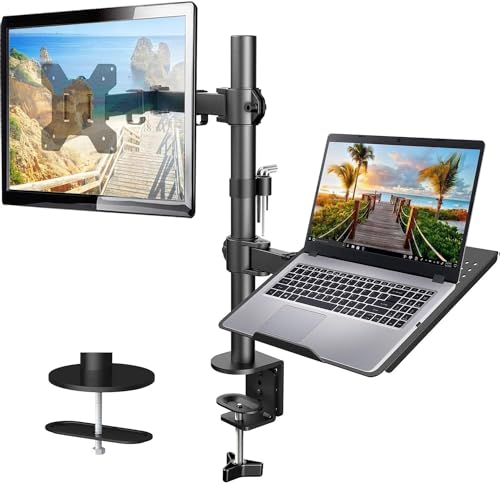
- Ventilated 14 x 12-inch laptop tray
- Supports 13-32-inch monitors up to 22 lb
- C-clamp or grommet mounting with cable management
Best For: Small workstations needing an adjustable laptop-and-monitor setup
Best Under-Desk Space Saver
Mount-It! Under Desk Laptop Holder
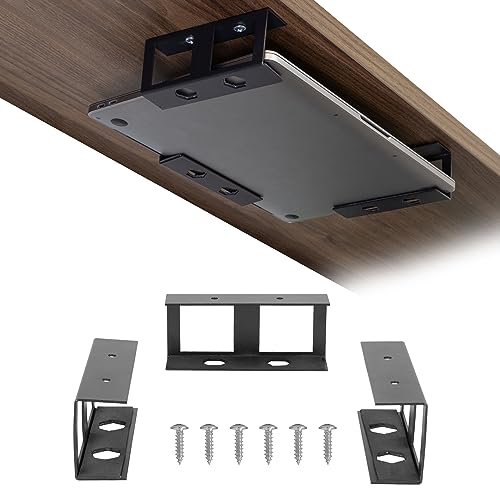
- Stores devices beneath desks or shelves
- Supports devices up to 1.7 inches and 11 lb
- Includes screws, tape, and protective foam pads
Best For: Clearing laptops and slim devices off small desktops
Best Adjustable Mid-Size Setup

- Detachable ventilated 400 x 300 mm tray
- Supports laptops up to 15.6 inches and 15.6 lb
- Adjustable arm with C-clamp and grommet options
Best For: Flexible laptop-and-monitor setups on compact workstations
Best No-Drill Space Saver
Adjustable Desk Side Laptop Mount

- Clamp-on installation needs no drilling
- Metal frame with silicone scratch protection
- Frees desk space by mounting the laptop at the side
Best For: Small desks and renters wanting a compact, tool-free holder
Best Full-Motion 2-in-1

- Supports laptops up to 17 inches or monitors up to 34 inches
- Offers tilt, swivel, and 360-degree rotation
- Ventilated tray helps secure and cool the laptop
Best For: Flexible small workstations that may alternate between a laptop and monitor
Best for Laptop-to-Monitor Flexibility

- Converts between a laptop tray and VESA monitor mount
- Provides broad tilt, swivel, and rotation adjustment
- Includes ventilation, securing straps, and cable management
Best For: Compact workstations needing an adjustable laptop or monitor arm
Most Versatile Mount – VIVO Single Laptop Desk Mount
For shoppers comparing laptop mounts for small desks, the VIVO STAND-V001L offers a flexible way to lift a laptop off the work surface while preserving adjustable positioning. Its ventilated tray supports laptops up to 17 inches and 22 pounds, with either C-clamp or grommet installation.
Best For: Small workspaces that need broad height, tilt, swivel, and rotation adjustments.
Pros:
- Fits laptops up to 17 inches and supports up to 22 pounds.
- Offers C-clamp or grommet mounting for different desk layouts.
- Provides tilt, swivel, rotation, and height adjustment, plus cable clips.
- Can also support a compatible monitor when the tray is configured accordingly.
Cons:
- The 14-by-11.8-inch tray may take up more space than compact laptop platforms.
- Requires checking desk thickness against the selected mounting method.
With its generous adjustment range and dual mounting options, this VIVO model is a strong all-around choice when flexibility matters more than the smallest possible footprint.
Best 2-in-1 Option – HUANUO Laptop Desk Mount
The HUANUO laptop desk mount is designed for small desks that may need to switch between laptop and monitor setups. Its ventilated tray holds laptops up to 17 inches, while the removable tray allows the arm to support compatible monitors from 15 to 32 inches.
Best For: Users who want one desk mount for both a laptop and a monitor.
Pros:
- Supports laptops up to 17 inches or monitors from 15 to 32 inches.
- Ventilated tray includes 240 holes to promote airflow.
- Provides tilt, swivel, rotation, and 15 inches of pole adjustment.
- Includes cable management and C-clamp or grommet installation.
Cons:
- The 22-pound capacity applies across the supported setup.
- Monitor use requires a VESA-compatible display and removing the laptop tray.
This is a practical pick for a compact desk that serves multiple roles. The removable tray and substantial adjustment range make it more adaptable than a laptop-only stand.
Best Under-Desk Design – VIVO Clamp-on Rotating Laptop Tray
For especially crowded small desks, the VIVO MOUNT-LAP1CB moves the laptop tray below the desktop when needed. The rotating clamp lets you pivot the platform 360 degrees, creating extra surface area while keeping a laptop within reach.
Best For: Small desks where reclaiming the main desktop is the priority.
Pros:
- Rotates below the desk to free up the primary work surface.
- Fits laptops up to 17 inches with a maximum supported weight of 11 pounds.
- Uses a single adjustable C-clamp without drilling.
- Offers 360-degree positioning for flexible placement.
Cons:
- Supports less weight than the other listed mounts.
- Requires a desk no thicker than 2 inches and 31 inches of rotation clearance.
- Does not lock in place, and it is not compatible with lipped or beveled edges.
This tray is appealing when desk space is scarce, but its installation restrictions and lower weight limit require careful measurement before purchase.
Best Height Range – WALI Adjustable Laptop Desk Mount
The WALI adjustable laptop desk mount combines a ventilated 14-by-11-inch tray with a height-adjustable arm, making it a useful option among laptop mounts for small desks. It supports laptops up to 17 inches and can also accommodate a compatible monitor.
Best For: Users who want substantial height adjustment and dual laptop-or-monitor functionality.
Pros:
- Supports laptops up to 17 inches and 22 pounds.
- Offers up to 16 inches of height adjustment, plus tilt, swivel, and rotation.
- Includes both C-clamp and grommet mounting options.
- Ventilation holes help allow airflow beneath the laptop.
Cons:
- The tray’s protruding bottom lip may affect how some laptops sit.
- Monitor use requires a display with 75-by-75mm or 100-by-100mm mounting holes.
- Desk thickness limits differ between the C-clamp and grommet mounts.
With a 10-year warranty and a broad range of mounting and adjustment options, the WALI is a compelling choice for buyers prioritizing long-term versatility and ergonomic positioning.
Best All-in-One Pick – HUANUO Laptop and Monitor Arm
For small desks that need both a laptop and an external display, this HUANUO model combines a ventilated laptop tray with an adjustable monitor arm. It is a versatile choice among laptop mounts for small desks, provided your monitor meets the supported VESA, size, and weight limits.
Best For: Small workstations needing an adjustable laptop-and-monitor setup.
Pros:
- Supports laptops on a 14 x 12-inch ventilated tray with a retaining lip.
- Fits 13- to 32-inch VESA monitors weighing up to 22 pounds.
- Offers tilt, swivel, rotation, height adjustment, cable management, and C-clamp or grommet installation.
Cons:
- The mounting hardware is intended for wooden desks.
- Installation requires careful tightening and following the provided instructions.
Its combination of monitor support, laptop storage, and flexible positioning makes it a strong space-saving option for compact desks. Check your desk material and monitor specifications before buying.
Best Under-Desk Space Saver – Mount-It! Under Desk Laptop Holder
If your desktop is too crowded for a conventional stand, this Mount-It! bracket system stores a laptop or slim device underneath the desk, shelf, or even on a wall. It is one of the most compact laptop mounts for small desks and leaves the work surface open.
Best For: Clearing laptops, keyboards, and other slim devices off a small desktop.
Pros:
- Uses three adjustable steel brackets beneath a desk, shelf, or wall.
- Fits devices up to 1.7 inches high and 11 pounds.
- Includes protective foam pads, screws, and double-sided tape for installation.
- Backed by a lifetime warranty and US-based customer support.
Cons:
- It is a fixed storage bracket rather than an articulating laptop arm.
- Installation positioning requires measuring the device’s width and depth.
This is a practical choice when the main goal is reclaiming desktop space rather than adjusting the laptop’s viewing angle. Verify your device dimensions and the strength of the mounting surface first.
Best Adjustable Mid-Size Setup – Suptek Laptop Desk Mount
The Suptek desk mount pairs a detachable laptop tray with an adjustable monitor arm, making it useful when you want a more ergonomic arrangement on a compact workstation. It supports smaller monitors and laptops up to 15.6 inches.
Best For: Users who want an adjustable laptop tray that can convert into a monitor-only arm.
Pros:
- Detachable 400 x 300 mm tray includes ventilation holes and a retaining lip.
- Supports 13- to 27-inch VESA monitors and laptops up to 15.6 inches.
- Provides independent adjustment, 360-degree monitor rotation, tilt, and up to 400 mm of height adjustment.
- Includes C-clamp and grommet mounting options for desks 10-80 mm thick.
Cons:
- The laptop capacity is limited to 15.6 inches and 15.6 pounds.
- It has a shorter one-year warranty than some alternatives.
With a removable tray and broad adjustment range, this Suptek model offers flexibility for small desks that alternate between laptop and monitor use. Confirm the laptop weight and monitor VESA pattern before installation.
Best No-Drill Space Saver – Adjustable Desk Side Laptop Mount
For shoppers looking for laptop mounts for small desks, this side-mounted clamp holder creates a dedicated spot for a laptop, tablet, notebook, or documents without taking up the main work surface. Its tool-free design attaches to desks up to 1.96 inches thick and uses silicone padding to help protect both the desk and device.
Best For: Small desks, renters, home offices, and anyone who wants a simple side-mounted laptop holder without drilling.
Pros:
- No-drill, clamp-on installation for desks up to 1.96 inches thick
- Metal construction with thick anti-scratch silicone pads
- Adjustable design fits laptops, tablets, notebooks, documents, and sheet music
- Lifts the laptop off the desk to leave more room for a keyboard and mouse
Cons:
- Side-mounted design may require a suitable desk edge and clear side space
- Its 1.5-pound weight and compact holder format are better suited to storage and positioning than a full articulating arm
This is a practical choice when desk space is limited and you want the simplest installation possible. It does not provide the height and motion range of an articulated stand, but its compact, damage-free clamp is useful for straightforward workspace organization.
Best Full-Motion 2-in-1 – HUANUO Laptop Mount with Tray
This HUANUO model is one of the more versatile laptop mounts for small desks because it can hold either a laptop up to 17 inches or a VESA monitor from 13 to 34 inches. Its articulating arm raises the screen off the desk while offering tilt, swivel, and rotation adjustments for a more flexible workstation.
Best For: Small workstations that need an adjustable laptop arm now but may switch to a monitor setup later.
Pros:
- 2-in-1 tray and monitor-arm design supports laptops up to 17 inches or VESA monitors up to 34 inches
- Full-motion adjustment includes ±45° tilt, ±90° swivel, and 360° rotation
- Arm extends up to 18.1 inches and reaches a maximum height of 17.5 inches
- Ventilated tray includes anti-slip pads, a bottom guard, and Velcro straps
Cons:
- The arm may rise when the laptop is removed because of its counterbalance mechanism
- Its larger articulating-arm design requires more installation space than a basic side clamp
Choose this mount if adjustability and future flexibility matter more than the smallest possible footprint. The C-clamp supports desks from 0.39 to 2.56 inches thick, while the grommet option accommodates desks up to 2.95 inches, giving it broad installation compatibility.
Best for Laptop-to-Monitor Flexibility – MOUNT PRO Laptop Arm Mount
The MOUNT PRO arm is a useful option among laptop mounts for small desks when you want to reclaim surface area without giving up the ability to use a monitor later. With the tray attached, it supports notebooks up to 17 inches; remove the tray to mount a 13- to 32-inch VESA monitor.
Best For: Home offices, students, programmers, designers, and gamers who want an adjustable laptop or single-monitor setup.
Pros:
- 2-in-1 design supports laptops up to 17 inches and monitors up to 32 inches
- Full-motion adjustment includes -45° to +90° tilt, 180° swivel, and 360° rotation
- Raises the screen up to 16.9 inches to support a more comfortable viewing position
- Ventilated tray, anti-slip pads, Velcro straps, and cable-management guides help keep the setup tidy
Cons:
- The tray should not be rotated to a vertical position
- Installation requires assembly, tools, and adequate clamp or grommet clearance
- Its monitor capacity is limited to 32 inches, compared with some larger dual-use arms
This mount is a strong fit for a compact desk that needs ergonomic height adjustment and a clean cable setup. The clamp and grommet options fit desks from 0.39 to 2.76 inches thick, but measure your desk and verify the mounting area before buying.
How We Picked the Best Laptop Mounts for Small Desks
We focused on the features that matter most when desk space is limited: mounting footprint, laptop compatibility, adjustment range, stability, and ease of installation. The lineup includes clamp-on mounts that avoid drilling, under-desk holders that clear the desktop completely, and articulated arms that let you position a laptop beside or below a monitor.
We also considered stated size and weight limits, tray dimensions, rotation, tilt, height adjustment, and VESA compatibility where applicable. Because small desks vary widely, no single design is best for everyone; the right choice depends on your desk edge, laptop size, preferred viewing height, and whether you need room for another screen.
Quick Comparison
| Mount type | Best for | Main advantage | Watch for |
|---|---|---|---|
| Clamp-on tray | Renters and compact desks | No drilling and easy repositioning | Requires a compatible desk edge |
| Monitor-arm laptop tray | Mixed laptop-and-monitor setups | Flexible positioning and shared arm hardware | Check VESA and weight limits |
| Under-desk holder | Maximum desktop clearance | Stores the laptop below the work surface | Less convenient for frequent access |
| Rotating tray | Shared workspaces | Easy angle and orientation changes | May provide less height range |
Key Buying Factors for Laptop Mounts for Small Desks
Desk Compatibility
Measure the desk thickness and inspect the available edge before ordering. C-clamps need enough clearance to tighten securely, while side-mounted models may require an unobstructed vertical edge. Avoid placing a clamp over fragile, hollow, or heavily rounded surfaces unless the manufacturer permits it.
Laptop Size and Weight
Check both the mount’s maximum screen size and its weight rating. A 17-inch laptop may fit within the stated width but still exceed the tray’s load limit, especially with a bulky case. Tray dimensions and retaining lips are also important for keeping the computer stable when tilted.
Adjustment and Ergonomics
Look for height, tilt, swivel, and rotation controls if you frequently change posture or share the desk. Position the top of the screen near eye level, keep the laptop centered, and use an external keyboard and mouse for longer sessions when the computer is elevated.
Stability and Cable Management
A sturdy clamp, broad tray, and firm adjustment joints help prevent wobble. Leave room for charging and display cables, and confirm that the arm will not collide with a wall, shelf, or monitor stand as it moves.
Who Should Buy Which Laptop Mounts for Small Desks?
Choose a basic clamp-on tray if you want an affordable, drill-free way to lift a laptop and reclaim a small amount of desktop space. Choose a rotating or side clamp mount if multiple people use the workstation or you need to switch between portrait-style positioning and a forward-facing setup.
Choose a monitor-arm laptop tray if you want to combine a laptop with a monitor and need the most positioning flexibility. Confirm VESA compatibility and total arm capacity before buying. Choose an under-desk holder if the laptop is mainly used as a secondary computer or docked device and keeping the desktop completely clear matters more than quick access.
For most small workstations, prioritize a secure fit and useful adjustment range over the highest advertised capacity. A mount that fits the desk properly and keeps the laptop stable will be more practical than a larger arm that cannot be positioned comfortably.