
Choosing the right laptop for photo editing comes down to more than raw speed. You need a sharp display, reliable color, enough memory for large files, and storage that won’t slow your workflow.
In this roundup, we focus on 10 laptops that balance editing performance, portability, and value for different kinds of creators.
Best 10 Laptops for Photo Editing Picks for 2026
Flagship Workstation Pick
Dell Precision 7680 for Demanding Creative Work
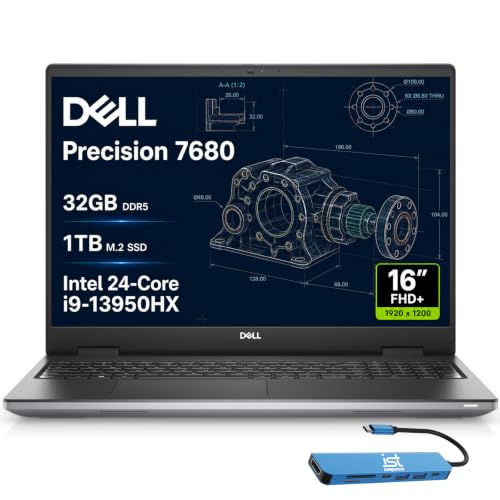
- Core i9-13950HX and 32GB DDR5 CAMM
- 1TB SSD for fast photo project storage
- 16-inch FHD+ anti-glare display
Best For: Photographers and creative pros needing a high-end Windows workstation
Portable Mac Choice
MacBook Air M5 for On-the-Go Editing

- M5 chip with 16GB unified memory
- 13.6-inch Liquid Retina display with 1 billion colors
- Up to 18 hours of battery life
Best For: Mobile users wanting a thin Mac for everyday photo work
Renewed Creator Workhorse
Dell Precision 5550 for Photo Projects

- 32GB RAM and 1TB SSD
- Nvidia Quadro dedicated graphics
- 15.6-inch FHD workstation display
Best For: Buyers wanting a renewed Windows workstation for editing and multitasking
Flexible 2-in-1 Choice
Lenovo IdeaPad 2-in-1 for Everyday Editing

- Ryzen 7 8845HS with Radeon 780M
- 16-inch 1920 x 1200 touch display
- 1TB SSD with 16GB DDR5 RAM
Best For: Users wanting a versatile touch-screen laptop for casual to moderate editing
Creative Mobility Pick
Acer Aspire 14" AI Touchscreen Creator Laptop

- Core Ultra 7 with NPU supports local AI photo editing
- 32GB RAM and 2TB SSD suit large photo libraries
- 14-inch touchscreen helps with precise retouching
Best For: Portable photo editors and creators who value AI tools
Budget Large-Screen Pick
HP OmniBook 3 17.3" Photo Editing Laptop

- 17.3-inch FHD IPS screen gives you lots of room
- Ryzen 3 30 is listed for smooth photo editing
- Up to 14 hours and 15 minutes of battery life
Best For: Casual editors who want a big display and long battery life
Budget-Friendly Photo Editing Pick

- 15.6-inch FHD display
- 16GB DDR4 RAM
- 512GB NVMe SSD
Best For: Light photo editing on a budget
Creator-Ready Value Choice

- 6-core Ryzen 5 6600H
- Radeon 660M graphics
- 16GB DDR5 with upgrade room
Best For: Entry-level creators who multitask
Business Laptop with Editing Headroom

- 15.6-inch FHD IPS anti-glare display
- Ryzen 3 7330U with Radeon graphics
- 16GB RAM and 512GB SSD
Best For: Students and business users doing light editing
Flagship Workstation Pick – Dell Precision 7680 for Demanding Creative Work
For laptops for photo editing, the Dell Precision 7680 is aimed at users who want workstation-level performance, lots of expandability, and dependable compatibility for heavy creative projects. Its 16-inch FHD+ anti-glare display, Intel Core i9-13950HX, and 32GB of DDR5 CAMM memory make it a strong fit for large photo files, multitasking, and studio workflows.
Best For: Photographers and creative pros who want a high-end Windows workstation with room to grow.
Pros:
- Intel Core i9-13950HX and 32GB DDR5 CAMM support demanding creative workloads.
- 1TB PCIe NVMe SSD helps with fast project loading and file storage.
- 16-inch FHD+ anti-glare screen is practical for long editing sessions.
- Two Thunderbolt 4 ports, USB-C, USB-A, HDMI, and Ethernet offer flexible connectivity.
Cons:
- Integrated Intel UHD Graphics is less suited to GPU-heavy editing tasks than dedicated graphics.
- 16-inch workstation design is less portable than thinner ultraportables.
This is the most serious option in the group if you prioritize performance, ports, and workstation reliability over portability. It is built for advanced professional workflows, not casual everyday use.
Portable Mac Choice – MacBook Air M5 for On-the-Go Editing
If you want laptops for photo editing in a lightweight Mac form factor, the MacBook Air 13-inch with M5 is built around speed, battery life, and a sharp Liquid Retina display. Its 16GB unified memory and 512GB SSD should handle everyday editing work smoothly, while the compact chassis makes it easy to carry between classes, shoots, or client meetings.
Best For: Mobile users who want a thin, long-lasting Mac for everyday photo work.
Pros:
- M5 chip with faster CPU, Neural Engine, and next-generation GPU supports responsive creative workflows.
- 13.6-inch Liquid Retina display supports 1 billion colors for vivid photo viewing.
- Up to 18 hours of battery life is excellent for all-day use away from a charger.
- Two Thunderbolt 4 ports and support for up to two external displays add useful flexibility.
Cons:
- 13.6-inch screen is compact for detailed side-by-side editing.
- No mention of a dedicated graphics card, so it is best for lighter editing workloads.
This model stands out for portability and battery life more than raw workstation power. It is a smart choice if you value a polished macOS experience and a color-rich display in a very travel-friendly laptop.
Renewed Creator Workhorse – Dell Precision 5550 for Photo Projects
Among laptops for photo editing, the renewed Dell Precision 5550 is a practical workstation-style option with a 15.6-inch FHD display, 32GB of RAM, and a 1TB SSD. It is built around an Intel Core i7-10850H and Nvidia Quadro graphics, which makes it a sensible pick for users who want a capable Windows machine for creative software and large image libraries.
Best For: Buyers who want a renewed 15.6-inch Windows workstation for editing and multitasking.
Pros:
- 32GB RAM and 1TB SSD support smooth multitasking and fast file access.
- Nvidia Quadro dedicated graphics add workstation-focused visual support.
- 15.6-inch 1080p display offers a familiar editing size.
- Includes HDMI, DisplayPort, USB-C, Ethernet, and multiple USB ports for peripherals.
Cons:
- It is a renewed model, so condition and battery wear can vary.
- 1920 x 1080 resolution is solid, but not as sharp as higher-resolution creator panels.
This is a strong value-oriented workstation choice if you are comfortable buying renewed. It offers plenty of memory and storage for photo libraries, plus graphics designed for professional workloads.
Flexible 2-in-1 Choice – Lenovo IdeaPad 2-in-1 for Everyday Editing
For laptops for photo editing that also double as flexible everyday machines, the Lenovo IdeaPad 2-in-1 brings a 16-inch 1920 x 1200 touch display, Ryzen 7 8845HS performance, and 1TB of storage. The combination of an efficient AMD chip, Radeon 780M graphics, and a roomy 16:10-style screen makes it well suited to browsing photos, light editing, and multitasking.
Best For: Users who want a versatile touch-screen laptop for casual to moderate photo editing.
Pros:
- Ryzen 7 8845HS provides strong multi-core performance for creative and business tasks.
- 16-inch 1920 x 1200 touch display gives extra vertical workspace.
- 1TB SSD and 16GB DDR5 RAM support fast everyday responsiveness.
- Backlit keyboard, fingerprint reader, and numeric keypad add convenience.
Cons:
- 16GB RAM is good, but less ideal for very large professional editing projects.
- Integrated Radeon 780M graphics are better for light-to-moderate workloads than intensive rendering.
This Lenovo is a balanced pick if you want a laptop that feels practical first and creative second. It is especially appealing if you like the added flexibility of a touch display and 2-in-1 design.
Creative Mobility Pick – Acer Aspire 14" AI Touchscreen Creator Laptop
If you want laptops for photo editing that also stay light enough for daily carry, this Acer Aspire is built around that workflow. The Intel Core Ultra 7 258V, 32GB of RAM, and Intel Arc 140V graphics give it the kind of headroom that helps Lightroom and other creative apps run smoothly, while the 14-inch 1920×1200 touchscreen adds a more hands-on way to retouch images.
Best For: Photographers, creators, and remote workers who want a portable editing machine with AI features.
Pros:
- Intel Arc 140V graphics are positioned for photo editing acceleration and 1080p creative work.
- 32GB LPDDR5X RAM and a 2TB SSD provide strong multitasking and plenty of storage for photo libraries.
- 14-inch touchscreen with stylus support makes detailed retouching more intuitive.
- USB hub includes HDMI, USB-A, USB-C, SD card, and Ethernet for easier workspace setup.
Cons:
- Integrated graphics means it is not aimed at heavy GPU workloads.
- 14-inch screen may feel compact if you prefer a larger canvas for editing.
This is a smart pick if you want a travel-friendly creator laptop with strong memory, generous storage, and useful AI-assisted editing tools. It leans more toward productivity and photo work than brute-force media production, which is exactly what many editors need.
High-Performance Editing Pick – ASUS V16 16" RTX 5060 Editing Laptop
For laptops for photo editing that can also handle heavier creative tasks, the ASUS V16 stands out with a discrete RTX 5060 GPU and a 16-inch WUXGA display. The 1920 x 1200 panel, 300-nit brightness, and 144Hz refresh rate are aimed at smoother visuals, while the Intel Core 7 240H and 16GB of memory give you solid performance for editing and multitasking.
Best For: Editors who want stronger graphics performance and a larger display for creative work.
Pros:
- RTX 5060 graphics are described as helping with AI-accelerated photo editing and other demanding creative tasks.
- 16-inch 16:10 display gives more vertical room for timelines, panels, and image work.
- Intel Core 7 240H and 16GB RAM support responsive multitasking.
- 512GB PCIe 4.0 SSD offers fast storage for projects and apps.
Cons:
- 512GB storage may feel limited if you keep large raw photo libraries locally.
- At 4.3 pounds, it is less portable than smaller creator laptops.
This model makes sense if you want a more performance-focused editing laptop with discrete graphics and a bigger, more comfortable display. It is a better fit for users who prioritize creative speed over maximum portability.
Budget Large-Screen Pick – HP OmniBook 3 17.3" Photo Editing Laptop
If you are shopping laptops for photo editing and want a big screen without moving into high-end pricing territory, the HP OmniBook 3 is the most straightforward option here. Its 17.3-inch FHD IPS panel, Ryzen 3 30 processor, 8GB of RAM, and 512GB SSD are aimed at everyday performance with smooth photo editing and strong battery life.
Best For: Casual editors who want a roomy display and basic all-day portability.
Pros:
- 17.3-inch Full HD IPS display provides a large workspace with wide viewing angles.
- Ryzen 3 30 and integrated Radeon 610M graphics are described as supporting smooth photo editing.
- Up to 14 hours and 15 minutes of battery life is a plus for long sessions away from an outlet.
- 8GB LPDDR5 RAM and a 512GB SSD keep everyday use responsive.
Cons:
- Ryzen 3 and integrated graphics are better for lighter editing than demanding creative workloads.
- 8GB RAM is modest if you work with many large files or multiple apps at once.
This HP is best viewed as a practical, large-screen choice for everyday editing rather than a powerhouse. It gives you the space and battery life many casual users want, but it is not the strongest option for heavier creative demands.
Budget-Friendly Photo Editing Pick – Ryzen 7430U 16GB 512GB
If you want laptops for photo editing without spending on a high-end creator machine, this KAIGERR model covers the basics well. Its 15.6-inch Full HD display, AMD Radeon integrated graphics, 16GB RAM, and 512GB NVMe SSD give it the right mix of screen space, memory, and responsiveness for everyday editing tasks and file management.
Best For: Budget-minded users who want a capable everyday laptop for light photo editing, multitasking, and general productivity.
Pros:
- 16GB DDR4 RAM helps with multitasking and smoother editing workflows.
- 512GB M.2 NVMe SSD supports fast boot times and quick app loading.
- Full HD 15.6-inch display provides a practical workspace for editing.
- Integrated AMD Radeon graphics are described as suitable for photo editing projects.
Cons:
- Integrated graphics are better for light editing than heavier creative workloads.
- 60Hz panel and standard LCD display are basic compared with creator-class screens.
This is a straightforward pick if you need a low-cost, portable Windows laptop for photo editing, browsing, and everyday use. It is more about balanced value than premium color-critical performance, but the specs line up well for casual creators.
Creator-Ready Value Choice – Ryzen 5 6600H FHD IPS
For laptops for photo editing that need a little more performance headroom, this NIMO 15.6 AI Creator Laptop stands out with its Ryzen 5 6600H, 16GB DDR5 memory, and Radeon 660M graphics. It is positioned as a balanced machine for content handling, light photo editing, and multitasking, while the FHD IPS display gives you a solid foundation for viewing and adjusting images.
Best For: Students, remote workers, and entry-level creators who want stronger everyday performance for light editing and multitasking.
Pros:
- Ryzen 5 6600H offers 6 cores, 12 threads, and up to 4.5GHz boost.
- Radeon 660M graphics are aimed at light photo editing and smooth media use.
- 16GB DDR5 RAM and 512GB PCIe SSD support responsive daily performance.
- Dual SO-DIMM slots and M.2 storage leave room for future upgrades.
Cons:
- Integrated graphics still limit it to light editing and casual creative work.
- The 15.6-inch 1080p panel is practical, but not specifically described as color-critical.
This model makes sense if you want more performance than a basic office laptop while still keeping things affordable and practical. The upgrade room, USB-C convenience, and included warranty support add to its appeal for everyday creators.
Business Laptop with Editing Headroom – HP 255 G10 Ryzen 3
If you are shopping for laptops for photo editing and want a practical business machine, the HP 255 G10 is worth a look. It pairs a Ryzen 3 7330U processor with 16GB RAM, a 512GB SSD, and a 15.6-inch Full HD IPS anti-glare display, making it a sensible option for editing photos, handling documents, and working comfortably in bright environments.
Best For: Students and business users who want a lightweight Windows laptop for light photo editing and everyday work.
Pros:
- Ryzen 3 7330U is described as suitable for editing photos or videos smoothly.
- 15.6-inch FHD IPS anti-glare display helps with detail and visibility.
- 16GB RAM and 512GB SSD provide a responsive everyday setup.
- Wi-Fi 6, Bluetooth 5.3, and a full port selection improve practicality.
Cons:
- Integrated graphics mean it is best suited to light editing, not heavy creative workloads.
- Battery capacity is modest at 41 Wh compared with larger creator laptops.
This HP is a well-rounded choice if you care more about reliability, portability, and a usable display than specialized creator features. It should fit photo editing workflows that stay in the light-to-moderate range.
How We Picked These Laptops for Photo Editing
We prioritized the features that have the biggest impact on real editing work: display quality, CPU and GPU performance, RAM, SSD capacity, portability, and overall value. For Laptops for Photo Editing, a bright panel with good color coverage matters just as much as a fast processor.
We also looked for models that can handle common creative workloads such as Lightroom, Photoshop, batch exports, large RAW files, and multitasking with browser tabs or reference apps open.
Quick Comparison
At a glance, the strongest choices generally fall into three groups: premium workstations for heavy editing, modern creator-friendly thin-and-light laptops for everyday use, and budget systems that can handle lighter photo workflows. The best fit depends on whether you edit professionally, casually, or on the go.
Key Buying Factors for Laptops for Photo Editing
Display Quality
Look for a high-resolution display with accurate color and good brightness. A panel with wide color coverage is especially important if you print your work or need dependable color grading.
Memory and Storage
16GB of RAM is the practical minimum for smooth editing, while 32GB is better for large catalogs and layered files. Fast SSD storage helps with boot times, project loading, and scratch disk performance.
Processor Performance
Photo editing benefits from strong single-core speed for responsiveness and multi-core performance for exports and batch processing. Efficient modern chips can make a big difference in everyday use.
Graphics and Thermals
Dedicated graphics are helpful for some creative apps and heavier workloads, but they are not always required. Just as important is good cooling, since sustained performance matters more than short bursts.
Who Should Buy Which Laptops for Photo Editing?
If you want maximum performance for demanding projects, a workstation-class laptop is the safest choice. If you value portability and a great screen for everyday editing, a slim premium model may be better. If you are shopping on a tighter budget, choose a system with at least 16GB of RAM and an SSD, then prioritize display quality over extras.
Ultimately, the best Laptops for Photo Editing are the ones that match your workflow. Choose the display first, then make sure the CPU, memory, and storage can keep up with your editing pace.