
Choosing the right display can improve everything from productivity to gaming comfort. The best computer monitors balance resolution, refresh rate, panel type, and ergonomics for the way you actually use your PC.
Below, we focus on a mix of value, performance, and practical features so you can narrow down the best fit without overpaying for specs you won’t use.
Best 10 Computer Monitors Picks for 2026
Budget Office Pick
Philips 24 Inch FHD 100Hz VA Monitor

- 23.8-inch Full HD display with VA contrast
- 100Hz refresh rate and 4ms response time
- Flicker-Free, blue light filter, and VESA mount support
Best For: Office work, casual gaming, and compact desks
Curved Gaming Value
Sceptre 24-inch 1080p 75Hz Curved Monitor

- 1800R curved 24-inch Full HD display
- 98% sRGB with 1ms response time
- Dual HDMI, VGA, and VESA wall-mount ready
Best For: Budget gaming and curved-screen value
All-Around Smooth Pick
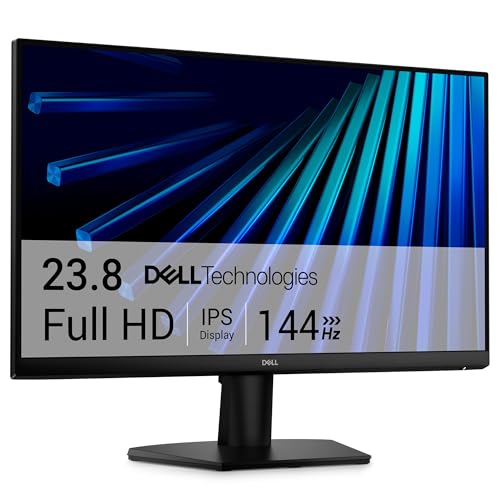
- 144Hz IPS panel with 1ms MPRT motion handling
- TÜV 3-star eye comfort certification
- Dual HDMI and ultra-thin bezels
Best For: Work, streaming, and casual gaming
Large Curved Everyday Pick
Samsung 27-inch Essential S3 Curved Monitor

- 27-inch 1800R curved Full HD screen
- 100Hz refresh rate with Game Mode
- TÜV eye comfort and flicker-free features
Best For: Larger desks, streaming, and relaxed gaming
Entry-Level 27" 120Hz IPS Pick
Acer 27in FHD 1920x1080 IPS 120Hz Gaming Monitor

- 27-inch IPS panel with 1920 x 1080 resolution
- 120Hz refresh rate and 1ms VRB response time
- Adaptive-Sync support with HDMI and VGA inputs
Best For: Budget buyers wanting a roomy 27-inch screen for work and casual gaming
Large-Screen Business Monitor
Samsung 32" Flat Computer Monitor

- 32-inch FHD panel with a three-sided borderless design
- 75Hz refresh rate with AMD FreeSync support
- Eye Saver Mode and Flicker Free help reduce strain
Best For: People who want a large, comfortable display for work and media
Compact 100Hz Value Monitor
Philips 22 Inch Computer Monitor FHD 100Hz VA VESA Flicker-Free, 221V8LB

- 21.5-inch VA panel with Full HD resolution
- 100Hz refresh rate plus Adaptive-Sync support
- Blue light filter, Flicker-Free, and VESA mount support
Best For: Small desks and everyday users who want a compact smooth-running display
Gaming Value Pick
Sceptre 27-inch Prime Gaming Monitor

- 100Hz refresh rate with 1ms response time
- 100% sRGB color gamut for better color
- Built-in speakers plus HDMI and DisplayPort
Best For: Budget gaming and everyday desktop use
Balanced IPS Pick
- 144Hz refresh rate with 1ms MPRT
- IPS panel with 178° wide viewing angles
- TÜV Rheinland 3-star eye comfort certification
Best For: Work, streaming, and casual gaming
Comfort Desk Pick

- 144Hz refresh rate with 1ms MPRT
- Height, tilt, pivot, and swivel adjustments
- Built-in dual 3W speakers
Best For: Compact desks and ergonomic everyday use
Budget Office Pick – Philips 24 Inch FHD 100Hz VA Monitor
If you want computer monitors that keep things simple and practical, this Philips 24-inch model covers the basics well. It pairs Full HD resolution with a VA panel, a 100Hz refresh rate, and eye-comfort extras like Flicker-Free and a blue light filter, making it a solid fit for everyday work and light entertainment.
Best For: Office tasks, casual gaming, and anyone who wants a compact monitor with strong contrast.
Pros:
- Full HD 1920×1080 resolution on a 23.8-inch screen
- VA panel with 3000:1 contrast for deeper blacks and brighter whites
- 100Hz refresh rate and 4ms response time for smoother motion
- Three-sided bezel-free design works well for multi-monitor setups
Cons:
- Brightness is listed at 250 nits, so it is not the brightest option here
- Only one HDMI port is included
- VA panels are less color-focused than IPS for some users
Overall, this Philips is a straightforward value choice among computer monitors, especially if you care more about contrast, comfort, and everyday productivity than premium extras.
Curved Gaming Value – Sceptre 24-inch 1080p 75Hz Curved Monitor
This Sceptre is aimed at buyers who want curved computer monitors without spending much. Its 1800R curve, 24-inch 1080p panel, and 75Hz refresh rate create a more immersive feel for games, streaming, and general desktop use, while the included ports keep setup flexible.
Best For: Budget gaming and casual use with an immersive curved screen.
Pros:
- 1800R curved 24-inch display for a more immersive viewing experience
- Full HD resolution with 98% sRGB color gamut
- 75Hz refresh rate and 1ms response time
- Two HDMI ports, VGA, and VESA wall mount support
Cons:
- Brightness is modest at 220 cd/m²
- 75Hz is fine for casual play, but not high-end gaming
- Built-in speakers are mentioned in the title, but the monitor is still basic overall
For shoppers comparing computer monitors on a budget, this Sceptre stands out for its curved design and flexible inputs more than premium image quality.
All-Around Smooth Pick – Dell 24 144Hz IPS Monitor
If you want computer monitors that can handle work and play, this Dell 24 keeps the spec sheet balanced. The IPS panel, 144Hz refresh rate, and 1ms MPRT make motion look smooth while maintaining consistent color across wide viewing angles, and the slim bezels help it fit cleanly on a desk.
Best For: Mixed use, including business, streaming, and fast-paced everyday gaming.
Pros:
- 144Hz refresh rate and 1ms MPRT for fluid motion
- IPS technology with 178° viewing angles and good color consistency
- TÜV Rheinland 3-star eye comfort certification
- Ultra-thin bezels and two HDMI ports
Cons:
- Response time is listed as 8ms in the detailed specs
- Color gamut is 72%, so it is not a wide-gamut display
- No USB hub or advanced ergonomic stand features are listed
This is a sensible choice if you want a smoother, more modern-feeling monitor without moving into a specialized gaming display.
Large Curved Everyday Pick – Samsung 27-inch Essential S3 Curved Monitor
This Samsung model is a good option if you want a larger curved screen in the world of computer monitors. The 27-inch FHD panel, 1800R curve, and 100Hz refresh rate are built for comfortable everyday viewing, while game settings and eye-comfort features add extra versatility.
Best For: Larger desks, everyday multitasking, and relaxed gaming or streaming.
Pros:
- 27-inch Full HD screen with an immersive 1800R curve
- 100Hz refresh rate helps reduce lag and motion blur
- Game Mode and adjustable contrast add flexibility for entertainment
- TÜV-certified eye comfort features help reduce strain
Cons:
- Only one HDMI port is listed
- Resolution is still 1080p, so it is not a sharpness upgrade over smaller FHD models
- Brightness is 250 cd/m², which is fairly standard rather than standout
As a larger curved everyday monitor, Samsung keeps the focus on comfort, motion smoothing, and easy versatility instead of premium resolution.
Entry-Level 27" 120Hz IPS Pick – Acer 27in FHD 1920×1080 IPS 120Hz Gaming Monitor
If you’re comparing computer monitors for a mix of everyday work and casual gaming, the Acer KB272 G0bi offers a practical 27-inch Full HD IPS panel with a 120Hz refresh rate. It focuses on smooth motion, basic tear reduction with Adaptive-Sync, and a simple 1080p setup that still feels roomy on a desktop.
Best For: Budget-conscious buyers who want a larger 27-inch monitor for office tasks, streaming, and light gaming.
Pros:
- 27-inch IPS screen with Full HD 1920 x 1080 resolution
- 120Hz refresh rate with 1ms VRB response time for smoother motion
- Adaptive-Sync support helps reduce tearing in games and video
- Includes HDMI and VGA connectivity plus tilt adjustment
Cons:
- 1080p resolution on a 27-inch panel may not feel very sharp to everyone
- 250 nits brightness is fairly standard rather than especially bright
This Acer monitor is a straightforward option if you want better-than-basic refresh performance without moving into a higher price bracket. It is well suited to desktop use where smoothness, size, and simple connectivity matter more than premium extras.
Large-Screen Business Monitor – Samsung 32" Flat Computer Monitor
For computer monitors that prioritize screen size and everyday comfort, the Samsung S32B304NWN gives you a 32-inch Full HD display with a clean three-sided borderless design. Its 75Hz refresh rate, AMD FreeSync support, and eye comfort features make it a sensible pick for mixed business, multimedia, and personal use.
Best For: Users who want a large 32-inch monitor for work, media, and light gaming with a minimal bezel design.
Pros:
- 32-inch FHD screen with a three-sided borderless look
- 75Hz refresh rate with AMD FreeSync for smoother visuals
- Eye Saver Mode and Flicker Free technology help reduce strain
- Game Mode and 178-degree viewing angles add versatility
Cons:
- 8ms response time is not aimed at fast competitive gaming
- Resolution is still 1920 x 1080, so pixel density is modest at 32 inches
This Samsung monitor makes sense if you value screen real estate and a tidy multi-monitor setup more than ultra-sharp resolution. It balances size, comfort, and basic gaming-friendly features in a package that fits office desks well.
Compact 100Hz Value Monitor – Philips 22 Inch Computer Monitor FHD 100Hz VA VESA Flicker-Free, 221V8LB
If you need a smaller computer monitor that still keeps motion smooth, the Philips 221V8LB is a practical 21.5-inch Full HD VA display with a 100Hz refresh rate. It adds Adaptive-Sync, a 4ms response time, and eye-care extras in a compact design that works well for desks with limited space.
Best For: Small-desk users who want a compact monitor for everyday computing, streaming, and casual gaming.
Pros:
- 21.5-inch Full HD VA panel with crisp 1920 x 1080 visuals
- 100Hz refresh rate with Adaptive-Sync for smoother action
- VA contrast and 178/178 viewing angles for consistent image quality
- Blue light filter, Flicker-Free design, and VESA mounting support
Cons:
- Glossy screen finish may be less ideal in bright rooms
- Smaller screen size may feel limiting for users wanting more workspace
This Philips model is a good fit if you want a modestly priced monitor that emphasizes smoothness and compact size. It covers the basics well while staying friendly to smaller setups and mixed-use desktop needs.
Gaming Value Pick – Sceptre 27-inch Prime Gaming Monitor
If you want computer monitors that stretch your budget for gaming and everyday use, this 27-inch Sceptre keeps the focus on speed and color. It pairs a 100Hz refresh rate with a 1ms response time, plus 100% sRGB for more natural-looking color in games, creative work, and general desktop tasks.
Best For: Budget-conscious gamers and general users who want a larger 27-inch display with good color and basic built-in audio.
Pros:
- 100Hz refresh rate and 1ms response time help motion look cleaner in fast-moving content.
- 100% sRGB coverage supports stronger color consistency for gaming and photo/video editing.
- Includes two HDMI ports, DisplayPort, built-in speakers, and a headphone jack for flexible setup.
- Blue Light Shift and VESA mount support add comfort and placement options.
Cons:
- FHD 1080p on a 27-inch panel is less sharp than higher-resolution alternatives.
- Built-in speakers are convenient, but they are not a substitute for dedicated audio.
This is a practical pick if you want a straightforward monitor with gaming-friendly specs and useful extras without overcomplicating the setup. It stands out most for buyers who value color, connectivity, and speed at a simple 1080p tier.
Balanced IPS Pick – Dell 27 Monitor SE2726H
Among computer monitors in the 27-inch class, this Dell focuses on smooth motion, accurate IPS viewing, and easy day-to-day use. Its 144Hz refresh rate and 1ms MPRT support fluid visuals, while the IPS panel and wide 178° viewing angle make it a solid fit for shared workspaces and mixed-use setups.
Best For: Users who want a dependable 27-inch monitor for work, streaming, and casual gaming with good viewing angles.
Pros:
- 144Hz refresh rate and 1ms MPRT create smoother motion for work, gaming, and streaming.
- IPS technology and 178°/178° viewing angles help keep colors consistent from more positions.
- TÜV Rheinland 3-star eye comfort certification adds a useful blue-light reduction feature.
- Ultra-thin bezels give the display a cleaner look for multi-monitor setups.
Cons:
- 1080p resolution on 27 inches may feel modest if you want a sharper workspace.
- Response time is listed as 8 milliseconds in the detailed specs, which is less aggressive than the headline claim.
This Dell is a good middle-ground option if you want a modern monitor that balances speed, comfort, and wide-angle IPS viewing. It is especially appealing for buyers who value a familiar brand and practical features over higher-resolution extras.
Comfort Desk Pick – Dell 24 Plus Monitor S2425HSM
If you are comparing computer monitors for a desk setup, this 23.8-inch Dell puts comfort and flexibility first. It combines a 144Hz refresh rate and 1ms MPRT with height, tilt, pivot, and swivel adjustments, plus built-in 3W speakers for a cleaner all-in-one desktop arrangement.
Best For: Users who want a compact 24-inch monitor with strong adjustability, integrated speakers, and smooth 144Hz performance.
Pros:
- 144Hz refresh rate and 1ms MPRT support smooth, tear-free viewing.
- Height, tilt, pivot, and swivel adjustments make it easier to dial in an ergonomic position.
- Dual 3W speakers add convenient built-in audio for basic entertainment and calls.
- 4-star TÜV certification and Eye Care Technologies help reduce harmful blue light emissions.
Cons:
- HDMI-only connectivity is less flexible than monitors with DisplayPort options.
- 1080p resolution is standard rather than high-end for productivity at this size.
This model makes the most sense if you want a compact monitor that is easy to position and pleasant for long desk sessions. It is a well-rounded choice for users who care more about comfort and convenience than advanced connectivity.
How We Picked These Computer Monitors
We prioritized models that offer a useful mix of display quality, smooth motion, and everyday convenience. That means looking at screen size, full HD resolution, refresh rate, IPS or VA panel behavior, FreeSync support, built-in speakers, and stand adjustability where it matters.
We also considered the kinds of buyers shopping for Computer Monitors today: office users who want eye comfort, casual gamers who want a smoother image, and budget-focused shoppers who still want a dependable screen.
Quick Comparison
If you want a simple shortcut, think in categories. 22- and 24-inch models are usually best for tight desks and general work. 27-inch options give you a larger image and feel better for multitasking or gaming. Curved screens can add immersion, while flat IPS displays are often easier for text, mixed use, and color consistency.
Higher refresh rates, such as 100Hz, 120Hz, or 144Hz, are a noticeable upgrade over standard 60Hz for scrolling and gaming. If you spend long hours at a desk, stand flexibility and flicker-free features can be just as valuable as raw specs.
Key Buying Factors for Computer Monitors
Screen Size and Resolution
For most buyers, 24-inch Full HD remains the sweet spot. A 27-inch Full HD panel is better if you want a bigger image, but it will look less sharp than a smaller screen at the same resolution. If crisp text is your top priority, size and pixel density matter as much as panel type.
Panel Type and Motion
IPS panels usually offer better viewing angles and more consistent color, while VA panels often deliver stronger contrast. Gamers and fast scrollers should pay attention to refresh rate and response time, since these affect how smooth motion feels in real use.
Ergonomics and Comfort
Height, tilt, pivot, and swivel adjustments can make a huge difference during long sessions. Eye-care features such as flicker-free backlighting and low-blue-light modes are also worth considering if you spend hours in front of Computer Monitors every day.
Ports and Everyday Features
Check for HDMI, DisplayPort, and any legacy inputs you may still need. Built-in speakers are convenient, though external audio is usually better. VESA mounting is another helpful feature if you plan to use an arm or wall mount.
Who Should Buy Which Computer Monitors?
Choose a 22- to 24-inch monitor if you want the most practical all-around size for work, school, and light entertainment. Go with a 27-inch model if you prefer a larger viewing area for spreadsheets, editing, or gaming.
If smooth motion matters most, prioritize the 120Hz and 144Hz options. If you want a more relaxed viewing experience for general use, the curved models may be appealing. For the most flexible desk setup, look for height-adjustable stands and VESA compatibility so your monitor can adapt as your needs change.
In short, the best Computer Monitors are the ones that match your desk space, daily tasks, and comfort preferences—not just the highest spec sheet.