
Choosing the right editing machine can make your workflow faster, smoother, and far less frustrating. The best laptops for video editing need strong CPUs, enough RAM, fast SSD storage, and a display you can trust.
In this roundup, we focus on creator-friendly options ranging from portable everyday picks to workstation-grade systems built for demanding timelines and effects.
Best 10 Laptops for Video Editing Picks for 2026
Workstation-Class Power
Dell Precision 7680 with RTX 2000 Ada

- RTX 2000 Ada 8GB for creative workloads
- Core i7-13850HX with 32GB DDR5 RAM
- 1TB SSD and support for multiple external displays
Best For: Video editors and other pro users who need workstation reliability
Budget Creator Pick

- Ryzen 5 6600H with 6 cores and 12 threads
- 16GB DDR5 RAM, 512GB SSD, and upgrade room
- 15.6-inch FHD IPS display for everyday work
Best For: Students and entry-level creators who need a flexible daily laptop
Flagship Editing Workstation

- Core i9-13950HX for top-tier CPU performance
- 32GB DDR5 CAMM RAM and 1TB SSD
- Strong connectivity with Thunderbolt 4 and HDMI
Best For: Professional editors who need workstation-class speed and expandability
Portable Mac Choice

- M5 chip for faster CPU and creative workflows
- 16GB unified memory, 512GB SSD, and up to 18 hours battery
- 13.6-inch Liquid Retina display with 1 billion colors
Best For: Mobile editors and students who want portability and battery life
Workstation Pick
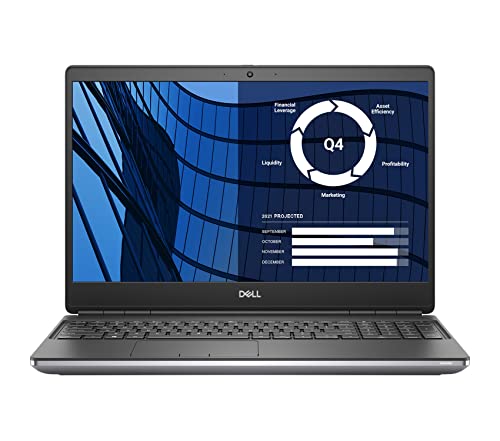
- 17.3-inch FHD display with 100% DCI-P3
- 32GB RAM and 1TB SSD
- NVIDIA Quadro RTX 3000 6GB graphics
Best For: Editors who want a big-screen workstation for demanding projects
Portable Touch Pick
Dell 16" Touchscreen Laptop 2026

- Ryzen 7 processor with up to 5.1GHz boost
- 16GB DDR5 RAM and 16-inch 1920 x 1200 IPS touchscreen
- Wi-Fi 6, USB-C PD, and HDMI connectivity
Best For: Creators who want a slim 16-inch laptop with a touchscreen for moderate editing
Balanced Creator Pick

- Intel Core i7-13620H with 10 cores and 16 threads
- 1TB PCIe 4.0 SSD and 16GB DDR5 RAM
- 3.8-pound chassis with 16-inch WUXGA IPS display
Best For: Students, professionals, and creators who want a lightweight all-rounder with good storage for editing projects
Large-Screen Editing Pick

- 17.3-inch FHD anti-glare display
- Ryzen 5 7520U with 512GB SSD
- Wi-Fi 6, Bluetooth 5.3, HDMI, USB-C
Best For: Editors who want a roomy screen for comfortable timeline work
Flexible Creator Choice
Lenovo IdeaPad 2-in-1 16" Ryzen 7

- Ryzen 7 8845HS with up to 5.1GHz
- 16-inch 1920 x 1200 touch display
- 16GB RAM, 1TB SSD, fingerprint reader
Best For: Creators who want a versatile 2-in-1 with strong multitasking
Value Large-Display Option
HP 17 Ryzen 5 Video Editing Laptop

- 17.3-inch FHD anti-glare display
- Ryzen 5 7520U with 512GB SSD
- Wi-Fi 6, USB-C, HDMI included
Best For: Buyers who want a simple large-screen editing laptop with modern connectivity
Workstation-Class Power – Dell Precision 7680 with RTX 2000 Ada
If you’re comparing laptops for video editing, the Dell Precision 7680 is a serious workstation choice built for demanding creative workflows. Its RTX 2000 Ada 8GB graphics, Intel Core i7-13850HX, and 32GB of DDR5 CAMM memory give it the kind of headroom that helps with editing, multitasking, and other professional production tasks.
Best For: Video editors, designers, architects, and technical users who want workstation reliability and strong expandability.
Pros:
- RTX 2000 Ada 8GB GPU is designed for creative workloads like video editing and content creation
- Intel Core i7-13850HX plus 32GB DDR5 RAM supports fast multitasking
- 1TB PCIe NVMe SSD provides speedy storage for large media projects
- 16-inch FHD+ anti-glare display and support for up to 4 external monitors help with editing setups
Cons:
- At 5.9 pounds, it is not a light travel laptop
- FHD+ panel uses 45% NTSC color coverage, so it is not the most color-focused display spec here
- Built for professional work, so it may be more laptop than casual users need
Overall, this Precision 7680 is aimed squarely at users who need dependable workstation performance rather than portability. For video editing, it offers the right mix of GPU power, memory, storage, and connectivity to handle serious projects.
Budget Creator Pick – NIMO 15.6 AI Creator Laptop
For shoppers looking at laptops for video editing on a tighter budget, the NIMO 15.6 AI Creator Laptop is a practical entry-level option. The Ryzen 5 6600H, 16GB DDR5 memory, and 512GB SSD make it a balanced everyday machine for light content work, multitasking, and general productivity.
Best For: Students, remote workers, and entry-level creators who want a capable everyday laptop with upgrade room.
Pros:
- Ryzen 5 6600H offers 6 cores and 12 threads for stronger daily performance
- 16GB DDR5 RAM and 512GB PCIe SSD handle multitasking and file storage well
- Dual SO-DIMM slots and M.2 2280 design allow upgrades to 64GB RAM and 4TB SSD
- 15.6-inch FHD IPS display is suitable for everyday editing and split-screen work
Cons:
- Integrated Radeon 660M graphics are better for light photo/video work than heavy editing
- Display specs are solid for daily use, but not positioned as a high-end creator panel
- More of a balanced general-use laptop than a dedicated editing workstation
In practice, this NIMO model makes sense if you want a more affordable machine that can handle lighter editing jobs and everyday tasks. It is a flexible starting point thanks to its upgrade path, but serious editors will likely want more graphics power.
Flagship Editing Workstation – Dell Precision 7680 with i9
If you want one of the most capable laptops for video editing in this list, the Dell Precision 7680 with the Core i9-13950HX is the most powerful option here. It combines a high-end workstation CPU, 32GB DDR5 CAMM memory, and a 1TB SSD with the kind of expansion and connectivity serious creative workflows often need.
Best For: Professional editors, creators, and technical users who prioritize workstation-class performance and expandability.
Pros:
- Intel Core i9-13950HX delivers top-tier CPU performance for demanding workflows
- 32GB DDR5 CAMM RAM and 1TB SSD support fast multitasking and media storage
- 16-inch FHD+ anti-glare display and up to three external monitors help with editing setups
- Two Thunderbolt 4 ports, USB-C, USB-A, HDMI, and Ethernet provide broad connectivity
Cons:
- Uses integrated Intel UHD Graphics rather than a dedicated GPU
- At this level, it is more workstation-focused than portable or casual
- Likely unnecessary for basic editing or light content creation
This Precision 7680 stands out for CPU strength, memory, and professional connectivity, making it a strong fit for heavy productivity. If your editing workflow depends more on processing power and expansion than on a discrete graphics card, it is an impressive workstation-style pick.
Portable Mac Choice – Apple MacBook Air 13-inch M5
For buyers considering laptops for video editing who also care about portability, the 13-inch MacBook Air with M5 is a compact, lightweight option. Apple says the M5 chip brings faster CPU and unified memory performance, while the Liquid Retina display and long battery life make it a comfortable choice for mobile creative work.
Best For: Editors, students, and creators who want a thin-and-light laptop with strong battery life.
Pros:
- M5 chip is described as delivering faster CPU performance and smooth creative workflows
- 16GB unified memory and 512GB SSD give it solid everyday working room
- Liquid Retina display supports 1 billion colors for sharp photo and video viewing
- Up to 18 hours of battery life and a 2.71-pound design favor travel and all-day use
Cons:
- 13.6-inch screen is smaller than many editing-focused laptops
- Supports up to two external displays, which may limit larger desktop-style setups
- Designed as an ultraportable, so it is less workstation-like than the Precision models
This MacBook Air is the easiest to carry and the most battery-friendly option in the group, which can matter a lot for editing on the move. It is best for creators who value a premium portable experience more than a large screen or workstation hardware.
Workstation Pick – Dell Precision 7750 17.3" FHD
If you want laptops for video editing with more of a desktop-workstation feel, the Dell Precision 7750 is built around serious screen space and pro-grade hardware. Its 17.3-inch FHD panel, 32GB of RAM, 1TB SSD, and NVIDIA Quadro RTX 3000 6GB make it a strong fit for heavier editing timelines, large project files, and external-monitor workflows.
Best For: Editors who want a big-screen workstation for demanding projects, color work, and multitasking.
Pros:
- 17.3-inch 1080p display with 100% DCI-P3 and 500 nits for more confident visual work
- 32GB RAM and 1TB SSD provide ample room for editing software, media, and cache files
- NVIDIA Quadro RTX 3000 6GB is suited to demanding professional graphics workloads
- Five USB ports plus HDMI help support external drives and accessories
Cons:
- At 6.7 pounds, it is less travel-friendly than lighter laptops
- Renewed condition may not appeal to buyers wanting a brand-new machine
- 60Hz 1080p panel is practical, but not a high-refresh display
This is the most workstation-like option in the group, and it makes sense if you value a larger, color-focused screen and robust RAM over portability.
Portable Touch Pick – Dell 16" Touchscreen Laptop 2026
For shoppers comparing laptops for video editing, this Dell 16-inch model stands out for its balanced mix of speed, portability, and a useful touchscreen. The AMD Ryzen 7 processor, 16GB DDR5 RAM, and 256GB PCIe NVMe SSD should handle everyday editing tasks, lighter creative work, and fast project switching without feeling bulky.
Best For: Creators who want a slim 16-inch laptop with a touchscreen for moderate editing and multitasking.
Pros:
- AMD Ryzen 7 processor with up to 5.1GHz boost supports demanding multitasking
- 16GB DDR5 memory helps keep editing apps and browser tabs responsive
- 16-inch 1920 x 1200 IPS touchscreen offers extra vertical space for timelines and tools
- Wi-Fi 6, USB-C with Power Delivery, and HDMI add modern connectivity
Cons:
- 256GB SSD is relatively small for large video libraries and active projects
- Integrated graphics make it better for lighter editing than heavy GPU-accelerated workflows
- No dedicated graphics listed, which may limit performance in complex effects work
This model is a practical choice if you want a thin, modern laptop that can handle editing basics and travel easily, but it is not the most storage-rich option here.
Balanced Creator Pick – Lenovo 16 IPS FHD+
If you need laptops for video editing that also stay easy to carry, this Lenovo 16-inch model offers a strong middle ground. It pairs an Intel Core i7-13620H, 16GB of DDR5 RAM, and a 1TB PCIe 4.0 SSD with a 16:10 WUXGA IPS display, giving you useful space for timelines, tools, and large media libraries.
Best For: Students, professionals, and creators who want a lightweight all-rounder with good storage for editing projects.
Pros:
- Intel Core i7-13620H offers 10 cores and 16 threads for strong multitasking
- 1TB PCIe 4.0 SSD gives generous room for video files, photos, and software
- 16-inch WUXGA IPS display with 16:10 aspect ratio adds vertical workspace
- At 3.8 pounds, it is the most portable of the three options here
Cons:
- 300-nit display and 45% NTSC color gamut are solid, but not tuned for high-end color grading
- Shared graphics are less capable than a dedicated GPU for heavy effects work
- HD 720p camera is serviceable, but not a standout feature for creators
Overall, this Lenovo is the most balanced pick if you want a lighter laptop with better storage than the Dell touchscreen model and more portability than the Precision workstation.
Large-Screen Editing Pick – HP 17 17.3" FHD Laptop
If you want laptops for video editing with a big, easy-to-see workspace, this HP 17 gives you a 17.3-inch Full HD anti-glare display, Ryzen 5 performance, and fast SSD storage. It is built more like a practical productivity machine than a flashy creator laptop, but the large screen and Windows 11 Pro setup make it a solid fit for light-to-moderate editing tasks, timelines, and review work.
Best For: Editors who want a roomy 17.3-inch display for comfortable timeline viewing, multitasking, and everyday content work.
Pros:
- 17.3-inch FHD anti-glare display offers a spacious viewing area.
- AMD Ryzen 5 7520U is positioned for efficient multitasking.
- 512GB NVMe SSD helps with faster boot-ups and file access.
- Includes Wi-Fi 6, Bluetooth 5.3, HDMI, and USB-C for connectivity.
Cons:
- Integrated graphics are not aimed at heavy GPU-accelerated editing.
- 8GB RAM can feel limited for larger projects and more demanding workflows.
- At 4.6 pounds, it is less portable than smaller laptops.
Overall, this HP 17 is best viewed as a budget-friendly large-screen option for creators who value visibility and simple day-to-day performance over high-end editing power. If your workflow is lighter and screen size matters most, it makes sense.
Flexible Creator Choice – Lenovo IdeaPad 2-in-1 16" Ryzen 7
For laptops for video editing that also need flexibility, this Lenovo IdeaPad 2-in-1 combines a Ryzen 7 8845HS processor, 16GB of LPDDR5 memory, and a 1TB SSD with a 16-inch touch display. The taller 16:10-style 1920 x 1200 panel gives you more vertical room for timelines and toolbars, while the 2-in-1 design adds touch input for quick navigation and review work.
Best For: Creators and business users who want a versatile 2-in-1 with strong multitasking support and a roomy touch display.
Pros:
- Ryzen 7 8845HS offers 8 cores, 16 threads, and up to 5.1GHz.
- 16-inch 1920 x 1200 touch display gives extra vertical space.
- 1TB SSD and 16GB RAM support fast, efficient workflows.
- Includes fingerprint reader, backlit keyboard, and multiple USB-C/USB-A ports.
Cons:
- Integrated Radeon 780M graphics are not a replacement for a discrete GPU.
- At 6 pounds, it is heavier than many standard laptops.
- The 60Hz display is practical, but not targeted at high-refresh creative use.
This is the strongest all-around option in the group for editing-focused multitaskers who also want a convertible form factor. It balances storage, memory, and processor headroom better than the more basic 17-inch machines.
Value Large-Display Option – HP 17 Ryzen 5 Video Editing Laptop
If you are comparing laptops for video editing on a budget, this HP 17 keeps the same big-screen formula but adds Wi-Fi 6 and a clean Windows 11 Pro setup. The 17.3-inch FHD anti-glare display is helpful for editing layouts, and the Ryzen 5 7520U should handle everyday multitasking, web-based tools, and lighter creative work with less fuss.
Best For: Buyers who want a simple, large-screen editing laptop with modern wireless connectivity and straightforward daily performance.
Pros:
- 17.3-inch Full HD anti-glare display is practical for editing and reviewing.
- Ryzen 5 7520U is tuned for multitasking and general productivity.
- 512GB SSD supports quicker boot times and file loading.
- Wi-Fi 6, Bluetooth 5.3, USB-C, and HDMI improve connectivity.
Cons:
- 8GB DDR5 RAM may be restrictive for heavier projects.
- Integrated graphics limit suitability for demanding editing workloads.
- The 17-inch chassis is not the easiest to carry every day.
This model makes sense if you want a bigger display and decent everyday performance without stepping up to a more expensive creator laptop. It is a practical pick for light editing, school projects, and general media work.
How We Picked These Laptops for Video Editing
We prioritized practical editing performance first: multi-core CPU power, at least 16GB of memory where possible, SSD capacity, and graphics hardware that can handle acceleration in common editing apps. We also considered display size, portability, and whether a laptop is better suited to 1080p work, 4K timelines, or heavier effects and color tasks.
Quick Comparison
If you want a fast rule of thumb, the Dell Precision models are the strongest choices for heavy workloads, the Apple MacBook Air is the best lightweight option, and the Ryzen- and Core i7-based mainstream systems offer a more balanced mix of price and performance. Larger 17-inch laptops can improve comfort for timeline work, but they trade away portability.
Key Buying Factors for Laptops for Video Editing
Processor and GPU
Video editing benefits from high-core-count processors and, for many workflows, a discrete GPU. RTX and Quadro-class graphics are especially helpful for accelerated effects, playback, and exports. If you mostly edit simple projects, a strong integrated graphics setup can still be enough, but it will be slower with heavier files.
Memory and Storage
For modern Laptops for Video Editing, 16GB RAM is a workable baseline, while 32GB is much better for 4K footage, multitasking, and larger projects. SSD storage matters just as much; 512GB is the minimum most buyers should consider, and 1TB is more comfortable if you keep active projects locally.
Display and Portability
Look for a sharp IPS or Liquid Retina panel with good brightness and color quality. A 16-inch screen often hits the best balance between workspace and portability, while 17-inch models are better if you work mostly at a desk. If you travel often, thinner systems are easier to carry, but they may run hotter under sustained load.
Who Should Buy Which Laptops for Video Editing?
Choose a workstation-style Dell Precision if you edit regularly, use Adobe Premiere Pro, DaVinci Resolve, or similar tools, and want headroom for larger projects. Pick the MacBook Air if you value battery life, quiet operation, and a lighter carry for everyday editing. Go with the Lenovo or AMD Ryzen-based options if you want a more budget-conscious machine for school, content creation, or lighter professional use. The 17-inch HP models make sense for users who prefer a bigger screen and do not mind the extra size.
For most buyers, the best choice is the laptop that matches your footage type, software, and editing intensity—not just the highest specs on paper.