
Choosing the right support can make an office livestream look instantly more polished. The best tripods for office livestream cameras improve framing, reduce shake, and make it easier to switch between talking-head shots, product demos, and overhead angles.
This roundup focuses on practical stands and tripods that fit real workspaces, with options for webcams, mirrorless cameras, phones, and desk-mounted streaming setups.
Best 10 Tripods for Office Livestream Cameras Picks for 2026
Best for Weighted Stability
InnoGear Webcam Stand for Desk

- Weighted metal base improves desk stability.
- Adjustable gooseneck and swivel head for framing.
- Fits many 1/4" webcams and other accessories.
Best For: Desk livestreamers and office creators who want a stable webcam mount with a small footprint.
Best for Overhead Shots
K&F CONCEPT 90'' Overhead Camera Tripod

- 90-inch height for elevated camera placement
- Horizontal center axis for overhead framing
- Fluid head supports smoother live camera movement
Best For: Office livestreamers who need overhead reach and flexible angle control.
Best for Stable Eye-Level Framing

- Heavy metal base improves desk stability.
- 28-inch pole reaches eye-level framing.
- 360° ball head and phone holder add flexibility.
Best For: Desk-based livestreamers and remote workers who want a steady, adjustable webcam mount.
Best for Compact Desk Streaming
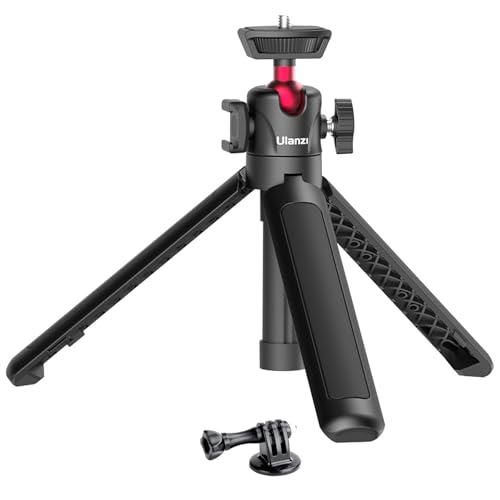
- Ultra-portable design for desk or travel use
- 360° ball head with vertical shooting support
- Cold shoe mount for mic or LED light
Best For: Office streamers and creators who need a tiny, flexible tripod for compact cameras.
Best for Overhead Streaming
Overhead Camera Mount with Ring Light

- 6-inch dimmable ring light with multiple modes and brightness levels
- Flexible boom arm for overhead, angled, and desk-mounted shots
- Compatible with iPhone and popular Logitech webcams
Best For: Office livestreams, top-down demos, and lightweight webcam recording setups.
Best Budget Portable Pick
Amazon Basics 50-inch Lightweight Tripod

- Lightweight aluminum design for easy movement and storage
- 3-way head and quick-release plate speed up setup
- Adjustable height works well for desk or standing office streams
Best For: Budget-conscious buyers who need a portable tripod for simple office livestream setups.
Best for Small Desktops
Extendable Webcam Tripod Stand
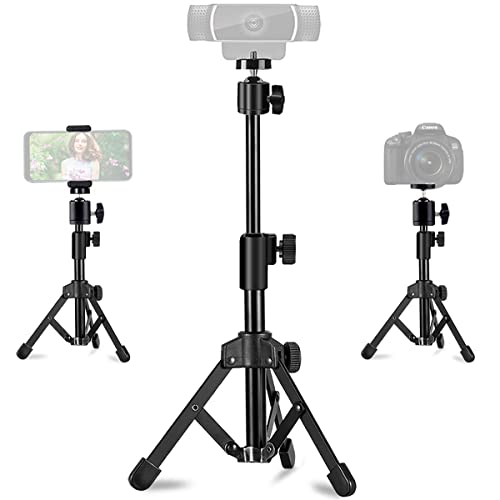
- Stable metal-and-ABS build with non-slip pads
- 11.5-18 inch height with 360° rotation and 90° tilt
- Includes phone holder; works with webcams, phones, and ring lights
Best For: Streamers and remote workers who want a compact desk tripod for webcams or phones.
Best for Tall, Flexible Setups

- Reaches 75 inches for better presentation angles
- Lightweight, foldable design suits office or travel use
- Includes phone/tablet mount and Bluetooth remote
Best For: Office livestreams, meetings, and creators who want a tall, portable tripod.
Best for Flexible Height & Travel
XXZU 75" Camera Tripod with Remote

- Extends to 75 inches for elevated office livestream angles.
- Converts to a monopod or low-angle setup for added versatility.
- Includes a 360° ball head, remote, and leveling indicators.
Best For: Creators who need a tall, portable tripod for office streaming, phones, webcams, and cameras.
Best Value for Tall Setup
NEEWER BASICS 71'' Camera Tripod

- 71-inch max height for desk and overhead framing
- Lightweight aluminum build with carrying bag
- 3-way pan tilt head and phone holder included
Best For: Budget-conscious office streamers who need a tall, portable tripod with basic flexibility.
Best for Weighted Stability – InnoGear Webcam Stand for Desk
If you want a steadier alternative to typical tripods for office livestream cameras, this InnoGear desk stand is built around a weighted metal base instead of a tall, easy-to-tip tripod. It’s a practical pick for webcams and other devices with a standard 1/4″ thread, especially when you want a compact setup that can be moved around a desk without constant re-clamping.
Best For: Desk-based livestreamers, video callers, and creators who need a stable, adjustable webcam mount for office use.
Pros:
- Weighted all-metal base helps reduce tipping on desks and tables.
- Adjustable gooseneck and swivel head make angle changes easy.
- Broad compatibility with many Logitech webcams, ring lights, and other 1/4″ devices.
- Non-slip pads help protect surfaces and keep the stand in place.
Cons:
- Only works with devices that have a standard 1/4″ screw hole.
- Gooseneck may need to be kept straight for the most stable setup.
- Less height flexibility than a full-size floor tripod.
This is a smart choice if your priority is desk stability over tall reach, making it a strong alternative to traditional tripods for office livestream cameras. It’s especially useful when you need a small footprint, easy repositioning, and reliable webcam angles for calls or live broadcasts.
Best for Overhead Shots – K&F CONCEPT 90'' Overhead Camera Tripod
If you need tripods for office livestream cameras that can shoot above a desk, this K&F CONCEPT model stands out for its 90-inch height, horizontal center-axis design, and smooth fluid head. It’s built for creators who want flexible framing for talking-head videos, product demos, whiteboard content, or overhead desk shots without moving the entire setup.
Best For: Office livestreamers and content creators who need an extra-tall tripod with horizontal reach for overhead and desk-level camera angles.
Pros:
- 90-inch max height helps position cameras well above desks and backdrops
- Horizontal center-axis setup supports overhead and top-down shooting
- Fluid head adds smoother pan and tilt control for live framing
- Converts to a monopod for more flexible use beyond office streaming
Cons:
- Heavier than compact desktop tripods at 2 kg
- May be more tripod than needed for simple seated webcam use
For tripods for office livestream cameras, this is a strong choice when your priority is reach and angle control rather than portability alone. Its overhead-friendly design makes it especially useful for demos, unboxings, and any stream that benefits from a higher, more cinematic camera position.
Best for Stable Eye-Level Framing – JCWINY 28-Inch Webcam Stand
If you want one of the more practical tripods for office livestream cameras, this JCWINY stand is built around stability and height control instead of portability gimmicks. The heavy metal base, anti-skid feet, and 28-inch extendable pole make it easier to position a webcam at eye level for cleaner Zoom calls, webinars, and live streams.
Best For: Desk setups that need a steady, adjustable webcam mount for office livestreaming, remote meetings, and content creation.
Pros:
- Heavy metal base helps reduce wobble on desks and monitor stands.
- 28-inch height and 360-degree ball head make framing easy.
- Works with many 1/4" webcams plus included phone support.
- Folds down for storage or travel when you need a compact setup.
Cons:
- Heavier base is stable, but less ideal if you need a very lightweight travel tripod.
- Best suited to desk use rather than full standing-height camera setups.
For office streamers who care more about a steady image than a flashy rig, this is a smart pick among tripods for office livestream cameras. It offers the height, compatibility, and adjustability most desk-based creators actually need.
Best for Compact Desk Streaming – ULANZI MT-16 Mini Tripod
If you need one of the most portable tripods for office livestream cameras, the ULANZI MT-16 is a practical desk-friendly option. It adds a 360° ball head, a cold shoe for accessories, and enough flexibility to work as a mini tripod, handle grip, or lightweight selfie stick for quick camera positioning.
Best For: Creators who want a compact, easy-to-carry tripod for webcams, small cameras, and simple office livestream setups.
Pros:
- Very compact and lightweight for desk use or travel
- 360° ball head supports vertical and angled framing
- Cold shoe lets you add a mic or small LED light
- Universal 1/4″ mount fits many compact cameras and action cams
Cons:
- Phone holder is not included
- Vertical mode is limited to lighter cameras
- Not ideal for heavier studio gear
Overall, the MT-16 is a strong fit if you want simple, flexible support without taking up much space. For office livestream cameras, it makes the most sense when portability and quick angle changes matter more than maximum load capacity.
Best for Overhead Streaming – Overhead Camera Mount with Ring Light
If you need one of the more flexible tripods for office livestream cameras, this overhead camera mount adds a 6-inch dimmable ring light and multiple articulation points for top-down shots, webcam use, and desk-mounted recording. It’s a practical pick for creators who want a compact setup that can handle live meetings, tutorials, and close-up content without much fuss.
Best For: Office livestreams, overhead demos, and webcam setups that need adjustable lighting plus a flexible desk mount.
Pros:
- Built-in 6-inch ring light with 3 lighting modes and 10 brightness levels per mode
- Flexible arm and ball joints make it easy to position for top-down or angled recording
- Wide 1/4-inch compatibility works with iPhone, Logitech webcams, and lightweight cameras
- Clamp-style base is useful for desks, tables, and other office surfaces
Cons:
- 3 lb max load means it’s not suitable for heavier cameras
- Clamp max thickness of about 2 inches may not fit every desk
- Designed more for small gear than full studio setups
For creators comparing tripods for office livestream cameras, this model stands out by combining overhead positioning, simple lighting control, and webcam-friendly mounting in one affordable desk setup. It’s a smart choice if your content is mostly filmed from a workstation.
Best Budget Portable Pick – Amazon Basics 50-inch Lightweight Tripod
If you need a simple, low-cost option for tripods for office livestream cameras, this Amazon Basics model covers the essentials without adding bulk. It’s light, adjustable, and quick to set up, making it a practical choice for desks, meeting rooms, and occasional streaming.
Best For: Budget-conscious buyers who want a lightweight tripod for office livestreams, webcam-style cameras, or small mirrorless setups.
Pros:
- Lightweight aluminum build is easy to move between rooms or storage spots
- Adjusts from 16.1 to 50 inches for desk-level or standing shots
- 3-way head, bubble level, and quick-release plate make setup faster
- Includes a zippered storage bag for travel and portability
Cons:
- Not ideal for heavy DSLR rigs, long lenses, or larger cameras
- Max load is limited to 4.4 pounds
- Build is basic compared with sturdier studio tripods
For creators who want a straightforward stand for tripods for office livestream cameras, this is a solid value pick, especially if portability and easy adjustment matter more than heavy-duty stability.
Best for Small Desktops – Extendable Webcam Tripod Stand
If you need one of the more practical tripods for office livestream cameras, this desktop stand focuses on stability, adjustability, and broad device compatibility. It’s a compact choice for webcams, phones, ring lights, and lighter cameras when you want a steady setup without taking over your desk.
Best For: Streamers, remote workers, and office creators who need a stable tabletop mount for webcams or phones.
Pros:
- Metal-and-ABS build with non-slip pads for better desk stability
- Height adjusts from 11.5 to 18 inches with 360-degree rotation and 90-degree tilt
- Includes a phone holder and standard 1/4-inch mount for wide compatibility
- Lightweight, foldable design is easy to move between workspaces
Cons:
- Not ideal for heavier camera rigs or larger accessories
- Maximum load is limited to 3.2 lb
- Desktop footprint may still be noticeable on very small workstations
Overall, this is a sensible pick if you want tripods for office livestream cameras that are simple, compact, and dependable for everyday use. It’s strongest as a desk-based solution for webcams and lightweight streaming gear rather than a full-size production stand.
Best for Tall, Flexible Setups – K&F CONCEPT 75" Camera Tripod
If you need one of the more adaptable tripods for office livestream cameras, this K&F CONCEPT model is a practical pick. It reaches 75 inches, folds down compactly, and includes a phone/tablet mount plus a Bluetooth remote, making it useful for webinars, training sessions, and casual live video without much setup hassle.
Best For: Office creators who want a tall, portable tripod for livestreaming, online meetings, and multi-device use.
Pros:
- Extends up to 75 inches for higher framing and standing presentations
- Lightweight, foldable design is easy to move between rooms or carry on trips
- Works with smartphones and tablets, plus includes a Bluetooth remote
- 3-way pan head and bubble level help with smoother, more accurate framing
Cons:
- Not as heavy-duty as studio tripods built for larger cameras
- Plastic phone/tablet holder may feel less premium than metal mounts
For teams shopping for tripods for office livestream cameras, this one stands out for height range, portability, and simple remote control. It is a good fit if you want an affordable all-purpose stand that can handle meetings, demos, and lightweight video setups.
Best for Flexible Height & Travel – XXZU 75" Camera Tripod with Remote
If you need one of the most adaptable tripods for office livestream cameras, the XXZU 75" tripod is a strong fit thanks to its tall reach, removable center column, and included remote. It works well for desk-to-standing framing changes, and the ball head makes it easy to switch between portrait and landscape without resetting the whole setup.
Best For: Creators who want a tall, lightweight tripod that can handle livestreaming, webcams, phones, and DSLR setups with quick angle changes.
Pros:
- Extends up to 75 inches, which helps with higher camera placement for office streams and standing shots.
- 3-in-1 design converts to a monopod or low-angle support for more shooting flexibility.
- Includes a 360° ball head, built-in remote, and level indicators for easier framing.
- Folds down compactly and comes with a carrying bag for easier transport.
Cons:
- At 2.18 lb, it is portable, but not the heaviest-duty choice for very large camera rigs.
- Best stability comes from using the hook and proper counterweight when fully extended.
For buyers comparing tripods for office livestream cameras, this model stands out for versatility more than specialization: it gives you tall reach, useful accessories, and enough stability for everyday content work without taking up much space.
Best Value for Tall Setup – NEEWER BASICS 71'' Camera Tripod
If you need one of the more affordable tripods for office livestream cameras, this NEEWER BASICS model covers the essentials without adding much bulk or cost. It reaches up to 71 inches, uses quick flip locks for fast height changes, and includes a 3-way pan tilt head plus a phone holder for switching between camera and mobile streaming setups.
Best For: Budget-conscious creators who want a tall, lightweight tripod for desk-based livestreams, video calls, and simple office content.
Pros:
- Tall 71-inch max height is useful for framing at desk level or above monitors
- Lightweight aluminum build folds down for easy storage and travel
- 3-way pan tilt head and included phone mount support flexible livestream angles
- Quick-release plate and 1/4" mount add easy compatibility with cameras and accessories
Cons:
- Not as heavy-duty as pricier studio tripods for frequent professional use
- Plastic parts and basic design may feel less refined than premium models
- Included phone holder is practical, but lighting and mic gear are limited to a single cold shoe
For office creators who mainly need a simple, tall, and portable setup, this is a smart value pick among tripods for office livestream cameras. It prioritizes core stability and easy positioning, which makes it a solid fit for everyday streaming and recording without overcomplicating the workflow.
How We Picked the Best Tripods for Office Livestream Cameras
We focused on stability, height range, mounting flexibility, and how well each option fits a desk, conference room, or compact studio. For Tripods for Office Livestream Cameras, the most useful picks are easy to adjust, hold position securely, and work with common streaming gear like webcams, phones, and lightweight cameras.
We also looked for designs that help with everyday office use, including quick setup, compact storage, and usable framing for seated or standing shots.
Quick Comparison
Desk-mounted webcam arms are best for tight workstations and fixed talking-head streams. Mid-height tabletop or mini tripods are ideal when you need a clean, portable setup. Full-size floor tripods work better for standing presentations, wider framing, and flexible camera placement. Overhead mounts are the strongest choice for product demos, tutorials, and top-down content.
Key Buying Factors for Tripods for Office Livestream Cameras
Height and Reach
Choose a tripod that matches your shooting style. If you stream seated at a desk, a shorter arm or mini tripod may be enough. If you alternate between seated and standing presentations, look for a taller model with a wide height range.
Stability and Load Support
A stable base matters more than extra features. Make sure the tripod can support your camera, webcam, or phone without drifting, especially if you use extension arms or a mounted light.
Head Type and Adjustability
Ball heads are fast and flexible for simple framing. Fluid heads are better when you want smoother motion for video. Articulating arms and overhead designs are useful when your livestream includes product close-ups or tutorial angles.
Mount Compatibility
Check that the tripod works with your device out of the box or with a simple adapter. Many office streamers need support for webcams, smartphones, or cameras with standard 1/4-inch mounts.
Workspace Footprint
In small offices, footprint matters. A clamp mount or compact desk tripod can keep your setup clean, while larger tripods are better if you have dedicated floor space.
Who Should Buy Which Tripods for Office Livestream Cameras?
If you mainly host webcam meetings or stream from a desk, choose a clamp-style webcam stand or flexible arm. If you create tutorials, product demos, or overhead shots, pick an articulating mount or overhead tripod. If you need one versatile option for multiple rooms or on-camera presentations, a lightweight full-size tripod is usually the safest choice. For office livestream cameras, the right pick is the one that matches your framing needs, available space, and how often you move your setup.