
Portable livestream kits for business help teams look polished on camera without building a full studio. The right kit can improve audio, lighting, framing, and overall production quality in minutes.
Whether you’re hosting client demos, webinars, social selling sessions, or remote training, these picks focus on fast setup, portability, and practical performance for real business use.
Best 7 Portable Livestream Kits for Business Picks for 2026
Best All-in-One Starter Kit
Movo iVlogger-PRO Vlogging Kit

- VXR10 mic for cleaner voice pickup
- Rechargeable RGB light for better on-camera presentation
- Includes two tripods, remote, and carry case
Best For: Small businesses and solo creators who want a travel-ready kit for quick livestreams and mobile content.
Best for Teleprompter-Led Live Streams
Large Screen Teleprompter Holder

- Tablet teleprompter + smartphone camera holder
- Extendable tripod with 360° rotation
- Three clamp sizes for wider device compatibility
Best For: Business presenters who want a portable teleprompter setup for live streaming and recording.
Best for Fast Mobile Setup
yAyusi 3-in-1 Magnetic Vlogging Kit

- One-handed magnetic tripod setup speeds up filming
- Includes mic, light, and remote in one kit
- Compatible with iPhone and Android phones
Best For: Solo creators and small businesses that need a fast, portable phone-based livestream kit.
Best for Small Desk Setups
Evershop Clip-On Ring Light for Laptop

- 5-inch compact light for travel-friendly setups
- Clips onto laptops, monitors, phones, and webcams
- Improves on-camera lighting for meetings and recordings
Best For: Remote professionals and creators who need a compact, attach-anywhere light for calls and livestreams.
Best for Solo Mobile Streaming
USKEYVISION iPhone & Android Vlogging Kit
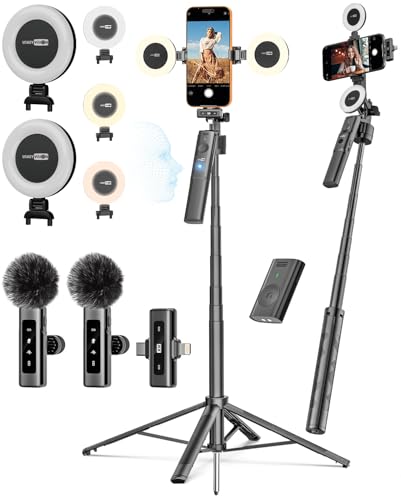
- All-in-one starter bundle with light, mic, tripod, and remote
- Auto face tracking helps keep solo shots framed
- Compatible with both iPhone and Android
Best For: Solo sellers, coaches, and creators who need a compact mobile streaming starter kit.
Best for Dual-Screen Setups

- Includes two compact lights for flexible desk or shared-use setups
- USB-powered and easy to plug in for laptops, PCs, or power banks
- 10 brightness levels and 3 color temperatures for quick tuning
Best For: Remote workers and small teams who want an easy, budget-friendly lighting kit for calls and simple livestreams.
Best for Smartphone Social Streaming
Vlogging Kit for iPhone & Android

- Clearer audio with cardioid mic and foam windscreen
- Built-in LED light with 3 brightness settings
- Tripod, phone clip, and Bluetooth remote included
Best For: Creators and small businesses that need a lightweight phone-based livestream kit.
Best All-in-One Starter Kit – Movo iVlogger-PRO Vlogging Kit
If you want portable livestream kits for business that are ready to go out of the box, the Movo iVlogger-PRO bundles the core tools most creators actually need: a directional mic, adjustable RGB light, phone mount, and two aluminum tripods. It’s a practical pick for on-the-go product demos, social video, and simple live setups without piecing together separate accessories.
Best For: Small businesses, solo creators, and marketers who want a travel-friendly kit for quick livestreams, talking-head videos, and mobile content production.
Pros:
- Includes the VXR10 mic for clearer voice capture than basic bundled mics
- Rechargeable RGB light helps improve on-camera look in low-light spaces
- Comes with two aluminum tripods, a handle grip, remote, and carry case
- Supports iPhone and Android with USB-C, Lightning, and 3.5mm options
Cons:
- Built for starter-to-midlevel use, not a fully modular pro rig
- Can be more kit than a casual user needs if they only want a basic stand
- Best results still depend on the phone and app setup you pair with it
This is a strong fit if you need portable livestream kits for business that prioritize convenience, decent audio, and flexible shooting angles over maximum customization. For teams and solo operators who want one carry case with the essentials, it’s an easy way to start filming faster.
Best for Teleprompter-Led Live Streams – Large Screen Teleprompter Holder
If you need portable livestream kits for business that help you stay on-message, this teleprompter holder is a practical pick. It pairs a tablet teleprompter setup with a phone camera mount, so you can read scripts clearly while keeping your delivery natural for live selling, webinars, demos, and virtual meetings.
Best For: Business creators, presenters, and small teams that want a compact teleprompter-and-tripod setup for polished streaming and recording.
Pros:
- Dual-clamp design supports a tablet for teleprompting plus a smartphone camera.
- Extendable tripod adds flexibility for desktop shooting, vlogging, and quick setup changes.
- Includes three clamp sizes, 360° rotation, and adjustable height for better compatibility.
- Aluminum alloy construction feels sturdier than many lightweight phone-only rigs.
Cons:
- More specialized than a simple tripod, so it may be overkill for casual use.
- Best results depend on matching the right clamp size to your device.
- Not the smallest travel option if you want an ultra-minimal kit.
For hosts who want a compact, script-friendly tool in portable livestream kits for business, this model stands out for keeping both the camera and teleprompter in one setup. It is especially useful when you want more confident delivery without sacrificing mobility.
Best for Fast Mobile Setup – yAyusi 3-in-1 Magnetic Vlogging Kit
If you want one compact package that can cover filming, calls, and quick live sessions, this yAyusi kit is a smart fit for portable livestream kits for business. It bundles a magnetic tripod, wireless microphone system, fill light, and remote so you can move from setup to shooting with minimal gear changes.
Best For: Solo creators, small business owners, and teams that need a quick, all-in-one phone kit for interviews, livestreams, and social content.
Pros:
- Magnetic tripod and one-hand pop-open design make setup fast.
- Includes mic, light, and remote so you can build a basic stream kit in one purchase.
- Wireless audio and light add-ons support interviews and polished on-camera work.
- Works with iPhone and Android, including a metal ring for non-MagSafe cases.
Cons:
- More of a mobile creator kit than a pro-level business livestream rig.
- The bundled accessories are useful, but advanced users may want stronger audio and lighting.
For teams that need portability first, this is one of the more practical portable livestream kits for business because it keeps the essentials together without adding much bulk. It is especially useful when you need to record, stream, or present on the go with a phone-based workflow.
Best for Small Desk Setups – Evershop Clip-On Ring Light for Laptop
If you need an easy lighting upgrade for portable livestream kits for business, this clip-on ring light is a simple way to improve webcam clarity without adding much bulk to your desk. It’s designed for laptops, monitors, phones, and webcams, making it a practical pick for quick setup before Zoom calls, recordings, and live demos.
Best For: Solo professionals, remote workers, and creators who want compact, attach-anywhere lighting for meetings and livestreams.
Pros:
- Compact 5-inch design is easy to pack and reposition.
- Clip-on stand works with laptops, monitors, phones, and webcams.
- Helps create more even, flattering light for calls and recordings.
- Good fit for fast, low-fuss business livestream setups.
Cons:
- Small size won’t light a large room or multi-person setup.
- May be less powerful than full-size ring lights.
For portable livestream kits for business, this is a budget-friendly, space-saving lighting add-on that prioritizes convenience over studio-level output. It makes the most sense when you want cleaner on-camera presentation from a compact, travel-friendly tool.
Best for Solo Mobile Streaming – USKEYVISION iPhone & Android Vlogging Kit
If you need one of the more flexible portable livestream kits for business, this USKEYVISION setup bundles the basics for filming on the go: a tripod, light, wireless microphone, and remote control. It’s aimed at creators who want a simple all-in-one kit for product demos, social content, and quick livestreams without piecing together separate accessories.
Best For: Solo sellers, coaches, and content creators who want a compact starter kit for livestreaming and mobile video recording.
Pros:
- Includes several core livestream accessories in one package
- Wireless mic and remote help make solo shooting easier
- 68-inch auto face-tracking tripod adds useful hands-free framing
- Works with both iPhone and Android devices
Cons:
- May be more starter-focused than pro-level streaming gear
- Best suited to mobile content rather than full studio setups
For buyers comparing portable livestream kits for business, this one stands out for convenience and broad device compatibility. It’s a practical pick if you want a lightweight kit that helps you start filming faster and keep your setup simple.
Best for Dual-Screen Setups – 2-Pack 5" USB Ring Lights
If you need a simple lighting upgrade for portable livestream kits for business, this 2-pack gives you a compact, USB-powered setup that works well with laptops, desktops, and mobile devices. The adjustable stand and phone holder make it a practical choice for Zoom calls, product demos, training sessions, and quick content shoots without a complicated rig.
Best For: Teams, solo creators, and remote professionals who want two affordable desk lights for video calls or basic livestreaming.
Pros:
- Two lights included, which is useful for multi-device or shared workspace setups
- USB plug-and-play power makes it easy to use with a laptop, power bank, or wall adapter
- 10 brightness levels and 3 color modes help match different room lighting conditions
- Foldable, compact design is easy to store and move between workspaces
Cons:
- 5-inch light heads are better for close-up desk use than full-room coverage
- Plastic build and small size may feel basic compared with pro creator lighting kits
- Phone-holder design is useful, but not as versatile as a full tripod system
This is a solid pick if you want portable livestream kits for business that prioritize convenience, quick setup, and value over advanced studio features. It’s especially appealing for everyday conferencing and lightweight on-the-go use.
Best for Smartphone Social Streaming – Vlogging Kit for iPhone & Android
This compact smartphone kit covers the core needs most portable livestream kits for business have to solve: better audio, brighter on-camera lighting, and a simple tripod setup that travels easily. It’s a practical choice for creators, sales teams, and solo operators who need a fast, lightweight way to look and sound more polished on video calls, social streams, and quick promo shoots.
Best For: Business owners, creators, and marketers who want an affordable all-in-one phone rig for livestreaming, short-form video, and virtual meetings.
Pros:
- Cardioid-style microphone with foam cover helps cut background noise for clearer speech.
- Rechargeable LED light adds useful fill light with three brightness levels.
- Includes a Bluetooth remote, making hands-free recording easier.
- Adjustable tripod and phone clamp make it simple to set up on a desk or move between locations.
Cons:
- Designed around smartphones, so it’s less flexible than larger creator kits.
- Wired mic compatibility may require checking adapters and device settings.
- Best for light-duty use rather than full-time studio production.
For portable livestream kits for business, this bundle is strongest as a value-friendly starter setup: it’s easy to carry, quick to deploy, and covers the main quality upgrades most phone-based streams need without adding a lot of bulk.
How We Picked These Portable Livestream Kits for Business
We looked for kits that make business livestreams easier to run, not harder. That means dependable audio capture, useful lighting, stable mounting options, and accessories that work for mobile creators, desk setups, and on-the-go presentations. We also favored products that are simple to assemble and easy to pack.
Quick Comparison
Different kits solve different problems. All-in-one vlogging bundles are the best fit if you want a fast, complete setup for phones. Teleprompter kits are better for scripted presentations and polished talking-head videos. Desk-mounted ring lights and monitor lights are ideal for laptop-based meetings, webinars, and frequent Zoom calls.
Key Buying Factors for Portable Livestream Kits for Business
Audio Quality
Clear voice pickup matters more than almost anything else. Look for an included external microphone, preferably one designed to reduce background noise and improve speech clarity.
Lighting
Good lighting helps you look credible and consistent on camera. Small LED lights are great for portability, while ring lights offer softer, more even illumination for face-to-camera work.
Mounting and Stability
A sturdy tripod, clamp, or desk mount keeps your frame steady. For business use, adjustable mounts are especially useful because they work across phones, tablets, laptops, and webcams.
Ease of Setup
The best Portable Livestream Kits for Business should be quick to deploy between meetings or shoots. Fewer parts usually means fewer delays and less chance of forgetting an accessory.
Compatibility
Check that the kit supports your phone size, tablet, or webcam setup. If you switch between iPhone and Android, or move from phone livestreaming to laptop conferencing, compatibility becomes a major advantage.
Who Should Buy Which Portable Livestream Kits for Business?
If you need a simple, mobile-friendly kit for product demos or social media broadcasts, choose an all-in-one phone vlogging bundle. If you present from a script or want a more polished delivery, a teleprompter setup is the smarter choice. For teams working from desks, a compact ring light or monitor light is often the best value. If you want one setup that can move between different business tasks, prioritize portability, a microphone, and flexible mounting over extra accessories you may never use.
In short, match the kit to your workflow: mobile presenters should optimize for lightweight gear, laptop-based users should optimize for desk lighting, and frequent on-camera communicators should prioritize quick setup and reliable audio first.