
The best samplers for recording can turn one-shots, loops, vocals, and field recordings into complete arrangements. The right choice depends on whether you want hands-on sampling, computer-based beatmaking, portable capture, or an all-in-one recording setup.
We’ve gathered 10 options spanning dedicated samplers, MIDI pad controllers, handheld recorders, USB interfaces, and podcast bundles. Use the guide below to match features, workflow, and budget to the way you plan to record.
Best 10 Samplers for Recording Picks for 2026
Deep Sound Design

- Four parallel stereo sampling tracks
- Granular, resonator, color, and space processing
- Scenes, macros, modulators, and USB-C audio
Best For: Experimental producers and live sound designers
Portable Field Capture

- Large stereo X/Y microphones
- 32-bit float clip-free recording
- Up to four-track WAV recording
Best For: Mobile recording, filmmaking, and live capture
Standalone Beatmaking
Akai MPC Sample Portable Sampler

- Battery-powered standalone operation
- 16 MPC pads and sample chopping
- Built-in mic, speaker, effects, and USB-C
Best For: Portable beatmaking and DAWless production
Computer-Based Pad Control
PreSonus ATOM MIDI Pad Controller

- 16 velocity- and pressure-sensitive pads
- Studio One and Ableton Live integration
- Assignable controls for samples and loops
Best For: DAW-based sample triggering and performance
Complete Recording Starter Kit

- 16 RGB pads trigger loops, effects, and virtual instruments
- Two mic preamps support simultaneous instrument and vocal recording
- Includes microphone, headphones, software, and cables
Best For: Beginners building an all-in-one home recording setup
Vocal Recording Bundle
AudioBox 96 with Mic and Accessories

- 24-bit/96 kHz two-channel USB interface with phantom power
- Includes condenser mic, headphones, pop filter, stand, and shockmount
- Studio One Artist and Studio Magic software are included
Best For: Vocalists, podcasters, and small home-studio sessions
Versatile MIDI Control

- 16 backlit pads with three banks
- Extra faders, knobs, and MIDI I/O
- Includes Melodics and Cubase LE resources
Best For: DAW-based beat making and sample triggering
Complete Podcast Input

- Two microphones and suspension arms included
- Built-in voice variations and sound effects
- Accepts XLR microphones and instruments
Best For: Podcasting, streaming, and compact multi-source recording
Starter Voice Recording Kit
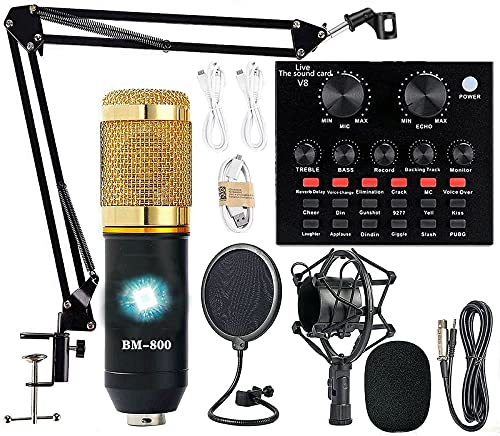
- Microphone, arm, shock mount, and pop filter included
- Cardioid condenser microphone for focused voice capture
- Compatible with computers, mobile devices, and consoles
Best For: Beginner podcasting, streaming, and voice recording
Deep Sound Design – S4 Sculpting Sampler
The S4 Sculpting Sampler is built for creators who want samplers for recording that can also reshape sound extensively. Four parallel stereo tracks, granular processing, modulation, scenes, macros, and a USB-C audio interface make it suited to experimental composition and live sound design.
Best For: Texture-focused producers, live performers, and sound designers who want deep onboard processing.
Pros:
- Records, layers, overdubs, and loops samples, including sound-on-sound and varispeed recording.
- Offers granular processing with up to 128 grains plus detailed pitch, movement, and distribution controls.
- Includes four stereo tracks, multiple audio devices, modulators, scenes, macros, and a master mixer.
- USB-C audio interface supports integration with a computer-based setup.
Cons:
- Its extensive modulation and processing options may require a learning period.
- It is focused on sound sculpting rather than a simple, streamlined sampling workflow.
The S4 is a specialized choice for turning recordings into evolving textures and performance material. Choose it if hands-on transformation is more important than basic sample capture.
Portable Field Capture – Zoom H5 Studio Recorder
The Zoom H5 Studio is a practical option among samplers for recording when the priority is capturing clean audio on location. Its large stereo microphones, 32-bit float recording, dedicated gain controls, and battery-powered design support musicians, filmmakers, and mobile recording setups.
Best For: Field recording, filmmaking, rehearsals, and musicians who need a portable multi-track recorder.
Pros:
- Large 19.4mm X/Y microphones are designed to capture detailed stereo audio.
- 32-bit float recording helps provide clip-free capture across changing volume levels.
- Records up to four tracks simultaneously at up to 192kHz in WAV format.
- Includes two XLR/TRS inputs, dedicated gain knobs, and USB audio interface functionality.
Cons:
- It is primarily a recorder rather than a pad-based sample production instrument.
- Battery operation requires four AA batteries.
The H5 Studio makes the most sense when dependable capture and portability come first. It can supply high-quality source material for later editing, sampling, or production.
Standalone Beatmaking – Akai MPC Sample Portable Sampler
The Akai MPC Sample is a compact standalone choice for samplers for recording, chopping, sequencing, and beatmaking without a computer. Battery power, a built-in microphone and speaker, responsive MPC pads, and internal effects make it convenient for capturing ideas wherever they happen.
Best For: Beatmakers, DAWless producers, finger drummers, and beginners exploring hardware sampling.
Pros:
- Operates without a computer using a rechargeable battery, built-in microphone, speaker, and microSD storage.
- Provides 16 velocity-sensitive MPC pads, Instant Sample Chop Mode, timestretching, repitching, and resampling.
- Includes over 100 factory kits and four internal FX processors with 60 effect types.
- Offers USB-C audio/MIDI, stereo line I/O, headphones output, and MIDI connectivity through an adapter.
Cons:
- MIDI DIN connectivity requires a separate 1/8-inch-to-MIDI DIN adapter.
- Its compact display may feel less spacious for detailed editing than a larger computer-based setup.
The MPC Sample is a strong fit for quick sampling and groove creation away from the desk. It balances accessible controls with enough onboard processing for standalone production and live use.
Computer-Based Pad Control – PreSonus ATOM MIDI Pad Controller
The PreSonus ATOM is a MIDI pad controller rather than a standalone sampler, but it can be useful alongside samplers for recording in a computer-based setup. Its 16 velocity- and pressure-sensitive pads, software integration, and assignable controls are designed for triggering samples, loops, effects, and virtual instruments.
Best For: Producers who use Studio One, Ableton Live, or compatible software to trigger samples and build performances.
Pros:
- Offers 16 full-size velocity- and pressure-sensitive RGB pads with eight assignable pad banks.
- Includes 20 assignable buttons, four endless encoders, Note Repeat, and MIDI keyboard mode.
- Comes with Studio One Artist, Ableton Live Lite, and Studio Magic plug-in content.
- USB compatibility supports use with computers and selected mobile devices.
Cons:
- It does not record or store samples independently; compatible software and a host device are required.
- Its usefulness depends on the workflow and software mapping used.
The ATOM is best viewed as a performance and input surface for a DAW, not as a self-contained sampling instrument. It is a sensible add-on when expressive pad control matters more than standalone operation.
Complete Recording Starter Kit – AudioBox USB 96 Bundle
The AudioBox USB 96 bundle is a practical starting point for anyone comparing samplers for recording and wants a complete setup for capturing vocals, guitar, loops, and virtual instruments. Its two-input interface, velocity-sensitive pads, headphones, microphone, and included recording software cover the essentials for a compact home studio.
Best For: Beginners and home-studio users who need an interface, microphone, headphones, and beat-triggering pads in one package.
Pros:
- Includes 16 velocity- and pressure-sensitive RGB pads for triggering loops, effects, and virtual instruments.
- Two Class-A mic preamps with +48V phantom power support simultaneous guitar and vocal recording.
- Zero-latency monitoring, MIDI In/Out, and USB bus-powered operation suit flexible setups.
- Includes a condenser microphone, studio headphones, cables, stand, and Studio One software.
Cons:
- The interface has two input channels, which may limit larger recording setups.
- The bundle is more comprehensive than necessary if you already own a microphone or headphones.
As a ready-to-use package, this bundle stands out for combining sampling-oriented pad control with the core tools needed to record instruments and vocals. It is especially convenient for creators who want to begin without assembling separate components.
Portable Beat-Making Pick – JP-1 Wireless MIDI Pad Controller
The JP-1 is a compact option for shoppers seeking samplers for recording without being tied to a desk. Its 16 velocity-sensitive RGB pads can trigger samples and loops, while Bluetooth and USB connectivity make it suitable for laptops, tablets, smartphones, and compatible music apps.
Best For: Beginners and mobile producers who want a portable controller for finger drumming, sampling, and looping.
Pros:
- Portable, battery-powered design supports beat making at home, in the studio, or on the go.
- Velocity-sensitive, touch-responsive pads add variation and expression to performances.
- Bluetooth and USB connections work with a wide range of computers, mobile devices, DAWs, and music apps.
- Designed for accessible sampling, looping, and rhythm practice.
Cons:
- It is a MIDI pad controller rather than a standalone sampler with built-in audio storage.
- Its 16-pad layout may be limiting for users who need more dedicated controls.
The JP-1 makes the most sense when your computer, tablet, or phone will run the music software and handle the samples. Its portability and wireless connectivity are useful advantages for learning, sketching ideas, and performing rhythms away from a traditional studio.
Vocal Recording Bundle – AudioBox 96 with Mic and Accessories
This AudioBox 96 bundle suits shoppers exploring samplers for recording who also need a focused vocal and instrument recording setup. Along with a two-channel USB interface, it includes a cardioid condenser microphone, closed-back headphones, pop filter, shockmount, stand, cable, and Studio One Artist software.
Best For: Home studios, podcasters, and vocalists who want the main recording accessories included in one kit.
Pros:
- Two XLR/TRS combo inputs, 24-bit/96 kHz conversion, Class-A preamps, and +48V phantom power support detailed recording.
- Zero-latency direct monitoring includes a Mix control for balancing input and DAW playback.
- The cardioid condenser microphone and included shockmount, pop filter, stand, and cable create a ready vocal setup.
- Studio One Artist and Studio Magic software provide recording, editing, mixing, instruments, effects, and loops.
Cons:
- The two-channel interface may not suit projects requiring many simultaneous sources.
- The supplied software support is listed for Windows, so platform compatibility should be checked before purchase.
This is a strong convenience-focused bundle for recording vocals, podcasts, and small instrument sessions. It emphasizes monitoring and vocal accessories rather than dedicated pad hardware, so it is best paired with software-based sampling workflows.
Versatile MIDI Control – STARRYPAD Beat Maker
For producers seeking samplers for recording, the Donner STARRYPAD is a flexible MIDI pad controller for triggering drums, samples, and effects inside a DAW. Its 16 backlit pads, three pad banks, and extra faders and knobs provide hands-on control, though it requires software to produce sound.
Best For: Home producers and beat makers who want an affordable, customizable pad controller for DAW-based recording.
Pros:
- 16 velocity-sensitive pads with three banks for up to 48 assignable pad locations
- Includes two faders, two knobs, three buttons, and Shift-layer controls
- USB-C connectivity plus MIDI input/output for compatible external gear
- Includes Melodics courses and a Cubase LE software kit
Cons:
- It does not record or arrange music by itself
- It needs DAW software to produce sound
- Connecting to an iPhone or iPad requires an Apple Lightning to USB adapter
The STARRYPAD is a practical choice when tactile sample triggering and rhythm programming matter more than standalone operation. Its lighting and bank system can help organize a compact recording workflow.
Complete Podcast Input – V8SS Recording Bundle
This V8SS bundle suits creators who need recording hardware alongside samplers for recording and other audio sources. It combines a live sound card, two condenser microphones, suspension arms, voice effects, and USB-C connectivity for podcasting, streaming, and basic music recording.
Best For: Podcasters, streamers, and creators recording voices or connecting guitars, bass, and electronic drums.
Pros:
- Includes two condenser microphones with anti-vibration suspension arms
- Offers noise reduction, omnidirectional capture, and DSP audio processing
- Provides four voice variations and 10 sound effects
- Supports XLR input and direct connection of electric guitars, bass, and electronic drums
Cons:
- The battery should be fully charged before initial use
- Driver installation may require contacting the manufacturer’s support team
- The listed configuration has two channels, which may limit larger setups
The V8SS is more of a ready-to-use podcast and live-production package than a dedicated sampler. Its instrument input and built-in effects make it useful for creators who want to combine voice, instruments, and real-time processing.
Starter Voice Recording Kit – BM-800 AM100-V8
The BM-800 AM100-V8 is a bundled microphone and live sound card setup for creators comparing samplers for recording with broader voice-production tools. It includes a cardioid condenser microphone, arm stand, shock mount, pop filter, and voice effects for podcasting, streaming, music recording, and short-form video.
Best For: Beginners who want a complete, voice-focused recording and streaming package with broad device compatibility.
Pros:
- Complete kit includes microphone, arm stand, shock mount, pop filter, and wind cover
- Cardioid pickup pattern focuses on sound from in front of the microphone
- Works with Windows, Mac, Android, iOS, computers, tablets, and gaming platforms
- Includes multiple sound effects and supports a listed maximum sample rate of 192 kHz
Cons:
- It is a one-channel setup
- The audio input is listed as a 3.5mm jack rather than XLR
- The included sound card is designed around voice effects and streaming rather than dedicated sample triggering
This package is a sensible entry point for spoken-word recording and live content. Buyers primarily seeking pad-based sample control should look elsewhere, but creators needing a microphone-centered kit get the key accessories in one bundle.
How We Picked the Best Samplers for Recording
We evaluated these products by looking at how directly they support sampling and recording, how easy they are to integrate into a modern setup, and what kind of user each one serves. Dedicated hardware samplers were considered for hands-on control, polyphonic or granular processing, sequencing, and live performance. MIDI controllers were judged by pad layout, portability, software compatibility, and the quality of their included production tools.
We also included handheld recorders, USB interfaces, microphones, and podcast packages because many creators use “sampler” setups that begin with capturing audio before editing and arranging it in a computer. The best option is not necessarily the most feature-heavy; it is the one that fits your workflow without adding unnecessary complexity.
Quick Comparison
- Dedicated hardware sampler: Best for tactile beatmaking, sound manipulation, and standalone or live workflows.
- Handheld recorder: Best for capturing environmental sounds, rehearsals, instruments, and dialogue to sample later.
- MIDI pad controller: Best for triggering samples inside a DAW such as Ableton Live or Studio One.
- USB recording bundle: Best for beginners who need an interface, microphone, headphones, and software in one purchase.
- Podcast bundle: Best for spoken-word recording, streaming, voice effects, and simple laptop-based production.
Key Buying Factors for Samplers for Recording
Sampling Workflow
Decide whether you want to record directly into the hardware or control samples inside a computer. Standalone samplers offer more immediate control, while MIDI controllers typically depend on a DAW and sample library.
Inputs and Recording Quality
Check the available microphone, line, instrument, or stereo inputs. For field recording, portability and microphone quality matter; for vocals and instruments, look for suitable preamps, monitoring, and dependable USB connectivity.
Pads, Controls, and Performance Features
Velocity-sensitive pads, RGB feedback, knobs, faders, modulation, and performance effects can make chopping and triggering samples faster. More controls are useful only if they match the way you work.
Software Compatibility
Confirm support for your operating system and preferred DAW. Included software can reduce startup costs, but compatibility and long-term workflow matter more than the title of a bundled program.
Portability and Expansion
If you record away from a desk, consider battery operation, size, storage, wireless connectivity, and transfer options. Also check whether the device supports expansion through removable media, USB storage, or computer-based libraries.
Who Should Buy Which Samplers for Recording?
Choose a dedicated sampler if you want hands-on sound design, live manipulation, and a more self-contained production process. A hardware sampler is the strongest fit for beatmakers and performers who value immediate control.
Choose a MIDI pad controller if your samples already live in a DAW and you want better finger-drumming, clip launching, or drum programming without buying a complete standalone workstation.
Choose a handheld recorder if your raw material comes from locations, rehearsals, acoustic instruments, or everyday sounds. It can serve as the front end for a sampling workflow even when editing happens later on a computer.
Choose a recording or podcast bundle if you are starting from scratch and need the core equipment for vocals, narration, streaming, or basic music recording. Bundles are convenient, but verify connection types, included accessories, and upgrade paths before buying.