
If you take frequent calls at your desk, the right speakerphone can make meetings clearer, faster, and far less fatiguing. Good USB models improve voice pickup, reduce background noise, and keep setup simple.
This roundup covers 10 practical options for office desks, from compact plug-and-play speakerphones to models with Bluetooth, AI noise reduction, and stronger audio for small conference spaces.
Best 10 USB Speakerphones for Office Desks Picks for 2026
Best for Clear Conference Calls
USB Speakerphone for Office Desks

- Dual mics capture voices from up to 3 meters away.
- Noise reduction and echo cancellation improve call clarity.
- Plug-and-play USB setup works with Zoom, Teams, Skype, and more.
Best For: Home offices and small meeting spaces that need an easy USB speakerphone for clear calls.
Best for Monitor-Mounted Desks
Cyber Acoustics USB Bluetooth Speaker Bar
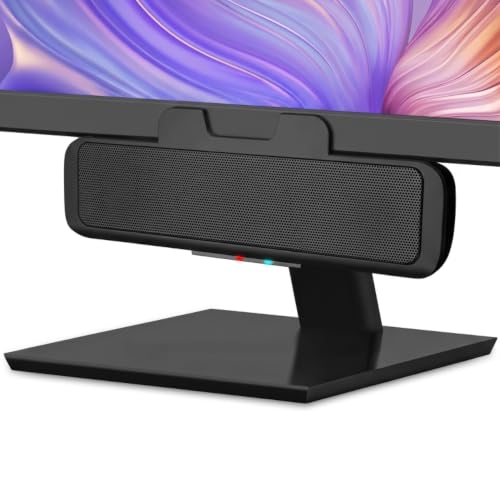
- Clamps under a monitor to save space
- USB + Bluetooth for PC and smartphone use
- Easy controls with mic mute and LED indicator
Best For: People who want a compact, easy-to-use speakerphone setup for a tidy office desk.
Best for Easy Conference Pickup
TONOR G11 USB Conference Microphone

- Omnidirectional pickup for group voice capture
- Plug-and-play on Windows and macOS
- Mute button plus compact desk-friendly base
Best For: Small office or home users who want an easy USB conference mic for clearer group calls.
Best for Easy Setup
Jabra Speak 510 Portable Speakerphone

- USB and Bluetooth support for flexible desk use
- 360-degree mic helps with small group calls
- Compact design makes it easy to carry or store
Best For: Employees who want a simple, portable speakerphone for everyday desk meetings and calls.
Best for Zoom Rooms
EMEET M1A Zoom Certified Speakerphone

- Zoom certified for reliable meeting-platform compatibility
- 360° pickup with dual mics for group calls
- USB-C/USB-A plug-and-play setup with mute control
Best For: Small to medium office meetings, especially Zoom-centric teams that want a simple wired speakerphone.
Best for Small Desks
FUNLOGY 14W USB Stereo PC Speakers

- Compact 30° tilt design saves desk space
- 14W stereo sound with punchy low end
- USB + 3.5mm plug-and-play setup
Best For: Compact office desks and users who want simple, space-saving desktop audio.
Best for Comfort
EMEET M0 Plus Conference Speakerphone

- 4 AI mics with 360° voice pickup
- USB-C and Bluetooth 5.0 connectivity
- Daisy chain support for larger meetings
Best For: Teams and remote workers who want a simple, desk-friendly conference speakerphone.
Best for Built-In USB Hub

- Speaker, mic, and 3-port USB hub in one unit
- 360° voice pickup with noise reduction for calls
- Plug-and-play USB setup for Windows, Mac, and laptops
Best For: Desk setups that need a speakerphone, extra USB ports, and easy conference-call audio without extra clutter.
Best for Microsoft Teams Calls

- Teams-certified with a dedicated meeting button
- Full duplex audio for natural back-and-forth conversation
- Compact soundbar design keeps desks tidy
Best For: Teams-heavy desks that need a compact USB speakerphone with clear voice pickup.
Best Simple Pick
Conference Speakerphone with 360° Voice Pickup

- 360° mic pickup for group calls
- AI noise reduction and echo cancellation
- USB plug-and-play with full-duplex audio
Best For: Small teams and home-office users who want a simple desktop speakerphone for everyday meetings.
Best for Clear Conference Calls – USB Speakerphone for Office Desks
If you need a simple, plug-and-play option for usb speakerphones for office desks, this USB speakerphone is built around clear voice pickup and everyday meeting use. It combines dual omnidirectional mics, noise reduction, and echo cancellation to help keep calls intelligible on Zoom, Teams, Skype, and similar apps.
Best For: Home offices and desk setups that need an easy USB speakerphone for small to medium group calls without extra software.
Pros:
- Two high-sensitivity microphones help capture voices from up to 3 meters away.
- Noise reduction and echo cancellation improve call clarity in busy workspaces.
- Works with major meeting platforms and connects via simple USB plug-and-play.
- Compact design with cable management makes it easy to keep on a desk or pack for travel.
Cons:
- Best suited to small rooms rather than larger conference spaces.
- Audio features focus on meetings, not music listening.
For buyers comparing usb speakerphones for office desks, this model stands out as a practical, no-fuss choice for clearer voice pickup and less background noise. It is a strong fit if your priority is reliable conference calling rather than premium audio extras.
Best for Monitor-Mounted Desks – Cyber Acoustics USB Bluetooth Speaker Bar
If you want one of the more space-saving usb speakerphones for office desks, this Cyber Acoustics speaker bar is built to sit neatly under a monitor while handling both PC audio and phone calls. USB power keeps the setup simple, and Bluetooth 5.0 adds a quick way to connect a smartphone for calls or meetings.
Best For: Workers who want a compact desk speakerphone that can switch between a computer and a phone without cluttering the workspace.
Pros:
- Clamps under a monitor to save valuable desk space
- USB and Bluetooth connections support PC/Mac plus smartphones
- Convenient controls for playback, volume, input switching, and mic mute
- Plug-and-play setup with a USB-A to USB-C adapter included
Cons:
- 5W output is modest for larger rooms or noisy environments
- Designed more for calls and casual audio than full-range music listening
For buyers comparing usb speakerphones for office desks, this model stands out for its monitor-mounted design and easy dual-device workflow. It is a practical fit if you want a tidy setup, fast switching, and straightforward call controls without adding another bulky device to the desk.
Best for Easy Conference Pickup – TONOR G11 USB Conference Microphone
If you need a simple desktop audio upgrade for small meetings, the TONOR G11 is a practical pick for usb speakerphones for office desks—with one important caveat: it’s a USB microphone, not a speakerphone. It captures voices from all around the mic, so it can make group calls, online classes, and remote training sound clearer without a complicated setup.
Best For: Small teams, remote workers, and home-office users who want an easy plug-and-play conference mic for clearer voice pickup on a desk.
Pros:
- Omnidirectional pickup helps capture voices from multiple directions.
- Plug-and-play USB setup works with Windows and macOS, with no drivers needed.
- Mute button and indicator light make quick call control easy.
- Compact metal build with a stable base takes up little desk space.
Cons:
- Not a speakerphone, so it does not provide built-in audio playback.
- Best suited to small or medium meetings rather than large conference rooms.
For buyers comparing usb speakerphones for office desks, this model is better thought of as a desktop conference mic than an all-in-one communication device. It’s a smart choice if your main goal is clearer voice capture with minimal setup, but you’ll still need separate speakers for listening.
Best for Easy Setup – Jabra Speak 510 Portable Speakerphone
If you want one of the more straightforward usb speakerphones for office desks, the Jabra Speak 510 is a practical pick: plug it in, pair over Bluetooth if needed, and get moving. Its slim portable design and 360-degree mic make it a good fit for solo calls, small huddles, and shared workspaces where reliability matters more than flashy extras.
Best For: Workers who need a simple, portable speakerphone that can handle everyday desk meetings and quick video calls.
Pros:
- Fast setup with both USB and Bluetooth connectivity
- 360-degree microphone helps capture voices from around the desk
- Compact, portable design is easy to move between rooms or trips
- Works with major meeting platforms and UC apps
Cons:
- Better suited to small meetings than larger conference rooms
- Sound quality is strong for calls, but not built for premium speaker audio
For office teams that need a dependable, no-fuss option, this Jabra lands squarely in the sweet spot for usb speakerphones for office desks. It focuses on clear voice pickup, flexible connectivity, and easy portability rather than complex controls or a heavy desktop footprint.
Best for Zoom Rooms – EMEET M1A Zoom Certified Speakerphone
If you want a dependable, plug-and-play option for usb speakerphones for office desks, the EMEET M1A is built around clear pickup, simple controls, and broad meeting-app compatibility. It’s a practical choice for small conference tables, hybrid workstations, and teams that need everyone heard without complicated setup.
Best For: Small to medium office meetings, especially Zoom-heavy teams that want a wired speakerphone with easy mute control and solid voice pickup.
Pros:
- Zoom certified and compatible with major meeting platforms like Teams, Skype, Webex, and more
- 360° voice pickup with dual omnidirectional mics helps capture group conversations clearly
- Plug-and-play USB-C/USB-A connection makes desk setup fast and stable
- Built-in echo cancellation, noise reduction, and mute control support cleaner calls
Cons:
- Best suited for small groups rather than large conference rooms
- Wired design is reliable, but not ideal if you want a portable wireless speakerphone
Overall, the M1A is a strong fit if your office values straightforward performance over extra features. For usb speakerphones for office desks, it stands out as a dependable meeting-room-to-desk solution that keeps setup simple and call quality consistent.
Best for Small Desks – FUNLOGY 14W USB Stereo PC Speakers
If you want one of the more compact usb speakerphones for office desks, this FUNLOGY set is a practical pick: it keeps the footprint small while still delivering fuller sound than typical monitor speakers. The USB power, 3.5mm input, and simple volume dial make it easy to drop into a work setup without extra software or pairing hassles.
Best For: Compact office desks, home workstations, and users who want straightforward plug-and-play audio with a tidy footprint.
Pros:
- 14W total output with dual drivers and passive radiators for strong sound in a small size
- 30° tilt design helps aim audio toward your ears and saves desk space
- USB power plus 3.5mm connection means fast setup across PCs, laptops, and monitors
- Noise-reducing design and gold-plated AUX input help keep playback clean
Cons:
- No Bluetooth or wireless playback option
- Best suited to small-to-medium rooms rather than larger spaces
- Not a true conference speakerphone with a microphone
For buyers comparing usb speakerphones for office desks, this model stands out most for space-saving simplicity and dependable everyday sound. It’s a good fit if you want an easy upgrade for calls, meetings, and general PC audio without giving up valuable desk real estate.
Best for Comfort – EMEET M0 Plus Conference Speakerphone
If you want one of the more practical usb speakerphones for office desks, the EMEET M0 Plus is built around simple plug-and-play use and reliable room coverage. It combines USB-C and Bluetooth 5.0 connectivity with 4 AI mics, so it’s a strong fit for everyday meetings where setup speed and clear pickup matter more than flashy extras.
Best For: Small to medium offices, home workstations, and meeting rooms that need quick setup, broad voice pickup, and easy platform compatibility.
Pros:
- 4-mic 360° pickup helps capture voices from around the desk.
- USB-C and Bluetooth 5.0 make it flexible for laptop or mobile use.
- Works with popular apps like Zoom, Teams, Skype, Slack, and Webex.
- Daisy chain support can expand coverage for larger meetings.
Cons:
- Sound output is solid for meetings, but not aimed at premium audio playback.
- Daisy chaining is mainly useful if you plan to scale beyond a single desk setup.
For buyers comparing usb speakerphones for office desks, the M0 Plus stands out as a low-friction choice that gets meetings started quickly and keeps voices understandable without complicated software or setup steps.
Best for Built-In USB Hub – 3-in-1 USB Speaker with Mic
If you want one of the more practical usb speakerphones for office desks, this 3-in-1 soundbar adds speaker, microphone, and USB hub functions in a single compact unit. It is a good fit for workspaces where you need clean desk setup, simple plug-and-play use, and reliable audio for calls, classes, and everyday media.
Best For: Desk setups that need a speakerphone, extra USB ports, and easy conference-call audio without adding more clutter.
Pros:
- Built-in microphone with 360° voice pickup helps capture speech clearly across the desk
- 3-port USB hub is handy for webcams, keyboards, mice, and flash drives
- Plug-and-play USB setup keeps installation simple on Windows, Mac, laptops, and more
- Compact soundbar design works well for office desks and home workstations
Cons:
- Not a dedicated high-end conference speakerphone with advanced room-filling features
- USB-powered design may be less flexible than wireless office speaker options
- Best for personal desks and small meetings rather than large conference rooms
For buyers comparing usb speakerphones for office desks, this model stands out most for convenience: it combines audio, mic input, and port expansion in one easy desktop device. That makes it especially useful if you want a tidy setup and dependable call quality without adding separate accessories.
Best for Microsoft Teams Calls – Dell SP3022 USB Speakerphone
If you want one of the more polished usb speakerphones for office desks, the Dell SP3022 is built for clean conference calls and a clutter-free setup. Its compact soundbar shape fits neatly under a monitor, while AI noise and echo cancellation help voices stay clear in meetings.
Best For: Teams-focused home offices and desk setups that need an easy USB speakerphone with clear voice pickup and a tidy footprint.
Pros:
- Microsoft Teams certified with a dedicated Teams button for faster meeting access
- Full duplex audio lets multiple people speak naturally at once
- USB-A and USB-C connectivity makes it easy to connect to most computers and monitors
- Compact design works well on crowded office desks
Cons:
- Only 2 x 1.8W output, so it is not ideal if you want room-filling music playback
- Best value is tied to Teams-heavy workflows rather than general casual use
For buyers comparing usb speakerphones for office desks, the SP3022 stands out most for meeting convenience, tidy cable management, and reliable voice clarity. It is a smart fit if your desk is mostly for calls, video meetings, and focused work rather than big audio output.
Best Simple Pick – Conference Speakerphone with 360° Voice Pickup
If you want a simple upgrade from a laptop mic and speakers, this is a practical pick among usb speakerphones for office desks. It focuses on clear group pickup, noise filtering, and plug-and-play USB use, making it a solid fit for routine Zoom or Teams calls without much setup.
Best For: Small teams, home offices, and anyone who needs a straightforward desktop speakerphone for meetings.
Pros:
- 360° voice pickup helps capture everyone around the desk.
- AI noise reduction and echo cancellation improve call clarity.
- USB plug-and-play design keeps setup fast and simple.
- Full-duplex audio supports more natural two-way conversations.
Cons:
- You may need to manually select it as the input/output device.
- Best suited to small and medium meeting spaces, not large conference rooms.
Overall, this is a straightforward choice if you need dependable audio for daily calls and want one of the more convenient usb speakerphones for office desks. It prioritizes clarity and ease of use over advanced conferencing features, which is exactly what many home-office buyers need.
How We Picked the Best USB Speakerphones for Office Desks
We focused on models that are easy to use at a workstation and that solve the most common office calling problems: weak microphone pickup, distracting background noise, and awkward device switching. Priority went to clear voice capture, reliable USB connectivity, broad compatibility, and features that matter in real desk use, such as mute controls, echo cancellation, and compact footprints.
Quick Comparison: What Matters Most
When comparing USB Speakerphones for Office Desks, the biggest differences usually come down to microphone array quality, speaker volume, connection type, and how well the unit handles mixed-use environments. Some products are better for solo desk calls, while others are more suitable for small huddles or shared workspaces. Bluetooth support can be helpful, but USB plug-and-play is often the easiest and most dependable choice for everyday office use.
Key Buying Factors for USB Speakerphones for Office Desks
Voice Pickup and Noise Handling
Look for 360-degree pickup, multiple microphones, and echo or noise cancellation if you speak from different positions or work in an open office. These features help keep your voice consistent without forcing you to lean toward the device.
Connection and Compatibility
Most buyers should prioritize simple USB or USB-C connections for instant setup. If you switch between a laptop, desktop, and mobile device, a model with Bluetooth or dual-mode support may be worth the extra flexibility.
Speaker Quality and Desk Size
A stronger speaker helps in small meetings, but compact size matters on crowded desks. If you mainly use it for one-on-one calls, a smaller unit may be enough. For group calls, look for fuller sound and higher output.
Controls and Workflow
Dedicated mute, volume, and call controls save time during meetings. Status indicators are also useful, especially in busy offices where you need to confirm when the mic is live.
Who Should Buy Which USB Speakerphones for Office Desks?
Solo remote workers usually benefit most from compact, plug-and-play speakerphones with dependable microphone pickup and a small footprint. Teams that join frequent group calls should look for wider voice coverage, stronger speakers, and clearer echo handling. If you want one device for both calls and casual audio playback, a speakerphone with Bluetooth and better stereo output may be the best fit. For budget-conscious buyers, basic USB models can still deliver excellent call clarity without extra complexity.
In short, the best choice depends on how many people use the device, how noisy the room is, and whether you value simplicity or extra features more. Matching those needs to the right model will make your desk setup more efficient and your calls easier to manage.