
Wireless sharing should make meetings faster, not more complicated. The best systems let presenters connect in seconds, switch speakers smoothly, and keep the room focused on discussion instead of cables.
In this roundup, we compare nine wireless presentation systems for meeting rooms to help you choose the right balance of ease, compatibility, and room size support.
Best 9 Wireless Presentation Systems for Meeting Rooms Picks for 2026
Best for Hybrid Video Calls
Barco ClickShare CX-20 Gen 2 Wireless Conferencing System

- One-click wireless sharing for quick room use
- USB-C button simplifies laptop connection
- Built for Teams and Zoom conference workflows
Best For: Small to mid-sized meeting rooms that need simple wireless sharing and reliable hybrid conferencing.
Best for Secure Rooms
Kramer Electronics Via-Go3 Wireless Presentation Device
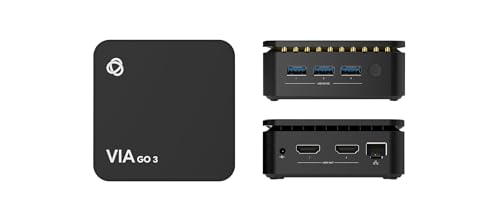
- Isolated Wi‑Fi and LAN help support secure room deployment
- Auto-disconnects when users leave the meeting room
- Works with AirPlay, Miracast, Chromebook, PC, and Mac
Best For: Secure conference rooms and guest-friendly meeting spaces.
Best for Small to Medium Rooms
Barco CSE-200 Wireless Presentation System

- Built for small to medium meeting rooms
- Simplifies wireless sharing for business meetings
- Cuts down on cable clutter and room setup time
Best For: Teams outfitting everyday conference rooms with a simple wireless sharing system.
Best for Plug-and-Play Meetings
Wireless HDMI 4K Transmitter & Receiver Kit

- No app or driver needed for quick setup
- USB-C adapters improve laptop and phone compatibility
- Supports long-range sharing in open meeting spaces
Best For: Teams needing a simple, cable-free presentation setup for quick room-to-room sharing.
Best for Small Meeting Rooms
Barco CS-100 Small Meeting Room Wireless Presentation System

- Wireless sharing from laptop, tablet, or smartphone
- One-user on-screen experience keeps setup simple
- HDMI output and included 1 Button for easy use
Best For: Small teams that need a straightforward standalone wireless presentation system for quick in-room sharing.
Best for 4K Dual-Display Rooms
MeetHub Kit Wireless Presentation System

- True 4K wireless sharing
- USB-C dongle for quick setup
- Dual HDMI with quad-view support
Best For: Conference rooms that need sharp wireless sharing and multi-display collaboration.
Best for Enterprise Rollouts
Barco ClickShare CSE-200+ Wireless Presentation System

- Two on-screen presenters at once
- Includes 2 ClickShare Buttons
- Works across major desktop and mobile platforms
Best For: Medium-sized meeting rooms and enterprise teams that need secure, centrally managed wireless sharing.
Best for Multi-Device Sharing
Monoprice One-Click USB-C Wireless Presenter 4K

- One-click wireless screen sharing for quick meeting starts
- Two presenters can share simultaneously
- Works with Windows, Mac, iOS, Android, and Miracast
Best For: Teams that need fast, flexible sharing across many device types.
Best for USB-C Presenters
ClearClick Present+Share 4K USB-C Edition

- Two USB-C transmitters make it easy to swap presenters
- Up to 4K/30 output with 1080p backward compatibility
- Secure 5 GHz wireless link with plug-and-play setup
Best For: Teams and educators using newer USB-C laptops or smartphones in meeting rooms.
Best for Hybrid Video Calls – Barco ClickShare CX-20 Gen 2 Wireless Conferencing System
If you want one of the most polished wireless presentation systems for meeting rooms, the Barco ClickShare CX-20 Gen 2 is built around fast one-click sharing and simple USB-C connectivity for hybrid collaboration. It’s aimed at teams that need a reliable way to bring laptops into conference calls without adding setup friction.
Best For: Small to mid-sized meeting rooms that need easy wireless sharing for Microsoft Teams and Zoom calls.
Pros:
- One-click screen sharing keeps meetings moving with minimal setup
- USB-C button makes laptop connection straightforward
- Designed for Microsoft Teams and Zoom compatibility
- Well suited to hybrid conferencing workflows
Cons:
- May be more system than needed for very basic presentation-only rooms
- Requires a dedicated hardware setup rather than a simple dongle
For buyers comparing wireless presentation systems for meeting rooms, this model stands out for its conferencing-first design and low-friction user experience. It’s a strong choice when you want dependable sharing plus video-call readiness in a single room solution.
Best for Secure Rooms – Kramer Electronics Via-Go3 Wireless Presentation Device
If you need wireless presentation systems for meeting rooms that prioritize security and clean day-to-day use, the Kramer Electronics Via-Go3 is built for that kind of environment. It supports quick wireless sharing across major platforms, includes built-in isolated Wi‑Fi and LAN, and is designed to connect and disconnect automatically as people enter and leave the room.
Best For: Conference rooms, corporate spaces, and guest-friendly setups where secure, low-friction wireless sharing matters more than flashy extras.
Pros:
- Built-in isolated Wi‑Fi and LAN for flexible, secure deployment
- Automatic disconnect when users leave the room adds a useful privacy layer
- Supports AirPlay, Miracast, Chromebook, PC, and Mac connectivity
- Calendar wallpaper widget and 3rd-party web apps make joining easier
Cons:
- Better suited to managed meeting spaces than casual plug-and-play home use
- Setup and administration may be more involved than simpler consumer devices
Overall, this is a strong fit if your priority is secure, reliable wireless presentation systems for meeting rooms rather than the lowest-cost option. Its room-aware behavior, broad device support, and enterprise-friendly feature set make it a practical choice for shared workspaces.
Best for Small to Medium Rooms – Barco CSE-200 Wireless Presentation System
MAIN-61771 Barco CSE-200 | Small Medium Size Meeting Room Wireless Presentation System
Check Price On AmazonIf you need a dependable option in wireless presentation systems for meeting rooms, the Barco CSE-200 is built around simple sharing for small to medium spaces. It’s a practical choice when you want presenters to connect quickly without adding cable clutter or extra setup steps.
Best For: Teams that want a straightforward wireless sharing system for everyday conference room use.
Pros:
- Designed for small to medium meeting rooms
- Streamlines wireless sharing for in-room presenters and guests
- Reduces cable switching and setup friction
- Good fit for recurring business meetings and collaboration spaces
Cons:
- May be more system than very small huddle rooms need
- Not the cheapest option for budget-focused buyers
Overall, the Barco CSE-200 is a solid fit if you want a room-friendly, business-oriented solution rather than a consumer-style streamer. Among wireless presentation systems for meeting rooms, it stands out for practical deployment in common conference spaces.
Best for Plug-and-Play Meetings – Wireless HDMI 4K Transmitter & Receiver Kit
If you want a simple way to add screen sharing to wireless presentation systems for meeting rooms, this plug-and-play HDMI transmitter/receiver kit is built for quick laptop-to-display casting without extra software. It supports up to 1080p/60Hz, works with a wide range of HDMI devices, and is easy to move between conference rooms, classrooms, and home offices.
Best For: Teams that need a fast, cable-free presentation setup with broad device compatibility and minimal setup steps.
Pros:
- No app or driver required, so setup stays straightforward for meetings.
- Includes USB-C adapters for better compatibility with modern laptops and phones.
- Up to 165 ft / 50 m range can work well in open meeting spaces.
- Receiver supports pairing with multiple transmitters for device switching.
Cons:
- Real-world range can drop sharply through cement walls or between floors.
- It tops out at 1080p/60Hz, not true 4K output for presentations.
- Extra transmitters must be purchased separately if you need more than one.
Overall, this is a practical pick for wireless presentation systems for meeting rooms where ease of use matters more than advanced enterprise features. It’s a good fit if you want quick, cable-light sharing and don’t need a complex install.
Best for Small Meeting Rooms – Barco CS-100 Small Meeting Room Wireless Presentation System
If you need a simple, room-friendly option among wireless presentation systems for meeting rooms, the Barco CS-100 keeps the focus on sharing content fast without adding extra complexity. It’s built around a single on-screen user experience and includes wireless sharing from a laptop, tablet, or smartphone, plus HDMI output for a straightforward connection to your display.
Best For: Small teams that want an easy-to-use standalone wireless presentation system for quick in-room sharing.
Pros:
- Wireless sharing from laptops, tablets, and smartphones
- Simple one-user on-screen presentation workflow
- HDMI output for easy display hookup
- Includes 1 Button for quick collaboration
Cons:
- Designed for small meeting rooms, so it may not suit larger spaces
- Only supports one active on-screen user at a time
Overall, the Barco CS-100 is a practical pick if you want wireless presentation systems for meeting rooms that prioritize simplicity and quick sharing over advanced multi-user features. It fits best where ease of use and reliable room setup matter more than bells and whistles.
Best for 4K Dual-Display Rooms – MeetHub Kit Wireless Presentation System
MeetHub Kit is a strong fit for teams comparing wireless presentation systems for meeting rooms that need simple sharing, sharp 4K output, and flexible display control. It combines a USB-C dongle with plug-and-play screen sharing, making it easier to get presenters connected without slowing down the meeting.
Best For: Conference rooms that want true 4K wireless sharing with dual HDMI and quad-view collaboration options.
Pros:
- True 4K wireless presentation support for crisp visuals
- USB-C dongle keeps setup fast and straightforward
- Dual HDMI and quad-view help with multi-source meetings
- Plug-and-play design reduces dependence on IT support
Cons:
- May be more system than smaller huddle rooms need
- Advanced features are best used in rooms with dual displays
Overall, MeetHub Kit is a practical choice for organizations that want a more capable wireless collaboration hub rather than a basic casting device. If your priority is clean sharing and multi-display flexibility, it stands out among wireless presentation systems for meeting rooms.
Best for Enterprise Rollouts – Barco ClickShare CSE-200+ Wireless Presentation System
If you’re comparing wireless presentation systems for meeting rooms, the Barco ClickShare CSE-200+ is built for teams that want simple content sharing with enterprise-friendly control. It supports up to two on-screen users, works with laptops and mobile devices, and adds wired input options for flexible room setups.
Best For: Medium-sized meeting rooms that need secure, easy-to-manage wireless sharing with both ClickShare Button and app-based collaboration.
Pros:
- Two users can share content on-screen at the same time
- Includes 2 ClickShare Buttons for quick plug-and-present use
- Supports Windows, macOS, Android, and iOS via app
- Offers HDMI input plus central management for rollout environments
Cons:
- Designed for meeting rooms, so it’s more system than casual plug-and-play gear
- Best experience depends on firmware and setup attention
- Higher-power enterprise features may be more than small teams need
The CSE-200+ is a strong fit when you want wireless presentation systems for meeting rooms that balance usability with IT oversight. Its dual-sharing support, legacy HDMI input, and cross-platform compatibility make it a practical choice for organizations standardizing room collaboration.
Best for Multi-Device Sharing – Monoprice One-Click USB-C Wireless Presenter 4K
For teams comparing wireless presentation systems for meeting rooms, this Monoprice setup stands out for its simple one-click launch, cross-platform support, and ability to keep multiple presenters connected without slowing down the room.
Best For: Meeting rooms that need fast screen sharing from laptops, phones, and tablets, plus the flexibility to let two people present at once.
Pros:
- Supports Windows, Mac, iOS, Android, and Miracast for broad compatibility
- Two users can share on-screen simultaneously, which helps collaborative meetings
- Up to 4K@60Hz output for sharp presentation quality
- Includes 2 transmitters and supports up to 16 simultaneous connections with add-ons
Cons:
- Extra transmitters are required to reach the full 16-connection capacity
- May be more system than needed for very small, occasional meeting spaces
Overall, this is a practical pick if you want wireless presentation systems for meeting rooms that prioritize easy launching, broad device support, and room for multi-user collaboration.
Best for USB-C Presenters – ClearClick Present+Share 4K USB-C Edition
ClearClick Present+Share is a practical choice for wireless presentation systems for meeting rooms when you want a simple plug-and-play setup for laptops and smartphones. It sends presentations and video to a TV, monitor, or projector without much setup, while keeping support for modern USB-C video-output devices and 4K/30 playback.
Best For: Teams, educators, and small businesses that want an easy wireless sharing system for USB-C laptops and compatible smartphones.
Pros:
- Includes two USB-C transmitters and one HDMI receiver for multi-user meeting setups
- Supports up to 4K at 30 fps with backward compatibility for 1080p
- Plug-and-play operation keeps setup fast for conference rooms and classrooms
- Encrypted 5 GHz wireless connection helps keep sharing secure
Cons:
- Requires a USB-C device that supports DisplayPort video output
- Best suited to newer laptops and smartphones, not older hardware
- Range and performance can vary depending on room layout and interference
This is a strong fit if you need straightforward wireless presentation systems for meeting rooms and care more about quick sharing, broad compatibility with modern USB-C devices, and secure operation than advanced conferencing features.
How We Picked the Best Wireless Presentation Systems for Meeting Rooms
We focused on Wireless Presentation Systems for Meeting Rooms that are easy to deploy, support common laptop and mobile workflows, and offer enough reliability for repeated business use. Priority factors included connection speed, device compatibility, supported resolution, multi-user collaboration, and how well each system fits small, medium, or larger meeting spaces.
Quick Comparison
Start with your room size and sharing needs. Simple one-button systems are best for quick presentations and guest-friendly use, while higher-end kits are better for collaborative sessions with multiple contributors, split-screen viewing, and more demanding AV setups. Also check whether the system uses a dedicated button, USB-C dongle, app-based casting, or HDMI transmitter/receiver design.
Key Buying Factors for Wireless Presentation Systems for Meeting Rooms
Room Size and Layout
A compact huddle room needs different hardware than a medium conference room. Look for the recommended room capacity and think about signal range, display placement, and whether the system needs a receiver connected directly to the room screen or conferencing device.
Connection Method
USB-C buttons, dongles, and one-click launch tools are usually the fastest for users. App-based systems can be flexible, but they may require more setup time. For guest-heavy environments, the simplest connection method is often the best choice.
Video Quality and Collaboration Features
If your team shares spreadsheets, designs, or detailed slides, 4K support and low latency matter. For collaboration-heavy rooms, features like quad view, dual-screen output, and multi-user switching can improve productivity.
Compatibility and IT Control
Make sure the system works with your team’s operating systems, mobile devices, and conferencing platforms. IT-friendly management, firmware updates, and secure access controls can also be important in enterprise environments.
Who Should Buy Which Wireless Presentation Systems for Meeting Rooms?
If you want a polished, meeting-room-ready solution with minimal friction, choose a branded conferencing system with strong support and simple one-click sharing. If your priority is budget or portability, a more basic wireless HDMI kit or compact presenter may be enough. Teams that run frequent workshops or hybrid meetings should lean toward systems with stronger collaboration tools, clearer device compatibility, and room-appropriate scalability.
In short, the best Wireless Presentation Systems for Meeting Rooms are the ones that match your room size, user habits, and AV expectations without adding setup headaches.