
The best voice recorders for lectures make it easier to revisit complex explanations, capture details you might miss while taking notes, and organize study material later. Today’s options range from straightforward digital dictaphones to AI-powered devices that transcribe, summarize, and translate recordings.
We compared these 10 models for storage, recording quality, voice activation, playback, battery convenience, and note-taking features so you can choose the right recorder for classes, seminars, interviews, or study sessions.
Best 10 Voice Recorders for Lectures Picks for 2026
Best AI Lecture Recorder

- AI transcription and summaries in 113 languages
- 3072Kbps recording with noise reduction
- 128GB storage and wired OTG transfer
Best For: Students who want recordings converted into organized AI notes
Best for Adjustable Playback

- 1536Kbps dual-mic PCM recording
- Up to 45 hours of recording battery life
- 16 playback speeds with A-B repeat
Best For: Reviewing lectures at slower or faster playback speeds
Best Compact AI Note Taker

- One-tap recording with AI summaries
- Ask questions across recorded conversations
- Up to four days of battery life
Best For: Phone users who want automated lecture notes and insights
Best Traditional Lecture Recorder

- 1536Kbps stereo recording with noise reduction
- Voice activation with seven sensitivity levels
- 64GB storage and USB-C computer transfer
Best For: Students who prefer simple standalone recording and playback
Best AI-Powered Pick

- Beamforming microphones capture voices across a room
- Transcribes and summarizes in 112 languages
- Credit-card-sized design with free starter plan
Best For: AI-assisted lecture notes and cross-device workflows
Best Simple Budget Recorder

- One-button recording and built-in playback speaker
- 16GB storage with over 30 hours of recording
- Noise reduction and voice-activated recording
Best For: Straightforward lecture recording without subscriptions
Best Standalone AI Note Taker
Innioasis PR1 AI Voice Recorder
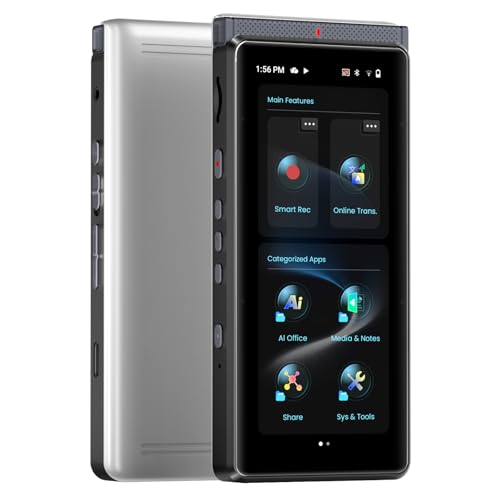
- Offline transcription with no monthly AI fee
- Beamforming array targets voices in noisy rooms
- Up to 17 hours of AI recording or 58 hours of audio
Best For: On-device lecture transcription, summaries, and translation
High-Capacity Pick

- 128GB storage with up to 54 hours of continuous recording
- 1536kbps PCM, MP3, and WAV recording options
- Voice activation, password protection, and organized folders
Best For: Students and teachers needing extensive storage and flexible controls
Easy Transfer Pick
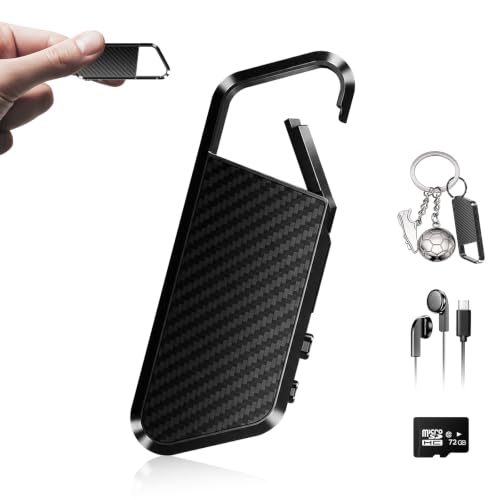
- DSP 6.0 noise reduction for clearer capture
- OTG transfers to compatible phones and tablets
- 72GB capacity rated for up to 10,860 hours
Best For: Users who want large storage and direct mobile file transfers
Simple Learning Pick

- Stereo recording with noise reduction
- MP3 and WAV support plus 3.5mm headphone jack
- A-B repeat and variable playback speed for study
Best For: Students wanting a compact recorder for lectures and review
Best AI Lecture Recorder – EVISTR L359
If you want voice recorders for lectures that also help organize what was said, the EVISTR L359 combines high-resolution recording with AI transcription and summaries. Its one-button operation, noise reduction, and voice activation make it practical for classroom use, while the AI DVR Link app can create transcripts, mind maps, speaker identification, and insights.
Best For: Students and professionals who want lecture recordings plus AI-assisted notes and summaries.
Pros:
- Transcribes in 113 languages and generates summaries, mind maps, and speaker identification through the app
- Records at up to 3072Kbps with intelligent noise reduction and voice-activated recording
- 128GB storage, up to 33 hours of continuous recording, and a lightweight 65g design
- Password encryption, a HOLD switch, and wired OTG transfers add privacy and convenience
Cons:
- AI processing depends on the AI DVR Link app and a wired phone connection
- Its built-in microphone is mono rather than stereo
The L359 is a strong choice when recording is only part of your workflow. It offers more storage and recording detail than many basic recorders, with AI tools for turning lectures into usable study material.
Best for Adjustable Playback – Aiworth E36
The Aiworth E36 is a practical option among voice recorders for lectures, especially if you regularly review difficult material. Its dual microphones support 1536Kbps PCM recording, while 16 playback-speed levels and A-B repeat help you slow down individual passages or move quickly through familiar sections.
Best For: Students, writers, and professionals who need detailed playback control and long battery life.
Pros:
- Dual-mic PCM recording supports up to 1536Kbps for clear speech capture
- Up to 45 hours of continuous recording from the rechargeable battery
- 16 playback speeds and A-B repeat make reviewing lectures more flexible
- Password protection helps keep stored recordings private
Cons:
- It does not list built-in AI transcription or summarization
- Storage specifications differ between the listing title and detailed information
The E36 focuses on dependable recording and listening rather than app-based transcription. Its variable-speed playback is particularly useful for revisiting lectures, dictation, or interviews at the pace that suits you.
Best Compact AI Note Taker – Pocket AI Voice Recorder
The Pocket is a modern alternative to traditional voice recorders for lectures, using one-tap recording and AI tools to turn captured audio into summaries, action items, and conversation maps. Its MagSafe compatibility supports hands-free use with compatible devices, and the battery is rated for up to four days.
Best For: iOS and Android users who want a compact recorder focused on automated notes and organization.
Pros:
- One-tap recording is designed for meetings, conversations, calls, and ideas
- AI can create summaries, action items, and structured conversation maps
- Ask Pocket lets users query information across their recordings
- MagSafe compatibility and a claimed four-day battery support portable use
Cons:
- Additional premium features may require an optional subscription
- Bluetooth smartphone compatibility makes it less like a standalone traditional recorder
- The supplied specifications do not state a continuous recording time
Pocket is best suited to buyers who value searchable, organized notes over conventional recorder controls. Before choosing it for lectures, confirm that its smartphone-based workflow and optional subscription model fit your needs.
Best Traditional Lecture Recorder – EVISTR L357
For shoppers comparing straightforward voice recorders for lectures, the EVISTR L357 offers clear stereo recording, voice activation, and simple physical controls. It can record only when speech is detected, helping reduce silent sections, and supports playback tools such as A-B repeat, rewind, and variable speed.
Best For: Students who want a simple standalone recorder with voice activation and flexible playback.
Pros:
- 1536Kbps stereo recording with dynamic and PCM noise reduction
- Seven voice-control sensitivity levels help capture speech while reducing silence
- 64GB storage and up to 32 hours of continuous recording are suited to extended use
- USB-C file transfer works with Windows and Mac computers
Cons:
- It does not include AI transcription or summary features
- Its listed continuous recording time is shorter than the stated playback battery life
The L357 keeps the process uncomplicated: press record, capture the lecture, and review it later with useful playback controls. It is a good fit when you prefer local recordings and do not need a companion AI app.
Best AI-Powered Pick – Plaud Note Pro
For shoppers comparing voice recorders for lectures, the Plaud Note Pro stands out when you want more than an audio file. Its multi-microphone array, automatic recording modes, and AI transcription can turn captured conversations into structured notes, summaries, action items, and follow-ups.
Best For: Students and professionals who want AI-assisted lecture or meeting notes across phones, computers, and mobile devices.
Pros:
- Four MEMS microphones and one VPU microphone use AI beamforming to capture voices across a room.
- Transcribes in 112 languages with speaker labels, summaries, action items, and customizable templates.
- Compact 0.12-inch-thin design with a 0.95-inch AMOLED display, magnetic case, and free starter plan with 300 transcription minutes monthly.
Cons:
- Some advanced transcription access requires a paid Pro or Unlimited upgrade.
- Its feature set may be more extensive than needed if you only want basic lecture recording and playback.
The Plaud Note Pro is a strong fit for buyers who want recordings converted into usable notes rather than manually reviewing every minute. Its compact design and cross-device workspace add convenience, while privacy certifications and no AI training on user data address sensitive recordings.
Best Simple Budget Recorder – Sunlan 16GB Voice Recorder
If you need straightforward voice recorders for lectures, this Sunlan model focuses on essential recording and playback controls. Its one-button operation, built-in speaker, noise reduction, and 16GB of storage make it a practical choice for capturing classes without apps, subscriptions, or complicated setup.
Best For: Students who want an affordable standalone recorder for lectures, interviews, and meetings.
Pros:
- Simple REC, STOP, and PLAY controls make it easy to begin recording quickly.
- DSP noise reduction, a sensitive microphone, and 1536kbps WAV recording support clearer voice capture.
- Stores recordings on 16GB of memory and can record continuously for more than 30 hours.
- Voice activation can start recording when sound is detected and help conserve power.
Cons:
- Records in mono WAV rather than offering the more advanced transcription features found on AI models.
- Playback battery life is listed at about 7 hours.
- Voice activation may not capture every quiet or intermittent part of a lecture.
This recorder is best when reliability and simplicity matter more than automated notes. USB file transfer, a 3.5mm headphone jack, and an included playback speaker make it easy to review or move recordings to a computer.
Best Standalone AI Note Taker – Innioasis PR1 AI Voice Recorder
Among voice recorders for lectures, the Innioasis PR1 is designed for buyers who want recording, transcription, translation, and document tools in one device. It processes speech offline, offers multiple recording modes, and uses a beamforming microphone array to focus on speakers in lecture halls and other noisy settings.
Best For: Students, researchers, and professionals who want on-device transcription and organized notes without a recurring AI subscription.
Pros:
- Offline transcription supports more than 70 languages, with a high-accuracy mode listed at up to 95% accuracy.
- AI-Do can generate summaries and mind maps, while integrated ChatGPT and Gemini support questions about notes.
- Four array microphones plus a high-SNR microphone use beamforming and noise filtering for lecture and meeting capture.
- Offers 17 hours of AI recording or up to 58 hours of Hi-Fi audio recording, according to the supplied specifications.
Cons:
- The larger 3.99-inch Android touchscreen design is less pocket-minimal than a basic dictaphone.
- Some translation features require online access, with offline translation supporting more than 40 languages.
- Its many apps and productivity functions may be unnecessary for buyers seeking recording only.
The PR1 is a versatile option for turning long lectures into searchable, summarized material while keeping transcription on the device. Its 64GB storage, Wi-Fi backup options, and large screen make it closer to a portable note-taking workstation than a conventional recorder.
High-Capacity Pick – EVIDA 128GB Lecture Recorder
For shoppers comparing voice recorders for lectures, the EVIDA 9296 offers substantial storage, multiple recording formats, and adjustable voice activation. Its noise-canceling microphone and up to 1536kbps PCM recording are suited to capturing classroom audio, meetings, and interviews.
Best For: Students, teachers, and users who want high storage capacity, password protection, and flexible recording quality.
Pros:
- 128GB capacity with up to 54 hours of continuous recording
- Supports MP3 and WAV recording, including 1536kbps PCM
- Voice activation, password protection, A-B repeat, and four-folder file management
- Can also function as a USB flash drive and MP3 player
Cons:
- Does not include a headphone jack
- The highest-quality WAV setting uses storage more quickly than lower-bitrate options
This is a feature-rich choice for lecture recording when storage and file organization matter most. The included phone-based customer support and 18-month warranty may also appeal to buyers who want setup assistance.
Easy Transfer Pick – NekSide 72GB Voice Recorder
The NekSide is a practical option among voice recorders for lectures, particularly for users who want to move recordings directly to a phone or tablet. DSP 6.0 noise reduction, voice activation, playback, and 72GB of built-in storage support everyday lecture, meeting, and interview use.
Best For: Mobile-focused users who value large storage and OTG file transfers without relying on a computer.
Pros:
- DSP 6.0 noise reduction is designed to filter background noise
- OTG function supports direct transfers to compatible smartphones and tablets
- 72GB storage is rated for up to 10,860 hours of audio
- Compact six-inch portable design with voice activation and playback
Cons:
- Default recordings are WAV files; MP3 requires conversion on a computer
- Mono microphone operation may be less suitable for users seeking stereo recording
This recorder stands out for convenient mobile file handling and expansive storage. Buyers should confirm device compatibility for OTG transfers and plan for WAV-to-MP3 conversion if MP3 files are required.
Simple Learning Pick – HoTiyan 8GB Voice Recorder
The HoTiyan H-10001 is a compact, straightforward choice among voice recorders for lectures. It combines voice activation, stereo recording, MP3 and WAV support, and playback tools such as variable speed and A-B repeat for reviewing classroom material.
Best For: Students who want an affordable, lightweight recorder for lectures, meetings, and repeated study playback.
Pros:
- Stereo recording with a higher-sensitivity microphone and noise reduction
- Supports MP3 and WAV files with an included Micro USB cable
- Voice activation, variable playback speed, and A-B repeat support study review
- Compact 1.6-ounce design with a 3.5mm headphone jack
Cons:
- 8GB storage is considerably smaller than the other listed options
- Continuous recording is rated at up to 20 hours per charge
- Storage supports up to 199 recording files
This model favors simple operation and learning-focused playback features over maximum capacity. It is a sensible fit for users who regularly transfer recordings to a computer and want a lightweight device with a standard headphone connection.
How We Picked the Best Voice Recorders for Lectures
We focused on the features that matter most in real classroom use: dependable recording, sufficient storage, simple controls, portability, and clear playback. Models with AI transcription or summarization were also considered for students who want searchable notes, while traditional recorders remain useful for buyers who prefer fewer apps, lower complexity, and predictable operation.
Storage capacity was evaluated alongside recording efficiency. A large capacity is helpful for recording multiple courses, but battery life, file management, and transfer options can matter just as much. We also looked for practical extras such as voice activation, noise reduction, password protection, translation, and offline processing.
Quick Comparison
| Feature | What to look for | Best suited to |
|---|---|---|
| Basic digital recording | Simple controls, playback, USB transfer | Students wanting reliable notes without an app |
| Voice activation | Recording starts when speech is detected | Long lectures and hands-off recording |
| AI transcription | Automatic text conversion and summaries | Reviewing, searching, and organizing lessons |
| Translation or offline AI | Language support and processing without constant connectivity | Multilingual classes and privacy-conscious users |
| High storage capacity | 64GB or more, depending on recording format | Frequent users who archive many sessions |
Key Buying Factors for Voice Recorders for Lectures
Recording Quality and Microphone Performance
Look for a sensitive microphone, noise reduction, and a format that produces clear speech without creating unnecessarily large files. In a large classroom, microphone placement still matters: sitting closer to the lecturer generally improves results more than relying on storage capacity alone.
Battery Life and Storage
Choose a recorder that can last through your longest class schedule, with extra capacity for unexpected delays. High-capacity models are convenient, but verify how files are organized and whether recordings can be moved easily to a computer or phone.
AI Features and Privacy
Transcription and summaries can save substantial study time, but check whether processing requires a subscription, internet connection, or account. Offline processing may be preferable for sensitive lectures or buyers who want to limit cloud uploads. AI output should still be checked for names, technical terms, and formulas.
Ease of Use and Portability
A pocket-sized design, physical recording button, visible status indicators, and fast playback controls are valuable during class. If you need to record discreetly and consistently, avoid a device whose key functions are buried in complicated menus.
Who Should Buy Which Voice Recorders for Lectures?
Choose a basic 8GB or 16GB recorder if you mainly need dependable audio, playback, and simple USB file transfer. These models are often the easiest to operate and may suit occasional lecture recording.
Choose a high-capacity voice-activated model if you record several lectures each week or want recording to begin automatically when speech starts. Confirm that the activation sensitivity works well in your classroom environment.
Choose an AI voice recorder if searchable transcripts, summaries, translations, or organized notes are more important than a minimal setup. Review included AI allowances, supported languages, connectivity requirements, and privacy terms before buying.
Finally, check your institution’s recording policy and obtain any required permission before recording a lecture. The right device is the one that balances clear audio, dependable battery life, manageable files, and the level of automation you will actually use.