
Choosing the right wireless presentation system can make boardroom meetings faster, cleaner, and far easier to manage. The best options reduce cable clutter, support multiple users, and keep screen sharing simple for guests and staff.
In this roundup, we focus on practical systems for real meeting-room use, from compact collaboration kits to higher-end options built for dependable enterprise sharing.
Best 10 Wireless Presentation Systems for Boardrooms Picks for 2026
Best for True 4K Sharing
MeetHub Kit Wireless Presentation System

- True 4K wireless screen sharing
- BYOM support for Zoom, Meet, and Teams
- Quad-view plus dual HDMI for larger rooms
Best For: Boardrooms that need sharp 4K casting, BYOM conferencing, and multi-display flexibility.
Best for Secure Meeting Rooms
Kramer Electronics Via-Go3 Wireless Presentation Device
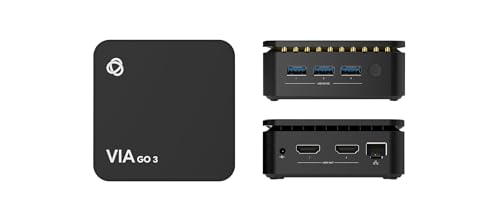
- Isolated Wi‑Fi and LAN support secure, separated room networking.
- Auto-stop presentation behavior helps prevent accidental carryover outside the room.
- Calendar wallpaper widget enables fast one-click meeting access.
Best For: IT-managed boardrooms and secure conference rooms that need streamlined, controlled presenting.
Best for Dual-Screen Collaboration
SIIG Dual View Wireless Presentation Kit

- Dual view output supports more interactive boardroom meetings
- Up to 16 simultaneous connections for group collaboration
- Whiteboard, annotation, and AirPlay support add flexibility
Best For: Boardrooms that need dual-screen presentation, annotation, and secure multi-device sharing.
Best for USB-C Teams
ClearClick Present+Share 4K USB-C

- Two USB-C transmitters included for easy sharing
- Up to 4K/30 fps and 160-foot wireless range
- Plug-and-play setup with encrypted 5 GHz wireless
Best For: Boardrooms and meeting spaces using newer USB-C laptops and smartphones.
Best For Small Meeting Rooms
Barco CSE-200 Wireless Presentation System

- One-click wireless sharing from multiple device types
- Two sources can appear on screen at once
- Enterprise-friendly security and central management
Best For: Small boardrooms and meeting rooms that need secure, easy wireless sharing.
Best for Air-Mouse Control
DINOSTRIKE Wireless Presenter Remote

- Air mouse mode for cursor-style control
- Long wireless range for bigger rooms
- Rechargeable USB-A/USB-C charging
Best For: Presenters who want slide control plus mouse-like navigation in larger meeting spaces.
Best for Multi-User Sharing
J-Tech Digital HDMI Wireless Presentation System
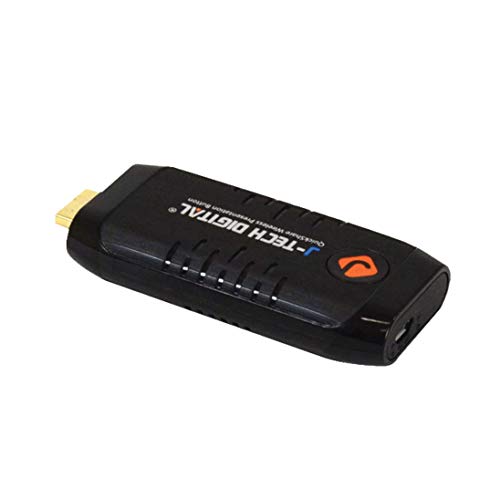
- Up to 5 transmitters for quick switching
- Near-zero latency for live presentations
- 1080p HD video up to 65 feet
Best For: Conference rooms and boardrooms where multiple presenters need to share HDMI sources wirelessly.
Best for Easy Setup
USB-A/USB-C Presentation Clicker

- Built-in USB-A and USB-C receiver
- Plug-and-play with no software needed
- Red laser and long wireless range
Best For: Presenters who need a simple remote that works across mixed boardroom laptops.
Best for Expanding G500 Setups
Lemorele G500 8-in-1 Expansion TX

- Adds another transmitter to an existing G500 receiver
- Stable 5.8GHz wireless link with low latency
- Portable battery-powered design with magnetic charging
Best For: Organizations that already own a G500 receiver and need to add more presenters.
Best for 4K Multi-Device Sharing
Monoprice One-Click USB-C Wireless Presenter

- Up to 4K@60Hz output
- Works with Windows, Mac, iOS, Android, and Miracast
- Includes 2 transmitters for immediate use
Best For: Boardrooms and meeting spaces that need high-resolution wireless sharing across mixed devices.
Best for True 4K Sharing – MeetHub Kit Wireless Presentation System
If you want one of the more capable wireless presentation systems for boardrooms, the MeetHub Kit is built for meeting spaces that need simple screen sharing plus full BYOM conferencing support. It lets presenters cast from laptops and mobile devices without a network, while keeping visuals sharp enough for detailed dashboards, slides, and design reviews.
Best For: Boardrooms and conference rooms that need true 4K wireless presenting, dual-display output, and easy BYOM meetings with mixed devices.
Pros:
- True 4K output helps preserve detail for charts, creative work, and high-resolution content.
- BYOM support lets you run Zoom, Meet, or Teams on your laptop while using room AV gear.
- Quad-view and dual HDMI output are useful for larger rooms and multi-presenter discussions.
- Plug-and-play USB-C setup avoids drivers, apps, and Wi-Fi dependency.
Cons:
- More feature-rich than a basic wireless display dongle, so it may be overkill for small huddle rooms.
- Dual-display and quad-view features will only matter if your room is set up to use them.
This is a strong pick if your team wants a presentation system that can do more than simple mirroring. For wireless presentation systems for boardrooms, the combination of true 4K output, BYOM support, and multi-display flexibility makes it especially appealing for modern conference spaces.
Best for Secure Meeting Rooms – Kramer Electronics Via-Go3 Wireless Presentation Device
If you need wireless presentation systems for boardrooms that prioritize control, room security, and quick handoffs, the Kramer Electronics Via-Go3 is built for that environment. Its isolated Wi‑Fi and LAN design, calendar widget, and automatic stop-on-exit behavior make it a practical fit for managed conference spaces.
Best For: IT-managed boardrooms, secure conference rooms, and teams that want simple one-click access with minimal room clutter.
Pros:
- Built-in isolated Wi‑Fi and LAN help keep presentation traffic separated from the main network.
- Automatically stops the presentation when a user leaves the room, which is useful in shared boardrooms.
- Calendar widget on the wallpaper supports fast, one-click connection for scheduled meetings.
- Can run third-party web applications directly on the device without needing the app.
Cons:
- More focused on managed meeting-room deployment than casual plug-and-play use.
- Security and IT-friendly features may be more than smaller teams need.
Overall, the Via-Go3 stands out among wireless presentation systems for boardrooms where secure access and dependable room workflows matter more than flashy extras. It is a strong fit when you want controlled connectivity and a cleaner meeting experience for frequent presenters.
Best for Dual-Screen Collaboration – SIIG Dual View Wireless Presentation Kit
If you need wireless presentation systems for boardrooms that support collaboration beyond a basic screen mirror, this SIIG kit stands out for dual-view output, multi-device access, and whiteboard tools. It is geared toward meetings where multiple presenters, live annotation, and secure network routing matter more than simple plug-and-play casting.
Best For: Boardrooms and conference rooms that need dual-screen presentation, annotation, and controlled wireless sharing across multiple devices.
Pros:
- Dual view support and up to 16 simultaneous connections for larger meetings
- Whiteboard and annotation features help teams mark up and share ideas live
- Works across Ethernet, Wi‑Fi, Android, and AirPlay for flexible compatibility
- Three security levels and segmented routing options suit stricter office environments
Cons:
- Requires separate transmitter and base components sold apart
- Best features are more complex than a simple one-button wireless display setup
For organizations comparing wireless presentation systems for boardrooms, this SIIG model is strongest when collaboration, security, and dual-screen workflows are the priority. It is not the simplest all-in-one choice, but it offers a more capable meeting-room toolkit for structured presentations and team interaction.
Best for USB-C Teams – ClearClick Present+Share 4K USB-C
If you need one of the more straightforward wireless presentation systems for boardrooms, ClearClick Present+Share is built around plug-and-play sharing from USB-C laptops and smartphones. It supports up to 4K/30 fps, works at distances up to 160 feet, and includes two transmitters so multiple presenters can get connected without passing a single dongle around.
Best For: Boardrooms, meeting rooms, and classrooms that want a simple wireless setup for modern USB-C devices.
Pros:
- Two included USB-C transmitters make it easy for teams to share.
- Up to 4K/30 and 160-foot range cover most meeting-room needs.
- Plug-and-play design keeps setup quick for presenters and IT teams.
- Encrypted 5 GHz wireless connection adds a security-focused touch.
Cons:
- Requires a USB-C port with video output support on the source device.
- Best suited to USB-C workflows, so older laptops may need adapters or won’t qualify.
For teams comparing wireless presentation systems for boardrooms, this ClearClick kit stands out for its dual-transmitter bundle and simple operation rather than advanced enterprise management features. It’s a practical choice if you want reliable sharing from newer laptops and smartphones without a complicated install.
Best For Small Meeting Rooms – Barco CSE-200 Wireless Presentation System
MAIN-61771 Barco CSE-200 | Small Medium Size Meeting Room Wireless Presentation System
Check Price On AmazonIf you need one of the more polished wireless presentation systems for boardrooms, the Barco CSE-200 is a strong fit for small to medium meeting spaces. It lets users share from a laptop, tablet, or smartphone with minimal setup, while keeping collaboration simple for guests and regular users alike.
Best For: Small boardrooms and meeting rooms that need secure, one-click wireless sharing with support for multiple presenters.
Pros:
- One-click sharing from PC, Mac, tablet, or smartphone
- Supports up to 2 simultaneous on-screen sources and 16 connections
- Enhanced security features for enterprise use
- Includes ClickShare Buttons for easy startup
Cons:
- Limited to 2 sources on screen at once
- Best suited to small and medium rooms, not larger conference spaces
For teams comparing wireless presentation systems for boardrooms, the CSE-200 stands out for its ease of use, secure rollout options, and low-friction guest access. It is a practical choice when reliability and fast sharing matter more than advanced room-scale features.
Best for Air-Mouse Control – DINOSTRIKE Wireless Presenter Remote
If you want a presentation clicker that does more than advance slides, this DINOSTRIKE remote is a practical fit for wireless presentation systems for boardrooms where a presenter may need cursor control, hyperlink clicks, and room-to-room mobility.
Best For: Presenters who need a single remote for slide advancing, cursor navigation, and long-range movement in larger meeting rooms.
Pros:
- Air mouse mode adds pointer-style control for more interactive presentations.
- Strong range and bright red laser help in larger boardrooms and training spaces.
- Rechargeable design with USB-C and USB-A support reduces battery hassle.
- Plug-and-play setup works with common presentation apps and major operating systems.
Cons:
- Boardrooms needing advanced AV integration may want a dedicated conferencing system instead.
- The feature set is broad, but the form factor is still a handheld clicker rather than a full meeting-room controller.
This is a versatile pick if you want more control than a basic clicker without adding complexity, especially for wireless presentation systems for boardrooms where presenters move between slides, links, and live cursor control.
Best for Multi-User Sharing – J-Tech Digital HDMI Wireless Presentation System
If you need wireless presentation systems for boardrooms that let multiple people jump in and share quickly, this J-Tech Digital kit is built around that workflow. It sends 1080p video up to 65 feet, keeps latency very low, and supports up to five transmitters so teams can switch sources without rearranging cables.
Best For: Conference rooms and boardrooms where several presenters need a fast, reliable way to share HDMI content wirelessly.
Pros:
- Supports up to 5 transmitters for easy source switching.
- Near-zero latency makes it suitable for live presentations and demos.
- 1080p HD output keeps slides and video looking sharp.
- Helpful for meeting spaces where cable-free setup matters.
Cons:
- This listing is transmitter only and requires a compatible receiver.
- Works best within direct line of sight.
For wireless presentation systems for boardrooms, this model stands out if your priority is smooth handoffs between presenters rather than standalone simplicity. It’s a practical fit for collaborative meeting spaces, but only if you already have — or plan to add — the matching receiver.
Best for Easy Setup – USB-A/USB-C Presentation Clicker
If you need a simple, dependable pointer for wireless presentation systems for boardrooms, this clicker stands out for its built-in USB-A and USB-C receiver. It’s a practical plug-and-play option for teams that move between newer laptops and older meeting-room PCs without wanting to manage extra adapters or software.
Best For: Presenters who want fast setup, broad device compatibility, and a straightforward remote for meetings, classes, and boardroom slides.
Pros:
- Built-in USB-A and USB-C receiver covers most modern and legacy computers
- No driver or software needed; works with Mac, Windows, Linux, PowerPoint, Keynote, Google Slides, and Prezi
- Red laser pointer and up to 100 ft wireless range suit larger rooms
- Includes page controls, full/black screen, volume, and window switching
Cons:
- Uses 2x AAA batteries, which are not included
- Fewer advanced features than more expensive presentation remotes
For boardrooms that value speed and compatibility over complex extras, this is an easy fit. It keeps the focus on reliable presenting, making it a sensible choice for wireless presentation systems for boardrooms where guests, laptops, and quick handoffs are common.
Best for Expanding G500 Setups – Lemorele G500 8-in-1 Expansion TX
If you already use a Lemorele G500 receiver and need more source flexibility, this expansion transmitter is a practical way to scale up wireless presentation systems for boardrooms. It adds another input to an existing setup while keeping 1080p/60Hz output, low latency, and a dedicated 5.8GHz connection for more stable meeting-room use.
Best For: Teams that already have a G500 receiver and want to add more presenters without replacing the whole system.
Pros:
- Expands a G500 system to support up to 8 inputs
- 5.8GHz wireless band helps reduce interference in busy offices
- 1080p 60Hz output with roughly 50ms low latency
- Built-in battery and magnetic charging make it easy to move between rooms
Cons:
- Not a standalone unit; requires a G500 receiver
- Single-source expansion is less useful for buyers starting from scratch
For organizations that need to grow an existing wireless presentation setup, this is a smart add-on rather than a full system. It fits the needs of wireless presentation systems for boardrooms where multiple presenters, quick switching, and reliable room-to-room performance matter.
Best for 4K Multi-Device Sharing – Monoprice One-Click USB-C Wireless Presenter
If you need one of the more flexible wireless presentation systems for boardrooms, this Monoprice setup is built for quick sharing across laptops, phones, and tablets without extra hassle. It supports up to 4K@60Hz, works across Windows, Mac, iOS, Android, and Miracast, and includes two transmitters for immediate use with dual presenters.
Best For: Boardrooms and meeting spaces that need high-resolution wireless sharing, cross-platform compatibility, and easy one-click launching.
Pros:
- Supports up to 4K@60Hz for sharp content display
- Works with Windows, Mac, iOS, Android, and Miracast
- Two users can share on-screen at the same time
- Includes 2 transmitters to get started right away
Cons:
- Additional transmitters are needed for larger multi-user setups
- May be more system than very small huddle rooms need
For teams that want dependable wireless presentation systems for boardrooms, this model stands out for resolution, compatibility, and multi-device flexibility rather than just basic screen mirroring. It is a strong fit when you want a simple launch process but still need room for multiple presenters and higher-end visual quality.
How We Picked These Wireless Presentation Systems for Boardrooms
We looked for systems that make it easy to share content in a professional meeting space without adding setup friction. Priority went to stable connections, broad device compatibility, clear display support, and features that fit day-to-day boardroom workflows.
We also considered whether a product is better suited to recurring meeting-room use versus simple presenter control. That distinction matters, because not every wireless presentation device is meant to power a shared boardroom experience.
Quick Comparison: What Matters Most
For Wireless Presentation Systems for Boardrooms, the biggest differences usually come down to resolution, connection method, user capacity, and room size. Some systems emphasize instant one-click sharing, while others are built for multi-user collaboration, dual-view output, or network-based deployment.
If your team frequently connects laptops, tablets, and phones, look for broad OS support and guest-friendly pairing. If your room handles larger meetings or hybrid collaboration, prioritize higher video quality, low latency, and more advanced output options.
Key Buying Factors for Wireless Presentation Systems for Boardrooms
Compatibility and Device Support
Check that the system works with the devices your team actually uses, including Windows, macOS, iOS, Android, USB-C laptops, and older HDMI sources where needed. Broad compatibility reduces frustration for visitors and rotating teams.
Image Quality and Latency
For presentations that include charts, spreadsheets, or live demos, video quality and responsiveness matter. Higher-resolution support and lower lag help keep content readable and avoid awkward delays during discussion.
Connection Type and Setup
Some systems use dedicated dongles, while others support network, wireless, or app-based sharing. Simpler setup is better for boardrooms that need quick starts, but IT-managed environments may prefer network-integrated solutions for control and consistency.
Output and Collaboration Features
Dual-view, quad-view, and split-screen functions can be useful when multiple people need to compare documents or present side by side. These features are especially valuable in decision-making meetings and training sessions.
Room Size and Deployment Style
Smaller conference rooms often do well with compact systems, while larger boardrooms may need stronger range, more robust hardware, or centralized management. Match the product to the room layout, not just the feature list.
Who Should Buy Which Wireless Presentation Systems for Boardrooms?
If you want the most straightforward experience, choose a plug-and-play system with simple dongle-based sharing. If your priority is enterprise collaboration, look for a more advanced platform with multi-user support and room-friendly controls.
IT teams and administrators should focus on reliability, manageability, and compatibility across mixed devices. For presenters who only need to navigate slides, a wireless clicker may be enough, but it is not a substitute for a true meeting-room presentation system.
In short, the best choice depends on how your boardroom operates: occasional presentations call for simplicity, while high-traffic meeting spaces benefit from stronger collaboration tools and more flexible connection options.