
The right audio interface can make recording vocals, instruments, podcasts, and livestreams noticeably easier. This roundup compares 10 strong options across beginner setups, mobile-friendly studios, and more capable multi-input rigs.
We focused on sound quality, connection options, input flexibility, monitoring features, and overall value so you can choose an interface that fits your current setup without limiting your next project.
Best 10 Audio Interface Picks for 2026
Best Entry-Level Pick
Focusrite Scarlett Solo 3rd Gen

- Air mode and high-performance mic preamp
- Hi-Z input for guitar or bass
- 24-bit/192kHz recording with included software
Best For: Solo musicians, vocalists, and podcasters
Best Vintage-Style Sound
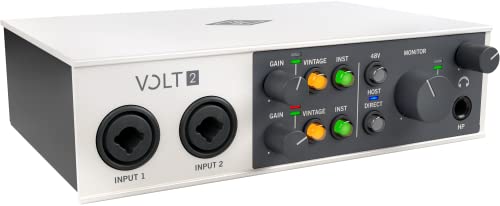
- 610 preamp-inspired Vintage mode
- 24-bit/192kHz recording support
- Includes LUNA and production software
Best For: Musicians, podcasters, and streamers wanting vintage-style tone
Best Monitoring Features

- Two preamps with 2-in/2-out operation
- Hardware monitoring for recording
- 24-bit/192kHz support and 6GB+ content
Best For: Windows-based home recording setups
Best for Flexible Recording
Focusrite Scarlett 2i2 4th Gen

- Two mic and Hi-Z instrument inputs
- Auto Gain and Clip Safe recording tools
- 120dB dynamic range with Air modes
Best For: Artists recording vocals and instruments with two inputs
High-Resolution Pick

- 24-bit/192kHz two-in/two-out recording
- Onyx preamp, phantom power, and Hi-Z input
- Bus-powered with zero-latency monitoring
Best For: Solo musicians who prioritize high-resolution recording
Versatile Starter
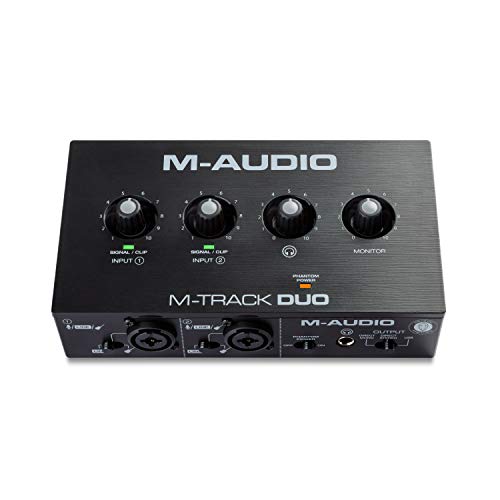
- Two combo mic, line, and instrument inputs
- USB/Direct switch for zero-latency monitoring
- Includes MPC Beats and supports Ableton Live Lite
Best For: Beginners, podcasters, and home recordists
Compact Budget Option

- Midas-designed mic preamp
- Separate instrument and combination inputs
- Direct monitoring with USB-supplied power
Best For: Solo musicians making basic home recordings
Versatile Studio Hub

- 4-in/4-out connectivity with MIDI I/O
- Two mic preamps and two Hi-Z inputs
- Auto Gain, Clip Safe, and Air modes
Best For: Growing home studios and multi-device setups
Compact Songwriter Pick

- One XLR mic preamp and one Hi-Z input
- 24-bit/192kHz recording with 120dB dynamic range
- Compact design with Air modes and software bundle
Best For: Solo vocalists, guitarists, and songwriters
Complete Recording Bundle

- Two mic preamps and two Hi-Z inputs
- Includes CM25 MkIII mic and SH-450 headphones
- Auto Gain, Clip Safe, and 24-bit/192kHz support
Best For: First-time recording setups needing included hardware
Best Entry-Level Pick – Focusrite Scarlett Solo 3rd Gen
The Focusrite Scarlett Solo 3rd Gen is a compact audio interface for solo musicians, vocalists, podcasters, and guitarists. Its dedicated mic and instrument inputs, Air mode, and 24-bit/192kHz recording support provide a practical foundation for home recording.
Best For: Solo creators recording vocals, guitar, bass, and podcasts.
Pros:
- High-performance mic preamp with switchable Air mode
- Dedicated Hi-Z instrument input for guitar or bass
- 24-bit/192kHz converters and low-noise balanced outputs
- Includes recording software, effects, and instruments
Cons:
- Only one XLR mic preamp
- Less suitable for recording multiple microphones at once
Choose the Solo when you want a straightforward, lightweight audio interface for one vocalist or instrumentalist. Its software bundle and broad Mac, Windows, and iPadOS compatibility also make it easy to start creating.
Best Vintage-Style Sound – Universal Audio Volt 2
The Universal Audio Volt 2 is a versatile audio interface for musicians, podcasters, and streamers who want a vintage-inspired recording option. Its Vintage mode emulates UA’s classic 610 preamps, while 24-bit/192kHz converters preserve detailed recordings.
Best For: Creators seeking vintage-style preamp character and two-channel recording.
Pros:
- Vintage mode provides 610 tube-preamp-inspired sound
- Supports up to 24-bit/192kHz recording quality
- Includes access to LUNA and additional production tools
- Supports Mac, Windows, iPad, and iPhone recording setups
Cons:
- Mobile iPhone and some iPad setups require additional power or an adapter
- One-year manufacturer warranty
The Volt 2 is a strong choice if tonal character matters as much as basic connectivity. Its two-channel design suits compact setups, while the included software and learning resources give new producers room to develop.
Best Monitoring Features – MOTU M2 USB-C Audio Interface
The MOTU M2 is a compact 2-in/2-out USB-C audio interface built for musicians and creators who need hardware monitoring in a simple recording setup. It combines two preamps with 24-bit/192kHz operation and includes more than 6GB of free content.
Best For: Home recordists who want hardware monitoring and a compact two-channel interface.
Pros:
- Two preamps in a 2-in/2-out configuration
- Hardware monitoring for a direct monitoring workflow
- Supports 24-bit/192kHz recording
- Includes 6GB or more of free content
Cons:
- Supplied notes specify Windows operating-system support
- Software support is centered on MOTU drivers
The M2 makes sense for a focused desktop recording rig where two inputs are enough. Its hardware monitoring and high-resolution support are useful priorities for tracking instruments or vocals without overcomplicating the setup.
Best for Flexible Recording – Focusrite Scarlett 2i2 4th Gen
The Focusrite Scarlett 2i2 4th Gen is a capable audio interface for recording vocals, guitars, and other sources through two mic or instrument inputs. Its 120dB dynamic range, Auto Gain, Clip Safe, and Air modes are designed to make high-quality recording easier.
Best For: Artists who need two inputs and automated level-control features.
Pros:
- Two mic preamps and two Hi-Z instrument inputs
- Auto Gain helps set recording levels
- Clip Safe helps prevent clipping during takes
- 120dB dynamic range, Air modes, and 24-bit/192kHz support
Cons:
- Larger and heavier than the Scarlett Solo
- Two-input design may not suit larger recording sessions
The 2i2 4th Gen is a practical upgrade for creators who record two sources or want extra safeguards while tracking. Its included software bundle and compatibility with computers, tablets, and smartphones add flexibility to a modern audio interface setup.
High-Resolution Pick – Mackie Onyx Artist 1-2
The Mackie Onyx Artist 1-2 is a capable audio interface for musicians who want high-resolution recording in a compact, bus-powered unit. It combines a boutique-quality Onyx mic preamp, a Hi-Z instrument input, and zero-latency monitoring for straightforward home or mobile recording.
Best For: Solo musicians recording vocals, guitar, or bass who want 24-bit/192kHz capture and durable construction.
Pros:
- Supports 24-bit/192kHz recording with two inputs and two outputs.
- Includes an Onyx mic preamp, 48V phantom power, and a Hi-Z switch.
- Offers zero-latency direct monitoring, a headphone output, and bus-powered USB 2.0 operation.
- Includes The Musician Collection of 23 plugins and instruments.
Cons:
- Its two-channel layout is better suited to solo recording than larger sessions.
- It is specified for Windows 10, so users of other systems should verify compatibility.
Choose this Mackie when recording fidelity, flexible instrument connectivity, and rugged portability matter more than having many simultaneous inputs.
Versatile Starter – M-Audio M-Track Duo
The M-Audio M-Track Duo is a practical audio interface for recording, podcasting, and live streaming from a Mac or PC. Its dual combo inputs accept microphones, line-level sources, or instruments, while the USB/Direct switch helps with zero-latency monitoring.
Best For: Beginners, podcasters, and home recordists who need flexible two-input connectivity and simple monitoring.
Pros:
- Provides two combo XLR/line/instrument inputs with phantom power.
- Includes a headphone output, stereo outputs, and USB/Direct monitoring control.
- Works with Windows, macOS, Android, and iOS systems according to the supplied details.
- Includes MPC Beats and supports Ableton Live Lite.
Cons:
- Its maximum sample rate is 48kHz, below the Mackie’s 192kHz specification.
- The interface uses USB Type-B rather than a newer USB-C connection.
The M-Track Duo makes a strong all-purpose choice when ease of use, broad device compatibility, and bundled production software are priorities.
Compact Budget Option – Behringer UMC22
The Behringer UMC22 is a compact audio interface designed to provide a simple recording path for microphones and instruments. It features a Midas-designed mic preamp, a combination input, a separate instrument input, and direct monitoring for solo recording with a Mac or Windows computer.
Best For: Solo musicians seeking an affordable, compact interface for basic microphone and instrument recording.
Pros:
- Uses a Midas-designed mic preamp for microphone recording.
- Accepts XLR, 1/4-inch TRS, and 1/4-inch TS connections through its front-panel inputs.
- Includes +48V phantom power, direct monitoring, a headphone output, and USB-supplied power.
- Is compatible with popular DAWs including Pro Tools, Ableton Live, and Cubase.
Cons:
- Its two-channel design is intended for smaller recording setups.
- The supplied specifications list a maximum sample rate of 96kHz and a 48kHz frequency response, so the details should be checked carefully before purchase.
The UMC22 is a sensible entry-level pick for musicians who want essential inputs and monitoring controls in a small, easy-to-connect package.
Versatile Studio Hub – Scarlett 4i4 4th Gen
The Focusrite Scarlett 4i4 4th Gen is a flexible audio interface for creators who need to connect several microphones, instruments, synths, or drum machines. Its 4-in/4-out design, MIDI I/O, 192kHz support, and practical recording tools make it well suited to a growing home studio.
Best For: Home producers, musicians, and small setups requiring multiple inputs, line connections, and MIDI.
Pros:
- Two mic preamps, two Hi-Z inputs, four line inputs, and four line outputs.
- Includes MIDI input/output for compatible keyboards and hardware.
- 120dB dynamic range, 24-bit/192kHz support, and Air modes.
- Auto Gain and Clip Safe help manage recording levels.
Cons:
- More connectivity than a basic two-input setup may require.
- Requires a separate microphone or instrument setup for recording.
The 4i4 is the strongest choice here for expanding beyond simple vocal-and-guitar recording. It combines broad connectivity with beginner-friendly level controls and a useful software bundle.
Compact Songwriter Pick – Scarlett Solo 4th Gen
The Focusrite Scarlett Solo 4th Gen is a compact audio interface built for recording one microphone and one guitar or other instrument. It delivers 24-bit/192kHz recording, a 120dB dynamic range, and a portable design for straightforward home, mobile, or iPad-compatible setups.
Best For: Songwriters, vocalists, and solo musicians who mainly record one mic and one instrument.
Pros:
- Combines one XLR mic preamp with one Hi-Z instrument input.
- Supports 24-bit/192kHz recording and a 120dB dynamic range.
- Air modes add presence and harmonic drive to vocals and guitars.
- Includes Pro Tools Intro+, Ableton Live Lite, Cubase LE, and Hitmaker Expansion.
Cons:
- Only one audio input is listed, limiting simultaneous recording options.
- Does not provide the additional line and MIDI connectivity of the 4i4.
The Solo keeps an audio interface setup simple and portable without giving up high-resolution recording or useful software. Choose it when your workflow centers on a single vocal or instrument part at a time.
Complete Recording Bundle – Scarlett 2i2 Studio 4th Gen
The Focusrite Scarlett 2i2 Studio 4th Gen pairs a two-input audio interface with a CM25 MkIII condenser microphone, XLR cable, and SH-450 headphones. It is a practical all-in-one starting point for recording vocals, instruments, and early production sessions.
Best For: New producers, vocalists, and musicians who want a ready-to-record studio package.
Pros:
- Includes two mic preamps and two Hi-Z inputs for flexible recording.
- Comes with a condenser mic, 3m XLR cable, and studio headphones.
- Offers Auto Gain and Clip Safe for easier level management.
- Supports 24-bit/192kHz recording and includes Air modes.
Cons:
- Includes only two audio inputs, so it is less suited to larger multi-source sessions.
- The bundled microphone and headphones may be unnecessary if you already own recording gear.
This bundle offers the most complete out-of-box path to recording among these options. Its included hardware reduces the need to shop for matching accessories, while the 2i2 keeps the interface layout approachable.
How We Picked These Audio Interfaces
We selected models that cover the most common home-recording needs, from simple one-microphone setups to interfaces with multiple inputs for collaborative recording. Our evaluation focuses on preamp quality, conversion performance, driver and software support, monitoring controls, connectivity, build quality, and ease of use.
The list includes compact USB interfaces from Focusrite, Universal Audio, MOTU, Mackie, M-Audio, and Behringer. Several offer USB-C connectivity, while others remain attractive choices for budget-conscious beginners. Bundled options are also included for shoppers who need headphones, microphones, or other essentials alongside the interface.
Quick Comparison
| Best For | Recommended Type | What to Look For |
|---|---|---|
| Solo vocals or instruments | One-input interface | Quality preamp, direct monitoring, instrument input |
| Two-person recording | 2×2 interface | Two combo inputs, independent gain controls |
| Podcasts and streaming | Simple 2×2 model | Low-latency monitoring, easy controls, headphone output |
| Growing home studio | 4-input interface | More simultaneous inputs, MIDI, expandable routing |
| First complete setup | Interface bundle | Included microphone, headphones, cables, and software |
Key Buying Factors for an Audio Interface
Inputs and Microphone Preamps
Choose the number of inputs based on what you will record at the same time. A solo singer-songwriter may need only one microphone and an instrument input, while stereo keyboards, drum machines, or two performers call for two inputs. If you expect your setup to grow, a four-input model can provide useful flexibility.
Connection and Compatibility
USB interfaces are generally simple to connect to a computer, but confirm the port and included cable match your system. Check operating-system support before buying, particularly if you use a newer computer or tablet. USB-C describes the connector; it does not automatically indicate identical performance across every model.
Monitoring and Latency
Direct monitoring lets you hear your input with little or no computer delay, which is important for vocals and live instruments. Look for a dedicated headphone output, monitor volume control, and a clear blend or monitor-mix function when available.
Software, Drivers, and Extras
Included recording software can reduce setup costs, while reliable drivers help keep sessions stable. MIDI connectivity matters if you use hardware synthesizers or controllers. Bundles can be convenient, but compare the included accessories with the quality of standalone gear before paying more.
Who Should Buy Which Audio Interface?
Beginners and solo creators: Choose a compact one-input interface if you mainly record one microphone or instrument at a time. It keeps the controls straightforward and takes up minimal desk space.
Singers, musicians, and podcasters: A 2×2 interface is the most versatile starting point for many users. Two inputs support stereo sources or two microphones, while direct monitoring makes recording and streaming easier.
Producers planning ahead: A four-input model is worth considering if you expect to record multiple sources, connect external hardware, or collaborate with another performer.
First-time home-studio buyers: A studio bundle may offer the best convenience when you still need a microphone, headphones, and cables. Experienced users with existing gear may get better value from the interface alone.