
Choosing the best audio interface with loopback can make streaming, podcasting, recording, and live collaboration far easier. Loopback routes computer audio into your recording or broadcast software without requiring extra cables or complicated mixer setups.
We compared 10 compact USB interfaces across connectivity, input flexibility, monitoring, driver support, and everyday usability to help you find the right fit for your setup and budget.
Best 10 Audio Interface with Loopback Picks for 2026
Best for Growing Creators
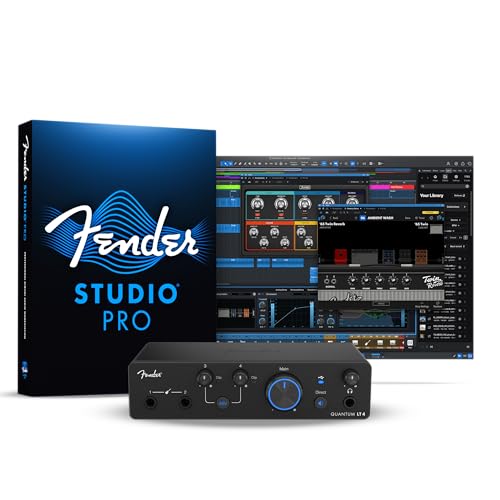
- 4x2 USB-C connectivity with four channels
- Dual 75 dB MAX-HD mic preamps
- Loopback, balanced outputs, and two instrument inputs
Best For: Growing musicians, streamers, and podcasters needing flexible routing
Best Compact Starter
Focusrite Scarlett Solo 3rd Gen

- One mic preamp and one Hi-Z input
- Air mode and 24-bit/192kHz recording
- Includes a broad starter software bundle
Best For: Solo musicians and beginners recording vocals or guitar
Best Portable Loopback Pick
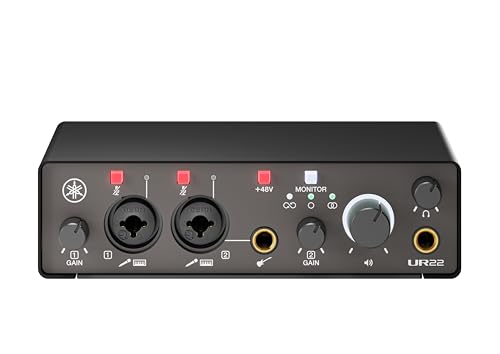
- 2-in/2-out USB-C design with loopback
- Two combo inputs with UR preamps
- Compact metal body and cross-platform support
Best For: Mobile creators, streamers, and podcasters
Best Solo Recording Upgrade
Focusrite Scarlett Solo 4th Gen

- 120dB dynamic range and 24-bit/192kHz support
- Improved Air mode for vocals and guitars
- Includes recording software and plugins
Best For: Songwriters and solo creators recording vocals and guitar
Flexible USB-C Recording
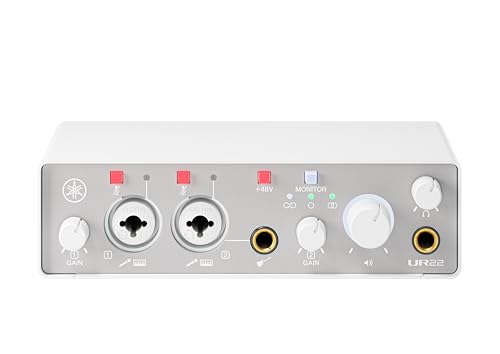
- 24-bit/192kHz, 2 x 2 analog I/O
- Two combo inputs with phantom power and Hi-Z
- Direct monitoring and loopback in a compact metal case
Best For: Musicians and creators needing two-input recording across Windows, macOS, or iOS
Polished Home Studio Control
Focusrite Scarlett 2i2 4th Gen

- 24-bit/192kHz and 120dB dynamic range
- Auto Gain, Clip Safe, and Air modes
- Includes a broad recording software bundle
Best For: Home-studio musicians prioritizing recording assistance and bundled tools
Portable Streaming Simplicity

- Dedicated loopback and direct-monitor switches
- One combo input plus stereo 3.5mm input
- USB-C bus-powered design weighing 230 grams
Best For: Solo streamers and mobile creators who want simple software-free routing
Best Budget Starter
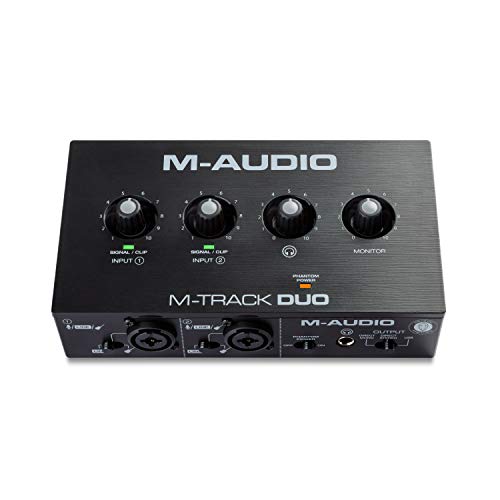
- Two combo inputs with phantom power
- Direct monitoring for zero-latency listening
- Compact interface with MPC Beats included
Best For: Beginners recording vocals, guitar, or line-level sources
Best for Software Loopback

- ProStudio software adds virtual channels and loopbacks
- Records at up to 24-bit/192kHz
- Compact design with direct monitoring
Best For: Podcasters, streamers, and beginner content creators
Best for Growing Creators – Fender Quantum LT 4
The Fender Quantum LT 4 is a versatile audio interface with loopback for creators who need more than a basic two-input setup. Its four-channel design, dual microphone preamps, two instrument inputs, balanced outputs, and USB-C connectivity suit music production, streaming, podcasting, and content creation.
Best For: Growing musicians, guitarists, streamers, and podcasters who need flexible inputs and loopback routing.
Pros:
- 4×2 USB-C configuration with two MAX-HD mic preamps offering up to 75 dB of gain.
- Two dedicated instrument inputs for guitars, basses, and line-level sources.
- Loopback routing, balanced TRS outputs, and a powerful headphone amp support flexible monitoring.
- Includes access to Fender amp and effects software after registration.
Cons:
- Larger and heavier than the compact Solo models in this roundup.
- Some software benefits require registration and app downloads.
The Quantum LT 4 is the most expandable option here. Choose it if loopback and multiple simultaneous inputs matter more than having the smallest possible desktop interface.
Best Compact Starter – Focusrite Scarlett Solo 3rd Gen
The Focusrite Scarlett Solo 3rd Gen is a compact choice for straightforward vocal, guitar, and podcast recording. Although the supplied specifications do not list loopback, it offers a single XLR mic preamp, a Hi-Z instrument input, Air mode, and 24-bit/192kHz recording in a portable USB-C interface.
Best For: Solo musicians and beginners who prioritize simple vocal-and-instrument recording.
Pros:
- High-performing mic preamp with switchable Air mode for added clarity.
- Dedicated high-headroom instrument input for guitar or bass.
- Records and mixes at up to 24-bit/192kHz.
- Includes Pro Tools Intro+, Ableton Live Lite, Cubase LE, and Hitmaker Expansion.
Cons:
- Only one XLR mic input and one instrument input limit simultaneous recording.
- Loopback is not identified in the supplied product notes.
The Scarlett Solo 3rd Gen is a sensible value-oriented recording interface, but it is not the strongest match for shoppers specifically seeking an audio interface with loopback. Consider it when traditional two-input recording is the priority.
Best Portable Loopback Pick – Yamaha UR22MK3
The Yamaha UR22MK3 is a practical audio interface with loopback for creators who want a compact two-in/two-out setup. It combines two combo inputs, UR mic preamps, phantom power, a Hi-Z input, direct monitoring, and mute controls in a lightweight metal case.
Best For: Mobile musicians, streamers, and podcasters who need loopback and cross-platform compatibility.
Pros:
- Built-in loopback function supports streaming and content workflows.
- Two combo inputs include UR mic preamps and phantom power.
- Direct monitoring and mute buttons simplify recording and live use.
- Works with Windows, macOS, and iOS.
Cons:
- Two-in/two-out connectivity is less expandable than the Fender’s four-channel design.
- The supplied notes specify a one-year manufacturer warranty.
With loopback, direct monitoring, and a durable 310-gram metal enclosure, the UR22MK3 is one of the more focused choices for portable streaming and recording. It is especially appealing when cross-platform use matters.
Best Solo Recording Upgrade – Focusrite Scarlett Solo 4th Gen
The Focusrite Scarlett Solo 4th Gen is a compact interface for recording one microphone and one instrument with upgraded conversion performance. It is not identified as an audio interface with loopback in the supplied notes, but its 120dB dynamic range, improved Air mode, and 24-bit/192kHz support make it a strong option for solo music production.
Best For: Songwriters and solo creators seeking a small, higher-spec interface for vocals and guitar.
Pros:
- Uses converters with a stated 120dB dynamic range.
- Improved Air mode adds presence and harmonic drive to vocals and guitars.
- Includes Pro Tools Intro+, Ableton Live Lite, Cubase LE, and Hitmaker Expansion.
- Compatible with PC, Mac, and iPad.
Cons:
- One mic input and one instrument input limit recording flexibility.
- Loopback is not listed in the supplied product notes.
The 4th Gen Solo is a refined choice for a single performer, with stronger stated conversion specifications than its predecessor. Choose it for compact solo recording rather than loopback-focused streaming.
Flexible USB-C Recording – Yamaha UR22MK3 W
The Yamaha UR22MK3 W is a practical audio interface with loopback for musicians, podcasters, and creators who need two-channel recording plus straightforward monitoring. Its two combo inputs, phantom power, Hi-Z support, and USB-C connectivity cover common microphone and instrument setups.
Best For: Home recording and streaming setups that need two inputs, loopback, and broad Windows, macOS, and iOS compatibility.
Pros:
- 24-bit/192kHz support with 2 x 2 analog I/O
- Two combo inputs with UR mic preamps, phantom power, and one Hi-Z input
- Direct monitoring, loopback, and mute controls
- Compact 1.3-pound metal casing
Cons:
- Only two channels are available
- The listed warranty is limited to one year and has regional purchase requirements
Choose the UR22MK3 W if high-resolution recording, flexible input options, and cross-platform use matter more than having a larger I/O count. The included Steinberg software suite adds value, although specific software details are not provided.
Polished Home Studio Control – Focusrite Scarlett 2i2 4th Gen
The Focusrite Scarlett 2i2 4th Gen is a two-channel USB-C interface aimed at recording musicians who want modern level-management features and a substantial software bundle. Its two mic preamps, Hi-Z instrument inputs, Auto Gain, Clip Safe, and Air modes make it a well-equipped choice for a home studio.
Best For: Artists recording vocals or instruments who value automatic gain assistance, high dynamic range, and bundled production software.
Pros:
- 24-bit/192kHz recording with a 120dB dynamic range
- Two mic preamps and two Hi-Z instrument inputs
- Auto Gain and Clip Safe help manage recording levels
- Includes Pro Tools Intro+, Ableton Live Lite, Cubase LE, and Hitmaker Expansion
Cons:
- The supplied notes do not list a dedicated loopback function
- It provides two channels rather than expanded I/O
The Scarlett 2i2 4th Gen is compelling for recording-focused buyers who want an easy starting workflow and useful software in the box. If loopback is essential to your search for an audio interface with loopback, verify that your intended setup supports it before buying.
Portable Streaming Simplicity – Zoom AMS-22
The Zoom AMS-22 is a compact audio interface with loopback designed for simple recording and streaming. It combines an XLR/TRS input with Hi-Z support and a stereo 3.5mm input, while dedicated Direct Monitor and Loopback switches let you manage monitoring and computer playback without extra software.
Best For: Solo musicians, podcasters, and mobile content creators who want bus-powered streaming and recording in a lightweight format.
Pros:
- Dedicated loopback and direct-monitoring switches
- Music and Streaming modes support DAW recording or combined livestream audio
- Bus-powered over USB-C with a 230-gram weight
- Works with major platforms and software such as Pro Tools, Cubase, GarageBand, YouTube, and Twitch
Cons:
- Maximum sample rate is 48kHz
- Input configuration is limited to one XLR/TRS combo input and one stereo 3.5mm input
- The listed warranty is one-year replacement coverage
The AMS-22 is the most purpose-built option here for uncomplicated streaming, especially when portability and software-free loopback matter. Its lower sample-rate ceiling and streamlined input layout make it less suited to larger or higher-resolution studio workflows.
Best Budget Starter – M-Audio M-Track Duo
The M-Audio M-Track Duo is a straightforward choice for anyone seeking an audio interface with loopback for basic podcasting, recording, or live streaming. Its two combo inputs, phantom power, and direct-monitoring switch cover common home-recording needs, although the supplied specifications do not list built-in loopback functionality.
Best For: Beginners recording vocals, guitar, or line-level sources on Mac or PC.
Pros:
- Two combo XLR/line/instrument inputs with phantom power
- Direct monitoring supports zero-latency monitoring
- Compact design and included MPC Beats software
Cons:
- Maximum sample rate is 48kHz
- Loopback is not identified in the supplied features
Choose this model for an uncomplicated, portable recording setup with flexible inputs and monitoring. If routing computer audio is essential, verify loopback support before buying.
Best for Software Loopback – MAONO PS22 Lite
The MAONO PS22 Lite is a strong fit for shoppers specifically seeking an audio interface with loopback. Its included ProStudio Routing Software adds virtual channels and loopbacks for broadcasts, while the interface also provides high-resolution recording, direct monitoring, and broad computer and iPad compatibility.
Best For: Podcasters, streamers, voice actors, and beginner creators who need flexible software routing.
Pros:
- ProStudio software provides virtual channels and loopbacks
- 24-bit/192kHz recording with 106dB dynamic range
- Up to 56dB of preamp gain and 48V phantom power
- Compact, plug-and-play design with direct monitoring
Cons:
- Loopback depends on the included routing software
- Proper ASIO driver selection is required for compatible software
For live content and software-based routing, the PS22 Lite offers more loopback-focused functionality than a basic interface. Its high-resolution recording and simple controls also make it approachable for home creators.
Best Hybrid Creator Setup – MAONO P2 Hybrid
The MAONO P2 Hybrid is designed for creators who need an audio interface with loopback plus flexible device connectivity. Its built-in loopback and ProStudio 2 software can combine instruments, microphones, backing tracks, and desktop audio, while dual USB ports support simultaneous computer and phone or iPad connections.
Best For: Streamers, podcasters, and musicians recording and broadcasting across computers and mobile devices.
Pros:
- Built-in loopback captures voice, instruments, backing tracks, and desktop audio
- Dual USB connectivity supports computer and mobile workflows
- 24-bit/192kHz recording with 56dB of gain
- Independent mute and monitoring controls for streaming
Cons:
- Its broader creator-routing feature set may be more than simple recording requires
- Some advanced routing and effects rely on ProStudio 2 software
The P2 Hybrid is the most purpose-built option here for integrated streaming and loopback workflows. Select it when mobile connectivity, desktop-audio routing, and independent creator controls matter as much as recording quality.
How We Picked the Best Audio Interface with Loopback
We focused on interfaces suited to real-world recording and streaming rather than judging specifications in isolation. The lineup includes simple two-channel models, compact streaming interfaces, and more flexible options for creators who need multiple microphones or instruments.
Our comparison considered input and output counts, USB connectivity, microphone preamp quality, phantom power, direct monitoring, loopback implementation, driver stability, portability, and compatibility with common recording, streaming, and video-call software. We also considered whether each model is straightforward enough for beginners while still offering useful room to grow.
Quick Comparison
| What to Compare | Best For |
|---|---|
| Two combo inputs | Recording vocals, guitar, or two microphones |
| Simple one-input designs | Solo creators, voice recording, and basic streaming |
| Dedicated loopback | Mixing computer audio with a microphone in broadcasts or calls |
| Portable USB-powered models | Mobile recording and compact desk setups |
| Hybrid computer and mobile connectivity | Creators switching between PC, phone, and tablet workflows |
Key Buying Factors for an Audio Interface with Loopback
Inputs and Preamps
Count the sources you expect to use at the same time. One input works for a solo microphone or instrument, while two combo inputs provide more flexibility for interviews, stereo sources, or simultaneous guitar and vocal recording. Check whether the inputs support phantom power if you use condenser microphones.
Loopback and Routing
Loopback is most useful when you need to combine system audio with microphone or instrument signals for streaming, podcasting, tutorials, or remote meetings. Confirm how the interface handles routing and whether your preferred software recognizes the loopback channels. A feature labeled “loopback” may work differently across models, so consult the manufacturer’s software and setup documentation.
Monitoring and Latency
Direct monitoring lets you hear an input with minimal delay, which is valuable when recording vocals or instruments. For software effects and live broadcasts, stable drivers and low-latency performance matter just as much as headline sample-rate figures.
Connections and Compatibility
USB-C describes the connector, not necessarily the full performance or included cable arrangement. Check computer, phone, and tablet compatibility, power requirements, included adapters, and whether the interface works with your operating system. Mobile creators should also verify that their device can provide enough power.
Controls and Outputs
Separate headphone and monitor controls, reliable meters, a mute function, and accessible gain knobs can make daily use much easier. Consider whether you need balanced monitor outputs, multiple headphone feeds, MIDI, or only a simple headphone connection.
Who Should Buy Which Audio Interface with Loopback?
Choose a basic one-input interface if you record alone, want a clean microphone or instrument connection, and prefer the simplest setup. These models are often the easiest starting point for voice creators and musicians.
Choose a two-input interface if you want to record vocals and guitar together, use two microphones, or leave more room for future projects. This is the most versatile category for home studios.
Choose a compact streaming-focused model if broadcasting, remote calls, and mobile recording are your priorities. Look for clear loopback routing, convenient monitoring, and compatibility with your phone or tablet.
Choose a larger or more flexible interface if you expect to add sources, use more advanced routing, or need extra headroom for a growing production setup. Before buying, map your intended signal flow so you do not pay for connections you will never use—or run out of inputs immediately.