
Choosing an audio interface with Dante means balancing channel count, connectivity, conversion quality, control, and installation needs. The right model can simplify routing across a studio, live rig, broadcast system, or commercial AV network.
We’ve gathered 10 strong options, from compact USB-C and analogue adapters to rackmount interfaces, stage boxes, and headphone monitoring units. Use the guide below to narrow the list by workflow, scale, and budget.
Best 10 Audio Interface with Dante Picks for 2026
Flexible Dante Routing

- 16x16 Dante/USB channel configuration
- VST Rack Pro with 30+ plug-ins
- Mac/Windows support with 96 kHz operation
Best For: Computer-based live sound and Dante routing
High-Channel Dante Hub
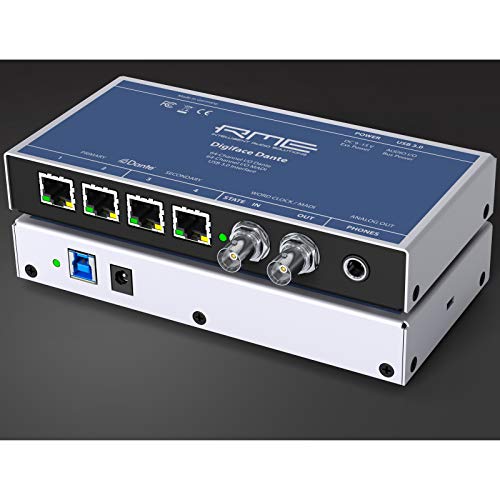
- Up to 128-in/128-out Dante/MADI routing
- USB 3.0 with bus-powered operation
- 24-bit/192 kHz support and headphone output
Best For: Large digital studio and live-production systems
Four-Input Network Stagebox
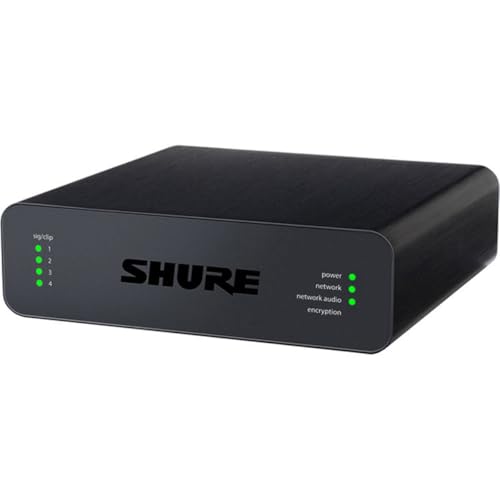
- Four mic/line XLR inputs
- Dante support up to 192 kHz
- Works with Crestron and AMX systems
Best For: Installed AV and conferencing systems
Compact USB Dante Bridge

- 2x2 bidirectional USB-C audio
- No drivers or extra software required
- PoE or USB powered at 24-bit/48 kHz
Best For: Portable two-channel computer-to-Dante connections
Best Reference Interface

- Dante with 24-bit/96kHz converters
- Four-channel, compact design
- 2-year warranty and cross-region support
Best For: Recording, live sound, and measurement setups needing a compact Dante interface
Best Dante Line-Level Adapter

- Two-channel Dante analog output
- Designed for amplifiers and speakers
- Lightweight with a 2-year warranty
Best For: Sending Dante audio to analog playback equipment
Best Stage I/O Expansion

- 16 inputs and 8 outputs
- 96kHz Dante Ethernet connectivity
- QUICK CONFIG for Yamaha DM3 and TF systems
Best For: Yamaha-centered live sound systems needing high-channel-count stage I/O
RedNet Network Hub

- 16-channel bi-directional Dante interface
- Per-channel level control via RedNet Control
- Redundant power and network connections
Best For: Professional Dante systems needing resilient 16-channel digital I/O
X32 Dante Expansion

- Adds 32 Dante channels to X32 systems
- Ethernet connectivity with Dante output
- Compact expansion-card design
Best For: X32 users expanding an existing console into a Dante network
Dante Monitoring Station

- Dante headphone and line-out interface
- Independent headphone and line level controls
- PoE or included power-supply operation
Best For: Dante-network headphone monitoring and line-level output
Flexible Dante Routing – Yamaha RUio16-D
The Yamaha RUio16-D is a practical audio interface with Dante for Mac and Windows setups that need 16 Dante input and output channels alongside USB connectivity. Its VST Rack Pro software and included plug-ins make it especially useful for computer-based processing and live audio workflows.
Best For: Musicians, engineers, and live sound users needing 16×16 Dante/USB connectivity with software-based effects.
Pros:
- Provides 16 Dante inputs and 16 Dante outputs.
- Works with both macOS and Windows computers over USB.
- Includes VST Rack Pro with more than 30 plug-ins.
- Supports sample rates up to 96 kHz and includes two mic inputs.
Cons:
- Only two line-level outputs are listed.
- Its 16-channel capacity may be more than needed for simple two-channel setups.
Choose the RUio16-D when Dante channel count and integrated plug-in processing matter more than having a broad selection of analog inputs and outputs.
High-Channel Dante Hub – RME Digiface Dante
The RME Digiface Dante is a high-capacity audio interface with Dante, MADI, and USB 3.0 connectivity. With up to 128 Dante/MADI inputs and outputs, TotalMix FX support, headphone output, and bus power, it suits demanding Mac and PC routing applications.
Best For: Studios and live-production systems requiring extensive Dante/MADI channel routing and computer control.
Pros:
- Offers up to 128 inputs and 128 outputs across Dante and MADI.
- Supports USB 3.0 and bus-powered operation.
- Includes a headphone output and word-clock I/O.
- Supports resolutions up to 24-bit/192 kHz.
Cons:
- Its high channel capacity may be excessive for basic recording needs.
- The supplied details identify Windows support, so platform requirements should be checked for your setup.
The Digiface Dante is the strongest fit here for large-scale digital routing, particularly when MADI integration and very high channel counts are priorities.
Four-Input Network Stagebox – Shure ANI4IN-XLR
The Shure ANI4IN-XLR is a focused audio interface with Dante for moving four microphone or line-level XLR inputs onto a Dante network. It is designed for professional audio systems and works with control platforms including Crestron and AMX.
Best For: Conference rooms, installed AV systems, and professional setups that need four XLR inputs on Dante.
Pros:
- Provides four mic/line XLR inputs.
- Supports Dante networking with sample rates up to 192 kHz.
- Compatible with professional audio devices, Crestron, and AMX systems.
- Has a compact, lightweight design at 1.5 pounds.
Cons:
- Offers four input channels rather than a larger multichannel configuration.
- The supplied details focus on XLR connectivity and do not list USB computer I/O.
For installed audio and conferencing applications, the ANI4IN-XLR offers a straightforward way to connect four analog sources to a Dante network without paying for unnecessary channel capacity.
Compact USB Dante Bridge – Audinate Dante AVIO 2×2
The Audinate Dante AVIO USB-C 2×2 adapter is a compact audio interface with Dante for connecting a Mac or Windows computer to a Dante network. It provides two inputs and two outputs, requires no additional drivers or software, and can draw power from PoE or USB.
Best For: Portable computer-based playback, conferencing, and simple two-channel Dante connections.
Pros:
- Provides bidirectional 2×2 USB-C audio.
- Requires no drivers or additional software.
- Supports PoE or USB power and has a rugged ABS enclosure.
- Works with Mac and Windows and supports Dante audio over IP and AES67 RTP.
Cons:
- Limited to two inputs and two outputs.
- Maximum resolution is 24-bit/48 kHz.
- Uses USB-C, which may require an adapter with computers lacking that port.
The Dante AVIO 2×2 is a convenient choice when portability and simple plug-and-play USB-C connectivity matter more than high channel counts or elevated sample rates.
Best Reference Interface – ESI planet 22c
If you need an audio interface with Dante for recording, live sound, or audio measurement, the ESI planet 22c combines a Dante IP audio network with 24-bit/96kHz converters. It supports Windows and macOS and works with all major DAWs.
Best For: Home, project, and mobile setups that need Dante connectivity with high-resolution conversion.
Pros:
- Dante networking with 24-bit/96kHz converters
- Supports Windows, macOS, and all major DAWs
- Compact 0.5 kg design
- Includes a 2-year warranty and US- and Germany-based support
Cons:
- Only four channels
- TRS audio input specification may not suit XLR-focused setups
The planet 22c is a practical choice when you want a compact Dante interface rather than a larger stage I/O system. Its four-channel format keeps the setup focused while retaining 96kHz capability.
Best Dante Line-Level Adapter – Dante AVIO Analog Output
The Audinate Dante AVIO Analog Output is a straightforward option if your audio interface with Dante system needs to feed an amplifier or speaker. This two-channel adapter is designed to provide Dante analog output in a compact black unit.
Best For: Connecting Dante network audio to amplifiers or speakers through two analog output channels.
Pros:
- Provides two-channel Dante analog output
- Compatible with amplifiers and speakers
- Compact 7.04-ounce design
- Includes a 2-year warranty
Cons:
- It is an output adapter, not a full recording interface
- Limited to two output channels
- Listed with a DVI connector type, so connector compatibility should be checked carefully
This AVIO adapter makes sense for extending a Dante system to analog playback equipment. Buyers needing microphone inputs, conversion for recording, or broader channel counts should consider a full Dante interface instead.
Best Stage I/O Expansion – Yamaha Tio1608-D2 Stage Box
For live production systems that need an audio interface with Dante-style networked I/O, the Yamaha Tio1608-D2 provides 16 inputs and eight outputs in a 3U stage box. It supports 96kHz operation, recallable D-PRE preamplifiers, and QUICK CONFIG Mode for Yamaha DM3 and TF series systems.
Best For: Yamaha TF and DM3-based live sound rigs requiring substantial Dante stage connectivity.
Pros:
- 16 inputs and eight outputs for 24 total channels
- 96kHz maximum sample rate
- Recallable D-PRE preamplifiers
- QUICK CONFIG Mode supports DM3 and TF series workflows
Cons:
- Its 3U rack format is less portable than a compact desktop interface
- Designed around Yamaha TF mixers with Dante cards
- One-year manufacturer warranty
The Tio1608-D2 is the strongest fit here for larger live setups, especially when paired with compatible Yamaha equipment. Its high I/O count is useful on stage, but it is more specialized than a general-purpose computer recording interface.
RedNet Network Hub – Focusrite RedNet D16R MkII
The Focusrite RedNet D16R MkII is a strong choice when you need an audio interface with Dante for routing 16 channels in both directions across a network. It adds individual input and output level control through RedNet Control, while redundant power and network connections support demanding installations.
Best For: Dante-based systems that need 16-channel digital I/O, remote level control, and built-in redundancy.
Pros:
- Provides 16-channel bi-directional Dante connectivity.
- Offers individual input and output level control through RedNet Control software.
- Includes dual PSUs and dual locking etherCON network connections with automatic failover.
- Front-panel indicators show power, network, sample rate, signal, and clock status.
Cons:
- Its 9.2-pound rack-oriented design is less suited to portable setups.
- It is focused on digital Dante networking rather than a broad selection of analog inputs and outputs.
Choose this model when system resilience and centralized channel control matter more than compact size. The three-year warranty also adds reassurance for installed or professional use.
X32 Dante Expansion – BEHRINGER X-DANTE
The BEHRINGER X-DANTE is an expansion card for compatible X32 systems, making it a practical way to add an audio interface with Dante connectivity to an existing console setup. It supports 32 channels and uses Ethernet networking with a Dante output connection.
Best For: X32 owners who want to add 32-channel Dante networking without replacing the console.
Pros:
- Adds 32 channels of Dante capability.
- Designed as a Dante expansion card for the X32 platform.
- Uses Ethernet connectivity and provides a Dante output connection.
- Compact and lightweight at 5.6 ounces.
Cons:
- It is an expansion card rather than a standalone interface.
- Its listed operating frequency is 48 kHz.
- Compatibility is centered on the X32 ecosystem.
This is an efficient upgrade for an existing X32 rig, but it is not the right fit if you need a self-contained Dante interface. Confirm that your console setup supports the card before buying.
Dante Monitoring Station – Focusrite RedNet AM2
The Focusrite RedNet AM2 is a focused audio interface with Dante for monitoring rather than multichannel recording. It combines a stereo Dante headphone amplifier and line output interface with independent level controls, a mute switch, and PoE support for flexible stage or studio placement.
Best For: Dante-network monitoring stations, headphone feeds, and line-level outputs where convenient power and independent volume control are useful.
Pros:
- Provides monitor-quality conversion for Dante networks.
- Can drive high-impedance headphones at substantial levels.
- Offers independent headphone and line-out level controls plus a mute switch.
- Supports Power over Ethernet or the included power supply.
Cons:
- It is intended for headphone and line output monitoring rather than broad multichannel I/O.
- The supplied specifications list one channel, limiting its role compared with larger Dante interfaces.
For musicians, engineers, and stage crews who need an accessible Dante monitor point, the AM2 keeps the feature set practical and compact. Its PoE option can simplify placement where network power is available.
How We Picked the Best Audio Interface with Dante
We evaluated these interfaces by looking at their Dante integration, physical I/O, connection options, channel capacity, monitoring features, power requirements, and likely use cases. We also considered whether each product is best suited to recording, live sound, fixed installation, broadcast, personal monitoring, or expanding an existing Dante network.
Because Dante systems vary widely, the best choice is not necessarily the model with the most channels. A compact adapter may be ideal for a laptop or single analogue source, while a rack interface or stage box may be more appropriate for permanent wiring or large live systems.
Quick Comparison
- Compact computer connectivity: Look at the Yamaha RUio16-D, RME Digiface Dante, and Audinate USB-C adapter.
- Analogue input and output expansion: Consider the Shure ANI4IN-XLR, Audinate analogue output adapter, or ESI planet 22c.
- Stage and rack I/O: The Yamaha Tio1608-D2 and Focusrite RedNet D16R MkII suit larger systems.
- Flexible or budget-oriented expansion: BEHRINGER X-DANTE may appeal when compatibility and cost are priorities.
- Networked monitoring: Focusrite RedNet AM2 is designed for headphone and stereo line output applications.
Key Buying Factors for an Audio Interface with Dante
Channel Count and I/O Type
Start by counting the analogue inputs and outputs you actually need, then leave room for expansion. XLR inputs, line-level connections, ADAT, USB, and digital expansion serve different workflows. A high channel count is useful only if the rest of your system can support it.
Computer Connection and Routing
Some products connect directly to a computer over USB, while others operate mainly as Dante network endpoints. Check operating-system support, driver requirements, sample-rate compatibility, and whether the interface can route computer audio to and from the network without additional hardware.
Power and Installation
PoE can make installation cleaner by supplying power over the network cable, but not every Dante switch supports it. Rackmount units are better for permanent systems, while compact adapters are easier to deploy temporarily or move between rooms.
Control, Clocking, and Reliability
For professional systems, confirm support for Dante Controller, clocking options, channel-level control, redundancy, and network configuration. These details matter more as channel counts and cable runs increase.
Who Should Buy Which Audio Interface with Dante?
Home and project studios should prioritize simple computer integration, dependable drivers, and enough I/O for current recording needs. Live-sound engineers will generally benefit from rugged rack or stage-box designs with clear channel expansion. Installers and commercial AV teams should focus on PoE, redundant networking, mounting, control, and long-term serviceability. Broadcast and production users may prefer higher channel counts, precise routing, and strong clocking options. Personal monitoring users should choose a dedicated Dante headphone or stereo output interface rather than paying for unused analogue inputs.
Before buying, verify the Dante channel count at your intended sample rate, the connector types, network-switch requirements, and compatibility with your existing control software. That final check will usually matter more than headline specifications alone.