
Choosing an audio interface with MADI is less about adding another connection and more about building a stable, scalable recording system. MADI can carry many digital channels over a single link, making it useful for larger studios, live production, broadcast workflows, and expandable monitoring rigs.
These 10 picks cover dedicated MADI interfaces, Dante-capable alternatives, high-channel-count USB systems, and accessible interfaces for smaller setups. Use the guide below to match connectivity, I/O, software, and expansion needs to your workflow.
Best 10 Audio Interface with Madi Picks for 2026
Best Compact MADI Pick

- Optical and coaxial MADI I/O
- Up to 64 channels at 192 kHz
- Includes TotalMix FX software
Best For: Compact Mac or Windows MADI setups
Best Dante-MADI Bridge
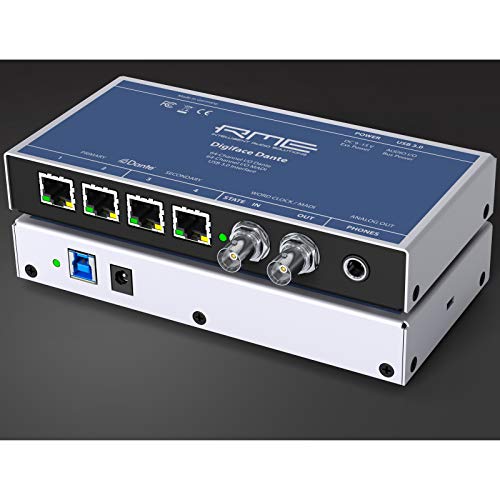
- 128-in/128-out Dante and MADI design
- USB 3.0 with 24-bit/192 kHz support
- Headphone output and bus power
Best For: High-channel Dante and MADI routing
Best Hybrid Studio Interface

- MADI and Dante over USB 3.0
- Four SSL mic preamps plus instrument inputs
- 192-in/192-out at 24-bit/192 kHz
Best For: Studios blending analog and digital I/O
Best High-Channel MADI Interface

- 394-channel USB 3.0 interface
- Two optical and one coaxial MADI ports
- Mic/line inputs, analog outs, and headphone out
Best For: Large professional MADI routing systems
SSL Clarity Pick

- SSL-designed mic preamp for dynamic and condenser microphones
- 32-bit converters with low-noise operation
- Includes SSL Production Pack software bundle
Best For: Compact home studios and mobile recording
Expandable Studio Hub

- 18 inputs and 20 outputs with eight mic preamps
- ADAT, S/PDIF, MIDI, and Word Clock connectivity
- Auto Gain and Clip Safe support recording workflow
Best For: Growing project studios and multi-mic recording
Native MADI Powerhouse

- MADI optical connectivity supports up to 128 channels at 48kHz
- 32x32 analog I/O with 130dB dynamic range
- USB and Thunderbolt 3 connectivity for high-channel workflows
Best For: Professional multi-channel studios and complex routing
Best for Expanded Studio I/O
Focusrite Scarlett 18i16 4th Gen

- 18 inputs and 16 outputs
- Four mic preamps plus ADAT and S/PDIF
- 24-bit/192kHz conversion with Auto Gain
Best For: Producers needing extensive I/O and digital expansion
Best Balanced Expansion Pick
Focusrite Scarlett 16i16 4th Gen

- 16 inputs and 16 outputs
- ADAT, S/PDIF, and MIDI I/O included
- Two mic preamps with 24-bit/192kHz support
Best For: Growing studios seeking flexible routing in a compact format
Best for Simple Recording
Focusrite Scarlett 2i2 4th Gen

- Two mic preamps and two Hi-Z inputs
- Compact 24-bit/192kHz USB-C interface
- Auto Gain, Clip Safe, and Air modes
Best For: Solo recording, guitar, vocals, and compact home studios
Best Compact MADI Pick – RME MADIface USB
The RME MADIface is a focused audio interface with MADI for computer-based recording setups that need substantial digital I/O without a large desktop unit. It connects over USB 2.0, provides optical and coaxial MADI I/O, and supports up to 192 kHz.
Best For: Laptop or desktop users building a compact MADI-centered recording system.
Pros:
- Includes two MADI I/O connections using optical and coaxial formats.
- Supports up to 64 channels and a 192 kHz maximum sample rate.
- Includes TotalMix FX management software.
- Works with Mac and Windows systems and mainstream recording software.
Cons:
- Uses USB 2.0 rather than USB 3.0.
- The supplied notes do not list built-in analog microphone or line inputs.
This is a practical choice when your workflow is primarily digital and you want straightforward MADI connectivity in a lightweight 1.3-pound interface.
Best Dante-MADI Bridge – RME Digiface Dante
The RME Digiface Dante is an audio interface with MADI designed for systems that also need Dante networking. Its listed 128-in/128-out architecture, USB 3.0 connection, headphone output, and bus-powered design make it suited to flexible computer-based routing.
Best For: Mac or PC users combining Dante and MADI sources in a high-channel-count setup.
Pros:
- Supports 128 inputs and 128 outputs through Dante/MADI connectivity.
- Uses USB 3.0 and supports 24-bit/192 kHz operation.
- Includes a headphone output and bus-powered operation.
- Includes word-clock I/O for compatible clocking setups.
Cons:
- The supplied operating-system details list Windows, so macOS compatibility should be verified before purchase.
- The notes do not specify built-in analog microphone preamps or line inputs.
Choose this model when networked Dante connectivity is as important as MADI, particularly for installations where high digital channel capacity matters more than analog I/O.
Best Hybrid Studio Interface – Solid State Logic UMD192
The Solid State Logic UMD192 is an audio interface with MADI and Dante connectivity for macOS and Windows systems. Alongside USB 3.0, it provides four SSL-designed mic preamps, instrument inputs, line inputs, ADAT optical, and S/PDIF connections, with operation up to 192 kHz.
Best For: Studios needing analog recording inputs alongside high-channel digital expansion.
Pros:
- Combines USB 3.0 with MADI and Dante connectivity.
- Lists 192-in/192-out operation at 24-bit/192 kHz.
- Includes four SSL-designed mic preamps and two instrument inputs.
- Supports Pro Tools, Logic Pro, Ableton Live, Cubase, Reaper, and GarageBand.
Cons:
- At 5.1 pounds, it is heavier than the compact RME MADIface model.
- The supplied notes list Windows 10 and Mac compatibility but do not specify broader Windows versions.
The UMD192 stands out for buyers who want MADI and Dante expansion without giving up accessible analog inputs for microphones, instruments, and line-level equipment.
Best High-Channel MADI Interface – RME MADIface XT II
The RME MADIface XT II is a high-capacity audio interface with MADI for Linux, Windows, and macOS workstations. It combines USB 3.0 with two MADI optical ports, one MADI coaxial port, two mic/line inputs, analog outputs, and a headphone output.
Best For: Professional systems that need extensive MADI routing and flexible computer compatibility.
Pros:
- Offers 394 channels and operation up to 192 kHz.
- Provides two MADI optical ports and one MADI coaxial port.
- Includes two mic/line inputs, two analog outputs, and a headphone output.
- Supports Linux, Windows, and macOS through USB 3.0.
Cons:
- At 5 pounds, it is less lightweight than the basic MADIface model.
- Its extensive channel capacity may be more than smaller recording systems require.
For demanding MADI installations, the XT II offers the broadest stated channel count in this group while retaining practical monitoring and limited analog connectivity.
SSL Clarity Pick – SSL1 2X2 USB Interface
If you want an audio interface with MADI for a compact setup, the SSL1 focuses on straightforward USB recording with SSL-designed preamp performance and modern 32-bit conversion. It is suited to musicians who prioritize clean, detailed capture over extensive expansion I/O.
Best For: Solo musicians, vocalists, and compact home studios using computers or iOS devices.
Pros:
- SSL-designed microphone preamp supports dynamic and condenser microphones.
- 32-bit converters and a low-noise design aim for clear, detailed recordings.
- Class-compliant operation works with laptops, desktops, and iOS devices.
- Includes the SSL Production Pack of instruments, samples, and software tools.
Cons:
- Its 2×2 format is less suitable for larger recording setups.
- The supplied notes do not list MADI connectivity.
The SSL1 is a practical choice when portability and SSL-branded sound matter more than broad digital expansion. However, shoppers specifically seeking MADI should verify connectivity requirements before choosing this compact interface.
Expandable Studio Hub – Scarlett 18i20 4th Gen
For buyers comparing an audio interface with MADI alongside broader studio connectivity, the Scarlett 18i20 offers a substantial USB-C I/O package with ADAT, S/PDIF, MIDI, and Word Clock. Its eight preamps and expansion connections make it a flexible centerpiece for a growing setup.
Best For: Project studios, bands, and engineers recording multiple microphones or integrating external digital equipment.
Pros:
- Provides 18 inputs and 20 outputs, with eight mic preamps and two Hi-Z inputs.
- Includes ADAT, S/PDIF, MIDI I/O, and Word Clock for flexible integration.
- 24-bit/192kHz converters offer a stated 122dB dynamic range.
- Auto Gain and Clip Safe simplify level setting and help manage clipping.
Cons:
- The supplied notes do not list MADI connectivity.
- Its rack-oriented feature set may be more than a simple two-channel setup needs.
The 18i20 is a strong expansion-friendly interface for USB-based studio production, especially when ADAT and Word Clock are more important than MADI. Confirm the required digital format before buying if MADI is essential.
Native MADI Powerhouse – Orion 32+ Gen 4
If you specifically need an audio interface with MADI, the Antelope Audio Orion 32+ Gen 4 is the clearest fit in this group. It combines 32-channel USB operation with 32×32 analog I/O, Thunderbolt 3 support, and MADI optical connectivity for larger studio routing and expansion.
Best For: Professional studios, complex routing systems, and multi-channel or Atmos-oriented workflows.
Pros:
- Offers 32×32 analog I/O with a stated 130dB dynamic range.
- MADI optical connectivity supports up to 128 channels at 48kHz.
- Thunderbolt 3 streams up to 128 channels at 192kHz, while USB supports 32 channels.
- Includes flexible signal routing, AFC 64-bit clocking, ADAT, and S/PDIF.
Cons:
- The extensive I/O and routing features may be excessive for basic recording.
- It is substantially heavier than the other listed interfaces at 6.21 kg.
- Thunderbolt performance requires a compatible Thunderbolt 3 setup.
Among these options, the Orion 32+ most directly matches a MADI-centered workflow. Its high channel count, clocking, routing, and monitoring features make it better suited to demanding studio infrastructure than casual home recording.
Best for Expanded Studio I/O – Focusrite Scarlett 18i16 4th Gen
If you need an audio interface with MADI-style studio expansion potential, the Scarlett 18i16 offers a broad connection set for a larger recording setup. It provides 18 inputs, 16 outputs, four mic preamps, ADAT, S/PDIF, MIDI I/O, and 24-bit/192kHz conversion.
Best For: Producers recording multiple sources who need substantial I/O and digital expansion options.
Pros:
- 18 inputs and 16 outputs with ADAT, S/PDIF, and MIDI I/O
- Four mic preamps with up to 69dB of gain, plus two Hi-Z inputs
- 24-bit/192kHz converters with a stated 122dB dynamic range
- Auto Gain, Clip Safe, and Air modes support a practical recording workflow
Cons:
- Its larger I/O set may be more than a simple two-channel setup requires
- Requires an external power supply
The 18i16 is the most flexible option here for expanding a project or home studio. While it is not identified as having native MADI connectivity in the supplied specifications, its ADAT and S/PDIF ports provide useful digital expansion paths.
Best Balanced Expansion Pick – Focusrite Scarlett 16i16 4th Gen
The Scarlett 16i16 is a practical audio interface with MADI-style workflow needs in mind if you want substantial routing and digital expansion without moving to the larger 18i16. It combines 16 inputs and 16 outputs with ADAT, S/PDIF, MIDI I/O, and high-resolution conversion.
Best For: Producers who want flexible studio connectivity with a slightly smaller footprint and fewer mic preamps.
Pros:
- 16 inputs and 16 outputs for flexible routing
- Includes ADAT, S/PDIF, and MIDI I/O for system expansion
- Two mic preamps, two Hi-Z inputs, and six line inputs
- 24-bit/192kHz converters with Auto Gain, Clip Safe, and Air modes
Cons:
- Only two mic preamps compared with the 18i16
- Requires an external power supply
The 16i16 balances connectivity and size well for a growing setup. Like the other Scarlett models listed here, it is not specified as a native MADI interface, but ADAT and S/PDIF make it useful for digital expansion alongside compatible equipment.
Best for Simple Recording – Focusrite Scarlett 2i2 4th Gen
The Scarlett 2i2 is a straightforward choice for musicians who want an audio interface with MADI-related expansion only as a future consideration, rather than a central requirement today. Its two mic preamps, two Hi-Z inputs, compact design, and USB-C connection suit basic recording and mobile setups.
Best For: Solo artists, guitarists, vocalists, and first-time home recordists.
Pros:
- Two mic preamps and two Hi-Z instrument inputs
- 24-bit/192kHz recording with a stated 120dB dynamic range
- Auto Gain and Clip Safe help simplify level setting
- Compact 1.3-pound design with included recording software
Cons:
- Only two input channels, with no ADAT, S/PDIF, MIDI, or MADI listed
- Offers less routing and expansion than the 16i16 and 18i16
The 2i2 is easy to recommend when portability and simplicity matter more than extensive studio connectivity. However, buyers specifically seeking an audio interface with MADI should look to a model with explicitly listed MADI support; this interface is designed for basic two-channel recording.
How We Picked the Best Audio Interface with Madi
We focused on interfaces and digital audio systems that support high-channel-count expansion or fit naturally into a MADI-centered studio. Selection criteria included connection type, channel capacity, driver and software support, conversion and clocking features, monitoring flexibility, USB compatibility, and suitability for recording, broadcast, live sound, or hybrid production. Because not every product here includes native MADI, we also considered whether it can serve as a practical companion to a MADI interface through USB, Dante, analog I/O, or other digital routing options.
Compatibility matters as much as headline specifications. Before buying, confirm the required MADI format, computer ports, operating-system support, sample-rate limits, and whether the interface provides the inputs, outputs, and control features your system actually needs.
Quick Comparison
- Best for dedicated MADI connectivity: RME MADIface models, particularly when dependable drivers and compact digital expansion are priorities.
- Best for large-format USB recording: SSL UMD192, with extensive I/O for complex studio and production setups.
- Best for Dante-based networks: RME Digiface Dante, when networked audio is more useful than direct MADI hardware.
- Best for conventional studio expansion: Focusrite Scarlett 18i20, 18i16, and 16i16 models, depending on the number of analog connections required.
- Best for compact or entry-level systems: SSL 2 and Focusrite Scarlett 2i2, when portability and straightforward recording matter more than channel count.
Key Buying Factors for an Audio Interface with Madi
MADI Format and Channel Count
Check whether the interface uses optical or coaxial MADI and whether it supports the channel count and sample rates your equipment requires. Higher sample rates can reduce available channels, so match the specifications across every device in the chain.
Clocking and System Stability
Large digital systems need dependable synchronization. Look for word-clock support, robust clocking options, clear status indicators, and mature drivers. These features can prevent clicks, dropouts, and difficult troubleshooting during sessions or live work.
Analog I/O and Expansion
MADI does not replace analog inputs, microphone preamps, monitor outputs, or headphone connections. Count the sources you record simultaneously, then allow room for future expansion. ADAT, AES, Dante, and additional USB connections may also be valuable depending on your setup.
Routing and Monitoring
Flexible internal mixing can reduce latency and simplify cue mixes. Review the included control software, routing depth, loopback features, and monitoring controls before choosing an interface for broadcast, streaming, or tracking.
Who Should Buy Which Audio Interface with Madi?
Choose a dedicated RME MADI interface if you already own MADI-equipped converters, consoles, stage boxes, or recorders and need a reliable computer connection. Choose the RME Digiface Dante when your facility is organized around Dante networking and you want streamlined network audio access. The SSL UMD192 is better suited to demanding studios that need extensive I/O in one USB-connected system.
Focusrite’s Scarlett 18i20, 18i16, and 16i16 are sensible choices for project and professional studios that need practical analog expansion without moving fully into a complex digital network. The Scarlett 2i2 and SSL 2 make more sense for solo creators, mobile recording, and small overdub setups. Antelope Audio’s multichannel USB option is worth considering when integrated mixing and a broad computer-based workflow are priorities. In every case, select the model that matches your current channel requirements while leaving enough connectivity for the next stage of your system.