
Choosing the right card printer can streamline badge production, tighten access control, and cut outsourcing costs. The best models balance print quality, speed, and ease of use.
This roundup of color ID card printers for businesses highlights options for small offices, growing teams, and organizations that need secure, professional-looking cards on demand.
Best 10 Color ID Card Printers for Businesses Picks for 2026
Bronze Starter Bundle
Bodno Seaory S25 Single-Sided ID Card Printer

- Includes printer, supplies, ribbon, and software
- Manual feed design for low-volume badge jobs
- Works with Windows, Mac, and Linux
Best For: Small businesses and schools needing a simple starter ID card kit
Smart Simplex Kit
IDP SMART-21S Starter Printer Kit

- Includes 100-print ribbon and 100 PVC cards
- Compact printer with full-color 300 dpi output
- Prints over 150 color cards per hour
Best For: Affordable badge printing for small businesses and larger organizations
Dual-Sided Pro Bundle
Magicard 300 Dual-Sided ID Card Printer
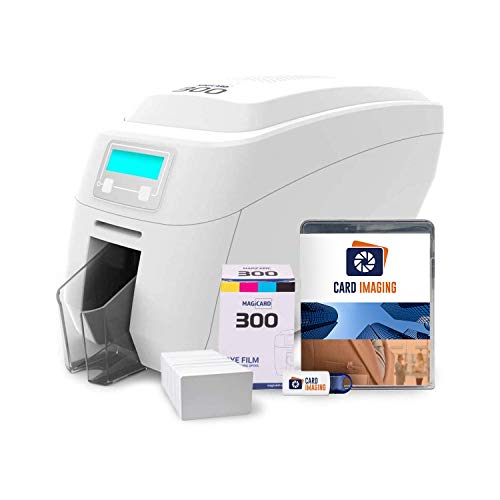
- Automatic duplex printing for both sides
- Includes ribbon, 100 PVC cards, and software
- 3-year warranty with setup support
Best For: Organizations needing a ready-to-use dual-sided ID card solution
Portable Badge Maker
Badgy100 Full-Color Card Printer

- Portable printer with a compact footprint
- Includes Badge Studio software and templates
- Designed for on-demand full-color badges
Best For: Small teams needing quick, portable, low-volume badge printing
Starter Bundle
Bodno Magicard Pronto Complete Supplies Package
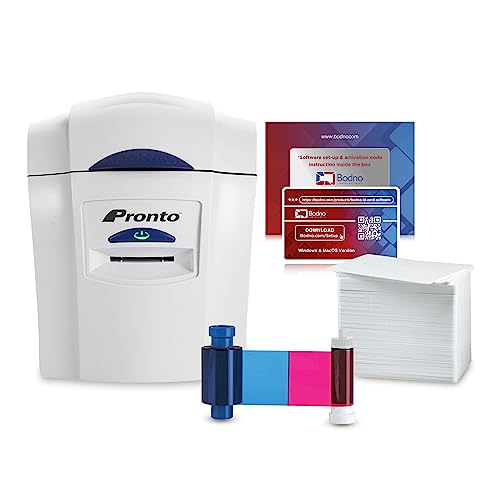
- Includes printer, ribbon, 100 PVC cards, and software.
- Drag-and-drop Bodno Bronze software simplifies card design.
- Portable USB dye-sublimation printer for photo ID and membership cards.
Best For: Businesses that want an all-in-one starter kit with supplies included.
Secure Desktop Pick
Fargo DTC1250e Single-Sided Desktop Printer

- Fast single-sided printer for on-demand cards and IDs.
- AES-256 encryption and resin scramble data protection.
- USB plug-and-play setup with intuitive operation.
Best For: Businesses needing a secure, easy-to-use desktop ID card printer.
Compact Business Choice
Zebra ZC100 LT Complete Supplies Package

- 600 x 600 dpi color printing for sharp ID cards.
- Includes CloudBadging software, blank cards, ribbon, and labels.
- Compact design with automatic card thickness adjustment.
Best For: Small offices wanting a compact printer with bundled supplies and crisp output.
Dual-Sided Badge Printer
2ID Fargo DTC1250e Dual-Sided Printer Only

- Dual-sided color printing for ID and access cards
- Built for business badges, member cards, and school IDs
- Printer-only design works for users with separate supplies
Best For: Businesses that already have ribbons and blank cards
All-in-One Badge Kit
Badgy200 Full-Color ID Printer Bundle
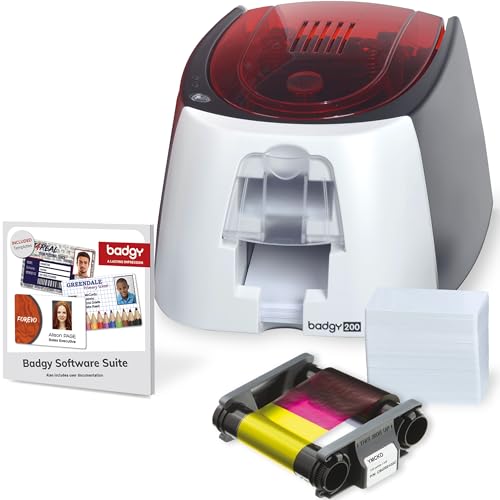
- Includes printer, ribbon, blank cards, software, and cables
- Badge Studio+ offers templates, database import, and design tools
- Full-color output suited to badges, IDs, and loyalty cards
Best For: Small teams that want a ready-to-use badge printing kit
Premium ID Bundle
Bodno Magicard 400X Bronze Dual-Sided Bundle

- Includes a 300-print YMCKO ribbon and software bundle
- Dual-sided color printing for more complete ID cards
- Covers setup with lifetime software support and a 4-year warranty
Best For: Organizations that want an all-inclusive ID printing package
Bronze Starter Bundle – Bodno Seaory S25 Single-Sided ID Card Printer
If you need color ID card printers for businesses and want a simple, all-in-one setup, the Bodno Seaory S25 is built for low-volume badge printing. This package includes the printer, supplies, a 100-print Seaory color ribbon, and Bodno Bronze Edition software, so you can start making professional-grade cards right away.
Best For: Small offices, schools, and other teams that want a compact single-sided ID card setup with bundled software and supplies.
Pros:
- All-inclusive package with ribbon and supplies included
- Bronze Edition software offers templates and drag-and-drop design
- Compatible with Windows, Mac, and Linux
- 2-year hardware warranty plus lifetime software support
Cons:
- Manual feed system is aimed at low-volume printing
- Single-sided printing only
- USB connection only
Overall, this is a practical starter choice if you value bundled software and a straightforward workflow over higher-volume automation. It fits best where badge printing is occasional but still needs to look polished and professional.
Smart Simplex Kit – IDP SMART-21S Starter Printer Kit
For businesses comparing color ID card printers for businesses, the IDP SMART-21S starter kit stands out as a compact, PC-focused option with a full bundle. It includes the printer, software, 100-print YMCKO ribbon, and 100 PVC cards, making it easy to begin printing ID badges, access cards, and membership cards.
Best For: Small businesses and larger organizations that need an affordable starter kit for ID badges and related cards.
Pros:
- Starter kit includes ribbon, PVC cards, software, and cables
- Produces professional full-color cards with 300 dpi resolution
- Compact size works well in small spaces
- Can print over 150 color cards per hour
Cons:
- PC-only software and Windows 10/11 compatibility
- Simplex, hand-feed design only
- USB connection only
This is a solid choice if you want a budget-conscious printer kit that still covers the essentials for badge printing. The included photo capture trial is also helpful for teams streamlining employee onboarding or rebadging workflows.
Dual-Sided Pro Bundle – Magicard 300 Dual-Sided ID Card Printer
If you want color ID card printers for businesses with more flexibility, the Magicard 300 bundle adds dual-sided printing and a complete supply package. It comes with a color ribbon, 100 PVC cards, and design software, so it is ready for professional ID card production with images, logos, and micro-text.
Best For: Businesses that want a dual-sided ID card printer bundle with bundled supplies and setup support.
Pros:
- Dual-sided automatic duplex printing
- Bundle includes ribbon, PVC cards, and card imaging software
- 3-year warranty
- Built for detailed printing such as images, logos, and micro-text
Cons:
- USB connectivity only
- Print speed is modest at 3 color pages per minute
- Requires card stock format and desktop setup space
This bundle is a strong fit when you want a more capable card printer without piecing together accessories separately. The dual-sided output and included software make it especially useful for organizations standardizing their badge design and issuance process.
Portable Badge Maker – Badgy100 Full-Color Card Printer
The Badgy100 is a compact option for businesses that want color ID card printers for businesses without a large footprint. It supports on-demand full-color badge printing with included Badge Studio software and online templates, making it a practical choice for replacing lost cards or creating custom badges quickly.
Best For: Small teams that need portable on-demand ID badge printing with built-in design tools.
Pros:
- Portable design with a small footprint
- Includes Badge Studio ID design software
- Online template library offers ready-made designs
- Prints full-color, high-resolution plastic cards
Cons:
- Manual duplex only
- Low color output speed at 1.3 pages per minute
- Small output sheet capacity of 1
For occasional badge production, this model is appealing because it keeps the workflow simple and self-contained. It is best suited to low-volume environments where fast replacement and easy customization matter more than throughput.
Starter Bundle – Bodno Magicard Pronto Complete Supplies Package
Bodno Magicard Pronto ID Card Printer & Complete Supplies Package ID Software - Bronze Edition
Check Price On AmazonIf you want color ID card printers for businesses that are easy to get started with, this Bodno Magicard Pronto bundle is built for a fast first setup. It includes the printer, color ribbon, 100 PVC cards, and Bodno Bronze software, so you can begin making photo ID or membership cards without assembling extra supplies.
Best For: Small teams that want an all-in-one starter package for professional ID or membership cards.
Pros:
- Includes printer, MA100YMCKO color ribbon, 100 PVC cards, and software.
- Bodno Bronze software offers pre-made templates and drag-and-drop design tools.
- Portable dye-sublimation printer with USB connectivity and 300 x 300 dpi color output.
- Two-year hardware warranty plus lifetime software support.
Cons:
- Single-sided printing only.
- Color print resolution is 300 x 300 dpi, not the highest in this group.
- Built for card printing only, with no other major print functions listed.
This is a practical bundle if you value convenience over piecing together separate supplies. The included software and consumables make it especially appealing for businesses that want a guided, out-of-the-box path to card printing.
Secure Desktop Pick – Fargo DTC1250e Single-Sided Desktop Printer
Among color ID card printers for businesses, the Fargo DTC1250e stands out for fast, straightforward desktop use and built-in security features. It is a single-sided dye-sublimation/thermal transfer printer with USB connectivity, designed for on-demand credential printing and easy operation.
Best For: Offices that want a fast single-sided ID card printer with security-focused features.
Pros:
- Fast in its class for reducing wait time on personalized cards and IDs.
- AES-256 encryption and resin scramble data protection add security.
- Plug-and-play setup and intuitive consumables loading make it easy to use.
- GreenCircle Certified energy efficiency supports eco-friendly goals.
Cons:
- Single-sided printing only.
- Package notes do not include extra consumables beyond the software CD.
- Color print resolution is listed at 300 dpi.
The DTC1250e is a solid fit when speed, simplicity, and security matter more than a bundled starter kit. It is a good business choice for organizations that already have a card program and want dependable desktop output.
Compact Business Choice – Zebra ZC100 LT Complete Supplies Package
If you are comparing color ID card printers for businesses and want a compact model with stronger print resolution, the Zebra ZC100 LT is worth a look. This package includes CloudBadging software, blank cards, ribbon, and labels, giving you what you need to start printing ID cards right away.
Best For: Small businesses and offices that want a compact, higher-resolution card printer with bundled supplies.
Pros:
- 600 x 600 dpi color resolution for sharp card output.
- Complete package includes CloudBadging software, blank cards, ribbon, and labels.
- Automatic card thickness adjustment and an intuitive graphical interface.
- Compact design helps save space in smaller offices.
Cons:
- Manual duplex, so it is not automatic double-sided printing.
- USB connectivity only is listed.
- Uses a printer-specific Zebra cartridge for the ZC100 series.
The ZC100 LT is a strong practical option if your business wants easy operation and bundled essentials in a space-saving printer. Its higher-resolution output gives it an edge when card appearance matters.
Dual-Sided Badge Printer – 2ID Fargo DTC1250e Dual-Sided Printer Only
If you need color ID card printers for businesses that focus on straightforward badge production, the 2ID Genuine Fargo DTC1250e is built around color, dual-sided card printing, and Windows compatibility. It’s a printer-only setup, so it makes sense for teams that already have ribbons and blank cards and want a dedicated machine for ID cards, business cards, member cards, and corporate access badges.
Best For: Businesses and organizations that already have supplies and want a dedicated dual-sided color ID card printer.
Pros:
- Dual-sided color printing for more complete badge layouts
- Designed for ID cards, business cards, membership cards, and access badges
- Windows-compatible printer-only setup for existing workflows
- Dye-sublimation output with auto-duplex support
Cons:
- Ribbon cartridge and ID cards are sold separately
- USB-only connectivity may be limiting for some offices
- Printer-only package means no bundled software or supplies
This is a practical pick if your priority is a dedicated color card printer rather than an all-in-one starter kit. The value here comes from the dual-sided badge printing focus, especially for organizations with recurring card needs.
All-in-One Badge Kit – Badgy200 Full-Color ID Printer Bundle
The Badgy200 is a strong option if you want color ID card printers for businesses that come as an all-in-one starter solution. It includes full-color printing, Badge Studio+ design software, blank cards, and a ribbon, making it easier to begin producing professional plastic ID badges, gift cards, loyalty cards, and other custom cards without piecing everything together separately.
Best For: Small organizations, schools, gyms, and workplaces that want an easy full-color badge printer bundle.
Pros:
- Includes printer, ribbon, blank cards, software, and cables
- Badge Studio+ adds database import, templates, and design tools
- Full-color dye-sublimation printing for custom badges
- Useful for student IDs, employee IDs, member IDs, and event cards
Cons:
- USB connectivity only
- Designed for print-only use, not scanning or copying
- Color speed is modest compared with faster office printers
For teams that want a simple entry point, this package reduces setup friction and gives you what you need to start right away. It stands out most as a bundled solution rather than a bare printer purchase.
Premium ID Bundle – Bodno Magicard 400X Bronze Dual-Sided Bundle
If you’re comparing color ID card printers for businesses and want a more complete package, the Bodno Magicard 400X Bronze Edition is aimed at users who value supplies, software, and support in one bundle. It includes a 300-print YMCKO ribbon, dual-sided printing, and Bodno Bronze Edition software with a lifetime license and activation code, which makes it well suited to offices that want to start printing full-color cards quickly.
Best For: Offices and organizations wanting a dual-sided ID card printer bundle with included supplies and software.
Pros:
- Includes a 300-print YMCKO ribbon to get started
- Dual-sided printing supports more complete card designs
- Bodno Bronze software includes pre-made templates and drag-and-drop tools
- 4-year warranty plus lifetime software support
Cons:
- USB connectivity only
- Color print speed is listed at 3 pages per minute
- Uses a 300 x 300 resolution, which is lower than some alternatives
This bundle is appealing when you want the printer plus the essentials instead of adding supplies later. It’s a balanced choice for teams that value ease of setup, dual-sided output, and long support coverage.
How We Picked the Best Color ID Card Printers for Businesses
We focused on Color ID Card Printers for Businesses that offer dependable output, straightforward setup, and sensible bundle value. Priority factors included print quality, single- or dual-sided capability, software usability, supply availability, and whether the package fits real business workflows.
Quick Comparison
Single-sided printers are usually the best fit for basic employee badges, visitor cards, and lower-volume use. Dual-sided models make more sense when you need more room for text, compliance details, access instructions, or branding. Bundled kits can be especially useful if you want to start printing immediately without sourcing cards, ribbons, and software separately.
Key Buying Factors for Color ID Card Printers for Businesses
Print Volume and Workload
Estimate how many badges you’ll print each month. Light-duty offices can save money with compact desktop units, while higher-volume teams should look for more durable printers and lower per-card operating costs.
Single-Sided Vs. Dual-Sided
Single-sided printers are simpler and often less expensive. Dual-sided printers are better when the back of the card needs names, policies, barcodes, emergency contacts, or department details.
Security and Card Durability
If badges control building access, choose features that support tamper resistance, secure printing, or laminated protection. A professional printer should produce crisp text and consistent colors that hold up to daily use.
Software and Workflow
Good badge software matters as much as hardware. Look for easy card design tools, user management, and compatibility with your operating system and database needs. For many businesses, software simplicity reduces training time.
Total Cost of Ownership
Compare not just the printer price, but also ribbons, cards, maintenance, and replacement parts. A bundle may cost more upfront but deliver better value if it includes enough supplies to get started.
Who Should Buy Which Color ID Card Printers for Businesses?
Small businesses and offices with modest badge needs should lean toward compact, single-sided systems. Growing organizations that need more branding space or employee data on both sides should consider dual-sided printers. If your team wants the easiest launch, a complete bundle is often the fastest path. If you need a more polished, scalable setup, choose one of the stronger Color ID Card Printers for Businesses with proven software support and lower friction over time.