
Compact studio monitors make it easier to produce, mix, and enjoy detailed audio when desk space, budget, or room size is limited. The right pair can deliver focused nearfield sound without the footprint of full-size monitors.
This roundup compares 10 compact options across accuracy, connectivity, power, placement flexibility, and everyday usability, including wired, Bluetooth, and portable designs.
Best 10 Compact Studio Monitors Picks for 2026
Best Portable Pick

- 50W RMS stereo output in a lightweight, compact design
- DSP controls optimize sound for desktop or free-field placement
- Bluetooth, RCA, and auxiliary inputs
Best For: Mobile producers and space-conscious home studios
Best Value Pair

- Complete stereo pair with 50W of built-in amplification
- Acoustic controls adjust high and low frequencies
- TRS, RCA, auxiliary, and headphone connections
Best For: Entry-level production and versatile desktop audio
Best Premium Desktop Choice

- 80W active system with 3.5-inch aluminum woofers
- D-ART tweeters and passive radiators reach a stated 45Hz
- USB-C, balanced inputs, DSP switches, and included stands
Best For: Dedicated desktop production and detailed monitoring
Best Connectivity
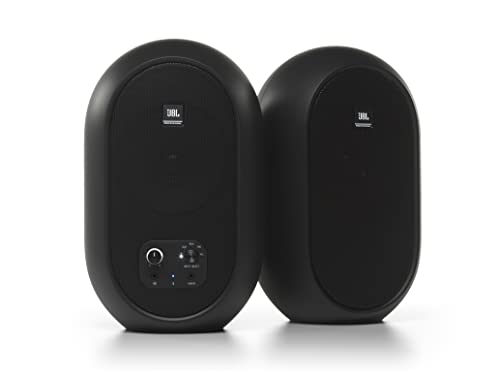
- 4.5-inch coaxial driver with a wide listening sweet spot
- 60W Class D amplification in a stereo pair
- Bluetooth 5.0, TRS, RCA, auxiliary, and headphone connections
Best For: Flexible desktop setups with multiple audio sources
Best Wired Value
M-AUDIO BX3 3.5" Studio Monitor Pair

- 3.5-inch Kevlar woofers with silk-dome tweeters
- RCA, 1/4-inch, and 1/8-inch inputs
- Front headphone output and rear EQ controls
Best For: Desktop production, podcasting, streaming, and gaming
Best Connected Option
Edifier MR3 Powered Studio Monitor

- 18W-per-channel output with 3.5-inch drivers
- Bluetooth, balanced TRS, RCA, and AUX inputs
- App EQ plus Music, Monitor, and Custom modes
Best For: Connected home studios and versatile desktop listening
Best Desk-Friendly Controls

- 3.5-inch woofers in a compact stereo pair
- Tone knob for quick voicing adjustments
- Location switch and included isolation pads
Best For: Small desks, home studios, and wired multimedia setups
Feature-Rich Pick
ULTIMEA BS-3 3-Way Bookshelf Monitors
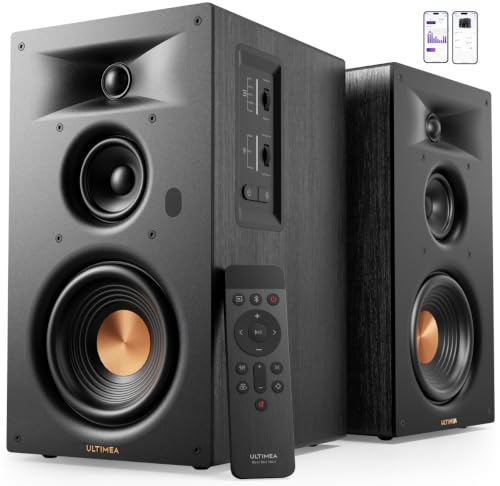
- Three-way driver design with a 5.25-inch woofer
- 70W RMS output with claimed 50Hz bass extension
- HDMI ARC, Bluetooth, optical, RCA, and USB inputs
Best For: Flexible desktop, TV, music, and home-theater setups
Studio Desk Classic
PreSonus Eris 3.5 Powered Monitors

- 50W stereo pair with 3.5-inch woven-composite woofers
- High- and low-frequency acoustic tuning controls
- Balanced TRS, RCA, aux, and front headphone output
Best For: Home studios and compact desktop listening
Connectivity Standout
Ortizan C7 Bluetooth Studio Monitors

- Bluetooth 5.3, USB DAC, RCA, AUX, and balanced TRS input
- 3.5-inch carbon-fiber driver with silk-dome tweeter
- Front headphone output for convenient monitoring
Best For: Small production desks with varied audio sources
Best Portable Pick – iLoud Micro Monitor
The IK Multimedia iLoud Micro Monitor is a strong choice for compact studio monitors when desk space and portability matter. Its 50-watt stereo system combines DSP-based EQ controls, Bluetooth, RCA, and auxiliary connectivity in a lightweight design.
Best For: Mobile producers, home studios, DJs, and anyone needing small monitors for travel or limited desk space.
Pros:
- Compact, lightweight design suited to home, project, and mobile studios.
- Internal DSP provides desktop, free-field, bass, treble, and placement adjustments.
- Bluetooth, RCA, and 1/8-inch auxiliary inputs support varied playback sources.
- 50 watts RMS and bass response down to 55Hz for its size.
Cons:
- Its 3-inch woofers provide less physical scale than larger desktop monitors.
- It is not waterproof, so it requires normal indoor handling and storage.
The iLoud Micro Monitor stands out when portability and flexible placement are more important than maximum low-end extension. Its DSP and multiple inputs make it adaptable for both production and everyday listening.
Best Value Pair – PreSonus Eris 3.5
The PreSonus Eris 3.5 is a practical entry point for compact studio monitors, providing a complete stereo pair with 50 watts of built-in amplification. Its compact desktop format, acoustic tuning controls, and broad input selection suit both production and general media use.
Best For: Home producers, gamers, streamers, and desktop listeners who want versatile powered monitors in a stereo pair.
Pros:
- Sold as a complete pair with 50 watts of built-in amplification.
- 3.5-inch woven-composite woofers and 1-inch silk-dome tweeters deliver balanced sound.
- High- and low-frequency controls help tailor the monitors to the room.
- TRS, RCA, auxiliary, and front headphone connections support many sources.
Cons:
- The 80Hz–20kHz stated range offers less low-end extension than some larger monitors.
- Bluetooth is listed in the specifications, but the supplied notes emphasize wired inputs for connections.
The Eris 3.5 is a well-rounded desktop option for buyers who want studio-oriented sound without giving up everyday convenience. Its tuning controls and headphone output add useful flexibility for mixed-use setups.
Best Premium Desktop Choice – ADAM Audio D3V
The ADAM Audio D3V brings advanced monitor features to a compact desktop system. Its 80-watt amplification, 3.5-inch aluminum woofers, D-ART tweeters, USB-C connectivity, and included angled stands make it a compelling option for serious desktop production.
Best For: Songwriters, producers, and music-focused listeners seeking detailed compact studio monitors with modern computer connectivity.
Pros:
- 80 watts of amplification drive the stereo monitoring system.
- D-ART tweeters are designed for precise, unfatiguing high-frequency reproduction.
- Passive radiators extend stated response down to 45Hz.
- USB-C, balanced 1/4-inch inputs, placement DSP switches, stands, and headphone output add flexibility.
Cons:
- The feature-rich design may be more than casual desktop listeners need.
- The supplied dimensions are presented as a combined measurement, so individual cabinet clearance should be checked before placement.
The D3V is the most feature-forward choice in this group for a dedicated desktop setup. Its stands, mounting options, placement controls, and extended low-end specification make it especially attractive when accurate monitoring is a priority.
Best Connectivity – JBL 104-BT
The JBL Professional 104-BT is a flexible pick among compact studio monitors, pairing a 4.5-inch coaxial driver with 60 watts of Class D amplification. Bluetooth 5.0 and three wired input types make it easy to integrate professional gear, computers, and consumer devices.
Best For: Desktop users who want a wide listening sweet spot, multiple connection options, and convenient Bluetooth playback.
Pros:
- Coaxial 4.5-inch woofer and 0.75-inch tweeter create a wide sweet spot.
- 60 watts of Class D power supplies 30 watts to each speaker.
- Bluetooth 5.0 joins balanced TRS, RCA, and auxiliary inputs.
- Front volume, input selection, headphone output, and speaker muting simplify desktop use.
Cons:
- The stated -3dB frequency range begins at 88Hz, so deep bass may require additional equipment.
- The master speaker contains the electronics, which concentrates connections and controls on one cabinet.
- It is not waterproof and is intended for desktop studio use.
The JBL 104-BT is a strong fit for users who regularly switch between studio equipment, mobile devices, and Bluetooth sources. Its coaxial design and desktop-focused controls make it convenient for everyday monitoring and playback.
Best Wired Value – M-AUDIO BX3 3.5" Studio Monitor Pair
The M-AUDIO BX3 is a practical choice if you want compact studio monitors for desktop music production, podcasting, gaming, or general multimedia. Its wired stereo design combines 3.5-inch Kevlar woofers, silk-dome tweeters, MDF cabinets, and flexible analog inputs.
Best For: Desktop producers, podcasters, streamers, and listeners who prefer a zero-latency wired connection.
Pros:
- 3.5-inch Kevlar woofers and silk-dome tweeters provide detailed stereo sound.
- Includes 1/4-inch, 1/8-inch, and RCA inputs for broad equipment compatibility.
- Front headphone and auxiliary connections support convenient late-night use.
- Rear high/low EQ controls and speaker-position switching allow basic voicing adjustments.
Cons:
- Wired connectivity does not provide Bluetooth convenience.
- The compact 3.5-inch woofer may offer less low-end scale than larger monitors.
With its useful input selection, included cables, and adjustable EQ, the BX3 is a well-equipped compact option for a small desk or entry-level studio setup.
Best Connected Option – Edifier MR3 Powered Studio Monitor
The Edifier MR3 is a versatile pick among compact studio monitors, pairing 18W-per-channel amplification with Bluetooth, balanced TRS, RCA, and AUX connectivity. Its 3.5-inch mid-low drivers and 1-inch tweeters are suited to near-field listening, creative work, and everyday playback.
Best For: Home studios and desktop users who want monitoring features alongside Bluetooth and app-based sound customization.
Pros:
- Hi-Res Audio certification supports a stated 52Hz–40kHz response.
- Offers balanced TRS, RCA, AUX, headphone, and multipoint Bluetooth connections.
- Music, Monitor, and Custom modes provide different listening approaches.
- EDIFIER ConneX app enables detailed EQ adjustments.
Cons:
- Its connectivity and app features may be more than needed for a simple wired setup.
- The supplied listing describes a powered monitor system rather than a battery-powered speaker.
The MR3 stands out when flexibility matters: it can serve as a near-field monitor for production or video editing and switch easily to wireless everyday listening.
Best Desk-Friendly Controls – Mackie CR3.5 Studio Monitors
The Mackie CR3.5 is a straightforward pair of compact studio monitors for desks, home studios, and multimedia setups. Its 3.5-inch woofers, tone knob, and location switch make it easy to adjust the presentation without navigating menus.
Best For: Home-studio users who want simple front-of-desk voicing controls and a complete wired starter package.
Pros:
- Sold as a stereo pair sized for desks and small studios.
- Tone knob provides quick sound adjustment from the desk.
- Location switch helps correct bass placement against a wall or in free space.
- Includes isolation pads and the necessary connection cables.
Cons:
- Connectivity is wired through RCA and TRS rather than Bluetooth.
- The 3.5-inch woofers are designed for compact setups, not large-room output.
The CR3.5 keeps the setup uncomplicated while still offering useful placement and tonal controls, making it a sensible fit for smaller workspaces and casual production.
Feature-Rich Pick – ULTIMEA BS-3 3-Way Bookshelf Monitors
For shoppers seeking compact studio monitors that can also handle TV audio, music, and gaming, the ULTIMEA BS-3 offers a versatile powered-speaker setup. Its three-way design separates bass, midrange, and treble, while HDMI ARC, Bluetooth, optical, RCA, and USB inputs make it easy to connect different sources.
Best For: Buyers who want compact monitors with broad connectivity, strong bass, and home-theater flexibility.
Pros:
- Three-way design includes a 5.25-inch woofer, dedicated midrange driver, and tweeter for clearer separation.
- 70W RMS output and BassMX technology support room-filling sound with claimed lows reaching 50Hz.
- HDMI ARC, optical, RCA, USB, Bluetooth, and a subwoofer output provide flexible setup options.
- App-based EQ controls and Edge Horn technology help tailor the sound and direct high frequencies.
Cons:
- Its bookshelf-oriented design may be less purpose-built for nearfield production than a traditional monitor.
- The larger 5.25-inch woofer may take more desk or shelf space than ultra-compact alternatives.
The BS-3 is a strong choice when versatility matters as much as monitoring. It is particularly appealing for a desktop or living-room system that needs both detailed stereo playback and straightforward TV connectivity.
Studio Desk Classic – PreSonus Eris 3.5 Powered Monitors
The PreSonus Eris 3.5 is a practical option for anyone comparing compact studio monitors for a home studio, dorm room, or desktop. Sold as a stereo pair, it combines 3.5-inch woven-composite woofers, 1-inch silk-dome tweeters, acoustic tuning controls, and several wired inputs in a space-conscious design.
Best For: Home recording, desktop listening, gaming, and buyers who want straightforward studio-oriented controls.
Pros:
- Complete stereo pair with 50W of built-in amplification.
- 3.5-inch woofers and 1-inch silk-dome tweeters cover a stated 80Hz–20kHz range.
- High- and low-frequency acoustic controls allow adjustment for different rooms.
- Balanced TRS, RCA, front aux, and front headphone connections support common desktop sources.
Cons:
- The 3.5-inch woofers provide less stated low-frequency extension than larger alternatives.
- The supplied details emphasize wired connections, so wireless use may be less central to the setup.
The Eris 3.5 keeps the focus on accessible studio-style monitoring in a compact footprint. Its tuning controls and headphone output are useful additions for desktop work, while the included pair makes setup simple.
Connectivity Standout – Ortizan C7 Bluetooth Studio Monitors
The Ortizan C7 targets users who want compact studio monitors with both wireless convenience and production-friendly connections. Its 3.5-inch carbon-fiber mid-bass driver, 0.75-inch silk-dome tweeter, USB DAC, Bluetooth 5.3, and balanced 6.35mm TRS input give a small workspace several ways to connect gear.
Best For: Compact music-production setups that need Bluetooth, USB, balanced input, and front-panel headphone monitoring.
Pros:
- Includes Bluetooth 5.3, RCA, 3.5mm AUX, USB, and 6.35mm TRS balanced connectivity.
- Built-in 24-bit DAC accepts digital audio through USB.
- 3.5-inch carbon-fiber mid-bass driver and 0.75-inch silk-dome tweeter use a two-way crossover.
- Front-panel headphone output supports convenient private monitoring.
Cons:
- The 3.5-inch driver size limits how much low-end output to expect compared with larger monitors.
- The supplied details do not specify amplification power or frequency-response limits.
The C7 stands out for its unusually broad connection set in a compact monitor pair. It is a sensible fit for creators who switch between a computer, professional gear, mobile devices, and headphones without adding separate interface hardware for every source.
How We Picked the Best Compact Studio Monitors
We focused on powered monitor pairs and compact speaker systems suited to desks, small studios, bedrooms, editing suites, and casual listening spaces. Our comparison considers driver size, claimed power, frequency response where available, input options, Bluetooth support, physical footprint, controls, and likely use case.
Because specifications vary by manufacturer, power ratings are not treated as a direct measure of sound quality. For production work, we give greater weight to tonal balance, stereo imaging, useful nearfield behavior, and the ability to make repeatable mix decisions. For general desktop listening, connectivity and ease of use matter more.
Quick Comparison
| Best For | Recommended Type | What to Prioritize |
|---|---|---|
| Mixing and production | Neutral active monitors | Balanced response, stereo imaging, low noise |
| Small desks | Ultra-compact pair | Width, depth, front-panel controls |
| Bluetooth listening | Wireless-enabled monitors | Stable connection and input flexibility |
| Portable setups | Compact lightweight monitors | Size, power arrangement, placement options |
| Budget upgrades | Entry-level powered pair | Useful inputs, build quality, warranty |
Key Buying Factors for Compact Studio Monitors
Size, Output, and Listening Distance
Small monitors work best at short listening distances, generally on a desk or compact stand. A larger woofer may produce more bass and volume, but it also needs more space and can exaggerate low frequencies in a small room. Choose a size that fits your desk while leaving room for proper stereo separation.
Sound Balance and Bass Expectations
Studio monitors are intended to reveal detail rather than add heavy coloration. Compact models may not reach deep sub-bass without a subwoofer, so producers should check low-end decisions on headphones or a second playback system. Boundary placement near walls can also increase bass, making positioning important.
Inputs and Wireless Features
Check whether you need balanced inputs for an audio interface, unbalanced connections for a computer, or Bluetooth for streaming. Bluetooth is convenient, but wired connections are generally preferable for production because they avoid wireless latency and compression concerns.
Controls, Placement, and Power
Front-panel volume and headphone controls can be valuable on a working desk. Look for separate left and right speakers, accessible tone controls, and enough cable length for your layout. Some pairs place amplification in one speaker, so confirm where the power connection and controls are located.
Who Should Buy Which Compact Studio Monitors?
Choose the most neutral option if you are mixing music, podcasts, or video and need dependable nearfield detail. Choose the smallest pair when desk space is the limiting factor, but keep expectations realistic about bass extension and maximum volume.
Choose Bluetooth-enabled Compact Studio Monitors if you want one system for production and everyday streaming. If you primarily listen casually, prioritize convenient controls, broader input support, and a pleasing sound over strict reference neutrality. Buyers with mobile or temporary setups should look for lightweight designs that are easy to reposition.
Whichever model you choose, place the speakers at ear height, form an approximate equilateral triangle with your listening position, and angle the tweeters toward your ears. Good placement can improve clarity and stereo imaging as much as moving up to a more expensive pair.