
A quieter computer starts with the right fan for your hardware, airflow layout, and noise expectations. The best quiet computer cooling fans balance low operating noise with enough airflow or static pressure to cool cases, radiators, laptops, and compact workspaces.
This roundup compares 10 options across standard PC case fans, USB-powered fans, laptop cooling pads, and multi-pack upgrades, so you can match the fan to your setup without paying for performance you do not need.
Best 10 Quiet Computer Cooling Fans Picks for 2026
Balanced PC Cooling

- 4-pin PWM speed control
- Pressure-optimized 120mm design
- Up to 1700 RPM and 120.2 m³/h airflow
Best For: Adjustable desktop cooling for CPU coolers, radiators, and cases
Quiet Laptop Stand

- Five USB-powered cooling fans
- Six adjustable height settings
- Dual USB hub for peripherals
Best For: 12- to 17-inch laptops and ergonomic desk setups
Low-Speed Radiator Cooling

- Pressure-optimized 120mm frame
- 1050 RPM maximum speed
- 0.08 Sone noise rating
Best For: Low-noise desktop cooling through heatsinks or radiators
Flexible Electronics Cooling

- Dual 120mm USB-powered fans
- 104 CFM combined airflow
- Multi-speed controller and dual-ball bearings
Best For: USB-powered cooling for consoles, AV gear, cabinets, and electronics
Quiet Case Cooling
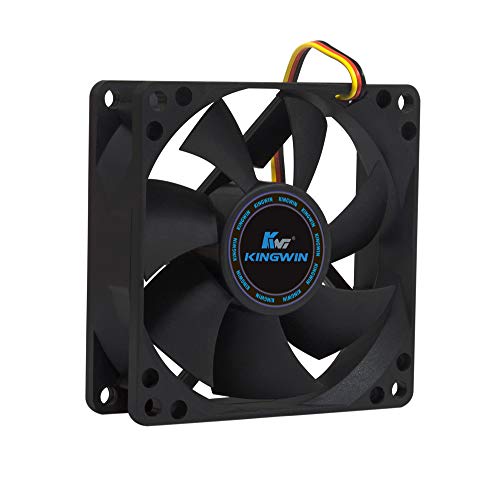
- 25 dB low-noise operation
- 30 CFM airflow at 1,700 RPM
- Standard 80mm, 3-pin design
Best For: Compact desktops, servers, and mining rigs
USB Electronics Cooling

- 18 dBA ultra-quiet operation
- 52 CFM airflow with speed control
- USB-powered 120mm dual-ball fan
Best For: Consoles, AV equipment, cabinets, and computers
Quiet PWM Case Cooling

- 4-pin PWM speed control
- 49.9 CFM airflow at 1,600 RPM
- 80,000-hour rifle-bearing life
Best For: Desktop, gaming PC, and radiator builds
Best USB Cooling Fan

- 18 dBA operation with multi-speed control
- USB-powered 140mm fan for flexible placement
- 57 CFM airflow and dual-ball bearings
Best For: USB cooling for consoles, AV equipment, and computer cabinets
Best Value Multi-Fan Pack

- Five 120mm fans for complete case coverage
- Pressure-optimized for heatsinks and radiators
- Up to 56.3 CFM with Fluid Dynamic Bearings
Best For: Multi-fan desktop PC builds and radiator cooling
Best High-Performance 140mm Fan

- 140mm PWM fan with up to 97.4 CFM airflow
- Speed switch supports multiple performance levels
- Designed for radiators and heatsinks with low vibration
Best For: High-performance gaming PCs and 140mm radiator cooling
Balanced PC Cooling – Noctua NF-P12 redux-1700 PWM
For builders seeking quiet computer cooling fans with stronger airflow when needed, the Noctua NF-P12 redux-1700 PWM combines pressure-optimized performance with automatic motherboard speed control. Its 120mm, 4-pin PWM design suits CPU coolers, radiators, and case ventilation.
Best For: Desktop users who want adjustable cooling for heatsinks, radiators, or chassis airflow.
Pros:
- 4-pin PWM control can provide powerful airflow under load and quieter operation at idle.
- Pressure-optimized design supports CPU coolers, water-cooling radiators, and case ventilation.
- Offers up to 1700 RPM, 120.2 m³/h airflow, and a six-year manufacturer warranty.
Cons:
- Its 25.1 dB(A) maximum rating is higher than some slower silent fan options.
- This is a single 120mm fan, so multi-fan setups require additional units.
The NF-P12 redux-1700 PWM is a practical choice when silence matters but you still want meaningful cooling headroom and motherboard-controlled speed adjustment.
Quiet Laptop Stand – Kootek 5-Fan Cooling Pad
The Kootek cooling pad is a quiet computer cooling fans option for laptop users who want added airflow without giving up an ergonomic stand. Five USB-powered fans cover laptops from 12 to 17 inches, while separate controls let you choose how many fans operate.
Best For: Laptop users who want adjustable cooling, added height, and two extra USB ports.
Pros:
- Five built-in fans provide broad cooling coverage with selectable one-, four-, or five-fan operation.
- Six adjustable height settings support more comfortable gaming, viewing, or work sessions.
- Dual USB hub adds connectivity, and front stoppers help secure 12- to 17-inch laptops.
Cons:
- It requires USB power, and the notes recommend a 5V 1A adapter for best performance.
- Blue LEDs cannot be separated from fan control according to the supplied switch description.
- Its 1.16 kg weight and relatively large footprint may reduce portability.
This pad is best viewed as a combined cooling stand and laptop accessory hub, especially for users who value adjustable positioning and flexible fan control.
Low-Speed Radiator Cooling – ARCTIC P12 Silent
The ARCTIC P12 Silent is a straightforward choice among quiet computer cooling fans for low-noise desktop builds. Its pressure-optimized 120mm frame is designed for heatsinks and radiators, while the 1050 RPM speed prioritizes restrained operation over maximum airflow.
Best For: Quiet desktop builds using heatsinks, radiators, or applications with higher air resistance.
Pros:
- Pressure-optimized design is intended to remain effective against increased air resistance.
- Virtually silent motor and specialized bearing design help reduce friction and noise.
- Compact 120mm format, 3-pin connector, and six-year warranty suit simple PC installations.
Cons:
- Its 24.1 CFM airflow is substantially lower than performance-focused 120mm fan options.
- The 3-pin connection does not provide the same PWM control described for 4-pin fans.
- Maximum speed is limited to 1050 RPM.
The P12 Silent makes the most sense when low noise and compatibility with airflow-restricted installations matter more than high-volume cooling.
Flexible Electronics Cooling – AC Infinity MULTIFAN S7
The AC Infinity MULTIFAN S7 offers two quiet computer cooling fans in a USB-powered package for electronics, cabinets, consoles, and computers. A multi-speed controller lets you balance airflow and noise, while dual-ball bearings support either flat or upright placement.
Best For: Cooling AV equipment, game consoles, cabinets, or other electronics with accessible USB power.
Pros:
- Dual 120mm fans provide a combined 104 CFM airflow rating.
- Multi-speed control allows practical adjustment of noise and cooling performance.
- USB power, noise-absorption pads, and flexible flat or upright placement support varied setups.
Cons:
- The system uses a USB connection rather than a standard internal PC fan connector.
- Its 1300 RPM maximum speed may not suit demanding high-performance desktop cooling.
- The two-fan assembly requires more installation space than a single fan.
With its external USB power and speed controller, the MULTIFAN S7 is particularly convenient for cooling equipment that lacks a standard motherboard fan header.
Quiet Case Cooling – Kingwin 80mm Silent Fan
The Kingwin 80mm Silent Fan is a practical choice for quiet computer cooling fans in office desktops, home servers, and compact PC cases. Its 3-pin connection, 30 CFM airflow, and standard 80mm fit make it useful for replacement or supplemental cooling.
Best For: Quiet 80mm case, CPU cooler, radiator, and mining-rig applications.
Pros:
- Low-noise operation rated at 25 dB.
- Delivers up to 30 CFM of airflow at 1,700 RPM.
- Standard 80mm mounting size supports broad compatibility.
- Long-life bearing and one-year manufacturer warranty support extended use.
Cons:
- Uses a 3-pin connector rather than PWM speed control.
- Its 80mm size may provide less airflow than larger case fans.
Choose this model when you need a straightforward, durable 80mm replacement fan with modest noise and dependable airflow. Confirm your case or cooler has an 80mm mount and a compatible 3-pin connection.
USB Electronics Cooling – AC Infinity MULTIFAN S3
The AC Infinity MULTIFAN S3 is a flexible option among quiet computer cooling fans, especially when you need USB-powered airflow for a computer, console, cabinet, or AV component. Its included speed controller lets you balance cooling and noise.
Best For: USB-powered cooling for computers, game consoles, receivers, DVRs, and other electronics.
Pros:
- Very quiet 18 dBA operating noise rating.
- Three-speed controller helps adjust airflow and sound.
- USB power works with ports on many electronics and game consoles.
- Dual-ball bearings support upright or flat placement and a stated 67,000-hour lifespan.
Cons:
- USB power and 5-volt operation may not suit standard 12-volt case-fan installations.
- It provides external component cooling rather than a conventional internal case-mount solution.
This is a strong fit for targeted cooling where a USB port is available and placement flexibility matters. The 120mm frame, 52 CFM airflow, and speed controller offer a useful balance for electronics cabinets and entertainment setups.
Quiet PWM Case Cooling – be quiet! Pure Wings 3 120mm
The be quiet! Pure Wings 3 is designed for quiet computer cooling fans in desktop and gaming PC builds. Its 4-pin PWM connection, low minimum RPM capability, and airflow-focused frame make it suitable for systems that need adjustable cooling under changing workloads.
Best For: PWM-controlled desktop, gaming PC, and radiator configurations.
Pros:
- Seven airflow-optimized blades help reduce noise while maintaining performance.
- 4-pin PWM control supports adjustable fan operation.
- Provides up to 49.9 CFM at 1,600 RPM.
- Rifle bearing is rated for an 80,000-hour operating lifetime.
Cons:
- Its 25.5 dB rating is slightly higher than some ultra-quiet alternatives.
- Requires a compatible 4-pin PWM header to use its speed-control advantages.
Pure Wings 3 is a well-rounded choice when you want quiet low-speed behavior without giving up useful airflow at higher demand. Check for a 120mm mounting position and a 4-pin PWM header before buying.
Best USB Cooling Fan – AC Infinity MULTIFAN S4
The AC Infinity MULTIFAN S4 is a practical choice when you need quiet computer cooling fans for electronics, consoles, AV equipment, or a computer cabinet. Its 140mm frame delivers up to 57 CFM while the included multi-speed controller helps balance airflow and noise.
Best For: USB-powered cooling for computers, game consoles, receivers, DVRs, and enclosed equipment spaces.
Pros:
- Quiet 18 dBA operation with adjustable speed control.
- USB power works with ports on many AV devices and game consoles.
- Dual-ball bearings support a stated 67,000-hour lifespan and flexible horizontal or vertical placement.
- Noise-absorption pads help reduce vibration.
Cons:
- Its 5V USB design is intended for equipment cooling rather than direct PC motherboard installation.
- It is a single-fan package.
Choose the MULTIFAN S4 if simple USB power and low noise matter more than advanced PC fan controls. The controller and placement flexibility make it especially convenient for cooling gear outside a standard desktop case.
Best Value Multi-Fan Pack – ARCTIC P12 5-Pack
The ARCTIC P12 5-pack suits builders looking for quiet computer cooling fans throughout a desktop case. These 120mm fans are pressure-optimized for heatsinks and radiators, while the blade design focuses on efficient airflow and reduced noise.
Best For: Desktop PC builders who need several 120mm fans for case ventilation, heatsinks, or radiators.
Pros:
- Five fans provide broad coverage for a multi-fan PC setup.
- Pressure-optimized design is suitable for heatsinks and radiators.
- Fluid Dynamic Bearings are designed for quiet operation and long service life.
- Each fan provides up to 56.3 CFM at 1,800 RPM.
Cons:
- These are 3-pin fans, so they lack the supplied 4-pin PWM connector found on many newer fan models.
- The 120mm size may not fit cases designed for 140mm fans.
The P12 pack is a strong practical option when quantity and radiator-oriented performance are priorities. Verify your case mounting positions and control compatibility before buying.
Best High-Performance 140mm Fan – be quiet! Silent Wings Pro 4
The be quiet! Silent Wings Pro 4 is designed for demanding desktop cooling where high airflow and radiator performance are important. Its 140mm frame, PWM control, speed switch, and fluid-dynamic bearing make it a flexible option for quiet everyday operation or faster cooling when needed.
Best For: High-performance gaming PCs using 140mm case, radiator, or heatsink cooling.
Pros:
- Optimized blades and a funnel-shaped outlet support high air pressure.
- Speed switch offers medium, high, and ultra-high speed settings.
- PWM control allows motherboard-based speed adjustment.
- Six-pole motor and fluid-dynamic bearing promote smooth, low-vibration operation.
Cons:
- Its maximum rated noise is 36.8 dB, so high-speed operation is not the quietest setting.
- The 140mm format is incompatible with mounts designed only for 120mm fans.
- It is sold as a single fan.
The Silent Wings Pro 4 is best when you want a quiet baseline with substantial performance headroom. Keep it at regular speed for quieter operation, or use the speed switch and PWM control when intensive cooling takes priority.
How We Picked the Best Quiet Computer Cooling Fans
We selected fans across the main cooling categories rather than treating every model as interchangeable. The list includes 120mm and 140mm case fans, an 80mm compact fan, USB-powered desk and equipment fans, a laptop cooling pad, and a five-pack for broader case upgrades.
Our comparison focuses on the factors that most affect real-world use: noise-oriented design, airflow, static pressure, speed control, power connection, size, installation flexibility, and intended workload. A fan marketed as quiet may still become audible at maximum speed, so adjustable control and appropriate sizing matter as much as the motor design.
Quick Comparison
- Best general 120mm upgrade: Noctua NF-P12 redux-1700 PWM
- Best value multi-pack: ARCTIC P12 5 Pack
- Best laptop option: Kootek Laptop Cooling Pad
- Best USB dual-fan setup: AC Infinity MULTIFAN S7
- Best compact 80mm option: Kingwin 80mm Silent Fan
- Best premium 140mm performance: be quiet! Silent Wings Pro 4
Key Buying Factors for Quiet Computer Cooling Fans
Size and Compatibility
Check your case, cooler, radiator, or laptop dimensions before buying. The common 120mm format fits many desktop cases, while 140mm fans can move more air at lower rotational speeds when the chassis supports them. An 80mm fan is useful for compact spaces but may need to spin faster to provide similar airflow.
Airflow Versus Static Pressure
Choose airflow-focused fans for open case ventilation and static-pressure-optimized models for restrictive front panels, dust filters, heatsinks, or radiators. A fan with high advertised airflow is not automatically the best choice for every mounting position.
Speed Control and Connections
PWM fans can adjust speed through a compatible motherboard header, helping reduce noise during light workloads. USB fans are easier to use with laptops, routers, consoles, and other equipment, especially when a built-in speed controller is included.
Noise, Bearings, and Placement
Noise depends on fan speed, vibration, case panels, and airflow obstructions. Rubber mounts or stable bearings can help reduce mechanical noise, but correct placement and a clean dust filter are equally important. Avoid running every fan at maximum speed unless temperatures require it.
Who Should Buy Which Quiet Computer Cooling Fans?
Desktop builders upgrading a standard case should start with a quiet 120mm PWM model or the ARCTIC five-pack if several positions need replacement. Users cooling a radiator or dense heatsink should prioritize pressure-optimized designs. A 140mm model is a strong choice for compatible cases when you want broad airflow at lower speeds.
Laptop owners should choose the Kootek cooling pad when portability, elevated positioning, and USB-powered cooling are more useful than internal fan replacement. For equipment without motherboard fan headers, AC Infinity MULTIFAN models offer straightforward USB operation and external speed control. Finally, choose the compact Kingwin fan when space is limited and the mounting position specifically requires an 80mm model.