
Choosing the right digital signage setup can make content easier to manage, more visible, and more effective at the point of sale. The best option depends on where you’ll use it, how often content changes, and whether you need a screen, a player, or an all-in-one kiosk.
In this roundup, we focus on practical, business-ready options built for menus, promotions, wayfinding, internal messaging, and customer engagement. If you’re shopping for digital signage displays for businesses, the key is matching the hardware to your space and workflow.
Best 10 Digital Signage Displays for Businesses Picks for 2026
Best for Business Content Management
Samsung 55” BEFX-H Business Pro TV

- 4K UHD + HDR for vivid promotional content
- Business TV app, Knox, and VXT compatibility
- Sleek 3-side bezel-less design for storefronts
Best For: Small and medium-sized businesses that need a polished 55-inch display with easy content management.
Best for Easy Remote Management
OptiSigns OptiStick 4K Signage Player

- Pre-installed OptiSigns player for fast setup
- 4K UHD output with WiFi and Ethernet
- 160+ apps and 5,000+ templates included
Best For: Businesses that want a compact, app-rich signage player with remote control.
Best for Portable Interactive Displays
15.6" Touchscreen Signage with Battery
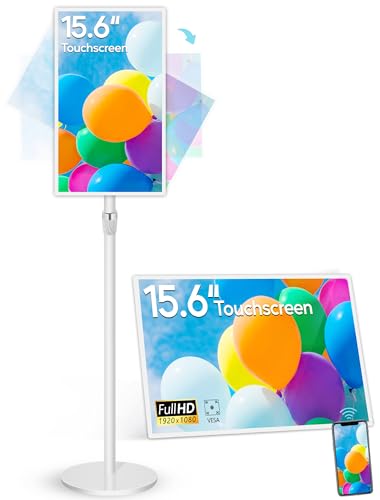
- 10,000mAh battery for 4-6 hours of wireless use
- 10-point touch with Android 13 and app support
- Wireless mirroring and adjustable stand for fast setup
Best For: Small businesses and pop-up teams needing a portable, touch-enabled signage screen.
Best for OptiSigns Management
OptiSigns Pro Digital Signage Player
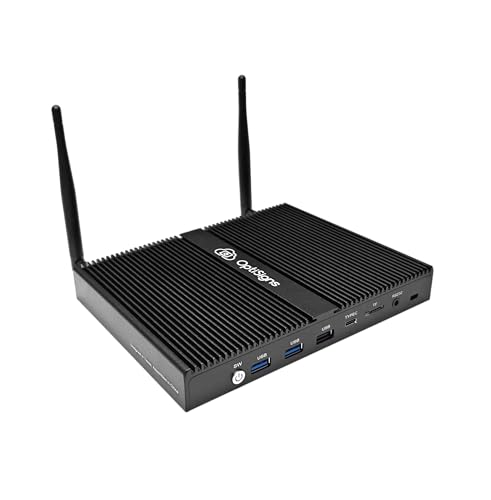
- Pre-installed OptiSigns Player for remote management
- 4K-ready with Wi‑Fi 6, Ethernet, and signage ports
- Passive cooling and auto wake features for 24/7 use
Best For: Businesses already using OptiSigns that want a dedicated, easy-to-manage signage player.
Best for Bright Menus
18.5-Inch 700-Nit Digital Menu Board

- 700 nits brightness for better visibility in bright spaces
- Remote CMS with scheduling, split-screen, and USB playback
- 24/7-ready design with aluminum alloy and tempered glass frame
Best For: Restaurants, cafés, and retail counters that need a compact, high-visibility menu board.
Best for Countertop Signage

- 10.1" HD touchscreen for menus and promos
- Remote management with OptiSigns templates
- Wi‑Fi, Ethernet, Bluetooth, and optional music
Best For: Restaurants, retail counters, and reception areas needing a compact interactive signage kiosk.
Best for Menus and Auto-Updates

- Cloud-controlled updates keep content current
- Free plan includes support and basic slide limits
- Built-in tools help create menus and promos fast
Best For: Restaurants and small businesses needing an easy menu-board and promo screen player.
Best for Interactive Kiosks

- 32-inch Full HD touchscreen with 10-point touch
- Preloaded OptiSigns software with remote management
- Optional rechargeable battery for portable use
Best For: Retail, event, lobby, and pop-up teams needing a touch-enabled signage kiosk.
Best for Countertop Menus
10.1 Inch Android Touchscreen Kiosk
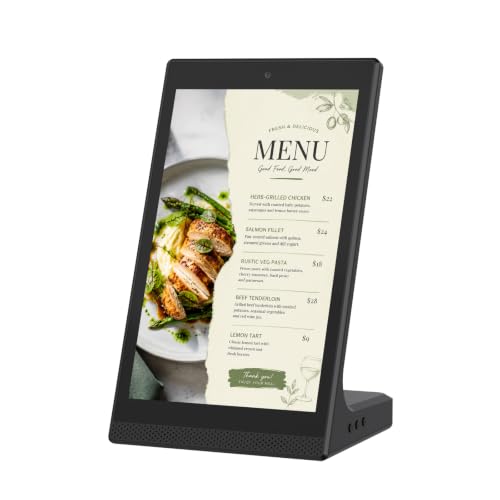
- Compact tabletop footprint for counters and desks
- WiFi and USB support for easy content changes
- Touchscreen interface suits menus and quick updates
Best For: Restaurants, retail counters, and reception areas that need a small interactive sign.
Best for Business Content Management – Samsung 55” BEFX-H Business Pro TV
Samsung 55” 4K BEFX-H Business Pro TV, CMS-Compatible Digital Signage (LH55BEFHLGFXGO)
Check Price On AmazonThe Samsung 55” BEFX-H Business Pro TV is a practical option for buyers comparing digital signage displays for businesses that need polished 4K visuals plus simple remote content control. It blends a clean bezel-less look with business-focused software support, making it a solid fit for stores, lobbies, and customer-facing spaces.
Best For: Small and medium-sized businesses that want a modern 55-inch signage-style display with easy content management and a professional storefront look.
Pros:
- 4K UHD and HDR help promotions, menus, and product visuals look sharp and vivid.
- Business tools like VXT, Samsung Knox, SmartThings Pro, and the Business TV app simplify management.
- 3-side bezel-less design gives it a cleaner, more modern presentation in public areas.
- Available in multiple sizes, so the BEFX-H line can scale across different rooms or locations.
Cons:
- VXT is sold separately, which may add to the overall cost.
- It is more of a business TV/signage hybrid than a full commercial CMS display platform.
For businesses that want digital signage displays for businesses with a more approachable setup and a polished appearance, this Samsung model offers a strong balance of image quality, software support, and everyday usability. It makes the most sense for teams that value easy updates and a professional customer-facing display.
Best for Easy Remote Management – OptiSigns OptiStick 4K Signage Player
For teams comparing digital signage displays for businesses, the OptiSigns OptiStick is a simple way to turn an existing HDMI screen into a remotely managed signage endpoint. It combines a compact Android-based player with built-in OptiSigns software, so setup is straightforward and day-to-day content changes can be handled from the portal or mobile app.
Best For: Businesses that want a small, easy-to-deploy signage player with remote management and built-in OptiSigns support.
Pros:
- Pre-installed OptiSigns player makes setup and screen management quick
- Supports 4K UHD output, plus WiFi and Ethernet for flexible connectivity
- Access to 160+ apps and 5,000+ templates speeds up content creation
- Compact HDMI stick design avoids brackets, mounts, and extra clutter
Cons:
- Requires an OptiSigns subscription to use
- Each device powers only one screen
- Free plan is limited to three screens and includes OptiSigns branding
Overall, the OptiStick is a practical choice for digital signage displays for businesses that already want to use the OptiSigns ecosystem and value simple remote control over a more general-purpose media player. It is especially appealing when you need fast deployment, 4K support, and low hardware footprint.
Best for CMS-Ready Business Signage – Samsung 65” 4K BEFX-H Business Pro TV
If you need one of the more flexible digital signage displays for businesses, this Samsung 65-inch 4K Business Pro TV is built around simple content management and a polished presentation. It fits well in storefronts, offices, hospitality spaces, and other customer-facing areas where you want a clean 4K screen without moving into full commercial AV complexity.
Best For: Businesses that want a large, CMS-compatible display for menus, promotions, lobby messaging, or everyday signage updates.
Pros:
- 65-inch 4K panel gives presentations and signage strong visual impact
- CMS compatibility makes content updates easier for business workflows
- Business-focused design suits retail, hospitality, and lobby use
- Large screen size works well for medium to high-traffic areas
Cons:
- Not a dedicated commercial display, so heavy-duty signage needs may want a more specialized model
- Larger size may be too much for small rooms or tight wall spaces
Overall, this Samsung is a practical choice if you want digital signage displays for businesses that balance screen size, 4K clarity, and manageable content control. It is a smart pick when presentation quality matters, but you still want a straightforward business TV approach.
Best for Portable Interactive Displays – 15.6" Touchscreen Signage with Battery
If you need digital signage displays for businesses that can move easily from counter to counter or room to room, this 15.6-inch unit stands out for its built-in battery, touch control, and flexible stand. It blends a commercial-style screen with Android 13, wireless casting, and app support, making it practical for short-term promos, kiosks, and interactive customer engagement.
Best For: Small businesses, pop-up displays, reception desks, and interactive point-of-sale setups that need a portable, touch-enabled screen.
Pros:
- Built-in 10,000mAh battery supports 4-6 hours of untethered use
- 10-point capacitive touchscreen with Android 13 and app flexibility
- Wireless screen mirroring works across iOS, Android, Windows, and macOS
- Adjustable metal stand plus VESA and wall-mount support
Cons:
- 15.6-inch size may be small for larger retail floor areas
- Battery life is useful but not ideal for full-day unplugged operation
- Best suited to indoor commercial use rather than bright outdoor settings
This is a smart pick if portability and interactivity matter more than raw screen size. For digital signage displays for businesses that need quick setup, touch input, and a clean all-in-one design, it offers a lot of flexibility for the price.
Best for OptiSigns Management – OptiSigns Pro Digital Signage Player
If you want a dedicated player for digital signage displays for businesses, this OptiSigns box is built to keep content running smoothly with minimal setup. It’s aimed at teams that already use or plan to use the OptiSigns platform and want a compact, always-on device with strong connectivity and remote management.
Best For: Businesses that want a turnkey OptiSigns player for easy remote control, template-based content creation, and reliable 24/7 playback.
Pros:
- Pre-installed OptiSigns Player with full platform support and remote management.
- 4K support, Wi‑Fi 6, Ethernet, HDMI-CEC, and RS-232 for flexible installs.
- Passive cooling, auto power-on, and RTC wake-up make it well suited for nonstop use.
- Large app library and ready-made templates help teams launch content quickly.
Cons:
- Requires an OptiSigns subscription to use.
- Best value is tied to businesses committed to the OptiSigns ecosystem.
Overall, this is a strong fit for companies that want digital signage displays for businesses managed from one platform rather than a general-purpose media box. It prioritizes dependable playback, easy content workflows, and practical integration over versatility.
Best for Bright Menus – 18.5-Inch 700-Nit Digital Menu Board
If you need digital signage displays for businesses that stay readable in bright front-of-house spaces, this 18.5-inch menu board is built for clear day-to-day promotion. It pairs 700 nits of brightness with 720p HD, remote CMS control, and 24/7 operation support, making it a practical fit for restaurants, retail counters, and other customer-facing spots.
Best For: Restaurants, cafés, and retail businesses that want a compact, ultra-bright menu board with remote content management.
Pros:
- 700 nits of brightness helps content stand out in well-lit areas
- CMS remote management supports scheduling, split-screen, and USB playback
- Built for 24/7 continuous use with a durable aluminum alloy and tempered glass frame
Cons:
- 18.5-inch screen may be too small for larger lobby or showroom setups
- 720p resolution is solid, but not ideal if you want full HD detail
Overall, this is a focused option for businesses that want reliable, easy-to-manage digital signage displays for businesses without moving up to a larger commercial panel. Its strength is visibility and convenience, especially for menus and simple promotional content.
Best for Countertop Signage – OptiSigns OptiKiosk 10
If you need digital signage displays for businesses that sit right at the counter, the OptiSigns OptiKiosk 10 is built for menus, promos, check-in screens, and quick announcements. Its 10.1-inch HD touchscreen, remote content management, and optional background music make it a practical fit for customer-facing spaces that want a polished, always-on display.
Best For: Restaurants, retail counters, reception desks, and other busy spaces that need a compact interactive signage kiosk.
Pros:
- 10.1-inch HD touchscreen is well suited to countertop menus and promotions.
- Pre-installed OptiSigns software supports remote content updates and templates.
- Wi-Fi, Ethernet, and Bluetooth give you flexible connectivity options.
- Optional licensed background music can add atmosphere without extra hardware.
Cons:
- OptiSigns subscription is required for full use.
- Designed for plug-in operation only, since it has no internal battery.
- 10-inch screen size may feel small for larger viewing distances.
For businesses that want a compact, interactive option rather than a large wall display, this kiosk hits a useful middle ground. It’s a strong fit if you’re comparing digital signage displays for businesses that need easy setup, reliable operation, and a countertop-friendly footprint.
Best for Menus and Auto-Updates – EZ AD TV 4K Signage Player
If you want digital signage displays for businesses that can run menus, promos, and rotating content without much hands-on management, the EZ AD TV player is built for that job. It plugs into an HDMI display, syncs to the cloud, and lets you create or update slides from a mobile app.
Best For: Restaurants, small shops, and business owners who want a simple cloud-managed media player for menu boards and promotional screens.
Pros:
- Supports 4K playback with cloud-based wireless content updates.
- Includes a free plan with tech support and up to 50 slides per box.
- Template Builder, Video Studio, and YouTube Loader make content creation easier.
- Multiple ports and vertical layout options add setup flexibility.
Cons:
- It is a media player, so you still need a compatible TV or display.
- Free plan limits may feel tight for larger signage networks.
- Advanced use cases may require upgrading to a paid plan.
Overall, this is a practical choice for businesses that need digital signage displays for businesses with easy content changes and menu-board-friendly tools. It is especially appealing if you want cloud control, mobile editing, and a straightforward way to keep screens current.
Best for Interactive Kiosks – OptiSigns OptiKiosk 32
If you want digital signage displays for businesses that do more than show slides, the OptiSigns OptiKiosk 32 is built for interactive, remotely managed kiosk use. It comes preloaded for the OptiSigns platform, supports a wide range of business apps, and is easy to deploy once connected to your account.
Best For: Retail, event, lobby, and pop-up teams that need a touchscreen signage kiosk with remote content management and interactive templates.
Pros:
- 32-inch Full HD touchscreen with 10-point touch for interactive experiences
- Preloaded OptiSigns software with remote management through web or mobile
- Strong business integrations, including Google Workspace, Power BI, YouTube, Canva, and more
- Optional rechargeable battery supports portable use for events and mobile setups
Cons:
- Requires an OptiSigns subscription to use
- Not a general Android kiosk, so it does not support app-store downloads
- Likely overkill if you only need a basic non-interactive display
This is a strong fit if your priority is a managed, touch-enabled kiosk rather than a standard screen. For businesses comparing digital signage displays for businesses, it stands out most when interactivity, portability, and centralized control matter more than open-platform flexibility.
Best for Countertop Menus – 10.1 Inch Android Touchscreen Kiosk
If you need a compact option among digital signage displays for businesses, this 10.1-inch Android touchscreen kiosk is built for close-range viewing, fast updates, and counter-friendly placement. It works well for menus, notices, product highlights, and reception messaging in smaller indoor spaces.
Best For: Restaurants, retail counters, reception desks, and other indoor spots where a small interactive sign is easier to manage than a larger display.
Pros:
- Compact tabletop design fits easily on counters and desks
- WiFi and USB support make content updates more flexible
- Touchscreen controls simplify browsing and simple interactions
- Useful for menus, promotions, notices, and front-desk information
Cons:
- 10.1-inch size is better for close viewing than room-distance visibility
- Designed for indoor use, so it is not suited to outdoor signage
- Small screen limits how much text or imagery you can show at once
As a space-saving sign, it makes sense for businesses that want simple, customer-facing updates without installing a larger system. For digital signage displays for businesses, its value is in convenience, touch control, and easy placement on busy counters.
How We Picked These Digital Signage Displays for Businesses
We prioritized commercial-friendly features that matter in real deployments: screen size options, brightness, touch capability, remote content management, 4K support, and ease of installation. We also considered whether each product works well as a standalone display, a kiosk, or a media player in a larger signage network.
Quick Comparison
Large-format Samsung business TVs are a strong fit for wall-mounted promotions and lobby messaging. OptiSigns players and the EZ AD TV unit are better if you already have displays and need flexible content control. Touch kiosks and countertop models are best for interactive menus, check-in, and point-of-sale use, while battery-powered and portable screens suit temporary setups or mobile promotions.
Key Buying Factors for Digital Signage Displays for Businesses
Display Type
Decide whether you need an all-in-one display, a separate signage player, or an interactive kiosk. All-in-one units simplify setup, but separate players can extend the life of existing screens.
Brightness and Visibility
Higher brightness matters in storefronts, windows, and well-lit public spaces. For indoor office use, standard commercial brightness is often enough, but restaurants and retail counters may benefit from brighter panels.
Resolution and Size
4K is ideal for polished branding, detailed menus, and large screens viewed up close. Smaller tabletop and kiosk displays work better for touch interactions and focused messaging.
Management and Compatibility
For multi-location businesses, cloud CMS support is one of the most important features. Make sure the system supports remote scheduling, playlist updates, and your preferred content workflow.
Touch and Interactivity
If customers need to browse products, sign in, or place orders, choose a touchscreen kiosk. If the display is mainly for announcements or ads, a non-touch screen is usually more cost-effective.
Who Should Buy Which Digital Signage Displays for Businesses?
Retailers and hospitality businesses should consider brighter menu boards and touch kiosks for better customer engagement. Offices, lobbies, and corporate environments may prefer larger business TVs or simple player-based setups for internal communication. If you’re building a flexible signage network, start with a CMS-compatible player and add displays as needed. For businesses comparing Digital Signage Displays for Businesses, the best choice is the one that fits your space, content frequency, and management needs without adding unnecessary complexity.