
Choosing the right display can make your menu easier to read, easier to update, and more effective at driving sales. The best options balance brightness, screen size, software, and placement.
This roundup of digital signage displays for restaurant menus focuses on practical choices for counters, walls, and high-traffic spaces, so you can match the screen to your service style and budget.
Best 10 Digital Signage Displays for Restaurant Menus Picks for 2026
Best for Small Counters
24-Inch Desktop Digital Menu Board

- Desktop 24-inch size fits tight ordering counters
- Full HD display with wide viewing angles
- Android CMS with USB, app, and remote updates
Best For: Compact restaurants and drink shops that need a clear countertop menu screen.
Best for Countertop Ordering
OptiSigns OptiKiosk 10 Countertop Kiosk

- 10.1-inch HD touchscreen for interactive menus
- Compact countertop footprint for tight spaces
- Wi-Fi, Ethernet, and Bluetooth connectivity
Best For: Quick-service restaurants and cafés needing a small interactive menu kiosk at the counter.
Best for Bright Dining Rooms
18.5-Inch 700-Nit Digital Menu Board

- High 700-nit brightness for easy visibility in lit spaces
- Remote CMS control with scheduling, loop playback, and split-screen
- Durable 24/7 commercial build with aluminum alloy and tempered glass
Best For: Cafes and restaurants that need a compact, bright, remotely managed menu display.
Best for Interactive Menus
OptiSigns OptiKiosk 32 Touchscreen Kiosk

- 32-inch Full HD touchscreen with 10-point touch
- Preloaded OptiSigns player for remote menu updates
- Optional battery helps with portable restaurant setups
Best For: Restaurants and pop-ups that want an interactive menu kiosk with remote content management.
Best for Bright, Always-On Menus
21.5" Wall Mount Digital Menu Board
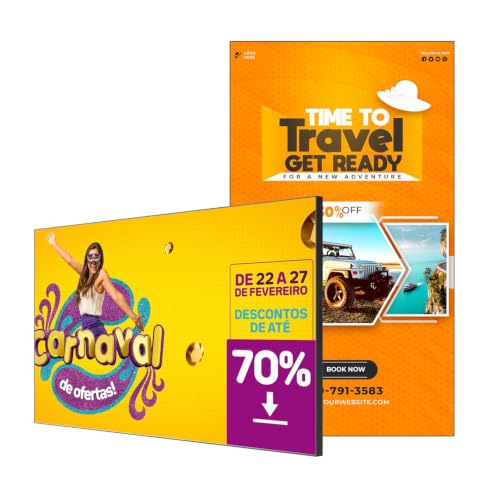
- 700 nits keeps menu text readable in bright spaces
- Free CMS supports remote scheduling and bulk edits
- Slim wall-mount design with ultra-narrow bezels
Best For: Restaurants and cafes needing a bright, easy-to-manage menu display.
Best for Outdoor Menus
43 Inch Outdoor Mobile Digital Signage Display

- 2000-nit brightness with auto-adjustment for outdoor visibility
- IP65 waterproof, dustproof, and impact-resistant construction
- Rechargeable battery supports up to 10 hours of cordless use
Best For: Restaurants and food service operators that need a mobile outdoor menu display for patios, curbside, or events.
Best for Bright Menus
29" 700-Nit Android Signage Display
- 700-nit brightness for clearer menu visibility
- Free CMS for remote content updates
- Compact 29-inch size for menu boards
Best For: Restaurants and cafes needing a bright, easy-to-update menu display.
Best for Small Countertops
10.1" Android Touchscreen Menu Board
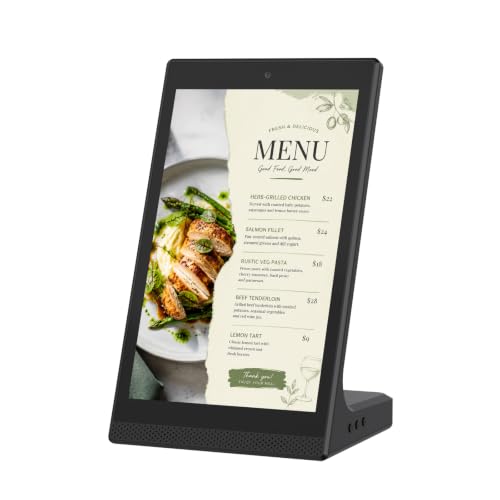
- Compact 10.1-inch footprint fits tight counter spaces
- WiFi and USB support make updates easier
- Touchscreen control is handy for close-range browsing
Best For: Small restaurants, cafes, and front desks that need a compact tabletop menu display.
Best for Bright Storefront Menus
21.5-Inch 700-Nit Digital Menu Board
- 700-nit brightness improves visibility in bright spaces
- Free CMS supports remote scheduling and quick menu updates
- Slim bezel wall mount creates a clean, modern presentation
Best For: Restaurants and cafes that need a bright, easy-to-manage digital menu board.
Best for Bright, Multi-Zone Menus
32-inch Wall-Mount Digital Menu Board
- 700 nits brightness for clearer menu visibility
- 2- to 6-zone layouts for menus, promos, and QR codes
- Free CMS tools with Android and Google Play support
Best For: Restaurants and cafés that want a bright wall-mounted menu board with flexible content zones.
Best for Small Counters – 24-Inch Desktop Digital Menu Board
If you want digital signage displays for restaurant menus that fit neatly on a counter, this 24-inch desktop model is built for high-visibility ordering areas. It combines Full HD clarity, Android-based control, and flexible update options, making it a practical pick for cafés, milk tea shops, restaurants, and small retail front desks.
Best For: Countertop menu displays in compact food-service spaces that need easy content updates and a clean commercial look.
Pros:
- 24-inch desktop format saves counter space while keeping menus easy to read
- Full HD 1080p screen with wide viewing angles for clearer menu and promo displays
- Android system with CMS, plus USB/app/PC remote updates for flexible control
- Commercial-grade build supports 24/7 operation for busy venues
Cons:
- 24-inch screen may be small for larger dining rooms or long-distance viewing
- Desktop form factor is less flexible than wall-mounted signage
- CMS and remote features may be more than very simple single-location users need
For buyers comparing digital signage displays for restaurant menus, this model stands out as a compact, commercial-friendly option that balances image quality, update convenience, and counter placement. It’s especially appealing if you want a dedicated menu screen without adding clutter or relying on manual printed signs.
Best for Countertop Ordering – OptiSigns OptiKiosk 10 Countertop Kiosk
If you want digital signage displays for restaurant menus that sit neatly at the counter, the OptiSigns OptiKiosk 10 is built for a compact front-of-house setup. Its 10.1-inch HD touchscreen makes it easy for guests to browse menu items, specials, or ordering prompts without taking up much space.
Best For: Quick-service restaurants, cafés, and reception areas that need a small interactive menu kiosk for countertop use.
Pros:
- 10.1-inch touchscreen keeps menus interactive and easy to navigate
- Countertop design fits tight checkout or host stand spaces
- Wi-Fi, Ethernet, and Bluetooth support flexible deployment options
- Useful for menus, promotions, and guest-facing information
Cons:
- Smaller screen size may not suit larger dining rooms
- Not ideal if you need a big-format wall-mounted display
For restaurants that want an interactive, space-saving front-counter display, this kiosk is a practical fit. It works especially well when you need digital signage displays for restaurant menus that are easy to place, easy to update, and simple for customers to use.
Best for Bright Dining Rooms – 18.5-Inch 700-Nit Digital Menu Board
If you need digital signage displays for restaurant menus that stay readable in well-lit spaces, this 18.5-inch board is built for visibility and simple content control. It combines 700 nits of brightness, 720P HD resolution, and remote CMS management so you can update menus, promos, and daypart specials without constant manual changes.
Best For: Cafes, quick-service restaurants, and small businesses that want a bright, compact menu display with remote scheduling and 24/7 operation.
Pros:
- 700 nits of brightness helps menus stand out in bright dining areas.
- Remote control from phone, tablet, or computer makes updates easier.
- Supports loop playback, scheduling, split-screen layouts, and USB file reading.
- Built for 24/7 use with durable aluminum alloy and tempered glass construction.
Cons:
- 18.5-inch screen may feel small for larger menu boards or high-traffic counters.
- 720P resolution is solid, but not as sharp as higher-end Full HD options.
- Desktop-style format is less flexible than wall-mounted signage setups.
For operators comparing digital signage displays for restaurant menus, this model stands out for brightness, remote management, and commercial durability in a compact footprint. It is a practical fit when you want dependable menu visibility without adding a more complex signage system.
Best for Interactive Menus – OptiSigns OptiKiosk 32 Touchscreen Kiosk
If you want digital signage displays for restaurant menus that can also handle touch interaction, the OptiSigns OptiKiosk 32 is built for exactly that kind of workflow. It ships with OptiSigns software preloaded, supports remote management, and is designed for commercial signage rather than general app use, which makes setup straightforward for menu boards, ordering prompts, and promotional displays.
Best For: Restaurants, cafes, and quick-service counters that need a touch-enabled menu kiosk with easy remote content updates.
Pros:
- 32-inch Full HD touchscreen with 10-point touch for interactive menu use
- Preloaded OptiSigns player with remote management via web or mobile app
- Strong integration support with Google Workspace, Microsoft Office, Canva, and more
- Optional rechargeable battery makes it useful for pop-ups and temporary setups
Cons:
- Requires an OptiSigns subscription, and the free plan is limited
- Not a general Android tablet or app-store device
- Touch kiosk format may be more than needed for simple static menu boards
For restaurants that want digital signage displays for restaurant menus with touch capability and centralized content control, this is a flexible kiosk-style option. It is strongest when you need a polished, interactive experience rather than a basic screen that only cycles through images.
Best for Bright, Always-On Menus – 21.5" Wall Mount Digital Menu Board
If you need digital signage displays for restaurant menus that stay readable in bright dining areas, this 21.5-inch wall-mount board is built for the job. Its 700-nit panel, slim bezel, and Android-based content management make it a practical fit for cafes, quick-service counters, and multi-location menu updates.
Best For: Restaurants, cafes, and retail counters that want a bright, easy-to-update menu screen with remote scheduling.
Pros:
- 700-nit brightness helps menus stay visible in well-lit spaces.
- Free CMS tools support remote updates, scheduling, and menu switching.
- Android platform with HDMI plug-and-play makes setup more flexible.
- Ultra-slim bezel and wall-mount design give it a clean, modern look.
Cons:
- 21.5 inches may be small for larger dining rooms or distant viewing.
- 2GB RAM and 32GB storage are solid for menus, but not heavy media workloads.
This is a strong pick if you want digital signage displays for restaurant menus that are bright, tidy, and simple to manage day to day. It stands out most for operators who value easy content control over oversized screen real estate.
Best for Outdoor Menus – 43 Inch Outdoor Mobile Digital Signage Display
If you need digital signage displays for restaurant menus that can work outdoors, this 43-inch mobile kiosk stands out for its bright screen, weather protection, and easy content updates. It’s built for patios, curbside ordering, pop-up events, and other high-visibility menu placements where glare and weather can be a problem.
Best For: Restaurants, cafés, and food service businesses that need a mobile outdoor menu display with strong visibility and simple playback options.
Pros:
- 2000-nit screen with auto brightness adjustment for better outdoor readability
- IP65 waterproof and dustproof design for more reliable use in changing weather
- Rechargeable battery supports up to 10 hours of cordless operation
- Flexible playback via USB, Wi‑Fi, wired connection, and split-screen content
Cons:
- Battery ships separately, which can delay full setup
- Large mobile kiosk may be more display than some small restaurants need
- Premium outdoor build likely puts it above basic indoor menu boards
For businesses comparing digital signage displays for restaurant menus, this model is a strong fit when outdoor durability and easy repositioning matter more than a simple wall-mounted screen. It’s especially appealing for menu boards that need to stay readable in direct sunlight and handle daily movement.
Best for Bright Menus – 29" 700-Nit Android Signage Display
If you need digital signage displays for restaurant menus that stay readable in brighter spaces, this 29-inch Android commercial screen is a practical pick. The 700-nit panel helps menus stand out, while the included free CMS makes it easier to update promotions, pricing, and daily specials across one or more locations.
Best For: Restaurants, cafes, and hospitality teams that want a simple remote-content setup for menu boards and promotional displays.
Pros:
- 700-nit brightness improves visibility in well-lit dining areas
- Android-based platform supports flexible commercial signage use
- Free CMS helps manage content remotely across multiple locations
- 29-inch size works well for compact menu board installations
Cons:
- 29-inch screen may be small for large-format menu walls
- Best value depends on whether you need remote management features
- Commercial signage setup may require more planning than consumer displays
For operators comparing digital signage displays for restaurant menus, this model stands out for brightness and centralized control more than flashy extras. It’s a solid fit when you want a straightforward screen that can keep up with frequent menu changes and daypart promotions.
Best for Small Countertops – 10.1" Android Touchscreen Menu Board
If you need a compact, customer-facing screen for changing specials, prices, or notices, this 10.1-inch Android unit fits well into digital signage displays for restaurant menus. It is sized for countertops and front desks, with WiFi and USB support that make local content updates straightforward.
Best For: Restaurants, cafes, and small retail counters that want a tabletop menu board or information display with easy tap-and-swipe control.
Pros:
- Compact 10.1-inch format works well on counters, shelves, and reception desks.
- Android platform with WiFi and USB helps simplify content updates.
- Touchscreen interface supports quick browsing and interactive use.
- Versatile enough for menus, price lists, notices, and product promos.
Cons:
- Small screen size is better for close-range viewing than larger menu boards.
- More suited to indoor tabletop use than wall-mounted signage setups.
This is a practical choice if you want a simple desktop display that keeps menu changes manageable without taking up much space. For businesses comparing digital signage displays for restaurant menus, its strongest appeal is the mix of compact size, touch control, and flexible indoor use.
Best for Bright Storefront Menus – 21.5-Inch 700-Nit Digital Menu Board
If you need digital signage displays for restaurant menus that stay readable in bright dining rooms or near windows, this 21.5-inch wall-mount screen is built for that job. It combines 700-nit brightness, a slim bezel, and Android-based CMS tools so you can update daily specials, breakfast/lunch/dinner boards, and promos without much hassle.
Best For: Restaurants, cafes, and quick-service counters that want a bright, easy-to-manage menu board with remote scheduling and plug-and-play setup.
Pros:
- 700-nit panel is easier to read in well-lit spaces than standard displays
- Free web CMS supports remote edits, scheduling, and menu rotation
- Ultra-thin bezel and wall-mount design give a clean, modern look
- Android system, HDMI input, and 2GB/32GB storage make setup flexible
Cons:
- 21.5 inches may be small for larger dining areas or distant viewing
- 2GB RAM is fine for signage, but not ideal for heavier multitasking
- Advanced features may take time to learn if you have never used CMS software
For buyers comparing digital signage displays for restaurant menus, this model stands out more for brightness and manageable remote content control than for sheer screen size. It is a practical fit when you want a polished menu board that can run all day and stay easy to update.
Best for Bright, Multi-Zone Menus – 32-inch Wall-Mount Digital Menu Board
If you need digital signage displays for restaurant menus that stay readable in bright dining rooms and can be updated quickly, this 32-inch wall-mount board is built for that job. It pairs 700 nits brightness with a slim bezel, Android-based content management, and flexible zone layouts for menus, promos, and QR codes.
Best For: Restaurants, cafés, and quick-service counters that want a bright, wall-mounted menu display with remote scheduling and multi-zone layouts.
Pros:
- 700 nits brightness and a 178° viewing angle help menus stay visible in busy spaces.
- Flexible 2- to 6-zone layouts make it easy to mix menus, images, videos, and QR codes.
- Android system, Google Play access, and free CMS tools support remote updates and scheduling.
- Ultra-slim 6.8mm bezel and wall-mount design create a clean, professional look.
Cons:
- 32 inches may feel small for larger dining rooms or long viewing distances.
- 2GB RAM and 32GB storage are fine for signage, but not ideal for heavy multitasking.
For operators comparing digital signage displays for restaurant menus, this model stands out for brightness, easy content control, and a polished wall-mounted format. It is especially useful when you want a simple upgrade from printed menus without adding much setup complexity.
How We Picked the Best Digital Signage Displays for Restaurant Menus
We focused on display quality, brightness, form factor, content-management support, and how well each option fits real restaurant use. For Digital Signage Displays for Restaurant Menus, readability and remote updating matter as much as screen size.
We also favored models that make installation and daily operation simpler, whether you need a tabletop kiosk, a wall-mounted menu board, or a portable outdoor screen.
Quick Comparison
Countertop kiosks are best for host stands, order counters, and self-service points. Wall-mount menu boards work well for fast-casual lineups and back-of-house updates. Larger 32-inch and 43-inch displays suit bigger menu layouts, while brighter 700-nit screens are better in sunny or highly lit spaces.
Key Buying Factors for Digital Signage Displays for Restaurant Menus
Brightness and Visibility
Brightness is one of the most important specs. If your display sits near windows or under strong lighting, look for higher-nit panels so text and food images remain clear.
Screen Size and Viewing Distance
Smaller 10.1-inch and 18.5-inch units are ideal for countertop interaction, while 21.5-inch, 24-inch, 29-inch, and 32-inch screens are better for overhead or wall-mounted menus. Choose a size that matches how far away customers will read it.
Content Management
CMS support is essential if you change pricing, specials, or item availability often. Remote scheduling and cloud-based updates save time and help keep menus consistent across locations.
Mounting and Placement
Make sure the display fits your counter, wall, or stand setup. Portable outdoor units are useful for patios, events, and pop-ups, but indoor menu boards are usually more efficient for daily operations.
Connectivity and Compatibility
Wi-Fi, Ethernet, Bluetooth, and Android-based platforms can simplify setup and integration. If your team is less technical, prioritize systems that are easy to manage without extra hardware.
Who Should Buy Which Digital Signage Displays for Restaurant Menus?
Small cafes and quick-service counters should look at compact tabletop or countertop displays. Restaurants with multiple menu sections will usually benefit from 21.5-inch to 32-inch wall-mount screens. Hospitality venues, franchises, and multi-location operators should prioritize CMS-driven models for centralized control. Outdoor or event-focused businesses should consider the mobile, weather-resistant option for maximum flexibility.
In short, the best Digital Signage Displays for Restaurant Menus are the ones that fit your space, stay readable in your lighting, and make updates fast enough to keep pace with daily service.