
Choosing the right display for a lobby is about more than screen size. The best setups make announcements easy to update, stay readable from a distance, and fit the look of a professional front-of-house space.
This roundup of digital signage displays for office lobbies focuses on usability, visibility, and long-term value so you can match the right hardware to your space and workflow.
Best 9 Digital Signage Displays for Office Lobbies Picks for 2026
Best for Simple Lobby Signage
Promethean ActivPanel D-Series 65" 4K Display

- 65-inch 4K commercial display
- 1-year Radix VISO license included
- No media player required
Best For: Offices and reception areas that need a clean, easy-to-manage lobby signage display.
Best for Countertop Lobbies

- 10.1" HD touchscreen for interactive counter messaging
- Cloud-managed OptiSigns software with 5,000+ templates
- Wi-Fi, Ethernet, Bluetooth, and optional background music
Best For: Reception desks and small office lobbies that need a compact, interactive signage kiosk.
Best for Managed Office Messaging
Promethean ActivPanelD 55" Display

- 55-inch 4K commercial signage screen
- Wall mount included for fast installation
- Remote MDM support plus 3-year onsite support
Best For: Offices and schools that need a polished, centrally managed lobby display.
Best for Simple Lobby Playback
OptiSigns Pro Digital Signage Player
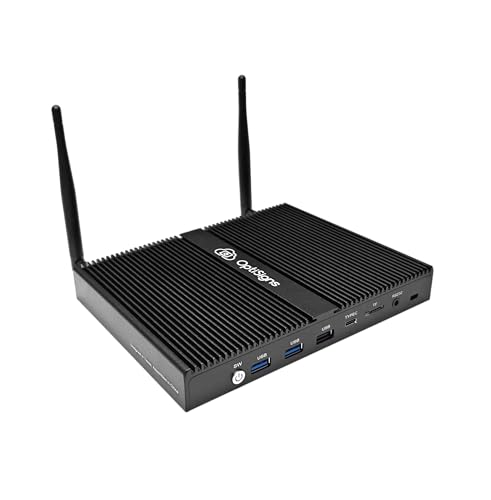
- Dedicated player for polished lobby signage
- Supports recurring schedules and branded content
- Cleaner setup than using a general-purpose PC
Best For: Offices that want a dedicated, easy-to-manage player for lobby screens.
Best For Outdoor Use
43-inch Outdoor Mobile Digital Signage Display

- 2000-nit screen with auto-brightness adjustment
- IP65 waterproof and dustproof protection
- Rechargeable battery for up to 10 hours of use
Best For: Offices, storefronts, and mixed indoor-outdoor spaces that need a mobile, weather-resistant signage kiosk.
Best for Easy Remote Management
OptiSigns OptiStick 4K Signage Player

- Pre-installed OptiSigns player simplifies setup
- 4K UHD output keeps lobby content sharp
- WiFi and Ethernet support reliable remote updates
Best For: Offices that want a compact signage player with remote cloud management.
Best for Interactive Wayfinding
43-Inch Touch Screen Digital Kiosk

- Touchscreen support for guest interaction and wayfinding
- Built-in media player plays JPG, MP4, and more from USB
- 4K display and timer function suit busy lobby environments
Best For: Corporate lobbies, visitor check-in areas, and interactive front-desk signage.
Best for Managed Touchscreen Lobbies

- 32-inch Full HD touchscreen with 10-point touch
- Preloaded OptiSigns player with remote management
- Portable battery option for events and mobile use
Best For: Teams that want a managed, interactive kiosk for lobbies, reception, or event check-ins.
Best for Lobby Branding
55" 4K Touchscreen Totem Kiosk

- 55-inch floor-standing format for a strong lobby presence
- Android 11 with Wi-Fi, USB, and HDMI for easy updates
- Touchscreen, split-screen, and speakers add versatility
Best For: Offices and reception areas that want a large, interactive lobby display for branded content and announcements.
Best for Simple Lobby Signage – Promethean ActivPanel D-Series 65" 4K Display
If you want one of the more straightforward digital signage displays for office lobbies, this 65-inch Promethean panel keeps the setup lean: no separate media player required, 4K resolution, and included Radix VISO content management for remote control and scheduling.
Best For: Offices, reception areas, and other professional spaces that need a clean, commercial-grade lobby display with minimal hardware to manage.
Pros:
- 65-inch 4K commercial display with a polished, professional look
- Includes a 1-year Radix VISO license for remote management and scheduling
- No external media player needed, which simplifies installation
- Backed by 3-year onsite support for added peace of mind
Cons:
- Non-touch design may not fit interactive lobby experiences
- More than a basic display, so it may be overkill for very small offices
This is a strong fit if you want digital signage displays for office lobbies that look professional and are easy to deploy at scale. The included software and reduced component count make it especially appealing for teams that want reliable announcements and scheduling without building a separate signage stack.
Best for Countertop Lobbies – OptiSigns OptiKiosk 10
If you need a compact option among digital signage displays for office lobbies, the OptiSigns OptiKiosk 10 is built for countertop messaging, check-in prompts, promotions, and wayfinding. Its 10.1″ HD touchscreen and built-in OptiSigns software make it easy to manage content remotely without adding a separate media player.
Best For: Reception desks, small lobby counters, and businesses that want an interactive signage display with simple cloud-managed updates.
Pros:
- 10.1″ HD touchscreen works well for interactive lobby prompts and announcements
- Pre-installed OptiSigns software includes remote management and 5,000+ templates
- Wi-Fi, Ethernet, and Bluetooth support flexible business connectivity
- Optional OptiSound adds licensed background music for a more polished space
Cons:
- Requires an OptiSigns subscription for full use
- Free plan branding may be a drawback for customer-facing areas
- No internal battery, so it must stay plugged in
As a countertop kiosk, this is a smart fit for digital signage displays for office lobbies where space is limited but you still want an interactive, professional presentation. It is less about large-scale visibility and more about close-range engagement, which makes it especially useful at reception and check-in points.
Best for Managed Office Messaging – Promethean ActivPanelD 55" Display
Promethean’s ActivPanelD is a practical fit for teams comparing digital signage displays for office lobbies, reception areas, and other high-traffic spaces. This 55-inch 4K non-touch screen is built for announcements, directories, schedules, and alerts, with a clean wall-mounted look that keeps information easy to see.
Best For: Offices, schools, and retail spaces that want a professional 55-inch signage display with simple deployment and remote device management.
Pros:
- 55-inch 4K commercial display designed for signage and announcements
- Wall mount included for a streamlined lobby or reception installation
- Pre-installed Radix VISO MDM support for remote monitoring and control
- 3-year onsite support adds peace of mind for daily business use
Cons:
- Non-touch design may not suit interactive wayfinding or kiosks
- Better for managed signage than casual plug-and-play use
For organizations prioritizing reliability, centralized control, and a polished presentation, this Promethean display checks the key boxes. It makes sense for digital signage displays for office lobbies where communication needs to stay clear, current, and easy to manage.
Best for Simple Lobby Playback – OptiSigns Pro Digital Signage Player
If you want a straightforward way to run digital signage displays for office lobbies, the OptiSigns Pro Digital Signage Player is built around easy content playback rather than complex setup. It’s a practical fit for teams that want a dedicated player for welcome messages, company news, menus, or branded screens without relying on a general-purpose computer.
Best For: Offices that need a simple, dedicated player for polished lobby signage and recurring content.
Pros:
- Dedicated signage player helps keep lobby displays focused and reliable
- Good fit for recurring schedules, announcements, and branded visuals
- Simple approach for teams that prefer a purpose-built setup
Cons:
- May be more than you need for very basic one-screen use
- Not as flexible as a full PC for advanced custom workflows
For digital signage displays for office lobbies, this type of player makes the most sense when you want consistent playback and a cleaner install than a laptop or kiosk-style workaround. It’s a sensible choice if your priority is dependable, everyday signage rather than advanced interactivity.
Best For Outdoor Use – 43-inch Outdoor Mobile Digital Signage Display
If you need digital signage displays for office lobbies that can also handle outdoor spillover, this mobile 43-inch kiosk is built for high visibility and flexible placement. It pairs a bright 2000-nit screen with auto-brightness adjustment, so content stays readable in changing light without constant manual tweaks.
Best For: Offices, storefronts, and mixed indoor-outdoor spaces that want a mobile signage screen with weather protection and battery power.
Pros:
- 2000-nit display with automatic brightness adjustment for clearer viewing in bright conditions
- IP65 waterproof and dustproof design adds protection for demanding environments
- Rechargeable battery supports up to 10 hours of operation for flexible placement
- USB, WiFi, and wired playback options make content updates straightforward
Cons:
- Overkill if you only need a simple indoor lobby screen
- Battery shipping note and charging workflow may be less convenient than plug-in models
- Heavier, wheeled design is less discreet than wall-mounted signage
This is a strong option if your digital signage displays for office lobbies need to move easily, stay visible in bright spaces, and survive tougher conditions. It makes the most sense for buyers who want a versatile kiosk rather than a basic static display.
Best for Easy Remote Management – OptiSigns OptiStick 4K Signage Player
If you want a simple way to run digital signage displays for office lobbies, the OptiSigns OptiStick is built around fast setup and cloud control. It plugs in like an HDMI stick, supports 4K UHD output, and pairs with OptiSigns tools so you can update lobby messaging, announcements, and branded content from anywhere.
Best For: Offices that want a compact signage player with remote management and built-in OptiSigns integration.
Pros:
- Pre-installed OptiSigns player makes deployment and screen management straightforward
- Supports 4K UHD output for sharp lobby visuals and presentations
- Built-in WiFi and Ethernet help keep playback and updates reliable
- Access to 160+ apps and thousands of templates speeds up content creation
Cons:
- Requires an OptiSigns subscription to use the platform
- Free plan is limited to 3 screens and includes OptiSigns branding
- One player powers only one display, so larger setups need multiple units
For teams shopping for digital signage displays for office lobbies, this is a strong fit when you care more about easy remote updates than standalone hardware flexibility. It’s a practical pick for companies already leaning toward the OptiSigns ecosystem.
Best for Interactive Wayfinding – 43-Inch Touch Screen Digital Kiosk
If you want digital signage displays for office lobbies that do more than loop static slides, this 43-inch touch kiosk adds self-service interaction, built-in playback, and a polished 4K presentation. It’s a strong fit for front desks, wayfinding, event check-in, and lobby promotions where clarity and ease of use matter.
Best For: Corporate lobbies, visitor check-in areas, and businesses that want an interactive sign with simple USB-based content playback.
Pros:
- Responsive touchscreen makes it useful for directories, wayfinding, and guest interaction.
- Built-in media player supports common files like JPG and MP4 from USB.
- 4K display helps content look sharp in bright, high-traffic spaces.
- Timer function can automate on/off scheduling to save energy.
Cons:
- Touch functionality may be more than some lobbies need for basic signage.
- Commercial setup can be heavier and less flexible than a simple wall-mounted display.
- Content management appears geared toward direct playback rather than advanced CMS workflows.
This is a practical choice if you want digital signage displays for office lobbies that can handle both information and interaction without extra hardware. Its strongest appeal is the mix of touch input, 4K visuals, and straightforward USB playback for teams that want a clean, low-friction setup.
Best for Managed Touchscreen Lobbies – OptiSigns OptiKiosk 32
If you want digital signage displays for office lobbies that can also handle check-ins, wayfinding, or interactive content, the OptiSigns OptiKiosk 32 is built around that workflow. It ships with OptiSigns software preloaded, a 32-inch Full HD touchscreen, and remote management tools so your team can update content without touching the screen.
Best For: Reception areas, office lobbies, and event spaces that need a touchscreen kiosk with strong cloud-based content control.
Pros:
- Purpose-built for OptiSigns, with built-in support for 160+ business and content tools
- 32-inch 1080p touchscreen with 10-point touch makes it useful for interactive lobby use
- Preloaded player and remote management simplify setup and ongoing updates
- Optional rechargeable battery adds portability for events, pop-ups, and mobile setups
Cons:
- Requires an OptiSigns subscription, so it is not a one-time purchase
- Not a general Android tablet replacement; it is locked to the OptiSigns ecosystem
- Free plan is limited, and branding applies on lower tiers
This is a strong fit if you want digital signage displays for office lobbies that feel more like a managed kiosk than a basic screen. The tradeoff is platform commitment, but the payoff is easier deployment, interactive touch support, and business-friendly integrations.
Best for Lobby Branding – 55" 4K Touchscreen Totem Kiosk
If you need digital signage displays for office lobbies that feel polished, this 55-inch floor-standing kiosk is built to make a strong first impression. The 4K-class IPS panel, 400 nits of brightness, and 178° viewing angle help content stay clear to visitors, while Android 11, Wi-Fi, USB, and HDMI make updates straightforward for everyday use.
Best For: Offices, reception areas, and commercial spaces that want a large, interactive lobby display for ads, directories, announcements, or branded welcome content.
Pros:
- Large 55-inch floor-standing format creates a premium lobby presence.
- Android 11, USB, HDMI, and Wi-Fi support flexible content management.
- Touchscreen, split-screen, and built-in speakers add interactive versatility.
- 4-year limited warranty adds peace of mind for commercial deployment.
Cons:
- More expensive and space-intensive than smaller wall-mounted options.
- Touch features may be unnecessary if you only need simple looping signage.
- Needs a suitable floor area and power/data access in the lobby.
For businesses comparing digital signage displays for office lobbies, this kiosk stands out when you want a display that does more than play ads—it can greet visitors, showcase services, and keep content updated with minimal hassle. It’s a solid fit if presentation quality and interactive capability matter more than compact size.
How We Picked the Best Digital Signage Displays for Office Lobbies
For Digital Signage Displays for Office Lobbies, we prioritized screen size, resolution, touch vs. non-touch use, content management options, installation style, and overall suitability for reception areas. We also looked for models that can handle everyday business communication, from visitor greetings to announcements and branded messaging.
Quick Comparison
If you want a simple lobby screen, a non-touch 4K display is usually the easiest choice. If you need wayfinding, self-service check-in, or interactive directories, a touch kiosk is a better fit. For spaces that change often or need flexible deployment, media players and connected signage software can matter as much as the screen itself.
Key Buying Factors for Digital Signage Displays for Office Lobbies
Screen Size and Viewing Distance
Choose a display that matches how far people will stand from it. Larger lobbies usually benefit from 43-inch, 55-inch, or 65-inch displays, while smaller reception areas may be better served by a compact kiosk or countertop unit.
Brightness and Readability
Lobby lighting can vary widely, so look for enough brightness to keep text and graphics legible without glare. High-resolution panels help with sharp logos, schedules, and detailed wayfinding.
Touch or Non-Touch
Non-touch screens work well for passive messaging and corporate branding. Touch-enabled models are better when you need interaction, but they also require more maintenance and stronger content planning.
Content Control and Updates
Remote management is a major advantage for office lobbies, especially if multiple locations need the same messaging. Check whether the system supports cloud scheduling, playlists, or simple plug-and-play updates.
Mounting and Footprint
Wall-mounted panels create a clean, minimal look, while kiosks and totems can act as standalone focal points. Make sure the format matches traffic flow, available floor space, and accessibility requirements.
Who Should Buy Which Digital Signage Displays for Office Lobbies?
Large corporate lobbies should usually start with a bigger 4K panel for polished branding and high visibility. Offices that need check-in, directories, or visitor instructions should lean toward a touch kiosk. Smaller businesses may prefer a compact or countertop option for announcements, hours, or welcome messaging. If you manage multiple locations, prioritize software and player compatibility so your Digital Signage Displays for Office Lobbies stay easy to update at scale.