
Choosing the right display for a conference room is about more than screen size. You need a setup that looks sharp, is easy to manage, and supports the way your team actually meets.
This roundup covers eight of the best digital signage displays for conference rooms in 2026, including commercial TVs, kiosks, and interactive options for different spaces and budgets.
Best 8 Digital Signage Displays for Conference Rooms Picks for 2026
Best for Easy Content Management
Samsung 65-Inch BE65T-H Pro TV
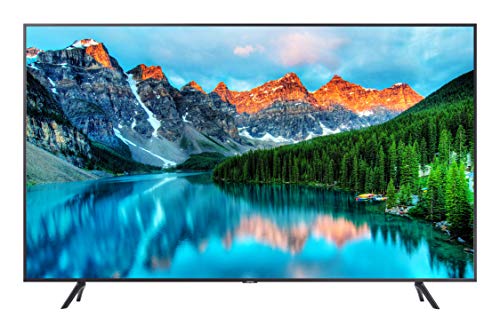
- 4K Crystal UHD picture with HDR support
- Easy Pro TV app control from iOS and Android
- 16/7 runtime for business-hour signage
Best For: Conference rooms and office spaces that need simple, polished signage playback.
Best for Outdoor-Ready Mobility
43-inch Outdoor Mobile Digital Signage Display

- 2000-nit screen with auto brightness adjustment
- IP65 waterproof and impact-resistant build
- 10-hour rechargeable battery with wheels for portability
Best For: Teams needing a portable signage display for conferences, events, and outdoor visibility.
Best for Reliable 16/7 Use
Samsung QE65T 65-inch 4K Signage Display

- 65-inch 4K UHD with non-glare finish
- Runs 16/7 with IP5X dust protection
- HDMI, USB playback, and 3-year warranty
Best For: Conference rooms that need a dependable, professional display for everyday presentations.
Best for Interactive Kiosk Use
OptiSigns OptiKiosk 32 Touchscreen

- 32-inch Full HD touchscreen with 10-point touch
- Preloaded OptiSigns software for remote management
- Optional battery provides up to 8 hours of portable runtime
Best For: Conference rooms and event spaces needing an interactive, centrally managed signage kiosk.
Best for Bright Meeting Spaces
Samsung QB65R 65-inch 4K Commercial Display

- 65-inch 4K UHD panel for crisp meeting-room content
- Commercial-grade design for business environments
- Wi-Fi and HDMI make setup simple
Best For: Teams needing a dependable large-format display for conference rooms and internal signage.
Best for Everyday Use
OptiSigns OptiKiosk 10 Countertop Kiosk

- Pre-installed OptiSigns software with remote control
- 10.1" HD touchscreen for interactive signage
- Wi-Fi, Ethernet, Bluetooth, and optional audio support
Best For: Teams that need a compact, plug-in signage kiosk for easy remote updates.
Best for Conference Casting
HORION 55-Inch 4K Interactive Display
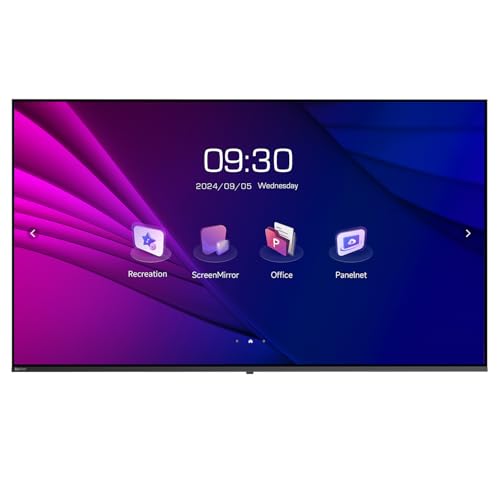
- 4K UHD panel with wide viewing angles
- Miracast and AirPlay support for wireless casting
- Dual Wi-Fi and portrait-mount flexibility
Best For: Boardrooms and offices that need one screen for meetings, casting, and signage.
Best for Bright Small-Room Displays
18.5-Inch 700-Nit Digital Signage

- 700-nit brightness improves visibility in bright conference rooms.
- CMS remote management supports phone, tablet, and computer control.
- 24/7 operation and scheduling make ongoing updates simple.
Best For: Small conference rooms and commercial spaces that need a compact, remotely managed display.
Best for Easy Content Management – Samsung 65-Inch BE65T-H Pro TV
If you want a straightforward large-screen option for digital signage displays for conference rooms, the Samsung BE65T-H Pro TV offers 4K clarity, built-in speakers, and easy content control through Samsung’s mobile-friendly Pro TV app. It’s a practical pick for meeting spaces that need polished visuals without a complex setup.
Best For: Conference rooms, lobbies, and other professional spaces that need simple, dependable signage playback.
Pros:
- 65-inch 4K Crystal UHD panel delivers sharp, detailed presentation content
- Pro TV app makes setup and content updates easier from iOS or Android devices
- Extended 16/7 operating time suits business-hour signage use
- Built-in speakers and multiple input options add flexibility for meetings
Cons:
- 250 nits brightness may be modest for very bright rooms
- Not designed for 24/7 heavy-duty commercial operation
Overall, this Samsung display is a solid fit if you need digital signage displays for conference rooms that are simple to manage and look polished during everyday business use. It balances professional features with an approachable setup, making it especially appealing for teams that want convenience over advanced commercial tooling.
Best for Outdoor-Ready Mobility – 43-inch Outdoor Mobile Digital Signage Display
If you need digital signage displays for conference rooms that can also handle lobbies, entryways, or outdoor event spaces, this mobile 43-inch kiosk is built for flexible, high-visibility messaging. It combines bright 2000-nit output, auto brightness adjustment, and battery power, so you can place it where a standard wall-mounted display won’t work.
Best For: Teams that want a portable, weather-resistant signage display for conferences, events, and high-traffic areas.
Pros:
- 2000 nits of brightness with auto-adjustment for better visibility in changing light
- IP65 waterproof, dustproof, and impact-resistant design for tougher environments
- Rechargeable battery supports up to 10 hours of cordless use
- Wheels and handle make it easy to move between rooms or event zones
Cons:
- Bulky compared with indoor-only conference room displays
- Overkill if you only need a simple meeting-room screen
- Battery ships separately, which can add setup friction
For buyers comparing digital signage displays for conference rooms, this model stands out when portability, durability, and bright performance matter more than a slim indoor profile. It’s a strong fit for organizations that need one screen to work across meetings, events, and outdoor-facing promotions.
Best for Reliable 16/7 Use – Samsung QE65T 65-inch 4K Signage Display
If you need one of the most dependable digital signage displays for conference rooms, the Samsung QE65T delivers a large 65-inch 4K canvas with a non-glare panel, clear upscaling, and commercial-grade operation for daily meeting use.
Best For: Conference rooms that need a polished, wall-mounted display for presentations, signage, and video calls with minimal maintenance.
Pros:
- 65-inch 4K UHD panel with anti-glare finish for better visibility in meeting spaces
- Commercial 16/7 runtime and IP5X dust resistance for dependable daily use
- Dual HDMI inputs plus USB playback make content sharing straightforward
- 3-year commercial warranty adds extra peace of mind
Cons:
- 300 nits is solid for indoor rooms, but not ideal for very bright environments
- No built-in touch or collaboration features
For teams comparing digital signage displays for conference rooms, this Samsung stands out as a practical commercial option that balances size, image quality, and long-term reliability rather than flashy extras.
Best for Interactive Kiosk Use – OptiSigns OptiKiosk 32 Touchscreen
If you want digital signage displays for conference rooms that do more than loop slides, the OptiSigns OptiKiosk 32 is built for interactive check-ins, wayfinding, schedules, and live content updates. It arrives with OptiSigns software preloaded, so setup is focused on pairing the device and managing everything remotely rather than configuring a general-purpose tablet.
Best For: Conference rooms, lobbies, and event spaces that need a touchscreen signage display with remote management and strong app integrations.
Pros:
- 32-inch Full HD touchscreen with 10-point touch for interactive use
- Preloaded OptiSigns software with remote management via web portal or mobile app
- Works with 160+ integrations, including Google Workspace, Power BI, Canva, and YouTube
- Optional rechargeable battery offers up to 8 hours of portable runtime
Cons:
- Requires an OptiSigns subscription to use
- Not a general Android device and does not support app-store downloads
- Free plan is limited to 3 screens and includes OptiSigns branding
For teams comparing digital signage displays for conference rooms, this kiosk stands out when interactivity and centralized control matter more than a simple monitor. The tradeoff is the subscription model, but the out-of-box software, touchscreen design, and portable battery option make it a strong fit for managed spaces.
Best for Bright Meeting Spaces – Samsung QB65R 65-inch 4K Commercial Display
The Samsung QB65R is a practical choice for digital signage displays for conference rooms when you want a large, polished screen that can double as a presentation display. Its 65-inch 4K UHD panel, business-oriented features, and built-in Wi-Fi make it a straightforward fit for meeting spaces, lobbies, and shared office environments.
Best For: Teams that need a reliable 65-inch commercial display for presentations, internal signage, and everyday conference room use.
Pros:
- 65-inch 4K resolution delivers sharp text, charts, and slides.
- Commercial design is better suited to extended business use than a consumer TV.
- Built-in HDMI and Wi-Fi simplify connectivity in meeting rooms.
- 350-nit brightness works well in controlled indoor spaces.
Cons:
- 350 nits may feel modest in very bright rooms.
- Lacks the higher brightness levels found in premium signage panels.
- May be more display than small conference rooms need.
Overall, the QB65R is a balanced option for buyers comparing digital signage displays for conference rooms, especially if they want dependable 4K clarity without moving into higher-end commercial pricing. It is most appealing in spaces where readability, size, and simple setup matter more than maximum brightness.
Best for Everyday Use – OptiSigns OptiKiosk 10 Countertop Kiosk
If you want digital signage displays for conference rooms that are simple to update remotely, the OptiSigns OptiKiosk 10 is a compact countertop option with a built-in 10.1″ HD touchscreen and pre-installed software. It’s a practical pick for lobby check-ins, reception counters, or meeting spaces where you need fast content changes, templates, and optional audio support without extra hardware.
Best For: Teams that want a small, plug-in signage kiosk with easy remote content management and an interactive touch display.
Pros:
- Pre-installed OptiSigns software with remote management and 5,000+ templates
- 10.1″ HD touchscreen makes it useful for interactive counters and wayfinding
- Wi-Fi, Ethernet, and Bluetooth support for flexible connectivity
- Optional licensed background music adds another layer of ambiance
Cons:
- Requires an OptiSigns subscription for full use
- Free plan includes branding and limits each kiosk as one screen
- Designed for plug-in use only, with no internal battery
For buyers comparing digital signage displays for conference rooms, this model stands out more for easy content control and interactive countertop use than for a large wall-mounted presentation screen. It makes the most sense when you need a compact, always-on display that can be managed centrally with minimal setup.
Best for Conference Casting – HORION 55-Inch 4K Interactive Display
If you need digital signage displays for conference rooms that can also handle presentations, the HORION 55-inch display is built around quick switching, wireless casting, and everyday commercial use. It pairs a 4K panel with dual Wi-Fi and meeting tools, making it a practical fit for teams that want one screen for signage, meetings, and internal communications.
Best For: Boardrooms, classrooms, and offices that want an all-in-one display for meeting casting and commercial signage.
Pros:
- 4K UHD screen with wide viewing angles for clear room visibility
- Wireless casting support with Miracast and AirPlay for cable-free meetings
- Dual Wi-Fi modules help keep casting and internet traffic separate
- Portrait mounting support makes it versatile for lobby or directory-style signage
Cons:
- 260 nit brightness is solid indoors but not ideal for very bright spaces
- 55 inches may be too large for smaller conference rooms
For teams shopping digital signage displays for conference rooms, this HORION model stands out more for flexibility than flashy specs. It is a strong pick if you want a commercial display that can move smoothly between signage, casting, and meeting-mode use without adding extra hardware.
Best for Bright Small-Room Displays – 18.5-Inch 700-Nit Digital Signage
If you need digital signage displays for conference rooms that stay readable in bright lighting and can be updated remotely, this 18.5-inch model is a practical fit. Its 700-nit panel, 720p resolution, and CMS-based control make it useful for agendas, room info, and live announcements in smaller meeting spaces.
Best For: Small conference rooms, reception areas, and business spaces that need a compact, high-brightness display with remote content management.
Pros:
- 700 nits of brightness helps text and graphics stay visible in well-lit rooms.
- Remote management via phone, computer, or tablet makes updates easier.
- Supports 24/7 operation, loop playback, scheduling, and split-screen layouts.
- Durable aluminum alloy and tempered glass build suits commercial use.
Cons:
- 18.5-inch screen may be too small for larger conference rooms.
- 720p resolution is solid, but not as sharp as higher-resolution signage options.
- Designed more for functional messaging than polished presentation visuals.
For buyers comparing digital signage displays for conference rooms, this model stands out for visibility, remote control, and continuous operation rather than big-screen impact. It is a good choice when you want a compact display that handles schedules, wayfinding, or internal communication without much upkeep.
How We Picked the Best Digital Signage Displays for Conference Rooms
We focused on Digital Signage Displays for Conference Rooms that balance image quality, business-friendly features, and practical deployment. Priority went to commercial models with 4K resolution, dependable connectivity, remote or app-based content control, and brightness levels suited to indoor meeting spaces.
We also considered operation ratings, touchscreen support, portability, and whether a display fits simple meeting-room use or broader signage needs across offices and lobbies.
Quick Comparison
For straightforward meeting rooms, 65-inch commercial displays are often the best all-around choice. For interactive presentations or self-serve scheduling, touchscreen kiosks and interactive displays add more flexibility. Portable and outdoor-rated models make sense when the display needs to move between spaces or operate in challenging environments.
Key Buying Factors for Digital Signage Displays for Conference Rooms
Screen Size and Viewing Distance
Most conference rooms work well with 43- to 65-inch screens, depending on room depth and audience size. Larger rooms benefit from 65-inch models, while smaller huddle spaces may be better served by 32-inch or 43-inch units.
Brightness and Clarity
Conference rooms usually do not need extreme brightness, but clear 4K resolution helps text, charts, and video remain readable. If your room has strong windows or mixed lighting, consider a brighter display.
Management and Connectivity
Look for HDMI, USB, Wi-Fi, and software that makes scheduled updates or remote content changes simple. These features reduce setup time and help IT teams manage content across multiple rooms.
Interaction and Use Case
Touchscreen displays are useful for agenda navigation, check-in, or interactive collaboration. Standard commercial displays are better when the goal is to show presentations, meeting schedules, or branded content with minimal complexity.
Who Should Buy Which Digital Signage Displays for Conference Rooms?
If you want a dependable all-purpose option, choose a 65-inch commercial signage display. If your team needs interactivity, go with a touchscreen kiosk or interactive conference display. If the display must move between locations, a mobile or battery-powered model is the most flexible. For compact spaces or reception-style setups, a smaller high-brightness display may be the better fit.
In short, the best Digital Signage Displays for Conference Rooms are the ones that match your room size, content workflow, and management needs, not just the lowest price or largest screen.