
Choosing the right display can make retail promotions easier to update, easier to notice, and easier to measure. The best options balance screen quality, remote control, and reliable uptime.
Below, we break down seven strong picks for different store layouts, from countertop units to outdoor-ready screens and dedicated signage players.
Best 7 Digital Signage Displays for Retail Stores Picks for 2026
Best for Bright In-Store Menus

- 700-nit brightness improves visibility in bright stores
- Remote CMS control makes updates fast and flexible
- Built for 24/7 commercial use with durable materials
Best For: Retail counters and small businesses that need a compact, always-on display for promos or menus.
Best for Easy Remote Management
OptiSigns OptiStick 4K HDMI Player

- Direct HDMI stick design for fast installation
- Remote management via OptiSigns portal or app
- 4K UHD output with WiFi and Ethernet support
Best For: Retail stores that need simple, remotely managed signage on one screen per player.
Best for Outdoor Promotions
43-Inch Outdoor Mobile Signage Display

- 2000-nit brightness with auto-adjustment for clear daytime viewing
- IP65 waterproof, dustproof, and impact-resistant construction
- Rechargeable battery and wheels for flexible placement
Best For: Stores and venues that need a portable outdoor screen for promotions and storefront advertising.
Best for Easy Setup
OptiSigns Pro Digital Signage Player
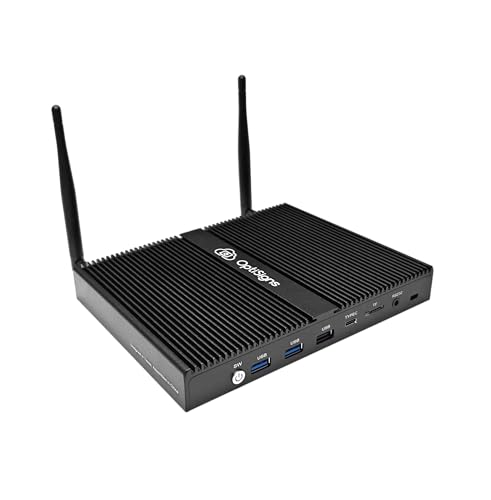
- Pre-installed player with remote cloud management
- 160+ apps and 5,000+ templates speed up content creation
- 24/7-ready hardware with 4K, Wi‑Fi 6, and passive cooling
Best For: Retail teams that want a ready-to-run signage player with centralized control.
Best for Interactive Kiosks
OptiSigns OptiKiosk 32 Touchscreen Kiosk

- 32-inch Full HD touchscreen with 10-point touch
- Preloaded OptiSigns software for remote management
- 160+ integrations plus optional portable battery use
Best For: Retail teams that want a managed touchscreen kiosk for promotions, self-service, or interactive customer experiences.
Best for Easy Content Management
EZ AD TV 4K Digital Signage Player

- 4K playback with a large media gallery
- Cloud and mobile app control for remote updates
- Free plan with tech support and up to 50 slides
Best For: Retailers and small businesses that want simple, cloud-managed signage updates.
Best for Interactive Countertop Signage

- 10.1" HD touchscreen for counter displays and promos
- Pre-installed OptiSigns software with 5,000+ templates
- Optional background music with commercial-grade connectivity
Best For: Retail counters and reception areas that need an interactive, easy-to-manage display.
Best for Bright In-Store Menus – 18.5-Inch 700-Nit Menu Board
If you need digital signage displays for retail stores that can stay visible in bright interiors and run all day, this 18.5-inch menu board is a practical pick. It combines 700-nit brightness, remote CMS control, and scheduled playback, making it well suited for point-of-sale promos, menus, and rotating store messaging.
Best For: Retail counters, cafes, and small businesses that want a compact, high-visibility display with easy remote updates.
Pros:
- 700-nit panel stays readable in brighter store environments
- Remote management from phone, tablet, or computer simplifies updates
- 24/7 operation, loop playback, and split-screen support add flexibility
- Metal-and-tempered-glass build feels durable for commercial use
Cons:
- 720p resolution is solid, but not as sharp as Full HD options
- 18.5-inch size may feel small for larger retail floor spaces
This is a strong fit if you want digital signage displays for retail stores that prioritize visibility, simple content control, and dependable nonstop use over premium resolution. It’s especially useful for compact storefronts that need a polished, always-on message board.
Best for Easy Remote Management – OptiSigns OptiStick 4K HDMI Player
If you want a simple way to power digital signage displays for retail stores without adding a bulky media box, the OptiSigns OptiStick is a practical pick. It plugs directly into HDMI, supports 4K UHD output, and pairs with OptiSigns’ portal and admin app for centralized updates across screens.
Best For: Retail teams that want an easy-to-install signage player with remote content management and strong app support.
Pros:
- Plug-in stick design keeps installation quick and clutter-free
- Remote screen management through OptiSigns portal or admin app
- Supports 160+ apps and thousands of ready-made templates
- 4K UHD output with WiFi and Ethernet connectivity
Cons:
- Requires an OptiSigns subscription to use
- One device powers only one screen
- Free plan includes OptiSigns branding and up to 3 screens
For retailers prioritizing fast setup and centralized control, this is a strong fit for digital signage displays for retail stores. It’s less about standalone hardware power and more about making content management easy, which is a major advantage if you’re updating promotions frequently.
Best for Outdoor Promotions – 43-Inch Outdoor Mobile Signage Display
If you need digital signage displays for retail stores that can also handle sidewalk traffic, weather, and frequent repositioning, this 43-inch mobile unit is built for high-visibility outdoor advertising. Its 2000-nit panel, auto-brightness adjustment, and IP65 protection make it a practical choice for stores promoting seasonal offers, events, or curbside specials.
Best For: Retailers, restaurants, and venues that want a mobile, weather-resistant display for outdoor promotions and storefront marketing.
Pros:
- 2000-nit screen with automatic brightness adjustment for strong daytime visibility
- IP65 waterproof and dustproof build with impact-resistant AR tempered glass
- Built-in rechargeable battery supports up to 10 hours of cordless use
- Wheels and handle make it easy to move between locations
Cons:
- Designed for outdoor use, so it may be more robust than some indoor retail setups need
- Battery shipping note may add a small setup delay after delivery
For stores that want a flexible, eye-catching option among digital signage displays for retail stores, this model stands out for mobility and weather protection rather than compactness. It’s especially useful when you need one display that can move from storefront to event space without sacrificing visibility.
Best for Easy Setup – OptiSigns Pro Digital Signage Player
If you want digital signage displays for retail stores that are simple to deploy and easy to manage remotely, the OptiSigns Pro Digital Signage Player is built around that workflow. It combines a pre-installed player, cloud-based control, and broad app support so you can get promotions, menus, and announcements live without a complicated AV setup.
Best For: Retail teams that want a ready-to-run signage player with centralized management and strong app/template support.
Pros:
- Pre-installed OptiSigns Player with remote management from the portal or admin app
- Supports 160+ apps and 5,000+ ready-to-use templates for fast content creation
- Built for 24/7 operation with passive cooling, 4K support, and secure Linux OS
- Compact hardware with Wi‑Fi 6, Ethernet, HDMI-CEC, and RS-232 connectivity
Cons:
- Requires an OptiSigns subscription to unlock full use
- Free plan is limited to 3 screens and includes OptiSigns branding
For retailers that need a dependable, centrally managed player rather than a generic media device, this is a strong fit. It’s especially appealing when your digital signage displays for retail stores need frequent content updates, automation, and stable always-on performance.
Best for Interactive Kiosks – OptiSigns OptiKiosk 32 Touchscreen Kiosk
OptiSigns OptiKiosk 32 is a purpose-built option for digital signage displays for retail stores that need touch interaction, remote updates, and a polished kiosk-style presentation. Instead of acting like a general-purpose tablet, it’s designed to work within the OptiSigns ecosystem for menus, promotions, wayfinding, and customer engagement.
Best For: Retail teams that want a managed touchscreen kiosk for promotions, self-service, or interactive customer experiences.
Pros:
- 32-inch Full HD touchscreen with 10-point touch for interactive retail use
- Preloaded OptiSigns software with remote management through web portal or mobile app
- Works with 160+ integrations, including Google Slides, Power BI, YouTube, and Canva
- Optional rechargeable battery supports portable setups for events and pop-ups
Cons:
- Requires an OptiSigns subscription to use
- Not a general Android device with app store access
- Higher-commitment setup than a basic standalone screen
This kiosk makes sense when you want digital signage displays for retail stores that do more than loop promos—it’s built for interaction, centralized control, and commercial deployment. The tradeoff is that you’re buying into the OptiSigns platform, but for stores that want a ready-made signage system, that can be a strength rather than a limitation.
Best for Easy Content Management – EZ AD TV 4K Digital Signage Player
If you need one of the more flexible digital signage displays for retail stores, EZ AD TV is built around quick content updates, simple cloud control, and a setup that can turn any HD TV into a 4K signage screen. It’s a practical choice for shops that want menu boards, promos, or rotating ads without constantly reformatting files or relying on complex software.
Best For: Retailers, cafes, and small businesses that want an easy cloud-managed signage player with room to grow from a free plan.
Pros:
- Supports 4K playback and a large built-in media gallery for polished in-store visuals.
- Cloud control and mobile app make it easy to update content remotely.
- Free plan includes tech support and support for up to 50 slides per box.
- Flexible templates, video tools, and vertical layouts help customize displays quickly.
Cons:
- Requires a separate TV or display, so it’s not an all-in-one screen.
- Advanced features may require upgrading beyond the free plan.
For retailers comparing digital signage displays for retail stores, this model stands out more for ease of management and content creation than for hardware alone. It’s a smart fit if you want simple remote updates, reusable templates, and an affordable way to keep promotions fresh.
Best for Interactive Countertop Signage – OptiSigns OptiKiosk 10
If you need digital signage displays for retail stores that are easy to manage at the counter, the OptiSigns OptiKiosk 10 is built for that job. Its 10.1-inch HD touchscreen, remote content tools, and compact footprint make it a strong fit for menus, promos, and self-serve information in busy front-of-house spaces.
Best For: Retail counters, reception desks, and small-format displays that need touchscreen interactivity and simple remote updates.
Pros:
- 10.1-inch HD touchscreen is ideal for countertop menus, promotions, and announcements.
- Pre-installed OptiSigns software supports remote management and 5,000+ templates.
- Optional OptiSound background music adds a more polished in-store experience.
- Commercial-ready hardware includes Wi-Fi, Ethernet, Bluetooth, 4GB RAM, and 32GB storage.
Cons:
- Requires an OptiSigns subscription for full use.
- Free plan includes branding and only up to 3 screens.
- No internal battery, so it must stay plugged in.
For retailers that want a compact, interactive screen with software included, this kiosk offers a practical balance of convenience and presentation. It is especially appealing if you want digital signage displays for retail stores that can do more than just loop static content.
How We Picked These Digital Signage Displays for Retail Stores
We focused on the features that matter most in day-to-day retail use: readability in bright environments, content management simplicity, compatibility with common signage workflows, and the flexibility to support different store zones. We also considered whether a product works as a display, a player, or an all-in-one kiosk, since those roles affect setup and long-term costs.
Quick Comparison
Not every option serves the same purpose. Some models are best for front windows or outdoor placement, while others fit checkout counters, shelf-edge promotions, or back-office content control. Signage players are the right choice when you already have screens in place and need a reliable way to power them, while kiosks and integrated displays are better when you want a self-contained system.
Key Buying Factors for Digital Signage Displays for Retail Stores
Brightness and Visibility
Higher brightness matters near windows and in sunlit areas. For outdoor or semi-outdoor use, look for weather resistance and enough luminance to keep content legible.
Screen Size and Placement
Small touchscreens suit counters and kiosks, mid-size displays work well for aisles and checkout areas, and larger screens are better for promotional walls or storefront messaging.
Management and Scheduling
Retail teams should prioritize cloud control, remote updates, and scheduling features so promotions can change quickly without manual intervention.
Touch and Interactivity
Touch-enabled units are useful for wayfinding, self-service browsing, product discovery, and guided promotions. If the display is purely informational, touch may not be necessary.
Player Versus All-In-One Display
A separate signage player gives more flexibility if you already have compatible screens. An all-in-one kiosk or display simplifies deployment and can reduce setup time for small teams.
Who Should Buy Which Digital Signage Displays for Retail Stores?
Retailers who want a simple, branded customer-facing display should lean toward integrated kiosks or menu-board-style screens. Stores that need portable or window-facing messaging may prefer a brighter, more mobile option. Teams with existing TVs or monitors should consider a dedicated signage player for easier upgrades at lower cost. For Digital Signage Displays for Retail Stores, the best choice depends on where the screen will live, how often content changes, and whether customers need to interact with it.