
Keeping tax records on a standard USB stick is a risk you do not need to take. The best encrypted drives for tax documents add password protection, hardware encryption, and safer portability for sensitive files.
Below, we focus on ten options that balance security, storage, and everyday usability for individuals, freelancers, and small businesses.
Best 10 Encrypted Drives for Tax Documents Picks for 2026
Best for Strong Security
Kingston IronKey Keypad 200 USB-C 32GB

- FIPS 140-3 Level 3 pending with XTS-AES 256-bit encryption
- PIN keypad access with admin and user options
- Brute-force and BadUSB protection for sensitive files
Best For: Tax professionals and security-focused users who need a hardware-encrypted USB-C drive.
FIPS-Validated Security Pick
Apricorn Aegis Fortress L3 4TB
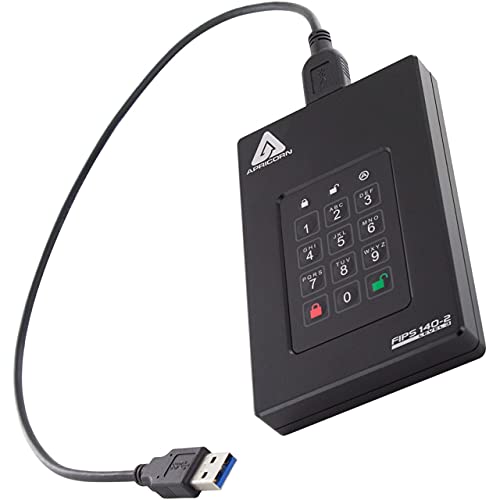
- FIPS 140-2 Level 3 validated hardware security
- On-device keypad with admin and user PIN modes
- Read-only options and brute-force crypto-erase defense
Best For: Accountants and security-conscious users storing sensitive tax records.
Best for Dual-Partition Security
Integral 32GB Secure 360 Encrypted USB3.0 Drive
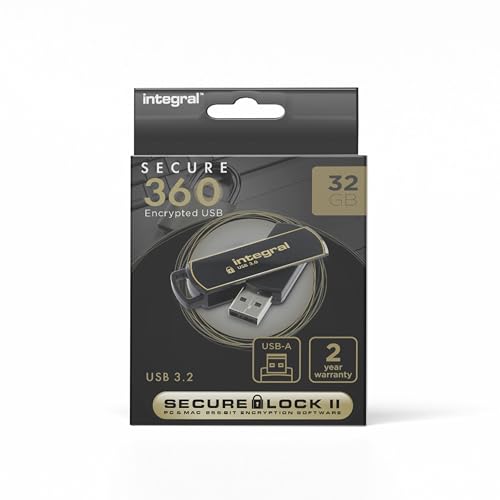
- Dual partitions separate everyday and encrypted files
- 256-bit AES encryption with password protection
- USB 3.0 transfer speeds and no-install setup
Best For: Users who want a simple encrypted USB drive with a separate secure partition for tax files and other confidential documents.
Best for High-Security PIN Access
Kingston IronKey Vault Privacy 80 960GB Encrypted SSD
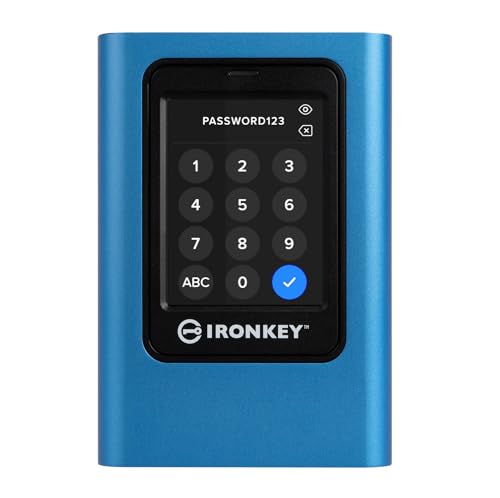
- FIPS 197-certified XTS-AES 256-bit encryption
- Touch-screen PIN and passphrase access
- Dual read-only modes for added protection
Best For: People who want a hardware-encrypted SSD for highly sensitive tax records.
Best for Hardware Encryption
INNPLUS Secure 32GB Encrypted USB Drive

- 256-bit AES XTS hardware encryption
- Works with Windows, Mac, Linux, and embedded systems
- Fast USB 3.0 transfer speeds for backups
Best For: People who want straightforward, hardware-encrypted storage for sensitive tax files.
Best for Everyday Use
Kingston IronKey Locker+ 50 G2 64GB

- FIPS 197-certified XTS-AES 256-bit hardware encryption
- Admin and User passwords with complex/passphrase modes
- Up to 145MB/s read speed for routine document transfers
Best For: Tax professionals and privacy-conscious users who need a secure, portable USB drive for sensitive records.
Best for Hardware Security
Apricorn Aegis Secure Key 3 NX 8GB

- Hardware keypad with 256-bit AES XTS encryption
- FIPS 140-2 Level 3 validated for added assurance
- Read-only modes help protect sensitive tax files
Best For: Users who want a highly secure, PIN-protected USB drive for tax documents and financial records.
Best for Multi-Password Security
Kingston IronKey Locker+ 50 128GB

- XTS-AES hardware encryption
- Admin/user password controls
- Virtual keyboard protection
Best For: Tax filers and small-business users who want a secure USB drive with layered access controls.
Best Heavy-Duty Pick
Apricorn Aegis Padlock 1TB USB 3.0 Drive

- 256-bit AES XTS hardware encryption
- No software installation required
- Rugged keypad design for portable security
Best For: People who want a software-free encrypted portable drive for tax records and other sensitive files.
Best Simple Pick
Integral Crypto-197 4GB Encrypted USB 3.0 Drive

- FIPS 197 certified with 256-bit AES hardware encryption
- Wipes data after 6 failed password attempts
- Waterproof dual-layer build with no software required
Best For: Users who want a rugged, hardware-encrypted USB drive for securing tax files and other sensitive documents.
Best for Strong Security – Kingston IronKey Keypad 200 USB-C 32GB
If you want encrypted drives for tax documents, the Kingston IronKey Keypad 200 is a solid pick because it combines hardware-level protection with a simple PIN-based workflow. Its FIPS 140-3 Level 3 pending design, XTS-AES 256-bit encryption, and built-in brute-force/BadUSB defenses make it a practical option for keeping sensitive returns, W-2s, and supporting records locked down.
Best For: Tax professionals and security-minded users who need a hardware-encrypted USB-C drive with strong access controls.
Pros:
- FIPS 140-3 Level 3 pending with XTS-AES 256-bit encryption
- PIN keypad helps protect access without relying on software
- Brute-force and BadUSB protection add extra peace of mind
- USB-C and OS-independent design make it broadly compatible
Cons:
- 32GB capacity may be limiting for larger archives
- Higher cost than basic encrypted flash drives
- Keypad workflow is less convenient than simple plug-and-play drives
For encrypted drives for tax documents, this model stands out when security matters more than storage size or low price. It is a smart choice if you need a compact, compliant-friendly drive for carrying private financial files between home, office, and client meetings.
FIPS-Validated Security Pick – Apricorn Aegis Fortress L3 4TB
If you want encrypted drives for tax documents that prioritize compliance and physical tamper resistance, the Apricorn Aegis Fortress L3 is built for exactly that kind of sensitive storage. It uses 256-bit AES-XTS hardware encryption, requires keypad PIN entry on the drive itself, and ships ready to use with no software installs.
Best For: Accountants, tax professionals, and anyone storing highly sensitive records who wants a FIPS-validated portable drive with strong on-device access controls.
Pros:
- FIPS 140-2 Level 3 validated for a higher-security hardware boundary
- On-device keypad authentication with separate admin and user modes
- Read-only modes help protect files from accidental changes and USB malware
- Rugged aluminum enclosure and brute-force defense add extra protection
Cons:
- More expensive than basic encrypted portable drives
- Physical keypad entry can be slower than password apps or software unlocks
- Security-focused design may be more than casual users need
For encrypted drives for tax documents, this model stands out when compliance, tamper resistance, and offline PIN control matter more than convenience. It’s a strong choice if you regularly move client records or archival files and want hardware-based protection you can trust across platforms.
Best for Dual-Partition Security – Integral 32GB Secure 360 Encrypted USB3.0 Drive
Integral 32GB Secure 360 Encrypted USB3.0 Flash Drive (256-bit AES Encryption)
Check Price On AmazonIf you want encrypted drives for tax documents that keep personal records separated from everyday files, this Integral Secure 360 flash drive is a practical option. Its dual-partition setup lets you store routine documents on one side and protected files on the other, while 256-bit AES encryption adds a stronger layer of privacy for sensitive returns, receipts, and ID scans.
Best For: Users who want a simple encrypted USB drive with a separate secure partition for tax files and other confidential documents.
Pros:
- Dual partitions let you keep normal files separate from encrypted tax documents
- 256-bit AES encryption and password protection help secure sensitive data
- USB 3.0 speeds make it easy to move files quickly
- No software installation required, with Windows and macOS compatibility
Cons:
- 32GB capacity may be limiting if you store lots of scans or backups
- Password reset protection can erase data after too many failed attempts
For shoppers comparing encrypted drives for tax documents, this model stands out for its mix of easy setup, physical convenience, and built-in separation between secure and everyday storage. It’s a solid fit if you mainly need a compact USB drive for annual tax paperwork rather than a larger long-term archive.
Best for High-Security PIN Access – Kingston IronKey Vault Privacy 80 960GB Encrypted SSD
If you want encrypted drives for tax documents that prioritize security over convenience, the Kingston IronKey Vault Privacy 80 is built for exactly that job. It combines FIPS 197 certification, XTS-AES 256-bit encryption, and a touch-screen PIN interface to keep sensitive files protected without relying on software encryption.
Best For: Tax preparers, small business owners, and anyone who needs hardware-level protection for confidential records.
Pros:
- FIPS 197 certified with XTS-AES 256-bit hardware encryption
- Touch-screen PIN and passphrase support for flexible access control
- Dual read-only modes help reduce malware and tampering risk
- Admin/user password options suit shared or managed use
Cons:
- More expensive than basic encrypted USB drives
- Touchscreen and security setup may be overkill for casual users
For buyers comparing encrypted drives for tax documents, this Kingston IronKey stands out when security policy, access control, and malware resistance matter more than price. It is a strong fit for storing returns, W-2s, 1099s, and other records that should stay locked down.
Best for Hardware Encryption – INNPLUS Secure 32GB Encrypted USB Drive
If you want one of the more security-focused encrypted drives for tax documents, the INNPLUS Secure 32GB USB drive is built around 256-bit AES XTS hardware encryption and password protection. It’s a practical choice for storing returns, scanned receipts, and other sensitive files when you need portable protection without relying on extra software.
Best For: Users who want a simple, hardware-encrypted USB drive for protecting tax files across multiple devices.
Pros:
- 256-bit AES XTS hardware encryption helps protect sensitive tax and financial documents.
- No drivers or software required, with broad compatibility for Windows, Mac, Linux, and embedded systems.
- USB 3.0 speeds make it faster to move backups and large document folders.
- Durable zinc alloy shell adds a sturdier feel for travel and daily carry.
Cons:
- 32GB capacity may be limiting if you store lots of scans, photos, or multi-year archives.
- Wrong-password lockout can erase data after 10 failed attempts, so setup discipline matters.
For buyers comparing encrypted drives for tax documents, this model stands out for keeping protection simple: hardware-based security, broad compatibility, and no software hassle. It’s a solid fit if you want encrypted portable storage more than a large-capacity archival drive.
Best for Everyday Use – Kingston IronKey Locker+ 50 G2 64GB
If you want encrypted drives for tax documents that prioritize strong security over flashy extras, the Kingston IronKey Locker+ 50 G2 is a solid pick. It uses FIPS 197-certified XTS-AES 256-bit hardware encryption, so your files stay protected on the drive itself while still offering decent USB 3.2 Gen 1 performance for everyday backup and transfer tasks.
Best For: Tax preparers, freelancers, and anyone who wants a compact encrypted USB drive with admin/user password controls for storing sensitive returns and receipts.
Pros:
- FIPS 197-certified XTS-AES 256-bit hardware encryption
- Multi-password support with Admin and User modes
- Fast enough for routine document backups with up to 145MB/s read speeds
- Compact 64GB size is easy to keep dedicated to tax files
Cons:
- 64GB may be limiting if you also store large media archives
- Security features can add setup steps compared with basic flash drives
For buyers comparing encrypted drives for tax documents, this model stands out for its hardware-based protection and password flexibility rather than raw capacity. It is a practical choice if your priority is keeping financial records locked down in a portable, easy-to-manage drive.
Best for Hardware Security – Apricorn Aegis Secure Key 3 NX 8GB
If you want one of the most locked-down encrypted drives for tax documents, the Apricorn Aegis Secure Key 3 NX focuses on hardware-based protection instead of software you have to trust or install. Its onboard keypad, FIPS 140-2 Level 3 validation, and 256-bit AES XTS encryption make it a strong fit for storing returns, W-2s, receipts, and other sensitive files.
Best For: Buyers who want a rugged, PIN-protected USB drive for secure tax and financial file storage across different computers and operating systems.
Pros:
- Hardware-only encryption with keypad PIN access
- FIPS 140-2 Level 3 validation for stronger security confidence
- Cross-platform compatibility without special software
- Read-only modes help protect files from accidental changes
Cons:
- 8GB capacity is fairly small for larger archives
- Security features add cost versus basic flash drives
- PIN-based workflow is less convenient than plug-and-play storage
For encrypted drives for tax documents, this model stands out when security matters more than capacity or convenience. It is a practical choice for users who want a tamper-resistant, portable drive that keeps sensitive records protected at rest and in transit.
Best for Multi-Password Security – Kingston IronKey Locker+ 50 128GB
If you want encrypted drives for tax documents that prioritize access control as much as storage, the Kingston IronKey Locker+ 50 is a strong fit. It combines XTS-AES hardware encryption, brute-force protection, and a virtual keyboard to help keep sensitive returns, W-2s, and client files safer from common attack methods.
Best For: Tax preparers, freelancers, and households that want a secure USB drive with separate admin and user access options.
Pros:
- XTS-AES hardware encryption with brute-force and BadUSB protection
- Admin and user passwords support flexible access control
- Virtual keyboard helps protect against keyloggers and screenloggers
- Metal casing adds a sturdier feel for everyday carry
Cons:
- 128GB is ample for documents, but not ideal if you also store large media files
- Security setup is more involved than a basic flash drive
For encrypted drives for tax documents, this model stands out if you care more about layered protection and controlled access than about the lowest price. The cloud-backup option is a useful extra, but the core appeal is the drive’s security-focused design.
Best Heavy-Duty Pick – Apricorn Aegis Padlock 1TB USB 3.0 Drive
If you want one of the more dependable encrypted drives for tax documents, this Apricorn model focuses on hardware-based protection, simple setup, and everyday portability. The keypad lock and 256-bit AES XTS encryption make it a practical choice for storing sensitive returns, receipts, and backup files without relying on software installation.
Best For: Users who want a software-free, hardware-encrypted portable drive for secure tax file storage and travel.
Pros:
- Hardware 256-bit AES XTS encryption with keypad access
- No software or admin rights needed for use
- USB 3.0 speeds help with quicker backups and restores
- Rugged, compact design suits on-the-go storage
Cons:
- Physical keypad adds bulk versus plain portable drives
- Higher cost than non-encrypted external hard drives
- Not the lightest option if you only need occasional archiving
For buyers comparing encrypted drives for tax documents, this Apricorn is a strong fit if you value straightforward hardware security over app-based convenience. It’s a solid pick for keeping year-end records protected, organized, and easy to carry between home and office.
Best Simple Pick – Integral Crypto-197 4GB Encrypted USB 3.0 Drive
If you want a simple, hardware-based option for encrypted drives for tax documents, this Integral Crypto-197 flash drive keeps the focus on access control rather than software installs. It uses 256-bit AES encryption, works with both PC and Mac, and adds brute-force protection that wipes data after too many failed attempts.
Best For: Tax preparers, freelancers, and anyone who wants a rugged USB drive with built-in encryption and no software setup.
Pros:
- FIPS 197 certified with 256-bit AES hardware encryption
- Brute-force protection erases data after 6 failed password attempts
- Waterproof dual-layer design adds extra physical durability
- No software or subscription required
Cons:
- 4GB capacity is limited for larger archives
- Password entry adds friction compared with a standard USB drive
- Premium security features make it less economical for casual use
For encrypted drives for tax documents, this model stands out if your priority is strong hardware protection in a compact, portable format. It is a practical pick when you need secure storage for returns, receipts, and client files without relying on extra software or cloud access.
How We Picked These Encrypted Drives for Tax Documents
We prioritized hardware-based encryption, security certifications, brute-force protection, and password management features that matter when storing returns, W-2s, receipts, and scanned records. We also considered capacity, connection type, portability, and whether the drive is better suited to light personal filing or heavier business archives.
Quick Comparison
Smaller flash drives are best for a few years of personal tax files or sharing encrypted copies with an accountant. Larger flash drives and portable SSDs are better if you store multiple years of scans, bookkeeping exports, or client records. External encrypted hard drives offer the most capacity, but they trade speed and pocketability for bulk storage.
Key Buying Factors for Encrypted Drives for Tax Documents
Encryption Standard
Look for hardware encryption such as AES-XTS or similarly validated protection. For tax records, this is more dependable than software-only password tools because the encryption is handled on the drive itself.
Security Validation and Access Controls
Certifications like FIPS validation can be a useful signal, especially for business users. Multi-password support, PIN entry, and brute-force lockout features also reduce the chance of unauthorized access.
Capacity and File Volume
A 4GB to 32GB drive can handle basic personal records, but scanned receipts, PDFs, spreadsheets, and multi-year archives grow fast. If you keep full-year backups or business documentation, 128GB and up is usually the safer choice.
Portability and Connector Type
USB-C is increasingly convenient for modern laptops, while USB-A remains common on older systems. If you move files between devices often, make sure the drive works smoothly across your hardware without extra adapters.
Durability and Workflow
For tax files you may access only a few times per year, reliability matters more than speed. Rugged housings, keypad access, and clearly managed passwords can make long-term storage less stressful.
Who Should Buy Which Encrypted Drives for Tax Documents?
If you want simple personal storage, a compact encrypted flash drive is usually enough. If you handle years of scanned returns, backup folders, or business documents, choose a larger-capacity USB drive or SSD. If you need long-term, high-volume archival storage, an encrypted portable hard drive is the most practical option. The best choice depends on how much data you keep, how often you access it, and whether you prioritize pocket portability or storage headroom.