
When sensitive documents, client records, or private backups need to travel with you, ordinary storage isn’t enough. The best secure external drives for confidential files combine encryption, access control, and reliable hardware protection.
Below, we’ve narrowed the field to 10 options that balance security, portability, and capacity so you can choose a drive that fits your workflow and risk level.
Best 10 Secure External Drives for Confidential Files Picks for 2026
Best for Maximum File Security
Kingston IronKey Vault Privacy 80 960GB
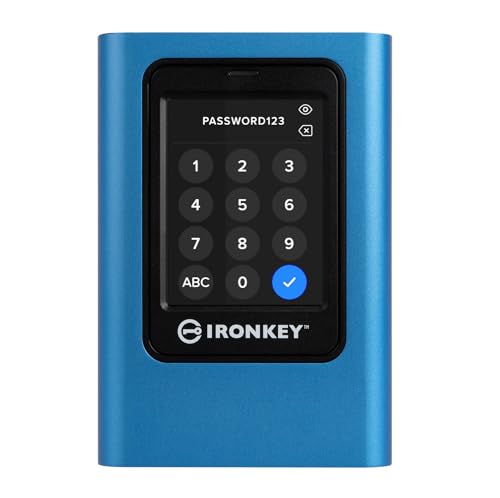
- FIPS 197-certified XTS-AES 256-bit hardware encryption
- Touch-screen PIN/passphrase access with admin/user control
- Write-protect modes and brute-force protection for sensitive data
Best For: Professionals storing confidential files who want maximum encryption and access control.
Best for Simple Plug-and-Play Backup
Seagate Portable 2TB External Hard Drive

- 2TB portable storage for backups and files
- Plug-and-play setup with no software required
- Works with Windows, Mac, PlayStation, and Xbox
Best For: People who want a simple external drive for everyday backups and portable file storage.
Best for Quick, Private Transfers
SANDISK 256GB Ultra Flair USB 3.0 Flash Drive

- Fast USB 3.0 performance up to 150MB/s
- Password protection with 128-bit AES encryption
- Durable metal casing in a compact form factor
Best For: People who want a speedy, pocket-sized flash drive with basic password protection for confidential files.
Best Hardware Encryption
Apricorn Aegis Padlock 1TB USB 3.0

- 256-bit AES-XTS hardware encryption
- Software-free, no-admin setup
- Rugged keypad design with tamper resistance
Best For: Business users and travelers who need portable encrypted storage for confidential files.
Best for Password Protection
Seagate One Touch 1TB Portable Drive
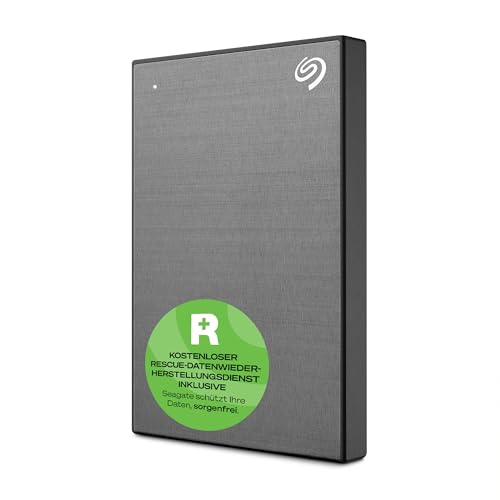
- Password-activated hardware encryption
- USB 3.0 for fast everyday backups
- Windows and Mac compatible
Best For: People who want a compact encrypted drive for sensitive files and routine backups.
Best High-Capacity Pick
UnionSine 16TB Desktop External HDD

- Massive 16TB storage for backups and archives
- USB 3.0 speeds for large file transfers
- Broad compatibility across PC, Mac, TV, and consoles
Best For: People who want a high-capacity desktop drive for local storage and backup workflows.
Best Password-Protected Portable

- Password-activated hardware encryption
- Portable 2TB backup for everyday files
- USB 3.0 and one-click backup support
Best For: People who want a compact, encrypted external drive for private files and simple backups.
Best Portable Pick
UnionSine 1TB Portable External Hard Drive

- Slim 2.5-inch build travels easily
- USB 3.0 and Type-C for broad compatibility
- Plug-and-play setup with up to 120MB/s speeds
Best For: People who want a compact external drive for everyday file storage and device hopping.
Best Rugged Security
LaCie Rugged Secure 2TB External HDD

- Hardware encryption for sensitive files
- Shock, dust, and rain resistant build
- USB-C and USB 3.0 connectivity
Best For: Mobile professionals who need encrypted portable storage with extra physical protection.
Best for Maximum File Security – Kingston IronKey Vault Privacy 80 960GB
If you need one of the most security-focused secure external drives for confidential files, the Kingston IronKey Vault Privacy 80 stands out with hardware encryption, a touch-screen PIN setup, and OS-independent protection that works without special software.
Best For: Professionals who prioritize encrypted storage for sensitive business, legal, or personal data and want a drive built around access control, malware resistance, and brute-force protection.
Pros:
- FIPS 197 certified with XTS-AES 256-bit hardware encryption
- Touch-screen PIN and passphrase options with admin/user controls
- Write-protect modes help reduce malware risk on shared systems
- Brute-force protection can crypto-erase the drive after too many failed attempts
Cons:
- Security-first design may be overkill for casual file transfer
- Touchscreen and PIN workflow can feel slower than plug-and-play drives
- Higher cost than standard external SSDs
For buyers comparing secure external drives for confidential files, this IronKey model is a strong choice when data protection matters more than convenience. It is built for controlled access, hardened encryption, and safer handling of sensitive information.
Best for Simple Plug-and-Play Backup – Seagate Portable 2TB External Hard Drive
If you want one of the easiest secure external drives for confidential files to set up and carry around, the Seagate Portable 2TB is a practical pick for basic backup and everyday file storage. It works with Windows and Mac, uses a standard USB 3.0 connection, and doesn’t require software to get started.
Best For: Users who want a straightforward external drive for backing up important documents, media, and work files without extra setup.
Pros:
- 2TB of portable storage for documents, backups, and media
- Plug-and-play setup with automatic computer recognition
- Compatible with Windows, Mac, PlayStation, and Xbox
- Includes a USB 3.0 cable for quick connection
Cons:
- Does not include built-in encryption or password protection
- Mechanical HDD is slower than an SSD for large transfers
- Not designed as a ruggedized or water-resistant drive
As a simple, affordable storage option, this drive is better for easy backups than for advanced security features, so it pairs well with your own file encryption if you need secure external drives for confidential files.
Best for Quick, Private Transfers – SANDISK 256GB Ultra Flair USB 3.0 Flash Drive
If you want one of the simplest secure external drives for confidential files, the SanDisk Ultra Flair gives you fast USB 3.0 transfers plus built-in password protection for private data. It’s a practical pick for everyday file transport, especially when you need a compact drive that balances speed, privacy, and portability.
Best For: Users who want a fast USB flash drive with basic password protection for sensitive documents, photos, and work files.
Pros:
- Up to 150MB/s read speed for quick file transfers
- Password protection with 128-bit AES encryption for private files
- Sleek metal casing adds a durable, portable feel
- Works well for sharing files while keeping confidential data separate
Cons:
- Password protection software support is limited on some systems
- Not as security-focused as a hardware-encrypted drive
- USB 3.0 speeds depend on a compatible port and device
For buyers comparing secure external drives for confidential files, this model stands out as a fast, compact option with a straightforward privacy layer rather than advanced enterprise-grade security. It’s a strong fit if convenience and everyday file protection matter most.
Best Hardware Encryption – Apricorn Aegis Padlock 1TB USB 3.0
If you want one of the more practical secure external drives for confidential files, the Apricorn Aegis Padlock stands out for hardware-based AES-XTS encryption, keypad access, and software-free setup. It is built for people who need strong protection without installing drivers or relying on host-device software.
Best For: Business users, IT teams, and frequent travelers who need encrypted portable storage that is easy to deploy and hard to tamper with.
Pros:
- 256-bit AES-XTS hardware encryption keeps data protected in real time
- USB 3.0 support delivers faster transfers than older portable encrypted drives
- No software installation or admin rights needed for setup and use
- Tough epoxy coating and keypad design add physical security
Cons:
- Physical keypad entry is less convenient than app-based unlocking
- Bulkier than ultra-slim portable SSD options
- Performance depends on the connected USB port and drive type
For secure external drives for confidential files, this model is especially appealing when you need strong encryption, simple deployment, and a rugged build in one portable package. It is a solid fit if security matters more than having the lightest or fastest drive on the market.
Best for Large-Volume Archiving – UnionSine 10TB Desktop External Hard Drive
If you need a straightforward way to store backups, media, and work files, this desktop drive gives you a lot of room without a complicated setup. It fits well among secure external drives for confidential files when your priority is keeping sensitive data on a dedicated, high-capacity local drive.
Best For: Users who want a high-capacity desktop hard drive for backups, archives, and local file storage.
Pros:
- Huge 10TB capacity for large file collections and long-term archives
- USB 3.0 support with strong transfer speeds for big backups
- Wide compatibility across Windows, Mac, Linux, Android, TV, and game consoles
- External power supply helps keep desktop use stable
Cons:
- Not portable; it’s designed for desk use, not travel
- No built-in encryption or password protection features
- Requires power and cable setup before use
For buyers comparing secure external drives for confidential files, this model makes sense if you mainly want capacity, reliability, and simple plug-and-play storage. You’ll still want to add your own encryption or backup workflow for sensitive data, but as a roomy desktop archive drive it covers the essentials well.
Best for Password Protection – Seagate One Touch 1TB Portable Drive
If you need one of the more practical secure external drives for confidential files, the Seagate One Touch adds password-activated hardware encryption to a simple, portable USB 3.0 design. It’s built for easy daily backups on Windows or Mac, with a compact metal enclosure that travels well in a laptop bag.
Best For: Users who want a straightforward encrypted portable drive for backing up sensitive documents, photos, and work files.
Pros:
- Password-activated hardware encryption helps protect private files at rest.
- USB 3.0 plug-and-play setup makes it easy to back up quickly.
- Compatible with Windows and Mac for flexible everyday use.
- Includes backup software options and a two-year rescue plan.
Cons:
- 1TB capacity may feel limited for large media libraries.
- Mac Time Machine use may require reformatting.
- Security features are practical, but not as advanced as full enterprise drives.
For shoppers comparing secure external drives for confidential files, this Seagate option stands out for combining portable convenience with password-based protection and simple backup tools. It’s a solid fit if you want basic file security without moving to a bulky or expensive solution.
Best High-Capacity Pick – UnionSine 16TB Desktop External HDD
If you need roomy, straightforward storage for backups, archives, or media libraries, this desktop hard drive is a practical option to consider among secure external drives for confidential files. It prioritizes capacity, steady desktop power, and broad device compatibility over built-in encryption features, so it works best as a reliable storage vault you control with your own security setup.
Best For: Users who want a large-capacity external drive for local file storage, backups, and offline archives on a desktop setup.
Pros:
- Large 16TB capacity suits bulky backups, project files, and long-term archives.
- USB 3.0 support and reported 130–270MB/s speeds help move large files faster.
- Works with Windows, Mac, Linux, Android, TVs, and game consoles for flexible use.
- Includes external power for more stable desktop operation.
Cons:
- Not a portable pocket drive; it needs a power adapter and desktop space.
- No built-in hardware encryption or password protection is listed.
- 3.5-inch form factor is less convenient for frequent travel.
For buyers comparing secure external drives for confidential files, this model stands out more for capacity and steady offline storage than for advanced security features. Pair it with file encryption or folder-level protection if your confidential data needs an added layer of privacy.
Best Password-Protected Portable – Seagate One Touch 2TB
If you want one of the more practical secure external drives for confidential files, this Seagate One Touch offers password-activated hardware encryption plus simple USB 3.0 portability. It is a good fit for everyday backup and carrying private documents between a laptop, desktop, and Mac, with the added convenience of one-click or scheduled backups.
Best For: Users who want a portable, password-protected backup drive for private files, photo libraries, and cross-platform use.
Pros:
- Password-activated hardware encryption helps keep stored files protected.
- Compact 2TB design is easy to carry for work, travel, or home backup.
- USB 3.0 support and one-click backup make routine use straightforward.
- Works with Windows and Mac, giving it broad everyday compatibility.
Cons:
- Mac Time Machine use may require reformatting.
- Encryption adds convenience, but it is still a portable drive rather than a full enterprise security solution.
For shoppers comparing secure external drives for confidential files, this model stands out for combining basic hardware protection with easy backup features and a travel-friendly footprint. It is a solid pick when you want simple, private storage without moving up to a more complex business-class drive.
Best Portable Pick – UnionSine 1TB Portable External Hard Drive
If you want a simple, travel-friendly option for secure external drives for confidential files, the UnionSine 1TB portable HDD is a practical pick. It is lightweight, easy to carry, and offers plug-and-play storage with both USB 3.0 and Type-C support, making it convenient for moving sensitive documents between laptops, desktops, and compatible consoles.
Best For: Users who need a compact, no-fuss external drive for everyday file storage and quick device switching.
Pros:
- Slim 2.5-inch design is easy to carry in a bag or laptop sleeve
- USB 3.0 and Type-C connections improve compatibility across newer and older devices
- Up to 120MB/s transfer speeds help with quicker file access
- Plug-and-play setup keeps storage simple with no software required
Cons:
- Does not include built-in encryption or password protection
- Hard drive performance is less robust than a solid-state drive
- Actual usable capacity is lower than the advertised 1TB
For shoppers comparing secure external drives for confidential files, this model works best when you plan to add your own encryption or keep files protected through software. It is a straightforward, portable storage choice, but security features are minimal out of the box.
Best Rugged Security – LaCie Rugged Secure 2TB External HDD
If you need secure external drives for confidential files and also want something that can survive travel, the LaCie Rugged Secure 2TB is a practical pick. It combines hardware encryption with LaCie’s signature shock, dust, and rain resistance, making it a strong fit for mobile professionals who move sensitive data between home, office, and job sites.
Best For: Users who want encrypted portable storage with extra physical protection for work files, client documents, and backups.
Pros:
- Built-in hardware encryption helps protect sensitive files
- Rugged design adds shock, dust, and rain resistance for travel
- USB-C and USB 3.0 support makes it easy to use with modern systems
- Portable 2TB capacity is useful for documents, media, and backups
Cons:
- Heavier and bulkier than a standard slim external drive
- Mechanical HDD speeds are slower than SSD alternatives
For buyers comparing secure external drives for confidential files, this model stands out when durability matters as much as encryption. It is less about maximum speed and more about dependable protection for data you need to keep both private and physically safer on the go.
How We Picked the Best Secure External Drives for Confidential Files
We prioritized drives with practical security features such as hardware encryption, password protection, and locked-down access methods. We also looked at build quality, capacity range, portability, and compatibility across Windows, macOS, consoles, and mixed-device environments.
For Secure External Drives for Confidential Files, the best picks are the ones that make protection easy to use every day, not just in theory.
Quick Comparison
Use a hardware-encrypted SSD or portable encrypted HDD if you want the strongest mix of security and convenience. Choose a rugged drive if your files travel often and the drive may face bumps, dust, or weather. Pick a larger desktop HDD when capacity matters more than portability and the drive will stay in one place.
Key Buying Factors for Secure External Drives for Confidential Files
Encryption Type
Hardware encryption is generally preferable because it keeps the protection process on the drive itself. Look for AES-based encryption and, where relevant, compliance cues such as FIPS validation for business or regulated use.
Access Controls
Password protection, PIN entry, touch-screen authentication, and lockout features help prevent unauthorized access. The easier the authentication method is to use consistently, the more likely you are to keep your files protected.
Portability and Durability
If you carry data between offices or client sites, size and toughness matter. SSDs are typically more shock resistant, while rugged HDDs can add protection against drops, dust, and moisture.
Capacity and Workflow
Match capacity to how you actually store confidential files. Smaller flash drives suit document transfers, mid-size portable drives fit backups and working files, and large desktop drives are better for archives and local repositories.
Compatibility
Check whether the drive works cleanly with your operating system and devices. Some models are better for PCs and Macs, while others add broader support for consoles or media devices.
Who Should Buy Which Secure External Drives for Confidential Files?
If security is your top priority, choose a hardware-encrypted drive with strong authentication. If you need a travel-friendly backup for documents and media, a compact portable SSD or encrypted HDD is the best all-around option. If you archive large volumes of sensitive material at one desk, a higher-capacity desktop drive may be the smarter value. For frequent field use, rugged models offer a better balance of protection and peace of mind.