
If you store contracts, payroll files, client records, or internal reports on removable media, security matters. The best encrypted USB drives for office documents help reduce the risk of data loss, theft, and unauthorized access.
In this roundup, we focused on drives with hardware encryption, strong authentication options, and practical capacity choices for everyday office use.
Best 10 Encrypted USB Drives for Office Documents Picks for 2026
Best for Strong File Protection
Kingston IronKey Locker+ 50 128GB

- XTS-AES hardware encryption with brute-force and BadUSB protection
- Admin and user passwords with passphrase support
- Virtual keyboard helps defend against keyloggers
Best For: Professionals who need a secure, portable drive for sensitive documents and office file sharing.
Best for Compliance
iStorage datAshur PRO 4GB Encrypted USB

- FIPS 140-2 Level 3 certified hardware encryption
- PIN-authenticated access with no software required
- Rugged IP57 dust- and water-resistant design
Best For: Regulated offices and professionals protecting sensitive documents.
Best for Multi-User Office Security
Kingston Ironkey Locker+ 50 G2 64GB

- XTS-AES 256-bit hardware encryption
- Admin and user multi-password support
- FIPS 197 certified with USB 3.2 Gen 1
Best For: Teams that need a secure flash drive for shared office documents.
Best for Hardware-Locked Security
Apricorn Aegis Secure Key 3 NX 8GB

- Onboard keypad with PIN-based access
- 256-bit AES XTS encryption, hardware-only
- FIPS 140-2 Level 3 validated
Best For: Office users who need a highly secure, software-free encrypted USB drive for sensitive documents.
Best for Maximum Physical Security
Kingston IronKey Keypad 200 32GB Encrypted USB

- Hardware XTS-AES 256-bit encryption
- Built-in alphanumeric keypad with multi-PIN access
- Brute-force and BadUSB protection
Best For: Confidential office files that need strong on-device security and PIN-based access.
Best Hardware Encryption
INNPLUS Secure 32GB Encrypted USB 3.0 Drive

- 256-bit AES XTS hardware encryption for confidential files
- Fast USB 3.0 transfer speeds for office backups
- Compatible with Windows, Mac, Linux, and embedded systems
Best For: Office professionals and remote workers who need a secure, password-protected flash drive.
Best for High-Security Office Files
Kingston Ironkey Keypad 200 USB-C 64GB

- XTS-AES 256-bit hardware encryption
- FIPS 140-3 Level 3 (pending) security
- BadUSB, brute-force, and read-only protections
Best For: Teams that need a locked-down USB drive for confidential office documents.
Best for Hardware-Encrypted USB-C Security
Apricorn Aegis Secure Key 3 NXC 128GB

- 256-bit AES-XTS hardware encryption
- USB 3.2 Type-C for modern office devices
- Separate admin and user modes
Best For: Office users who need a secure, software-free USB-C drive for sensitive documents.
Best for High-Security Admin Control
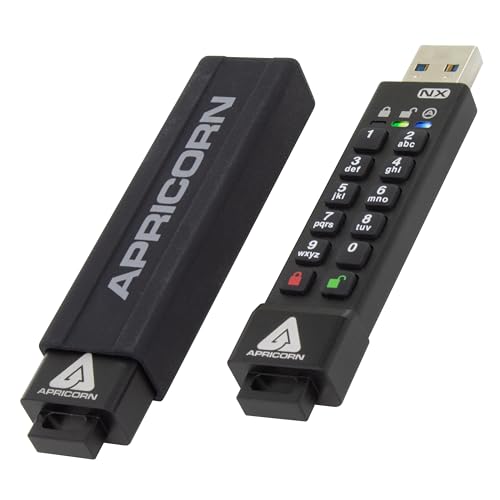
- Onboard keypad with software-free unlocking
- Separate admin and user modes
- Two read-only modes for safer document handling
Best For: IT-managed offices and regulated users who need controlled access to sensitive files.
Best for High-Security Office Use
Apricorn Aegis Secure Key 3 NX 32GB
- 256-bit AES-XTS hardware encryption
- FIPS 140-2 Level 3 validated security
- Admin/user modes with recovery PINs
Best For: Professionals and teams protecting confidential office documents on the go.
Best for Strong File Protection – Kingston IronKey Locker+ 50 128GB
If you want encrypted usb drives for office documents that prioritize security over extras, the Kingston IronKey Locker+ 50 is a strong fit. It combines XTS-AES hardware encryption, brute-force protection, and BadUSB safeguards with a simple, office-friendly 128GB capacity.
Best For: Professionals who need a secure, portable drive for sensitive documents, client files, and everyday office sharing.
Pros:
- XTS-AES hardware encryption with brute-force and BadUSB protection
- Admin and user passwords with complex or passphrase login modes
- Virtual keyboard helps protect password entry from keyloggers and screenloggers
- Metal casing adds a durable, business-ready feel
Cons:
- Slower than non-encrypted USB drives for pure transfer speed
- Security features may feel more complex than basic thumb drives
- Cloud backup is useful, but not a substitute for a full document backup plan
For buyers comparing encrypted usb drives for office documents, this model stands out for its layered protection and practical admin controls. It is a sensible choice when keeping sensitive files locked down matters more than chasing the fastest read and write numbers.
Best for Compliance – iStorage datAshur PRO 4GB Encrypted USB
If you need encrypted usb drives for office documents, the iStorage datAshur PRO is built around strict access control and hardware-level protection. Enter the 7–15 digit PIN, use it like a normal flash drive, then disconnect it and the data stays encrypted automatically—without relying on software.
Best For: Teams and professionals handling sensitive files who want hardware encryption, PIN protection, and a compliance-friendly design.
Pros:
- FIPS 140-2 Level 3 certified with AES-XTS 256-bit hardware encryption
- Works across Windows, macOS, Linux, Chrome, Android, and virtual environments
- Rugged, dust- and water-resistant IP57 build for daily carry
- No software install required, which makes deployment simple in offices
Cons:
- 4GB capacity is limited for larger document archives
- Premium security features raise the price versus basic USB drives
For buyers comparing encrypted usb drives for office documents, this model stands out for compliance credentials and zero-software convenience. It is a strong fit when security policy matters more than storage size, especially for regulated workplaces.
Best for Multi-User Office Security – Kingston Ironkey Locker+ 50 G2 64GB
If you need encrypted usb drives for office documents, the Kingston Ironkey Locker+ 50 G2 is built for locked-down file sharing with hardware-based XTS-AES 256-bit protection and FIPS 197 certification. It adds multi-password access controls and fast USB 3.2 Gen 1 speeds, making it a practical choice for teams that move sensitive files between desks, meetings, and remote work.
Best For: Offices that want a secure USB drive with user/admin access separation for shared document workflows.
Pros:
- Hardware encryption with XTS-AES 256-bit helps protect confidential files
- Multi-password support works well for admin and end-user access
- FIPS 197 certification adds confidence for security-conscious buyers
- USB 3.2 Gen 1 delivers solid transfer speeds for office documents
Cons:
- 64GB may be limiting if you store large media files too
- Security features can add a little setup time versus basic flash drives
For buyers comparing encrypted usb drives for office documents, this Kingston model stands out for combining strong protection with practical shared-use controls, rather than focusing only on raw capacity or low cost.
Best for Hardware-Locked Security – Apricorn Aegis Secure Key 3 NX 8GB
If you want encrypted usb drives for office documents without relying on software installs, the Apricorn Aegis Secure Key 3 NX is a strong fit. It uses onboard keypad authentication, 256-bit AES XTS encryption, and FIPS 140-2 Level 3 validation to keep sensitive files protected on the drive itself.
Best For: Teams and professionals who need a hardware-encrypted USB drive for confidential office files, especially in mixed-device or restricted IT environments.
Pros:
- Hardware-based encryption with keypad PIN access
- FIPS 140-2 Level 3 validated for stronger compliance needs
- Cross-platform and software-free, so it works across many office setups
- Separate admin and user modes with read-only options
Cons:
- 8GB capacity is limited for larger document libraries
- Physical keypad adds bulk compared with basic thumb drives
- Higher cost than standard USB flash drives
For buyers comparing encrypted usb drives for office documents, this Apricorn model stands out for security-first design rather than storage size. It is a practical choice when protecting files matters more than getting the lowest price or the biggest capacity.
Best for Maximum Physical Security – Kingston IronKey Keypad 200 32GB Encrypted USB
If you need encrypted usb drives for office documents that prioritize lock-down security over convenience, the Kingston IronKey Keypad 200 is built for exactly that job. Its onboard keypad, hardware encryption, and tamper-resistant design make it a strong fit for sensitive files that may travel between desks, meetings, and remote work locations.
Best For: Teams and professionals handling confidential office files who want keypad access, hardware encryption, and strong theft deterrence.
Pros:
- XTS-AES 256-bit hardware encryption keeps files protected on the drive itself.
- Alphanumeric keypad supports multi-PIN access for admin and user control.
- FIPS 140-3 Level 3 pending certification adds a high-security credential.
- Brute-force protection and BadUSB defense help reduce common attack risks.
Cons:
- Keypad-based unlocking is slower than simple plug-and-play encrypted drives.
- Security-focused design adds cost compared with basic office USB sticks.
For buyers comparing encrypted usb drives for office documents, this model stands out when security policy matters more than speed or simplicity. It is a serious option for keeping confidential files protected in environments where physical access, tampering, and password attacks are all concerns.
Best Hardware Encryption – INNPLUS Secure 32GB Encrypted USB 3.0 Drive
If you need encrypted usb drives for office documents, the INNPLUS Secure 32GB drive is built around hardware-level protection rather than simple software locking. Its 256-bit AES XTS encryption, password access, and auto-wipe after repeated failed attempts make it a strong fit for keeping sensitive files safe during travel, client visits, or everyday office transfers.
Best For: Office professionals and remote workers who want a password-protected USB drive for confidential documents, presentations, and backups.
Pros:
- 256-bit AES XTS hardware encryption helps protect confidential office files.
- USB 3.0 speeds are fast enough for large document backups and transfers.
- Works across Windows, Mac, Linux, and embedded systems without extra software.
- Zinc alloy shell adds durability for commuting and travel.
Cons:
- 32GB capacity may feel limited for users storing larger media libraries.
- Password reset behavior erases data after too many failed attempts, so access discipline matters.
For encrypted usb drives for office documents, this model stands out because it combines serious hardware security with broad compatibility and simple day-to-day use. It is a practical pick if your priority is protecting sensitive work files rather than maximizing storage capacity.
Best for High-Security Office Files – Kingston Ironkey Keypad 200 USB-C 64GB
If you need encrypted usb drives for office documents that prioritize lock-down security over convenience, the Kingston Ironkey Keypad 200 is a strong fit. It pairs hardware-based XTS-AES 256-bit encryption with FIPS 140-3 Level 3 (pending) validation, plus BadUSB and brute-force protections for sensitive workplace files.
Best For: Office teams, compliance-focused buyers, and anyone storing confidential documents on a portable drive.
Pros:
- Hardware encryption with FIPS 140-3 Level 3 (pending) design
- Built-in keypad for PIN access with admin and user PIN options
- Protection against BadUSB attacks and brute-force attempts
- Read-only modes help reduce the risk of accidental changes
Cons:
- Keypad-based security adds setup and unlock steps
- Higher-security design usually costs more than basic flash drives
- Security features may be more than some casual users need
For buyers comparing encrypted usb drives for office documents, this model stands out for balancing rugged admin controls with strong hardware protection. It is especially compelling when document confidentiality matters more than speed or simplicity.
Best for Hardware-Encrypted USB-C Security – Apricorn Aegis Secure Key 3 NXC 128GB
If you need encrypted usb drives for office documents, the Apricorn Aegis Secure Key 3 NXC is built for strong on-drive protection without relying on software. Its FIPS-validated hardware encryption, USB-C connection, and separate admin/user access make it a practical pick for keeping sensitive files portable and controlled.
Best For: Office teams and professionals who want a software-free, hardware-encrypted USB-C drive for protected document storage.
Pros:
- 256-bit AES-XTS hardware encryption for strong file protection
- USB 3.2 Type-C connector for modern laptops and desktops
- Separate admin and user modes for access control
- FIPS validation adds confidence for security-focused buyers
Cons:
- More expensive than standard unencrypted flash drives
- Security-focused design may be overkill for casual file transfer
- Requires entering authentication to access files
For buyers comparing encrypted usb drives for office documents, this Apricorn model stands out for combining modern USB-C convenience with serious hardware-level security. It is a strong fit when document protection matters more than lowest cost or maximum simplicity.
Best for High-Security Admin Control – Apricorn Aegis Secure Key 3NX
If you need encrypted usb drives for office documents and want stronger access control than a standard password-protected stick, the Apricorn Aegis Secure Key 3NX is built for that job. Its onboard keypad, software-free setup, and FIPS 140-2 Level 3 validation make it a solid choice for handling sensitive files across office teams.
Best For: IT-managed offices, regulated workflows, and users who need separate admin and user access on a portable encrypted drive.
Pros:
- Onboard keypad keeps unlocking independent of host software
- Separate admin and user modes support office sharing with control
- Two read-only modes help prevent accidental file changes
- FIPS 140-2 Level 3 validation adds strong security credibility
Cons:
- Higher-security design is more involved than basic encrypted drives
- Physical keypad adds bulk compared with simpler USB sticks
- May be more than casual users need for everyday document storage
For offices that prioritize access management and device-level protection, this is a dependable option among encrypted usb drives for office documents. It suits teams that value security features over convenience extras and want hardware-based control they can trust.
Best for High-Security Office Use – Apricorn Aegis Secure Key 3 NX 32GB
If you need encrypted usb drives for office documents, the Apricorn Aegis Secure Key 3 NX is built for a more security-focused workflow than a standard flash drive. It combines 256-bit AES-XTS encryption with FIPS 140-2 Level 3 validation and a hardware keypad, making it a strong fit for handling sensitive files that should stay protected even if the drive is lost.
Best For: Teams and professionals who need a hardware-encrypted USB drive for confidential office files, restricted access, and portable document sharing.
Pros:
- Hardware-based 256-bit AES-XTS encryption for stored documents
- FIPS 140-2 Level 3 validation adds strong security credibility
- Separate admin and user modes help manage shared access
- Two read-only modes and recovery PINs improve office usability
Cons:
- More expensive and more complex than a basic USB drive
- 32GB capacity may be limiting for larger media-heavy backups
- Security setup is less convenient than plug-and-play drives
For encrypted usb drives for office documents, this model stands out when security matters more than simplicity. It’s a practical pick for organizations that want controlled access, recovery options, and stronger protection for sensitive files in transit.
How We Picked the Best Encrypted USB Drives for Office Documents
We prioritized Encrypted USB Drives for Office Documents that offer hardware-based protection, dependable access controls, and clear security certifications where available. We also considered real-world office needs such as portability, compatibility, capacity range, and build quality.
Drives that support multi-password setups, keypad entry, and FIPS validation scored well because they better fit shared or compliance-sensitive environments.
Quick Comparison
For fast decision-making, compare the drives by three main traits: security level, ease of use, and storage size. Keypad models are often better for strict security workflows, while simpler password-protected drives can suit individual users who need faster access. Larger capacities are useful for teams moving PDFs, spreadsheets, presentations, and archives.
Key Buying Factors for Encrypted USB Drives for Office Documents
Encryption and Certification
Look for hardware encryption with AES or XTS-AES, and prefer FIPS 140-2 or FIPS 140-3 validated models if your organization handles regulated data. These certifications can matter in legal, finance, healthcare, and government settings.
Authentication Method
Password-only models are easier to use, but keypad and multi-pin options can add stronger access control. If multiple people may use the drive, consider models that support separate user and admin authentication.
Compatibility and Workflow
Make sure the drive works with your office devices and operating systems without creating extra steps. Software-free or OS-independent designs are often the simplest choice for busy teams and shared workstations.
Capacity and Portability
Choose enough space for current needs plus archive files. For confidential office documents, 32GB to 64GB is often enough for many users, while 128GB models suit larger file sets and repeated transfers.
Durability
If the drive will travel between offices or client sites, look for rugged housings and resistance to dust or water. Physical durability is an important backup layer to digital security.
Who Should Buy Which Encrypted USB Drives for Office Documents?
If you want simple, secure day-to-day document transfer, a password-protected hardware-encrypted drive is usually the easiest fit. If you need stronger controls for shared use or compliance requirements, choose a validated keypad model with higher certification. If you move larger document libraries, presentations, or scanned archives, a higher-capacity USB drive is the most practical option.
For most office buyers, the best choice balances encryption strength, ease of access, and storage size rather than chasing the highest spec in every category.