
Law offices need external storage that does more than hold files. It has to protect sensitive client data, support fast day-to-day workflow, and reduce the risk of accidental exposure.
This 2026 roundup focuses on encrypted external drives for law offices that combine strong hardware-based security, practical capacity, and reliable portability for legal teams.
Best 10 Encrypted External Drives for Law Offices Picks for 2026
Best for Hardware-Backed Security
Apricorn Aegis Padlock Fortress 500GB

- FIPS 140-2 Level 2 validated
- 256-bit AES-XTS hardware encryption
- Keypad PIN access with admin/user controls
Best For: Law offices needing a portable, software-free encrypted drive with strong physical security.
Best for Touchscreen Access Control
Kingston IronKey Vault Privacy 80 960GB Secure SSD
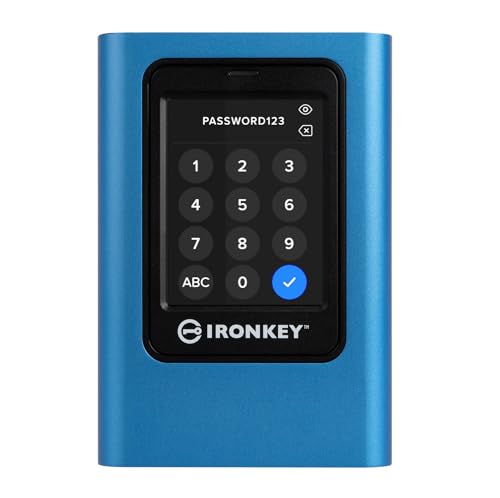
- FIPS 197 certified with XTS-AES 256-bit encryption
- Touchscreen PIN/passphrase access for admin and user profiles
- Dual read-only modes help protect against malware
Best For: Law firms that need secure portable storage with easy PIN-based access control.
Best for Simple Offline Backups
Seagate Portable 1TB USB 3.0 Drive

- Easy plug-and-play setup
- Windows and Mac compatible
- 1TB portable backup storage
Best For: Solo attorneys and small firms needing a simple portable drive for everyday backups and file transport.
Best for Hardware Encryption
Apricorn Aegis Secure Key 3 NXC 128GB

- 256-bit AES-XTS hardware encryption
- FIPS 140-3 Level 3 validated
- USB-C with admin/user access modes
Best For: Law offices that want a compact, software-free encrypted USB-C drive for secure file transfer.
Best for Biometric iPhone Workflows
iPhone USB3.0 Encrypted Drive 128GB

- Fingerprint and password protection for secure access
- Lightning plus USB 3.0 for Apple devices and computers
- Portable option for client files and case documents
Best For: Attorneys and legal staff who need biometric file protection with iPhone/iPad compatibility.
Best for PIN-Controlled Security
Apricorn Aegis Padlock SSD 1TB
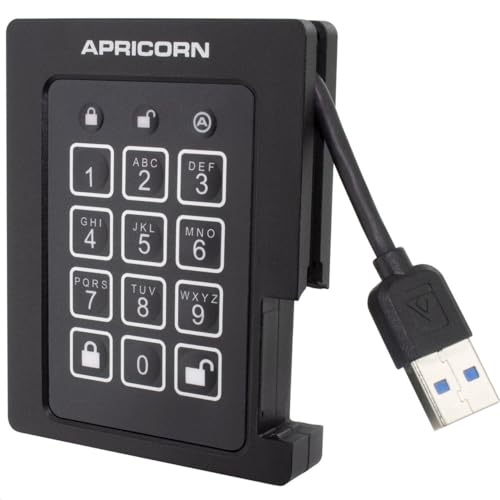
- FIPS 140-2 Level 2 validated
- Admin and user modes for access control
- Brute-force defense with self-destruct PIN option
Best For: Law offices that need a portable encrypted SSD with strict PIN-based access control.
Best for Comfort
Apricorn Aegis Padlock 2TB USB 3.0

- AES XTS 256-bit hardware encryption
- Built-in keypad with admin and user PINs
- Software-free setup for easy deployment
Best For: Law offices that need secure, portable file storage with simple PIN access.
Best for Hardware-Based Security
Apricorn Aegis Padlock SSD 4TB

- Hardware-only 256-bit AES XTS encryption
- FIPS 140-2 Level 2 validated security
- Cross-platform portable SSD with keypad PIN access
Best For: Law offices that need portable, compliance-friendly encrypted storage.
Best Heavy-Duty Pick
Apricorn Aegis Padlock 1TB USB 3.0
- 256-bit AES XTS hardware encryption
- Keypad PIN access with no software needed
- Portable 1TB capacity for legal files
Best For: Law firms that want simple hardware-encrypted portable storage.
Best Simple Pick
- 256-bit AES-XTS hardware encryption
- No-software, cross-platform setup
- USB 3.0 with rugged keypad security
Best For: Law offices that need a portable, software-free encrypted drive for client files and backups.
Best for Hardware-Backed Security – Apricorn Aegis Padlock Fortress 500GB
For law firms that need encrypted external drives for law offices, this Apricorn Aegis Padlock Fortress stands out for its keypad-based access, FIPS 140-2 Level 2 validation, and 256-bit AES-XTS hardware encryption. It is designed to keep client files protected without software installation, making it a practical choice for mixed-device or on-the-go workflows.
Best For: Offices that want a portable, software-free encrypted drive with strong physical and hardware security.
Pros:
- FIPS 140-2 Level 2 validated with 256-bit AES-XTS hardware encryption
- Integrated keypad helps avoid host-system keylogging risks
- USB 3.0 support for faster backups and file transfers
- Admin and user PIN options add practical access control
Cons:
- PIN-pad workflow is less convenient than biometric or app-based unlocks
- 500GB may feel limited for larger case archives
- Security-focused design can be overkill for casual storage needs
As a security-first option, this drive fits firms that prioritize straightforward protection over bells and whistles. For encrypted external drives for law offices, its combination of hardware encryption, keypad access, and platform independence makes it especially appealing for confidential legal data.
Best for Touchscreen Access Control – Kingston IronKey Vault Privacy 80 960GB Secure SSD
If you need encrypted external drives for law offices, the Kingston IronKey Vault Privacy 80 is a strong fit for keeping case files, client records, and other sensitive data locked down. It combines FIPS 197 certification, XTS-AES 256-bit encryption, and a touchscreen PIN/passphrase workflow that makes day-to-day access straightforward for authorized staff.
Best For: Law firms, solo attorneys, and legal teams that want a self-contained encrypted SSD with PIN-based access control and malware-resistant read-only options.
Pros:
- FIPS 197 certified with XTS-AES 256-bit encryption for strong data protection
- Touchscreen interface supports multi-password admin/user access and PIN or passphrase modes
- Dual read-only write-protect modes help reduce malware risk when sharing files
- Configurable password rules add another layer of policy control for office use
Cons:
- More expensive than basic external SSDs
- Touchscreen and security setup may take longer than a plug-and-play drive
- 960GB capacity may be limiting for very large discovery archives
For firms comparing encrypted external drives for law offices, this model stands out for balancing strong hardware-based security with practical access controls. It’s especially appealing if you want a portable drive that feels more like a secure device than a simple storage accessory.
Best for Simple Offline Backups – Seagate Portable 1TB USB 3.0 Drive
If you need a straightforward backup drive for case files, scans, and archived documents, the Seagate Portable 1TB is a practical pick to consider alongside encrypted external drives for law offices. It offers plug-and-play setup, wide Windows and Mac compatibility, and enough capacity for everyday portable storage without adding complexity.
Best For: Solo attorneys, small firms, and office teams that want an easy-to-use portable drive for general backups and document transport.
Pros:
- Simple plug-and-play setup with USB 3.0 connectivity
- Works with Windows and Mac for flexible office use
- Compact 1TB size is convenient for on-the-go file storage
- Includes a 1-year Rescue Service for added peace of mind
Cons:
- Does not include built-in hardware encryption
- May require reformatting for some Mac workflows
- 1TB may be limiting for large media-heavy archives
For law firms comparing encrypted external drives for law offices, this model makes sense only if you plan to add software-based protection or use it for non-sensitive backups. It is best viewed as a simple, reliable portable drive rather than a security-focused storage solution.
Best for Hardware Encryption – Apricorn Aegis Secure Key 3 NXC 128GB
For law firms that need encrypted external drives for law offices, the Apricorn Aegis Secure Key 3 NXC is a strong pick because it combines hardware-based AES-XTS encryption, FIPS validation, and a USB-C connection in a compact flash drive format. It’s built for secure transport of sensitive case files without relying on software installs, making it easier to deploy across mixed office systems.
Best For: Attorneys and legal staff who need a portable, software-free encrypted USB-C drive for secure file transfer.
Pros:
- Hardware-encrypted with 256-bit AES-XTS for strong on-device protection
- FIPS 140-3 Level 3 validated for compliance-focused environments
- USB 3.2 Type-C design works well with newer laptops and workstations
- Separate admin and user modes help with controlled access
Cons:
- 128GB capacity may be limiting for larger evidence or document archives
- Costs more than standard flash drives
- Security features add setup steps compared with plug-and-play storage
As encrypted external drives for law offices go, this model stands out for security-first teams that value portability and validated hardware protection over raw storage size. It’s a practical choice when confidentiality and easy deployment matter more than capacity.
Best for Biometric iPhone Workflows – iPhone USB3.0 Encrypted Drive 128GB
If your firm needs portable encrypted external drives for law offices and works heavily from iPhone or iPad, this fingerprint-protected USB drive is built around that workflow. It combines Lightning and USB 3.0 connections, so you can secure files on Apple mobile devices and then move them to a Mac or PC when needed.
Best For: Attorneys, paralegals, and solo practices that want a compact, biometric-encrypted flash drive for client files, case documents, and mobile review on Apple devices.
Pros:
- Fingerprint and password protection add a strong layer of access control.
- Works with iPhone/iPad plus USB 3.0 computers for cross-device file handling.
- On-device security means files stay protected even if the drive is misplaced.
- App-based file access supports common photo and video formats for mobile use.
Cons:
- Security setup is limited to Apple iOS devices, not Android/Windows/Mac.
- Uses a Lightning connector on the mobile side, so newer port standards may require an adapter.
- More specialized than a simple plug-and-play encrypted drive for mixed-device teams.
This is a practical pick for encrypted external drives for law offices that prioritize biometric access on Apple devices, but it makes the most sense if your team is already using iPhone and iPad for secure file handling.
Best for PIN-Controlled Security – Apricorn Aegis Padlock SSD 1TB
If you need encrypted external drives for law offices, the Apricorn Aegis Padlock SSD is built around controlled access, rugged portability, and hardware-based protection. Its FIPS 140-2 Level 2 validation, separate admin and user modes, and programmable PIN lengths make it a strong fit for handling client files on the move.
Best For: Attorneys, paralegals, and office teams that want a compact encrypted SSD with PIN-based access control and travel-ready durability.
Pros:
- FIPS 140-2 Level 2 validated for compliance-focused workflows
- Separate admin and user modes help manage access more securely
- Brute-force defense and optional self-destruct PIN add extra protection
- SSD design and ruggedized build suit frequent transport
Cons:
- PIN entry adds a small setup and login step
- More expensive than basic unencrypted portable drives
For encrypted external drives for law offices, this model stands out when security policy matters more than convenience. It is a practical choice for teams that want strong access controls and a portable drive that can handle daily use.
Best for Comfort – Apricorn Aegis Padlock 2TB USB 3.0
If you want encrypted external drives for law offices that keep client files secure without adding software overhead, the Apricorn Aegis Padlock is a strong fit. It uses hardware-based AES XTS 256-bit encryption, a built-in keypad for PIN access, and USB 3.0 speeds for faster transfers than older portable drives.
Best For: Law firms that need a portable, software-free encrypted drive for secure document transport and backup.
Pros:
- Hardware encryption with AES XTS 256-bit security
- Keypad PIN access supports up to 5 user PINs plus an admin PIN
- Software-free design works without admin rights on compatible systems
- USB 3.0 connection helps speed up large case-file transfers
Cons:
- Portable HDD performance is slower than SSD alternatives
- Physical keypad adds bulk compared with basic thumb drives
- Higher security features can mean a steeper price than standard externals
For firms comparing encrypted external drives for law offices, this Apricorn model stands out for straightforward PIN-based access and hardware-level protection. It’s a practical choice when security and ease of deployment matter more than ultra-light portability.
Best for Hardware-Based Security – Apricorn Aegis Padlock SSD 4TB
If you need encrypted external drives for law offices, the Apricorn Aegis Padlock SSD is built around hardware-only protection, PIN authentication, and FIPS 140-2 Level 2 validation. It’s a strong fit for firms that want to keep client files encrypted at rest without relying on software installs or a specific operating system.
Best For: Law offices, solo attorneys, and legal teams that need portable, cross-platform encrypted storage with strong compliance-friendly security features.
Pros:
- 256-bit hardware encryption with onboard keypad PIN access
- FIPS 140-2 Level 2 validated for security-focused environments
- Cross-platform use with Windows, Mac, Linux, Android, and Chrome
- Ruggedized SSD design with fast USB 3.0 transfer speeds
Cons:
- Higher cost than standard portable drives
- Keypad workflow adds a bit of setup and daily handling
- Security-focused design may be more than casual users need
This Apricorn drive stands out for legal practices that prioritize tamper resistance, hardware encryption, and easy cross-platform portability. Among encrypted external drives for law offices, it’s a practical choice when security and compliance matter more than a low price.
Best Heavy-Duty Pick – Apricorn Aegis Padlock 1TB USB 3.0
If you need a straightforward lock-and-go option for encrypted external drives for law offices, the Apricorn Aegis Padlock keeps data protected with built-in 256-bit AES XTS hardware encryption and keypad access. It is a practical choice for attorneys, paralegals, and staff who need portable storage without relying on software installs.
Best For: Law firms that want hardware-based encrypted portable storage with simple PIN access and no software dependency.
Pros:
- 256-bit AES XTS hardware encryption helps secure client files at rest.
- Keypad PIN entry avoids password management software on office PCs.
- USB 3.0 support is convenient for everyday file transfers and backups.
- Portable 1TB capacity works well for case files, scans, and media.
Cons:
- Keypad-based unlock can feel slower than software-authenticated drives.
- 1TB may be limiting for larger archive workloads.
- No ruggedized or waterproof design for extra field protection.
For encrypted external drives for law offices, this model stands out for combining hardware encryption with easy everyday portability. It is less about flashy features and more about dependable access control for sensitive client data.
Best Simple Pick – Apricorn Aegis Padlock 500GB
If you need encrypted external drives for law offices, this Apricorn Aegis Padlock is a practical fit thanks to its hardware-based AES-XTS encryption, PIN keypad access, and software-free setup. It is designed for fast, portable case storage and easy deployment across different computers without requiring admin rights or installs.
Best For: Legal teams that need a portable, policy-friendly drive for securing client files, evidence, and office backups.
Pros:
- 256-bit AES-XTS hardware encryption keeps data protected in real time
- No software installation required, making it easier to use across office systems
- USB 3.0 helps move large case files faster than USB 2.0 drives
- Rugged keypad design and epoxy protection add physical security
Cons:
- 500GB capacity may be limiting for very large matter archives
- Keypad-based access can be slower than biometric or app-based unlocks
- Portable hard drive design is less durable than solid-state options
This is a solid choice when encrypted external drives for law offices need to balance security, portability, and simple rollout. It is especially appealing for firms that want strong onboard encryption without adding extra software management overhead.
How We Picked the Best Encrypted External Drives for Law Offices
For Encrypted External Drives for Law Offices, we prioritized hardware encryption, PIN or biometric access, compliance-friendly validation where available, and durable builds suited to frequent transport. We also considered storage capacity, transfer speed, and how easy each drive would be for attorneys, paralegals, and staff to use without creating workflow friction.
Quick Comparison
In general, SSD-based models are the better fit for busy legal professionals who need faster access and a tougher, more portable design. Traditional portable hard drives can offer more capacity for the money, which may suit archival use or case-file backups. Smaller flash-drive style options are useful for court handoff, short-term transport, or highly portable confidential file transfers.
Key Buying Factors for Encrypted External Drives for Law Offices
Security Standard
Look for hardware encryption over software-only protection. FIPS validation, where available, can be a strong indicator for organizations that need a more formal security posture. PIN entry, keypad locks, and biometric access can further reduce the chance of unauthorized use.
Capacity and Use Case
Choose capacity based on how the drive will be used. Smaller drives work well for active matters, confidential transport, and individual user backups. Larger drives are better for matter archives, imaging, and long-term storage of discovery files.
Speed and Portability
SSD models usually deliver faster performance and better shock resistance, which is helpful for mobile attorneys and staff who work between office, home, and court. HDD options may still be practical when budget and capacity matter more than speed.
Compatibility and Ease of Use
Make sure the drive supports the devices your office actually uses, including Windows and macOS systems, and any mobile workflows that apply. Simple setup matters because a secure drive only helps if staff will use it correctly and consistently.
Who Should Buy Which Encrypted External Drives for Law Offices?
Solo practitioners and small firms often do well with compact, encrypted flash drives or smaller portable SSDs for secure document transfer. Litigation teams and firms handling larger files may prefer 1TB to 4TB Encrypted External Drives for Law Offices to support ongoing matter storage and backups. For maximum portability and frequent travel, choose a rugged SSD. For lower-cost archival storage, a hardware-encrypted HDD can be the more practical option.
Whichever route you choose, the best drive is the one that fits your security policy, file sizes, and daily workflow without adding unnecessary steps for your team.