
Protecting client records calls for more than basic password protection. The best encrypted SSDs combine hardware-based security, strong encryption standards, and portable designs that fit real-world workflows.
In this roundup, we focus on encrypted SSDs for client records that balance security, ease of use, and reliable everyday access for professionals who handle sensitive data.
Best 10 Encrypted Ssds for Client Records Picks for 2026
Best Hardware-Secured Option
Kingston IronKey Vault Privacy 80 1.92TB
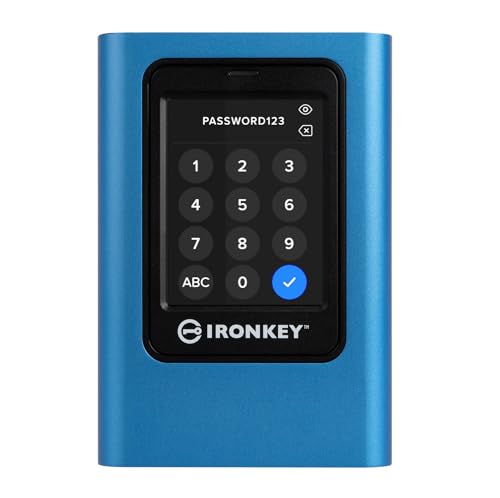
- FIPS 197 and XTS-AES 256-bit hardware encryption
- Touch-screen PIN/passphrase access with admin/user modes
- Dual read-only modes plus brute-force protection
Best For: Professionals protecting client files, regulated records, and portable confidential archives.
Best for PIN-Locked Field Security
Glyph SecureDrive+ 1TB Encrypted Rugged SSD

- AES 256-bit XTS hardware encryption
- Physical keypad PIN access, no software required
- Rugged aluminum body with USB-C connectivity
Best For: Mobile professionals handling sensitive client files who want hardware encryption and PIN-only access.
Best Hardware-Encrypted USB Pick
Kingston IronKey Vault Privacy 50 512GB

- FIPS 197-certified XTS-AES 256-bit encryption
- BadUSB and brute-force protection
- Multi-password and read-only modes
Best For: Professionals who need secure portable storage for client records and sensitive files.
Best for Hardware-Backed Security
Glyph SecureDrive+ Encrypted Rugged SSD 2TB
- AES 256-bit XTS encryption for sensitive files
- Physical keypad PIN access with no software required
- Rugged aluminum housing for travel and field use
Best For: Professionals who need a secure portable SSD for confidential client data.
Best Hardware Encryption

- Hardware AES-XTS 256-bit encryption
- No software install required
- USB 3.0 for faster file transfers
Best For: Consultants and mobile pros who need portable, hardware-encrypted storage for client records.
Best for Hardware-Locked Transfers
MINI Pro External encrypted SSD 512GB

- Hardware AES256-XTS encryption for sensitive data
- Built-in hardware write-blocker for safer handling
- Bootable virtual ODD/HDD support for advanced workflows
Best For: Consultants, legal teams, and IT users moving sensitive client files.
Best for High-Security PIN Access
Kingston IronKey Keypad 200 USB-C 64GB

- FIPS 140-3 Level 3 (Pending) with XTS-AES 256-bit encryption
- Physical keypad with multi-PIN admin and user access
- Brute force, BadUSB, and tamper-evident protection
Best For: Professionals who need tightly controlled, portable encrypted storage for sensitive client data.
Best for Biometric Drive Security
VCOM Fingerprint SSD Enclosure

- Fingerprint unlock with hardware AES-256 encryption
- 10Gbps USB 3.2 Gen2 transfer speeds
- Supports NVMe and SATA M.2 SSDs
Best For: Professionals who need portable, hardware-protected storage for sensitive client files.
Best for Portable Client File Protection
Kingston IronKey Locker+ 50 128GB

- Hardware-encrypted XTS-AES protection
- Multi-password security options
- Durable metal casing for travel
Best For: Professionals who need a secure, portable drive for sensitive client documents.
Best for Single-User Client Vaults
Kingston IronKey Locker+ 50 G2 256GB
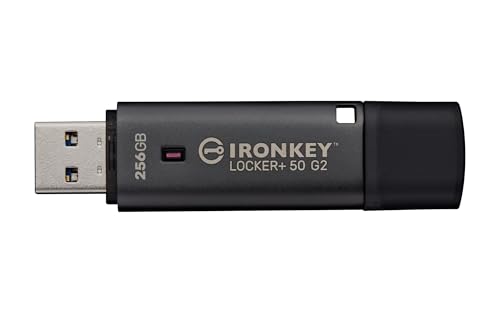
- Hardware AES-XTS encryption with FIPS 197 certification
- Admin and user password modes for access control
- Portable USB 3.2 Gen 1 design for secure file transport
Best For: Solo professionals and small teams securing client files on the go.
Best Hardware-Secured Option – Kingston IronKey Vault Privacy 80 1.92TB
If you need encrypted ssds for client records, the Kingston IronKey Vault Privacy 80 stands out for its OS-independent hardware encryption, touch-screen PIN entry, and strong anti-tamper protections. It is a practical choice when you want portable storage that keeps sensitive files locked down without relying on software installed on each computer.
Best For: Professionals who need a highly secure external SSD for regulated files, client documents, and portable confidential archives.
Pros:
- FIPS 197 certified with XTS-AES 256-bit hardware encryption
- Touch-screen PIN/passphrase access with admin and user modes
- Brute-force defense and digitally signed firmware for added protection
- Dual read-only modes help reduce malware risk
Cons:
- More expensive than standard external SSDs
- Security features add setup steps compared with plug-and-play drives
- Touch-screen workflow may feel slower than simple password-only drives
For encrypted ssds for client records, this model makes sense when security matters more than convenience. Its hardware-based controls, malware defenses, and compliance-focused design are a strong fit for professionals handling confidential data on the go.
Best for PIN-Locked Field Security – Glyph SecureDrive+ 1TB Encrypted Rugged SSD
If you need encrypted ssds for client records, the Glyph SecureDrive+ is a strong fit because it combines hardware-based AES 256-bit XTS encryption with keypad-only PIN access. That makes it a practical choice for professionals who want security that does not depend on installed software or a host machine’s settings.
Best For: Consultants, attorneys, accountants, and mobile teams who carry sensitive files and want hardware encryption plus rugged portability.
Pros:
- Hardware encryption with physical PIN entry reduces software-related security risks.
- Rugged aluminum enclosure adds durability for travel and field use.
- USB-C with USB 3.1 support helps keep transfers fast and broadly compatible.
- Pre-formatted exFAT works out of the box on Mac and Windows.
Cons:
- Keypad security is secure, but slower to unlock than a simple password prompt.
- Premium security and rugged build typically cost more than basic portable SSDs.
- 1TB may feel limited if you store large media libraries alongside records.
For encrypted ssds for client records, this model stands out when your priority is physical access control and dependable protection on the go. It is less about bare-bones value and more about giving professionals a secure, portable drive they can trust in transit.
Best Hardware-Encrypted USB Pick – Kingston IronKey Vault Privacy 50 512GB
If you need encrypted ssds for client records but want a portable, hardware-based option, the Kingston IronKey Vault Privacy 50 is a strong fit for offline storage and transport. It uses FIPS 197-certified XTS-AES 256-bit encryption, adds BadUSB and brute-force protections, and keeps sensitive files under your physical control instead of in the cloud.
Best For: Professionals who need a secure, carry-anywhere drive for client files, case notes, contracts, or other regulated records.
Pros:
- FIPS 197-certified XTS-AES 256-bit hardware encryption
- BadUSB protection and brute-force attack safeguards
- Multi-password support with complex and passphrase modes
- Dual read-only settings help prevent accidental changes
Cons:
- USB-A only, so newer laptops may need an adapter
- Flash-drive form factor is not as fast as a high-end SSD
- Security features add setup steps compared with basic drives
For encrypted ssds for client records, this model stands out when security matters more than raw speed or capacity. It is a practical choice for attorneys, consultants, and healthcare teams that need a compact encrypted drive with serious access controls.
Best for Hardware-Backed Security – Glyph SecureDrive+ Encrypted Rugged SSD 2TB
If you need encrypted ssds for client records, the Glyph SecureDrive+ is built around hardware-based protection rather than software-only convenience. Its AES 256-bit XTS encryption, physical keypad PIN access, and rugged aluminum body make it a strong fit for professionals who want secure portability without adding extra setup steps.
Best For: Attorneys, accountants, consultants, and other professionals who need a portable drive with on-device encryption for sensitive files.
Pros:
- AES 256-bit XTS encryption adds strong protection for confidential data
- Keypad PIN authentication avoids software-based login vulnerabilities
- USB-C connectivity supports fast transfers on modern systems
- Rugged aluminum housing improves durability for mobile use
Cons:
- Hardware security features add cost versus standard external SSDs
- Keypad access can be less convenient than password-only software unlocks
For encrypted ssds for client records, this drive stands out because it combines strong on-device encryption with simple cross-platform use and no software dependency. That makes it appealing for anyone who needs to move sensitive files between offices, laptops, and field work while keeping access tightly controlled.
Best Hardware Encryption – Apricorn Aegis Padlock 1TB
If you want simple, portable protection for sensitive files, this Apricorn drive is a strong fit for encrypted ssds for client records and other business data that needs to stay locked down. Its hardware-based AES-XTS encryption, keypad access, and software-free setup make it easy to deploy without adding admin overhead.
Best For: Consultants, small offices, and mobile professionals who need encrypted portable storage for client records without relying on extra software.
Pros:
- Hardware AES-XTS 256-bit encryption keeps data protected in real time
- No software installation required, so setup is quick and platform-flexible
- USB 3.0 support delivers faster transfers than older encrypted drives
- Rugged, compact design is built for travel and frequent transport
Cons:
- Physical keypad means setup is less convenient than password-only software tools
- 1TB capacity may feel limited for larger media-heavy archives
- It’s a hard drive, so it won’t match SSD speed or shock resistance
For buyers comparing encrypted ssds for client records, this Apricorn model stands out for its practical balance of security, portability, and easy deployment. It’s especially appealing if you value hardware encryption more than maximum speed.
Best for Hardware-Locked Transfers – MINI Pro External encrypted SSD 512GB
If you need encrypted ssds for client records and want stronger control over how data is handled in transit, the MINI Pro is built around hardware AES256-XTS encryption, a hardware write-blocker, and bootable virtual drive support. It is a practical fit for workflows where you need to move sensitive files without exposing them to casual access or accidental edits.
Best For: Consultants, legal teams, and IT users who need a portable, hardware-encrypted SSD for protected client data transfers.
Pros:
- Hardware AES256-XTS encryption adds a strong layer of protection for sensitive records
- Hardware write-blocker helps prevent unwanted changes during transfer or review
- Bootable virtual ODD/HDD support can be useful for imaging and recovery workflows
- Compact USB-C 3.1 Gen 1 design keeps it easy to carry between jobs
Cons:
- 512GB capacity may be limiting for larger media-heavy archives
- Security-focused features may be more than casual users need
- Best value depends on whether you will actually use the bootable and write-blocking tools
For encrypted ssds for client records, this model stands out when you care more about controlled access and safe handling than raw capacity or speed. It makes the most sense for professionals who regularly transport sensitive data and want hardware-level safeguards built in.
Best for High-Security PIN Access – Kingston IronKey Keypad 200 USB-C 64GB
If you need portable hardware protection for encrypted ssds for client records, this Kingston IronKey drive is built for strict access control and tamper resistance. It pairs XTS-AES 256-bit encryption with a physical keypad, so you can lock down sensitive files without relying on the host system.
Best For: Professionals who want OS-independent, PIN-based encrypted storage with strong anti-tamper safeguards.
Pros:
- FIPS 140-3 Level 3 (Pending) and XTS-AES 256-bit hardware encryption
- Physical keypad with multi-PIN admin/user access control
- Brute force and BadUSB protection for stronger endpoint security
- Read-only mode options help reduce accidental changes
Cons:
- 64GB capacity is modest for larger client archives
- More expensive than standard flash drives
- Keypad workflow is less convenient than plug-and-go storage
This is a strong fit when encrypted ssds for client records need an extra layer of physical and firmware-level defense, especially for carrying confidential data between offices or off-site visits. If security matters more than speed or capacity, it offers a very serious protection-first approach.
Best for Biometric Drive Security – VCOM Fingerprint SSD Enclosure
If you’re comparing encrypted ssds for client records, this VCOM enclosure stands out for combining fingerprint access, hardware AES-256 encryption, and a built-in LCD status screen in one portable drive case. It’s a practical fit when you need fast transfer speeds, simple physical access control, and compatibility with both NVMe and SATA M.2 drives.
Best For: Consultants, small firms, and mobile professionals who want strong on-device protection for sensitive files without relying on software-only encryption.
Pros:
- Fingerprint unlock plus hardware encryption adds a strong physical security layer
- 10Gbps USB 3.2 Gen2 speeds help move large client files quickly
- Supports both M.2 NVMe and SATA SSDs in 2242/2260/2280 sizes
- LCD screen shows connection status, capacity, and security mode at a glance
Cons:
- Requires installing your own M.2 SSD, so it’s not a ready-to-use drive
- Biometric and encryption features may be more than casual users need
- Fingerprint systems can add setup steps compared with basic enclosures
For encrypted ssds for client records, this is a strong option if your priority is keeping data locked down while still staying portable and fast. It’s especially appealing when you want hardware-based protection rather than depending only on a laptop’s software controls.
Best for Portable Client File Protection – Kingston IronKey Locker+ 50 128GB
If you need encrypted ssds for client records but want something smaller and easier to carry between offices, the Kingston IronKey Locker+ 50 is a practical encrypted USB drive with hardware-based XTS-AES protection, simple USB 3.2 Gen 1 connectivity, and a rugged metal casing.
Best For: Solo professionals, consultants, and small teams who want a secure, portable way to move sensitive files without relying on cloud-only access.
Pros:
- Hardware-encrypted XTS-AES protection helps keep client files secure
- Multi-password options are useful for different users or access levels
- Metal casing adds durability for daily carry and travel
- USB 3.2 Gen 1 keeps file transfers straightforward
Cons:
- It’s a USB flash drive, not a full SSD
- 128GB capacity may be limiting for larger media-heavy archives
- Security features can add setup steps compared with a basic drive
For encrypted ssds for client records, this is a compact alternative when portability matters more than bulk storage, offering strong on-device protection for routine document transport and secure handoff.
Best for Single-User Client Vaults – Kingston IronKey Locker+ 50 G2 256GB
If you need encrypted ssds for client records but want a simpler, pocketable alternative for moving sensitive files between offices, the Kingston IronKey Locker+ 50 G2 adds hardware-based AES-XTS protection, FIPS 197 certification, and multi-password access control in a compact USB drive.
Best For: Solo professionals and small teams that want portable, hardware-encrypted storage for protected client documents without a full desktop SSD setup.
Pros:
- XTS-AES 256-bit hardware encryption with FIPS 197 certification
- Admin and user password modes help separate access levels
- Fast USB 3.2 Gen 1 performance for a secure thumb drive
- Compact, easy to carry for on-the-go record transfer
Cons:
- Not an internal or external SSD, so capacity and speed are lower
- Best suited to file transport rather than heavy project workloads
For encrypted ssds for client records, this is a strong choice if your main priority is secure portability over high-capacity storage. It delivers practical protection for confidential documents, but buyers who need a true SSD workflow should look elsewhere.
How We Picked These Encrypted Ssds for Client Records
We prioritized hardware encryption, reputable security certifications, resistance to brute-force and BadUSB attacks, and practical features such as PIN pads, keypad access, rugged builds, and cross-platform compatibility. We also favored drives that make it easier to separate secure client data from general storage.
Quick Comparison
For maximum convenience, some buyers will prefer portable SSDs with built-in PIN entry or touchscreen access. Others may want smaller encrypted USB drives for daily carry, or a drive enclosure if they already have a trusted NVMe SSD and want to add encrypted protection. Capacity matters too: client archives, scans, and case files can grow quickly, so choose enough headroom for long-term use.
Key Buying Factors for Encrypted Ssds for Client Records
Encryption Standard and Certification
Look for proven hardware encryption such as AES-XTS or FIPS-aligned models when security policy matters. Certifications do not replace good practices, but they can help support compliance requirements and internal audits.
Authentication Method
PIN pads, touchscreens, password tiers, and biometric options each solve different problems. PIN-based drives are often simple and dependable for shared professional workflows, while fingerprint-enabled options can speed access for individual users.
Form Factor and Durability
Client records are often accessed on the move, so rugged housings and compact designs are worth paying for. If you travel frequently or work in field settings, prioritize shock resistance and a cable-free or low-profile design.
Capacity and Workflow
Choose a capacity based on file types, retention needs, and backup habits. Smaller encrypted flash drives can be ideal for transporting selected records, while larger encrypted SSDs suit full case libraries, scans, and encrypted archives.
Compatibility
Confirm support for your operating systems and ports before buying. USB-C is more flexible for newer hardware, but many professionals still need USB-A compatibility for older workstations and shared office equipment.
Who Should Buy Which Encrypted Ssds for Client Records?
If you need the strongest everyday balance of security and usability, choose a larger encrypted external SSD with keypad or touchscreen access. If you want simple transport for a subset of files, a compact encrypted USB drive may be enough. If you already own an SSD and want a custom secure setup, an encrypted enclosure can be the most flexible option. For teams handling Encrypted Ssds for Client Records in regulated or client-facing environments, the best choice is usually the model that combines policy-friendly security features with the least friction in daily use.