
Choosing the right display can make meetings faster, clearer, and more collaborative. The best interactive whiteboards for meeting rooms combine responsive touch, video conferencing support, and simple sharing tools.
Below, we focus on practical options for teams that want a smarter meeting space without overspending on features they will never use.
Best 10 Interactive Whiteboards for Meeting Rooms Picks for 2026
Enterprise AI Collaboration Board
HORION 86-Inch 4K AI Digital Whiteboard

- 86-inch 4K board with 50-point touch
- Camera, 8 mics, and speakers for conferencing
- AI assistant helps with summaries and mind maps
Best For: Large boardrooms and enterprise collaboration
Windows 11 Hybrid Meeting Board
NearHub S Pro 75" Interactive Whiteboard
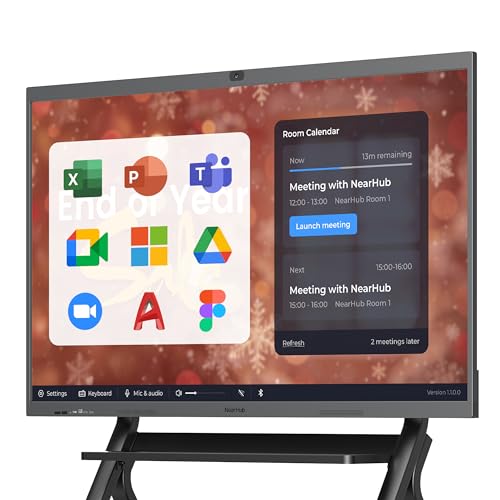
- Windows 11 OPS supports desktop apps
- 40 touchpoints and 6ms latency
- Built-in 4K camera, mics, and speakers
Best For: Hybrid teams needing Windows compatibility and IT control
App-Ready Collaboration Board

- 55-inch 4K touchscreen with cloud whiteboarding
- 250+ apps and open ecosystem support
- Split-screen mode and infinite canvas for meetings
Best For: Huddle rooms and app-driven collaboration
Android Business Smart Board
55" 4K UHD Interactive Whiteboard

- 55-inch 4K UHD board with wall mount included
- Screencasts from Mac, Windows, iOS, and Android
- Android 14 with 8GB RAM for smooth use
Best For: Offices wanting a simple wall-mounted meeting board
Business Hybrid Meeting Hub
NearHub S Pro 4K UHD Smart Board
- Windows 11 OPS with Core i5, 16GB RAM, 128GB storage
- Built-in 4K camera, 8-mic array, and dual speakers
- 55-inch 4K touchscreen with 20-point touch and 6ms latency
Best For: Hybrid meeting rooms that need Windows-native conferencing and IT control
Large-Format Collaboration Board
86-Inch Android 14 Smart Board

- 86-inch 4K UHD display with over 400 nits brightness
- Android 14, 8GB RAM, and 128GB storage
- Built-in conferencing hub with front connectivity
Best For: Large meeting rooms and training spaces that need a big interactive display
Open-Ecosystem Meeting Board

- 65-inch 4K UHD touchscreen with 20-point touch
- Android 13 with 128GB storage and open app ecosystem
- Cross-platform wireless sharing plus voting and QR file sharing
Best For: Mixed-device teams that want a 65-inch board with flexible app support
Hybrid Collaboration Board

- 4K 55-inch touchscreen with anti-glare glass
- Wireless sharing with Mac, Windows, iOS, and Android
- Built-in camera for hybrid meetings
Best For: small teams needing a flexible meeting-room board
All-in-One Meeting Hub

- 65-inch 4K board with 20-point touch
- Camera, microphone, and speakers built in
- Wireless and wired sharing with split screen
Best For: larger rooms that need an integrated collaboration system
Premium Conference Board
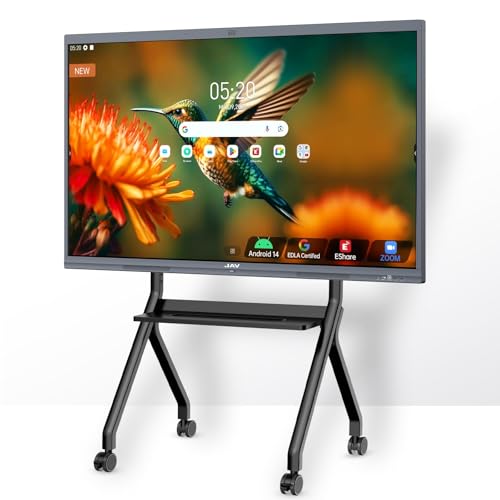
- 48MP AI camera with 100W soundbar
- EDLA-certified Android 14 with Google tools
- 20-point touch and multiple sharing options
Best For: teams wanting premium conferencing and Google integration
Enterprise AI Collaboration Board – HORION 86-Inch 4K AI Digital Whiteboard
If you need interactive whiteboards for meeting rooms that combine presentation, video conferencing, and whiteboarding in one large-format display, the HORION 86-inch model is built for that workflow. It pairs 4K touch collaboration with wireless casting, an AI assistant, and Android 14/Google EDLA support, making it a strong fit for busy corporate spaces.
Best For: Large boardrooms and enterprise teams that want an all-in-one collaboration display with AI tools.
Pros:
- 86-inch 4K display with 50-point touch and low-latency writing for multi-user collaboration
- Wireless casting with touchback makes it easy to present from laptops and phones
- Built-in camera, 8-mic array, and speakers support Zoom and Teams meetings
- AI assistant can generate meeting summaries, mind maps, and text translations
Cons:
- Large 86-inch format is better suited to bigger rooms than compact huddle spaces
- Wall-mount setup and 150.1-pound weight may require planning for installation
For teams that want a premium meeting-room centerpiece, this HORION board stands out for combining collaboration tools, conferencing hardware, and AI features in one system. Its scale and feature set are most compelling where multiple people present and annotate regularly.
Windows 11 Hybrid Meeting Board – NearHub S Pro 75" Interactive Whiteboard
For interactive whiteboards for meeting rooms that need full desktop software support, the NearHub S Pro is a practical pick. Its native Windows 11 OPS PC, 4K touch display, and integrated conferencing hardware are aimed at hybrid meetings where compatibility and smooth collaboration matter most.
Best For: Teams that rely on Windows apps, Teams, Zoom Rooms, and enterprise IT control.
Pros:
- Native Windows 11 OPS with Intel Core i5, 16GB RAM, and 128GB storage for desktop apps
- 4K camera, 8 microphones, and dual speakers support hybrid meetings
- Ultra-low 6ms touch latency and up to 40 touchpoints for collaborative work
- Wired and wireless sharing options plus cloud saving for easy follow-up
Cons:
- More feature-rich than a basic whiteboard, so it may be overkill for simple presentations
- Mobile stand is sold separately if you want a non-permanent setup
The NearHub S Pro is especially appealing if your meeting room needs to behave like a Windows workstation as much as a whiteboard. It combines strong collaboration tools with centralized IT management, which is useful for organizations deploying multiple rooms.
App-Ready Collaboration Board – Vibe S1 55 Inch Smart Board
The Vibe S1 is a compact option for interactive whiteboards for meeting rooms, especially when you want a simple all-in-one board for brainstorming, presenting, and cloud-based follow-up. With 250+ apps, 4K UHD resolution, and an infinite canvas whiteboard, it suits smaller teams that want flexibility without a complicated setup.
Best For: Huddle rooms, small conference rooms, and teams that use cloud apps regularly.
Pros:
- 55-inch 4K UHD touchscreen with cloud-based whiteboarding
- 250+ apps and open ecosystem support Google Workspace and Microsoft 365
- 10-point infrared touch with sub-8ms response time for natural writing
- Split-screen mode helps you present, reference content, and take notes at once
Cons:
- 10 touchpoints are lower than larger enterprise boards with more simultaneous input
- Freestanding design may not be ideal if you specifically want a wall-mounted install
This Vibe board makes sense when your room needs a versatile collaboration display more than a massive enterprise system. Its strength is ease of use, app access, and a workflow that works well for fast meetings and shared ideation.
Android Business Smart Board – 55" 4K UHD Interactive Whiteboard
If you want interactive whiteboards for meeting rooms with a straightforward Android-based setup, this 55-inch EUNIVON board is designed for general office use. It supports screencasting from major device types, HDMI input, and annotation on the screen, making it a practical fit for everyday meetings and presentations.
Best For: Offices and meeting rooms that want a simple wall-mounted Android smart board.
Pros:
- 55-inch 4K UHD touchscreen with wall mount included
- Supports screencasting from Mac, Windows, iOS, and Android devices
- Annotation tools and screenshot pinning help with live meeting collaboration
- Android 14 with 8-core Cortex-A55 CPU and 8GB RAM for smooth operation
Cons:
- Android-based system may be less flexible than Windows OPS boards for desktop software
- Listed notes focus on general business use rather than advanced conferencing hardware
This board is a solid choice if you want a more direct, business-friendly interactive display without extra complexity. It covers the core meeting-room basics well: casting, annotating, and managing content on a 4K screen.
Business Hybrid Meeting Hub – NearHub S Pro 4K UHD Smart Board
If you want one of the more capable interactive whiteboards for meeting rooms, the NearHub S Pro is built around a native Windows 11 OPS, so it can run full desktop software instead of limiting you to a mobile-style app environment. That makes it a strong fit for offices that rely on Microsoft Teams, Zoom Rooms, Office, and other Windows-first tools. The 55-inch 4K display, built-in camera, microphones, and speakers turn it into an all-in-one collaboration station for hybrid meetings.
Best For: Teams that want a Windows-based meeting-room board with native conferencing and enterprise management features.
Pros:
- Native Windows 11 OPS with 12th Gen Intel Core i5, 16GB RAM, and 128GB storage
- Built-in 4K camera, 8-mic array, and dual front speakers for hybrid meetings
- 4K UHD touch panel with up to 20 touch points and 6ms low latency
- Supports wired and wireless sharing plus cloud saving of content
Cons:
- 55-inch size may be small for larger conference rooms
- Wall-mount bracket is included, but the mobile stand is optional
- Designed for business use, so it may be more system-heavy than simpler boards
Overall, this board stands out if your meeting room needs a true Windows collaboration device rather than a basic display. Its mix of conferencing hardware, touch performance, and IT control makes it especially practical for organizations standardizing on Microsoft tools.
Large-Format Collaboration Board – 86-Inch Android 14 Smart Board
For bigger spaces that need interactive whiteboards for meeting rooms, this 86-inch smart board offers a large 4K UHD canvas with Android 14, 8GB RAM, and 128GB storage. The size makes it easier for teams in larger conference rooms to see content clearly, while the built-in video conferencing hub keeps meetings and remote collaboration in one device. It also includes front-facing ports for faster plug-and-play use during busy work sessions.
Best For: Large meeting rooms, training spaces, and organizations that want a big-screen Android-based collaboration board.
Pros:
- Large 86-inch 4K UHD display with over 400 nits brightness
- Android 14 with 8GB RAM and 128GB storage for responsive use
- Built-in conferencing hub for calls, annotation, and real-time document editing
- Front USB, HDMI, and TOUCH ports make quick connections easier
Cons:
- Larger footprint may be overkill for smaller meeting rooms
- No camera or microphone array is listed in the supplied details
- Some connectivity is spread across front, rear, and bottom panels, which can make planning more involved
This is a strong pick when screen size is a priority and you want a board that can handle presentations, hybrid meetings, and interactive teaching. Its main advantage is the large format, which should help visibility in rooms where a 55- or 65-inch display would feel undersized.
Open-Ecosystem Meeting Board – COOLHOOD 65" Smart Board
The COOLHOOD 65-inch board is a practical middle-ground option among interactive whiteboards for meeting rooms, combining a 4K UHD touchscreen with Android 13 and 128GB of storage. It supports wireless screen sharing across Mac, Windows, iOS, and Android, which is helpful when different people join meetings with different devices. Built-in collaboration tools like voting, screenshots, timer functions, and QR code file sharing make it useful for team sessions that need quick decisions and easy follow-up.
Best For: Teams that want a 65-inch Android board with open app support and easy cross-device sharing.
Pros:
- 65-inch 4K UHD touchscreen with 20-point multi-touch and 6ms response time
- Wireless sharing works across Mac, Windows, iOS, and Android
- Built-in tools for voting, screenshots, timer use, and QR file sharing
- Supports Zoom, Google Meet, Microsoft Teams, and Webex
Cons:
- Only one HDMI port is listed in the supplied specs
- Stand is sold separately; only the wall mount is included
- Android 13 may be less appealing if you specifically want Windows-based software support
Overall, this board is a versatile choice for offices that want a balanced screen size and broad app compatibility without moving to a much larger display. Its collaboration tools and cross-platform support make it especially useful for mixed-device meeting environments.
Hybrid Collaboration Board – JAV 55" Smart Board
If you want interactive whiteboards for meeting rooms that can handle screen sharing, annotation, and remote calls without a lot of setup, this JAV 55-inch smart board is built for that kind of everyday use. It combines 4K visuals, wireless compatibility with Mac, Windows, iOS, and Android, plus a built-in camera for hybrid meetings and presentations.
Best For: Teams that want a compact, all-in-one board for meetings, presentations, and remote collaboration.
Pros:
- Works with Mac, Windows, iOS, and Android for easy wireless sharing
- 4K 55-inch touchscreen with anti-glare tempered glass
- Built-in camera supports video conferencing and hybrid collaboration
- Android 14 with 8GB RAM and 128GB storage for smoother multitasking
Cons:
- 55-inch size may feel small for larger meeting rooms
- Feature set is broad, so some teams may not use every function
Overall, this is a practical choice if your priority is a responsive meeting-room board with secure wireless sharing, app flexibility, and enough performance for daily collaboration tasks.
All-in-One Meeting Hub – QIXZOCV 65" Smart Board
For buyers comparing interactive whiteboards for meeting rooms, this QIXZOCV 65-inch board stands out as an all-in-one setup with 4K display, touchscreen collaboration, conferencing tools, and onboard Android 14. It is designed to replace separate projectors, PCs, and meeting systems, which makes it a strong fit for rooms that need a cleaner, more integrated workflow.
Best For: Organizations that want a large all-in-one board for meetings, hybrid calls, and group collaboration.
Pros:
- 65-inch 4K UHD display with 20-point touch support
- Includes camera, 8-array microphone, and dual 20W speakers for remote meetings
- Wired and wireless screen sharing with split-screen support
- Android 14 with open app access and 128GB internal storage
Cons:
- Larger size may be more than some smaller rooms need
- Feature-rich design may be more complex than a basic display
This is a strong pick if you want a meeting-room board that feels closer to a full collaboration system, especially when you need both local touch interaction and remote conferencing in one unit.
Premium Conference Board – JAV 55" Smart Board Pro
This JAV Smart Board Pro is aimed at interactive whiteboards for meeting rooms where clear audio, screen sharing, and polished presentation tools matter. It pairs a 55-inch 4K UHD display with a 48MP AI camera, 100W soundbar, and EDLA-certified Android 14 software, so it is built to support both collaborative meetings and mixed-use office or classroom environments.
Best For: Teams that want a premium board with stronger conferencing features and built-in Google ecosystem support.
Pros:
- 48MP AI camera and 100W soundbar for stronger meeting-room presence
- 20 touch points, palm erase, and annotation tools for collaboration
- Supports AirPlay, Miracast, Chromecast, and cross-platform sharing
- EDLA-certified with Google Drive and Workspace integration
Cons:
- 55-inch screen may be limiting in larger conference rooms
- Many advanced tools may be more than basic users need
For teams that want a more polished meeting experience, this model offers a strong mix of visual quality, conferencing hardware, and Google-centered workflow support without sacrificing collaboration features.
How We Picked These Interactive Whiteboards for Meeting Rooms
We looked for models that fit real-world meeting spaces, not just classrooms or general-purpose rooms. Priority went to display clarity, touch responsiveness, built-in camera and mic options, operating system flexibility, app support, and overall value for business use.
We also considered screen size variety, since Interactive Whiteboards for Meeting Rooms should match the room layout and expected audience size. Larger boards suit boardrooms and hybrid team spaces, while mid-size models are better for huddle rooms and smaller conference areas.
Quick Comparison
If you need hybrid meeting features, prioritize models with integrated cameras, microphones, and strong conferencing compatibility. If your team wants broader app access and simpler content sharing, a board with Android, Google EDLA, or Windows support may be the better fit. For spaces that mainly need whiteboarding, presentation, and annotation, a straightforward touchscreen model can deliver strong value at a lower cost.
Key Buying Factors for Interactive Whiteboards for Meeting Rooms
Screen Size and Room Fit
Match the display size to the room. A 55-inch board can work well in compact rooms, while 65-inch and 75-inch options are often better for standard conference rooms. An 86-inch display is usually best for larger meeting rooms or spaces where people sit farther from the screen.
Touch Performance and Collaboration
Look for accurate multi-touch input so multiple people can write, draw, or move content at once. For brainstorming sessions and workshops, a smoother touch experience matters more than flashy extras.
Hybrid Meeting Features
Built-in cameras, microphones, and speaker support can simplify video calls. This is especially important for teams that use the board as a central hub for hybrid meetings and remote collaboration.
Operating System and App Support
Android-based boards are often straightforward for whiteboarding and wireless sharing, while Windows-based options may better suit teams that rely on desktop software. Google EDLA certification can also help with app access and Google Workspace compatibility.
Storage, Connectivity, and Management
More RAM and storage can improve long-term responsiveness, especially if the board will handle frequent app use or large files. Check for the ports and wireless options your team actually needs, including HDMI, USB, Wi-Fi, and casting support.
Who Should Buy Which Interactive Whiteboards for Meeting Rooms?
Choose a 55-inch model if you need an affordable option for small rooms or light collaboration. Step up to 65 inches for a balanced choice that works in many offices. Pick 75 inches if hybrid meetings are common, and choose 86 inches when visibility and impact matter most in larger spaces.
If your team depends on video conferencing, look for integrated camera and mic bundles. If your priority is app flexibility and everyday productivity, focus on the software ecosystem first. The best Interactive Whiteboards for Meeting Rooms are the ones that fit your room size, workflow, and meeting style—not just the one with the biggest screen.