
The right display can make meetings faster, clearer, and far more collaborative. For teams that need whiteboarding, video conferencing, and shared presentations in one device, today’s interactive displays for office meetings are a major upgrade over a basic TV.
In this roundup, we focus on screen size, touch responsiveness, built-in camera and microphone quality, app compatibility, and the features that matter most in real office spaces.
Best 10 Interactive Displays for Office Meetings Picks for 2026
Large Team Collaboration Board

- 65-inch 4K touchscreen with 20-point touch
- Wireless sharing plus built-in meeting tools
- Supports Zoom, Meet, Teams, and Webex
Best For: Large office teams that need an all-in-one meeting and annotation board
Conference Screen with Signage Flexibility
HORION 55" 4K Interactive Display
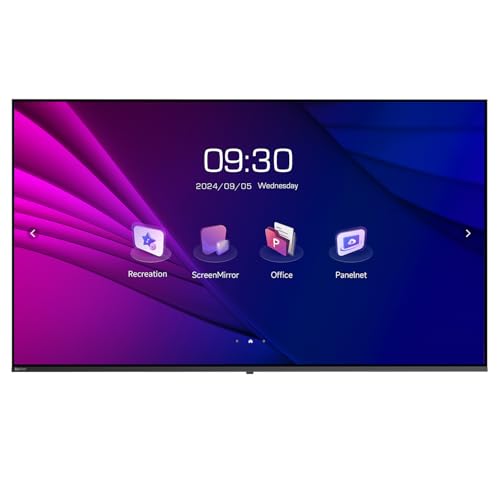
- 4K 55-inch display with 320 cd/m² brightness
- Wireless casting and dual Wi-Fi for meetings
- Portrait or landscape mounting support
Best For: Conference rooms that also need digital signage flexibility
Hybrid Meeting Whiteboard System

- 65-inch 4K board with 20-point infrared touch
- 13MP camera, 8-array mic, and dual 20W speakers
- Wireless casting plus HDMI/USB-C sharing
Best For: Hybrid office meetings that need built-in video conferencing hardware
Compact AI Presentation Board

- Native 4K UHD display with 60 touch points
- Android 14, 8GB RAM, and 256GB storage
- 48MP camera and microphone for meetings
Best For: Business rooms that want a compact all-in-one meeting board
Premium Collaboration Hub

- 55" 4K UHD touchscreen with fast 10-point infrared touch
- Cloud whiteboard with instant save/share and PDF annotation
- 250+ apps plus Google Workspace and Microsoft 365 access
Best For: Huddle rooms and smaller teams
Versatile Classroom Display
KEINONE 55" Android 14 Smart Board

- Google EDLA-certified Android 14 with 8GB/128GB
- 20 touch points and 6ms latency for shared annotation
- AirPlay, WiFi, Type C, and HDMI connectivity
Best For: Offices and classrooms needing an Android-powered board
All-in-One Meeting Center
NewBoard P Series 75" Smart Board

- Combines 4K display, camera, mics, speakers, and Android 14
- 48MP camera and 8-mic array support hybrid meetings
- 75" 4K touch panel with 20-point multi-touch and fast response
Best For: Large conference rooms and hybrid meeting spaces
Office Meeting Whiteboard

- 4K UHD touchscreen with 20-point multi-touch
- 13MP camera, 8 mics, and 2×20W speakers
- Wireless projection for up to 4 users
Best For: Offices that want an all-in-one meeting display with built-in camera and audio
Google-Ready Collaboration Board
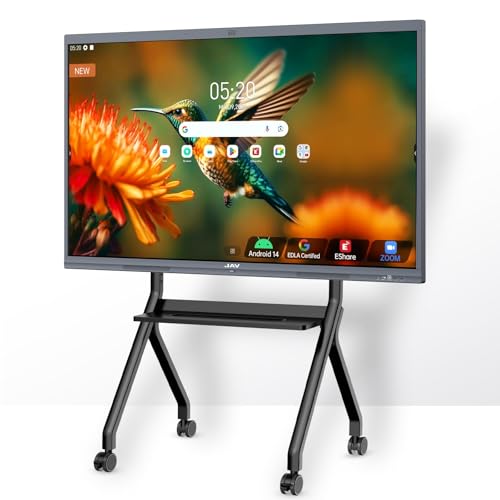
- Google EDLA certification with Workspace access
- 48MP AI camera and 100W soundbar
- Zoom, Meet, Teams, and Webex support
Best For: Hybrid teams that rely on Google services and want a feature-rich meeting display
Large-Room Meeting Display
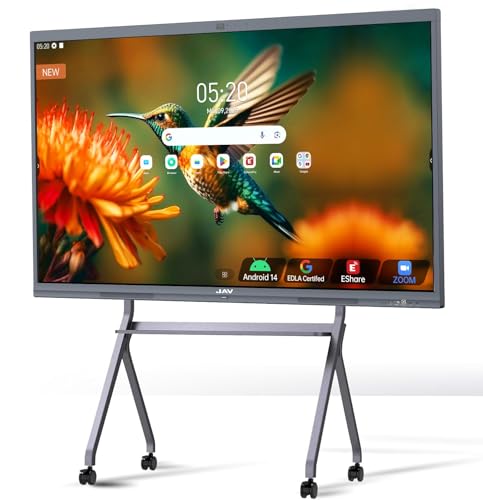
- 65-inch 4K UHD touchscreen for larger rooms
- Google EDLA certification with Google app access
- 8 mics and noise reduction for meetings
Best For: Larger meeting rooms and teams that want more display area for presentations and collaboration
Large Team Collaboration Board – COOLHOOD 65" Smart Board
If you want interactive displays for office meetings that feel closer to a shared workspace than a simple screen, this COOLHOOD smart board is built for that job. The 65-inch 4K panel, 20-point touch, Android 13 system, and built-in collaboration tools make it a practical all-in-one option for presentations, annotation, and remote teamwork.
Best For: Teams that want a large, feature-rich meeting board for annotation, screen sharing, and video calls.
Pros:
- 65-inch 4K UHD display with 20-point multi-touch for group collaboration
- Wireless screen sharing works with Mac, Windows, iOS, and Android
- Built-in meeting tools like voting, screenshot capture, and timer
- Supports Zoom, Google Meet, Microsoft Teams, and Webex
Cons:
- Stand is sold separately; wall mount is included
- Only one HDMI port listed, which may limit wired inputs
- Primarily aimed at meetings and collaboration, not general-purpose signage
This is a strong fit for office teams that need a large interactive surface with practical software features built in. The open app ecosystem and cloud storage support add flexibility, while the 6ms response time and ±1mm precision help keep writing and annotation smooth.
Conference Screen with Signage Flexibility – HORION 55" 4K Interactive Display
For buyers comparing interactive displays for office meetings with a screen that can also handle commercial signage, this HORION 55-inch model stands out for versatility. It combines 4K conferencing features, wireless casting, and dual Wi-Fi stability in a package that can shift between meeting mode and display duty without much setup.
Best For: Offices that need one display for meetings, presentations, and occasional signage use.
Pros:
- 4K LED panel with 320 cd/m² brightness and 178° viewing angles
- K-share wireless casting supports Miracast and AirPlay
- Dual 2.4G/5G Wi-Fi modules designed for stable connectivity
- VESA 300×300 mounting supports portrait or landscape use
Cons:
- No touchscreen listed, so it is less interactive than true whiteboard-style boards
- Brightness is good for indoor use but not positioned as a high-brightness outdoor screen
- Best suited to display and presentation tasks rather than handwriting collaboration
This HORION model makes sense if your team needs a reliable conference screen that can double as signage. The low blue light certification is another practical plus for longer viewing sessions, and the built-in tools help keep meeting setups simple.
Hybrid Meeting Whiteboard System – QIXZOCV 65" Smart Board
If your priority is interactive displays for office meetings with serious built-in collaboration hardware, this QIXZOCV smart board is a compelling option. It combines a 65-inch 4K touchscreen, Android 14, 8GB RAM, 128GB storage, and remote meeting tools so it can function as a true all-in-one conference hub.
Best For: Hybrid teams that want a fully integrated meeting board with camera, mic, and screen sharing.
Pros:
- 65-inch 4K UHD screen with 20-point infrared touch
- 13MP auto-focus camera, 8-array microphone, and dual 20W speakers
- Supports wireless casting plus HDMI and USB-C wired input
- Android 14 with access to apps and cloud storage support
Cons:
- Large all-in-one design may be more than small teams need
- Details mention an Achievable Windows System, but Android 14 is the core platform
- As with many smart boards, setup and room fit should be planned carefully
This model is especially strong for hybrid meetings because the camera, microphones, and speakers are already built in. The split-screen feature and multi-source sharing also make it easier to compare content during presentations or workshops.
Compact AI Presentation Board – Plus 55" Smart Board 4K
For office teams looking at interactive displays for office meetings with strong specs in a more compact size, this Plus 55-inch smart board is well equipped. It offers native 4K UHD resolution, Android 14, 8GB RAM, 256GB storage, and an AI-assisted camera and microphone setup for presentations and collaborative sessions.
Best For: Business meeting rooms that want a compact but capable interactive presentation display.
Pros:
- Native 4K UHD panel with 178° viewing angle
- Android 14 system with 8GB RAM and 256GB storage
- Up to 60 touch points for multi-user collaboration
- Includes 48MP camera, microphone, and two stylus pens
Cons:
- 55-inch size may feel small for larger conference rooms
- OPS module is sold separately if extra computing is needed
- Primary strength is office presentation rather than signage or classroom use
This board is a practical pick if you want a modern meeting display with strong multitouch support and plenty of onboard storage. The included cables and onsite warranty also make it easier to get running in an office environment.
Premium Collaboration Hub – Vibe S1 55" Smart Board
If you’re comparing interactive displays for office meetings, the Vibe S1 is built to combine whiteboarding, app access, and presentation tools in one all-in-one board. Its 55-inch 4K UHD touchscreen, cloud-based whiteboard, and 250+ app ecosystem make it a practical fit for huddle rooms and smaller teams that want a simple collaboration setup.
Best For: Huddle rooms, smaller office teams, and mixed in-person/remote collaboration.
Pros:
- 55″ 4K UHD touchscreen with 10-point infrared touch and less than 8ms response time.
- Cloud-based whiteboard lets users annotate PDFs and third-party apps, then save and share instantly.
- Supports split-screen meetings, Chrome/YouTube references, and video-call notes in real time.
- Runs on VibeOS with access to Google Workspace, Microsoft 365, and 250+ apps.
Cons:
- Smaller 55-inch size may be less ideal for larger conference rooms.
- Designed as a portable, freestanding unit rather than a fixed room installation.
- Only one year of warranty is listed in the supplied details.
The Vibe S1 stands out when you want a flexible meeting display that handles presenting, whiteboarding, and app-based work without adding extra gear. It is especially useful for teams that value an open app ecosystem and fast handoff between in-room and remote collaboration.
Versatile Classroom Display – KEINONE 55" Android 14 Smart Board
For buyers seeking interactive displays for office meetings with built-in Android support, this KEINONE smart board blends a 4K touchscreen, wireless connectivity, and collaboration tools into a single display. It also works as a monitor, projector alternative, and whiteboard, which makes it a useful option for teams that need a multifunction meeting screen.
Best For: Offices, classrooms, and studios that want a versatile 4K interactive board with Android apps.
Pros:
- Google EDLA-certified Android 14 platform with 8GB RAM and 128GB SSD.
- 20 touch points and 6ms latency support multi-user writing and annotation.
- Includes AirPlay, WiFi, Type C, and HDMI connectivity for flexible sharing.
- Built-in educational and whiteboard tools for presenting, writing, and recognition features.
Cons:
- Listed screen size is 50.15 inches, not a full 55-inch panel.
- Only one HDMI port is specified in the supplied details.
- Wall-mount hardware is included, so setup may be less flexible than a freestanding unit.
This KEINONE board is a strong fit if you want an all-purpose display that can handle meetings, casting, and collaborative markup without adding a separate computer. Its mix of Android 14, touchscreen responsiveness, and wireless options makes it practical for shared workspaces that need broad usability.
All-in-One Meeting Center – NewBoard P Series 75" Smart Board
If your priority is a premium interactive display for office meetings, the NewBoard P Series packs the display, camera, microphones, speakers, and Android 14 system into one device. The 75-inch 4K UHD panel, 48MP camera, and 8-mic array are aimed at teams that want a clean hybrid-meeting setup with fewer external accessories.
Best For: Larger conference rooms and hybrid collaboration spaces that need integrated video meeting hardware.
Pros:
- All-in-one design combines display, 4K camera, microphone array, speakers, and Android 14.
- 48MP CMOS sensor with 4K imaging and a 100° field of view for meeting video.
- 8-mic array supports up to 12-meter pickup with echo cancellation and noise suppression.
- 75-inch 4K UHD touchscreen with less than 5ms touch latency and 20-point multi-touch.
Cons:
- Larger 75-inch size may be more than smaller rooms need.
- Built around a full meeting-room solution, so it may be more than a basic whiteboard buyer wants.
- Listed storage is 64GB, which is lower than some competing boards.
The NewBoard P Series is best when you want one display to handle video conferencing, casting, and whiteboarding without external peripherals. It is especially compelling for teams that value integrated room hardware and clear audio/video performance in busy office environments.
Office Meeting Whiteboard – 55″ Smart Board with 4K UHD
If you’re comparing interactive displays for office meetings, this 55-inch smart board is built around presentation, annotation, and video conferencing basics. It combines a 4K UHD touchscreen with a 13MP camera, eight array microphones, and dual 20W speakers, so it’s aimed at teams that want one shared display for collaboration and remote calls.
Best For: Offices that want an all-in-one meeting display with built-in camera and audio.
Pros:
- 4K UHD touchscreen with stable 20-point multi-touch for writing and annotation
- Built-in 13MP camera, 8 array mics, and 2×20W speakers for video conferences
- Supports wireless screen projection for up to 4 users and reverse touch control
- Open app ecosystem lets you install the software your team prefers
Cons:
- Wall bracket is included, but a mobile stand is sold separately
- Feature set is broad, so smaller teams may not use every function
This is a practical choice if you want a meeting-first board that still leaves room for classroom or home use. The emphasis here is on conferencing tools and flexible sharing, rather than just basic display quality.
Google-Ready Collaboration Board – JAV 55" Smart Board Pro
For teams shopping interactive displays for office meetings, this 55-inch JAV board is built to cover conferencing, sharing, and whiteboarding in one package. It adds Google EDLA certification, Android 14, a 48MP AI camera, and a 100W soundbar, making it a strong fit for offices that want tighter integration with Google tools and hybrid meeting platforms.
Best For: Hybrid teams that rely on Google services and want a feature-rich meeting display.
Pros:
- Google EDLA certification with access to Google Play, Workspace, and Education Suite
- 4K UHD touchscreen with 20 touch points, palm erase, and annotation tools
- 8-array microphone system with noise suppression, echo cancellation, and voice enhancement
- Supports Zoom, Google Meet, Microsoft Teams, Webex, and multi-device screen sharing
Cons:
- Many advanced tools may be more than a simple meeting room needs
- At 55 inches, it may suit smaller to mid-sized rooms better than very large spaces
This model stands out if your office already works in Google Drive, Meet, and Workspace. It’s designed to reduce friction in meetings while still offering the teaching-style tools and screen-sharing features teams often want for collaboration.
Large-Room Meeting Display – JAV 65" Smart Board Pro
If your search for interactive displays for office meetings points to a larger room, this 65-inch JAV smart board gives you more screen space without giving up the meeting-focused features. It includes Google EDLA certification, Android 14, a 48MP AI camera, a 100W soundbar, and the same collaboration tools found on the smaller model, but in a format better suited to group visibility.
Best For: Larger meeting rooms and teams that want more display area for presentations and collaboration.
Pros:
- 65-inch 4K UHD touchscreen offers more visibility for shared content
- Google EDLA certification with Google Play, Workspace, and Education Suite access
- 20-point touch, palm erase, PDF annotation, and split-screen support
- 8-array microphones and intelligent noise reduction for clearer meetings
Cons:
- Larger size may be unnecessary for small huddle rooms
- Like other feature-heavy boards, setup may be more involved than a basic display
The extra screen real estate is the main advantage here, especially for presentations, whiteboarding, and side-by-side collaboration. If your office meeting space can handle a 65-inch board, this model is positioned as the more room-friendly version of JAV’s smart meeting setup.
How We Picked the Best Interactive Displays for Office Meetings
We focused on the features that matter most for Interactive Displays for Office Meetings: display size for the room, 4K clarity, touch accuracy, built-in collaboration tools, and ease of setup. We also gave more weight to models with strong meeting features such as integrated cameras, microphones, wireless sharing, and business-friendly operating systems.
Quick Comparison
For smaller huddle rooms, 55-inch models are often the best fit. Mid-size conference rooms usually benefit from 65-inch displays, while larger boardrooms may need a 75-inch option for visibility across the table. If your team runs frequent video calls, look for built-in camera and audio hardware so the display can handle meetings without extra peripherals.
Key Buying Factors for Interactive Displays for Office Meetings
Room Size and Viewing Distance
The biggest mistake buyers make is choosing a screen that is too small. A 55-inch unit works well for compact rooms, but a 65-inch or 75-inch screen is usually better when several people need to read charts, notes, or shared documents from across the room.
Touch and Collaboration Features
Look for responsive multi-touch support, smooth annotation tools, and easy whiteboarding. These features help teams brainstorm, review files, and mark up presentations without switching devices.
Connectivity and Platform Support
Check for HDMI, USB, wireless casting, and support for the apps your team already uses. Android-based and EDLA-certified systems can simplify access to collaboration apps, while Chrome OS options may appeal to teams already using Google Workspace.
Camera, Mics, and Audio
If the display will be used for hybrid meetings, built-in cameras and noise-canceling microphones can be a major advantage. They reduce cable clutter and make the room easier to keep organized.
Who Should Buy Which Interactive Displays for Office Meetings?
Smaller teams and hot-desking spaces should usually start with a 55-inch model. Medium conference rooms and growing departments will often get the best balance from a 65-inch display. Large meeting spaces, executive boardrooms, and hybrid collaboration hubs should consider a 75-inch display with stronger integrated conferencing hardware.
If your priority is simple collaboration, choose a model with reliable touch and strong app support. If your priority is video meetings, prioritize camera and microphone quality. Matching the display to your room and workflow matters more than chasing the biggest spec sheet.