
Smart whiteboards can turn ordinary meetings into faster, more interactive sessions. For business offices, the right model makes it easier to present, annotate, share content, and keep hybrid teams engaged.
In this roundup, we focused on display size, touch response, connectivity, built-in computing, and features that matter in real office workflows.
Best 10 Smart Whiteboards for Business Offices Picks for 2026
Enterprise Collaboration Board
COOLHOOD 65" 4K Smart Board for Office

- 65-inch 4K touchscreen with 20-point touch
- Wireless sharing for Mac, Windows, iOS, and Android
- Built-in voting, timer, QR sharing, and conferencing support
Best For: Office teams needing a fixed wall-mounted collaboration board
Hybrid Meeting Hub
QIXZOCV 75" Smart Board with Camera
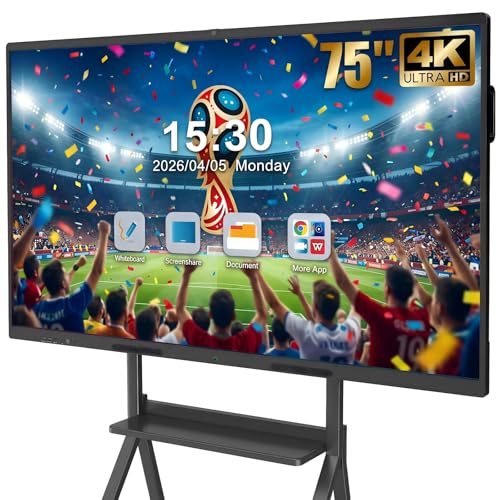
- 75-inch 4K board with 20-point touch and split-screen
- Built-in camera, 8-array mic, and dual 20W speakers
- Wireless and wired sharing with Android 14
Best For: Hybrid meeting rooms that need an all-in-one conferencing board
Large-Screen Workspace Board
86" Android 14 Smart Whiteboard

- 86-inch 4K UHD touchscreen with strong brightness
- Android 14, 8GB RAM, and 128GB storage
- Wide front, rear, and bottom port selection
Best For: Large office rooms and training spaces that need maximum visibility
Boardroom Conference Board
HORION 65" Pro Smart Whiteboard
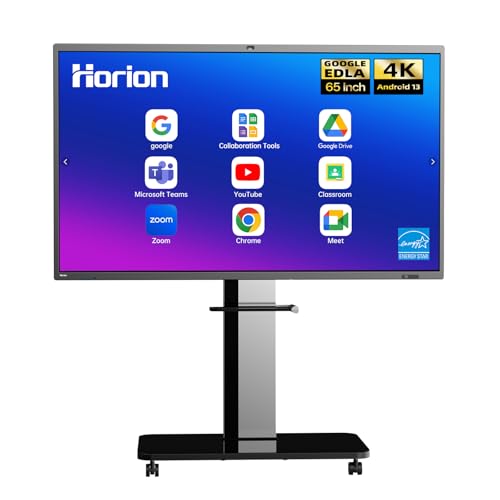
- 50-point touch with low-latency writing and casting
- 48MP camera, 8-mic array, and 3 speakers
- Android 13 with Google EDLA, Wi-Fi 6, and 128GB storage
Best For: Boardrooms that need premium conferencing and wireless casting
Flagship 75-Inch Office Board
75'' Android 14 4K Smart Board for Offices

- 75-inch 4K UHD touchscreen with 400+ nits brightness
- Android 14 with 8GB RAM and 128GB storage
- Built-in video conferencing hub and wide port selection
Best For: Large offices and meeting rooms needing an all-in-one collaboration display
Wall-Mounted Office Collaborator
55'' 4K Smart Whiteboard for Office

- 55-inch 4K UHD display with Android-based system
- Screencasting from major device platforms plus HDMI
- Enterprise security and fleet management support
Best For: Small to mid-sized offices that want wall-mounted collaboration with IT control
AI-Ready Meeting Display
55'' 4K Smart Board with Camera

- Native 4K display with Android 14 and 8GB/256GB specs
- Built-in 48MP camera, microphone, and AI assistant
- Up to 60 touch points with OPS expansion slot
Best For: Teams that need a meeting-ready board with camera and AI collaboration tools
Collaboration Hub Pick
55'' 4K Interactive Smart Board for Office Teams

- 4K UHD touchscreen with eye-care design
- Android 14 with 8GB RAM and 128GB storage
- Built-in conferencing tools and 20-point touch
Best For: Small office teams needing an all-in-one collaboration board
Hybrid Meeting Pick
65'' 4K Smart Board with Camera for Office Meetings

- 65-inch 4K UHD touchscreen with 20-point touch
- Built-in HD camera and microphone for conferencing
- Wireless sharing supports Windows, Mac, iOS, and Android
Best For: Hybrid offices and conference rooms
Boardroom Display Pick
86'' 4K Smart Board for Large Office Rooms
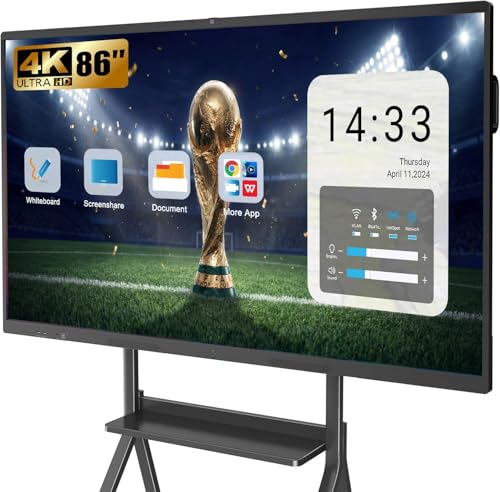
- 86-inch 4K UHD display for high visibility
- Built-in 13MP camera, mics, and speakers
- Open app ecosystem with multi-user wireless projection
Best For: Large boardrooms and executive meeting spaces
Enterprise Collaboration Board – COOLHOOD 65" 4K Smart Board for Office
If you’re comparing smart whiteboards for business offices, this 65-inch COOLHOOD model is built for teams that want a fast, app-friendly all-in-one board. It combines 4K touch, Android 13, wireless sharing, and built-in collaboration tools in a package that can handle presentations, annotation, and remote meetings without extra gear.
Best For: Office teams that want a versatile 65-inch board for meetings, screen sharing, and hybrid collaboration.
Pros:
- 65-inch 4K display with 20-point touch for interactive work
- Wireless sharing across Mac, Windows, iOS, and Android
- Built-in tools like smart voting, screenshot, timer, and QR file sharing
- Zoom, Google Meet, Teams, and Webex support for conferencing
Cons:
- Stand is sold separately if you need a mobile setup
- Wall mount is included, so it’s best suited to fixed installation
Overall, this is a strong fit for offices that want a straightforward collaboration hub with useful meeting tools and open app flexibility. The 128GB storage and responsive writing make it practical for day-to-day business use.
Hybrid Meeting Hub – QIXZOCV 75" Smart Board with Camera
For businesses that want smart whiteboards for business offices with stronger conferencing hardware, this 75-inch QIXZOCV board is positioned as an all-in-one meeting solution. It pairs a 4K 20-point touch display with Android 14, a camera, microphones, speakers, and wireless or wired sharing to keep meetings moving smoothly.
Best For: Teams that need a large-format board for hybrid meetings, screen sharing, and collaborative presentations.
Pros:
- Large 75-inch 4K UHD display with 20-point infrared touch
- Built-in 13MP camera, 8-array mic, and dual 20W speakers for remote meetings
- Supports Miracast, AirPlay, HDMI, and USB-C sharing
- Android 14 with 128GB storage and cloud integration
Cons:
- Large size may be more than smaller conference rooms need
- Feature-rich setup may be overkill for simple whiteboarding only
This model makes the most sense when the board itself needs to handle presentation, collaboration, and video calls in one place. The split-screen function and open app system add flexibility for office workflows.
Large-Screen Workspace Board – 86" Android 14 Smart Whiteboard
This 86-inch option is the biggest of the group and is aimed at teams that need a highly visible display for presentations, training, and collaboration. Among smart whiteboards for business offices, it stands out for its large 4K panel, Android 14 system, and a broad set of connectivity options that support mixed environments.
Best For: Large offices, training rooms, and spaces that need a big, highly connected interactive display.
Pros:
- Extra-large 86-inch 4K UHD touchscreen with 400+ nits brightness
- Android 14 with 8GB RAM and 128GB storage
- Built-in video conferencing and 20-point infrared touch
- Convenient front ports plus extensive rear and bottom connectivity
Cons:
- Very large footprint may not suit smaller meeting rooms
- Most useful when you need many ports and a bigger shared display
If your office needs a centerpiece board for group collaboration, this one is designed for scale and flexibility. Its connectivity layout is especially useful for teams that switch between modern and legacy equipment.
Boardroom Conference Board – HORION 65" Pro Smart Whiteboard
This HORION model is built for offices that want a polished boardroom experience from a 65-inch smart display. It focuses on fast collaboration, wireless casting with touchback, and enterprise-style video conferencing, making it a practical choice in the smart whiteboards for business offices category.
Best For: Boardrooms and professional meeting spaces that need secure, high-end collaboration features.
Pros:
- 50-point touchscreen with less than 30ms latency
- 48MP camera, 8-mic array with AI noise reduction, and three 20W speakers
- Android 13 with Google EDLA, Wi-Fi 6, Bluetooth 5.3, and 128GB storage
- Wireless casting includes touchback for controlling your device from the board
Cons:
- 65-inch size may be limiting for larger training rooms
- Premium conferencing features may exceed basic whiteboard needs
For office teams that value smooth casting, strong audio-video hardware, and a business-friendly ecosystem, this is a well-rounded option. The included wall mount, styluses, and 18-month warranty add practical value.
Flagship 75-Inch Office Board – 75'' Android 14 4K Smart Board for Offices
If you want smart whiteboards for business offices that can handle presentations, hybrid meetings, and live annotation, this 75-inch model brings a lot of capability in one display. Its Android 14 platform, 4K UHD touchscreen, and built-in video conferencing features make it a strong fit for rooms where teams need quick collaboration and easy device connections.
Best For: Large meeting rooms, boardrooms, and teams that want an all-in-one collaboration display.
Pros:
- Android 14 with 8GB RAM and 128GB storage for smooth everyday use.
- True 4K UHD touchscreen with over 400 nits brightness and eye-care/flicker-free tech.
- Built-in video conferencing hub supports calls, annotation, and real-time document editing.
- Front, rear, and bottom ports offer broad connectivity for modern and legacy setups.
Cons:
- The 75-inch size may be too large for smaller offices or compact meeting spaces.
- Its many ports and features may be more than casual users need.
Overall, this is a versatile office smart board built for teams that want a large-format display with strong connectivity and collaboration tools. It stands out most in environments where meetings, training, and screen sharing happen often.
Wall-Mounted Office Collaborator – 55'' 4K Smart Whiteboard for Office
This 55-inch option is a practical pick for smart whiteboards for business offices that need a manageable size and solid everyday features. It runs on Android 14, supports screencasting and HDMI input, and includes wall-mount hardware, making it easier to set up in a meeting room or office space.
Best For: Offices that want a wall-mounted collaboration display with secure management features.
Pros:
- Android-based system with 8GB RAM and 128GB storage for smooth office use.
- Supports screencasting from Mac, Windows, iOS, and Android devices, plus HDMI input.
- Enterprise security and fleet management tools are included for IT-admin control.
- Wall mount hardware is included for easier installation.
Cons:
- The 55-inch screen is better suited to small and mid-sized rooms than large boardrooms.
- Feature set is strong, but it does not include the extra camera-focused collaboration tools found on some rivals.
For teams that want a dependable office whiteboard with casting, annotation, and IT management features, this model is well balanced. It focuses on core business needs without pushing into overly complex territory.
AI-Ready Meeting Display – 55'' 4K Smart Board with Camera
For smart whiteboards for business offices that need stronger collaboration tools, this 55-inch board adds a built-in camera, microphone, and AI assistant on top of 4K touch display performance. It is designed for office presentations, interactive communication, and multitasking, while still working as a standalone Android 14 system.
Best For: Office teams that want a presentation board with built-in video and AI collaboration features.
Pros:
- Native 4K UHD display with 178° viewing angle and high color support.
- Android 14 with 8GB RAM and 256GB storage for multitasking and file handling.
- Built-in 48MP camera and microphone support interactive meetings and presentations.
- Supports up to 60 touch points and includes an OPS slot for future expansion.
Cons:
- Like other 55-inch boards, it may feel small for large conference rooms.
- Some buyers may not need the camera and AI features for basic whiteboarding tasks.
This model is the most collaboration-focused of the group, especially for offices that value video-enabled meetings and smart presentation features. If your team wants more than a standard touch display, it offers a strong mix of performance and built-in communication tools.
Collaboration Hub Pick – 55'' 4K Interactive Smart Board for Office Teams
If you want smart whiteboards for business offices that double as a meeting and collaboration display, this 55-inch model is built for versatile day-to-day use. It pairs a 4K UHD touchscreen with Android 14, 8GB RAM, and 128GB storage, so it can handle apps, presentations, annotation, and shared work without feeling stripped down.
Best For: Small to mid-sized offices that need an interactive board for meetings, presentations, and video calls.
Pros:
- 4K UHD display with over 400 nits brightness for clear office viewing
- Android 14 with 8GB RAM and 128GB storage for smooth app use
- Built-in video conferencing hub supports calls, annotation, and real-time editing
- 20-point infrared touch with 6ms response and handwriting recognition
Cons:
- 55-inch size may feel small for larger conference rooms
- Many connection ports can be more than some offices need
Overall, this is a practical pick for teams that want an all-in-one board for collaboration rather than a basic display. Its front-access ports and broad connectivity make it especially convenient in active meeting spaces.
Hybrid Meeting Pick – 65'' 4K Smart Board with Camera for Office Meetings
For smart whiteboards for business offices that need a balanced size and strong meeting features, this 65-inch interactive board is a solid middle ground. It combines a 4K UHD 20-point touchscreen with Android 13, 8GB RAM, and 128GB storage, plus built-in camera and microphone hardware for conference use.
Best For: Offices that want a feature-rich board for presentations, wireless sharing, and hybrid meetings.
Pros:
- 65-inch 4K UHD screen gives teams more viewing space than a smaller board
- Built-in HD camera and microphone simplify video conferencing
- Wireless screen mirroring works with Windows, Mac, iOS, and Android
- Android 13 with 8GB RAM and 128GB storage supports app-based workflows
Cons:
- Large size may be better suited to dedicated meeting rooms than compact offices
- No specific brightness figure is provided in the notes
This model stands out if your office prioritizes hybrid collaboration and easy content sharing. It covers the basics well and adds the kind of built-in conferencing hardware that reduces setup clutter.
Boardroom Display Pick – 86'' 4K Smart Board for Large Office Rooms
If your office needs a bigger collaboration surface, this 86-inch option is one of the more expansive smart whiteboards for business offices in the group. It offers a 4K UHD touchscreen, Android 13, and an open app ecosystem, with a built-in 13MP camera, 8-array mics, and 2 x 20W speakers designed for presentations and video meetings.
Best For: Large conference rooms and boardrooms that need a high-visibility interactive display.
Pros:
- 86-inch 4K UHD screen provides a large viewing area for group sessions
- Built-in 13MP camera, microphones, and speakers support meeting use
- Open app ecosystem lets users download compatible software as needed
- Supports wireless projection for up to 4 users and reverse touch control
Cons:
- Very large footprint makes it better for dedicated rooms than flexible setups
- Android 13 is not the newest OS version in this roundup
For organizations that need maximum screen presence and integrated conference hardware, this is the most boardroom-ready option here. The included wall mount is useful, though buyers needing mobility may need to add a stand separately.
How We Picked the Best Smart Whiteboards for Business Offices
We prioritized models that fit everyday office use, not just classroom demos. That means reliable touch performance, clear 4K panels, solid wireless and wired connectivity, and enough processing power to handle collaboration apps, screen sharing, and digital notes without lag.
We also looked at practical office details such as screen size options, camera and microphone support for video meetings, multi-user interaction, and operating-system flexibility. For Smart Whiteboards for Business Offices, the best choice is usually the one that matches room size and meeting style first.
Quick Comparison: Which Size Works Best?
55-inch boards are better for small huddle rooms, one-on-one presentations, or compact offices. 65-inch models tend to be the most balanced for standard meeting rooms. 75-inch and 86-inch boards are better for larger conference rooms, training spaces, and situations where people may be seated farther from the screen.
If your team uses remote calls often, features like a built-in camera, microphone array, and easier app access can matter as much as display size.
Key Buying Factors for Smart Whiteboards for Business Offices
Display Size and Room Fit
Choose a size based on viewing distance and how many people will gather around the board. Larger is not always better if the room is small, but undersizing can make content hard to read during presentations.
Touch Accuracy and Multi-User Support
Look for responsive multi-touch capability so multiple people can annotate or navigate at once. This is especially useful in brainstorming sessions and interactive workshops.
Connectivity and Collaboration Tools
Strong support for HDMI, Wi-Fi, Bluetooth, and screen sharing keeps meetings moving. If your office uses mixed devices, compatibility is essential.
Operating System and App Access
Android-based boards are common, but the quality of app support, update availability, and ease of use can vary. If your team relies on cloud tools or conferencing apps, make sure the board can support them cleanly.
Camera, Audio, and Meeting Readiness
For hybrid offices, integrated cameras and microphones can reduce setup time and equipment clutter. Audio and video quality should be good enough for regular calls without requiring extra accessories.
Who Should Buy Which Smart Whiteboards for Business Offices?
Small offices and huddle rooms should lean toward 55-inch options. Mid-size teams will usually get the best overall value from 65-inch Smart Whiteboards for Business Offices. Larger conference rooms, training centers, and collaboration-heavy teams should consider 75-inch or 86-inch displays for better visibility and impact.
If your office needs frequent video conferencing, prioritize boards with built-in camera and mic features. If your focus is whiteboarding, file sharing, and in-room collaboration, a simpler model with strong touch response and reliable connectivity may be the smarter purchase.