
Choosing an interactive display for a training room is about more than screen size. The best models make it easier to present, annotate, share content, and keep a room of learners engaged.
In this roundup, we focus on practical features that matter in real training environments: touch responsiveness, wireless casting, app support, and ease of setup.
Best 10 Interactive Whiteboards for Training Rooms Picks for 2026
Premium Collaboration Pick

- 65-inch 4K UHD screen with 20-point touch
- Wireless sharing plus QR file distribution
- Zoom, Meet, Teams, and Webex support
Best For: Wall-mounted training rooms that need a feature-rich collaboration display
Secure Hybrid Training Pick
Dornium 55" EDLA Smart Whiteboard
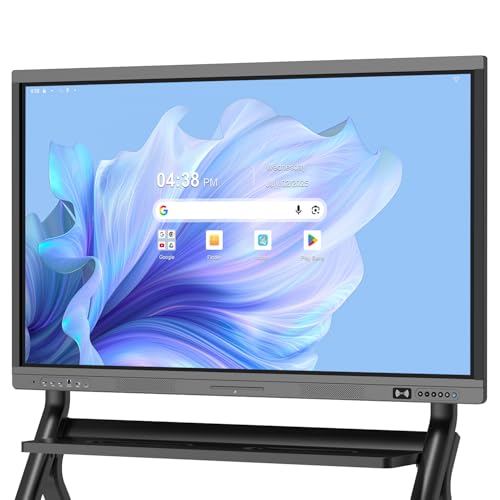
- Google EDLA-certified with OTA updates and Play Store access
- 4K anti-glare display with 20-point touch
- HDMI, Type-C, VGA, USB, and LAN connectivity
Best For: Hybrid training rooms that need secure Google ecosystem access
Budget-Friendly Office Pick
EUNIVON 55" 4K Smart Whiteboard

- Screencasts from Mac, Windows, iOS, and Android
- Android 14 with open app ecosystem
- Wall mount included for fixed setup
Best For: Smaller training rooms that need core whiteboard features
Enterprise Conference Pick
Shiarffe R9 65" EDLA Smart Board

- Google EDLA-certified with no subscription fees
- 65-inch 4K anti-glare IPS touchscreen
- Selected sizes add camera and microphone array
Best For: Enterprise training rooms that mix live collaboration and video meetings
Classroom-Ready Smart Board
Smart Board, 55'' 4K UHD Touch Display

- Android 14 with 8GB RAM and 128GB storage
- Screens from Mac, Windows, iOS, or Android
- Annotate on a 4K UHD touchscreen
Best For: Training rooms and classrooms that need easy screen sharing and annotation
Secure Collaboration Board

- EDLA-certified Android 14 with security features
- Built-in camera for hybrid training and meetings
- 4K anti-glare touchscreen with wireless sharing
Best For: Hybrid training rooms that need secure sharing and remote collaboration
Large-Room Training Board
HORION 65-Inch 4K Digital Whiteboard
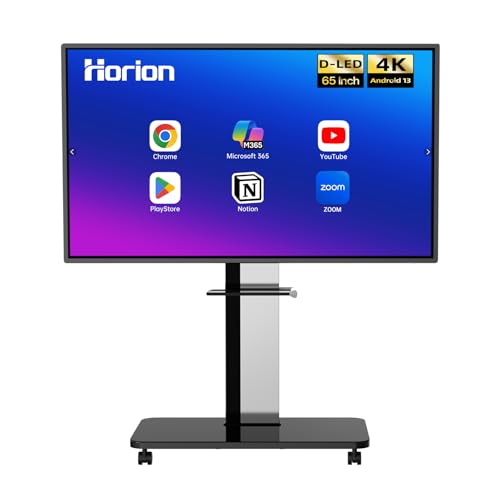
- 65-inch 4K anti-glare display with 40-point touch
- Four-way split-screen sharing with touchback control
- Android 13 with Google Play and Wi-Fi 5
Best For: Larger training rooms that need a bigger display and group collaboration
All-in-One Collaboration Hub
65" Smart Board for Classroom Office Home

- Integrated computer, 4K display, and whiteboard tools
- 20-point touch for multi-user writing and collaboration
- Camera, mics, and speakers support hybrid training
Best For: Training rooms that need an integrated hybrid collaboration board
Google-Certified Large Format Board

- Google EDLA-certified with Google Workspace access
- 75-inch 4K screen for large-room visibility
- 50-point touch and 16-device casting support
Best For: Training rooms that use Google tools and need a large collaborative display
AI-Powered Meeting Board
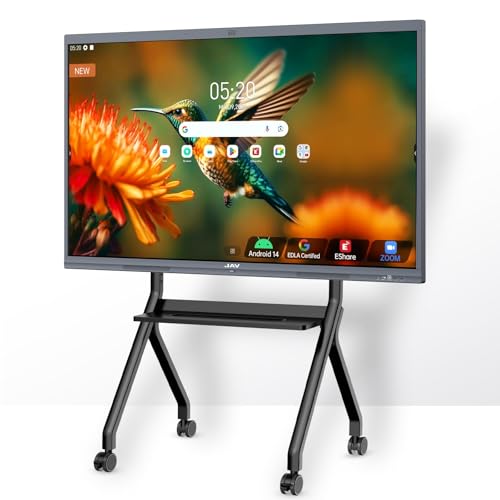
- EDLA-certified with Google apps and Workspace support
- 48MP AI camera plus 100W soundbar for meetings
- OCR, PDF annotation, and wireless sharing tools
Best For: Training rooms that need strong audio, AI tools, and Google integration
Premium Collaboration Pick – COOLHOOD 65" 4K Smart Board
If you’re comparing interactive whiteboards for training rooms, this COOLHOOD 65-inch model is built for smooth presenting, annotation, and screen sharing in a large-room format. Its 4K UHD display, 20-point multi-touch, and Android 13 platform make it a practical fit for teams that need a responsive board for live instruction, remote sessions, and everyday office use.
Best For: Training rooms that need a wall-mounted 65-inch board for collaboration, casting, and video meetings.
Pros:
- 65-inch 4K UHD touchscreen with 20-point multi-touch for group use
- Wireless screen sharing works with Mac, Windows, iOS, and Android
- Built-in presentation tools like voting, screenshots, timer, and annotation
- Supports Zoom, Google Meet, Microsoft Teams, and Webex
Cons:
- Wall mount is included, but a stand is sold separately
- Only 1 HDMI port may limit hardwired source options
- Best suited for fixed installations rather than portable use
Overall, this is a strong pick if your training room needs a feature-rich interactive board with broad app support and easy file sharing. It favors collaboration and presentation workflow over portability.
Secure Hybrid Training Pick – Dornium 55" EDLA Smart Whiteboard
For buyers focused on interactive whiteboards for training rooms, this 55-inch Dornium board stands out for Google EDLA certification, Android 14, and strong connectivity. It combines anti-glare 4K visuals, 20-point touch, and cross-device sharing to support teaching sessions, hybrid meetings, and regular office presentations.
Best For: Training rooms that need Google-based app access, security features, and flexible connectivity.
Pros:
- Google EDLA-certified with Play Store, Google Drive, and OTA updates
- 4K anti-glare tempered glass with 20-point touch and ±1mm accuracy
- Wireless sharing, HDMI, and QR code sharing for documents and notes
- Wide port selection including HDMI, DP, Type-C, VGA, USB, and LAN
Cons:
- Stand mount is not included and must be bought separately
- 55-inch size may feel small in larger training rooms
- Heavier than smaller classroom displays at 59.5 pounds
This is a smart choice if your team wants an enterprise-oriented board with managed updates and broad device compatibility. It leans toward secure, practical training use rather than flashy extras.
Budget-Friendly Office Pick – EUNIVON 55" 4K Smart Whiteboard
If you need interactive whiteboards for training rooms without moving up to a 65-inch format, this 55-inch EUNIVON model covers the essentials well. It supports screencasting, HDMI input, annotation, and an open Android ecosystem, making it a practical display for classrooms, meeting rooms, and office training sessions.
Best For: Smaller training rooms that want a straightforward Android-based smart board for presentations and annotation.
Pros:
- Supports screencasting from Mac, Windows, iOS, and Android devices
- Android 14 with open app ecosystem for flexible training workflows
- IT-friendly security management with fleet management tools
- Wall mount included for easier fixed installation
Cons:
- Smaller 55-inch screen may not suit larger training spaces
- Fewer premium collaboration details listed than some higher-end models
- Designed mainly for wall mounting rather than mobile use
This model makes sense when your priority is reliable presentation and annotation features in a compact size. It offers the basics a training room needs without overcomplicating setup.
Enterprise Conference Pick – Shiarffe R9 65" EDLA Smart Board
When training rooms need a larger-format display with enterprise features, this Shiarffe R9 65-inch board is built for real-time collaboration and easy room integration. It combines Google EDLA certification, 4K anti-glare touch, wireless mirroring, and optional conference hardware on selected sizes, which makes it suitable for team sessions, workshops, and hybrid training.
Best For: Training rooms that need a premium 65-inch board with security, collaboration, and video meeting support.
Pros:
- Google EDLA-certified with no subscription fees
- 65-inch 4K IPS touchscreen with anti-glare glass and 20-point touch
- Wireless mirroring plus HDMI for flexible meeting-room setups
- Selected sizes include built-in camera and microphone array for video calls
Cons:
- Conference camera and mic array are only on selected sizes
- Mobile cart is sold separately if you want a movable setup
- Large 65-inch format may be more than small rooms need
This is a strong enterprise-style option for teams that want a polished room display with less software overhead. It is especially appealing if your training sessions often blend in-room instruction with remote participants.
Classroom-Ready Smart Board – Smart Board, 55'' 4K UHD Touch Display
If you want interactive whiteboards for training rooms that can also handle everyday office collaboration, this 55-inch model is built for flexible use. It runs on Android 14 with 8GB RAM and 128GB storage, supports screencasting from Mac, Windows, iOS, and Android devices, and lets you annotate directly on the 4K display during presentations or video calls.
Best For: Training rooms, classrooms, and business teams that want an Android-based board with easy screen sharing and annotation.
Pros:
- 4K UHD touchscreen with direct annotation for presentations and lessons
- Supports screencasting plus HDMI input for flexible device connections
- Android-based system with open app ecosystem for work or education
- Includes wall mount hardware for straightforward installation
Cons:
- Built as a 55-inch display, which may be small for larger rooms
- No built-in camera is mentioned in the supplied product details
- Best suited to wall mounting rather than portable use
This is a practical pick if your training space needs a straightforward smart board that combines touch writing, app flexibility, and broad device compatibility. It is especially appealing when you want a single display for presenting, annotating, and sharing content without adding a separate conferencing stack.
Secure Collaboration Board – JAV 55-Inch EDLA Smart Board
For interactive whiteboards for training rooms where security and smooth collaboration matter, this 55-inch JAV board brings together EDLA-certified Android 14, wireless sharing, and a built-in camera. It supports Mac, Windows, iOS, and Android devices, and its 4K anti-glare touchscreen is designed for clear viewing and responsive annotation in bright spaces.
Best For: Training rooms, classrooms, and hybrid meeting spaces that need secure app access and built-in remote collaboration tools.
Pros:
- EDLA certification and security features like screen lock and USB password protection
- Built-in camera for video conferencing and remote collaboration
- 4K anti-glare display with 8GB RAM and 128GB storage
- Wireless screen sharing and open app ecosystem for flexible use
Cons:
- At 55 inches, it may be better for smaller training rooms than large auditoriums
- Detailed conferencing accessories are not included in the supplied notes
- Wireless collaboration depends on compatible devices and setup
This model makes sense when your training room needs more than a basic display. The combination of security features, built-in camera, and broad app support gives it an edge for teams that run presentations, hybrid sessions, and shared file workflows from one screen.
Large-Room Training Board – HORION 65-Inch 4K Digital Whiteboard
If your interactive whiteboards for training rooms need a larger canvas, this 65-inch HORION model is the roomiest option here. It pairs a 4K anti-glare 40-point touchscreen with Android 13, Google Play, wireless screen sharing, and touchback control, making it well suited to multi-user collaboration and presentation-heavy sessions.
Best For: Larger training rooms and office spaces that need multi-user writing, wireless sharing, and a bigger display.
Pros:
- 65-inch 4K anti-glare display with 40-point touch for group input
- Wireless screen sharing with four-way split-screen collaboration
- Touchback control lets you operate a laptop from the display
- Includes wall mount, remote, two styluses, and an 18-month warranty
Cons:
- Heavier and larger than the 55-inch options
- External camera and mic are sold separately for conferencing
- Designed for wall mounting rather than portable deployment
This is the strongest fit when room size and group interaction are top priorities. The bigger screen, multi-user touch support, and split-screen sharing make it easier for trainers to present, annotate, and compare content without feeling cramped.
All-in-One Collaboration Hub – 65" Smart Board for Classroom Office Home
If you want interactive whiteboards for training rooms that minimize setup and maximize features, this 65-inch all-in-one smart board is built to do exactly that. It combines a 4K display, Android 14, built-in computing, touch interaction, and conferencing tools in a single unit, so teams can present, annotate, and meet without adding extra hardware.
Best For: Training rooms that need an all-in-one board with strong hybrid meeting and collaboration features.
Pros:
- All-in-one design combines the display, computer, whiteboard software, camera, microphones, and speakers.
- 20-point infrared touch supports multiple people writing, drawing, and zooming at the same time.
- 13MP autofocus camera, 8-array microphone, and dual 20W speakers support remote lessons and meetings.
- Wireless casting plus HDMI/USB-C wired sharing gives flexible connection options.
Cons:
- 65-inch size may be smaller than some larger training room installations.
- Android-based setup may not suit buyers who want a simple display-only panel.
Overall, this board fits well in training environments that value a streamlined, integrated experience over piecing together separate devices. It is especially appealing when hybrid instruction and fast content sharing matter as much as in-room collaboration.
Google-Certified Large Format Board – 75 Inch 4K Smart Board
For interactive whiteboards for training rooms where app access and team collaboration matter, this 75-inch Google EDLA-certified board stands out. It runs Android 14, supports Google Play and Google Workspace, and offers a large 4K canvas with multi-user touch and wireless casting for modern training sessions.
Best For: Training rooms that rely on Google apps, large-screen visibility, and shared writing.
Pros:
- Google EDLA certification provides access to Google Play, Google Workspace, and Google Education Suite.
- 75-inch 4K panel with 178-degree viewing angle improves visibility in larger rooms.
- 50-point touch with support for up to 10 simultaneous writers encourages group participation.
- Wireless casting can connect up to 16 devices, useful for mixed-device training groups.
Cons:
- 8 GB RAM and 64 GB ROM are solid, but not as spacious as higher-storage alternatives.
- Glossy screen finish may be less ideal in bright rooms than a matte surface.
This is a strong fit when you want a room-friendly format with broad Google ecosystem support. The combination of large-screen readability, multi-user touch, and flexible casting makes it practical for collaborative instruction.
AI-Powered Meeting Board – JAV 55" Smart Board Pro
If you’re comparing interactive whiteboards for training rooms, this 55-inch smart board is focused on presentation, collaboration, and clear communication. It pairs Google EDLA certification with Android 14, AI teaching tools, 20-point touch, and conferencing features, making it a versatile fit for instruction and team sessions.
Best For: Training rooms that need AI-assisted collaboration, strong audio, and Google ecosystem support.
Pros:
- Google EDLA certification unlocks Google TV, YouTube, Google Workspace, and Google Play access.
- 48MP AI camera, 8-array microphone, and 100W soundbar support clearer meetings and presentations.
- 20-point touch, palm erase, OCR, PDF annotation, and split-screen tools improve interactive use.
- Wireless sharing options include AirPlay, Miracast, Chromecast, and E-Share Pro software.
Cons:
- 55-inch size is more compact than other boards in this roundup.
- Brightness and color gamut are more modest than some larger premium alternatives.
This model is a strong choice when the training room needs both teaching tools and meeting-room polish. Its audio, camera, and sharing features make it especially useful for hybrid instruction and collaborative demos.
How We Picked These Interactive Whiteboards for Training Rooms
We focused on displays that fit common training-room needs: clear 4K panels, reliable multi-touch input, built-in wireless sharing, and enough onboard hardware to run presentations without constant lag. We also favored models with Google EDLA or Android support, since that usually makes app access, account management, and classroom-style collaboration easier.
For Interactive Whiteboards for Training Rooms, we gave extra weight to room-friendly sizes, anti-glare screens, and connectivity options that reduce setup friction for instructors and AV teams.
Quick Comparison: What Matters Most
Choose the size first: 55-inch boards work well in smaller training rooms, 65-inch models suit most standard spaces, and 75-inch displays are better for larger rooms or wider seating layouts. Then compare touch point count, storage, RAM, and casting tools if you plan to switch between slides, whiteboarding, video, and live demos.
Best for Smaller Rooms
A 55-inch board is usually the most space-efficient choice when participants sit close to the display.
Best for Mid-Sized Rooms
A 65-inch option is often the best balance of visibility and installation flexibility.
Best for Larger Training Spaces
A 75-inch model can improve readability for back-row viewers and hybrid sessions.
Key Buying Factors for Interactive Whiteboards for Training Rooms
Touch performance: Look for low-latency touch, good palm rejection, and enough touch points for collaborative exercises. This keeps annotation and group work smooth.
Display quality: 4K resolution is the baseline for readable text, charts, and detailed software demos. Anti-glare coating helps in bright meeting rooms.
Software ecosystem: EDLA-certified or Google Play-enabled boards are easier to integrate into modern training workflows. Check whether your preferred apps, cloud tools, and casting methods are supported.
Performance headroom: More RAM and storage help if the board will run multiple apps, browser tabs, or offline content. That matters in long sessions where reliability is non-negotiable.
Connectivity: Wireless screen sharing, HDMI, USB, and network options should match your training format. If presenters rotate often, simpler casting and input switching save time.
Mounting and room fit: Make sure the board size suits sightlines, wall space, and audience distance. Oversized displays can overwhelm small rooms, while undersized ones hurt visibility.
Who Should Buy Which Interactive Whiteboards for Training Rooms?
Small teams and compact rooms should prioritize a 55-inch model with solid casting and touch response. Most corporate training rooms will be well served by a 65-inch board with EDLA support and strong multitasking performance. Larger learning spaces, demo labs, and hybrid training environments should consider a 75-inch screen for better visibility and room-scale collaboration.
If your priority is simplicity, choose the board with the easiest setup and best app compatibility. If your priority is collaboration, focus on touch quality, screen clarity, and smooth wireless sharing. The best Interactive Whiteboards for Training Rooms are the ones that remove friction for both presenters and participants.