
Choosing the right touchscreen whiteboard can make meetings faster, cleaner, and far more collaborative. The best options turn a conference room into a shared workspace for brainstorming, presenting, and hybrid calls.
In this roundup, we focus on models that balance display quality, touch response, software support, and easy setup for real business use.
Best 10 Touchscreen Whiteboards for Conference Rooms Picks for 2026
All-in-One Collaboration Hub
65" Smart Board for Classroom Office Home

- 4K UHD display with 20-point touchscreen
- Built-in camera, mic, and dual speakers
- Wireless/wired sharing with split-screen support
Best For: Conference rooms that need an all-in-one meeting and whiteboard system
Large-Screen Presenter
70 Inch 4k Smart Board Touch Screen

- 70-inch 4K UHD screen for roomy presentations
- 40-point touch for collaborative input
- Wall-mount setup with scratch-resistant finish
Best For: Big conference rooms needing a large interactive display
AI Meeting Board
65" Touchscreen AI Smart Board

- 48MP AI camera with mic and dual speakers
- 40-point touch with low-latency writing
- Wireless casting, Android 14, and Wi-Fi 6
Best For: Hybrid meetings and teams that want advanced collaboration tools
Privacy-First Conference Display
HORION 65-Inch 4K Digital Whiteboard
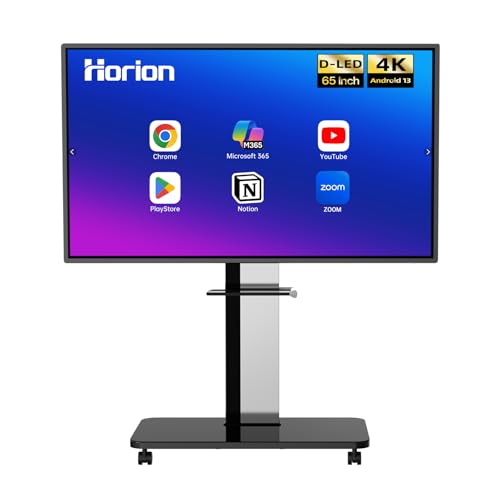
- Anti-glare 4K display with 40-point touch
- Wireless sharing and touchback control
- Android 13 with Google Play and Bluetooth 5.2
Best For: Rooms that want sharing and touch without built-in conferencing hardware
All-in-One Conference Hub
65'' 4K Smart Board for Office Use

- 4K UHD display with 20-point infrared touch
- Built-in HD camera and microphone for calls
- Wireless screen mirroring for major platforms
Best For: Large conference rooms and hybrid meetings
Privacy-Conscious Meeting Display
55-Inch 4K Anti-Glare Smart Board
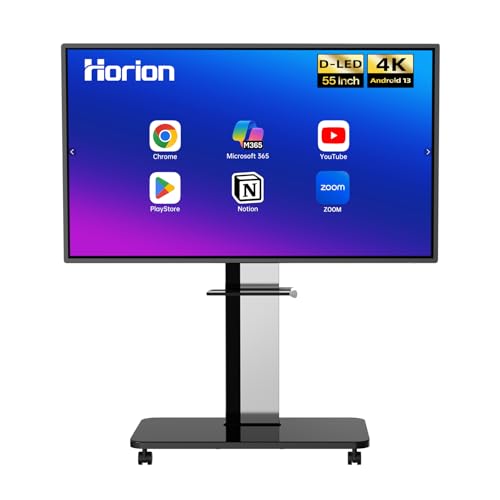
- 40-point anti-glare touchscreen with low latency
- Wireless sharing plus touchback control
- Includes wall mount, stylus pens, and 18-month warranty
Best For: Wall-mounted collaboration rooms with existing AV equipment
Flexible Collaboration Board
55" 4K Touchscreen Smart Board

- 4K UHD 20-point infrared touch for annotation
- Built-in 13MP camera, mics, and speakers
- Open app ecosystem with wireless projection
Best For: Teams wanting app flexibility and built-in meeting hardware
Enterprise Collaboration Board
Shiarffe R9 65" Google EDLA Smart Board

- 65-inch 4K UHD anti-glare touchscreen
- 20-point multi-touch with wireless and HDMI sharing
- Google EDLA certification with no subscription fees
Best For: Conference rooms needing a managed all-in-one collaboration board
Hybrid Meeting Hub
QIXZOCV 55" Android 14 Smart Board

- 55-inch 4K UHD touchscreen with 20-point touch
- Built-in 13MP camera, mic array, and dual speakers
- Wireless casting plus HDMI and USB-C input options
Best For: Smaller conference rooms that want an all-in-one hybrid meeting display
Smart Collaboration Display
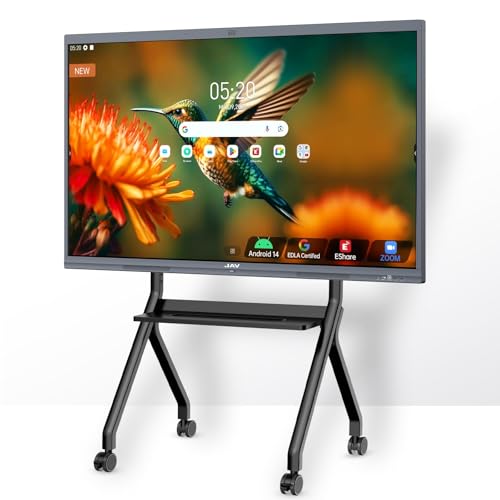
- Google EDLA-certified with Google Drive support
- 48MP AI camera and 100W soundbar for meetings
- 20-point touch with palm erase and PDF annotation
Best For: Conference rooms that want a Google-integrated board with advanced meeting tools
All-in-One Collaboration Hub – 65" Smart Board for Classroom Office Home
If you want touchscreen whiteboards for conference rooms that do more than just display slides, this 65-inch smart board is built as an all-in-one collaboration hub. It combines a 4K display, integrated computing, whiteboard software, and conferencing hardware, so teams can brainstorm, present, and run hybrid meetings without adding separate devices.
Best For: Teams that want a complete conference-room board with built-in camera, mic, speakers, and Android-based app support.
Pros:
- All-in-one design reduces the need for a projector, PC, or separate conference system
- 4K UHD screen with 20-point touch supports multi-user writing and drawing
- 13MP autofocus camera, 8-array microphone, and dual 20W speakers support hybrid meetings
- Wireless and wired screen sharing plus split-screen viewing for multiple sources
Cons:
- Wall mount is included, but installation still requires planning for a 65-inch display
- Best fit is for rooms that can use its built-in collaboration features, not just basic signage
This model stands out if you want a self-contained board that can handle both meetings and interactive collaboration. Its strongest appeal is convenience: fewer devices, simpler setup, and plenty of built-in tools for teams that meet often.
Large-Screen Presenter – 70 Inch 4k Smart Board Touch Screen
For buyers comparing touchscreen whiteboards for conference rooms, this 70-inch display is aimed at presentations and group interaction on a larger canvas. It offers 4K resolution, 40-point touch, and wall-mount installation, making it a straightforward option for offices or classrooms that want a big interactive screen.
Best For: Rooms that prioritize a large 70-inch interactive display for presentations and collaborative markup.
Pros:
- 70-inch 4K UHD panel gives presenters plenty of space
- 40-point touch supports multi-user interaction
- Wall-mount design helps it fit a permanent meeting-room setup
- Scratch-resistant finish adds durability for shared use
Cons:
- Product details are relatively minimal compared with feature-heavy conference boards
- Only one HDMI port is listed, so some setups may need extra planning
This board makes sense if your top priority is size and a clean interactive display rather than an all-in-one conferencing package. It is best viewed as a large, practical digital whiteboard for teams that already have their room technology planned out.
AI Meeting Board – 65" Touchscreen AI Smart Board
This 65-inch model is a strong fit if you want touchscreen whiteboards for conference rooms with serious meeting-room features. It pairs a 4K UHD panel and 40-point touch with AI conferencing hardware, wireless casting, and Android 14, so it can handle both collaborative writing and modern hybrid calls.
Best For: Offices and schools that want an AI-enhanced smart board for meetings, casting, and shared annotation.
Pros:
- 48MP AI camera, 8-array microphone, and dual 15W speakers support video calls
- 40-point touch with low-latency writing and multiple writing modes
- Wireless projection supports up to 4 simultaneous signal sources
- Android 14, Wi-Fi 6, and 8GB/128GB storage support a broad app and workflow setup
Cons:
- Some Windows functionality depends on adding an OPS PC
- Many advanced tools may be more than casual users need
Among conference-room boards, this one stands out for its mix of meeting hardware and smart-whiteboard software. It is a good choice if your team wants more than a basic display and will actually use AI tools, casting, and built-in collaboration features.
Privacy-First Conference Display – HORION 65-Inch 4K Digital Whiteboard
If your team wants touchscreen whiteboards for conference rooms without forcing a built-in camera and microphone setup, this HORION board is a practical fit. It centers on a 4K anti-glare display, 40-point touch, wireless sharing, and BYOM-style conferencing support, while letting you keep your own external meeting gear.
Best For: Conference rooms that want a touch-enabled board with screen sharing and privacy-friendly external conferencing gear.
Pros:
- Anti-glare 4K touchscreen with 40-point input and low latency
- Wireless screen sharing supports iPhone, Mac, Windows, and Android devices
- Direct touchback control lets users operate a laptop from the board
- Android 13, Google Play, Wi-Fi 5, and Bluetooth 5.2 provide a stable ecosystem
Cons:
- External cameras and microphones are sold separately
- Wi-Fi 5 is less current than newer wireless standards
This is a smart choice for teams that already have conferencing peripherals and value privacy or flexibility. It focuses on the display and sharing experience, making it especially useful in rooms that need an interactive board without extra built-in meeting hardware.
All-in-One Conference Hub – 65'' 4K Smart Board for Office Use
For teams comparing touchscreen whiteboards for conference rooms, this 65-inch smart board brings together 4K clarity, 20-point infrared touch, and built-in collaboration tools in one display. It is designed to handle writing, presenting, screen sharing, and video calls without needing a stack of extra hardware.
Best For: Conference rooms, offices, and hybrid teams that want an all-in-one board with camera and microphone built in.
Pros:
- 4K UHD display with sharp, vibrant visuals for presentations and annotations
- 20-point infrared touch supports smooth writing, dragging, and zooming
- Built-in HD camera and microphone simplify video conferencing and remote collaboration
- Android 13 with 8GB RAM and 128GB storage offers plenty of room for apps and files
Cons:
- Large 65-inch format may be more display than smaller rooms need
- Heavier all-in-one design at 112.8 pounds
This is a strong pick if you want a versatile conference-room display that can cover whiteboarding, sharing, and meetings from a single unit. The combination of built-in conferencing hardware and wireless mirroring makes it especially practical for hybrid workflows.
Privacy-Conscious Meeting Display – 55-Inch 4K Anti-Glare Smart Board
If you’re shopping for touchscreen whiteboards for conference rooms, this 55-inch HORION board is built for fast collaboration with a 4K anti-glare panel, 40-point touch, and touchback screen sharing. It keeps the setup flexible with Android 13, Google Play access, and support for BYOM-style meetings.
Best For: Teams that want a wall-mounted whiteboard for shared meetings, touchback control, and privacy-conscious conferencing.
Pros:
- 40-point anti-glare touchscreen with low latency for smooth multi-user use
- Wireless sharing supports iPhone, Mac, Windows, and Android devices
- Touchback control lets you operate your laptop from the display
- Includes wall mount, remote, stylus pens, and an 18-month warranty
Cons:
- External camera and microphones are sold separately for conferencing
- 55-inch size may be better suited to medium rooms than large boardrooms
This model stands out for teams that already have AV gear and want a dependable interactive display to anchor the room. The anti-glare panel, split-screen collaboration, and built-in software ecosystem make it a practical meeting-room upgrade.
Flexible Collaboration Board – 55" 4K Touchscreen Smart Board
This 55-inch touchscreen whiteboard for conference rooms focuses on flexible collaboration with 4K UHD touch, an open app ecosystem, and built-in conferencing hardware. It is set up for presentations, annotation, and wireless projection, while the 13MP camera and 8-array microphones support remote meetings.
Best For: Offices and classrooms that want an open, app-friendly smart board with built-in video meeting tools.
Pros:
- 4K UHD 20-point infrared touch for precise writing and annotation
- Built-in 13MP camera, 8-array microphones, and 2x20W speakers support video calls
- Open app ecosystem lets you download software that fits your workflow
- Supports wireless projection for up to 4 users and reverse touch control
Cons:
- Wall-mounted brackets are included, but a mobile standing mount costs extra if needed
- 55-inch size may be limiting for very large conference rooms
For teams that want more software flexibility than a locked-down system, this board is a compelling fit. Its mix of touch annotation, conferencing tools, and app access makes it useful for meetings that blend in-room and remote participation.
Enterprise Collaboration Board – Shiarffe R9 65" Google EDLA Smart Board
If you’re comparing touchscreen whiteboards for conference rooms, the Shiarffe R9 is built around fast in-room collaboration and lower IT overhead. It combines a 65-inch 4K UHD anti-glare touchscreen, 20-point multi-touch, and Google EDLA certification so teams can write, annotate, mirror devices, and keep meetings moving without extra software subscriptions.
Best For: Conference rooms that need an all-in-one board for collaborative meetings, wireless sharing, and optional video conferencing hardware.
Pros:
- Google EDLA-certified with no monthly license fees
- 20-point multi-touch on a 4K UHD anti-glare display
- Wireless mirroring plus HDMI for stable wired presentations
- Selected sizes include a conference AI camera and microphone array
Cons:
- Camera and microphone are only included on selected sizes
- Wall-mount hardware is included, but mobile carts are sold separately
- Best fit for rooms that can support a 65-inch display
The R9 is a strong pick when you want a conference-room whiteboard that feels purpose-built for business collaboration instead of a basic display. Its combination of managed updates, multi-user touch, and flexible connectivity makes it a practical long-term choice for teams that meet often.
Hybrid Meeting Hub – QIXZOCV 55" Android 14 Smart Board
For buyers shopping touchscreen whiteboards for conference rooms, the QIXZOCV 55-inch board focuses on an all-in-one setup that reduces extra hardware. It pairs a 4K UHD 20-point touchscreen with Android 14, built-in conferencing tools, and wired/wireless screen sharing, making it a straightforward option for meetings that mix in-room and remote participation.
Best For: Smaller conference rooms and hybrid meeting spaces that need a compact all-in-one whiteboard with conferencing features.
Pros:
- Integrated 8GB/128GB computer and Android 14 system
- 4K UHD 20-point touch display for collaborative writing and drawing
- 13MP autofocus camera, 8-array mic, and dual 20W speakers
- Supports Miracast/AirPlay plus HDMI and USB-C wired sharing
Cons:
- 55-inch size may be limiting for larger conference rooms
- The product notes are less specific about enterprise management features
- Hybrid use depends on your room’s camera and audio needs
This model makes sense if you want a room-ready board that can handle presentations, annotations, and video calls without adding separate devices. Its mix of open app access, split-screen support, and built-in conferencing hardware gives it broad day-to-day flexibility.
Smart Collaboration Display – JAV 55" Google EDLA Pro Board
If you’re narrowing down touchscreen whiteboards for conference rooms, the JAV 55-inch Pro board stands out for collaboration features and meeting-friendly audio. It combines a 4K UHD touchscreen, Android 14, Google EDLA certification, and a 48MP AI camera with a powerful soundbar, so it can serve as both an interactive whiteboard and a meeting hub.
Best For: Teams that want a 55-inch conference-room board with strong conferencing tools, Google integration, and advanced annotation features.
Pros:
- Google EDLA-certified with Google Drive and Workspace integration
- 48MP AI camera and 100W soundbar for meetings
- 20 touch points, palm erase, PDF annotation, and split-screen support
- Works with Zoom, Meet, Teams, and Webex plus wireless mirroring
Cons:
- 55-inch format may not suit very large conference rooms
- Many advanced meeting features may be more than basic users need
- Glossy display finish may not be ideal for every lighting setup
The JAV board is especially appealing if your conference room needs a polished mix of teaching-style annotation tools and business-ready meeting hardware. Its broad app ecosystem, strong audio-visual package, and Google-centric workflow make it easy to use for both presentations and hybrid collaboration.
How We Picked the Best Touchscreen Whiteboards for Conference Rooms
We looked for models that suit everyday conference-room use: sharp 4K panels, responsive multi-touch input, reliable wireless sharing, and software or OS support that fits mixed-team workflows. We also prioritized screen sizes that work well in medium to large meeting rooms, plus features like anti-glare finishes, built-in camera options, and Google EDLA or Android support where they add value.
Quick Comparison: What Matters Most
If you’re comparing Touchscreen Whiteboards for Conference Rooms, start with four basics: screen size, touch-point count, operating system, and collaboration tools. Larger rooms usually benefit from 65-inch or 70-inch displays, while smaller spaces may be fine with 55-inch models. More touch points can improve multi-user brainstorming, but software compatibility and clarity matter just as much.
Key Buying Factors for Touchscreen Whiteboards for Conference Rooms
Display Size and Room Fit
Match the display to viewing distance. A 55-inch board is often best for compact rooms or huddle spaces. For standard conference rooms, 65-inch models are the safer all-around choice. A 70-inch screen can be ideal when attendees sit farther back or when content must be visible across a larger table.
Touch Response and Collaboration
Look for smooth multi-touch performance so multiple people can annotate, sketch, or navigate at the same time. Higher touch-point counts help with group brainstorming, but only if the system remains accurate and responsive during fast use.
OS, Apps, and Admin Support
For business environments, Android-based boards and Google EDLA-certified models can simplify app access, login, and device management. If your team depends on a specific conferencing stack or cloud tools, confirm compatibility before buying.
Brightness, Glare, and Camera Features
Conference rooms often have mixed lighting, so anti-glare panels are a real advantage. If you host hybrid meetings, a built-in camera, microphone support, or wireless screen sharing can reduce extra hardware and keep the setup cleaner.
Who Should Buy Which Touchscreen Whiteboards for Conference Rooms?
Choose a 55-inch board if you want a more affordable option for smaller rooms, offices, or flexible spaces. Step up to 65 inches if you need the most balanced choice for most conference rooms. Go with a 70-inch model if visibility is the top priority or your room is larger and used for group presentations.
Teams that want better app support and easier IT management should lean toward EDLA-certified options. If collaboration is the main goal, prioritize touch performance, sharing features, and a display that stays readable from every seat. For most buyers, the best Touchscreen Whiteboards for Conference Rooms are the ones that fit the room first and the software workflow second.